2022 LINCOLN NAVIGATOR cooling
[x] Cancel search: coolingPage 425 of 646

How Fail-Safe Cooling Works
If the engine begins to overheat,
the coolant temperature gauge
moves toward the red zone:
A warning lamp illuminates and a
message may appear in the
information display.
If the engine reaches a preset
over-temperature condition, the engine
automatically switches to alternating cylinder
operation. Each disabled cylinder acts as an
air pump and cools the engine.
When this occurs, your vehicle still operates,
however:
• Engine power is limited.
• The air conditioning system turns off.
Continued operation increases the engine
temperature, causing the engine to
completely shut down. Your steering and
braking effort increases in this situation.
When the engine temperature cools, you can
re-start the engine. Have your vehicle
checked as soon as possible to minimize
engine damage. When Fail-Safe Mode Is Activated WARNING: Fail-safe mode is for use
during emergencies only. Operate your
vehicle in fail-safe mode only as long as
necessary to bring your vehicle to rest in
a safe location and seek immediate repairs.
When in fail-safe mode, your vehicle will
have limited power, will not be able to
maintain high-speed operation, and may
completely shut down without warning,
potentially losing engine power, power
steering assist, and power brake assist,
which may increase the possibility of a
crash resulting in serious injury. WARNING: Do not remove the
coolant reservoir cap when the engine is
on or the cooling system is hot. Wait 10
minutes for the cooling system to cool
down. Cover the coolant reservoir cap with
a thick cloth to prevent the possibility of
scalding and slowly remove the cap.
Failure to follow this instruction could result
in personal injury. Your vehicle has limited engine power when
in the fail-safe mode, drive your vehicle with
caution. Your vehicle does not maintain
high-speed operation and the engine could
operate poorly.
Remember that the engine is capable of
automatically shutting down to prevent
engine damage. In this situation:
1. Pull off the road as soon as safely
possible and switch the engine off.
2. If you are a member of a roadside assistance program, we recommend that
you contact your roadside assistance
service provider.
3. If this is not possible, wait for a short period of time for the engine to cool.
4. Check the coolant level. If the coolant level is at or below the minimum mark,
add prediluted coolant immediately.
5. When the engine temperature cools, you
can re-start the engine. Have your vehicle
checked as soon as possible to minimize
engine damage.
Note: Driving your vehicle without repair
increases the chance of engine damage.
421
2022 Navigator (TB9) Canada/United States of America, enUSA, Edition date: 202109, First-Printing Maintenance
Page 477 of 646
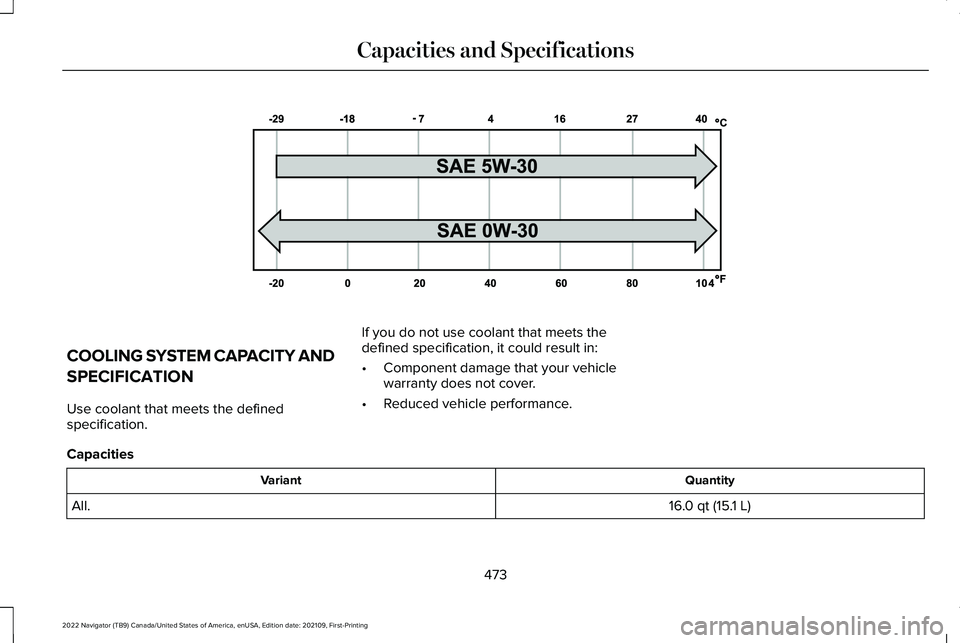
COOLING SYSTEM CAPACITY AND
SPECIFICATION
Use coolant that meets the defined
specification.
If you do not use coolant that meets the
defined specification, it could result in:
•
Component damage that your vehicle
warranty does not cover.
• Reduced vehicle performance.
Capacities Quantity
Variant
16.0 qt (15.1 L)
All.
473
2022 Navigator (TB9) Canada/United States of America, enUSA, Edition date: 202109, First-Printing Capacities and SpecificationsE240523
Page 530 of 646

Transferable Coverage
If you sell your vehicle before your Lincoln
Protect extended service plan coverage
expires, you can transfer any remaining
coverage to the new owner. This should give
you and your potential buyer a little more
peace of mind.
Less Cost to Properly Maintain Your Vehicle
The Lincoln Protect extended service plan
also offers a Premium Maintenance Plan that
covers all scheduled maintenance, and
selected wear items. The coverage is
prepaid, so you never have to worry about
the cost of your vehicle
’s maintenance.
Covered maintenance includes:
• Windshield wiper blades.
• Spark plugs.
• The clutch disc - if equipped.
• Brake pads and linings.
• Shock absorbers and struts.
• Engine cooling hoses, clamps and
o-rings. •
Engine belts.
• Diesel exhaust fluid replenishment - if
equipped.
Interest Free Finance Options
Just a 5% down payment will provide you
with an affordable, no interest, no fee
payment program allowing you all the
security and benefits Lincoln Protect
extended service plan has to offer while
paying over time. You are pre-approved with
no credit check or hassles. To learn more,
call our Lincoln Protect extended service
plan specialists at 800-367-3377.
Complete the information below and mail to:
Lincoln Protect Extended Service Plan
P.O. Box 321067
Detroit, MI 48232 Lincoln Protect (Canada Only)
You can get more protection for your vehicle
by purchasing a Lincoln Protect extended
service plan. The Lincoln Protect extended
service plan is the only service contract
backed by Lincoln, Limited. Depending on
the plan you purchase, the Lincoln Protect
extended service plan provides benefits such
as:
•
Rental reimbursement.
• Coverage for certain maintenance and
wear items.
• Protection against repair costs after your
New Vehicle Limited Warranty Coverage
expires.
• Roadside Assistance benefits.
526
2022 Navigator (TB9) Canada/United States of America, enUSA, Edition date: 202109, First-Printing Lincoln Protect
Page 534 of 646

Check Every Month
The tires including the spare for wear and proper pressure. The windshield washer fluid level.
The fuel and water separator. Drain if necessary or if indicated by the information display. 1
The holes and slots in the tail pipe to make sure they are functional and clear of debris. 1
1 Diesel vehicles only. Check Every Six Months
The battery connections. Clean if necessary.
The body and door drain holes for obstructions. Clean if necessary. The cooling system fluid level and the coolant system strength. The door weatherstrips for wear. Lubricate if necessary.
The hinges, latches and outside locks for proper operation. Lubricate if necessary. The parking brake for proper operation.
530
2022 Navigator (TB9) Canada/United States of America, enUSA, Edition date: 202109, First-Printing Scheduled Maintenance
Page 538 of 646

Normal Maintenance Intervals
At Every Oil Change Interval as Indicated by the Information Display
1
Change the engine oil and filter. 2
Rotate the tires, inspect tire wear and measure tread depth.
Perform a multi-point inspection - recommended.
Inspect the automatic transmission fluid level - vehicles with dipstick.\
Consult your dealer for requirements.
Inspect the brake pads, rotors, hoses and parking brake.
Inspect the engine cooling system strength and hoses.
Inspect the exhaust system and heat shields.
Inspect the front axle and U-joints.
Inspect the half-shaft boots.
Inspect the steering linkage, ball joints, suspension, tire-rod ends, driveshaft and U-joints.
Inspect the wheels and related components for abnormal noise, wear, looseness or drag.
1 Do not exceed one year or 10,000 mi (16,000 km) between service intervals.
2 Reset the oil change reminder after engine oil and filter changes.
534
2022 Navigator (TB9) Canada/United States of America, enUSA, Edition date: 202109, First-Printing Scheduled Maintenance
Page 626 of 646

Connected Vehicle......................................482
Connected Vehicle – Troubleshooting.........483
Connecting the Vehicle to a Mobile
Network............................................................482
Connected Vehicle Data...............................27
Connected Vehicle Limitations.................482
Connected Vehicle Requirements...........482
Connected Vehicle – Troubleshooting.........................................483
Connected Vehicle – Frequently Asked Questions.........................................................483
Connecting a Bluetooth® Device..............512
Connecting a Trailer....................................346 Connecting a Trailer – Troubleshooting.......348
Hitches..................................................................345
Connecting a Trailer Precautions.............345
Connecting a Trailer – Troubleshooting.........................................348
Connecting a Trailer – Information Messages.........................................................348
Connecting the Vehicle to a Mobile Network........................................................482
Connecting Lincoln Way to the Modem.......482
Enabling and Disabling the Modem..............482
What Is the Modem............................................482
Connecting the Vehicle to a Wi-Fi Network........................................................482
Connecting Your Phone.............................506 Contacting Us...................................................17
Cooling System Capacity and
Specification................................................473
Crash and Breakdown Information.........390 Automatic Crash Shutoff..................................394
Jump Starting the Vehicle.................................391
Post-Crash Alert System...................................393
Recovery Towing................................................394
Crash Sensors and Airbag Indicator
..........68
Creating a MyKey...........................................83
Creating a Personal Profile.........................516
Creating a Vehicle Wi-Fi Hotspot.............486
Cross Traffic Alert
..........................................316
Cross Traffic Alert – Troubleshooting............319
Cross Traffic Alert Indicators......................318
Cross Traffic Alert Limitations.....................317
Cross Traffic Alert Precautions..................316
Cross Traffic Alert – Troubleshooting..........................................319
Cross Traffic Alert – Information Messages..........................................................319
Customer Information.................................540 Radio Frequency Certification Labels...........544
Customizing the Instrument Cluster Display...........................................................149 D
Data Privacy
.....................................................24
Department of Transportation Uniform Tire Quality Grades............................................437
Deploying and Stowing the Power Running Boards............................................................110
Digital Radio...................................................491 Digital Radio Indicators.....................................492
Digital Radio Limitations...................................492
How Does Digital Radio Work.........................492
Switching Digital Radio Reception On and
Off......................................................................492
What Is Digital Radio..........................................491
Directing the Flow of Air.............................159
Disposing of Airbags.....................................69
Distance Alert
................................................326
Adjusting the Sensitivity of Distance
Alert...................................................................326
What Is Distance Alert.......................................326
Distance Indication
......................................323
Distance Indication Indicator...........................325
Switching Distance Indication On and
Off......................................................................325
What Is Distance Indication.............................323
Doors and Locks Audible Warnings..........89
Doors and Locks
.............................................87
Autolock..................................................................88
622
2022 Navigator (TB9) Canada/United States of America, enUSA, Edition date: 202109, First-Printing Index
Page 639 of 646

Starting and Stopping the Engine...........200
Automatic Engine Stop.....................................203
Engine Block Heater.........................................202
Starting and Stopping the Engine –
Troubleshooting.............................................205
Starting the Engine.............................................201
Stopping the Engine..........................................203
Starting and Stopping the Engine – Troubleshooting........................................205
Starting and Stopping the Engine – Frequently Asked Questions...........................................206
Starting and Stopping the Engine – Information Messages..................................205
Starting and Stopping the Engine – Warning Lamps...............................................................205
Starting the Engine.......................................201 Restarting the Engine After Stopping it.........201
Starting a Gasoline Engine...............................201
Status Bar........................................................501
Steering..........................................................253 Electric Power Steering....................................253
Steering – Troubleshooting.............................254
Steering – Troubleshooting.......................254 Steering – Information Messages..................254
Steering – Warning Indicators........................254
Steering Wheel................................................29 Stopping the Engine
....................................207
Stopping the Engine When Your Vehicle is
Moving..............................................................203
Stopping the Engine When Your Vehicle is Stationary.........................................................203
Stopping the Liftgate Movement
..............103
Storage............................................................199 Center Console....................................................199
Glove Compartment...........................................199
Overhead Storage..............................................199
Storing Your Vehicle
....................................435
Sunroof See: Moonroof.....................................................139
Switching ActiveGlide ™ On and Off.........288
Switching Active Park Assist On and Off..................................................................265
Switching Adaptive Cruise Control On and Off..................................................................273
Switching Air Conditioning On and Off...................................................................158
Switching All of the Interior Lamps On and Off
....................................................................131
Switching Android Auto On and Off.........514
Switching Apple CarPlay On and Off.......514
Switching Auto Hold On and Off..............244
Switching Auto-Start-Stop On and Off..................................................................207 Switching Blind Spot Information System
On and Off....................................................312
Switching Climate Control On and Off...................................................................158
Switching Cross Traffic Alert On and Off...................................................................317
Switching Defrost On and Off....................158
Switching Driver Alert On and Off............331
Switching Easy Entry and Exit On and Off.....................................................................97
Switching From Adaptive Cruise Control to Cruise Control........................................278
Switching Hill Descent Control On and Off...................................................................251
Switching Maximum Cooling On and Off...................................................................159
Switching Maximum Defrost On and Off...................................................................158
Switching Parking Aid On and Off...........256
Switching Pre-Collision Assist On and Off..................................................................322
Switching Rear Occupant Alert System On and Off...........................................................184
Switching Recirculated Air On and Off...................................................................158
Switching Repeat Mode On and Off.......489
Switching Reverse Braking Assist On and Off
..................................................................240
635
2022 Navigator (TB9) Canada/United States of America, enUSA, Edition date: 202109, First-Printing Index