2022 LINCOLN NAUTILUS lock
[x] Cancel search: lockPage 264 of 586

ADAPTIVE CRUISE CONTROL
AUTOMATIC CANCELLATION
The system may cancel if:
•The tires lose traction.
•You apply the parking brake.
The system may cancel and set the parkingbrake if:
•You unbuckle the seatbelt and open thedriver door after you stop your vehicle.
•Your vehicle is at a stop continuously formore than three minutes.
The system may deactivate or preventactivating when requested if:
•The vehicle has a blocked sensor.
•The brake temperature is too high.
•There is a failure in the system or arelated system.
SETTING THE ADAPTIVE CRUISE
CONTROL SPEED
Drive to the speed you prefer.
Press either button to set thecurrent speed.
Take your foot off the accelerator pedal.
The indicator, current gap setting and setspeed appear in the information display.
A vehicle image illuminates if there is avehicle detected in front of you.
Note:When adaptive cruise control is active,the speedometer may vary slightly from theset speed displayed in the informationdisplay.
Setting the Adaptive Cruise Speedfrom a Complete Stop
Press and release either buttonwhile keeping the brake pedal fullypressed.
The set speed adjusts to 20 mph (30 km/h).
The indicator, current gap setting and setspeed appear in the information display.
Note:The system will activate from acomplete stop only when it detects a leadvehicle in close proximity.
Manually Changing the Set Speed
Press and release to increase theset speed in small increments.
Press and hold to increase the set speed inlarge increments. Release the button whenyou reach the speed you prefer.
Press and release to decrease theset speed in small increments.
260
2022 Nautilus (CD9) Canada/United States of America, enUSA, Edition date: 202108, First-PrintingAdaptive Cruise Control (If Equipped)E265299 E255686 E265299 E265299
Page 271 of 586

ADAPTIVE CRUISE CONTROL –INFORMATION MESSAGES - VEHICLESWITH: STOP AND GO
Note:Depending on your vehicle optionsand instrument cluster type, not all messagesdisplay or are available.
Note:The system could abbreviate orshorten certain messages depending uponwhich cluster type you have.
ActionMessage
A malfunction is preventing the adaptive cruise from engaging.Adaptive Cruise Malfunction
Front Sensor Not AlignedContact an authorized dealer to have the radar checked for proper coverage and operation.
Conditions exist preventing the system from being available.Adaptive Cruise Not Available
You have a blocked radar because of poor radar visibility due to inclement weather or ice, mud,or water in front of the radar. You can typically clean the sensor to resolve this.Adaptive Cruise Not Available SensorBlocked See ManualDue to the nature of radar technology, it is possible to get a blockage warning with no actualblock. This happens, for example, when driving in sparse rural or desert environments. A falseblocked condition either self clears, or clears after you restart your vehicle.
You have selected normal cruise control. The system does not brake or react to traffic.Normal Cruise Active Adaptive Braking Off
Displays when the adaptive cruise control is going to cancel and you must take control.Adaptive Cruise - Driver Resume Control
Displays when the vehicle speed is too slow to activate the adaptive cruise control and there isno lead vehicle in range.Adaptive Cruise Speed Too Low toActivate
267
2022 Nautilus (CD9) Canada/United States of America, enUSA, Edition date: 202108, First-PrintingAdaptive Cruise Control (If Equipped)
Page 273 of 586

WHAT IS THE LANE KEEPING
SYSTEM
The lane keeping system alerts you byproviding temporary steering assistance orsteering wheel vibration when it detects anunintended lane departure.
HOW DOES THE LANE KEEPING
SYSTEM WORK
The lane keeping system uses a forwardlooking camera mounted on the windshieldto monitor vehicle movement within thetravel lane.
When the camera detects a drift out of thetravel lane, the lane keeping system alertsthe driver by vibrating the steering wheel, oraids the driver by providing a small steeringinput to move the vehicle back into the travellane.
The driver can select one of three modes:
•Alert (If Equipped)
•Aid
•Alert + Aid
LANE KEEPING SYSTEM
PRECAUTIONS
WARNING: You are responsible forcontrolling your vehicle at all times. Thesystem is designed to be an aid and doesnot relieve you of your responsibility todrive with due care and attention. Failureto follow this instruction could result in theloss of control of your vehicle, personalinjury or death.
WARNING: The system will notoperate if the sensor cannot track the roadlane markings.
WARNING: The sensor mayincorrectly track lane markings as otherstructures or objects. This can result in afalse or missed warning.
WARNING: In cold and severeweather conditions the system may notfunction. Rain, snow and spray can all limitsensor performance.
WARNING: The system may notoperate properly if the sensor is blocked.Keep the windshield free from obstruction.
WARNING: If damage occurs in theimmediate area surrounding the sensor,have your vehicle checked as soon aspossible.
WARNING: The system may notcorrectly operate if your vehicle is fittedwith a suspension kit not approved by us.
WARNING: Large contrasts in outsidelighting can limit sensor performance.
269
2022 Nautilus (CD9) Canada/United States of America, enUSA, Edition date: 202108, First-PrintingLane Keeping System
Page 274 of 586

LANE KEEPING SYSTEM
LIMITATIONS
The lane keeping system only operates whenthe vehicle speed is greater than 40 mph(64 km/h).
The system works when the camera candetect at least one lane marking.
The lane keeping system may not correctlyoperate in any of the following conditions:
•The lane keeping system does not detectat least one lane marking.
•You switch the turn signal on.
•You apply direct steering, accelerate fastor brake hard.
•The vehicle speed is less than 40 mph(64 km/h).
•The anti-lock brake, stability control ortraction control system activates.
•The lane is too narrow.
•Something is obscuring the camera or itis unable to detect the lane markings dueto environment, traffic or vehicleconditions.
The lane keeping system may not correctlane positioning in any of the followingconditions:
•High winds.
•Uneven road surfaces.
•Heavy or uneven loads.
•Incorrect tire pressure.
SWITCHING THE LANE KEEPING
SYSTEM ON AND OFF
To activate the lane keepingsystem, press the button on theturn signal lever.
Note:The system stores the on or off settinguntil manually changed, unless it detects aMyKey™. If the system detects a MyKey™, itdefaults to on and the mode is set to alert.
Note: If the system detects a MyKey™,pressing the button does not affect the onor off status of the system. You can onlychange the mode and intensity settings.
SWITCHING THE LANE KEEPING
SYSTEM MODE
The lane keeping system has differentsettings that you can view or adjust usingthe information display.
The system stores the last known selectionfor each of these settings. You do not needto readjust your settings each time youswitch on the system.
To change the lane keeping system mode,use the instrument cluster display:
1.Using the instrument cluster displaycontrols on the steering wheel, selectSETTINGS.
2.Select Driver assistance.
3.Select Lane keeping system.
4.Select Mode.
5.Select a mode.
Note:The system remembers the last settingwhen you start your vehicle. If the systemdetects a MyKey™, it defaults to the lastsetting for that MyKey™.
270
2022 Nautilus (CD9) Canada/United States of America, enUSA, Edition date: 202108, First-PrintingLane Keeping SystemE308131
Page 279 of 586

LANE KEEPING SYSTEM – FREQUENTLY ASKED QUESTIONS
Why is the feature not available (lane markings are gray) when I can see the lane markings on the road?
Your vehicle speed is less than 40 mph (65 km/h).
The sun is shining directly into the camera lens.
A quick intentional lane change has occurred.
Your vehicle stays too close to the lane markings for an extended interval of time.
Driving at high speeds in curves.
The last alert warning or aid intervention occurred a short time ago.
Ambiguous lane markings, for example, in construction zones.
Rapid transition from light to dark, or from dark to light.
Sudden offset in lane markings.
ABS or AdvanceTrac™ is active.
There is a camera blockage due to dirt, grime, fog, frost or water on the windshield.
You are driving too close to the vehicle in front of you.
Transitioning between no lane markings to lane markings, or vice versa.
There is standing water on the road.
Faint lane markings, for example, partial yellow lane markings on concrete roads.
275
2022 Nautilus (CD9) Canada/United States of America, enUSA, Edition date: 202108, First-PrintingLane Keeping System
Page 282 of 586

Note:The system may not correctly operatewhen towing a trailer. For vehicles with atrailer tow module and tow bar approved byus, the system turns off when you attach atrailer. For vehicles with an aftermarkettrailer tow module or tow bar, werecommend that you switch the system offwhen you attach a trailer.
BLIND SPOT INFORMATION
SYSTEM REQUIREMENTS
Blind spot information system turns on whenall the following occur:
•You start your vehicle.
•You shift into drive (D).
•The vehicle speed is greater than 6 mph(10 km/h).
SWITCHING BLIND SPOT
INFORMATION SYSTEM ON AND
OFF
To switch blind spot information system onor off, use the instrument cluster display:
1.Using the instrument cluster displaycontrols on the steering wheel, selectSETTINGS.
2.Select Driver assistance.
3.Switch Blindspot on or off.
When you switch blind spot informationsystem off, a warning lamp illuminates anda message displays. When you switch thesystem on or off, the alert indicators flashtwice.
Note:The system remembers the last settingwhen you start your vehicle.
To permanently switch the system off,contact an authorized dealer.
LOCATING THE BLIND SPOT
INFORMATION SYSTEM SENSORS
The sensors are behind the rear bumper onboth sides of your vehicle.
Note:Keep the sensors free from snow, iceand large accumulations of dirt.
Note:Do not cover the sensors with bumperstickers, repair compound or other objects.
Note:Blocked sensors may affect systemaccuracy.
If the sensors become blocked, a messagemay appear in the information display. Thealert indicators remain illuminated but thesystem does not alert you.
278
2022 Nautilus (CD9) Canada/United States of America, enUSA, Edition date: 202108, First-PrintingBlind Spot Information SystemE205199
Page 283 of 586
BLIND SPOT INFORMATION
SYSTEM INDICATORS
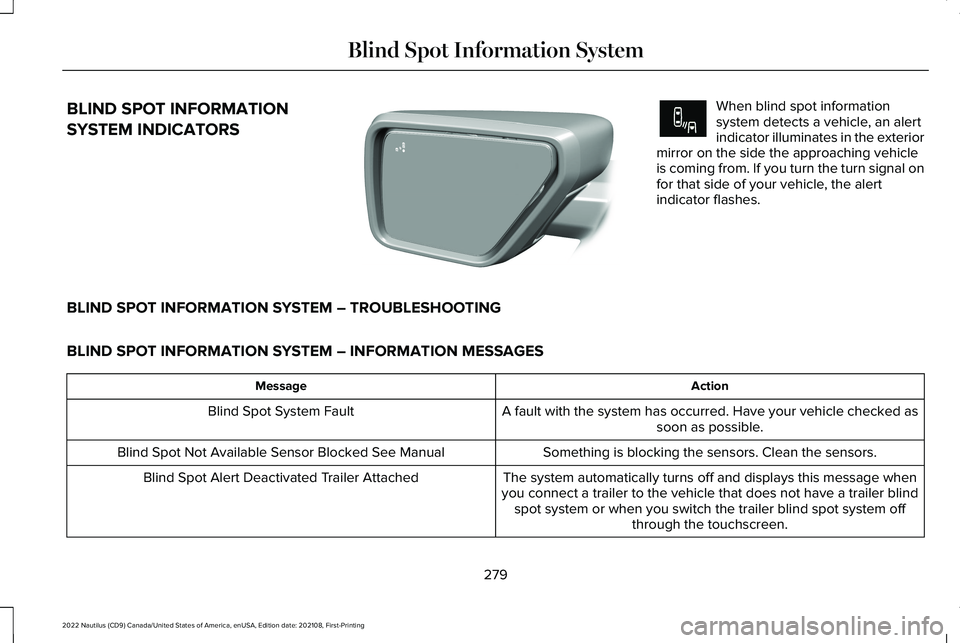
When blind spot informationsystem detects a vehicle, an alertindicator illuminates in the exteriormirror on the side the approaching vehicleis coming from. If you turn the turn signal onfor that side of your vehicle, the alertindicator flashes.
BLIND SPOT INFORMATION SYSTEM – TROUBLESHOOTING
BLIND SPOT INFORMATION SYSTEM – INFORMATION MESSAGES
ActionMessage
A fault with the system has occurred. Have your vehicle checked assoon as possible.Blind Spot System Fault
Something is blocking the sensors. Clean the sensors.Blind Spot Not Available Sensor Blocked See Manual
The system automatically turns off and displays this message whenyou connect a trailer to the vehicle that does not have a trailer blindspot system or when you switch the trailer blind spot system offthrough the touchscreen.
Blind Spot Alert Deactivated Trailer Attached
279
2022 Nautilus (CD9) Canada/United States of America, enUSA, Edition date: 202108, First-PrintingBlind Spot Information SystemE309137 E249861E249861
Page 285 of 586
CROSS TRAFFIC ALERT
LIMITATIONS
Cross traffic alert may not correctly operatewhen any of the following occur:
•Something is blocking the sensors.
•Adjacently parked vehicles or objects areobstructing the sensors.
•Vehicles approach at speeds less than4 mph (6 km/h) or greater than 37 mph(60 km/h).
•Your vehicle speed is greater than 7 mph(12 km/h).
•You reverse out of an angled parkingspace.
SWITCHING CROSS TRAFFIC
ALERT ON AND OFF
To switch cross traffic alert on or off use theinstrument cluster display:
1.Using the instrument cluster displaycontrols on the steering wheel, selectSETTINGS.
2.Select Driver assistance.
3.Switch Cross traffic alert on or off.
LOCATING THE CROSS TRAFFIC
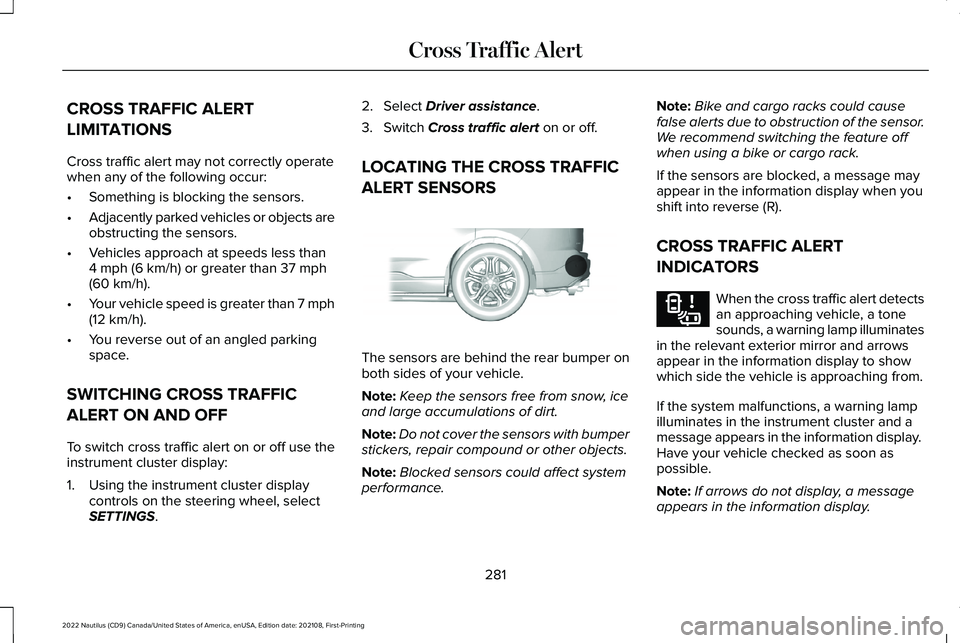
ALERT SENSORS
The sensors are behind the rear bumper onboth sides of your vehicle.
Note:Keep the sensors free from snow, iceand large accumulations of dirt.
Note:Do not cover the sensors with bumperstickers, repair compound or other objects.
Note:Blocked sensors could affect systemperformance.
Note:Bike and cargo racks could causefalse alerts due to obstruction of the sensor.We recommend switching the feature offwhen using a bike or cargo rack.
If the sensors are blocked, a message mayappear in the information display when youshift into reverse (R).
CROSS TRAFFIC ALERT
INDICATORS
When the cross traffic alert detectsan approaching vehicle, a tonesounds, a warning lamp illuminatesin the relevant exterior mirror and arrowsappear in the information display to showwhich side the vehicle is approaching from.
If the system malfunctions, a warning lampilluminates in the instrument cluster and amessage appears in the information display. Have your vehicle checked as soon aspossible.
Note:If arrows do not display, a messageappears in the information display.
281
2022 Nautilus (CD9) Canada/United States of America, enUSA, Edition date: 202108, First-PrintingCross Traffic AlertE205199 E268294