2022 LINCOLN CORSAIR battery
[x] Cancel search: batteryPage 94 of 676
Note:
The system recalls the new
programmed height until you reprogram it,
even if you disconnect the battery.
CLOSING THE LIFTGATE
CLOSING THE LIFTGATE FROM INSIDE
YOUR VEHICLE WARNING: Make sure all persons
are clear of the power liftgate area before
using the power liftgate control. With the transmission in park (P),
press the button on the instrument
panel.
Note: Make sure that you close the liftgate
before operating or moving your vehicle,
especially in an enclosure, like a garage or
a parking structure. This could damage the
liftgate and its components. Note:
Make sure the area behind your
vehicle is free from obstruction and that
there is enough room for you to operate the
liftgate. Objects too close to your vehicle,
for example a wall, garage door or another
vehicle may come into contact with the
moving liftgate. This could damage the
liftgate and its components.
Note: Make sure that you fully close the
liftgate to prevent cargo from falling out.
CLOSING THE LIFTGATE FROM
OUTSIDE YOUR VEHICLE WARNING:
Make sure all persons
are clear of the power liftgate area before
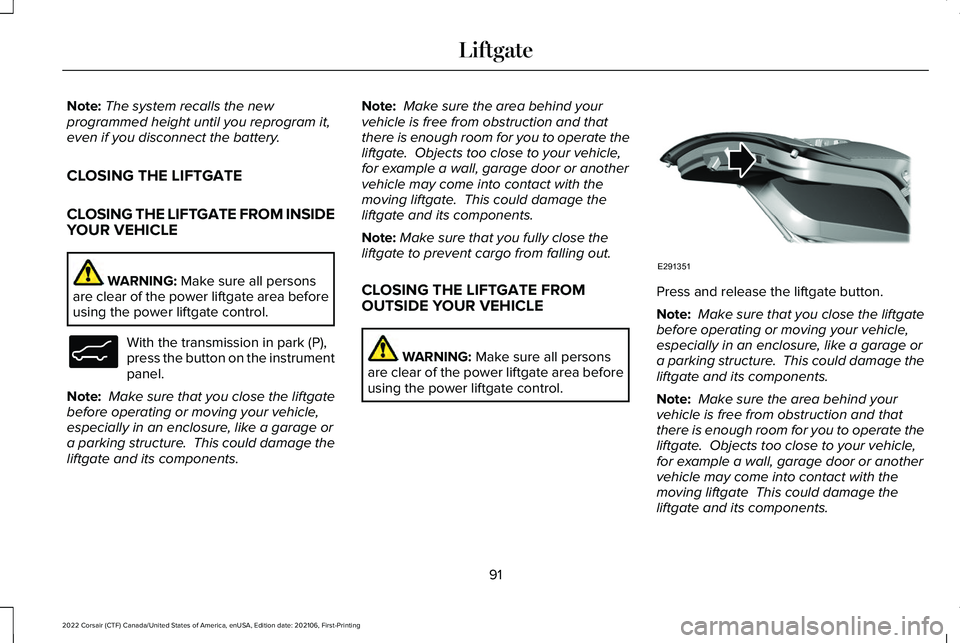
using the power liftgate control. Press and release the liftgate button.
Note:
Make sure that you close the liftgate
before operating or moving your vehicle,
especially in an enclosure, like a garage or
a parking structure. This could damage the
liftgate and its components.
Note: Make sure the area behind your
vehicle is free from obstruction and that
there is enough room for you to operate the
liftgate. Objects too close to your vehicle,
for example a wall, garage door or another
vehicle may come into contact with the
moving liftgate This could damage the
liftgate and its components.
91
2022 Corsair (CTF) Canada/United States of America, enUSA, Edition date: 202106, First-Printing LiftgateE138633 E291351
Page 98 of 676
LIFTGATE – FREQUENTLY ASKED
QUESTIONS
Why won't my power liftgate function?
Make sure the transmission is in park
(P), ensure nothing is obstructing the
liftgate path and there is not excessive
weight on the liftgate. If there are
continued issues, the battery voltage
may be low or other system issues. See
an authorized dealer.
95
2022 Corsair (CTF) Canada/United States of America, enUSA, Edition date: 202106, First-Printing Liftgate
Page 99 of 676
PASSIVE ANTI-THEFT SYSTEM
WHAT IS THE PASSIVE ANTI-THEFT
SYSTEM
The passive anti-theft system prevents
someone from starting the vehicle with an
incorrectly coded key.
Note:
Do not leave a duplicate coded key
in your vehicle. Always take the keys and
lock all the doors when leaving your vehicle.
ARMING THE PASSIVE ANTI-THEFT
SYSTEM
The passive anti-theft system arms your
vehicle after a short period of time when you
switch the power off.
DISARMING THE PASSIVE ANTI-THEFT
SYSTEM
The passive anti-theft system disarms when
you switch the power on with a correctly
coded key. Note:
You could have difficulty starting the
vehicle if you have metallic objects,
electronic devices or a second coded key
on the same key chain.
ANTI-THEFT ALARM SYSTEM
WHAT IS THE ANTI-THEFT ALARM
SYSTEM
The Anti-Theft Alarm System warns you of
an unauthorized entry to your vehicle.
HOW DOES THE ANTI-THEFT ALARM
SYSTEM WORK
When armed, the anti-theft alarm is triggered
in any of the following ways:
• If someone opens a door, the liftgate or
the hood without a correctly coded key
or remote control.
• If you turn the power on without a
correctly coded key.
• If the interior sensors detect movement
inside your vehicle. •
If the inclination sensors detect an
attempt to raise your vehicle.
• If someone disconnects the vehicle
battery or the battery backup alarm.
If the anti-theft alarm is triggered, the alarm
horn sounds for 30 seconds and the
direction indicators flash for 5 minutes.
Any further attempts to carry out one of the
above sounds the alarm again.
WHAT IS THE PERIMETER ALARM
The perimeter alarm is designed to detect
unauthorized access to your vehicle.
WHAT ARE THE INTERIOR SENSORS
The interior sensors are designed to detect
any movement inside your vehicle.
The interior sensors are in the overhead
console.
Note: Do not cover the interior sensors.
96
2022 Corsair (CTF) Canada/United States of America, enUSA, Edition date: 202106, First-Printing Security
Page 100 of 676
WHAT ARE THE INCLINATION
SENSORS
The inclination sensor is designed to detect
an attempt to raise your vehicle, for example
to remove a wheel or to tow it away.
WHAT IS THE BATTERY BACKUP
ALARM
The battery backup alarm is an additional
alarm sounder that has its own battery. It can
detect if the vehicle battery is disconnected
to overcome the alarm system.
ARMING THE ANTI-THEFT ALARM
SYSTEM
The alarm is ready to arm when your vehicle
is switched off.
Lock your vehicle with your remote control
to arm the alarm.
DISARMING THE ANTI-THEFT ALARM
SYSTEM
Disarm the alarm by performing any of the
following actions:
•
Unlock the doors or luggage
compartment with the remote control.
• Switch your vehicle on or start your
vehicle.
ANTI-THEFT ALARM SYSTEM
SETTINGS
WHAT ARE THE ALARM SECURITY
LEVELS
You can select two levels of alarm security,
all sensors and perimeter sensing.
All Sensors
All sensors is the standard setting.
In all sensors, all equipped sensors are on
when you arm the alarm. Note:
Do not arm the alarm with all sensors
if passengers, animals or other moving
objects are inside your vehicle.
Perimeter Sensing
In perimeter sensing, the interior sensors are
off when you arm the alarm.
All the other equipped sensors activate when
you arm the alarm in this mode.
SETTING THE ALARM SECURITY
LEVEL
1. Press Settings on the touchscreen.
2. Press
Vehicle Settings.
3. Press
Alarm System.
4. Press
Sensor Set.
5. Press a setting.
WHAT IS ASK ON EXIT
You can choose which level of security you
require after you switch the ignition off.
97
2022 Corsair (CTF) Canada/United States of America, enUSA, Edition date: 202106, First-Printing Security
Page 126 of 676

Vehicle driving range.
D
Fuel and battery gauges.
E
Engine coolant temperature gauge.
F
Left information group.
G
Dual Gauge View
Note: Displays may appear slightly different
depending on region.
123
2022 Corsair (CTF) Canada/United States of America, enUSA, Edition date: 202106, First-Printing Instrument Cluster
Page 128 of 676

Vehicle driving range.
D
Fuel and battery gauges.
E
Engine coolant temperature gauge.
F
Power gauge.
G
Status Bar
Displays information related to the current
audio source, compass direction and outside
air temperature.
Left and Right Information Group
Information that appears depends on current
gauge view and personalized settings. See
General Information (page 136).
Fuel Gauge
The fuel gauge indicates about how much
fuel is in the fuel tank.
The arrow adjacent to the fuel pump symbol
indicates on which side of your vehicle the
fuel filler door is located.
Note: The fuel gauge may vary slightly when
your vehicle is moving or on a slope. Low Fuel Reminder
A low fuel level reminder displays and
sounds when the distance to empty reaches
75 mi (120 km)
to empty for MyKey, and at
50 mi (80 km), 25 mi (40 km), 10 mi (20 km)
and 0 mi (0 km) for all vehicle keys.
Note: The low fuel reminder can appear at
different fuel gauge positions depending on
fuel economy conditions. This variation is
normal. High Voltage Battery Gauge
The high voltage battery gauge displays the
total amount of charge associated with your
available electric only driving range. A full fill
represents the total amount of energy you
can get from an external charge, plugging
your vehicle in. When the fill reaches empty,
the powertrain system switches to hybrid
operation.
See Plug-In Hybrid Vehicle
Operation (page 215).
125
2022 Corsair (CTF) Canada/United States of America, enUSA, Edition date: 202106, First-Printing Instrument Cluster
Page 129 of 676

Power Gauge
The power gauge displays power to the
wheels when accelerating or maintaining
speed. The high voltage battery power and
engine power contributions are distinguished
by color and added together to indicate total
power to the wheels. When slowing down
by lifting your foot off the accelerator pedal
or pressing the brake, the gauge displays
the power captured by the regenerative
braking system and returned to the high
voltage battery.
Vehicle Driving Range
Vehicle range indicates the estimated
distance your vehicle will travel with the
energy currently onboard. Estimates will vary
based on the energy used while driving. Changes in driving pattern can cause the
values to not only decrease but also increase
or stay constant for periods of time.
The amount of energy being used while
driving is affected by:
•
Mild or aggressive acceleration or
braking.
• Your vehicle speed.
• Use of accessories such as climate
control.
• Ambient temperature and other weather
conditions.
• Driving in a city or on a highway.
• Driving on hilly road conditions.
Note: It is normal for vehicle range estimates
to vary due to changes in average energy
usage. This is why you typically see different
range estimates each time you fill up your
fuel tank or fully charge your battery.
Gasoline Distance to Empty
Indicates the approximate distance your
vehicle can travel on the fuel remaining in
the tank. Electric Range
Indicates the approximate distance your
vehicle can travel on electric power only with
the engine off.
Engine Coolant Temperature Gauge
WARNING: Do not remove the
coolant reservoir cap when the engine is
on or the cooling system is hot. Wait 10
minutes for the cooling system to cool
down. Cover the coolant reservoir cap with
a thick cloth to prevent the possibility of
scalding and slowly remove the cap.
Failure to follow this instruction could result
in personal injury.
Indicates engine coolant temperature. At
normal operating temperature, the level
indicator is in the normal range. If the engine
coolant temperature exceeds the normal
range, stop your vehicle as soon as safely
possible, switch off the engine and let the
engine cool.
126
2022 Corsair (CTF) Canada/United States of America, enUSA, Edition date: 202106, First-Printing Instrument ClusterE320830
Page 135 of 676

Auto Hold Unavailable
Illuminates when the system is on,
but unavailable to hold your
vehicle stationary.
Auto Start-Stop (If Equipped) Illuminates to inform you when the
engine shuts down or in
conjunction with a message.
Battery If it illuminates while driving, it
indicates a system error. Switch off
all unnecessary electrical
equipment and have the system checked
immediately.
Blind Spot Monitor Illuminates when you switch this
feature off or in conjunction with a
message.
See Blind Spot
Information System (page 324). Brake System Warning Lamp WARNING:
Driving your vehicle with
the warning lamp on is dangerous. A
significant decrease in braking
performance may occur. It may take you
longer to stop your vehicle. Have your
vehicle checked as soon as possible.
Driving extended distances with the
parking brake engaged can cause brake
failure and the risk of personal injury.
This lamp is a dual function lamp and
illuminates when:
• You apply the parking brake with the
ignition on.
• Your vehicle has a brake fault or low
brake fluid level, regardless of parking
brake position. If the lamp illuminates when you
are moving, you may have the
parking brake applied. Make sure
the parking brake is off. Have your
vehicle checked as soon as
possible if the lamp continues to
illuminate. Note:
Indicator varies depending on region.
Cruise Control
(If Equipped) Illuminates when you switch this
feature on.
Direction Indicator Illuminates when you switch on the
left-hand or right-hand direction
indicator or the hazard flasher. If
the indicators stay on or flash faster, check
for a burned out bulb. See Changing a Bulb
(page
412).
Distance Alert Flashes when your vehicle is
rapidly approaching another
vehicle or a pedestrian within your
driving path. See Pre-Collision Assist (page
331
).
132
2022 Corsair (CTF) Canada/United States of America, enUSA, Edition date: 202106, First-Printing Instrument ClusterE197934 E151262 E270480 E71340 E281485