Page 504 of 676
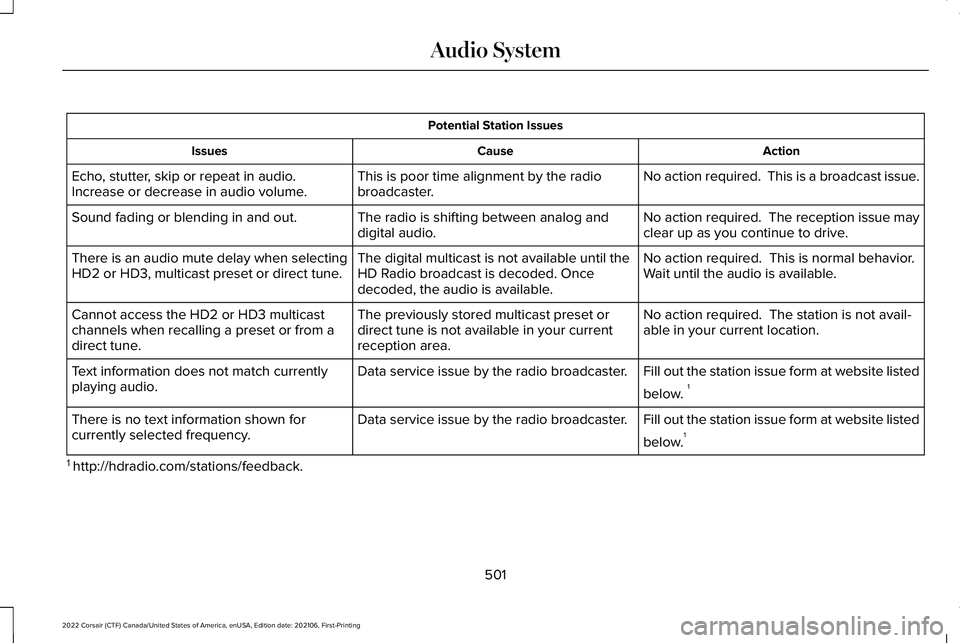
Potential Station Issues
Action
Cause
Issues
No action required. This is a broadcast issue.
This is poor time alignment by the radio
broadcaster.
Echo, stutter, skip or repeat in audio.
Increase or decrease in audio volume.
No action required. The reception issue may
clear up as you continue to drive.
The radio is shifting between analog and
digital audio.
Sound fading or blending in and out.
No action required. This is normal behavior.
Wait until the audio is available.
The digital multicast is not available until the
HD Radio broadcast is decoded. Once
decoded, the audio is available.
There is an audio mute delay when selecting
HD2 or HD3, multicast preset or direct tune.
No action required. The station is not avail-
able in your current location.
The previously stored multicast preset or
direct tune is not available in your current
reception area.
Cannot access the HD2 or HD3 multicast
channels when recalling a preset or from a
direct tune.
Fill out the station issue form at website listed
below. 1
Data service issue by the radio broadcaster.
Text information does not match currently
playing audio.
Fill out the station issue form at website listed
below.1
Data service issue by the radio broadcaster.
There is no text information shown for
currently selected frequency.
1 http://hdradio.com/stations/feedback.
501
2022 Corsair (CTF) Canada/United States of America, enUSA, Edition date: 202106, First-Printing Audio System
Page 507 of 676
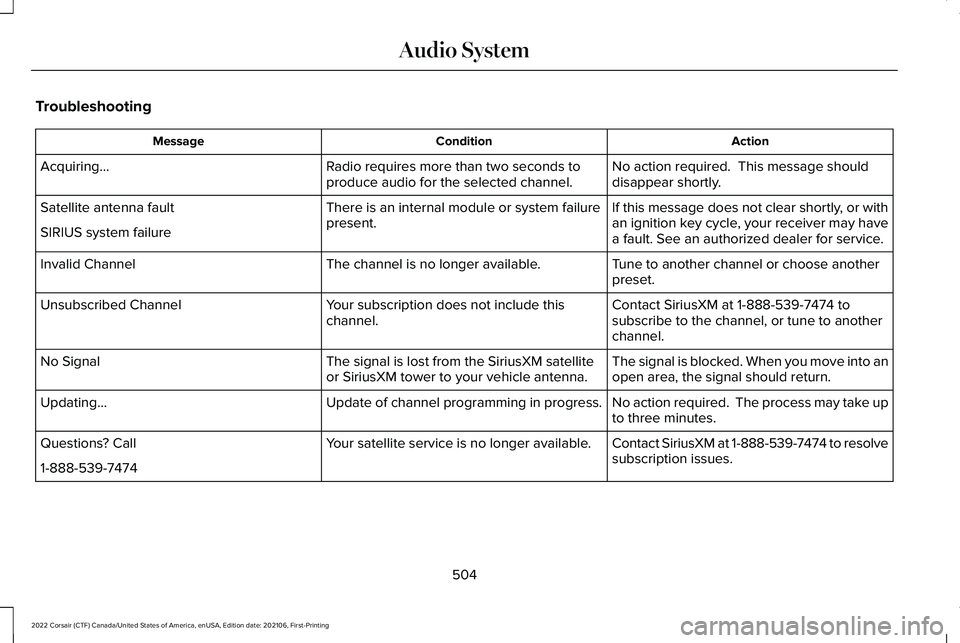
Troubleshooting
Action
Condition
Message
No action required. This message should
disappear shortly.
Radio requires more than two seconds to
produce audio for the selected channel.
Acquiring…
If this message does not clear shortly, or with
an ignition key cycle, your receiver may have
a fault. See an authorized dealer for service.
There is an internal module or system failure
present.
Satellite antenna fault
SIRIUS system failure
Tune to another channel or choose another
preset.
The channel is no longer available.
Invalid Channel
Contact SiriusXM at 1-888-539-7474 to
subscribe to the channel, or tune to another
channel.
Your subscription does not include this
channel.
Unsubscribed Channel
The signal is blocked. When you move into an
open area, the signal should return.
The signal is lost from the SiriusXM satellite
or SiriusXM tower to your vehicle antenna.
No Signal
No action required. The process may take up
to three minutes.
Update of channel programming in progress.
Updating…
Contact SiriusXM at 1-888-539-7474 to resolve
subscription issues.
Your satellite service is no longer available.
Questions? Call
1-888-539-7474
504
2022 Corsair (CTF) Canada/United States of America, enUSA, Edition date: 202106, First-Printing Audio System
Page 528 of 676
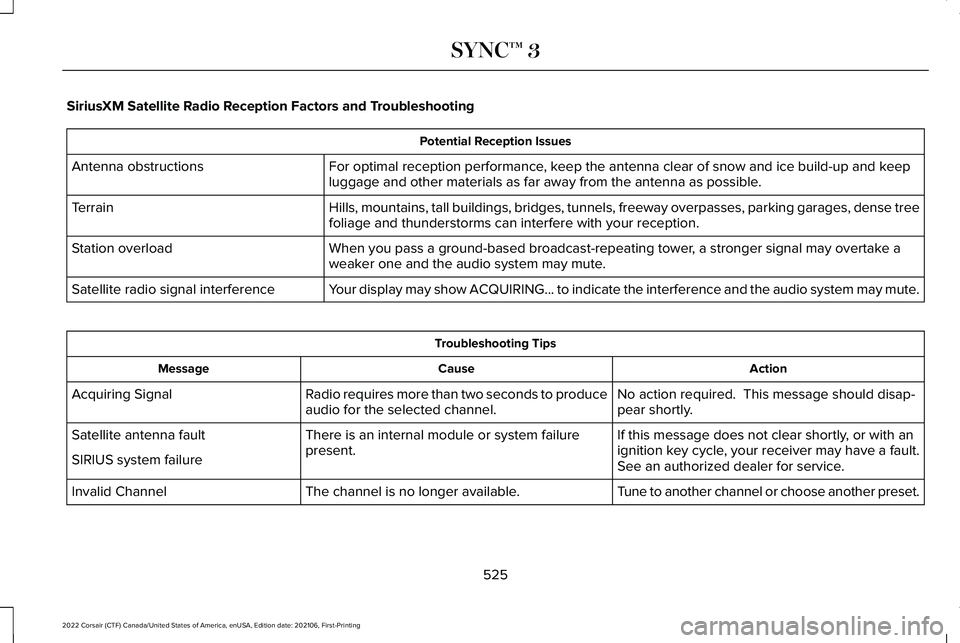
SiriusXM Satellite Radio Reception Factors and Troubleshooting
Potential Reception Issues
For optimal reception performance, keep the antenna clear of snow and ice build-up and keep
luggage and other materials as far away from the antenna as possible.
Antenna obstructions
Hills, mountains, tall buildings, bridges, tunnels, freeway overpasses, \
parking garages, dense tree
foliage and thunderstorms can interfere with your reception.
Terrain
When you pass a ground-based broadcast-repeating tower, a stronger signal may overtake a
weaker one and the audio system may mute.
Station overload
Your display may show ACQUIRING... to indicate the interference and the a\
udio system may mute.
Satellite radio signal interference Troubleshooting Tips
Action
Cause
Message
No action required. This message should disap-
pear shortly.
Radio requires more than two seconds to produce
audio for the selected channel.
Acquiring Signal
If this message does not clear shortly, or with an
ignition key cycle, your receiver may have a fault.
See an authorized dealer for service.
There is an internal module or system failure
present.
Satellite antenna fault
SIRIUS system failure
Tune to another channel or choose another preset.
The channel is no longer available.
Invalid Channel
525
2022 Corsair (CTF) Canada/United States of America, enUSA, Edition date: 202106, First-Printing SYNC™ 3
Page 532 of 676
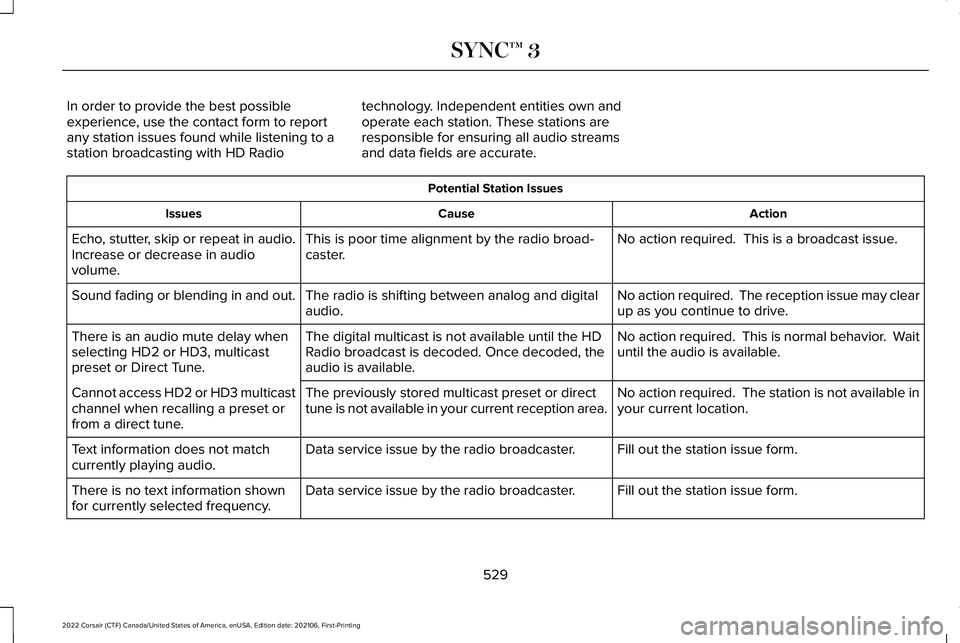
In order to provide the best possible
experience, use the contact form to report
any station issues found while listening to a
station broadcasting with HD Radio
technology. Independent entities own and
operate each station. These stations are
responsible for ensuring all audio streams
and data fields are accurate. Potential Station Issues
Action
Cause
Issues
No action required. This is a broadcast issue.
This is poor time alignment by the radio broad-
caster.
Echo, stutter, skip or repeat in audio.
Increase or decrease in audio
volume.
No action required. The reception issue may clear
up as you continue to drive.
The radio is shifting between analog and digital
audio.
Sound fading or blending in and out.
No action required. This is normal behavior. Wait
until the audio is available.
The digital multicast is not available until the HD
Radio broadcast is decoded. Once decoded, the
audio is available.
There is an audio mute delay when
selecting HD2 or HD3, multicast
preset or Direct Tune.
No action required. The station is not available in
your current location.
The previously stored multicast preset or direct
tune is not available in your current reception area.
Cannot access HD2 or HD3 multicast
channel when recalling a preset or
from a direct tune.
Fill out the station issue form.
Data service issue by the radio broadcaster.
Text information does not match
currently playing audio.
Fill out the station issue form.
Data service issue by the radio broadcaster.
There is no text information shown
for currently selected frequency.
529
2022 Corsair (CTF) Canada/United States of America, enUSA, Edition date: 202106, First-Printing SYNC™ 3
Page 589 of 676

At Every Oil Change Interval as Indicated by the Information Display
1
Inspect the exhaust system and heat shields.
Inspect the rear axle and U-joints for all-wheel drive vehicles.
Inspect the half-shaft boots.
Inspect the steering linkage, ball joints, suspension, tie-rod ends, driveshaft and the U-joints.
Inspect the tires, tire wear and measure the tread depth.
Inspect the wheels and related components for abnormal noise, wear, looseness or drag.
1 Do not exceed one year or 10,000 mi (16,000 km) between service intervals.
2 Reset the Intelligent Oil-Life Monitor after engine oil and filter change\
s.
See Oil Change Indicator Reset (page 397). Brake Fluid Maintenance
1
Change the brake fluid. 2
Every Three Years
1 Perform this maintenance item every three years. Do not exceed the designated time for the interval.
2 Brake fluid servicing requires special equipment available at your authorize\
d dealer.
586
2022 Corsair (CTF) Canada/United States of America, enUSA, Edition date: 202106, First-Printing Scheduled Maintenance
Page 591 of 676

SPECIAL OPERATING CONDITIONS
SCHEDULED MAINTENANCE
If you operate your vehicle primarily in any
of the following conditions, you need to
perform extra maintenance as indicated. If
you operate your vehicle occasionally under
any of these conditions, it is not necessary
to perform the extra maintenance. For
specific recommendations, see your
dealership service advisor or technician. Perform the services shown in the following
tables when specified or within
3,000 mi
(4,800 km) of the message appearing in the
information display prompting you to change
your oil.
• Example 1
: The message comes on at
28,750 mi (46,270 km). Perform the
30,000 mi (48,000 km) automatic
transmission fluid replacement.
• Example 2
: The message has not come
on, but the odometer reads 30,000 mi
(48,000 km) (for example, the Intelligent
Oil-Life Monitor was reset at 25,000 mi
(40,000 km). Perform the engine air filter
replacement.
588
2022 Corsair (CTF) Canada/United States of America, enUSA, Edition date: 202106, First-Printing Scheduled Maintenance
Page 594 of 676

Operating in Dusty or Sandy Conditions Such as Unpaved or Dusty Roads
Perform multi-point inspection.
Change automatic transmission fluid.
Every 30,000 mi
(48,000 km)
1 This is an optional feature.
2 Reset your Intelligent Oil-Life Monitor after engine oil and filter chang\
es.
See Oil Change Indicator Reset (page 397).
Exceptions
There are several exceptions to the Normal
Schedule:
Axle and PTU Maintenance
The Power Transfer Unit (PTU) and rear axle
(AWD only) in your vehicle does not require
any normal scheduled maintenance unless
the vehicle has experienced extended
periods of extreme/severe duty cycle driving
or the PTU and/or the rear axle has been
submerged in water. Checking the PTU and
rear axle fluid is not necessary unless the
unit shows signs of leakage. Contact an
authorized dealer for service. California Fuel Filter Replacement
If you register your vehicle in California, the
California Air Resources Board has
determined that the failure to perform this
maintenance item does not nullify the
emission warranty or limit recall liability
before the completion of your vehicle's
useful life. We however, urge you to have all
recommended maintenance services
performed at the specified intervals and to
record all vehicle service.
Engine Air Filter and Cabin Air Filter
Replacement
The life of the engine air filter and cabin air
filter is dependent on exposure to dusty and
dirty conditions. Vehicles operated in these
conditions require frequent inspection and
replacement of the engine air filter and cabin
air filter.
591
2022 Corsair (CTF) Canada/United States of America, enUSA, Edition date: 202106, First-Printing Scheduled Maintenance