2022 LEXUS RX450h warning
[x] Cancel search: warningPage 339 of 532

3375-6. Using the other interior features
5
Interior features
RX450h
Pull the armrest down for use.
RX450hL
To adjust the armrest angle, raise the
armrest to the highest position and
then lower the armrest to the lowest
position.
Raise the armrest again to the desired
position and the armrest will be locked
at that position.
When the armrest is locked, the armrest
cannot be lowered.
To lower the armrest, raise the armrest to
the highest position again.
An assist grip installed on the ceiling
can be used to support your body
while sitting on the seat.
NOTICE
■To prevent failure or damage to data
●Do not bring magnetic cards, such as a
credit card, or magnetic recording
media, close to the wireless charger
while charging. Otherwise, data may
be erased due to the influence of mag-
netism. Additionally, do not bring pre-
cision instruments such as wrist
watches, close to the wireless charger,
as such objects may malfunction.
●Do not leave portab le devices in the
cabin. The temperature inside the
cabin may become high when parked
in the sun, and cause damage to the
device.
■To prevent 12-vol t battery discharge
Do not use the wireless charger for a
long period of time with the hybrid sys-
tem is stopped.
Armrest
NOTICE
■To prevent damage to the armrest
Do not apply too much load on the arm-
rest.
Assist grips
WARNING
■Assist grip
Do not use the assist grip when getting in
or out of the vehicle or rising from your
seat.
Page 340 of 532

3385-6. Using the other interior features
The coat hooks are provided with the
rear assist grips.
The GPS clock's time is automatically
adjusted by utilizing GPS time infor-
mation.
For details, refer to “NAVIGATION AND
MULTIMEDIA SYSTEM OWNER’S
MANUAL”.
Please use as a power supply for elec-
tronic goods that use less than 12
VDC/10 A (power consumption of
120 W).
Observe the following when using
electronic goods:
Make sure that the power consump-
tion of all the connected power out-
lets on the instrument panel and in
the luggage compartment is less
than 120 W.
Make sure that the power consump-
tion of all the connected power out-
lets inside the console box is less
than 120 W.
On the instrument panel
Remove the cap.
Inside the console box
Open the lid.
NOTICE
■To prevent damage to the assist grip
Do not hang any heavy object or put a
heavy load on the assist grip.
Coat hooks
WARNING
■Items that must not be hung on the
hook
Do not hang coat hangers or other hard
or sharp objects on the hook. If the SRS
curtain shield airbags deploy, these items
may become projectiles, causing death
or serious injury.
Clock
Power outlets
Page 342 of 532

3405-6. Using the other interior features
it backward.
Slide the cover to open.
The light turns on when the cover is
opened.
■To prevent 12-volt battery discharge
If the vanity lights remain on when the
power switch is turned off, the lights will go
off automatically after 20 minutes.
Use the front passenger footwell hooks
to help support and prevent objects
placed on the floor, such as a grocery
bag, from overturning. Pull the sunshade up using the tab and
hook the sunshade on to the anchors.
To lower the sunshade, pull it up slightly
using the tab, unhook it from the anchors,
and lower it slowly.
Vanity mirrors
NOTICE
■To prevent the 12-volt battery from
being discharged
Do not leave the vanity lights on for
extended periods while the hybrid sys-
tem is off.
Front passenger footwell hooks
NOTICE
■To prevent damage to the hooks
Do not hang anything from a hook or
apply excessive force to it.
Rear door sunshades (if
equipped)
WARNING
■Closing the rear door sunshade
When a rear door sunshade is in use, do
not put fingers, etc. on the anchors or in
the groove of the rear door sunshade.
Otherwise, a finger, etc. may get caught,
possibly causing an injury.
Page 344 of 532

3425-6. Using the other interior features
HomeLink® indicator light
Garage door operation indicators
HomeLink
® icon
Illuminates while HomeLink® is operating.
Buttons
■Codes stored in the HomeLink® mem-
ory
●The registered codes are not erased even
if the 12-volt battery cable is discon-
nected.
●If learning failed wh en registering a dif-
ferent code to a HomeLink® button that
already has a code registered to it, the
already registered code will not be
erased.
■Before programming HomeLink®
During programming, it is possible
that garage doors, gates, or other
devices may operate. For this rea-
son, make sure that people and
objects are clear of the garage door
or other devices to prevent injury or
other potential harm.
It is recommended that a new bat-
tery be placed in the remote control
transmitter for more accurate pro-
gramming.
Garage door opener motors manu-
factured after 1995 may be
equipped with rolling code protec-
tion. If this is the case, you may need
a stepladder or other sturdy, safe
device to reach the “Learn” or
“Smart” button on the garage door
opener motor.
WARNING
■When programming a garage door or
other remote control device
The garage door or other device may
operate, so ensure people and objects
are out of danger to prevent potential
harm.
A
B
C
D
■Conforming to federal safety stan-
dards
Do not use the HomeLink
® compatible
transceiver with any garage door opener
or device that lacks safety stop and
reverse features as required by federal
safety standards.
This includes any garage door that can-
not detect an interf ering object. A door
or device without these features
increases the risk of death or serious
injury.
■When operating or programming
HomeLink®
Never allow a child to operate or play
with the HomeLink® buttons.
Programming the HomeLink®
Page 349 of 532

3475-6. Using the other interior features
5
Interior features
●The vehicle is on an inclined surface.
●The vehicle is in a place where the earth’s
magnetic field is subject to interference
by artificial magnetic fields (under-
ground car park/parking lot, under a
steel tower, between buildings, roof car
park/parking lot, near an intersection,
near a large vehicle, etc.).
●The vehicle has become magnetized.
(There is a magnet or metal object near
the inside rear view mirror.)
●The battery has been disconnected.
●A door is open.
■Deviation
The direction display deviates from the tr ue direction determined by the earth’s
magnetic field. The amount of deviation varies according to the geographic posi-
tion of the vehicle.
If you cross over a map boundary shown in illustration, the compass will deviate.
To obtain higher precision or perfec t calibration, refer to the following.
■Deviation calibration 1Stop the vehicle.
WARNING
■While driving the vehicle
Do not adjust the display. Adjust the dis-
play only when the vehicle is stopped.
NOTICE
■To avoid compass malfunctions
Do not place magnets or any metal
objects near the inside rear view mirror.
Doing this may cause the compass sen-
sor to malfunction.
■To ensure normal operation of the
compass
●Do not perform a circling calibration of
the compass in a place where the
earth’s magnetic field is subject to
interference by artificial magnetic
fields.
●During calibration, do not operate
electric systems (moon roof, pan-
oramic moon roof, power windows,
etc.) as they may interfere with the cal-
ibration.
Calibrating the compass
Page 350 of 532

3485-6. Using the other interior features
2Press and hold the switch for 6 sec-
onds. A number (1 to 15) appears
on the compass display.
3 Press the switch and, referring to
the map above, select the number
of the zone where you are.
If the direction is di splayed several seconds
after adjustment, the calibration is com-
plete.
■Circling calibration
1 Stop the vehicle in a place where it
is safe to drive in a circle.
2 Press and hold the button for 9 sec-
onds.
“C” appears on th e compass display.
3Drive the vehicle at 5 mph (8
km/h) or less in a circle until a
direction is displayed.
If there is not enough space to drive in a
circle, drive around the block until a direc- tion is displayed.
WARNING
■When doing the circling calibration
Secure a wide space, and watch out for
people and vehicles in the vicinity. Do not
violate any local traffic rules while per-
forming circling calibration.
Page 353 of 532
3516-1. Maintenance and care
6
Maintenance and care
■Brake pads and calipers
Rust may form if the vehicle is parked with
wet brake pads or disc rotors, causing them
to stick. Before parking the vehicle after it is
washed, drive slowly and apply the brakes
several times to dry the parts.
■Bumpers
Do not scrub with abrasive cleaners.
■Front side windows water-repellent
coating
●The following precautions can extend the
effectiveness of the water-repellent coat-
ing.
• Remove any dirt, etc. from the front side
windows regularly.
• Do not allow dirt and dust to accumulate on the windows for a long period.
Clean the windows with a soft, damp
cloth as soon as possible.
• Do not use wax or glass cleaners that
contain abrasives when cleaning the win-
dows.
• Do not use any metallic objects to
remove condensation build up.
●When the water-repellent performance
has become insufficient, the coating can
be repaired. Contact your Lexus dealer.
■Plated portions
If dirt cannot be removed, clean the parts as
follows:
●Use a soft cloth dampened with an
approximately 5% solution of neutral
detergent and water to clean the dirt off.
●Wipe the surface with a dry, soft cloth to
remove any remaining moisture.
●To remove oily deposits, use alcohol wet
wipes or a similar product.
WARNING
■When washing the vehicle
Do not apply water to the inside of the
engine compartment. Doing so may
cause the electrical components, etc. to
catch fire.
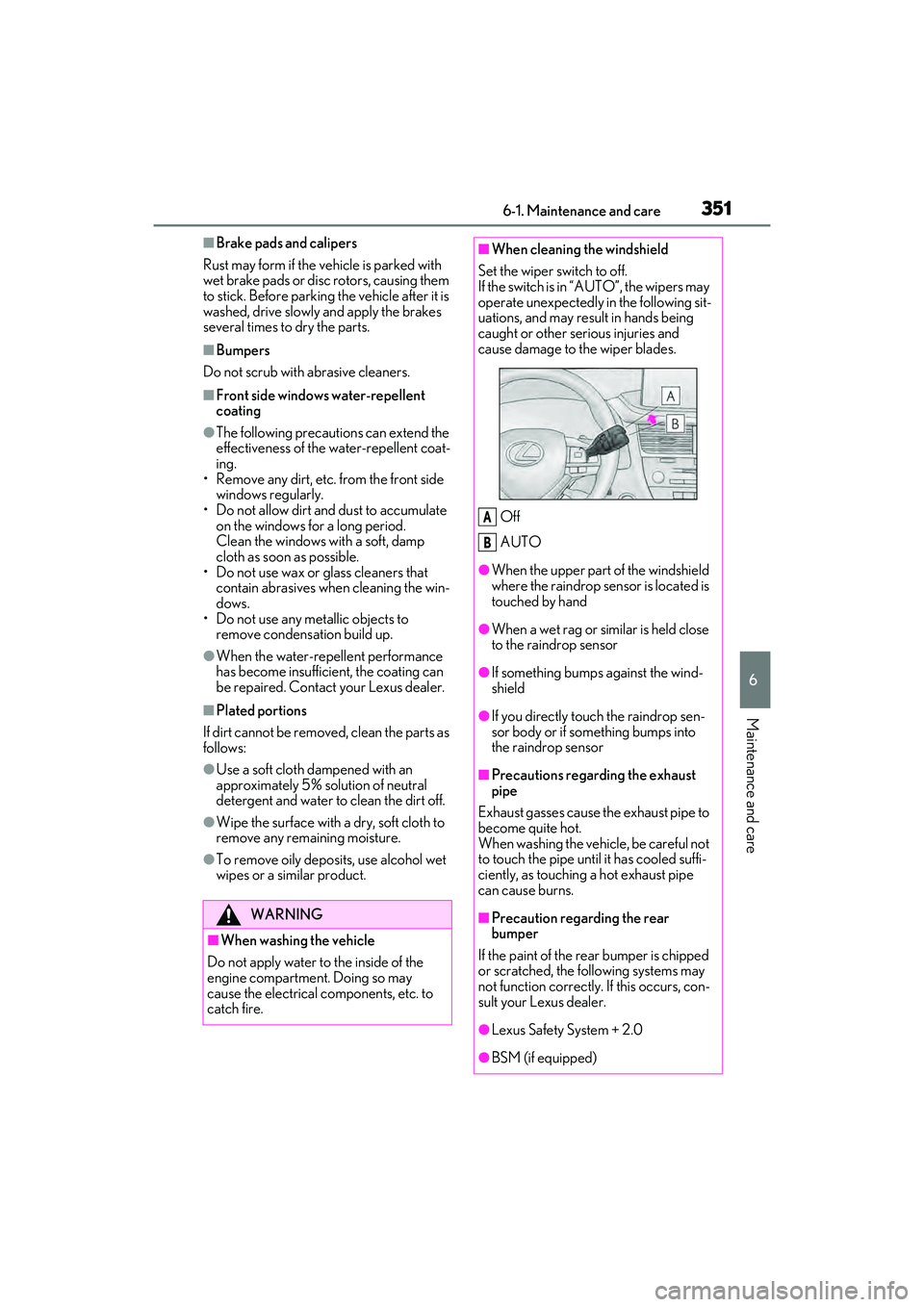
■When cleaning the windshield
Set the wiper switch to off.
If the switch is in “AUTO”, the wipers may
operate unexpectedly in the following sit-
uations, and may result in hands being
caught or other serious injuries and
cause damage to the wiper blades.
Off
AUTO
●When the upper part of the windshield
where the raindrop sensor is located is
touched by hand
●When a wet rag or similar is held close
to the raindrop sensor
●If something bumps against the wind-
shield
●If you directly touch the raindrop sen-
sor body or if something bumps into
the raindrop sensor
■Precautions regarding the exhaust
pipe
Exhaust gasses cause the exhaust pipe to
become quite hot.
When washing the vehicle, be careful not
to touch the pipe until it has cooled suffi-
ciently, as touching a hot exhaust pipe
can cause burns.
■Precaution regarding the rear
bumper
If the paint of the re ar bumper is chipped
or scratched, the following systems may
not function correctly. If this occurs, con-
sult your Lexus dealer.
●Lexus Safety System + 2.0
●BSM (if equipped)
A
B
Page 354 of 532

3526-1. Maintenance and care
WARNING
●RCTA (if equipped)
●PKSB (if equipped)
NOTICE
■To prevent paint deterioration and
corrosion on the body and compo-
nents (aluminum wheels, etc.)
●Wash the vehicle immediately in the
following cases:
• After driving near the sea coast
• After driving on salted roads
• If coal tar or tree sap is present on the paint surface
• If dead insects, in sect droppings or
bird droppings are present on the
paint surface
• After driving in an area contaminated with soot, oily smoke, mine dust, iron
powder or chemical substances
• If the vehicle becomes heavily soiled with dust or mud
• If liquids such as benzene and gasoline are spilled on the paint surface
●If the paint is chip ped or scratched,
have it repaired immediately.
●To prevent the wheels from corroding,
remove any dirt and store in a place
with low humidity when storing the
wheels.
■Cleaning the exterior lights
●Wash carefully. Do not use organic
substances or scrub with a hard brush.
This may damage the surfaces of the
lights.
●Do not apply wax to the surfaces of the
lights.
Wax may cause damage to the lenses.
■When using an automatic car wash
Set the wiper switch to the off position.
If the wiper switch is in “AUTO”, the wip-
ers may operate and the wiper blades
may be damaged.
■When using a high pressure car wash
●When washing the vehicle, do not
spray the camera or its surrounding
area directly with a high pressure
washer. Shock applied from high pres-
sure water may cause the device to not
operate normally.
●Do not spray water directly on the
radar which is equipped behind the
emblem. Otherwise it may cause the
device to be damaged.
●Do not bring the nozzle tip close to
boots (rubber or resin manufactured
cover), connectors or the following
parts. The parts may be damaged if
they come into contact with high-pres-
sure water.
• Traction related parts
•Steering parts
• Suspension parts
• Brake parts
●Keep the cleaning nozzle at least 11.9
in. (30 cm) away from the vehicle
body. Otherwise resin section, such as
moldings and bumpers, may be
deformed and damaged.
Also, do not continuously hold the nozzle
in the same place.
●Do not spray the lower part of the
windshield continuously.
If water enters the air conditioning sys-
tem intake located near the lower part of
the windshield, the air conditioning sys-
tem may not operate correctly.
●Do not wash the underside of the vehi-
cle using a high pressure car washer.