2022 LEXUS RX350 warning light
[x] Cancel search: warning lightPage 293 of 508
2915-3. Using the air conditioning system and defogger
5
Interior features
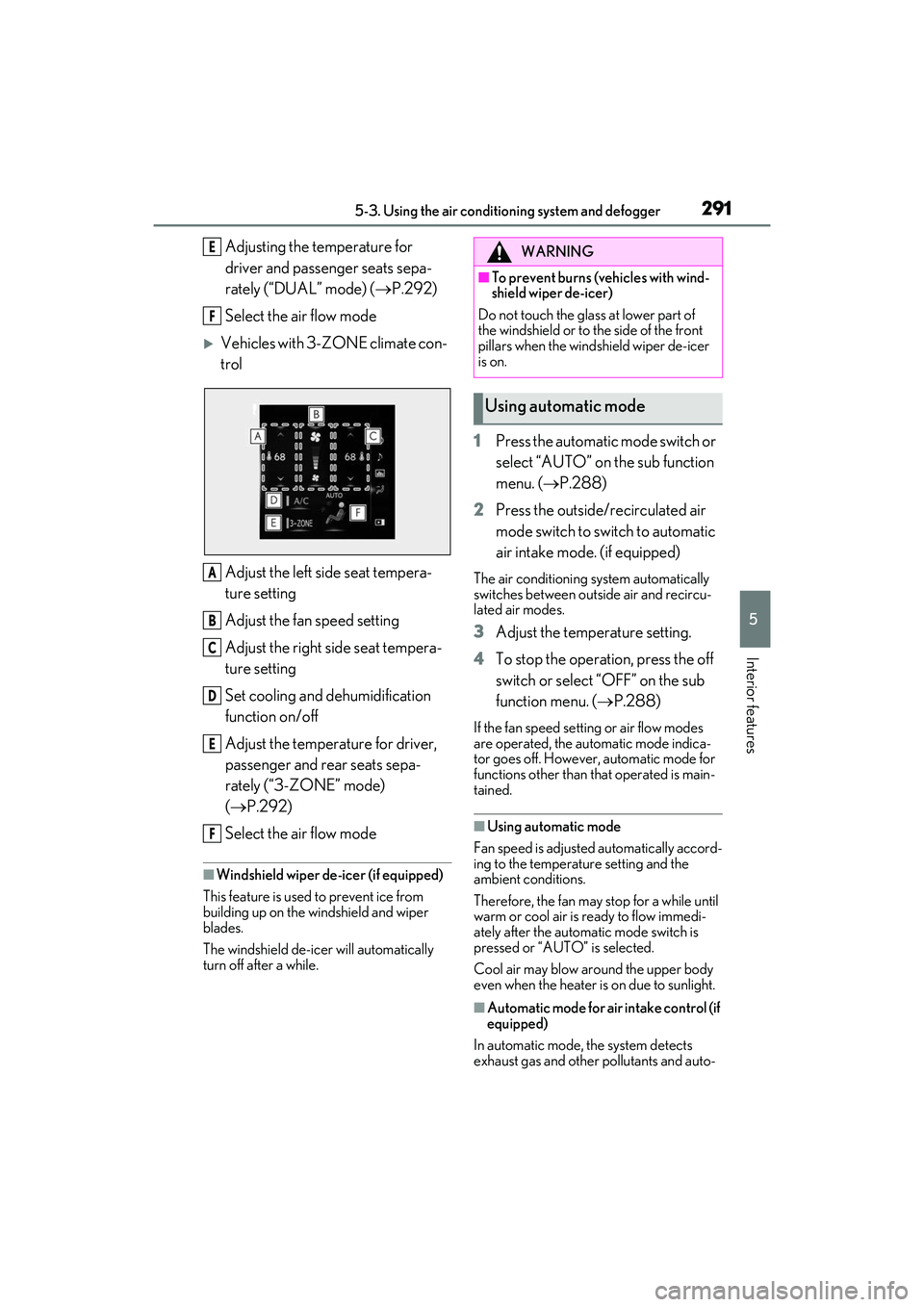
Adjusting the temperature for
driver and passenger seats sepa-
rately (“DUAL” mode) (P.292)
Select the air flow mode
Vehicles with 3-ZONE climate con-
trol
Adjust the left side seat tempera-
ture setting
Adjust the fan speed setting
Adjust the right side seat tempera-
ture setting
Set cooling and dehumidification
function on/off
Adjust the temperature for driver,
passenger and rear seats sepa-
rately (“3-ZONE” mode)
( P.292)
Select the air flow mode
■Windshield wiper de-icer (if equipped)
This feature is used to prevent ice from
building up on the windshield and wiper
blades.
The windshield de-icer will automatically
turn off after a while.
1 Press the automatic mode switch or
select “AUTO” on the sub function
menu. ( P.288)
2 Press the outside/recirculated air
mode switch to switch to automatic
air intake mode. (if equipped)
The air conditioning system automatically
switches between outside air and recircu-
lated air modes.
3Adjust the temperature setting.
4 To stop the operation, press the off
switch or select “OFF” on the sub
function menu. ( P.288)
If the fan speed settin g or air flow modes
are operated, the automatic mode indica-
tor goes off. However, automatic mode for
functions other than that operated is main-
tained.
■Using automatic mode
Fan speed is adjusted automatically accord-
ing to the temperature setting and the
ambient conditions.
Therefore, the fan may stop for a while until
warm or cool air is ready to flow immedi-
ately after the automatic mode switch is
pressed or “AUTO” is selected.
Cool air may blow around the upper body
even when the heater is on due to sunlight.
■Automatic mode for air intake control (if
equipped)
In automatic mode, the system detects
exhaust gas and other pollutants and auto-
E
F
A
B
C
D
E
F
WARNING
■To prevent burns (vehicles with wind-
shield wiper de-icer)
Do not touch the glass at lower part of
the windshield or to the side of the front
pillars when the windshield wiper de-icer
is on.
Using automatic mode
Page 301 of 508
2995-3. Using the air conditioning system and defogger
5
Interior features
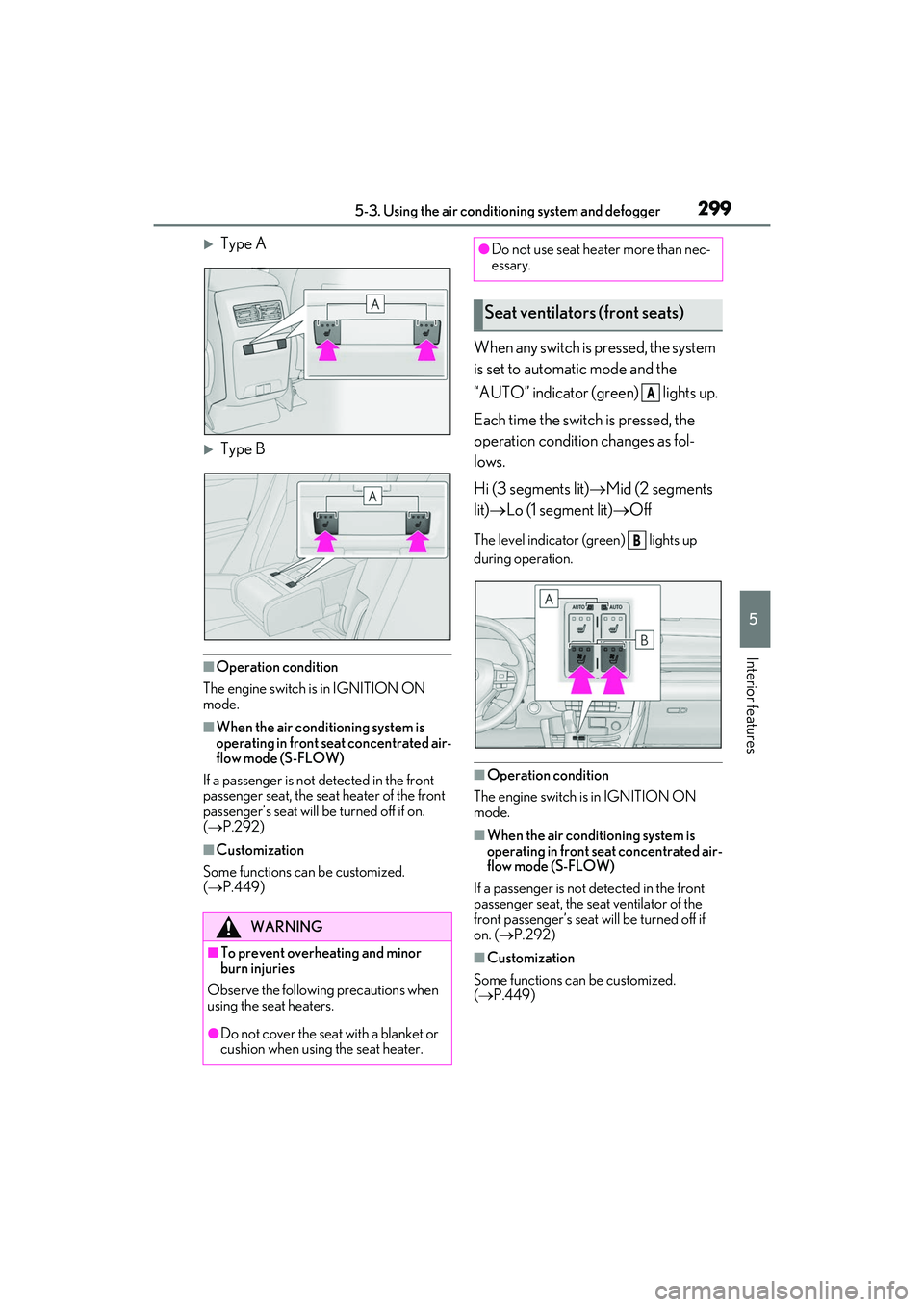
Type A
Type B
■Operation condition
The engine switch is in IGNITION ON
mode.
■When the air conditioning system is
operating in front seat concentrated air-
flow mode (S-FLOW)
If a passenger is not detected in the front
passenger seat, the seat heater of the front
passenger’s seat will be turned off if on.
( P.292)
■Customization
Some functions can be customized.
( P.449)
When any switch is pressed, the system
is set to automatic mode and the
“AUTO” indicator (green) lights up.
Each time the switch is pressed, the
operation condition changes as fol-
lows.
Hi (3 segments lit) Mid (2 segments
lit) Lo (1 segment lit) Off
The level indicator (green) lights up
during operation.
■Operation condition
The engine switch is in IGNITION ON
mode.
■When the air conditioning system is
operating in front seat concentrated air-
flow mode (S-FLOW)
If a passenger is not detected in the front
passenger seat, the se at ventilator of the
front passenger’s seat will be turned off if
on. ( P.292)
■Customization
Some functions can be customized.
( P.449)
WARNING
■To prevent overheating and minor
burn injuries
Observe the following precautions when
using the seat heaters.
●Do not cover the seat with a blanket or
cushion when using the seat heater.
●Do not use seat heater more than nec-
essary.
Seat ventilators (front seats)
A
B
Page 306 of 508
3045-5. Using the storage features
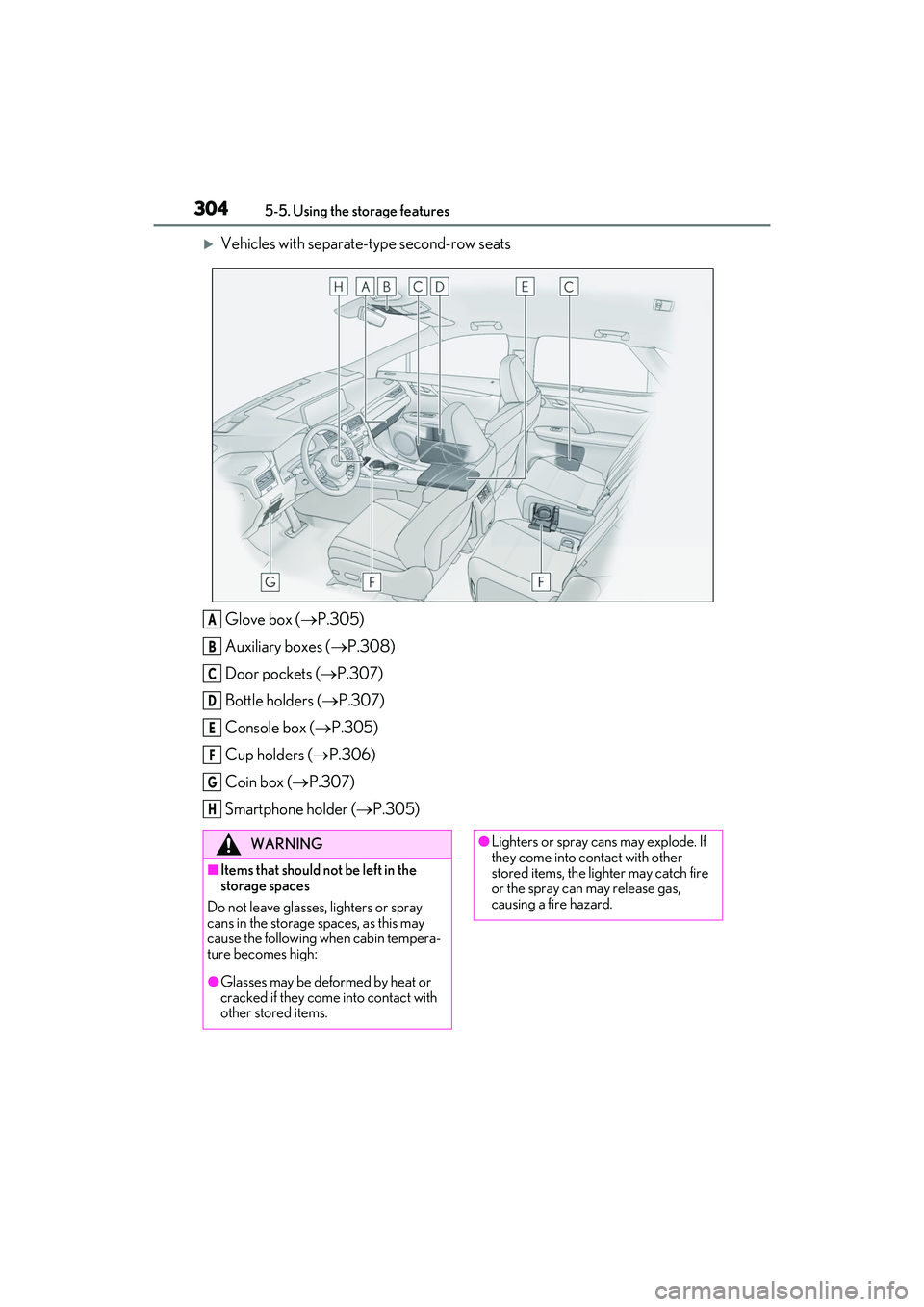
Vehicles with separate-type second-row seatsGlove box ( P.305)
Auxiliary boxes ( P.308)
Door pockets ( P.307)
Bottle holders ( P.307)
Console box ( P.305)
Cup holders ( P.306)
Coin box ( P.307)
Smartphone holder ( P.305)
A
B
C
D
E
F
G
H
WARNING
■Items that should not be left in the
storage spaces
Do not leave glasses, lighters or spray
cans in the storage spaces, as this may
cause the following when cabin tempera-
ture becomes high:
●Glasses may be deformed by heat or
cracked if they come into contact with
other stored items.
●Lighters or spray ca ns may explode. If
they come into contact with other
stored items, the lighter may catch fire
or the spray can may release gas,
causing a fire hazard.
Page 307 of 508

3055-5. Using the storage features
5
Interior features
1Open (press the button)
2 Unlock with the mechanical key
3 Lock with the mechanical key
■Glove box light
The glove box light turns on when the tail
lights are on.
■When cleaning the interior
Remove to clean it.
When installing , engage the left and
right claws and then engage the center
claw.
Push the knob.
Lift by hand to fully open the console box.
■Console box light
The console box light turns on when the tail
lights are on.
■Pen holder
A pen can be stored in the pen holder on
the underside of the lid.
WARNING
■When storage compartments are not
in use
When driving or when the storage com-
partments are not in use, keep the lids
closed.
In the event of sudden braking or sudden
swerving, an accident may occur due to
an occupant being struck by an open lid
or the items stored inside.
Glove box
Smartphone holder
Console box
A
A
Page 323 of 508

3215-6. Using the other interior features
5
Interior features
WARNING
■Caution while driving
When charging a portable device while
driving, for safety reasons, the driver
should not operate th e portable device.
■Caution regarding interference with
electronic devices
People with implantable cardiac pace-
makers, cardiac resynchronization ther-
apy pacemakers or implantable
cardioverter defibrillators, as well as any
other electrical medical device, should
consult their physician about the usage of
the wireless charger.
Operations of the wireless charger may
have an affect on medical devices.
■To prevent damage or burns
Observe the following precautions.
Failure to do so may result in the possibil-
ity of fire, equipment failure or damage,
or burns due to heat.
●Do not put any metallic objects
between the charging area and the
portable device while charging.
●Do not attach metallic objects, such as
aluminum stickers, to the charging
area.
●Do not cover the wireless charger with
a cloth or other obje ct while charging.
●Do not attempt to charge portable
devices which are not compatible with
the Qi wireless charging standard.
●Do not disassemble, modify or remove
the wireless charger.
●Do not apply force or impact to the
wireless charger.
NOTICE
■Conditions in which the wireless
charger may not operate correctly
In the following situations, the wireless
charger may not operate correctly:
●When a portable device is fully
charged
●When there is a foreign object
between the charging area and porta-
ble device
●When a portable device becomes hot
while charging
●When a portable device is placed on
the wireless area with its charging sur-
face facing up
●When a portable device is not cen-
tered on the charging area
●When the vehicle is near a TV tower,
electric power plant, gas station, radio
station, large display, airport or other
facility that gene rates strong radio
waves or electrical noise
●When the portable device is in contact
with, or is covered by any of the follow-
ing metallic objects:
• Cards to which aluminum foil is attached
• Cigarette boxes that have aluminum foil inside
• Metallic wallets or bags
•Coins
• Metal hand warmers
• Media such as CDs and DVDs
●When wireless keys (that emit radio
waves) other than those of your vehicle
are being used nearby.
If in situations other than above the wire-
less charger does not operate properly
or the operation indicator light is blink-
ing, the wireless charger may be mal-
functioning. Contact your Lexus dealer.
Page 327 of 508
3255-6. Using the other interior features
5
Interior features
3To use the side extender, place the
visor in the side position, then slide
it backward.
Slide the cover to open.
The light turns on when the cover is
opened.
■To prevent battery discharge
If the vanity lights remain on when the
engine switch is turned off, the lights will go
off automatically after 20 minutes.
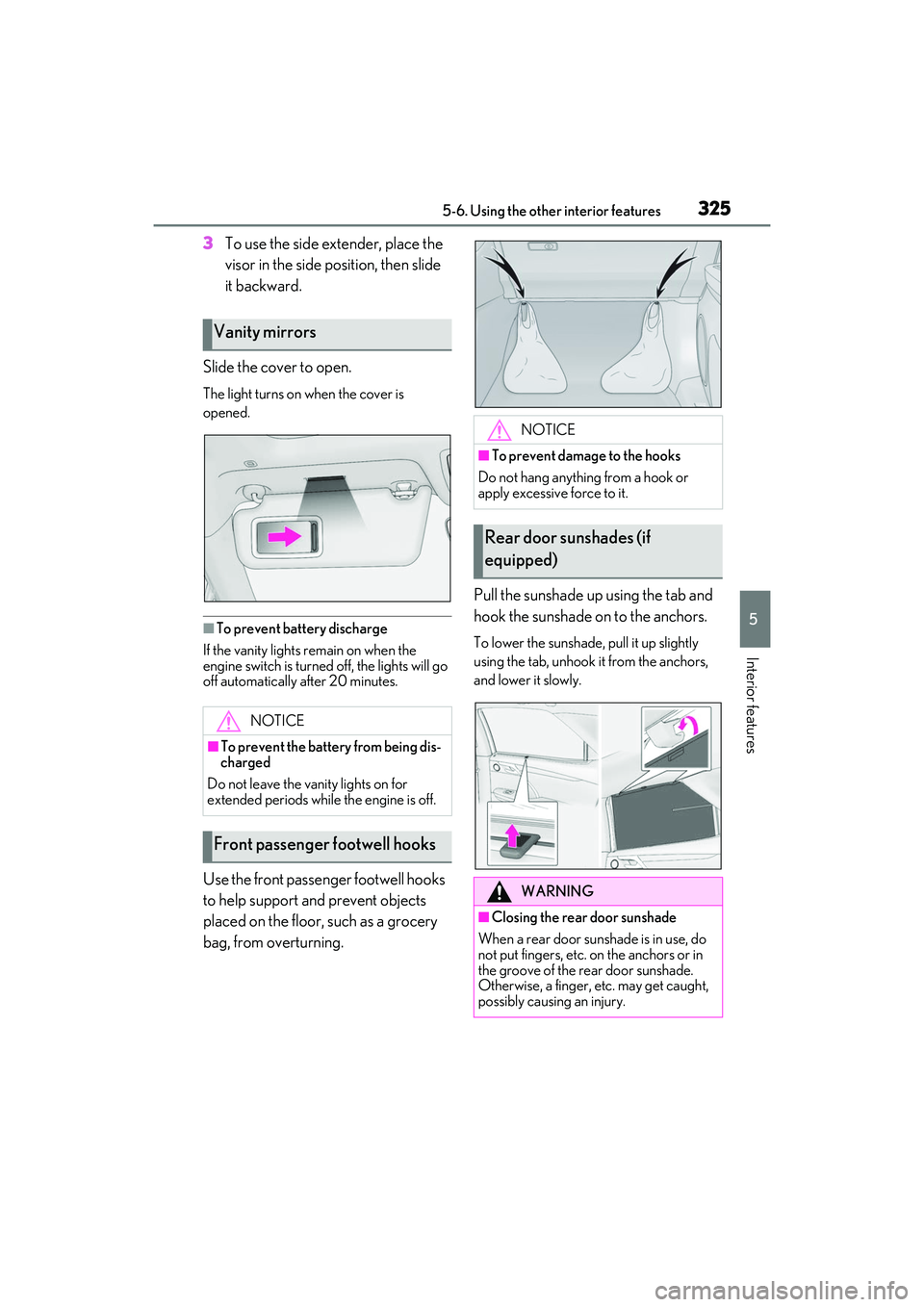
Use the front passenger footwell hooks
to help support and prevent objects
placed on the floor, such as a grocery
bag, from overturning. Pull the sunshade up using the tab and
hook the sunshade on to the anchors.
To lower the sunshade, pull it up slightly
using the tab, unhook it from the anchors,
and lower it slowly.
Vanity mirrors
NOTICE
■To prevent the battery from being dis-
charged
Do not leave the vanity lights on for
extended periods whil e the engine is off.
Front passenger footwell hooks
NOTICE
■To prevent damage to the hooks
Do not hang anything from a hook or
apply excessive force to it.
Rear door sunshades (if
equipped)
WARNING
■Closing the rear door sunshade
When a rear door sunshade is in use, do
not put fingers, etc. on the anchors or in
the groove of the rear door sunshade.
Otherwise, a finger, etc. may get caught,
possibly causing an injury.
Page 329 of 508
3275-6. Using the other interior features
5
Interior features
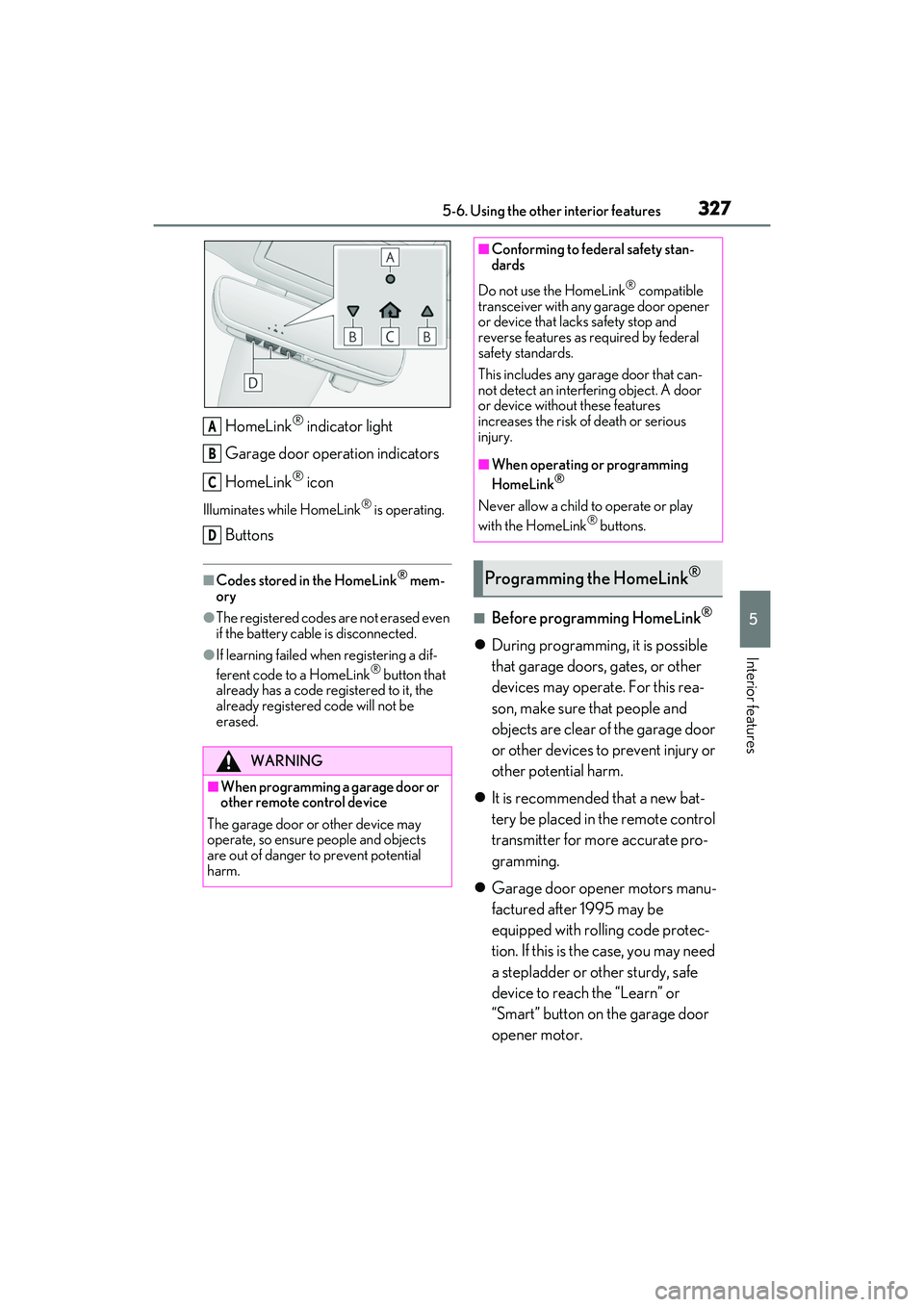
HomeLink® indicator light
Garage door operation indicators
HomeLink
® icon
Illuminates while HomeLink® is operating.
Buttons
■Codes stored in the HomeLink® mem-
ory
●The registered codes are not erased even
if the battery cable is disconnected.
●If learning failed wh en registering a dif-
ferent code to a HomeLink® button that
already has a code registered to it, the
already registered code will not be
erased.
■Before programming HomeLink®
During programming, it is possible
that garage doors, gates, or other
devices may operate. For this rea-
son, make sure that people and
objects are clear of the garage door
or other devices to prevent injury or
other potential harm.
It is recommended that a new bat-
tery be placed in the remote control
transmitter for more accurate pro-
gramming.
Garage door opener motors manu-
factured after 1995 may be
equipped with rolling code protec-
tion. If this is the case, you may need
a stepladder or other sturdy, safe
device to reach the “Learn” or
“Smart” button on the garage door
opener motor.
WARNING
■When programming a garage door or
other remote control device
The garage door or other device may
operate, so ensure people and objects
are out of danger to prevent potential
harm.
A
B
C
D
■Conforming to federal safety stan-
dards
Do not use the HomeLink
® compatible
transceiver with any garage door opener
or device that lacks safety stop and
reverse features as required by federal
safety standards.
This includes any garage door that can-
not detect an interf ering object. A door
or device without these features
increases the risk of death or serious
injury.
■When operating or programming
HomeLink®
Never allow a child to operate or play
with the HomeLink® buttons.
Programming the HomeLink®
Page 340 of 508
3386-1. Maintenance and care
WARNING
●BSM (if equipped)
●RCTA (if equipped)
●PKSB (if equipped)
NOTICE
■To prevent paint deterioration and
corrosion on the body and compo-
nents (aluminum wheels, etc.)
●Wash the vehicle immediately in the
following cases:
• After driving near the sea coast
• After driving on salted roads
• If coal tar or tree sap is present on the paint surface
• If dead insects, in sect droppings or
bird droppings are present on the
paint surface
• After driving in an area contaminated with soot, oily smoke, mine dust, iron
powder or chemical substances
• If the vehicle becomes heavily soiled with dust or mud
• If liquids such as benzene and gasoline are spilled on the paint surface
●If the paint is chip ped or scratched,
have it repair ed immediately.
●To prevent the wheels from corroding,
remove any dirt and store in a place
with low humidity when storing the
wheels.
■Cleaning the exterior lights
●Wash carefully. Do not use organic
substances or scrub with a hard brush.
This may damage the surfaces of the
lights.
●Do not apply wax to the surfaces of the
lights.
Wax may cause damage to the lenses.
■When using an automatic car wash
Set the wiper switch to the off position.
If the wiper switch is in “AUTO”, the wip-
ers may operate and the wiper blades
may be damaged.
■When using a high pressure car wash
●When washing the vehicle, do not
spray the camera or its surrounding
area directly with a high pressure
washer. Shock applied from high pres-
sure water may cause the device to not
operate normally.
●Do not spray water directly on the
radar which is equipped behind the
emblem. Otherwise it may cause the
device to be damaged.
●Do not bring the nozzle tip close to
boots (rubber or resin manufactured
cover), connectors or the following
parts. The parts may be damaged if
they come into contact with high-pres-
sure water.
• Traction related parts
•Steering parts
• Suspension parts
• Brake parts
●Keep the cleaning nozzle at least 11.9
in. (30 cm) away from the vehicle
body. Otherwise resin section, such as
moldings and bumpers, may be
deformed and damaged.
Also, do not continuously hold the nozzle
in the same place.
●Do not spray the lower part of the
windshield continuously.
If water enters the air conditioning sys-
tem intake located near the lower part of
the windshield, the air conditioning sys-
tem may not operate correctly.
●Do not wash the underside of the vehi-
cle using a high pressure car washer.