2022 LEXUS RX350 passenger
[x] Cancel search: passengerPage 53 of 508
511-2. Child safety
1
For safety and security
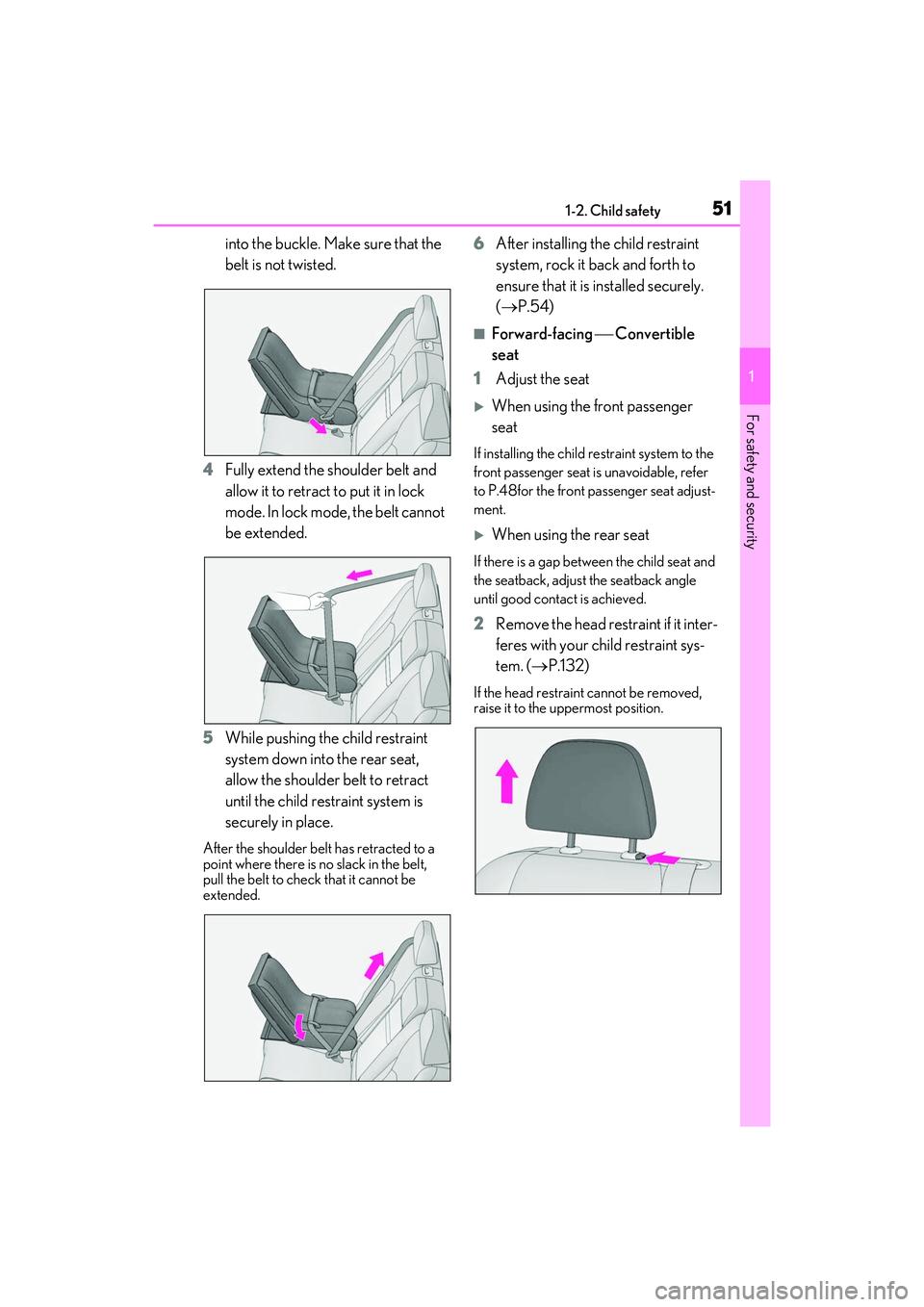
into the buckle. Make sure that the
belt is not twisted.
4 Fully extend the shoulder belt and
allow it to retract to put it in lock
mode. In lock mode, the belt cannot
be extended.
5 While pushing the child restraint
system down into the rear seat,
allow the shoulder belt to retract
until the child restraint system is
securely in place.
After the shoulder belt has retracted to a
point where there is no slack in the belt,
pull the belt to check that it cannot be
extended.
6After installing the child restraint
system, rock it back and forth to
ensure that it is installed securely.
( P.54)
■Forward-facing Convertible
seat
1 Adjust the seat
When using the front passenger
seat
If installing the child restraint system to the
front passenger seat is unavoidable, refer
to P.48for the front passenger seat adjust-
ment.
When using the rear seat
If there is a gap between the child seat and
the seatback, adjust the seatback angle
until good contact is achieved.
2Remove the head restraint if it inter-
feres with your child restraint sys-
tem. ( P.132)
If the head restraint cannot be removed,
raise it to the uppermost position.
Page 54 of 508
521-2. Child safety
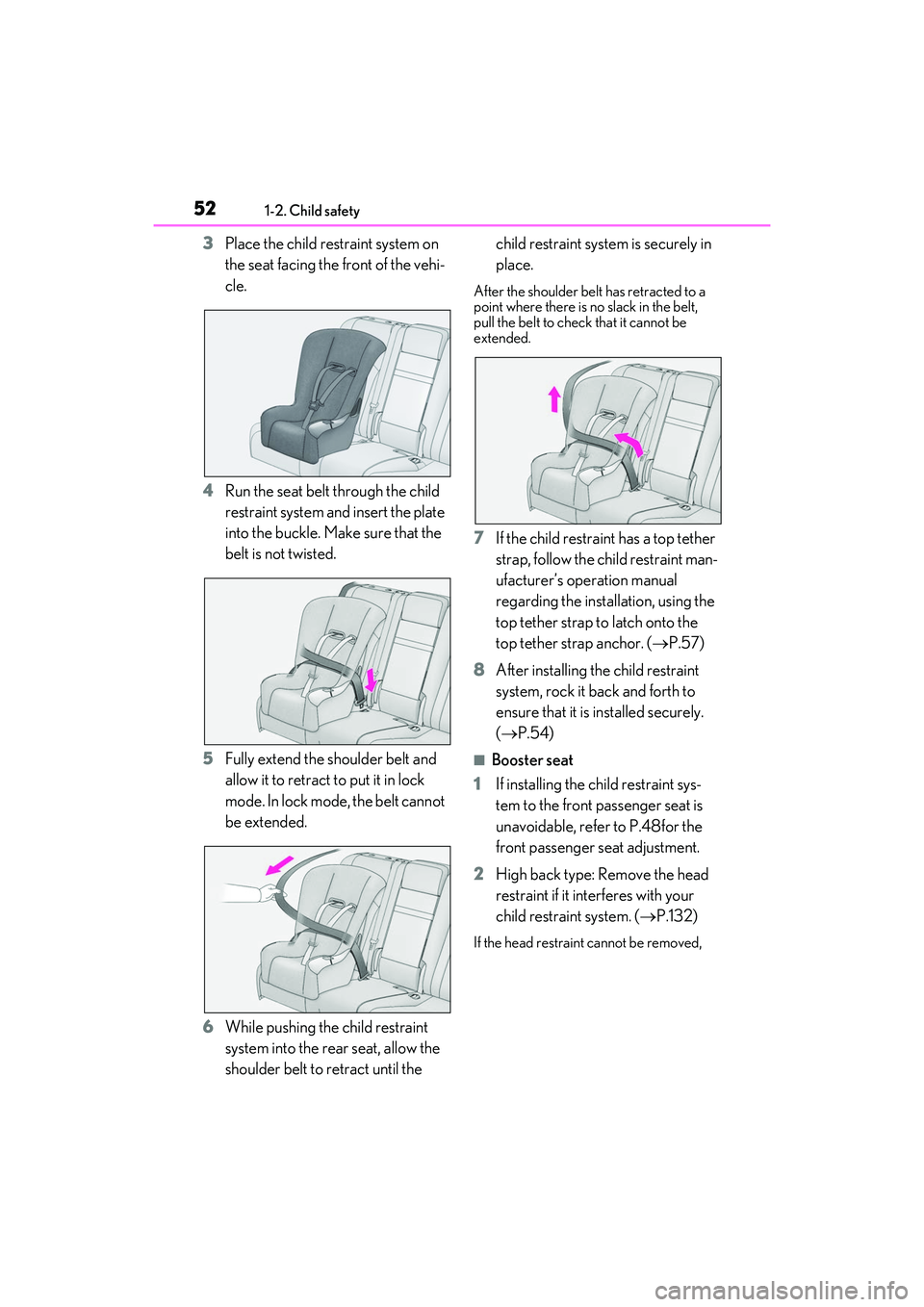
3Place the child restraint system on
the seat facing the front of the vehi-
cle.
4 Run the seat belt through the child
restraint system and insert the plate
into the buckle. Make sure that the
belt is not twisted.
5 Fully extend the shoulder belt and
allow it to retract to put it in lock
mode. In lock mode, the belt cannot
be extended.
6 While pushing the child restraint
system into the rear seat, allow the
shoulder belt to retract until the child restraint system is securely in
place.
After the shoulder belt has retracted to a
point where there is no slack in the belt,
pull the belt to check that it cannot be
extended.
7
If the child restraint has a top tether
strap, follow the child restraint man-
ufacturer’s operation manual
regarding the installation, using the
top tether strap to latch onto the
top tether strap anchor. ( P.57)
8 After installing the child restraint
system, rock it back and forth to
ensure that it is installed securely.
( P.54)
■Booster seat
1 If installing the child restraint sys-
tem to the front passenger seat is
unavoidable, refer to P.48for the
front passenger seat adjustment.
2 High back type: Remove the head
restraint if it interferes with your
child restraint system. ( P.132)
If the head restraint cannot be removed,
Page 56 of 508
541-2. Child safety
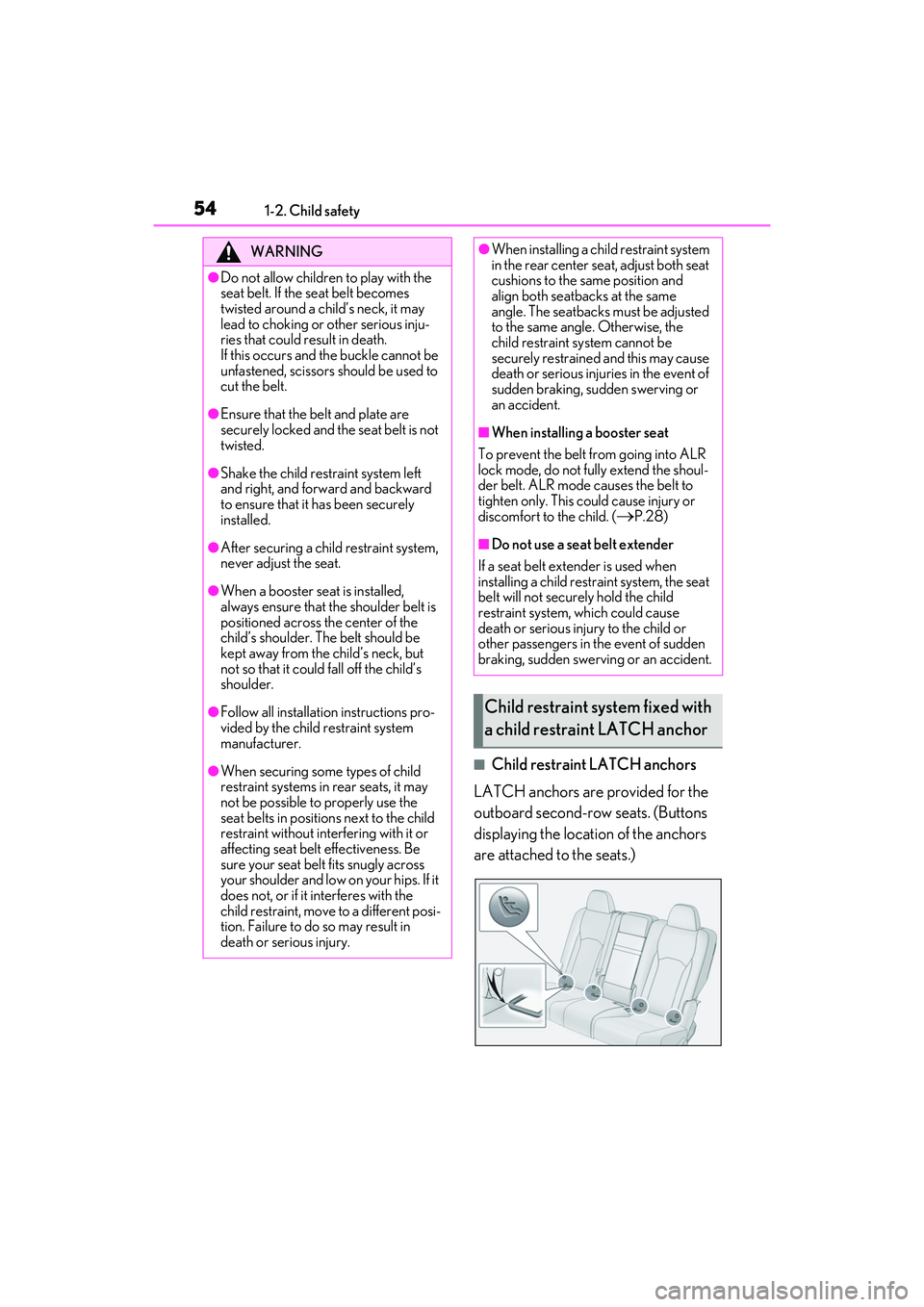
■Child restraint LATCH anchors
LATCH anchors are provided for the
outboard second-row seats. (Buttons
displaying the location of the anchors
are attached to the seats.)
WARNING
●Do not allow children to play with the
seat belt. If the seat belt becomes
twisted around a child’s neck, it may
lead to choking or other serious inju-
ries that could result in death.
If this occurs and the buckle cannot be
unfastened, scissors should be used to
cut the belt.
●Ensure that the belt and plate are
securely locked and the seat belt is not
twisted.
●Shake the child restraint system left
and right, and forward and backward
to ensure that it has been securely
installed.
●After securing a child restraint system,
never adjust the seat.
●When a booster seat is installed,
always ensure that th e shoulder belt is
positioned across the center of the
child’s shoulder. T he belt should be
kept away from the child’s neck, but
not so that it could fall off the child’s
shoulder.
●Follow all installation instructions pro-
vided by the child restraint system
manufacturer.
●When securing some types of child
restraint systems in rear seats, it may
not be possible to properly use the
seat belts in position s next to the child
restraint without inte rfering with it or
affecting seat belt effectiveness. Be
sure your seat belt fits snugly across
your shoulder and low on your hips. If it
does not, or if it interferes with the
child restraint, move to a different posi-
tion. Failure to do so may result in
death or serious injury.
●When installing a child restraint system
in the rear center se at, adjust both seat
cushions to the same position and
align both seatbacks at the same
angle. The seatbacks must be adjusted
to the same angle. Otherwise, the
child restraint system cannot be
securely restrained and this may cause
death or serious injuries in the event of
sudden braking, sudden swerving or
an accident.
■When installing a booster seat
To prevent the belt from going into ALR
lock mode, do not fully extend the shoul-
der belt. ALR mode causes the belt to
tighten only. This could cause injury or
discomfort to the child. (
P.28)
■Do not use a seat belt extender
If a seat belt extender is used when
installing a child restra int system, the seat
belt will not securely hold the child
restraint system, which could cause
death or serious injury to the child or
other passengers in the event of sudden
braking, sudden swerving or an accident.
Child restraint system fixed with
a child restraint LATCH anchor
Page 73 of 508

712-1. Instrument cluster
2
Vehicle status information and indicators
Warning lights inform the driver of mal-
functions in the indicated vehicle’s sys-
tems.
Warning lights
(U.S.A.)
Brake system warning light*1
( P.393)
(red)
(Canada)
Brake system warning light*1
( P.393)
(yellow)
Brake system warning light*1
( P.393)
High coolant temperature
warning light
*2 ( P.393)
Charging system warning
light
*3 ( P.394)
Low engine oil pressure warn-
ing light
*2 ( P.394)
(U.S.A.)
Malfunction indicator lamp*1
( P.394)
(Canada)
Malfunction indicator lamp*1
( P.394)
SRS warning light
*1 ( P.394)
(U.S.A.)
ABS warning light*1 ( P.395)
(Canada)
ABS warning light*1 ( P.395)
Brake Override System warn-
ing light/Drive-Start Control
warning light
*2 ( P.395)
(red)
Electric power st eering system
warning light
*1 ( P.395)
(yellow)
Electric power steering system
warning light
*1 (P.395)
Low fuel level warning light
( P.396)
Driver’s and front passenger’s
seat belt reminder light
( P.396)
(RX350)
Rear passengers’ seat
belt reminder light
*4
( P.396)
(RX350L)
Rear passengers’ seat
belt reminder
light
*4(P.396)
Tire pressure warning light
*1
( P.397)
(orange)
LTA indicator ( P.397)
(flashes)
Intuitive parking assist OFF indi-
cator
*1 (if equipped) (P.397)
(flashes)
RCTA OFF indicator*1 (if
equipped) ( P.397)
(flashes)
PKSB OFF indicator*1 (if
equipped) ( P.398)
(flashes or
illuminates)PCS warning light*1 ( P.398)
Slip indicator
*1 ( P.398)
(flashes)
(U.S.A.)
Parking brake indicator
( P.399)
(flashes)
(Canada)
Parking brake indicator
( P.399)
Page 100 of 508

983-2. Opening, closing and locking the doors
To prevent unintended triggering of the
alarm, unlock the doors using the wireless
remote control and open and close a door
once after the settings have been changed.
(If a door is not opened within 60 seconds
after is pressed, the doors will be
locked again and the alarm will automati-
cally be set.)
In a case that the alarm is triggered, imme-
diately stop the alarm. ( P.67)
■Impact detection door lock release sys-
tem
In the event that the vehicle is subject to a
strong impact, all the doors are unlocked.
Depending on the force of the impact or the
type of accident, however, the system may
not operate.
■Operation signals
Doors:
A buzzer sounds and the emergency flash-
ers flash to indicate that the doors have
been locked/unlocke d. (Locked: Once;
Unlocked: Twice)
Windows and moon roof or panoramic
moon roof:
A buzzer sounds.
■Security feature
If a door is not opened within approximately
60 seconds after the vehicle is unlocked,
the security feature automatically locks the
vehicle again.
■When the door cannot be locked by the
lock sensor on the surface of the door
handle
When the door cannot be locked even if the
lock sensor on the surface of the door han-
dle is touched by a finger, touch the lock
sensor with the palm.
When gloves are being worn, remove the
gloves.
■Door lock buzzer
If an attempt to lock the doors using the
smart key system is made when a door is
not fully closed, a buzzer will sound continu-
ously for 5 seconds. Fully close the door to
stop the buzzer, and lock the doors again.
■Setting the alarm
Locking the doors will set the alarm system.
( P.67)
■Conditions affecting the operation of
the smart access system with push-but-
ton start or wireless remote control
P.114
■If the smart access system with
push-button start or the wireless remote
control does not operate properly
Use the mechanical key to lock and unlock
the doors. (P.421)
Replace the key battery with a new one if it
is depleted. ( P.369)
■If the battery is discharged
The doors cannot be locked and unlocked
using the smart access system with
push-button start or wireless remote con-
trol. Lock or unlock the doors using the
Multi-information display/BeepUnlocking function
Exterior: Beeps 3 times
Interior: Pings once
Holding the driver’s
door handle unlocks
only the driver’s
door.
Holding any of the
passenger door
handles unlocks all
the doors.
Exterior: Beeps twice
Interior: Pings once
Holding a door han-
dle unlocks all the
doors.
Page 120 of 508
1183-3. Adjusting the seats
Rear seats
WARNING
■When a rear seatback is folded
Observe the following precautions.
Failure to do so may result in death or
serious injury.
●Do not fold down the rear seatbacks
while driving.
●Stop the vehicle on level ground, apply
the parking brake and shift the shift
lever to P.
●Do not allow anyone to sit on a folded
rear seatback or in the luggage com-
partment while driving.
●Do not allow children to enter the lug-
gage compartment.
■When operating the rear seatback
Observe the following precautions.
Failure to do so may result in death or
serious injury.
●Make sure that passengers are clear of
the rear seatback before operating it.
●To prevent hands and other body parts
from being caught, keep them away
from the gaps in the seats and the mov-
ing parts of the seat s when operating a
rear seatback.
●Power seat: Do not let children oper-
ate the rear seatback. Other passen-
gers may get caught in the seat.
●Power seat: Make su re that all passen-
gers are clear of a seat before folding
it. Do not let passeng ers sit in the seat
while it is being folded.
■Seat adjustment
Second-row seats: To reduce the risk of
sliding under the lap belt during a colli-
sion, do not recline the seat more than
necessary.
If the seat is reclin ed excessively, the lap
belt may slide past the hips and apply
restraint forces direct ly to the abdomen,
or your neck may contact the shoulder
belt, increasing the risk of death or seri-
ous injury in the event of an accident.
■After adjusting the rear seats
Observe the following precautions.
Failure to do so may result in death or
serious injury.
●Make sure that the rear seatback is
securely locked in position by lightly
pushing it back and forth.
●Check that the seat belts are not
twisted or caught between or behind
in the rear seatback.
●Arrange the seat belts in the proper
positions for ready use.
■Jam protection function (power seat)
Observe the following precautions.
Failure to do so may result in death or
serious injury.
●Never use any part of your body to
intentionally activate the jam protec-
tion function.
●The jam protection function may not
operate if somethin g is caught just
before the fully folded position. Be
careful so that finger s, etc. do not get
caught.
●The jam protection function may not
operate depending on the shape or
position of the obstruction. Be careful
so that fingers, etc. do not get caught.
Page 129 of 508
1273-3. Adjusting the seats
3
Before driving
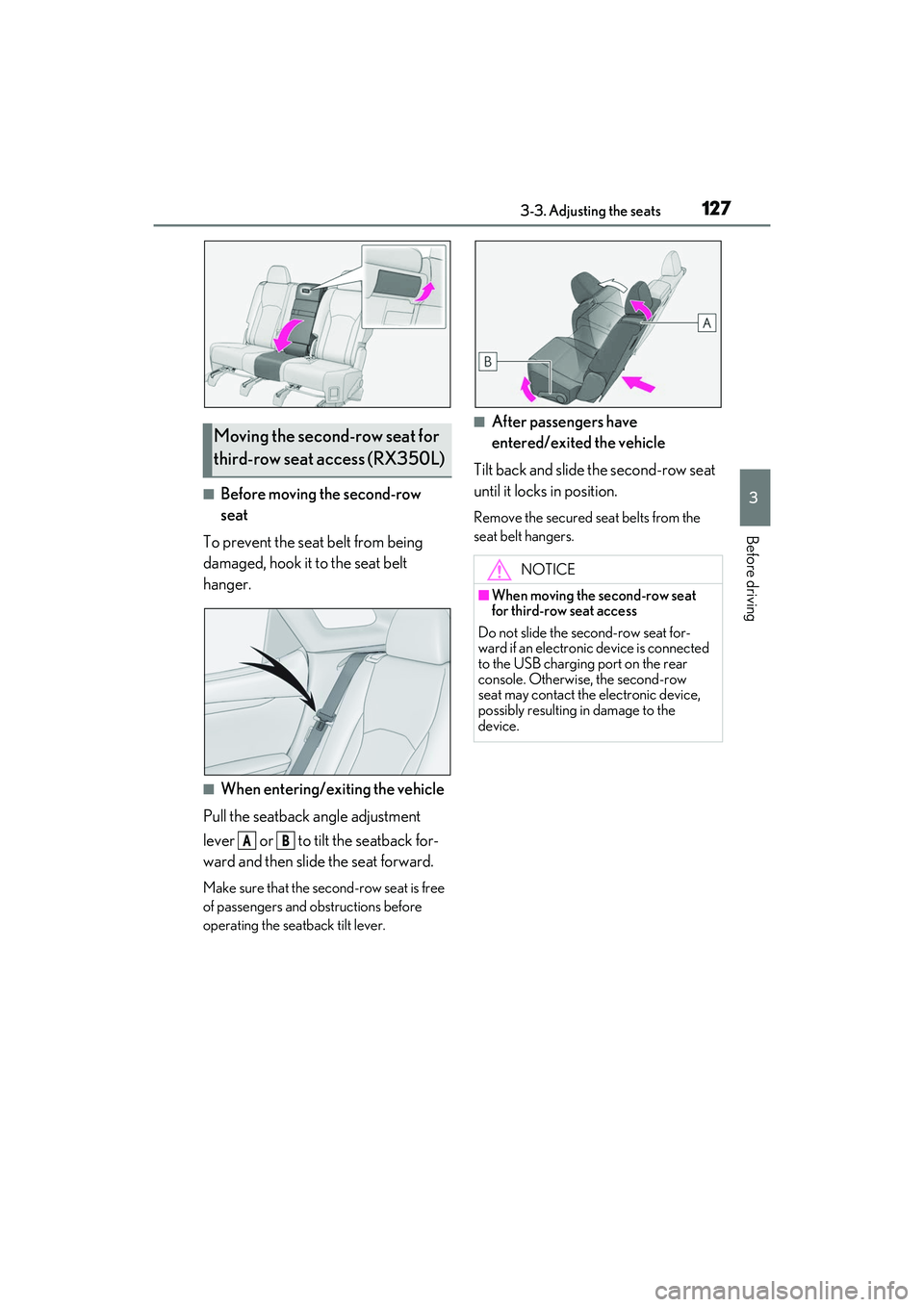
■Before moving the second-row
seat
To prevent the seat belt from being
damaged, hook it to the seat belt
hanger.
■When entering/exiting the vehicle
Pull the seatback angle adjustment
lever or to tilt the seatback for-
ward and then slid e the seat forward.
Make sure that the seco nd-row seat is free
of passengers and ob structions before
operating the seatback tilt lever.
■After passengers have
entered/exited the vehicle
Tilt back and slide the second-row seat
until it locks in position.
Remove the secured se at belts from the
seat belt hangers.
Moving the second-row seat for
third-row seat access (RX350L)
AB
NOTICE
■When moving the second-row seat
for third-row seat access
Do not slide the second-row seat for-
ward if an electronic device is connected
to the USB charging port on the rear
console. Otherwise, the second-row
seat may contact the electronic device,
possibly resulting in damage to the
device.
Page 139 of 508
1373-4. Adjusting the steering wheel and mirrors
3
Before driving
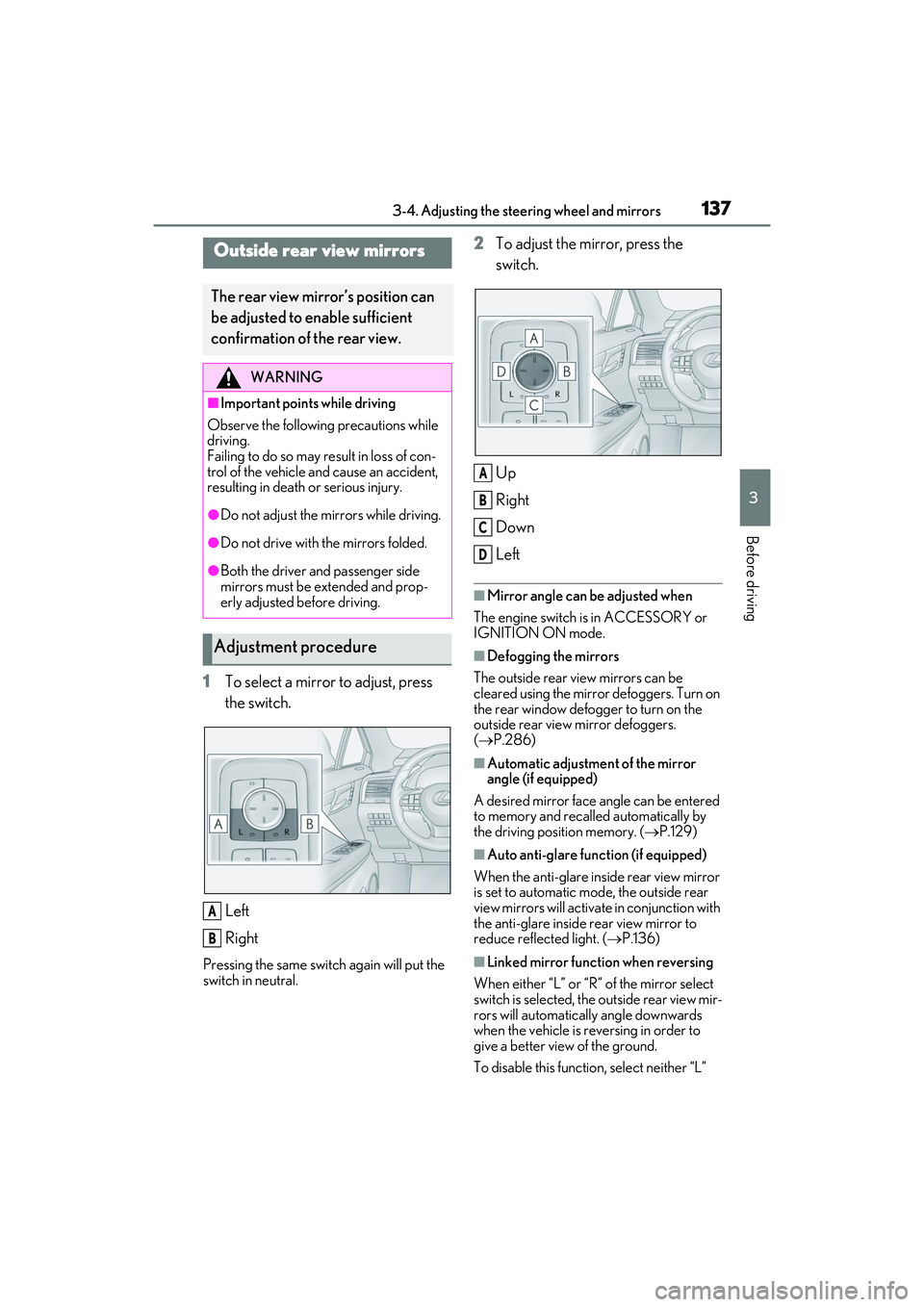
1To select a mirror to adjust, press
the switch.
Left
Right
Pressing the same switch again will put the
switch in neutral.
2To adjust the mirror, press the
switch.
Up
Right
Down
Left
■Mirror angle can be adjusted when
The engine switch is in ACCESSORY or
IGNITION ON mode.
■Defogging the mirrors
The outside rear view mirrors can be
cleared using the mirror defoggers. Turn on
the rear window defogger to turn on the
outside rear view mirror defoggers.
( P.286)
■Automatic adjustment of the mirror
angle (if equipped)
A desired mirror face angle can be entered
to memory and recalled automatically by
the driving position memory. ( P.129)
■Auto anti-glare function (if equipped)
When the anti-glare inside rear view mirror
is set to automatic mode, the outside rear
view mirrors will activate in conjunction with
the anti-glare inside rear view mirror to
reduce reflec ted light. (P.136)
■Linked mirror function when reversing
When either “L” or “R ” of the mirror select
switch is selected, the outside rear view mir-
rors will automatically angle downwards
when the vehicle is reversing in order to
give a better view of the ground.
To disable this functi on, select neither “L”
Outside rear view mirrors
The rear view mirror’s position can
be adjusted to enable sufficient
confirmation of the rear view.
WARNING
■Important points while driving
Observe the following precautions while
driving.
Failing to do so may result in loss of con-
trol of the vehicle and cause an accident,
resulting in death or serious injury.
●Do not adjust the mirrors while driving.
●Do not drive with the mirrors folded.
●Both the driver and passenger side
mirrors must be extended and prop-
erly adjusted before driving.
Adjustment procedure
A
B
A
B
C
D