Page 295 of 508
2935-3. Using the air conditioning system and defogger
5
Interior features
Vehicles with 3-ZONE climate con-
trol
To turn on the “3-ZONE” mode, per-
form any of the following procedures:
Select “3-ZONE” on the sub func-
tion menu. ( P.288)
Select “3-ZONE” on the option
control screen.
Adjust a passenger seat tempera-
ture setting.
The indicator on the main control screen
comes on when the “3-ZONE” mode is on.
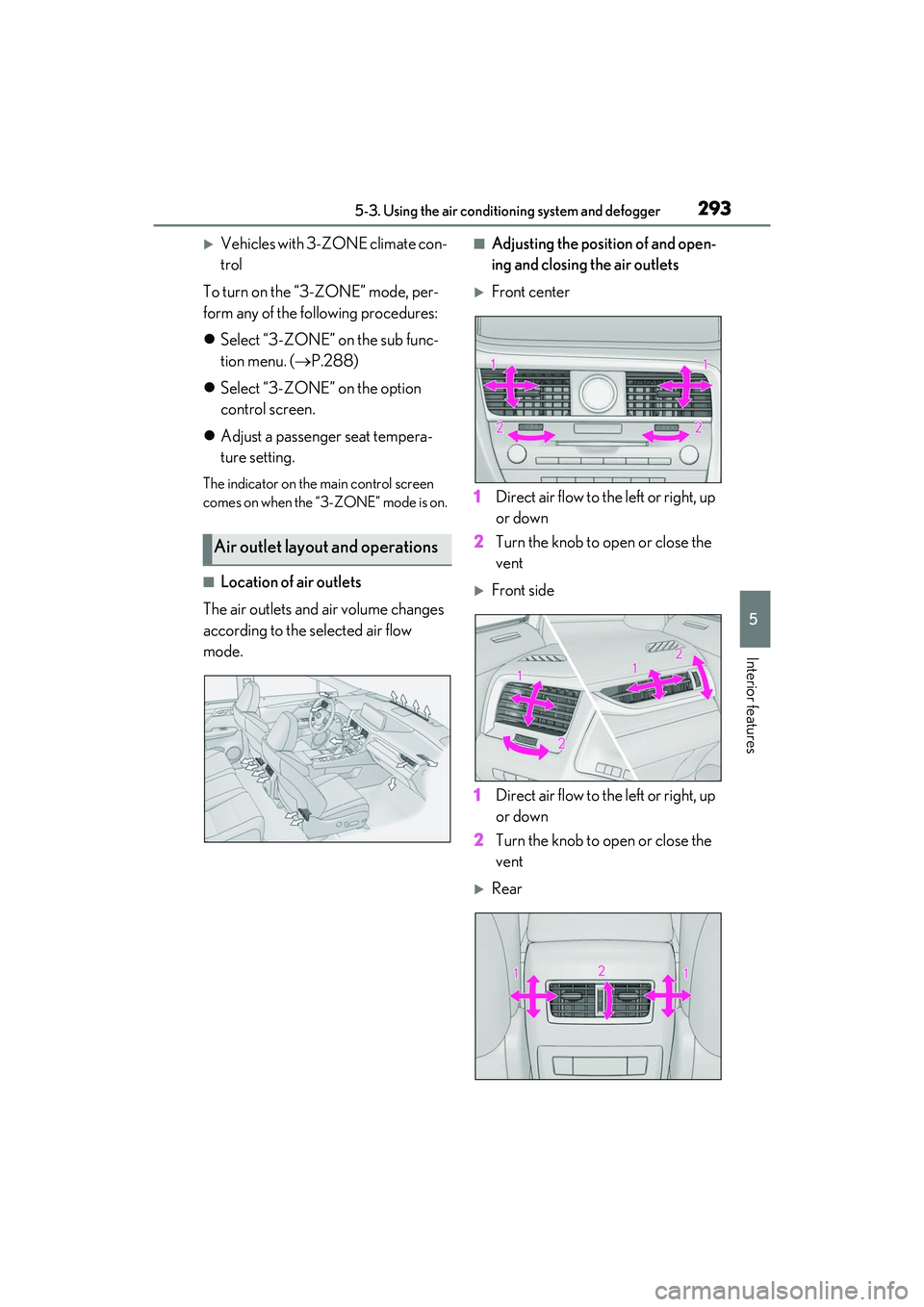
■Location of air outlets
The air outlets and air volume changes
according to the selected air flow
mode.
■Adjusting the position of and open-
ing and closing the air outlets
Front center
1 Direct air flow to the left or right, up
or down
2 Turn the knob to open or close the
vent
Front side
1 Direct air flow to the left or right, up
or down
2 Turn the knob to open or close the
vent
Rear
Air outlet layout and operations
Page 296 of 508
2945-3. Using the air conditioning system and defogger
1Direct air flow to the left or right, up
or down
2 Turn the knob to open or close the
vent
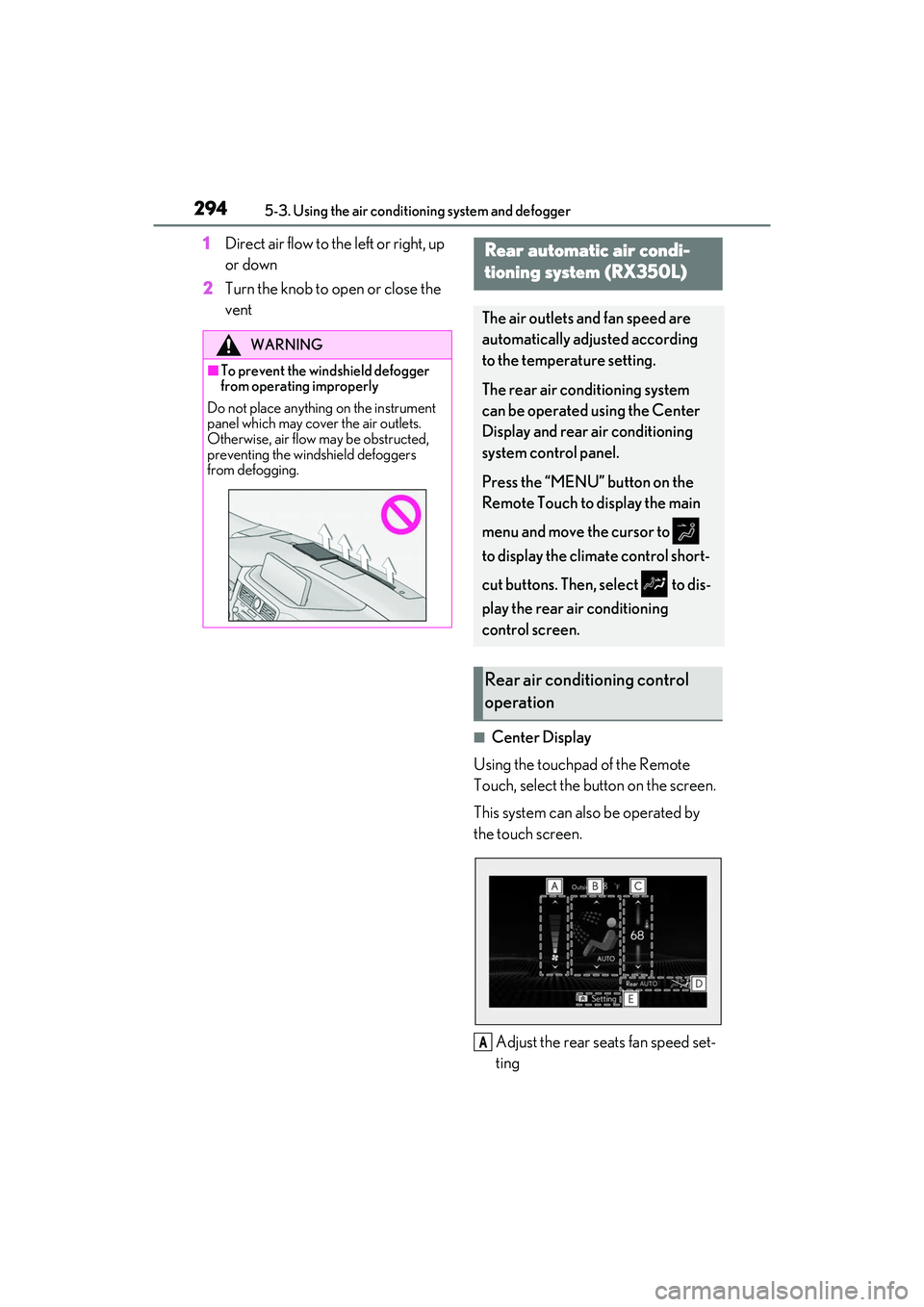
■Center Display
Using the touchpad of the Remote
Touch, select the button on the screen.
This system can also be operated by
the touch screen.
Adjust the rear seats fan speed set-
ting
WARNING
■To prevent the windshield defogger
from operating improperly
Do not place anything on the instrument
panel which may cover the air outlets.
Otherwise, air flow may be obstructed,
preventing the windshield defoggers
from defogging.
Rear automatic air condi-
tioning system (RX350L)
The air outlets and fan speed are
automatically adjusted according
to the temperature setting.
The rear air conditioning system
can be operated using the Center
Display and rear air conditioning
system control panel.
Press the “MENU” button on the
Remote Touch to display the main
menu and move the cursor to
to display the climate control short-
cut buttons. Then, select to dis-
play the rear air conditioning
control screen.
Rear air conditioning control
operation
A
Page 297 of 508
2955-3. Using the air conditioning system and defogger
5
Interior features
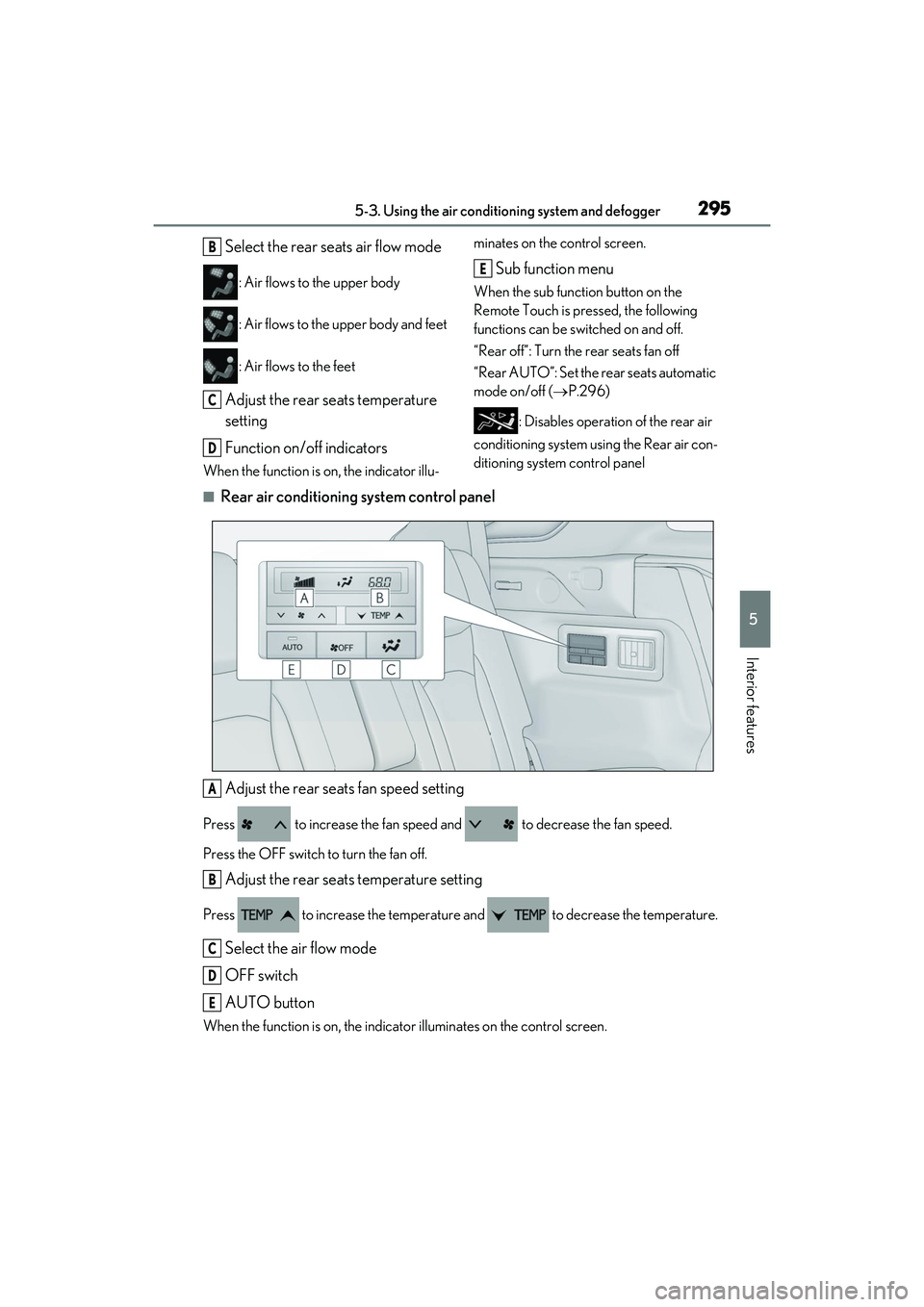
Select the rear seats air flow mode
: Air flows to the upper body
: Air flows to the upper body and feet
: Air flows to the feet
Adjust the rear seats temperature
setting
Function on/off indicators
When the function is on, the indicator illu- minates on the control screen.
Sub function menu
When the sub function button on the
Remote Touch is pressed, the following
functions can be switched on and off.
“Rear off”: Turn the rear seats fan off
“Rear AUTO”: Set the rear seats automatic
mode on/off (
P.296)
: Disables operatio n of the rear air
conditioning system using the Rear air con-
ditioning system control panel
■Rear air conditioning system control panel
Adjust the rear seats fan speed setting
Press to increase the fan speed and to decrease the fan speed.
Press the OFF switch to turn the fan off.
Adjust the rear seats temperature setting
Press to increase the temperature and to decrease the temperature.
Select the air flow mode
OFF switch
AUTO button
When the function is on, the indicat or illuminates on the control screen.
B
C
D
E
A
B
C
D
E
Page 298 of 508
2965-3. Using the air conditioning system and defogger
Center Display
1 Select “Rear AUTO” on the sub
function menu. ( P.294)
2 To stop the operation, select “Rear
off” on the sub function menu.
( P.294)
If the fan speed setting or air flow
modes are operated , the automatic
mode indicator goes off. However,
automatic mode for functions other
than that operated is maintained.
Rear air conditioning system control
panel
1 Press “AUTO” on the rear air con-
ditioning system control panel.
2 To stop the operation, select “OFF”
on the rear air conditioning system
control panel.
If the fan speed setting or air flow
modes are operated , the automatic
mode indicator goes off. However,
automatic mode for functions other
than that operated is maintained.
■Using automatic mode
Fan speed is adjusted automatically accord-
ing to the temperature setting and the
ambient conditions.
Therefore, the fan may stop for a while until
warm or cool air is ready to flow immedi-
ately after “Rear AUTO” is selected or
“AUTO” is touched.
Cool air may blow ar ound the upper body
even when the heater is on due to sunlight.
The temperature setting of the rear
seats can be adjusted using the follow-
ing methods:
When the “3-ZONE” indicator is
off: Adjust the driver’s seat tempera-
ture.
Adjust the temperature setting of each
rear seat using the Center Display or rear
air conditioning system control panel.
Adjust the temperature setting of
rear seats using the Center Display
(rear air conditioning control
screen) or rear air conditioning sys-
tem control panel.
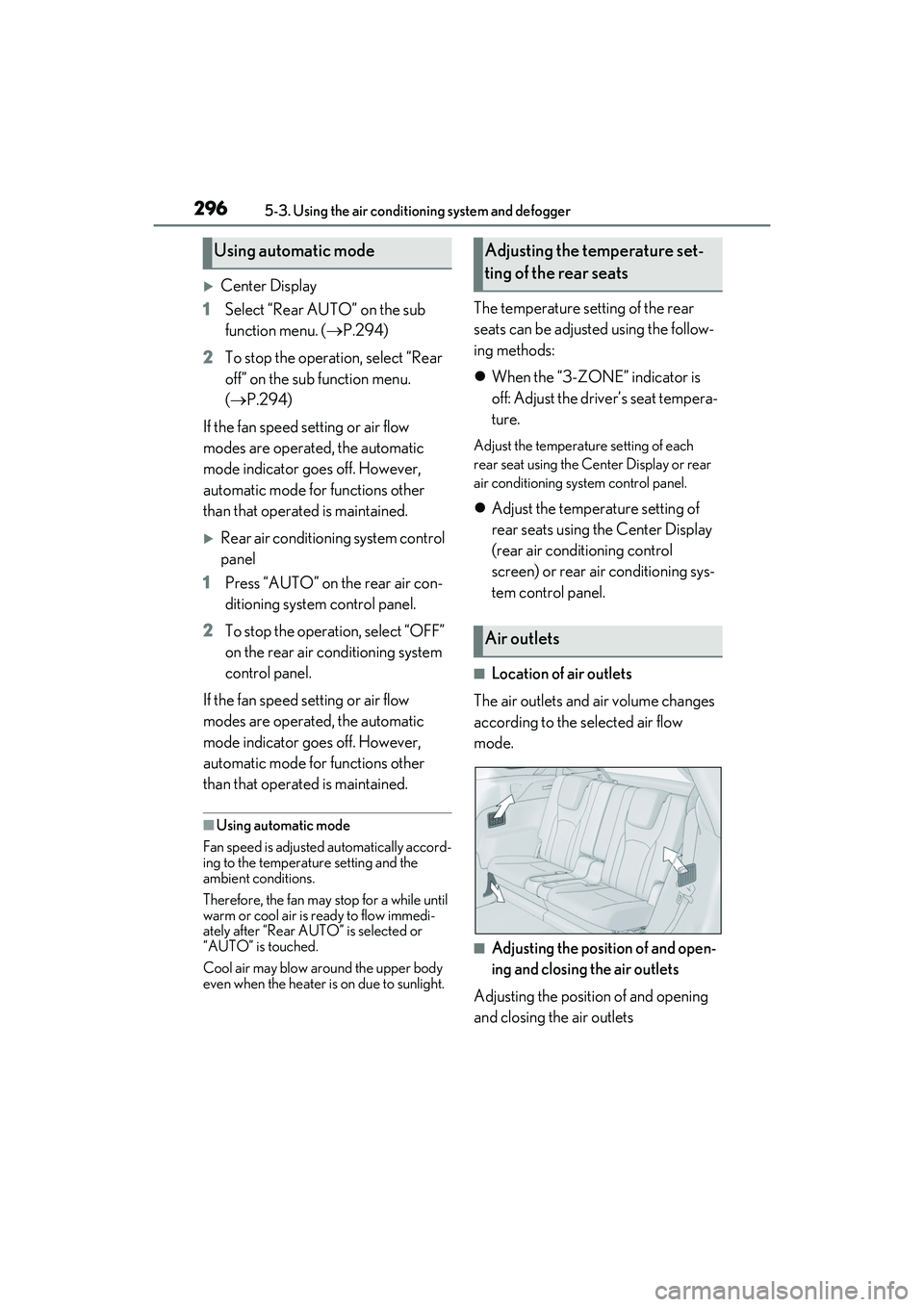
■Location of air outlets
The air outlets and air volume changes
according to the selected air flow
mode.
■Adjusting the position of and open-
ing and closing the air outlets
Adjusting the position of and opening
and closing the air outlets
Using automatic modeAdjusting the temperature set-
ting of the rear seats
Air outlets
Page 299 of 508
2975-3. Using the air conditioning system and defogger
5
Interior features
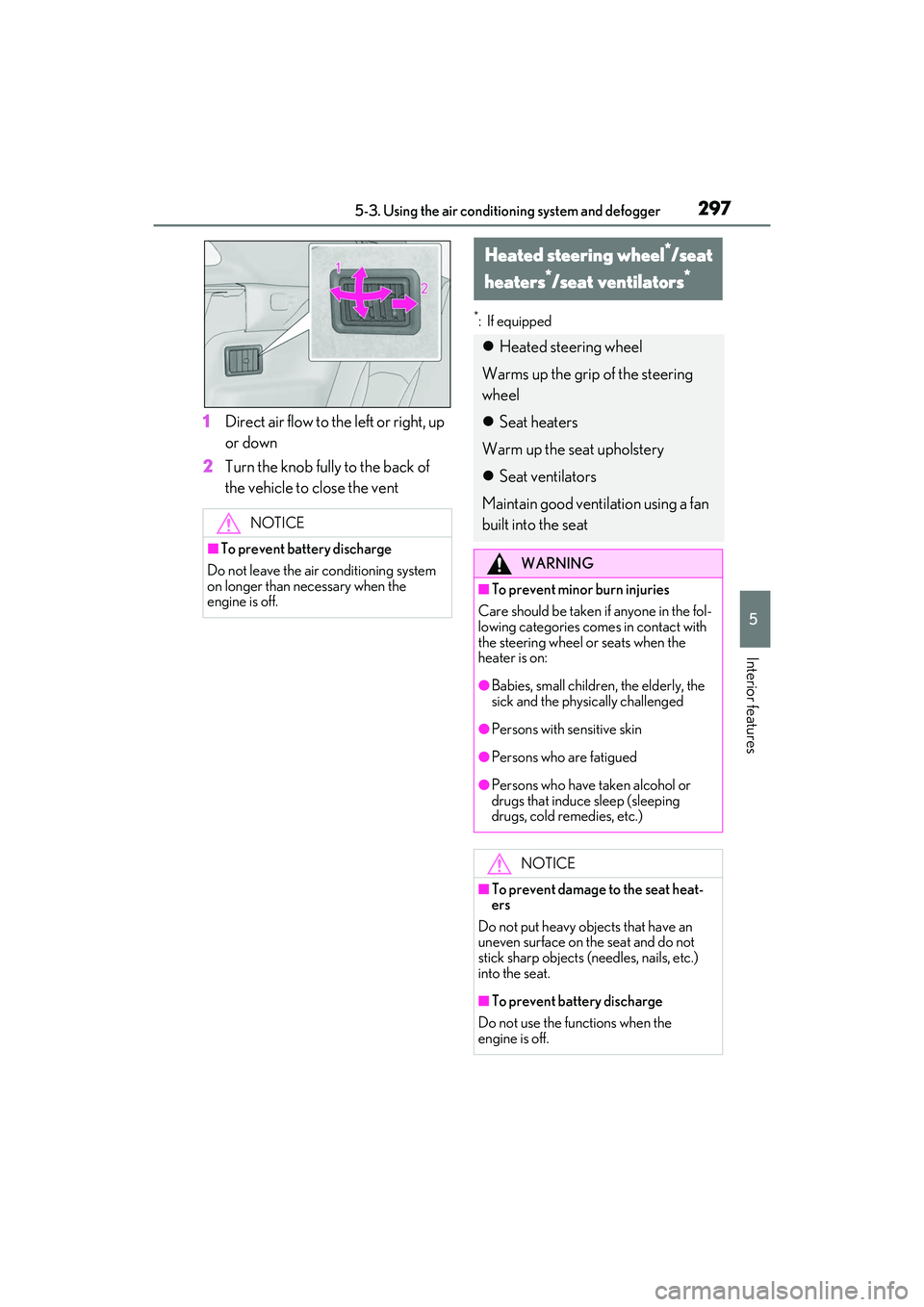
1Direct air flow to the left or right, up
or down
2 Turn the knob fully to the back of
the vehicle to close the vent
*: If equipped
NOTICE
■To prevent battery discharge
Do not leave the air conditioning system
on longer than ne cessary when the
engine is off.
Heated steering wheel*/seat
heaters
*/seat ventilators*
Heated steering wheel
Warms up the grip of the steering
wheel
Seat heaters
Warm up the seat upholstery
Seat ventilators
Maintain good ventilation using a fan
built into the seat
WARNING
■To prevent minor burn injuries
Care should be taken if anyone in the fol-
lowing categories comes in contact with
the steering wheel or seats when the
heater is on:
●Babies, small children, the elderly, the
sick and the physically challenged
●Persons with sensitive skin
●Persons who are fatigued
●Persons who have taken alcohol or
drugs that induce sleep (sleeping
drugs, cold remedies, etc.)
NOTICE
■To prevent damage to the seat heat-
ers
Do not put heavy objects that have an
uneven surface on the seat and do not
stick sharp objects (needles, nails, etc.)
into the seat.
■To prevent battery discharge
Do not use the functions when the
engine is off.
Page 300 of 508
2985-3. Using the air conditioning system and defogger
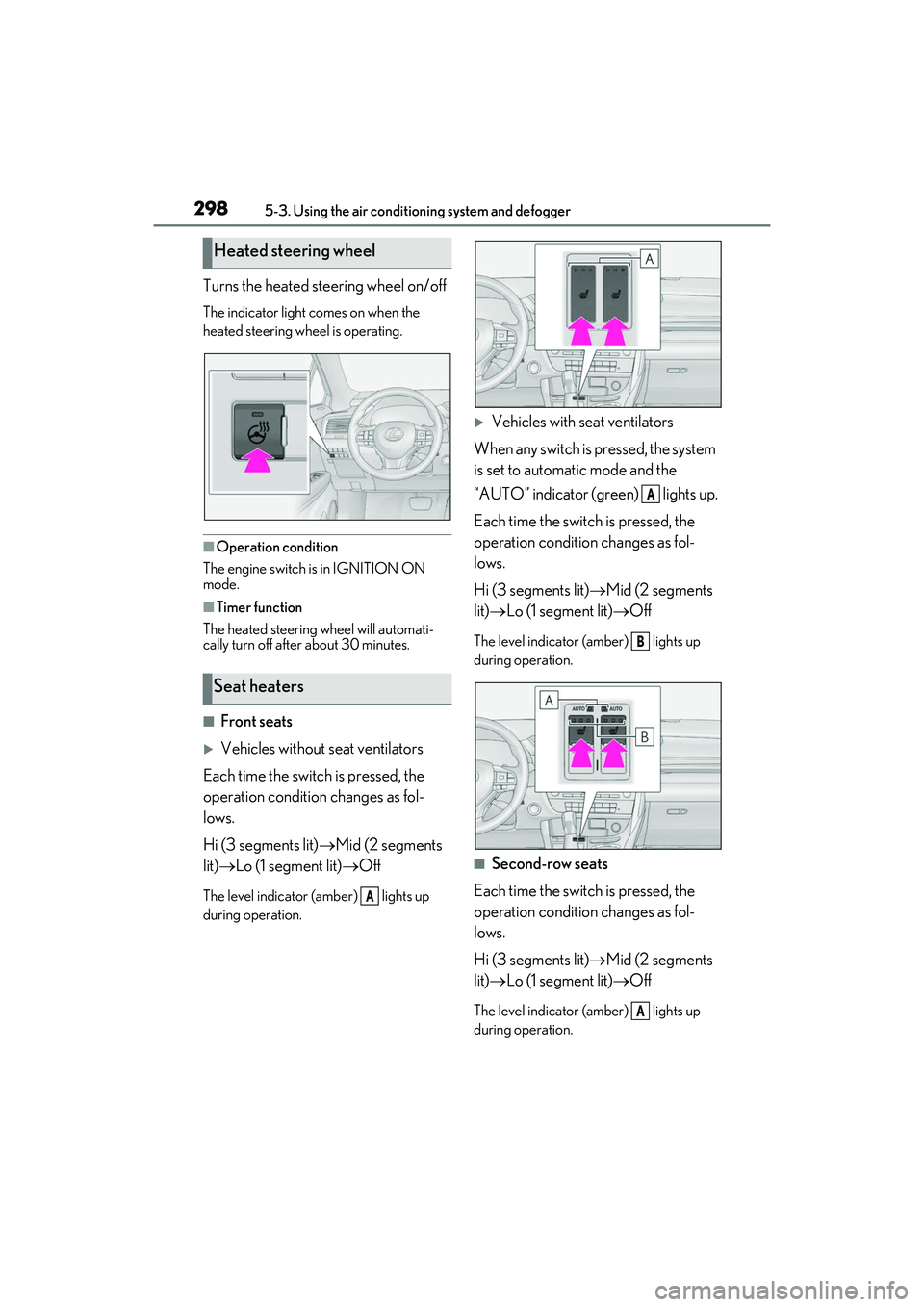
Turns the heated steering wheel on/off
The indicator light comes on when the
heated steering wheel is operating.
■Operation condition
The engine switch is in IGNITION ON
mode.
■Timer function
The heated steering wheel will automati-
cally turn off after about 30 minutes.
■Front seats
Vehicles without seat ventilators
Each time the switch is pressed, the
operation condition changes as fol-
lows.
Hi (3 segments lit) Mid (2 segments
lit) Lo (1 segment lit) Off
The level indicator (amber) lights up
during operation.
Vehicles with seat ventilators
When any switch is pressed, the system
is set to automatic mode and the
“AUTO” indicator (green) lights up.
Each time the switch is pressed, the
operation condition changes as fol-
lows.
Hi (3 segments lit) Mid (2 segments
lit) Lo (1 segment lit) Off
The level indicator (amber) lights up
during operation.
■Second-row seats
Each time the switch is pressed, the
operation condition changes as fol-
lows.
Hi (3 segments lit) Mid (2 segments
lit) Lo (1 segment lit) Off
The level indicator (amber) lights up
during operation.
Heated steering wheel
Seat heaters
A
A
B
A
Page 301 of 508
2995-3. Using the air conditioning system and defogger
5
Interior features
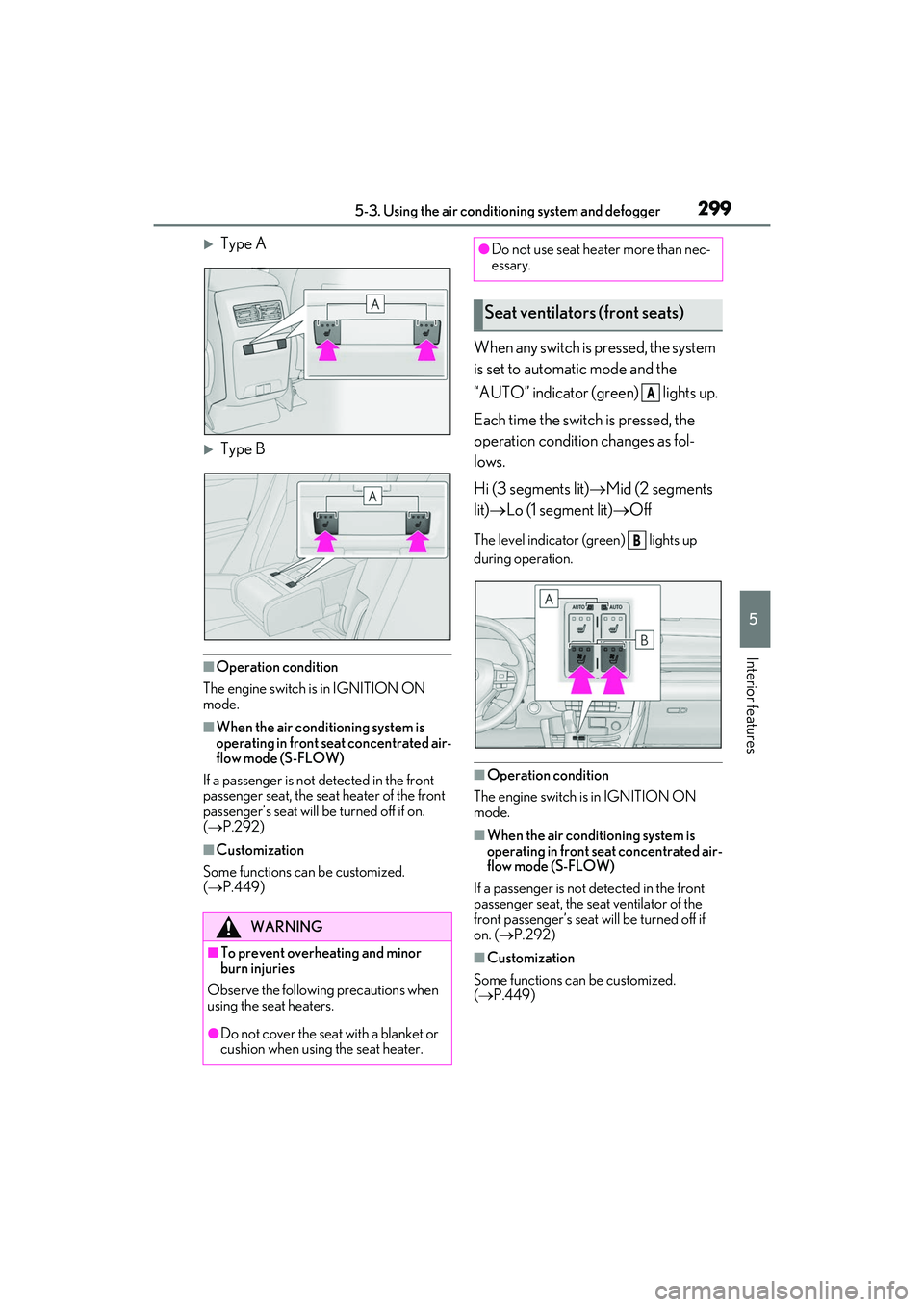
Type A
Type B
■Operation condition
The engine switch is in IGNITION ON
mode.
■When the air conditioning system is
operating in front seat concentrated air-
flow mode (S-FLOW)
If a passenger is not detected in the front
passenger seat, the seat heater of the front
passenger’s seat will be turned off if on.
( P.292)
■Customization
Some functions can be customized.
( P.449)
When any switch is pressed, the system
is set to automatic mode and the
“AUTO” indicator (green) lights up.
Each time the switch is pressed, the
operation condition changes as fol-
lows.
Hi (3 segments lit) Mid (2 segments
lit) Lo (1 segment lit) Off
The level indicator (green) lights up
during operation.
■Operation condition
The engine switch is in IGNITION ON
mode.
■When the air conditioning system is
operating in front seat concentrated air-
flow mode (S-FLOW)
If a passenger is not detected in the front
passenger seat, the se at ventilator of the
front passenger’s seat will be turned off if
on. ( P.292)
■Customization
Some functions can be customized.
( P.449)
WARNING
■To prevent overheating and minor
burn injuries
Observe the following precautions when
using the seat heaters.
●Do not cover the seat with a blanket or
cushion when using the seat heater.
●Do not use seat heater more than nec-
essary.
Seat ventilators (front seats)
A
B
Page 337 of 508

335
6
6
Maintenance and care
Maintenance and care
.6-1. Maintenance and careCleaning and protecting the vehi-cle exterior ................................ 336
Cleaning and protecting the vehi- cle interior ................................. 339
6-2. Maintenance Maintenance requirements........................................................ 342
General maintenance ............. 343
Emission inspection and mainte- nance (I/M) programs ......... 346
6-3. Do-it-yourself maintenance Do-it-yourself service precautions........................................................ 347
Hood............................................... 349
Positioning a floor jack............ 349
Engine compartment................ 351
Tires ................................................ 357
Tire inflation pressure.............. 363
Wheels........................................... 365
Air conditioning filter...............366
Windshield wiper inserts........ 368
Electronic key battery ............. 369
Checking and replacing fuses ......................................................... 371
Headlight aim.............................. 372
Light bulbs .................................... 374