2022 LEXUS RCF ignition
[x] Cancel search: ignitionPage 200 of 412

1984-5. Using the driving support systems
RC F Owner's Manual
2SLALOM mode
This mode emphasizes enhanced steering
response.
3TRACK mode
This mode emphasizes stability for high
speed sporty driving.
■Operating conditions
The engine switch is in IGNITION ON
mode.
■Automatic cancelation of the selected
TVD control mode
SLALOM and TRACK mode are canceled
when the engine switch is turned off. When
the engine switch is turned to IGNITION
ON mode, the TVD system will be in
STANDARD mode.
■Automatic disabling of the TVD system
If a malfunction is detected in the TVD sys-
tem, a warning message will be displayed
on the multi-information display ( P.309)
and the TVD system will be disabled auto-
matically. If the system is disabled, driving
force will not be distributed by the TVD but
through normal differential operation.
■To protect the system
The TVD fluid temperature may become
excessively high when driving for a long
time under extremely high load conditions.
In this case, a warnin g message will be dis-
played on the multi-information display.
( P.309)
The multi-information display shows the distribution of driving force
between the right and left rear wheels.
(
P.73)
WARNING
■Cautions regarding the use of the sys-
tem
The driver is solely responsible for safe
driving. Do not overly rely on the TVD
system. Always drive safely, taking care
to observe your surroundings.
TVD control status on the
multi-information display
Page 217 of 412
2155-2. Using the air conditioning system
RC F Owner's Manual
5
Interior features
automatically.
The indicator above the selected button
comes on.
■Micro dust and pollen filter
Pollen is removed from the air and the
air flows to the upper part of the body.
Select on the option control
screen.
When the micro dust and pollen filter is on, is displayed on the air conditioning
control screen.
In order to prevent the windshield from
fogging up when the outside air is cold, the
dehumidification function may operate.
Pollen is filtered even if the micro dust and
pollen filter is turned off.
■Defogging the windshield
Defoggers are used to defog the wind-
shield and side windows.
Press .
Set the outside/recirc ulated air mode but-
ton to outside air mode if the recirculated
air mode is used. (It may switch automati-
cally.)
To defog the windshield and the side win-
dows early, turn the air flow and tempera-
ture up.
To return to the previous mode, press
again when the windshield is
defogged.
■Defogging the rear window and
outside rear view mirrors
Defoggers are used to defog the rear
window, and to remove raindrops, dew
and frost from the outside rear view
mirrors. Press .
The defoggers will automatically turn off
after a period of time.
■Windshield wiper de-icer (if
equipped)
This feature is used to prevent ice from
building up on the windshield and
wiper blades.
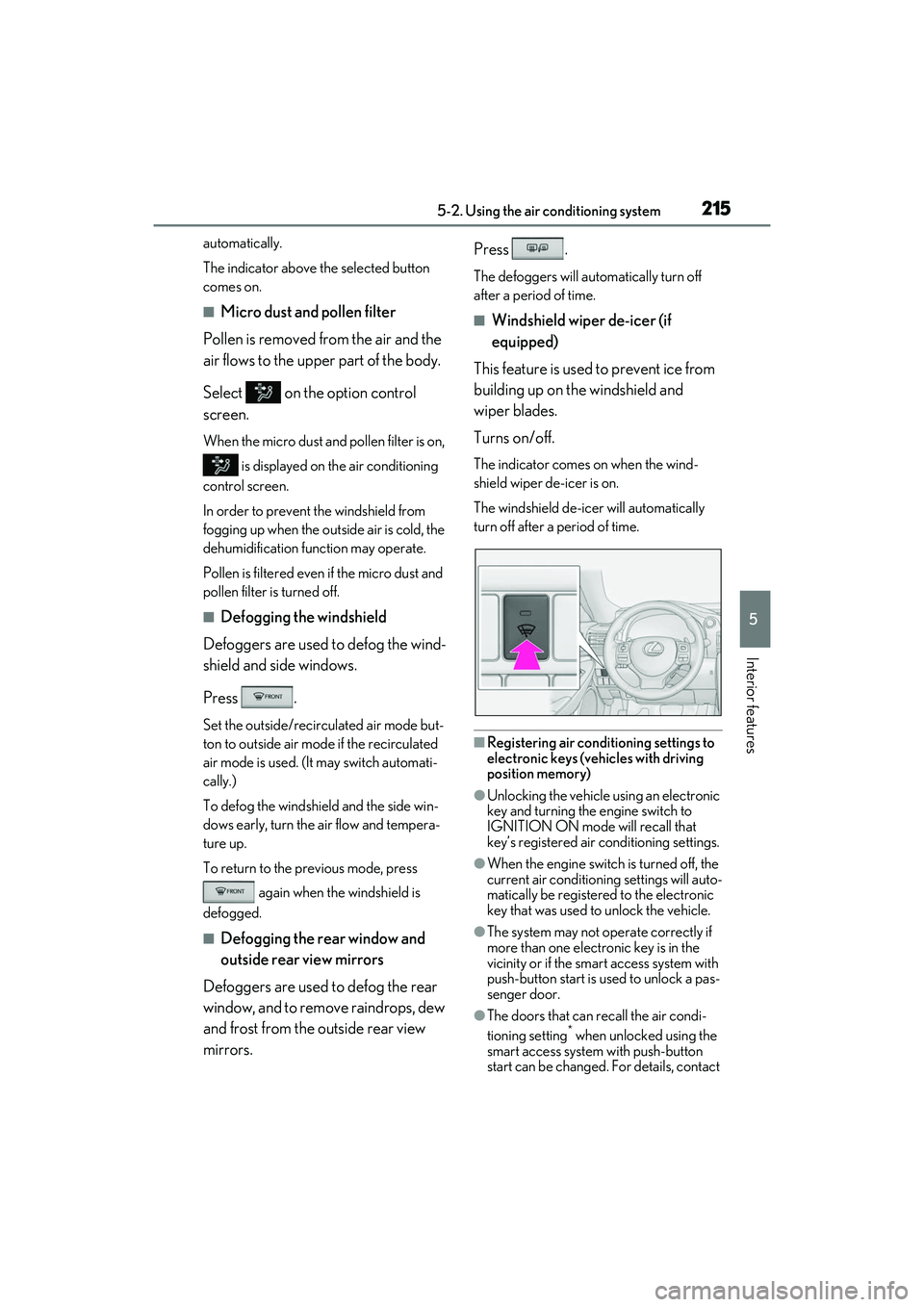
Turns on/off.
The indicator comes on when the wind-
shield wiper de-icer is on.
The windshield de-icer will automatically
turn off after a period of time.
■Registering air conditioning settings to
electronic keys (vehicles with driving
position memory)
●Unlocking the vehicle using an electronic
key and turning the engine switch to
IGNITION ON mode will recall that
key’s registered air conditioning settings.
●When the engine switch is turned off, the
current air conditioning settings will auto-
matically be registered to the electronic
key that was used to unlock the vehicle.
●The system may not operate correctly if
more than one electronic key is in the
vicinity or if the smart access system with
push-button start is used to unlock a pas-
senger door.
●The doors that can recall the air condi-
tioning setting* when unlocked using the
smart access system with push-button
start can be changed. For details, contact
Page 218 of 412

2165-2. Using the air conditioning system
RC F Owner's Manual
your Lexus dealer.
*: The doors that can recall the driving position memory are changed at the
same time.
■Using automatic mode
Fan speed is adjusted automatically accord-
ing to the temperature setting and the
ambient conditions.
Therefore, the fan may stop for a while until
warm or cool air is ready to flow immedi-
ately after is pressed or “AUTO” is
selected.
■Using the voice command system
Air conditioning syst em can be operated
using voice commands. Fo r details, refer to
the “NAVIGATION AND MULTIMEDIA
SYSTEM OWNER’S MANUAL”.
■Fogging up of the windows
The windows will easily fog up when the
humidity in the vehicle is high. Turning (“A/C”) on will dehumidify the air
from the outlets and defog the windshield
effectively.
●If you turn (“A/C”) off, the win-
dows may fog up more easily.
●The windows may fog up if the recircu-
lated air mode is used.
■When driving on dusty roads
Close all windows. If dust thrown up by the
vehicle is still drawn into the vehicle after
closing the windows, it is recommended
that the air intake mode be set to outside air
mode and the fan speed to any setting
except off.
■Outside/recirculated air mode
●Setting to the recirculated air mode tem-
porarily is recommended in preventing
dirty air from entering the vehicle interior
and helping to cool the vehicle when the
outside air temperature is high.
●Outside/recirculated air mode may auto-
matically switch depending on the tem-
perature setting or the inside
temperature.
■When the outside temperature exceeds
75°F (24°C) and the air conditioning
system is on
●In order to reduce the air conditioning
power consumption, the air conditioning
system may switch to recirculated air
mode automatically. This may also
reduce fuel consumption.
●Recirculated air mode is selected as a
default mode when the engine switch is
turned to IGNITION ON mode.
●It is possible to switch to outside air mode
at any time by pressing .
■Automatic mode for air intake control
In automatic mode, the system detects
exhaust gas and other pollutants and auto-
matically switches between outside air and
recirculated air modes.
When the dehumidification function is off,
and the fan is operating, turning automatic
mode on will activate the dehumidification
function.
■Operation of the air conditioning sys-
tem in Eco drive mode
In Eco drive mode, the air conditioning sys-
tem is controlled as foll ows to prioritize fuel
efficiency:
●Engine speed and compressor operation
controlled to restrict heating/cooling
capacity
●Fan speed restricted when automatic
mode is selected
To improve air condit ioning performance,
perform the following operations:
●Adjust the fan speed
●Turn off Eco drive mode
■When the outside temperature falls to
nearly 32°F (0°C)
The dehumidification function may not
operate even when is pressed or
“A/C” is selected.
■Ventilation and air conditioning odors
●To let fresh air in, set the air conditioning
system to the outside air mode.
Page 221 of 412

2195-2. Using the air conditioning system
RC F Owner's Manual
5
Interior features
*:If equipped
Turn the heated steering wheel on/off
The indicator light comes on when the
heated steering wheel is operating.
■Operation condition
The engine switch is in IGNITION ON
mode.
■Timer function
The heated steering wheel will automati-
cally turn off after about 30 minutes.
Vehicles without seat ventilators
Each time the switch is pressed, the
intensity of the seat heater changes
and the level indicator lights (amber) light as follows:
Hi (3 segments lit) Mid (2 segments
lit) Lo (1 segment lit) Off
Vehicles with seat ventilators
Each time the switch is pressed, the
intensity of the seat heater changes
and the level indicator lights (amber)
Heated steering wheel*/seat
heaters
*/seat ventilators*
Heated steering wheel and seat
heaters heat the side grips of the
steering wheel and seats, respec-
tively. Seat ventilators maintain
good ventilation using a fan built
into the seat.
WARNING
■To prevent minor burn injuries
Care should be taken if anyone in the fol-
lowing categories comes in contact with
the steering wheel or seats when the
heater is on:
●Babies, small children, the elderly, the
sick and the phys ically challenged
●Persons with sensitive skin
●Persons who are fatigued
●Persons who have taken alcohol or
drugs that induce sleep (sleeping
drugs, cold remedies, etc.)
NOTICE
■To prevent damage to the seat heat-
ers and seat ventilators
Do not put heavy objects that have an
uneven surface on the seat and do not
stick sharp objects (needles, nails, etc.)
into the seat.
■To prevent battery discharge
Do not use the functions when the
engine is off.
Heated steering wheel
Seat heaters
A
A
Page 222 of 412

2205-2. Using the air conditioning system
RC F Owner's Manual
light as follows:
Hi (3 segments lit) Mid (2 segments
lit) Lo (1 segment lit) Off
■Operation condition
The engine switch is in IGNITION ON
mode.
■Seat heater timer control
To enable seat heater timer control, press
and hold the driver and front passenger
seat heater switches at the same time when
the vehicle is stopped until a buzzer sounds
once. If a seat heater is turned on while seat
heater timer control is enabled, the intensity
of the seat heater will automatically change
from Hi Mid Lo.
The timing of the chan ge in seat heater
intensity differs depending on the tempera-
ture inside the cabin, etc. when the seat
heater is operating.
To disable seat heater timer control, press
and hold the driver and front passenger
seat heater switches at the same time until a
buzzer sounds twice.
Each time the switch is pressed, the
intensity of the seat ventilator changes
and the level indicator lights (green)
light as follows:
Hi (3 segments lit) Mid (2 segments
lit) Lo (1 segment lit) Off
■Operation condition
The engine switch is in IGNITION ON
mode.
WARNING
■To prevent overheating and minor
burn injuries
Observe the following precautions when
using the seat heaters.
●Do not cover the seat with a blanket or
cushion when using the seat heater.
●Do not use seat heater more than nec-
essary.
ASeat ventilators
A
Page 228 of 412

2265-5. Using the other interior features
RC F Owner's Manual
5-5.Using the other interior features
Please use as a power supply for elec-
tronic goods that use less than 12
VDC/10 A (power consumption of
120 W).
Open the lid.
■The power outlet can be used when
The engine switch is in ACCESSORY or
IGNITION ON mode.
■When turning the engine switch off
Disconnect electrical devices with charging
functions, such as mobile battery packs.
If such devices are left connected, the
engine switch may not be turned off nor-
mally.
■Using the power outlet
The shape of the console box rim allows
power cables to be passed through when
the console box lid is closed.
Fold down the armrest for use.
Long objects can be loaded in the vehi-
cle by utilizing the trunk space and
rearseat area.
Other interior features
Power outlet
NOTICE
■To avoid damaging the power outlet
Close the power outlet lid when the
power outlet is not in use.
Foreign objects or li quids that enter the
power outlet may cause a short circuit.
■To prevent the battery from being dis-
charged
Do not use the power outlet longer than
necessary when the engine is off.
Armrest (if equipped)
NOTICE
■To prevent damage to the armrest
Do not apply too much load on the arm-
rest.
Trunk storage extension (if
equipped)
Page 263 of 412

2616-4. Do-it-yourself maintenance
RC F Owner's Manual
6
Maintenance and care
Light bulbs
(P.286)
•Bulb with same num-
ber and wattage rat-
ing as original
• Phillips-head screw- driver
•Flathead screw- driver
•Wrench
Radiator and con-
denser ( P.268)
Tire inflation pres-
sure ( P.277)• Tire pressure gauge
•Compressed air
source
Washer fluid
(P.270)
• Water or washer
fluid containing anti-
freeze (for winter
use)
• Funnel (used only for adding water or
washer fluid)
WARNING
The engine compartment contains many
mechanisms and fluids that may move
suddenly, become hot, or become elec-
trically energized. To avoid death or seri-
ous injury, observe the following
precautions.
■When working on the engine com-
partment
●Keep hands, clothi ng and tools away
from the moving fans and engine drive
belt.
●Be careful not to touch the engine,
radiator, exhaust manifold, etc. right
after driving as they may be hot. Oil
and other fluids may also be hot.
●Do not leave anything that may burn
easily, such as paper and rags, in the
engine compartment.
ItemsParts and tools●Do not smoke, cause sparks or expose
an open flame to fuel or the battery.
Fuel and battery fumes are flammable.
●Be extremely cautious when working
on the battery. It contains poisonous
and corrosive sulfuric acid.
■When working near the electric cool-
ing fans or radiator grille
Be sure the engine switch is off.
With the engine switch in IGNITION
ON mode, the electric cooling fans may
automatically start to run if the air condi-
tioning is on and/or the coolant tempera-
ture is high. ( P.268)
■Safety glasses
Wear safety glasses to prevent flying or
falling material, fluid spray, etc. from get-
ting in your eyes.
NOTICE
■If you remove the air cleaner filter
Driving with the air cleaner filter
removed may cause excessive engine
wear due to dirt in the air.
Page 278 of 412

2766-4. Do-it-yourself maintenance
RC F Owner's Manual
pressure is set as the benchmark pres-
sure.
■How to initialize the tire pressure
warning system
1 Park the vehicle in a safe place and
turn the engine switch off.
Initialization cannot be performed while
the vehicle is moving.
2 Adjust the tire inflation pressure to
the specified cold tire inflation pres-
sure level.
Make sure to adjust th e tire pressure to the
specified cold tire infl ation pressure level.
The tire pressure warning system will oper-
ate based on this pressure level.
3 Turn the engine switch to IGNI-
TION ON mode.
4 Press and hold the tire pressure
warning reset switch until the tire
pressure warning light blinks slowly
3 times.
5 Wait for a few minutes with the
engine switch in IGNITION ON
mode and then turn the engine
switch off.
■Initialization procedure
●Make sure to carry out initialization after
adjusting the tire inflation pressure.
Also, make sure the tires are cold before
carrying out initializat ion or tire inflation
pressure adjustment.
●If you have accidentally turned the engine
switch off during initialization, it is not
necessary to press the reset switch again
as initialization will restart automatically
when the engine switch has been turned
to IGNITION ON mode for the next
time.
●If you accidentally press the reset switch
when initialization is not necessary, adjust
the tire inflation pressure to the specified
level when the tires are cold, and conduct
initialization again.
■When initialization of the tire pressure
warning system has failed
Initialization can be completed in a few min-
utes. However, in the following cases, the
settings have not been recorded and the
system will not operate properly. If repeated
attempts to record tire inflation pressure
settings are unsuccessf ul, have the vehicle
inspected by your Lexus dealer.
●When operating the tire pressure warn-
ing reset switch, the tire pressure warning
light does not blink 3 times.
●After carrying out the initialization proce-
dure, the tire pressure warning light
blinks for 1 minute then stays on after
driving for 20 minutes.
The tire pressure warning valve and
transmitter is equipped with a unique
ID code. When replacing a tire pres-
sure warning valve and transmitter, it is
necessary to register the ID code.
WARNING
■When initializing the tire pressure
warning system
Do not operate the tire pressure warning
reset switch without fi rst adjusting the tire
inflation pressure to the specified level.
Otherwise, the tire pressure warning
light may not come on even if the tire
inflation pressure is low, or it may come
on when the tire inflation pressure is
actually normal.
Registering ID codes