Page 197 of 412

1954-5. Using the driving support systems
RC F Owner's Manual
4
Driving
*:If equipped
Multi-information display (P.73)
Displays the status of the active rear wing
Active rear wing switch
Operates the active rear wing manually
Indicator
Illuminates when the active rear wing is
raised and turns off when it is retracted
■Operating conditions
●The engine switch is in IGNITION ON
mode.
●The trunk is closed.
●The active rear wing has been activated
in a customized setting.
■Conditions which stop the operation
In the following situations operation of the
active rear wing will stop:
●The engine switch is turned off while the
active rear wing is operating.
●The trunk is opened while the active rear
wing is operating.
●The raising operation of the active rear
wing is interrupted by an object, etc.
●The active rear wing is operated in an
unusual manner causing it to stop at an
irregular position.
In such cases, pressing the active rear wing
switch will fully raise the active rear wing.
Or, begin driving the vehicle and the active
rear wing will raise automatically when the
vehicle speed reaches 16 mph (25 km/h).
■When there is a malfunction in the sys-
tem
A warning message will be displayed on the
multi-information display. ( P.309)
■Customization
Some functions can be customized.
( P.358)
Active rear wing*
The RC F is equipped with an active
rear wing that operates automati-
cally while the vehicle is being
driven. This active rear wing
enhances aerodynamic perfor-
mance, especially at high speeds,
contributing to a more stable ride.
The active rear wing can be con-
trolled using a switch.
System components
A
B
C
NOTICE
■To prevent system damage
●Do not apply pressure to the active
rear wing when pushing or pulling the
vehicle.
●Do not lean on the active rear wing.
●Do not attach any accessories or other
objects to the active rear wing.
●Do not modify or disassemble the
active rear wing.
●Do not subject the active rear wing to
severe impact.
Page 207 of 412
205
RC F Owner's Manual
5
5
Interior features
Interior features
.5-1. Remote Touch/DisplayRemote Touch ............................ 206
Center Display ........................... 208
5-2. Using the air conditioning system Automatic air conditioning system.......................................................... 211
Heated steering wheel/seat heat- ers/seat ventilators ................. 219
5-3. Using the interior lights Interior lights list.......................... 221
5-4. Using the storage features List of storage features............ 223
Trunk features............................. 225
5-5. Using the other interior features
Other interior features ........... 226
Garage door opener............... 229
Compass....................................... 234
Page 226 of 412

2245-4. Using the storage features
RC F Owner's Manual
1Open (press the button)
2 Unlock with the mechanical key
3 Lock with the mechanical key
■Glove box light
The glove box light turns on when the
engine switch is in ACCESSORY or IGNI-
TION ON mode.
■Trunk opener main switch
The trunk opener main switch is located in
the glove box. ( P.98)
■Removing the partition
The insert inside the glove box can be
removed.
■Removing the insert
Rear cup holder insert can be removed.
Glove box
WARNING
■Caution while driving
Keep the glove box closed. In the event
of sudden braking or sudden swerving,
an accident may occur due to an occu-
pant being struck by the open glove box
or the items stored inside.
Front cup holders
WARNING
■Items unsuitable for the cup holder
Do not place anything other than cups or
aluminum cans in the cup holders.
Other items may be thrown out of the
holders in the event of an accident or
sudden braking, causing injury. If possi-
ble, cover hot drinks to prevent burns.
Rear cup holders (if equipped)
Page 227 of 412

2255-4. Using the storage features
RC F Owner's Manual
5
Interior features
Push the knob.
Lift by hand to fully open the console box.
Raise the hooks when needed.
The cargo hooks are provided for securing
loose items.
1Loosen the belt
2 Tighten the belt
WARNING
■Items unsuitable for the cup holder
Do not place anything other than cups or
beverage cans in the cup holders.
Inappropriate items must not be stored in
the cup holders even if the lid is closed.
Other items may be thrown out of the
holders in the event of an accident or
sudden braking and cause injury. If possi-
ble, cover hot drinks to prevent burns.
■When not in use
Keep the cup holders closed.
In the event of sudd en braking, an acci-
dent may occur due to an occupant
being struck by the items stored inside.
Console box
WARNING
■Caution while driving
Keep the console box closed.
Injuries may result in the event of an acci-
dent or sudden braking.
Trunk features
Cargo hooks
WARNING
■When the cargo net is not in use
To avoid injury, always return the cargo
hooks on the floor to their stowed posi-
tions.
First-aid kit storage belt
Page 228 of 412

2265-5. Using the other interior features
RC F Owner's Manual
5-5.Using the other interior features
Please use as a power supply for elec-
tronic goods that use less than 12
VDC/10 A (power consumption of
120 W).
Open the lid.
■The power outlet can be used when
The engine switch is in ACCESSORY or
IGNITION ON mode.
■When turning the engine switch off
Disconnect electrical devices with charging
functions, such as mobile battery packs.
If such devices are left connected, the
engine switch may not be turned off nor-
mally.
■Using the power outlet
The shape of the console box rim allows
power cables to be passed through when
the console box lid is closed.
Fold down the armrest for use.
Long objects can be loaded in the vehi-
cle by utilizing the trunk space and
rearseat area.
Other interior features
Power outlet
NOTICE
■To avoid damaging the power outlet
Close the power outlet lid when the
power outlet is not in use.
Foreign objects or li quids that enter the
power outlet may cause a short circuit.
■To prevent the battery from being dis-
charged
Do not use the power outlet longer than
necessary when the engine is off.
Armrest (if equipped)
NOTICE
■To prevent damage to the armrest
Do not apply too much load on the arm-
rest.
Trunk storage extension (if
equipped)
Page 229 of 412
2275-5. Using the other interior features
RC F Owner's Manual
5
Interior features
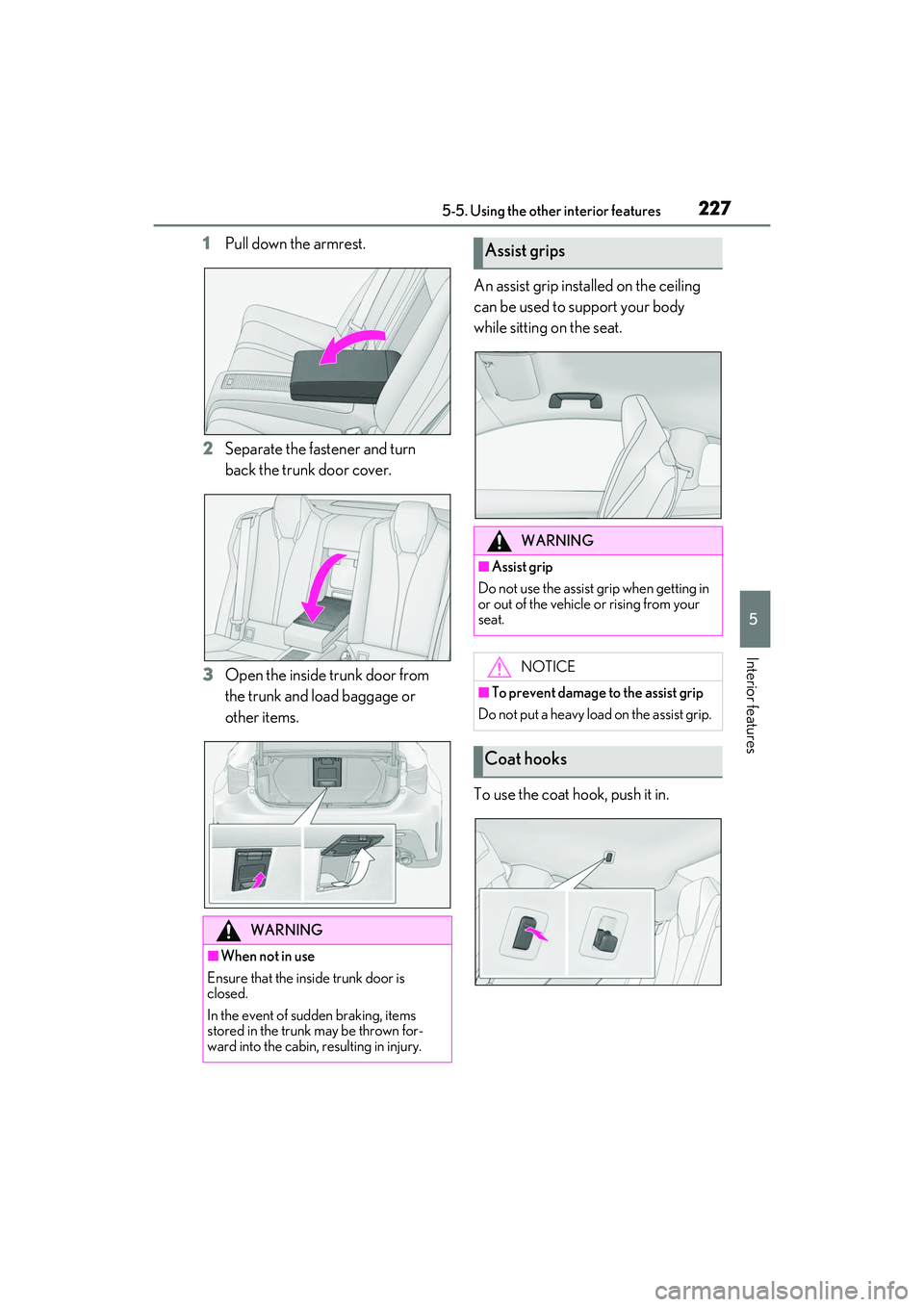
1Pull down the armrest.
2 Separate the fastener and turn
back the trunk door cover.
3 Open the inside trunk door from
the trunk and load baggage or
other items. An assist grip installed on the ceiling
can be used to support your body
while sitting on the seat.
To use the coat hook, push it in.
WARNING
■When not in use
Ensure that the insi de trunk door is
closed.
In the event of sudden braking, items
stored in the trunk may be thrown for-
ward into the cabin, resulting in injury.
Assist grips
WARNING
■Assist grip
Do not use the assist grip when getting in
or out of the vehicle or rising from your
seat.
NOTICE
■To prevent damage to the assist grip
Do not put a heavy load on the assist grip.
Coat hooks
Page 260 of 412
2586-3. Maintenance
RC F Owner's Manual
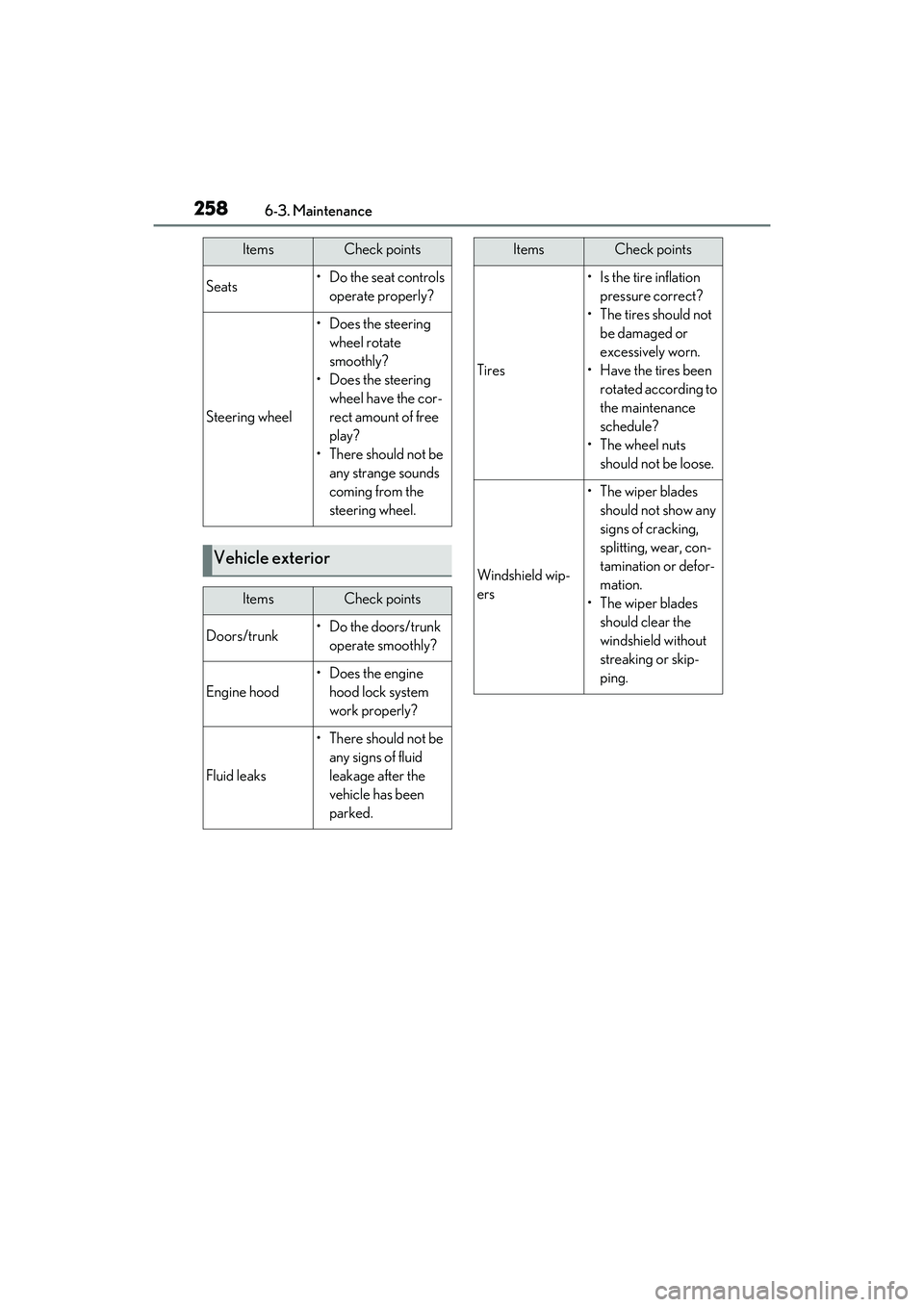
Seats• Do the seat controls operate properly?
Steering wheel
• Does the steering wheel rotate
smoothly?
• Does the steering wheel have the cor-
rect amount of free
play?
•There should not be any strange sounds
coming from the
steering wheel.
Vehicle exterior
ItemsCheck points
Doors/trunk• Do the doors/trunk operate smoothly?
Engine hood
•Does the engine hood lock system
work properly?
Fluid leaks
•There should not be any signs of fluid
leakage after the
vehicle has been
parked.
ItemsCheck points
Tires
• Is the tire inflation pressure correct?
• The tires should not be damaged or
excessively worn.
• Have the tires been rotated according to
the maintenance
schedule?
•The wheel nuts should not be loose.
Windshield wip-
ers
• The wiper blades should not show any
signs of cracking,
splitting, wear, con-
tamination or defor-
mation.
• The wiper blades should clear the
windshield without
streaking or skip-
ping.
ItemsCheck points
Page 289 of 412

2876-4. Do-it-yourself maintenance
RC F Owner's Manual
6
Maintenance and care
Stop/tail lights
Back-up lights
High mounted stoplight
License plate lights
■LED light bulbs
The lights other than the rear turn signal
lights each consist of a number of LEDs. If
any of the LEDs burn out, take your vehicle
to your Lexus dealer to have the light
replaced.
■Condensation build-up on the inside of
the lens
Temporary condensation build-up on the
inside of the headlight lens does not indi-
cate a malfunction. Contact your Lexus
dealer for more information in the following
situations:
●Large drops of water ha ve built up on the
inside of the lens.
●Water has built up in side the headlight.
■When replacing light bulbs
P.285
■Rear turn signal lights
1 Open the trunk and apply protec-
tive tape to the peripheral of the
taillight and the vehicle body
around the taillight.
Use masking tape, etc. Do not use duct
tape, as it may leave residue or damage the paint when removed.
2
Using a flathead screwdriver,
remove the cover.
To prevent scratching the vehicle, wrap the
tip of the flathead scre wdriver with a cloth,
etc.
3 Remove the 2 screws.Replacing light bulbs