2022 LEXUS RCF door lock
[x] Cancel search: door lockPage 132 of 412

1304-2. Driving procedures
RC F Owner's Manual
2Turn the mechanical key
counterclockwise.
3 Pull out the mechanical key and close
the door.
Modes can be changed by pressing
the engine switch with brake pedal
released. (The mode changes each
time the switch is pressed.)
WARNING
■Stopping the engine in an emergency
●If you want to stop the engine in an
emergency while driving the vehicle,
press and hold the engine switch for
more than 2 seconds, or press it briefly
3 times or more in succession.
( P.292)
However, do not touch the engine switch
while driving except in an emergency.
Turning the engine off while driving will
not cause loss of steering or braking con-
trol, but the power assist to these systems
will be lost. This will make it more difficult
to steer and brake, so you should pull
over and stop the vehicle as soon as it is
safe to do so.
●If the engine switch is operated while
the vehicle is running, a warning mes-
sage will be shown on the multi-infor-
mation display and a buzzer sounds.
●To restart the engine after performing
an emergency shutdown, shift the shift
lever to N and then press the engine
switch.
■When parking
Exhaust gases include harmful carbon
monoxide (CO), which is colorless and
odorless. Observe the following precau-
tions.
Failure to do so may cause exhaust gases
to enter the vehicle and may lead to an
accident caused by light-headedness, or
may lead to death or a serious health
hazard.
●If the vehicle is in a poorly ventilated
area or a closed area, such as a
garage, stop the engine.
●Do not leave the vehicle with the
engine running for a long time. If such
a situation cannot be avoided, park the
vehicle in an open space and ensure
that exhaust fumes do not enter the
vehicle interior.
●Do not leave the engine running in an
area with snow build-up, or where it is
snowing. If snowbanks build up around
the vehicle while the engine is running,
exhaust gases may collect and enter
the vehicle.
Changing engine switch modes
Page 153 of 412

1514-4. Refueling
RC F Owner's Manual
4
Driving
1With the doors unlocked, press the
center of the rear edge of the fuel
filler door.
Push until you hear a click and take your
hand away to slightly open the fuel filler
door. Then open the door fully by hand.
2Turn the fuel tank cap slowly and
remove it, then put it into the holder
on the fuel filler door.
■If the fuel filler door cannot be opened
P.329
1 After refueling, turn the fuel tank
cap until you hear a click. Once the cap is released, it will turn slightly in
the opposite direction.
2 Close the fuel filler door, and press
the center of the rear edge of the
fuel filler door until you hear a click.
When you lock the do ors, the fuel filler
door will also lock.
■When closing the fuel filler door
Do not lock the doors before closing the
fuel filler door, as the fuel filler door cannot
be closed if the doors are locked. If the
doors are locked and the fuel filler door
cannot be closed, unlock the doors and
then close the fuel filler door.
■Fuel filler door lock condition
The fuel filler door may not be locked even
when the vehicle’s doors are locked in the
following situations:
●When operating the door lock button
inside the vehicle
●When the automatic door locking system
is operated ( P.94)
Opening the fuel tank cap
Closing the fuel tank cap
Page 217 of 412
2155-2. Using the air conditioning system
RC F Owner's Manual
5
Interior features
automatically.
The indicator above the selected button
comes on.
■Micro dust and pollen filter
Pollen is removed from the air and the
air flows to the upper part of the body.
Select on the option control
screen.
When the micro dust and pollen filter is on, is displayed on the air conditioning
control screen.
In order to prevent the windshield from
fogging up when the outside air is cold, the
dehumidification function may operate.
Pollen is filtered even if the micro dust and
pollen filter is turned off.
■Defogging the windshield
Defoggers are used to defog the wind-
shield and side windows.
Press .
Set the outside/recirc ulated air mode but-
ton to outside air mode if the recirculated
air mode is used. (It may switch automati-
cally.)
To defog the windshield and the side win-
dows early, turn the air flow and tempera-
ture up.
To return to the previous mode, press
again when the windshield is
defogged.
■Defogging the rear window and
outside rear view mirrors
Defoggers are used to defog the rear
window, and to remove raindrops, dew
and frost from the outside rear view
mirrors. Press .
The defoggers will automatically turn off
after a period of time.
■Windshield wiper de-icer (if
equipped)
This feature is used to prevent ice from
building up on the windshield and
wiper blades.
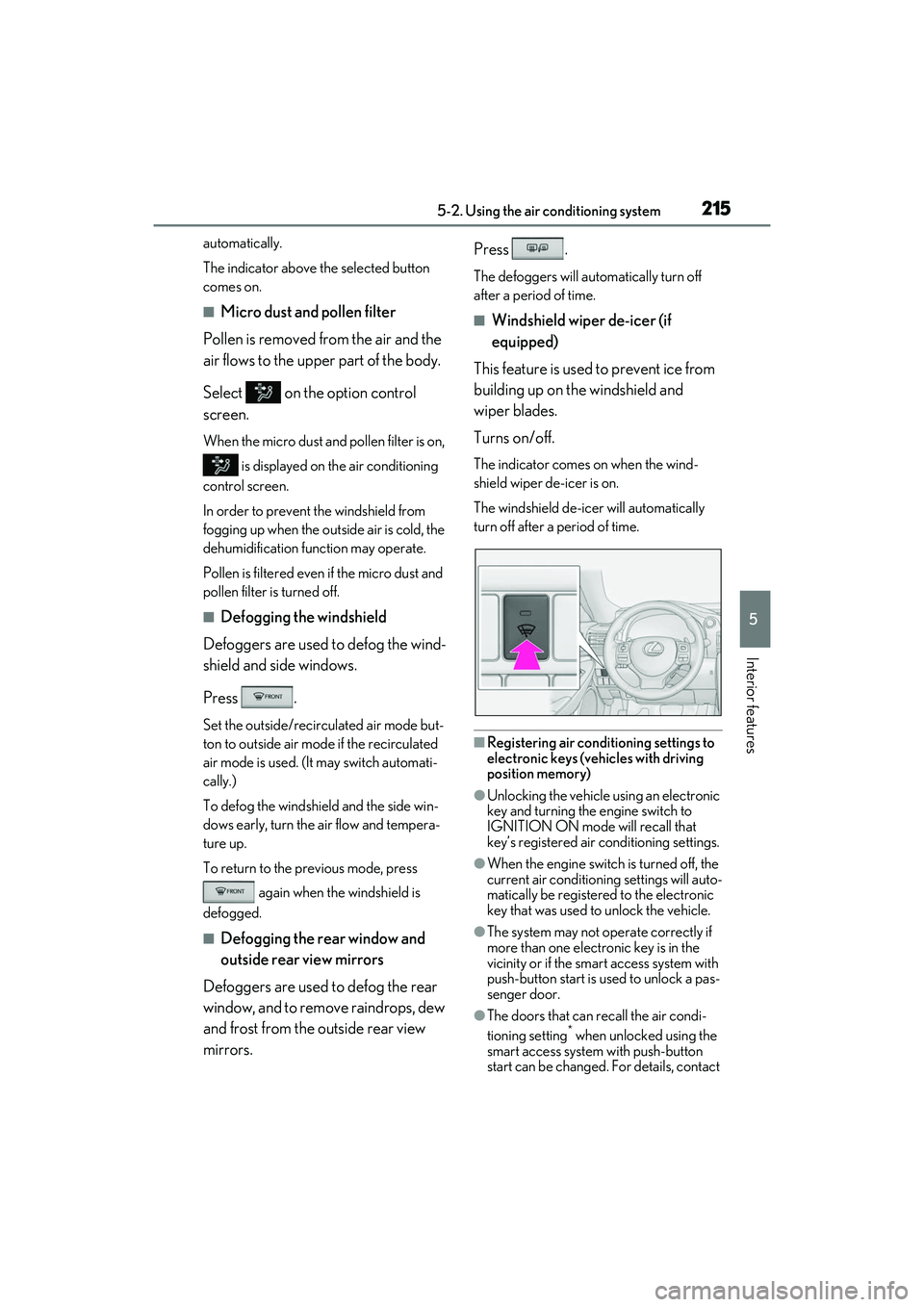
Turns on/off.
The indicator comes on when the wind-
shield wiper de-icer is on.
The windshield de-icer will automatically
turn off after a period of time.
■Registering air conditioning settings to
electronic keys (vehicles with driving
position memory)
●Unlocking the vehicle using an electronic
key and turning the engine switch to
IGNITION ON mode will recall that
key’s registered air conditioning settings.
●When the engine switch is turned off, the
current air conditioning settings will auto-
matically be registered to the electronic
key that was used to unlock the vehicle.
●The system may not operate correctly if
more than one electronic key is in the
vicinity or if the smart access system with
push-button start is used to unlock a pas-
senger door.
●The doors that can recall the air condi-
tioning setting* when unlocked using the
smart access system with push-button
start can be changed. For details, contact
Page 224 of 412
2225-3. Using the interior lights
RC F Owner's Manual
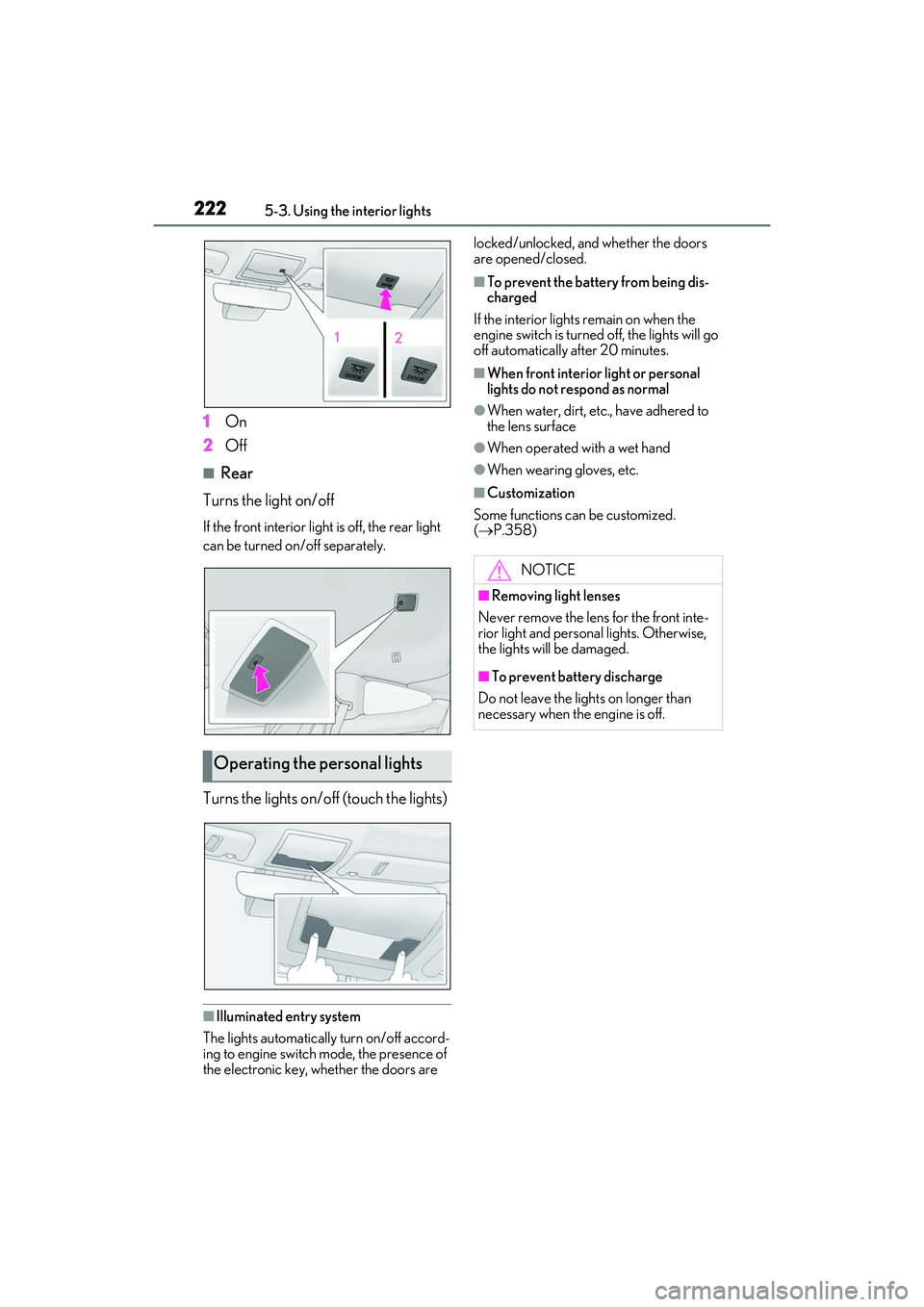
1On
2 Off
■Rear
Turns the light on/off
If the front interior light is off, the rear light
can be turned on/off separately.
Turns the lights on/off (touch the lights)
■Illuminated entry system
The lights automatically turn on/off accord-
ing to engine switch mode, the presence of
the electronic key, whether the doors are locked/unlocked, and whether the doors
are opened/closed.
■To prevent the battery from being dis-
charged
If the interior lights remain on when the
engine switch is turned off, the lights will go
off automatically after 20 minutes.
■When front interior light or personal
lights do not respond as normal
●When water, dirt, etc., have adhered to
the lens surface
●When operated with a wet hand
●When wearing gloves, etc.
■Customization
Some functions can be customized.
( P.358)
Operating the personal lights
NOTICE
■Removing light lenses
Never remove the lens for the front inte-
rior light and personal lights. Otherwise,
the lights will be damaged.
■To prevent battery discharge
Do not leave the lights on longer than
necessary when the engine is off.
Page 231 of 412

2295-5. Using the other interior features
RC F Owner's Manual
5
Interior features
■HomeLink® programming procedure
The programming procedures can also be
found at the following URL.
Website: www.homelink.com/lexus
For support, contact customer support at
the following.
Help Line: 1-800-355-3515
The HomeLink® wireless control sys-
tem in your vehicle has 3 buttons which
can be programmed to operate 3 dif-
ferent devices. Refer to the program-
ming methods on the following pages
to determine the method which is
appropriate for the device. HomeLink
® indicator light
Garage door operation indicators
HomeLink
® icon
Illuminates while HomeLink® is operating.
Buttons
■Codes stored in the HomeLink® mem-
ory
●The registered codes are not erased even
if the battery cable is disconnected.
●If learning failed when registering a dif-
ferent code to a HomeLink® button that
already has a code registered to it, the
already registered code will not be
erased.
Garage door opener
The garage door opener can be
programmed to operate garage
doors, gates, entry doors, door
locks, home lighting systems, secu-
rity systems, and other devices.
System componentsWARNING
■When programming a garage door or
other remote control device
The garage door or other device may
operate, so ensure people and objects
are out of danger to prevent potential
harm.
A
B
C
D
Page 241 of 412

2396-1. Maintenance and care
RC F Owner's Manual
6
Maintenance and care
this case, the active rear wing may not be
washed very well or may even be
scratched or damaged.
●Brushes used in automatic car washes
may scratch the vehi cle surface, parts
(wheel, etc.) and harm your vehicle’s
paint.
■Automatic car washes(vehicles with
CFRP parts)
Do not use an automatic car wash as they
may scratch the CFRP parts and damage
their finish or damage the fixed rear wing.
■High pressure car washes
As water may enter the cabin, do not bring
the nozzle tip near the gaps around the
doors or perimeter of the windows, or spray
these areas continuously.
■When using a car wash
If the door handle becomes wet while the
electronic key is within the effective range,
the door may lock and unlock repeatedly. In
that case, follow the following correction
procedures to wash the vehicle:
●Place the key in a position 6 ft. (2 m) or
more separate from the vehicle while the
vehicle is being washed. (Take care to
ensure that the key is not stolen.)
●Set the electronic key to battery-saving
mode to disable the smart access system
with push-button start. ( P.98)
■Wheels and wheel ornaments (vehicles
without matte black painted wheels)
●Remove any dirt immediately by using a
neutral detergent.
●Wash detergent off with water immedi-
ately after use.
●To protect the paint from damage, make
sure to observe the following precau-
tions.
• Do not use acidic, al kaline or abrasive
detergent
• Do not use hard brushes
• Do not use detergent on the wheels when they are hot, such as after driving or park-
ing in hot weather
■Wheels and wheel ornaments (vehicles
with matte black painted wheels)
As matte black painted wheels require dif-
ferent cleaning method s than conventional
aluminum wheels, be sure to observer the
following. For details, consult your Lexus
dealer.
●Remove dirt using water. If the wheels are
excessively dirty, use a sponge or soft
cloth dampened with a diluted neutral
detergent to remove the dirt.
●When using detergent, make sure to
rinse it off with water immediately. Then
use a soft cloth to wipe off the water.
●To prevent the matte black paint from
being damaged, make sure to observe
the following precautions:
• Do not scrub or polish the wheels using a brush or dry cloth.
• Do not use any wheel coatings or abra-
sive detergents.
• When using an automatic car wash, dis- able/do not select t he wheel brush func-
tion(if such an option is available).
• Do not use a high pressure pressure washer or steam cleaner.
• Do not use detergent on the wheels when they are hot, such as after driving or park-
ing in hot weather.
■Diffuser (Vehicles with titanium muf-
flers)
The cleaning method for the diffuser on
vehicles with titanium mufflers differs from
that for normal diffusers.
●When using detergent, make sure to
rinse it off with water immediately. Then
use a soft cloth to wipe off the water.
●To prevent the diffuser from being dam-
aged, make sure to observe the following
precautions:
• Do not scrub or polish the diffuser using a brush or dry cloth.
• Do not apply any ceramic coatings or use abrasive detergents.
Page 260 of 412
2586-3. Maintenance
RC F Owner's Manual
Seats• Do the seat controls operate properly?
Steering wheel
• Does the steering wheel rotate
smoothly?
• Does the steering wheel have the cor-
rect amount of free
play?
•There should not be any strange sounds
coming from the
steering wheel.
Vehicle exterior
ItemsCheck points
Doors/trunk• Do the doors/trunk operate smoothly?
Engine hood
•Does the engine hood lock system
work properly?
Fluid leaks
•There should not be any signs of fluid
leakage after the
vehicle has been
parked.
ItemsCheck points
Tires
• Is the tire inflation pressure correct?
• The tires should not be damaged or
excessively worn.
• Have the tires been rotated according to
the maintenance
schedule?
•The wheel nuts should not be loose.
Windshield wip-
ers
• The wiper blades should not show any
signs of cracking,
splitting, wear, con-
tamination or defor-
mation.
• The wiper blades should clear the
windshield without
streaking or skip-
ping.
ItemsCheck points
Page 271 of 412

2696-4. Do-it-yourself maintenance
RC F Owner's Manual
6
Maintenance and care
Check the battery as follows.
■Battery exterior
Make sure that the battery terminals
are not corroded and that there are no
loose connections, cracks, or loose
clamps.
Terminals
Hold-down clamp
■Checking battery condition (vehi-
cles with the battery indicator)
Check the battery condition by indica-
tor color.
Blue: Good condition
Red: Not working properly.
Have the battery checked by your
Lexus dealer.
White: Charging is necessary.
Have the vehicle inspected by your
Lexus dealer.
■Before recharging
When recharging, the battery produces
hydrogen gas which is flammable and
explosive. Therefore, observe the following
before recharging:
●If recharging with th e battery installed on
the vehicle, be sure to disconnect the
ground cable.
●Make sure the power switch on the char-
ger is off when connecting and discon-
necting the charger cables to the battery.
■After recharging/reconnecting the bat-
tery
The engine may not start. Follow the proce-
dure below to initialize the system.
1 Shift the shift lever to P.
2 Open and close either door.
3 Restart the engine.
●Unlocking the doors using the smart
access system with push-button start may
not be possible immediately after recon-
WARNING
■When filling the reservoir
Take care as brake fluid can harm your
hands and eyes and damage painted sur-
faces.If fluid gets on your hands or in your
eyes, flush the affected area with clean
water immediately.
If you still experience discomfort, see a
doctor.
NOTICE
■If the fluid level is low or high
It is normal for the brake fluid level to go
down slightly as the brake pads wear out
or when the fluid level in the accumulator
is high.
If the reservoir need s frequent refilling,
there may be a serious problem.
Battery
A
B
A
B
C