2022 LEXUS RC300 battery
[x] Cancel search: batteryPage 318 of 400

3167-2. Steps to take in an emergency
RC350/RC300 Owner's Manual
■Key linked functions
1 Locks both side door
2 Closes the windows and moon roof (if
equipped) (turn and hold)
*
3Unlocks the door
Turning the key rearward unlocks the
driver’s door. Turning the key again unlocks
the other door.
4 Opens the windows and moon roof (if
equipped) (turn and hold)
*
*
: These settings must be customized at
your Lexus dealer.
1 Ensure that the shift lever is in P and
depress the brake pedal.
2 Touch the Lexus emblem side of the
electronic key to the engine switch.
When the electronic key is detected, a
buzzer sounds and the engine switch will
turn to IGNITION ON mode.
When the smart access system with
push-button start is deactivated in
customization setting, the engine switch
will turn to ACCESSORY mode.
3 Firmly depress the brake pedal and
check that is shown on the
multi-information display.
4 Press the engine switch.
In the event that the engine still cannot
be started, contact your Lexus dealer.
■Stopping the engine
Shift the shift lever to P and press the engine
switch as you normally do when stopping
the engine.
■Electronic key battery
As the above procedure is a temporary
measure, it is recommended that the elec-
tronic key battery be replaced immediately
when the battery is depleted. ( P.275)
■Alarm (For Canada)
Using the mechanical key to lock the doors
will not set the alarm system.
If a door is unlocked using the mechanical
WARNING
■When using the mechanical key and
operating the power windows or
moon roof
Operate the power window or moon
roof after checking to make sure that
there is no possibilit y of any passenger
having any of their bo dy parts caught in
the window or moon roof.
Also, do not allow ch ildren to operate the
mechanical key. It is possible for children
and other passengers to get caught in
the power window or moon roof.
Starting the engine
Page 319 of 400
3177-2. Steps to take in an emergency
RC350/RC300 Owner's Manual
7
When trouble arises
key when the alarm system is set, the alarm
may be triggered.
■Changing engine switch modes
Release the brake pedal and press the
engine switch in step 3 above.
The engine does not start and modes will be
changed each time the switch is pressed.
( P.127)
If you have a set of jumper (or booster)
cables and a second vehicle with a
12-volt battery, you can jump start your
vehicle by following the steps below.
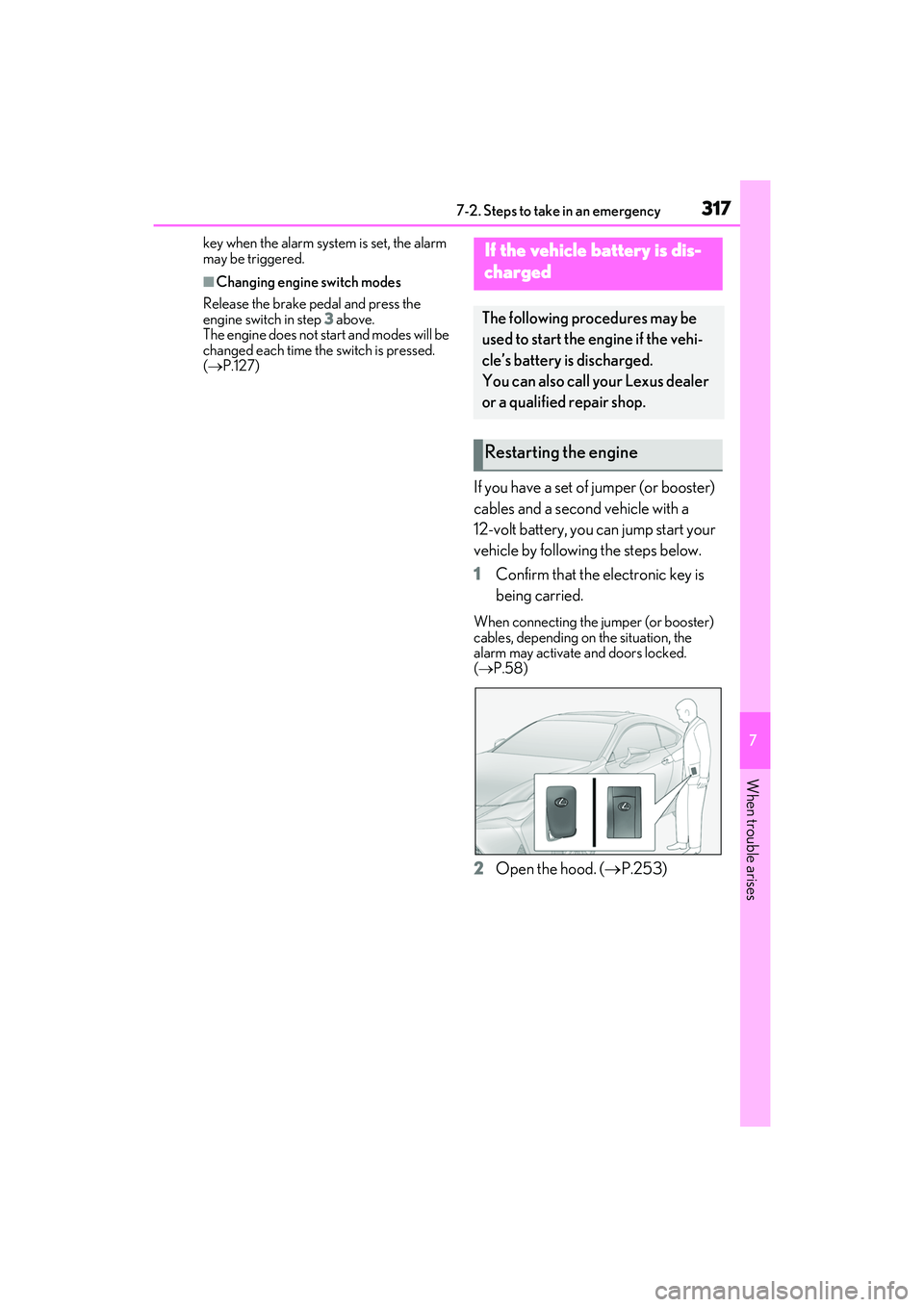
1 Confirm that the electronic key is
being carried.
When connecting the jumper (or booster)
cables, depending on the situation, the
alarm may activate and doors locked.
(P.58)
2 Open the hood. ( P.253)
If the vehicle battery is dis-
charged
The following procedures may be
used to start the engine if the vehi-
cle’s battery is discharged.
You can also call your Lexus dealer
or a qualified repair shop.
Restarting the engine
Page 320 of 400

3187-2. Steps to take in an emergency
RC350/RC300 Owner's Manual
3Connect a positive jumper cable clamp to on your vehicle and connect the
clamp on the other end of the positive cab le to on the second vehicle. Then,
connect a negative cable clamp to on the second vehicle and connect the
clamp at the other end of the negative cable to .
RC350/RC300 AWD
Positive (+) battery terminal (your vehicle)
Positive (+) battery terminal (second vehicle)
Negative (-) battery terminal (second vehicle)
Solid, stationary, unpainted metallic poin t away from the battery and any mov-
ing parts as shown in the illustration
RC300
Positive (+) battery terminal (your vehicle)
Positive (+) battery terminal (second vehicle)
Negative (-) battery terminal (second vehicle)
Solid, stationary, unpainted metallic poin t away from the battery and any mov-
ing parts as shown in the illustration
4 Start the engine of the second vehi-
cle. Increase the engine speed
slightly and maintain at that level for approximately 5 minutes to
recharge the battery of your vehi-
cle.A
B
C
D
A
B
C
D
A
B
C
D
Page 321 of 400

3197-2. Steps to take in an emergency
RC350/RC300 Owner's Manual
7
When trouble arises
5Open and close any of the door of
your vehicle with the engine switch
off.
6 Maintain the engine speed of the
second vehicle and start the engine
of your vehicle by turning the
engine switch to IGNITION ON
mode.
7 Once the vehicle’s engine has
started, remove the jumper cables
in the exact reverse order from
which they were connected.
Once the engine starts, have the vehi-
cle inspected at your Lexus dealer as
soon as possible.
■Starting the engine when the battery is
discharged
The engine cannot be started by push-start-
ing.
■To prevent battery discharge
●Turn off the headlights and the audio sys-
tem while the engine is off.
●Turn off any unnecessary electrical com-
ponents when the vehicle is running at a
low speed for an extended period, such
as in heavy traffic.
■Charging the battery
The electricity stored in the battery will dis-
charge gradually even when the vehicle is
not in use, due to natural discharge and the
draining effects of certain electrical appli-
ances. If the vehicle is left for a long time,
the battery may discharge, and the engine
may be unable to start. (The battery
recharges automatically during driving.)
■When recharging or replacing the bat-
tery
●In some cases, it may not be possible to
unlock the doors using the smart access
system with push-button start when the
battery is discharged. Use the wireless
remote control or the mechanical key to
lock or unlock the doors.
●The engine may not start on the first
attempt after the battery has recharged
but will start normally after the second
attempt. This is not a malfunction.
●The engine switch mode is memorized by
the vehicle. When the battery is recon-
nected, the system will return to the
mode it was in before the battery was dis-
charged. Before disconnecting the bat-
tery, turn the engine switch off.
If you are unsure wh at mode the engine
switch was in before the battery dis-
charged, be especially careful when
reconnecting the battery.
WARNING
■Avoiding battery fires or explosions
Observe the following precautions to
prevent accidentally igniting the flamma-
ble gas that may be emitted from the bat-
tery:
●Make sure each jumper cable is con-
nected to the correct terminal and that
it is not unintentionally in contact with
any other than the intended terminal.
●Do not allow the other end of the
jumper cable connected to the “+” ter-
minal to come into contact with any
other parts or meta l surfaces in the
area, such as brackets or unpainted
metal.
●Do not allow the + and - clamps of the
jumper cables to come into contact
with each other.
●Do not smoke, use matches, cigarette
lighters or allow open flame near the
battery.
■Battery precautions
The battery contains poisonous and cor-
rosive acidic electrol yte, while related
parts contain lead and lead compounds.
Observe the following precautions when
handling the battery:
Page 322 of 400

3207-2. Steps to take in an emergency
RC350/RC300 Owner's Manual
1Stop the vehicle in a safe place and
turn off the air conditioning system,
and then stop the engine.
2 If you see steam:
Carefully lift the hood after the
steam subsides.
If you do not see steam:
Carefully lift the hood.
3 After the engine has cooled down
sufficiently, inspect the hoses and
radiator core (radiator) for any
leaks.
RC350/RC300 AWD
WARNING
●When working with the battery, always
wear safety glasses and take care not
to allow any battery fluids (acid) to
come into contact with skin, clothing
or the vehicle body.
●Do not lean over the battery.
●In the event that battery fluid comes
into contact with the skin or eyes,
immediately wash the affected area
with water and seek medical attention.
Place a wet sponge or cloth over the
affected area until medical attention
can be received.
●Always wash your hands after handling
the battery support, terminals, and
other battery-related parts.
●Do not allow children near the battery.
NOTICE
■When handling jumper cables
When connecting the jumper cables,
ensure that they do not become entan-
gled in the cooling fans or engine drive
belt.
If your vehicle overheats
The following may indicate that
your vehicle is overheating.
The engine coolant temperature
gauge ( P.66) is in the red zone
or a loss of engine power is expe-
rienced. (For example, the vehicle
speed does not increase.)
“Engine Coolant Temp High Stop
in a Safe Place See Owner’s
Manual” is shown on the
multi-information display.
Steam comes out from under the
hood.
Correction procedures
Page 332 of 400

3308-1. Specifications
RC350/RC300 Owner's Manual
*: The fluid capacity is a reference quantity.
If replacement is necessary, contact your Lexus dealer.
■Spark plug
Cooling system
Capacity*
RC350/RC3
00 AWD10.0 qt. (9.5 L, 8.4 Imp. qt.)
RC300
Gasoline engine
8.5 qt. (8.0 L, 7.0 Imp. qt.)
Intercooler
3.3 qt. (3.1 L, 2.7 Imp. qt.)
Coolant type
Use either of the following:
“Toyota Super Long Life Coolant”
Similar high-quality ethylene glycol-based non-silicate,
non-amine, non-nitrite, and non-borate coolant with
long-life hybrid orga nic acid technology
Do not use plain water alone.
Ignition system (spark plug)
RC350/RC300 AWDRC300
MakeDENSO FK20HBR8NGK DILFR7K9G
Gap0.031 in. (0.8 mm)0.035 in. (0.9 mm)
NOTICE
■Iridium-tipped spark plugs
Use only iridium-tipped spark plugs. Do not adjust the spark plug gap.
Electrical system (battery)
Open voltage at 68°F (20°C):
12.3 V or higher
If the voltage is lower than the standard value,
charge the battery.
(Voltage is checked 20 minutes after the engine
and all lights are turned off.)
Charging rates5 A max.
Page 346 of 400

3448-1. Specifications
RC350/RC300 Owner's Manual
Maximum loaded vehicle weight
The sum of:
(a) Curb weight
(b) Accessory weight
(c) Vehicle capacity weight
(d) Production options weight
Normal occupant weight
150 lb. (68 kg) times the number of occupants
specified in the second column of Table 1
* that fol-
lows
Occupant distributionDistribution of occupants in a vehicle as specified in
the third column of Table 1
* below
Production options weight
The combined weight of installed regular produc-
tion options weighing over 5 lb. (2.3 kg) in excess of
the standard items which they replace, not previ-
ously considered in curb weight or accessory
weight, including heavy duty brakes, ride levelers,
roof rack, heavy duty battery, and special trim
RimA metal support for a tire or a tire and tube assem-
bly upon which the tire beads are seated
Rim diameter (Wheel diameter)Nominal diameter of the bead seat
Rim size designationRim diameter and width
Rim type designationThe industry manufacturer’s designation for a rim
by style or code
Rim widthNominal distance between rim flanges
Vehicle capacity weight (Total load
capacity)The rated cargo and luggage load plus 150 lb. (68
kg) times the vehicle’s de signated seating capacity
Vehicle maximum load on the tire
The load on an individual ti re that is determined by
distributing to each axle its share of the maximum
loaded vehicle weight, and dividing by two
Vehicle normal load on the tire
The load on an individual ti re that is determined by
distributing to each axle its share of curb weight,
accessory weight, and normal occupant weight
(distributed in accordance with Table 1
* below), and
dividing by two
Weather sideThe surface area of the rim not covered by the
inflated tire
Tire related termMeaning
Page 351 of 400

3498-2. Customization
RC350/RC300 Owner's Manual
8
Vehicle specifications
8-2.Customization
■Changing by using the meter con-
trol switches
1 Press or to select .
2 Operate the switches to select a
desired item.
3 Change the setting by referring to
the message displayed on the
screen.
■Changing by using the Remote
Touch
1 Press the “MENU” button on the
Remote Touch.
2 Select “Setup” on the menu screen
and select “Vehicle”.
3 Select “Vehicle Customization”,
“LEXUS Park Assist” or “Drive
Mode Customization”. Various setting can be changed. Refer
to the list of settings that can be
changed for details.
For details on the Remote Touch, refer
to the “NAVIGATION AND MULTI-
MEDIA SYSTEM OWNER’S MAN-
UAL”.
■When customizing using the Remote
Touch
Stop the vehicle in a safe place, apply the
parking brake, and shift the shift lever to P.
Also, to prevent battery discharge, leave
the engine running while customizing the
features.
Some function settings are changed simultaneously with other functions being cus-
tomized. Contact your Lexus dealer for further details.
Settings that can be changed using the Remote Touch
Settings that can be changed using the meter control switches
Settings that can be changed by your Lexus dealer
Customizable features
Your vehicle includes a variety of
electronic features that can be per-
sonalized to your preferences. The
settings of these features can be
changed by using the meter control
switches, the Remote Touch or at
your Lexus dealer.
Customizing vehicle features
WARNING
■During customization
As the engine needs to be running
during customization, ensure that the
vehicle is parked in a place with ade-
quate ventilation. In a closed area such as
a garage, exhaust gases including harm-
ful carbon monoxide (CO) may collect
and enter the vehicle. This may lead to
death or a serious health hazard.
NOTICE
■During customization
To prevent battery discharge, ensure that
the engine is running while customizing
features.
Customizable features
A
B
C