Page 40 of 400
381-1. For safe use
RC350/RC300 Owner's Manual
■Adult*1
■Child*4
■Child restraint system with infant*5
Condition and operation in the front passenger occupant classification
system
Indicator/warning light
“AIR BAG ON” and “AIR BAG OFF” indi-cator lights“AIR BAG ON”
SRS warning lightOff
Driver’s and front passenger’s seat belt reminder lightOff*2 or flashing*3
DevicesFront passenger airbagActivatedFront passenger knee airbag
Indicator/warning light
“AIR BAG ON” and “AIR BAG OFF” indi- cator lights“AIR BAG OFF” or
“AIR BAG ON”
*4
SRS warning lightOff
Driver’s and front passenger’s seat belt reminder lightOff*2 or flashing*3
DevicesFront passenger airbagDeactivated or acti-
vated
*4Front passenger knee airbag
Indicator/warning light
“AIR BAG ON” and “AIR BAG OFF” indi- cator lights“AIR BAG OFF”*6
SRS warning lightOff
Driver’s and front passenger’s seat belt reminder lightOff*2 or flashing*3
DevicesFront passenger airbagDeactivatedFront passenger knee airbag
Page 41 of 400
391-1. For safe use
RC350/RC300 Owner's Manual
1
For safety and security
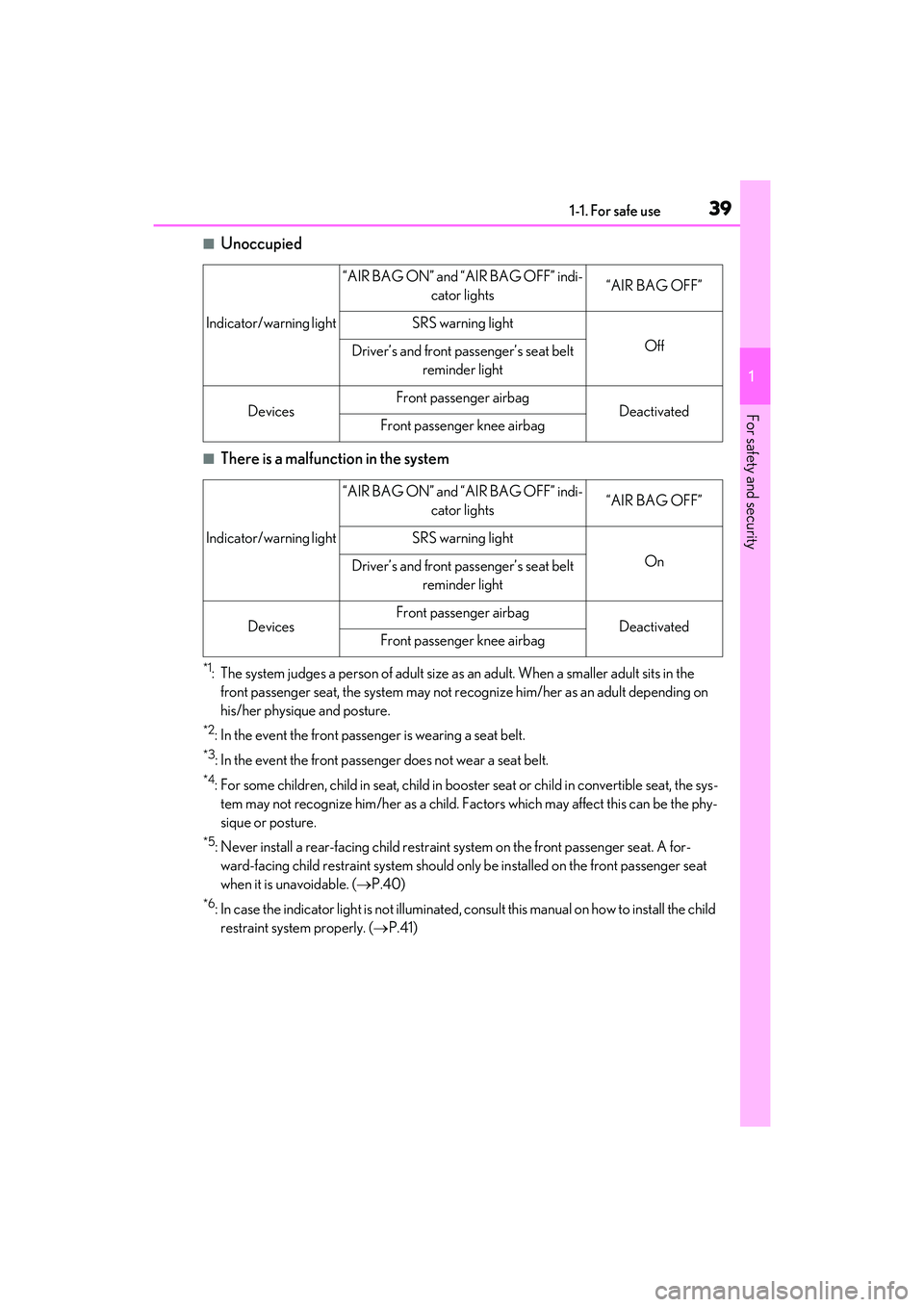
■Unoccupied
■There is a malfunction in the system
*1: The system judges a person of adult size as an adult. When a smaller adult sits in the
front passenger seat, the system may not re cognize him/her as an adult depending on
his/her physique and posture.
*2: In the event the front passenger is wearing a seat belt.
*3: In the event the front passenger does not wear a seat belt.
*4: For some children, child in se at, child in booster seat or child in convertible seat, the sys-
tem may not recognize him/her as a child. F actors which may affect this can be the phy-
sique or posture.
*5: Never install a rear-facing child restraint system on the front passenger seat. A for-
ward-facing child restraint syst em should only be installed on the front passenger seat
when it is unavoidable. ( P.40)
*6: In case the indicator light is not illuminated, consult this manual on how to install the child
restraint system properly. ( P.41)
Indicator/warning light
“AIR BAG ON” and “AIR BAG OFF” indi-
cator lights“AIR BAG OFF”
SRS warning light
OffDriver’s and front passenger’s seat belt reminder light
DevicesFront passenger airbagDeactivatedFront passenger knee airbag
Indicator/warning light
“AIR BAG ON” and “AIR BAG OFF” indi- cator lights“AIR BAG OFF”
SRS warning light
OnDriver’s and front passenger’s seat belt reminder light
DevicesFront passenger airbagDeactivatedFront passenger knee airbag
Page 63 of 400
61
RC350/RC300 Owner's Manual
2
2
Vehicle status information and indicators
Vehicle status informationand indicators
.2-1. Instrument cluster
Warning lights and indicators........................................................... 62
Gauges and meters .................... 66
Multi-information display............ 71
Fuel consumption information ........................................................... 78
Page 64 of 400
622-1. Instrument cluster
RC350/RC300 Owner's Manual
2-1.Instrument cluster
For the purpose of explanation, the following illustrations display all warning lights
and indicators illuminated.
Except F SPORT models
F SPORT models
The units used on the meters and some indicators may differ depending on the target
region.
Warning lights and indicators
The warning lights and indicators on th e instrument cluster, center panel and
outside rear view mirrors inform the driver of the status of the vehicle’s various
systems.
Warning lights and indicators displayed on the instrument cluster
Page 65 of 400

632-1. Instrument cluster
RC350/RC300 Owner's Manual
2
Vehicle status information and indicators
Warning lights inform the driver of mal-
functions in the indicated vehicle sys-
tems.
*1: These lights turn on when the engine
switch is turned to IGNITION ON
mode to indicate that a system check is
being performed. They will turn off after
the engine is started, or after a few sec-
onds. There may be a malfunction in a
system if a light does not come on, or
turn off. Have the vehicle inspected by
Warning lights
(U.S.A.)
Brake system warning light*1
( P.293)
(red)
(Canada)
Brake system warning light*1
( P.293)
(yellow)
Brake system warning light*1
( P.293)
High coolant temperature
warning light
*2 ( P.293)
Charging system warning
light
*3 ( P.294)
Low engine oil pressure warn-
ing light
*2 ( P.294)
(U.S.A.)
Malfunction indicator lamp*1
( P.294)
(Canada)
Malfunction indicator lamp*1
( P.294)
SRS warning light
*1 ( P.294)
(U.S.A.)
ABS warning light*1 ( P.295)
(Canada)
ABS warning light*1 ( P.295)
(flashes)
(U.S.A.)
Parking brake warning light
( P.298)
(flashes)
(Canada)
Parking brake warning light
( P.298)
(flashes) Brake hold operated indicator
*1
( P.293)
Brake Override System warn-
ing light/Drive-Start Control
warning light
*2 ( P.295)
Electric power steering system
warning light
*1 ( P.295)
(orange)
LDA (Lane Departure Alert)
indicator ( P.296)
(flashes or
illuminates)PCS warning light*1 ( P.296)
Slip indicator
*1 ( P.296)
Open door warning light
( P.297)
Low fuel level warning light
( P.297)
Driver’s and front passenger’s
seat belt reminder light
( P.297)
Rear passenger’s seat belt
reminder lights
*4 ( P.297)
Master warning light
*1
( P.298)
Tire pressure warning light
*1
( P.298)
Page 67 of 400

652-1. Instrument cluster
RC350/RC300 Owner's Manual
2
Vehicle status information and indicators
Drive mode indicators
Except F SPORT models
F SPORT models
*1: These lights turn on when the engine
switch is turned to IGNITION ON
mode to indicate that a system check is
being performed. They will turn off after
the engine is started, or after a few sec-
onds. There may be a malfunction in a
system if a light does not come on, or
turn off. Have the vehicle inspected by
your Lexus dealer.
*2: The light comes on when the system is turned off.
*3: In order to confirm operation, the BSM outside rear view mirror indicators illu-
minate in the following situations:
• When the engine switch is turned to
IGNITION ON mode while the
BSM main switch is turned on.
• When the BSM main switch is turned on while the engine switch is
in IGNITION ON mode.
If the system is functioning correctly, the
BSM outside rear view mirror indicators
will turn off after a few seconds. If the BSM
outside rear view mirror indicators do not
illuminate or do not turn off, there may be a
malfunction in the syst em. If this occurs,
have the vehicle inspected by your Lexus
dealer.
*4: This light illuminates on the outside rear view mirrors.
*5: This light illuminates on the center panel.
*6: When the outside temperature is approximately 37°F (3°C) or lower, this
indicator will flash for approximately 10
seconds, then stay on.
Eco Driving Indicator Light
*1
( P.74)
(U.S.A.)
“AIR BAG ON/OFF”
indicator
*1, 5 ( P.36)
(Canada)
“AIR BAG ON/OFF”
indicator
*1, 5 (P.36)
Eco drive mode indicator
( P.196)
“SPORT” indicator ( P.196)
Snow mode indicator ( P.131)
Eco drive mode indicator
( P.196)
“SPORT S” indicator ( P.196)
“SPORT S+” indicator
( P.196)
“CUSTOM” indicator ( P.196)
Snow mode indicator ( P.131)
Page 72 of 400

702-1. Instrument cluster
RC350/RC300 Owner's Manual
■Display items
Odometer
Displays the total distance the vehicle has
been driven.
Trip meter A/trip meter B
Displays the distance the vehicle has been
driven since the meter was last reset. Trip
meters A and B can be used to record and
display different distances independently.
Distance until next engine oil change
Displays the distance the vehicle can be
driven until an oil change is necessary.
■Changing the display
Each time the “ODO TRIP” switch is
pressed, the displayed item will be
changed. When the trip meter is dis-
played, pressing and holding the switch
will reset the trip meter.
■Pop-up display
In some situations the following will be
temporarily displayed:
Distance until next engine oil
change
Distance until the next engine oil change
will displayed when a warning message
indicating that oil maintenance should be
performed soon or is required is displayed.
The brightness of the instrument panel
lights can be adjusted.
WARNING
■The information display at low tem-
peratures
Allow the interior of the vehicle to warm
up before using the liquid crystal infor-
mation display. At extremely low tem-
peratures, the information display
monitor may respond slowly, and display
changes may be delayed.
For example, there is a lag between the
driver’s shifting and the new gear number
appearing on the display. This lag could
cause the driver to downshift again,
causing rapid and excessive engine brak-
ing and possibly an accident resulting in
death or injury.
NOTICE
■To prevent damage to the engine and
its components
●Do not let the indicator needle of the
tachometer enter the red zone, which
indicates the maxi mum engine speed.
●The engine may be overheating if the
engine coolant temperature gauge is
in the red zone (H). In this case, imme-
diately stop the vehicle in a safe place,
and check the engine after it has
cooled completely. ( P.320)
Odometer and trip meter dis-
play
Changing the instrument panel
light brightness
Page 73 of 400
712-1. Instrument cluster
RC350/RC300 Owner's Manual
2
Vehicle status information and indicators
Darker
Brighter
■Instrument panel brightness adjustment
The instrument pane l brightness levels
when the tail lights are on and off can be
adjusted individually. However, when the
surroundings are bright (daytime, etc.),
turning on the tail lights will not change the
instrument panel brightness.
At this time, any adjustments made to the
instrument panel brig htness levels will be
applied to both settings at once.
Except F SPORT models
F SPORT models (main meter in
center position)
F SPORT models (main meter
moved to the right)
A
B
Multi-information display
The multi-information display pres-
ents the driver with a variety of
vehicle data.
Displays and menu icons


