2022 LEXUS IS350 towed
[x] Cancel search: towedPage 6 of 440

4TABLE OF CONTENTS
Positioning a floor jack...............285
Engine compartment.................. 287
Tires ................................................... 296
Tire inflation pressure................. 304
Wheels.............................................. 305
Air conditioning filter..................307
Electronic key battery ................ 308
Checking and replacing fuses ............................................................ 310
Headlight aim.................................. 312
Light bulbs ........................................ 313
7-1. Essential information Emergency flashers..................... 320
If your vehicle has to be stopped in an emergency ............................. 320
If the vehicle is submerged or water on the road is rising ................... 321
7-2. Steps to take in an emergency If your vehicle needs to be towed........................................................... 323
If you think something is wrong ........................................................... 327
Fuel pump shut off system ........ 328
If a warning light turns on or a warn- ing buzzer sounds ..................... 329
If a warning message is displayed ........................................................... 338
If you have a flat tire...................... 341
If the engine wi ll not start .......... 349
If you lose your keys .................... 350
If the fuel filler door cannot be opened............................................ 351
If the electronic key does not oper- ate properly .................................. 351If the vehicle battery is discharged
.......................................................... 353
If your vehicle overheats ........... 357
If the vehicle becomes stuck .... 361
8-1. Specifications Maintenance data (fuel, oil level, etc.) ................................................. 364
Fuel information............................ 376
Tire information ............................ 378
8-2. Customization Customizable features .............. 388
8-3. Initialization Items to initialize ........................... 398
9-1. For owners Reporting safety defects for U.S. owners ........................................... 400
Reporting safety defects for Cana- dian owners ................................. 400
Seat belt instructions for Canadian owners (in French) .................... 401
SRS airbag instructions for Cana- dian owners (in French) ......... 402
Headlight aim instructions for Canadian owners (in French)
.......................................................... 408
What to do if... (Troubleshooting) ............................................................ 412
Alphabetical Index ....................... 415
7When trouble arises
8Vehicle specifications
9For owners
Index
Page 109 of 440
1073-3. Adjusting the seats
3
Before driving
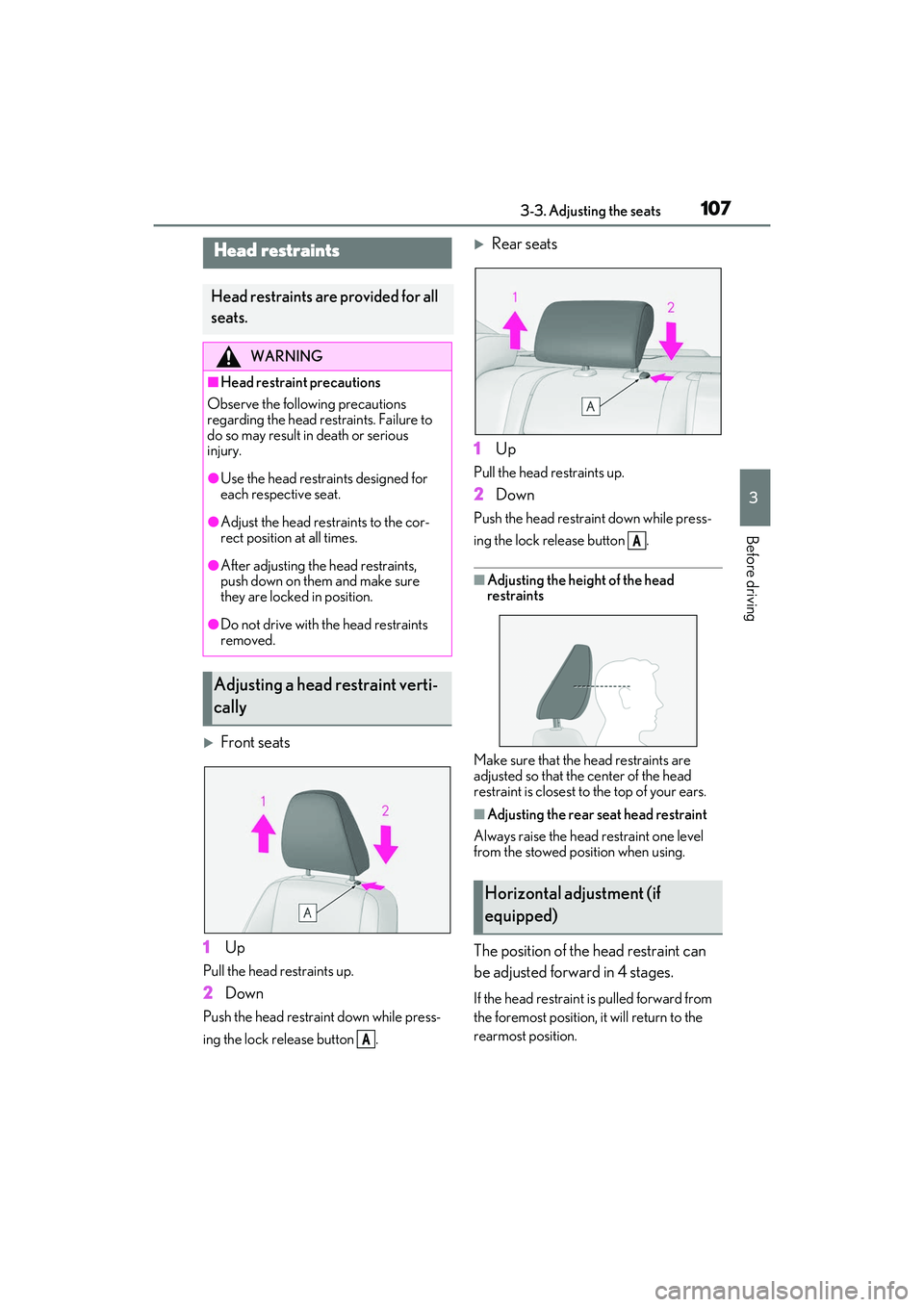
Front seats
1 Up
Pull the head restraints up.
2Down
Push the head restraint down while press-
ing the lock release button .
Rear seats
1 Up
Pull the head restraints up.
2Down
Push the head restra int down while press-
ing the lock release button .
■Adjusting the heig ht of the head
restraints
Make sure that the head restraints are
adjusted so that the center of the head
restraint is closest to the top of your ears.
■Adjusting the rear seat head restraint
Always raise the head restraint one level
from the stowed position when using.
The position of the head restraint can
be adjusted forward in 4 stages.
If the head restraint is pulled forward from
the foremost position, it will return to the
rearmost position.
Head restraints
Head restraints are provided for all
seats.
WARNING
■Head restraint precautions
Observe the following precautions
regarding the head restraints. Failure to
do so may result in death or serious
injury.
●Use the head restraints designed for
each respective seat.
●Adjust the head restraints to the cor-
rect position at all times.
●After adjusting the head restraints,
push down on them and make sure
they are locked in position.
●Do not drive with the head restraints
removed.
Adjusting a head restraint verti-
cally
A
Horizontal adjustment (if
equipped)
A
Page 131 of 440

1294-1. Before driving
4
Driving
Dinghy towing
Your vehicle is not designed to be
dinghy towed (with 4 wheels on the
ground) behind a motor home.
NOTICE
■To avoid serious damage to your vehi-
cle
Do not tow your vehicle with the four
wheels on the ground.
Page 150 of 440

1484-3. Operating the lights and wipers
●The high beams may be turned off if a
vehicle ahead that is using fog lights with-
out its headlights turned on is detected.
●House lights, street lights, traffic signals,
and illuminated billboards or signs and
other reflective objects may cause the
high beams to change to the low beams,
or the low beams to remain on.
●The following factors may affect the
amount of time taken for the high beams
to turn on or off:
• The brightness of the headlights, fog lights, and tail lights of vehicles ahead
• The movement and direction of vehicles ahead
• When a vehicle ahead only has opera-
tional lights on one side
• When a vehicle ahead is a two-wheeled vehicle
• The condition of the road (gradient, curve, condition of th e road surface, etc.)
• The number of passengers and amount of
luggage in the vehicle
●The high beams may turn on or off unex-
pectedly.
●Bicycles or similar vehicles may not be
detected.
●In the following situations the system may
not be able to correctly detect the sur-
rounding brightness level. This may cause
the low beams to remain on or the high
beams to flash or dazzle pedestrians or
vehicles ahead. In such a case, it is neces-
sary to manually switch between the high
and low beams.
• When driving in inclement weather (heavy rain, snow, fo g, sandstorms, etc.)
• When the windshield is obscured by fog, mist, ice, dirt, etc.
• When the windshield is cracked or dam-
aged
• When the camera sensor is deformed or dirty
• When the temperature of the camera sensor is extremely high
• When the surrounding brightness level is equal to that of head lights, tail lights or
fog lights
• When headlights or tail lights of vehicles ahead are turned off, dirty, changing
color, or not aimed properly
• When the vehicle is hit by water, snow, dust, etc. from a preceding vehicle
• When driving through an area of inter- mittently changing brightness and dark-
ness
• When frequently and repeatedly driving
ascending/descending roads, or roads
with rough, bumpy or uneven surfaces
(such as stone-paved roads, gravel roads,
etc.)
• When frequently and repeatedly taking curves or driving on a winding road
• When there is a highly reflective object
ahead of the vehicle, such as a sign or
mirror
• When the back of a preceding vehicle is
highly reflective, such as a container on a
truck
• When the vehicle’s headlights are dam-
aged or dirty, or are not aimed properly
• When the vehicle is listing or titling due to a flat tire, a trailer being towed, etc.
• When the headlights are changed between the high beams and low beams
repeatedly in an abnormal manner
• When the driver believes that the high beams may be flashing or dazzling
pedestrians or other drivers
■Temporarily lowering sensor sensitivity
The sensitivity of the sensor can be tempo-
rarily lowered.
1 Turn the engine switch off while the fol-
lowing conditions are met.
●The headlight switch is in or .
●The headlight switch lever is in the origi-
nal position.
●Automatic High Beam switch is on.
2 Turn the engine switch to IGNITION
ON mode.
3 Within 60 seconds after step 2, repeat
pushing the headlight switch lever to the
high beam position then pulling it to the
original position quickly 10 times, then
leave the lever in the original position.
4 If the sensitivity is changed, the Auto-
matic High Beam indicator is turn on
and off 3 times.
Page 169 of 440

1674-5. Using the driving support systems
4
Driving
WARNING
• Conditions under which the system may not operate properly:
P.172
●Do not attempt to test the operation of
the pre-collision system yourself.
Depending on the objects used for
testing (dummies, cardboard objects
imitating detectable objects, etc.), the
system may not operate properly, pos-
sibly leading to an accident.
■Pre-collision braking
●When the pre-collision braking func-
tion is operating, a large amount of
braking force will be applied.
●If the vehicle is stopped by the opera-
tion of the pre-collision braking func-
tion, the pre-collision braking function
operation will be canceled after
approximately 2 seco nds. Depress the
brake pedal as necessary.
●The pre-collision braking function may
not operate if certain operations are
performed by the driver. If the acceler-
ator pedal is being depressed strongly
or the steering wheel is being turned,
the system may determine that the
driver is taking evasive action and pos-
sibly prevent the pre-collision braking
function from operating.
●In some situations, while the pre-colli-
sion braking function is operating,
operation of the function may be
canceled if the accelerator pedal is
depressed strongly or the steering
wheel is turned and the system deter-
mines that the driver is taking evasive
action.
●If the brake pedal is being depressed,
the system may determine that the
driver is taking evasive action and pos-
sibly delay the operation timing of the
pre-collision braking function.
■Emergency steering assist
●As emergency steering assist opera-
tion will be canceled when the system
determines that lane departure pre-
vention function ha s been completed.
●Emergency steering assist may not
operate or may be ca nceled in the fol-
lowing cases as the system may deter-
mine the driver is taking actions.
• If the accelerator pedal is being depressed strongly, the steering wheel
is being operated sharply, the brake
pedal is being depressed or the turn
signal lever is being operated. In this
case, the system may determine that
the driver is taking evasive action and
the emergency steeri ng assist may not
operate.
• In some situations, while the emer- gency steering assist is operating,
operation of the function may be
canceled if the ac celerator pedal is
depressed strongly, the steering wheel
is operated sharply or the brake pedal
is being depressed and the system
determines that the driver is taking
evasive action.
• When the emergency steering assist is operating, if the steering wheel is held
firmly or is operated in the opposite
direction to that which the system is
generating torque, the function may be
canceled.
■When to disable the pre-collision sys-
tem
In the following situations, disable the
system, as it may not operate properly,
possibly leading to an accident resulting
in death or serious injury:
●When the vehicle is being towed
●When your vehicle is towing another
vehicle
●When transporting the vehicle via
truck, boat, train or similar means of
transportation
Page 260 of 440

2585-4. Using the storage features
■Bottle holders
■Cup holders/Bottle holders
●When storing a bottle, close the cap.
●The bottle may not be stored depending
on its size or shape.
●The rubber mats at the bottom of the
front cup holders can be removed.
Raise the hooks when needed.
The cargo hooks are provided for securing
loose items.
1Loosen the belt
2 Tighten the belt
Lift the luggage mat.
WARNING
■Items unsuitable for the cup holder
and bottle holder
Do not place anything other than cups or
aluminum cans in the cup holders and
bottle in the bottle holders. Other items
may be thrown out of the holders in the
event of an accident or sudden braking,
causing injury.
To prevent burns, cover hot drinks when
placed in the cup holders.
■When not in use
Keep the cup holders closed.
Injuries may result in the event of an acci-
dent or sudden braking.
NOTICE
■To prevent damage to the rear cup
holder
Stow the cup holder before stowing the
armrest.
Trunk features
Cargo net
WARNING
■When the cargo net is not in use
To avoid injury, always return the cargo
hooks to their stowed positions when not
in use.
First-aid kit storage belt
Luggage mat
Page 321 of 440

319
7
7
When trouble arises
When trouble arises
.7-1. Essential informationEmergency flashers.................. 320
If your vehicle has to be stopped in an emergency .......................... 320
If the vehicle is submerged or water on the road is rising ... 321
7-2. Steps to take in an emergency If your vehicle needs to be towed........................................................ 323
If you think something is wrong ........................................................ 327
Fuel pump shut off system ..... 328
If a warning light turns on or a warning buzzer sounds ....... 329
If a warning message is displayed ........................................................ 338
If you have a flat tire................... 341
If the engine wi ll not start .......349
If you lose your keys ................. 350
If the fuel filler door cannot be opened......................................... 351
If the electronic key does not operate properly ..................... 351
If the vehicle battery is discharged ........................................................ 353
If your vehicle overheats ........ 357
If the vehicle becomes stuck ......................................................... 361
Page 325 of 440

3237-2. Steps to take in an emergency
7
When trouble arises
7-2.Steps to take in an emergency
If your vehicle needs to be
towed
If towing is necessary, we recom-
mend having your vehicle towed by
your Lexus dealer or commercial
towing service, using a wheel-lift
type truck or flatbed truck.
Use a safety chain system for all
towing, and abide by all state/pro-
vincial and local laws.
If towing your vehicle with a
wheel-lift type truck from the front,
the vehicle’s rear wheels and axles
must be in good conditions.
( P.324)
If they are damaged, use a towing
dolly or flatbed truck.
WARNING
Observe the following precautions.
Failure to do so may result in death or
serious injury.
■When towing the vehicle
2WD models
Be sure to transport the vehicle with all
four wheels raised off the ground. If the
vehicle is towed with the tires contacting
the ground, the drivetrain and related
parts may be damaged or an accident
may occur due to a change in direction
of the vehicle.
AWD models
Be sure to transport the vehicle with all
four wheels raised off the ground. If the
vehicle is towed with the tires contacting
the ground, the drivetrain or related
parts may be damaged, the vehicle may
fly off the truck.