2022 LEXUS IS350 warning
[x] Cancel search: warningPage 99 of 440

973-2. Opening, closing and locking the doors and trunk
3
Before driving
■Antenna location
Antennas outside the cabin
Antennas inside the cabin
Antenna inside the trunk
Antenna outside the trunk
■Effective range (areas within which the
electronic key is detected) When locking or unlocking the doors
The system can be operated when the
electronic key is within about 2.3 ft. (0.7 m)
of an outside door ha ndle. (Only the doors
detecting the key can be operated.)
When opening the trunk
The system can be operated when the
electronic key is within about 2.3 ft. (0.7 m)
of the trunk release button.
When starting the engine or changing
engine switch modes
The system can be operated when the
electronic key is inside the vehicle.
■Alarms and warning messages
A combination of exterior and interior
alarms as well as warning messages shown
on the multi-information display are used to
prevent theft of the vehicle and accidents
resulting from errone ous operation. Take
appropriate measures in response to any
warning message on the multi-information
display. ( P.338)
When only an alarm sounds, circumstances
and correction procedures are as follows.
●When an exterior alarm sounds once for
5 seconds
Smart access system with
push-button start
The following operations can be
performed simply by carrying the
electronic key (including the card
key) on your person, for example in
your pocket. The driver should
always carry the electronic key.
Locks and unlocks the doors
( P.90)
Opens the trunk ( P.95)
Starts the engine ( P.130)
A
B
C
D
A
B
C
Page 100 of 440

983-2. Opening, closing and locking the doors and trunk
●When an interior alarm sounds continu-
ously
■If a warning message is displayed indi-
cating that there is a malfunction in the
smart access system with push-button
start
An attempt was made to lock the doors
using the smart access system with
push-button start while the electronic key
was still inside the vehicle. Retrieve the elec-
tronic key from the vehicle and lock the
doors again.
■Battery-saving function
The battery-saving fu nction will be acti-
vated in order to prevent the electronic key
battery and the vehicle battery from being
discharged while the vehicle is not in opera-
tion for a long time.
●In the following situations, the smart
access system with push-button start may
take some time to unlock the doors.
• The electronic key has been left within approximately 6 ft. (2 m) of the outside of
the vehicle for 10 minutes or longer.
• The smart access system with push-but- ton start has not been used for 5 days or
longer.
●If the smart access system with push-but-
ton start has not been used for 14 days or
longer, the doors cannot be unlocked at
any door except the driver’s door. In this
case, hold the driver’s door handle, or use
the wireless remote control or mechani-
cal key, to unlock the doors.
■Electronic Key Battery-Saving Function
When battery-saving mode is set, battery
depletion is minimized by stopping the elec-
tronic key from receiving radio waves.
Press twice while pressing and holding
. Confirm that the electronic key indica-
tor flashes 4 times.
While the battery-saving mode is set, the
smart access system with push-button start
cannot be used. To cancel the function,
press any of the electronic key buttons.
■Conditions affecting operation
The smart access system with push-button
start uses weak radio waves. In the following
situations, the communication between the
electronic key and the vehicle may be
affected, preventing the smart access sys-
tem with push-button start, wireless remote
control and engine immobilizer system
from operating properly. (Ways of coping:
P.351)
●When the electronic key battery is
depleted
●Near a TV tower, electric power plant,
SituationCorrection
procedure
An attempt was made to lock the vehicle while a door was open.Close all of the doors and lock the doors again.
The trunk was closed
while the electronic key was still inside the trunk and all the doors were locked.Retrieve the
electronic key
from the trunk and close the trunk lid.
SituationCorrection procedure
The engine switch was
turned to ACCESSORY mode while the driver’s door was open (The
driver’s door was opened when the engine switch was in ACCESSORY mode).
Turn the engine switch off and close the
driver’s door.
The engine switch was turned off while the
driver’s door was open.Close the
driver’s door.
Page 102 of 440

1003-2. Opening, closing and locking the doors and trunk
car wash, a message may be shown on
the multi-information display and a
buzzer will sound outside the vehicle. To
turn off the alarm, lock all the doors.
●The lock sensor may not work properly if
it comes into contact with ice, snow, mud,
etc. Clean the lock sensor and attempt to
operate it again, or use the lock sensor on
the lower part of the door handle.
●A sudden handle operation or a handle
operation immediately after entering the
effective range may prevent the doors
from being unlocked. Touch the door
unlock sensor and check that the doors
are unlocked before pulling the door
handle again.
●Unlocking the vehicle may take more
time if another electronic key is within the
effective range.
■When the vehicle is not driven for
extended periods
●To prevent theft of the vehicle, do not
leave the electronic key within 6 ft. (2 m)
of the vehicle.
●The smart access syst em with push-but-
ton start can be deactivated in advance.
( P.98)
■To operate the system properly
●Make sure to carry the electronic key
when operating the system. Do not get
the electronic key too close to the vehicle
when operating the system from the out-
side of the vehicle.
Depending on the position and holding
condition of the electronic key, the key may
not be detected correctly and the system
may not operate properly. (The alarm may
go off accidentally, or the door lock pre-
vention function may not operate.)
●Do not leave the electronic key inside the
luggage compartment.
The key confinement prevention function
may not operate, depending on the loca-
tion of the key (close to a spare tire, the
inside edge of the luggage compart-
ment), conditions (i nside a metal bag,
close to metallic objects) and the radio
waves in the surrounding area. ( P.95)
■If the smart access system with
push-button start does not operate
properly
●Locking and unlocking the doors and
opening the trunk: Use the mechanical
key. P.351
●Starting the engine: P.352
■Customization
Some functions can be customized.
( P.388)
■If the smart access system with
push-button start has been deactivated
in a customized setting
●Locking and unlocking the doors and
opening the trunk:
Use the wireless remote control or
mechanical key. ( P.90, 95, 351)
●Starting the engine and changing engine
switch modes: P.352
●Stopping the engine: P.131
WARNING
■Caution regarding interference with
electronic devices
●People with implantable cardiac pace-
makers, cardiac resynchronization
therapy-pacemakers or implantable
cardioverter defibrillators should keep
away from the smart access system
with push-button start antennas.
(P.97)
The radio waves may affect the opera-
tion of such device s. If necessary, the
entry function can be disabled. Ask
your Lexus dealer for details, such as
the frequency of radio waves and tim-
ing of the emitted radio waves. Then,
consult your doctor to see if you
should disable the entry function.
Page 103 of 440

1013-2. Opening, closing and locking the doors and trunk
3
Before driving
WARNING
●Users of any electrical medical device
other than implantable cardiac pace-
makers, cardiac resynchronization
therapy-pacemakers or implantable
cardioverter defibrillators should con-
sult the manufacturer of the device for
information about its operation under
the influence of radio waves.
Radio waves could have unexpected
effects on the operation of such medi-
cal devices.
Ask your Lexus dealer for details on
disabling the entry function.
Page 104 of 440
1023-3. Adjusting the seats
3-3.Adjusting the seats
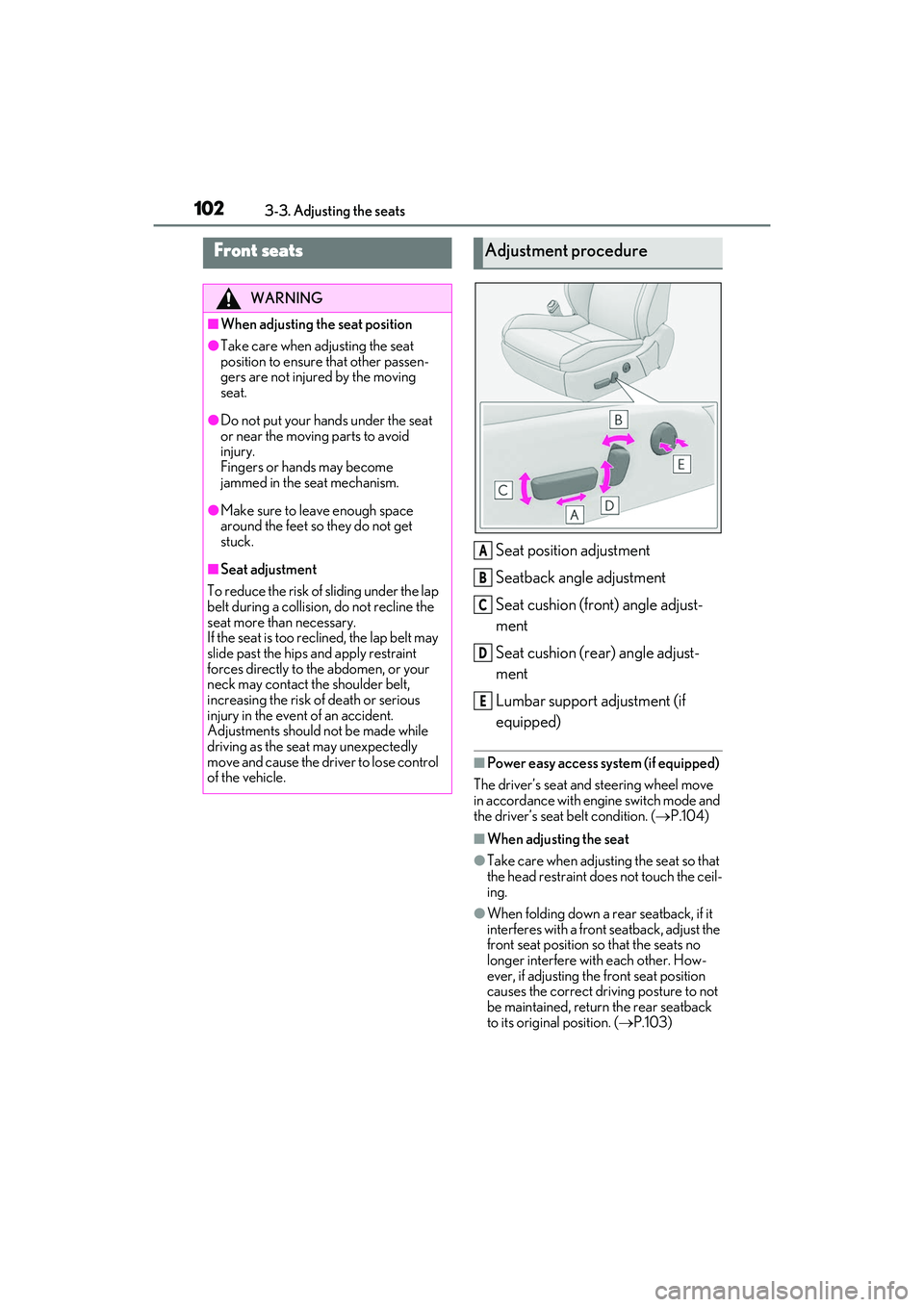
Seat position adjustment
Seatback angle adjustment
Seat cushion (front) angle adjust-
ment
Seat cushion (rear) angle adjust-
ment
Lumbar support adjustment (if
equipped)
■Power easy access system (if equipped)
The driver’s seat and steering wheel move
in accordance with engine switch mode and
the driver’s seat belt condition. ( P.104)
■When adjusting the seat
●Take care when adjusting the seat so that
the head restraint does not touch the ceil-
ing.
●When folding down a rear seatback, if it
interferes with a front seatback, adjust the
front seat position so that the seats no
longer interfere with each other. How-
ever, if adjusting the front seat position
causes the correct driving posture to not
be maintained, return the rear seatback
to its original position. ( P.103)
Front seats
WARNING
■When adjusting the seat position
●Take care when adjusting the seat
position to ensure that other passen-
gers are not injured by the moving
seat.
●Do not put your hands under the seat
or near the moving parts to avoid
injury.
Fingers or hands may become
jammed in the se at mechanism.
●Make sure to leave enough space
around the feet so they do not get
stuck.
■Seat adjustment
To reduce the risk of sliding under the lap
belt during a collision, do not recline the
seat more than necessary.
If the seat is too reclined, the lap belt may
slide past the hips and apply restraint
forces directly to the abdomen, or your
neck may contact the shoulder belt,
increasing the risk of death or serious
injury in the event of an accident.
Adjustments should not be made while
driving as the seat may unexpectedly
move and cause the driver to lose control
of the vehicle.
Adjustment procedure
A
B
C
D
E
Page 105 of 440

1033-3. Adjusting the seats
3
Before driving
1Check that the luggage security
system lever in the trunk is in the
unlock position.
2 Pull the seatback lock release lever
and fold the seatback down.
To return the rear seatbacks to their origi-
nal position, lift them up until they lock.
P.96
Rear seats
The rear seatbacks can be folded
down.
WARNING
Observe the following precautions. Fail-
ure to do so may result in death or seri-
ous injury.
■When folding the rear seatbacks
down
●Do not fold the seatbacks down while
driving.
●Stop the vehicle on level ground, set
the parking brake and shift the shift
lever to P.
●Do not allow anyone to sit on a folded
seatback or in the trunk while driving.
●Do not allow children to enter the
trunk.
■After returning the rear seatback to
the upright position
●Make sure that the seatback is
securely locked in position by lightly
pushing it back and forth.
If the seatback is not securely locked,
the red marking will be visible on the
seatback lock release knob. Make sure
that the red marking is not visible.
●Check that the seat belts are not
twisted or caught in the seatback.
Folding down the rear seatbacks
Luggage security system
Page 107 of 440

1053-3. Adjusting the seats
3
Before driving
If the selected button has already been
preset, the previously recorded position
will be overwritten.
■Seat positions that can be memorized
( P.102)
The adjusted positions other than the posi-
tion adjusted by lumbar support switch can
be memorized.
■In order to correctly use the driving
position memory function
If a seat position is already in the furthest
possible position and the seat is operated in
the same direction, the recorded position
may be slightly different when it is recalled.
1 Check that the shift lever is in P.
2 Turn the engine switch to IGNI-
TION ON mode. 3
Press one of the buttons for the
driving position you want to recall
until the buzzer sounds.
■To stop the position recall operation
part-way through
Perform any of the following operations:
●Press the “SET” button.
●Press button “1”, “2” or “3”.
●Operate any of the seat adjustment
switches (only cancels seat position
recall).
●Operate the tilt and telescopic steering
control switch (onl y cancels steering
wheel position recall).
■Operating the driving position memory
after turning the engine switch off
Recorded seat positions can be activated
up to 180 seconds after the driver’s door is
opened and another 60 seconds after it is
closed again. Recorded steering wheel
position can be activated by pressing the
engine switch.
■Registering procedure
Record your driving position to button
“1”, “2” or “3” before performing the
following:
Carry only the key yo u want to register,
WARNING
■Seat adjustment caution
Take care during seat adjustment so that
the seat does not strike the rear passen-
ger or squeeze your body against the
steering wheel.
Recalling a driving position
Registering/canceling/recall a
driving position to an electronic
key (including a card key) (mem-
ory recall function)
Page 109 of 440
1073-3. Adjusting the seats
3
Before driving
Front seats
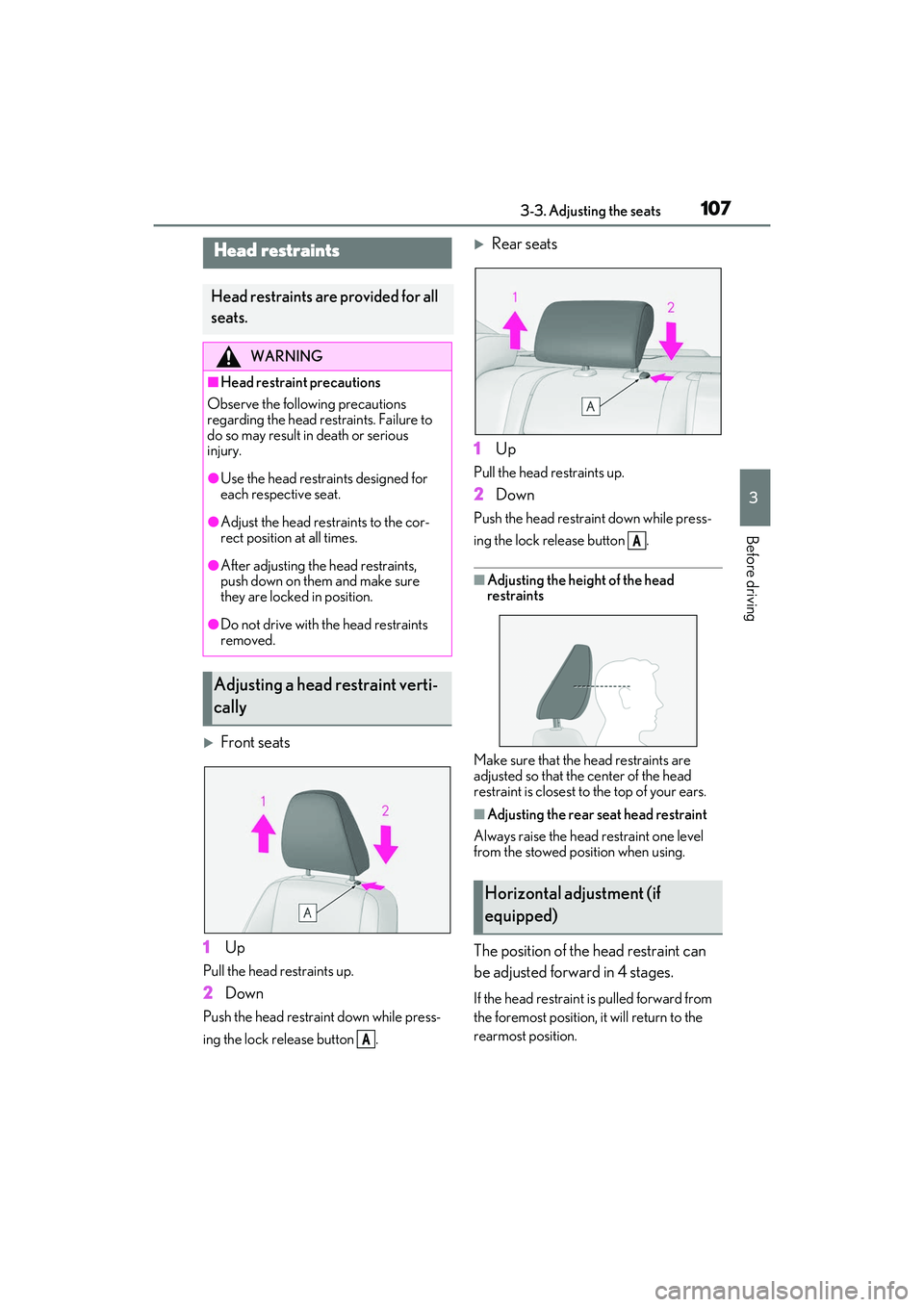
1 Up
Pull the head restraints up.
2Down
Push the head restraint down while press-
ing the lock release button .
Rear seats
1 Up
Pull the head restraints up.
2Down
Push the head restra int down while press-
ing the lock release button .
■Adjusting the heig ht of the head
restraints
Make sure that the head restraints are
adjusted so that the center of the head
restraint is closest to the top of your ears.
■Adjusting the rear seat head restraint
Always raise the head restraint one level
from the stowed position when using.
The position of the head restraint can
be adjusted forward in 4 stages.
If the head restraint is pulled forward from
the foremost position, it will return to the
rearmost position.
Head restraints
Head restraints are provided for all
seats.
WARNING
■Head restraint precautions
Observe the following precautions
regarding the head restraints. Failure to
do so may result in death or serious
injury.
●Use the head restraints designed for
each respective seat.
●Adjust the head restraints to the cor-
rect position at all times.
●After adjusting the head restraints,
push down on them and make sure
they are locked in position.
●Do not drive with the head restraints
removed.
Adjusting a head restraint verti-
cally
A
Horizontal adjustment (if
equipped)
A