2022 LEXUS IS350 change time
[x] Cancel search: change timePage 219 of 440

2174-5. Using the driving support systems
4
Driving
The Parking Support Brake can be
enabled/disabled on the multi-informa-
tion display. All of the Parking Support
Brake functions (static objects and
rear-crossing vehicles) are
enabled/disabled simultaneously.
Use the meter control switches to
enable/disable the parking support
brake. (P.76)
1 Press or to select . 2
Press or to select “
PKSB” and then press .
When the Parking Support Brake is dis-
abled, the PKSB OFF indicator ( P.66)
illuminates on the multi-information dis-
play.
When the Parking Support Brake is turned
on or off, operation of the Parking Support
Brake continues in the same condition the
next time the engine is started.
If the engine output restriction control or
brake control operates, a buzzer will sound
and a message will be displayed on the
Center Display and multi-information dis-
play, to alert the driver.
Depending on the situat ion, engine output
restriction control will operate to either
limit acceleration or restrict output as
much as possible.
Engine output restriction control is
operating (acceleration restriction)
Acceleration greater than a certain
amount is restricted by the system.
Center Display (Panoramic view monitor)
(If equipped): No warning displayed
Multi-information display: “Object
Detected Acceleration Reduced”
PKSB OFF indicator: Not illuminated
Buzzer: Does not sound
Engine output restriction control is
operating (output restricted as
much as possible)
The system has determined that stron-
ger-than-normal brake operation is neces-
sary.
WARNING
●When the vehicle is driven in a sporty
manner or off-road
●When the tires are not properly
inflated
●When the tires are very worn
●When a tire chains, compact spare tire
or an emergency tire puncture repair
kit is used
NOTICE
■If “Parking Support Brake Unavail-
able” is displayed on the multi-infor-
mation display and the PKSB OFF
indicator is flashing
If this message is displayed immediately
after the engine switch is changed to
IGNITION ON mode, operate the vehi-
cle carefully, paying attention to your
surroundings. It ma y be necessary to
drive the vehicle for a certain amount of
time before the system returns to normal.
(If the system is not return to normal after
driving for a while, clean the sensors and
their surrounding area on the bumpers.)
Enabling/Disabling the Parking
Support Brake
Displays and buzzers for engine
output restriction control and
brake control
Page 222 of 440

2204-5. Using the driving support systems
Time
Engine output restriction control begins operating
System determines that possibility of collision with detected object is high
Engine output reduced
System determines that possibility of col lision with detected object is extremely
high
Brake control begins operating
Brake control strength increased
Example: Multi-information display: “BRAKE!”
Example: Multi-information display: “Switch to Brake”
■If the Parking Support Brake has oper-
ated
If the vehicle is stoppe d due to operation of
the Parking Support Brake, the Parking
Support Brake will be disabled and the
PKSB OFF indicator will illuminate. If the
Parking Support Brake operates unneces-
sarily, brake control can be canceled by
depressing the brake pedal or waiting for
approximately 2 seconds for it to automati-
cally be canceled. Then, the vehicle can be
operated by depressing the accelerator
pedal.
■Re-enabling the Park ing Support Brake
To re-enable the Parking Support Brake
when it has been disabled due to system
operation perform an y of the following
operations.
At this time, the PKSB OFF indicator will
turn off. ( P.66)
●Turn the PKSB (Parking Support Brake)
on (P.217)
●The engine switch is turned to IGNI-
TION ON mode after the engine switch
has been turned off.
●The shift lever is in P.
●Drive with no operation targets in the
traveling direction of the vehicle
●Change the traveling direction of the
vehicle (such as chan ging from moving
forward to backing up, or from backing
up to moving forward)
■If “Parking Support Brake Unavailable”
is displayed on th e multi-information
display and the PKSB OFF indicator is
flashing
If this message is displayed only when the
shift lever is in any po sition other than R, a
sensor on the front or rear bumper may be
dirty. Clean the sensors and their surround-
ing area on the bumpers.
■If “Parking Support Brake Unavailable”
and “Parking Assist Unavailable Clean
Parking Assist Sensor” is displayed on
the multi-information display and the
PKSB OFF indicator is flashing
●A sensor may be cove red with ice, snow,
dirt, etc. Remove the ice, snow, dirt, etc.,
from the sensor to return the system to
normal.
If this message is shown even after
removing dirt from the sensor, or shown
when the sensor was not dirty to begin
with, have the vehicle inspected by your
Lexus dealer.
●A sensor may be frozen. Once the ice
melts, the system wi ll return to normal.
●Water may be continuo usly flowing over
the sensor surface, such as in a heavy
rain. When the system determines that it
is normal, the system will return to nor-
mal.
■If a battery terminal has been discon-
nected and reconnected
The system needs to be initialized. To initial-
ize the system, drive the vehicle straight
C
D
E
F
G
H
I
J
K
Page 229 of 440
2274-5. Using the driving support systems
4
Driving
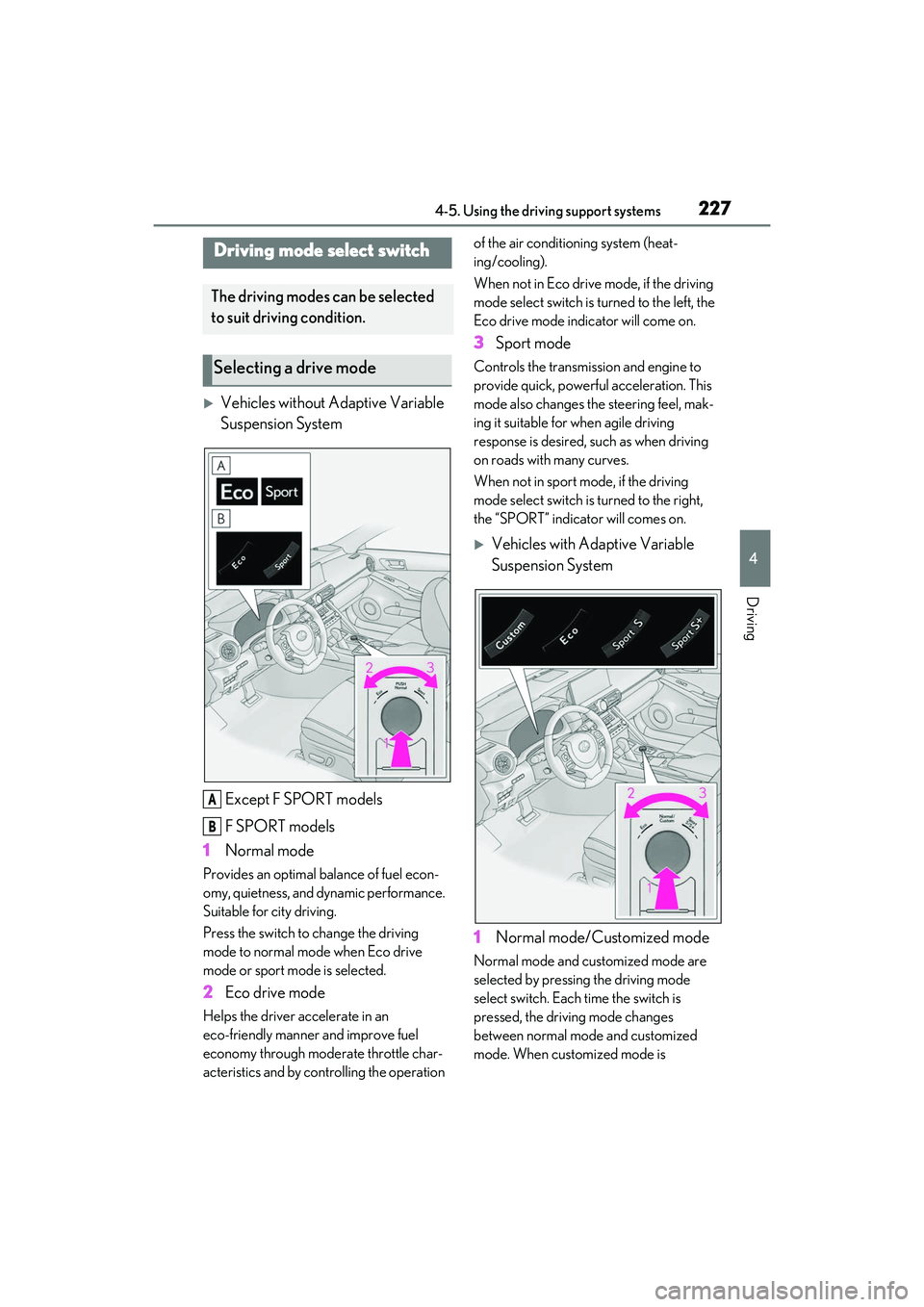
Vehicles without Adaptive Variable
Suspension SystemExcept F SPORT models
F SPORT models
1 Normal mode
Provides an optimal balance of fuel econ-
omy, quietness, and dynamic performance.
Suitable for city driving.
Press the switch to change the driving
mode to normal mode when Eco drive
mode or sport mode is selected.
2 Eco drive mode
Helps the driver accelerate in an
eco-friendly manner and improve fuel
economy through modera te throttle char-
acteristics and by controlling the operation of the air conditioning system (heat-
ing/cooling).
When not in Eco drive mode, if the driving
mode select switch is turned to the left, the
Eco drive mode indicator will come on.
3
Sport mode
Controls the transmission and engine to
provide quick, powerful acceleration. This
mode also changes the steering feel, mak-
ing it suitable for when agile driving
response is desired, such as when driving
on roads with many curves.
When not in sport mode, if the driving
mode select switch is turned to the right,
the “SPORT” indicator will comes on.
Vehicles with Adaptive Variable
Suspension System
1 Normal mode/Customized mode
Normal mode and customized mode are
selected by pressing the driving mode
select switch. Each time the switch is
pressed, the driving mode changes
between normal mode and customized
mode. When customized mode is
Driving mode select switch
The driving modes can be selected
to suit driving condition.
Selecting a drive mode
A
B
Page 240 of 440

2385-1. Remote Touch/Display
5-1.Remote Touch/Display
■SwitchesVehicles with a 10.3-inch display:
“MAP” button
Vehicles with navigation function:
Press this button to display the vehicle’s
current position.
Vehicles without navigation function:
Press this button to display the compass
mode screen.
“MENU” button
Press this button to display the menu
screen.
Back button
Press this button to display the previous
screen.
Touchpad
Slide your finger on the touchpad and
move the pointer to select a function, letter
and screen button. Press the touchpad to enter the selected
function, letter or screen button. Certain
finger movements on the touchpad can
perform functions, su
ch as changing map
scalings and scrolling list screens.
Sub function button
When is displayed on the screen, a
function screen assigned to the screen can
be displayed.
Vehicles with a 8-inch display:
“HOME” button
Press this button to display the compass
mode screen.
■Using the touchpad
1 Select: Touch the touchpad to
select the desired button on the
screen.
2 Enter: Buttons on the screen can be
selected by either depressing or
double tapping the touchpad.
Once a button has been selected,
the screen will change.
■Touch operation
Operations are performed by touching
the touchpad with your finger.
Trace
Trace the pad surface while maintaining
contact with the touchpad. Moving the
cursor and the pointer.
Remote Touch
The Remote Touch can be used to
operate the Center Display.
For details on the Remote touch,
refer to “NAVIGATION AND
MULTIMEDIA SYSTEM
OWNER’S MANUAL”.
Remote Touch operation
A
B
C
D
E
F
Page 246 of 440

2445-2. Using the air conditioning system and defogger
Rear window defogger and outside rear view mirror defoggers switch
Windshield defogger switch
■Adjusting the temperature
To adjust the temperature setting,
touch and slide your finger up or down
on the sensor.
The temperature setting can also be
adjusted by touching on the sensor.
When the temperature setting is changed,
a buzzer sounds.
If the A/C switch is not pressed, the system
will blow ambient temperature air or
heated air.
■Setting the fan speed
Operate the switch to increase the
fan speed and the switch to
decrease the fan speed.
Press the off switch to turn the fan off.
■Changing the air flow mode
To change the airflow, press the air flow
mode switch.
The air outlets used are switched each time
the button is pressed.
1 Air flows to the upper body.
2 Air flows to the upper body and
feet.
3 Air flows to the feet.
4 Air flows to the feet and the wind-
shield defogger operates.
■Switching between outside air and
recirculated air modes
To change to recirculated air mode,
press the recirculated air mode switch.
The indicator illuminates on the recircu-
lated air mode switch.
To change to outside air mode, press
the outside air mode switch.
The indicator illuminates on the outside air
mode switch.
■Set cooling and dehumidification
function
Press the A/C switch.
When the function is on, the indicator illu-
minates on the A/C switch.
L
M
Page 248 of 440

2465-2. Using the air conditioning system and defogger
senger door.
●The doors that can recall the air condi-
tioning setting when unlocked using the
smart access system with push-button
start can be changed.
* For details, con-
tact your Lexus dealer.
*: The doors that can recall the driving
position memory are changed at the
same time.
■Operation of the air conditioning sys-
tem in Eco drive mode
In Eco drive mode, the air conditioning sys-
tem is controlled as follows to prioritize fuel
efficiency:
●Engine speed and compressor operation
controlled to restri ct heating/cooling
capacity
●Fan speed restricted when automatic
mode is selected
To improve air condit ioning performance,
perform the following operations:
●Adjust the fan speed
●Turn off Eco drive mode ( P.227)
■When the outside temperature falls to
nearly 32°F (0°C)
The dehumidification function may not
operate even when A/C is pressed or
“A/C” is selected.
■Ventilation and air conditioning odors
●To let fresh air in, set the air conditioning
system to the outside air mode.
●During use, various odors from inside and
outside the vehicle may enter into and
accumulate in the air conditioning sys-
tem. This may then cause odor to be
emitted from the vents.
●To reduce potential odors from occur-
ring:
• It is recommended that the air condition- ing system be set to outside air mode
prior to turning the vehicle off.
• The start timing of the blower may be delayed for a short period of time imme-
diately after the air conditioning system is
started in automatic mode or with the
micro dust and pollen filter on.
■Using the voice command system
Air conditioning system can be operated
using voice commands. For details, refer to
“NAVIGATION AND MULTIMEDIA
SYSTEM OWNER’S MANUAL”.
■Air conditioning filter
P.307
■Air conditioning system refrigerant
●A label regarding the refrigerant of the
air conditioning system is attached to the
hood at the location shown in the follow-
ing illustration.
●The meaning of each symbol on the label
are as follows:
■Customization
Some functions can be customized.
( P.388)
Caution
Air conditioning system
Air conditioning system
lubricant type
Requires registered tech-
nician to service air condi-
tioning system
Flammable refrigerant
Page 251 of 440

2495-2. Using the air conditioning system and defogger
5
Interior features
pollen filter is turned off.
1Press the automatic mode switch or
select “AUTO” on the sub function
menu. ( P.247)
2 Adjust the temperature setting.
3 To stop the operation, press the off
switch or select “OFF” on the sub
function menu. ( P.247)
If the fan speed setting or air flow modes
are operated, the automatic mode indica-
tor goes off. However, automatic mode for
functions other than th at operated is main-
tained.
■Using automatic mode
Fan speed is adjusted automatically accord-
ing to the temperature setting and the
ambient conditions.
Therefore, the fan may stop for a while until
warm or cool air is ready to flow immedi-
ately after the automatic mode switch is
pressed or “AUTO” is selected.
Cool air may blow ar ound the upper body
even when the heater is on due to sunlight.
This feature is used to prevent ice from
building up on the windshield and
wiper blades.
Turns on/off.
The indicator comes on when the wind-
shield wiper de-icer is on. The windshield de-icer will automatically
turn off after a period of time.
To turn on the “DUAL” mode, perform
any of the following procedures:
Press the DUAL switch.
Select “DUAL” on the sub function
menu.
Select “DUAL” on the option con-
trol screen.
Select “DUAL” on the side display.
Adjust the passenger’s side tem-
perature setting.
The indicator on the main control screen
comes on when the “DUAL” mode is on.
■Location of air outlets
The air outlets and air volume changes
Using automatic mode
Windshield wiper de-icer (if
equipped)
WARNING
■To prevent burns
Do not touch the glass at lower part of
the windshield or to the side of the front
pillars when the windshield wiper de-icer
is on.
Adjusting the temperature for
the driver and passenger seats
separately
Air outlet layout and operations
Page 253 of 440
2515-2. Using the air conditioning system and defogger
5
Interior features
*:If equipped
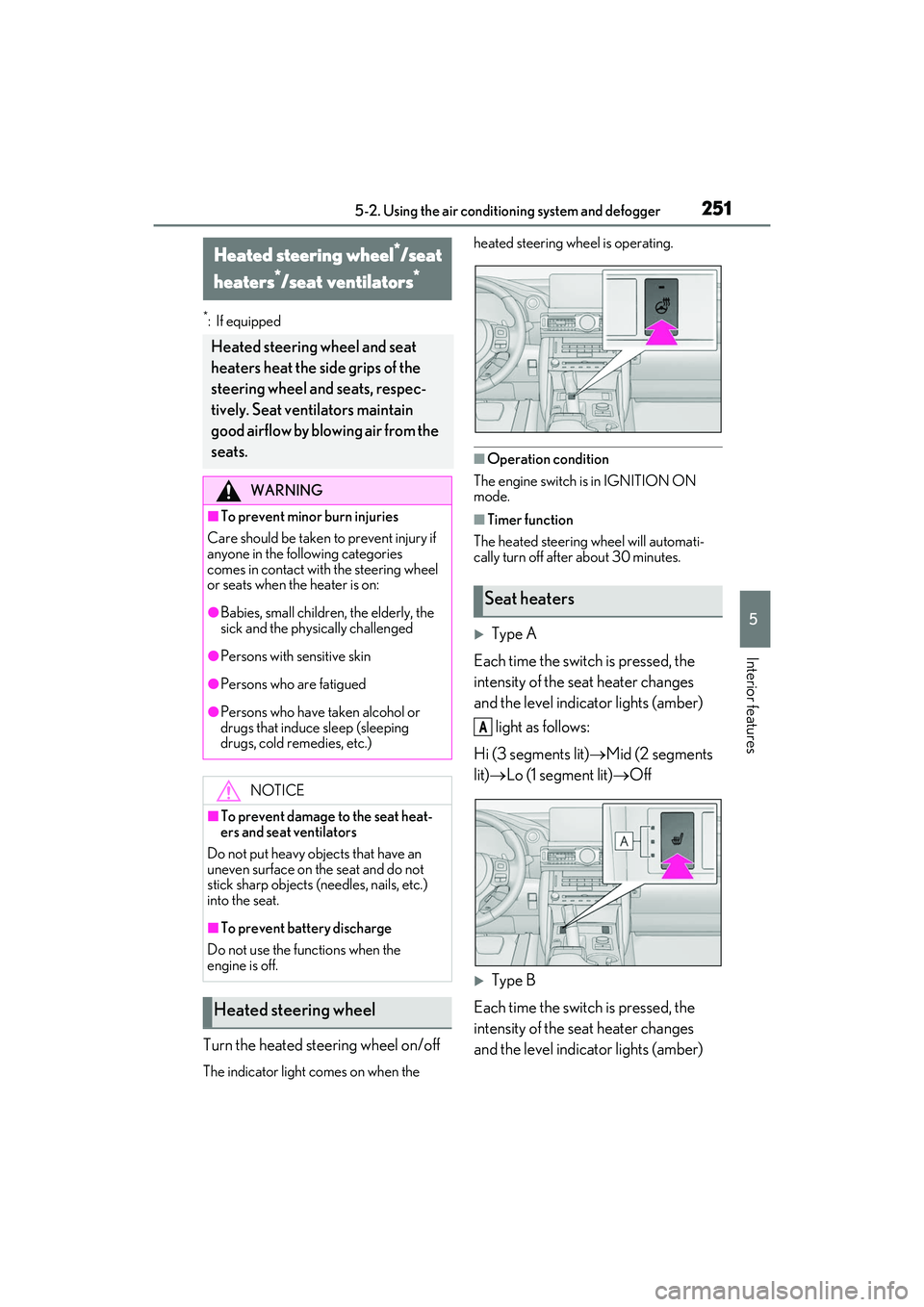
Turn the heated steering wheel on/off
The indicator light comes on when the heated steering wheel is operating.
■Operation condition
The engine switch is in IGNITION ON
mode.
■Timer function
The heated steering wheel will automati-
cally turn off after about 30 minutes.
Type A
Each time the switch is pressed, the
intensity of the seat heater changes
and the level indicator lights (amber) light as follows:
Hi (3 segments lit) Mid (2 segments
lit) Lo (1 segment lit) Off
Type B
Each time the switch is pressed, the
intensity of the seat heater changes
and the level indicator lights (amber)
Heated steering wheel*/seat
heaters
*/seat ventilators*
Heated steering wheel and seat
heaters heat the side grips of the
steering wheel and seats, respec-
tively. Seat ventilators maintain
good airflow by blowing air from the
seats.
WARNING
■To prevent minor burn injuries
Care should be taken to prevent injury if
anyone in the following categories
comes in contact with the steering wheel
or seats when the heater is on:
●Babies, small children, the elderly, the
sick and the phys ically challenged
●Persons with sensitive skin
●Persons who are fatigued
●Persons who have taken alcohol or
drugs that induce sleep (sleeping
drugs, cold remedies, etc.)
NOTICE
■To prevent damage to the seat heat-
ers and seat ventilators
Do not put heavy objects that have an
uneven surface on the seat and do not
stick sharp objects (needles, nails, etc.)
into the seat.
■To prevent battery discharge
Do not use the functions when the
engine is off.
Heated steering wheel
Seat heaters
A