Page 391 of 440
3898-2. Customization
8
Vehicle specifications
Definition of symbols: O = Available, — = Not available
■Gauges, meters and multi-information display ( P.64, 69, 75)
Function*1Default settingCustomized setting
LanguageEnglishFrenchOO—Spanish
Units*2miles (MPG US)
miles (MPG Impe-
rial)
OO—km (L/100 km)
km (km/L)
Eco Driving Indicator LightOnOff—O—
Switch settings*3Drive information 1Desired status
screen
*4—O—
Drive information 1
Current fuel con- sumption
Customizable items: P.78
—O—Average fuel econ-omy (after reset)
Drive information 2
Distance (driving range)
—O—Average vehicle
speed (after reset)
Drive information 3*3
Average fuel con- sumption (after refuel)
—O—
Elapsed time (after start)
Pop-up displayOnOff—O—
ColorColor 1Color 2OO—
Rev indicator*55000 rpm
2000 - 6800
rpm
*6
2000 - 6100 rpm*7
2000 - 7300 rpm
*8
—O—
Off
ABC
Page 393 of 440

3918-2. Customization
8
Vehicle specifications
■Smart access system with push-button start and wireless remote control
( P.90, 97)
■Smart access system with push-button start ( P.90, 97)
■Wireless remote control ( P.88, 90, 94)
FunctionDefault settingCustomized setting
Operation buzzer volume5OffO—O1 to 7
Operation signal (Emer-
gency flashers)OnOffO—O
Time elapsed before auto-
matic door lock function is
activated if door is not
opened after being unlocked
60 seconds
Off
O—O30 seconds
120 seconds
Open door warning buzzerOnOff——O
Welcome light illumination
controlOnOff——O
FunctionDefault settingCustomized setting
Smart access system with
push-button startOnOff——O
Smart door unlockingDriver’s doorAll the doorsO—O
Number of consecutive door
lock operations2 timesAs many as desired——O
FunctionDefault settingCustomized setting
Wireless remote controlOnOff——O
Unlocking operation
Driver’s door
unlocked in one step, all doors
unlocked in two steps
All doors unlocked in one stepO—O
ABC
ABC
ABC
Page 395 of 440

3938-2. Customization
8
Vehicle specifications
*:If equipped
■Turn signal lever (P.138)
*1: After flashing the turn signal lights when turnin g left or right while this function is off and
the turn signal lever is moved to the first positi on in the direction of the flashing light, the
turn signal lights can be sele cted to be flashing or off.
*2: The turn signal lights keep flashing if the turn signal lever is moved to the first position in
the direction of flashing light.
*3: The turn signal lights will be off if the turn signal lever is moved to the first position in the direction of flashing light.
■Automatic light control system ( P.145)
Wireless remote control
linked operationOffOn (open only)——O
Linked operation of compo-
nents when wireless remote
control is used
Slide onlyTilt only——O
Wireless remote control
linked operation signal
(buzzer)
OnOff——O
FunctionDefault settingCustomized setting
The number of times the turn
signal lights flash automati-
cally when the turn signal
lever is moved to the first
position during a lane
change
*1
3
5
——O
7
Off*2
Off*3
FunctionDefault settingCustomized setting
Light sensor sensitivityStandard-2 to 2O—O
Time elapsed before head-
lights automatically turn off
after doors are closed
30 seconds
Off
O—O60 seconds
90 seconds
FunctionDefault settingCustomized settingABC
ABC
ABC
Page 396 of 440

3948-2. Customization
■Lights (P.145)
*: U.S.A. only
■PCS (Pre-Collision System) ( P.165)
*: The system is automatically enabled each time the engine switch is turned to IGNITION
ON mode.
■LTA (Lane Tracing Assist) ( P.175)
■RSA (Road Sign Assist)* ( P.184)
*:If equipped
FunctionDefault settingCustomized setting
Daytime running lights*OnOffO—O
FunctionCustomized setting
PCS (Pre-Collision System)*On, Off—O—
Adjust alert timingEarly, Middle, Late—O—
FunctionCustomized setting
Lane centering functionOn, Off—O—
Alert typeSteering wheel vibration,
Buzzer—O—
Alert sensitivityHigh, Standard—O—
Vehicle sway warning functionOn, Off—O—
Vehicle sway warning sensitivityHigh, Standard, Low—O—
FunctionCustomized setting
RSA (Road Sign Assist)On, Off—O—
Excess speed notification
methodDisplay only, Display and buzzer, No notifi- cation—O—
Excess speed notification
level1 mph (2 km/h), 3 mph (5 km/h), 5 mph (10 km/h)—O—
Other notifications method
(No-entry notification)Display only, Display and buzzer, No notifi- cation—O—
ABC
ABC
ABC
ABC
Page 398 of 440
3968-2. Customization
■PKSB (Parking Support Brake)* ( P.216)
*:If equipped
■Driving mode select switch ( P.227)
*:If equipped
■Automatic air conditioning system ( P.243)
■Seat heaters* ( P.251)
*:If equipped
■Illumination ( P.253)
FunctionDefault settingCustomized setting
PKSB (Parking Support
Brake) functionOnOff—O—
FunctionDefault settingCustomized setting
Powertrain control in custom-
ized mode
*NormalPowerO——Eco
Chassis control in custom-
ized mode
*NormalSportO——
Air conditioning operation in
customized mode
*NormalEcoO——
FunctionDefault settingCustomized setting
A/C Auto switch operationOnOffO—O
FunctionDefault settingCustomized setting
Seat heater timer controlOffOnO—O
FunctionDefault settingCustomized setting
Time elapsed before the inte-
rior lights turn off15 seconds
Off
O—O7.5 seconds
30 seconds
Operation after the engine
switch is turned offOnOff——O
ABC
ABC
ABC
ABC
ABC
Page 399 of 440
3978-2. Customization
8
Vehicle specifications
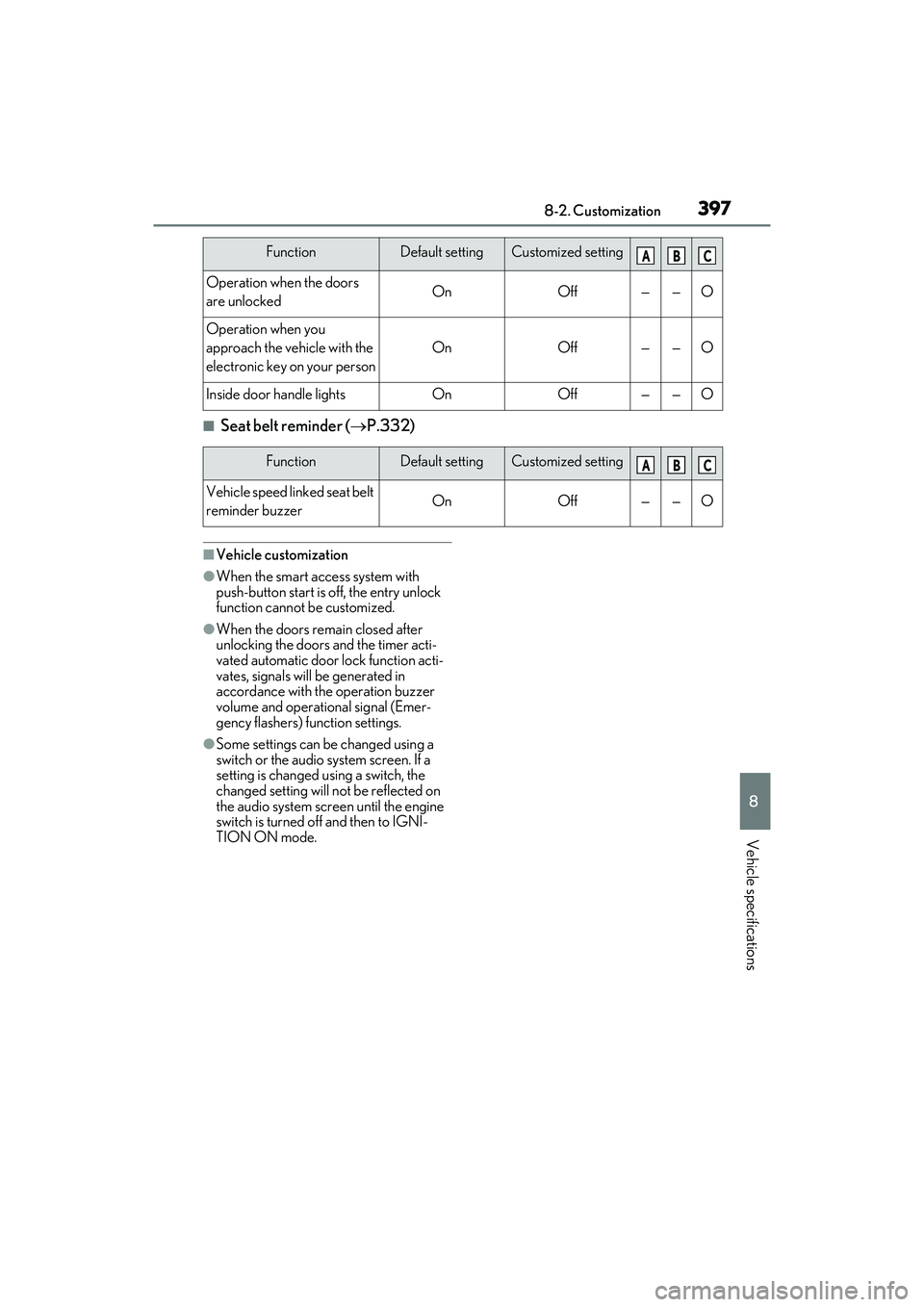
■Seat belt reminder (P.332)
■Vehicle customization
●When the smart access system with
push-button start is off, the entry unlock
function cannot be customized.
●When the doors rema in closed after
unlocking the doors and the timer acti-
vated automatic door lock function acti-
vates, signals will be generated in
accordance with the operation buzzer
volume and operational signal (Emer-
gency flashers) function settings.
●Some settings can be changed using a
switch or the audio system screen. If a
setting is changed using a switch, the
changed setting will not be reflected on
the audio system screen until the engine
switch is turned of f and then to IGNI-
TION ON mode.
Operation when the doors
are unlockedOnOff——O
Operation when you
approach the vehicle with the
electronic key on your person
OnOff——O
Inside door handle lightsOnOff——O
FunctionDefault settingCustomized setting
Vehicle speed linked seat belt
reminder buzzerOnOff——O
FunctionDefault settingCustomized settingABC
ABC
Page 401 of 440
399
9
9
For owners
For owners
.9-1. For ownersReporting safety defects for U.S. owners ........................................ 400
Reporting safety defects for Canadian owners ................... 400
Seat belt instructions for Cana- dian owners (in French)........ 401
SRS airbag instructions for Cana- dian owners (in French)....... 402
Headlight aim instructions for Canadian owners (in French)
........................................................ 408
Page 410 of 440

4089-1. For owners
Boulon de réglage A
Boulon de réglage B
Vérifiez que le réservoir de carbu-
rant du véhicule est plein et que la
zone autour des phares n'est pas
déformée.
Stationnez le véhicule sur une sur-
face plane.
Assurez-vous que la pression de
gonflage des pneus est au niveau
recommandé.
Faites asseoir quelqu'un dans le
siège conducteur.
AVERTISSEMENT
■Modification et mise au rebut des
composants du système de coussins
gonflables SRS
Ne mettez pas votre véhicule au rebut et
ne procédez à aucune des modifications
suivantes sans consulter votre conces-
sionnaire Lexus. Les coussins gonflables
SRS peuvent ne pas fonctionner cor-
rectement ou se déployer (se gonfler)
accidentellement, prov oquant la mort ou
de graves blessures.
●Installation, dépo se, démontage et
réparation des coussins gonflables
SRS
●Réparations, modifications, dépose ou
remplacement du vo lant, du tableau
de bord, de la planche de bord, des
sièges ou de leur garnissage, des mon-
tants avant, latéraux et arrière ou des
rails latéraux de toit
●Réparations ou modi fications des ailes
avant, du pare-chocs avant ou des
flancs de l'habitacle
●Installation d'un protège-calandre
(pare-buffle, pare-kangourou, etc.), de
chasse-neige, de treuils ou d'un
porte-bagages de toit
●Modifications du système de suspen-
sion du véhicule
●Installation d'appareils électroniques
tels que les émetteurs/récepteurs
radios mobiles et les lecteurs CD
●Modifications de votre véhicule pour
une personne atteinte d'un handicap
physique
Headlight aim instructions
for Canadian owners (in
French)
The following is a French explana-
tion of headlight aim instructions
from the headlight aim section in
this manual.
Boulons de réglage du mouve-
ment vertical
Avant de vérifier le réglage des
phares
A
B


