2022 LEXUS IS300 IS500
[x] Cancel search: IS500Page 73 of 440

712-1. Instrument cluster
2
Vehicle status information and indicators
Main meter in center position (IS500)
The units of measure may differ depending on the intended destination of the vehicle.
Engine oil temperature gauge
Displays the engine oil temperature
Outside temperature
Displays the outside temperature within the range of -40°F (-40°C) to 122°F (50°C)
Tachometer
Displays the engine speed in revolutions per minute
When sport mode is selected for the driving mode, the periphery of the tachometer will
change color and the scale of the tachometer will be emphasized.
Speedometer
Shift position and gear position ( P.134)
Clock
Time displayed is linked to the anal og clock on the center panel. (P.260)
Engine coolant temperature gauge
Displays the engine coolant temperature
Odometer and trip meter display ( P.74)
Fuel gauge
Displays the quantity of fuel remaining in the tank
Multi-information display
Presents the driver with a variety of vehicle data ( P.75)
Displays warning messages if a malfunction occurs (P.338)
A
B
C
D
E
F
G
H
I
J
Page 75 of 440

732-1. Instrument cluster
2
Vehicle status information and indicators
The desired engine speed at which the Rev
indicator will begin to be displayed can be
set on of the mult i-information display.
■Rev peak (F SPORT models)
The engine speed reaches or exceeds
5000 rpm, an afterimage of the
tachometer will be displayed at the
highest engine speed for approxi-
mately 0.5 seconds.
Moves between center and right-side
positions.
■The meters and display illuminate when
The engine switch is in IGNITION ON
mode.
■Variable red zone (IS500)
To help protect the engine, the engine
speed is controlled by starting the red zone
of the tachometer at different engine
speeds ranging from 3700 rpm to 7300
rpm depending on the engine coolant tem-
perature. Before driving under extremely
high load conditions, make sure to suffi-
ciently warm up the engine.
■Outside temperature display
●In the following situations, the correct
outside temperature may not be dis-
played, or the display may take longer
than normal to change:
• When stopped, or driving at low speeds (less than 12 mph [20 km/h])
• When the outside temperature has changed suddenly (at the entrance/exit of
a garage, tunnel, etc.)
Changing the main meter loca-
tion (F SPORT models)
Page 272 of 440
2706-1. Maintenance and care
6-1.Maintenance and care
Working from top to bottom, liber-
ally apply water to the vehicle body,
wheel wells and underside of the
vehicle to remove any dirt and dust.
Wash the vehicle body using a
sponge or soft cloth, such as a
chamois.
For hard-to-remove marks, use car
wash soap and rinse thoroughly with
water.
Wipe away any water.
Wax the vehicle when the water-
proof coating deteriorates.
If water does not bead on a clean surface,
apply wax when the vehicle body is cool.
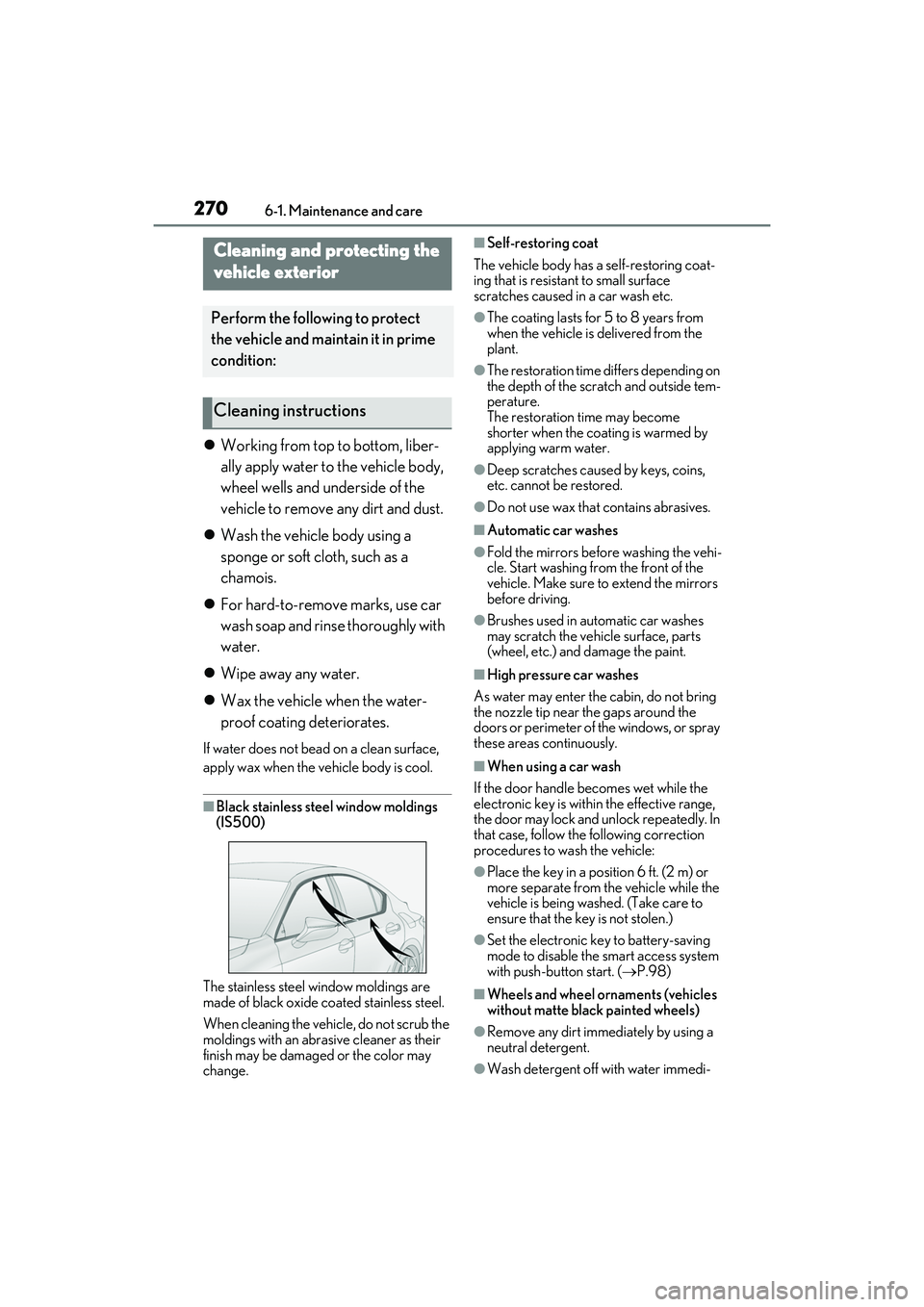
■Black stainless steel window moldings
(IS500)
The stainless steel window moldings are
made of black oxide coated stainless steel.
When cleaning the vehicle, do not scrub the
moldings with an abrasive cleaner as their
finish may be damaged or the color may
change.
■Self-restoring coat
The vehicle body has a self-restoring coat-
ing that is resistant to small surface
scratches caused in a car wash etc.
●The coating lasts for 5 to 8 years from
when the vehicle is delivered from the
plant.
●The restoration time differs depending on
the depth of the scratch and outside tem-
perature.
The restoration time may become
shorter when the coating is warmed by
applying warm water.
●Deep scratches caused by keys, coins,
etc. cannot be restored.
●Do not use wax that contains abrasives.
■Automatic car washes
●Fold the mirrors before washing the vehi-
cle. Start washing from the front of the
vehicle. Make sure to extend the mirrors
before driving.
●Brushes used in automatic car washes
may scratch the vehicle surface, parts
(wheel, etc.) and damage the paint.
■High pressure car washes
As water may enter the cabin, do not bring
the nozzle tip near the gaps around the
doors or perimeter of the windows, or spray
these areas continuously.
■When using a car wash
If the door handle becomes wet while the
electronic key is within the effective range,
the door may lock and unlock repeatedly. In
that case, follow the following correction
procedures to wash the vehicle:
●Place the key in a position 6 ft. (2 m) or
more separate from the vehicle while the
vehicle is being washed. (Take care to
ensure that the key is not stolen.)
●Set the electronic key to battery-saving
mode to disable the smart access system
with push-button start. ( P.98)
■Wheels and wheel ornaments (vehicles
without matte black painted wheels)
●Remove any dirt immediately by using a
neutral detergent.
●Wash detergent off with water immedi-
Cleaning and protecting the
vehicle exterior
Perform the following to protect
the vehicle and maintain it in prime
condition:
Cleaning instructions
Page 278 of 440
2766-1. Maintenance and care
Remove dirt and dust using a vac-
uum cleaner.
Wipe it off with a soft cloth damp-
ened with neutral detergent diluted
to approximately 1%.
Wring out any excess water from
the cloth and thoroughly wipe off
remaining traces of detergent and
water.
It is recommended that regular mainte-
nance should be performed for areas
that are frequently touched to maintain
quality.
■Routine maintenance
This maintenance is most effective if
performed regularly (around once per
month).
1 Soak a cloth in lukewarm water
(approximately 104°F [40°C]),
wring it out thoroughly and then
wipe the entire body.
Wipe carefully so that the pile is not dishev-
eled. Be sure to prepare a clean cloth.
Once you have wiped the part with the
cloth, rinse it until it is completely clean
before using the cloth again.
2 Once it has dried, use a lint brush
or the like to comb the pile.
■When cleaning the artificial
leather (Ultrasuede
®)
If liquid is spilled onto the surface, apply tissue paper or the like to
absorb the liquid.
If any substance such as mud or cof-
fee dries and becomes stuck to the
surface, use a lint brush or the like to
lightly brush the dirty area and
remove the substance. Then, it is
recommended to clean the dried
substance from the surface using a
vacuum cleaner.
For oil-based substances, use a dry
cloth or tissue paper to wipe off the
substance as much as possible,
while being careful not to spread it.
If the substance still cannot be
removed, use the following procedure
to remove it.
1 Liquid substances: Soak a cloth in
lukewarm water (approximately
104°F [40°C]), wring it out thor-
oughly and then wipe the dirty area
from the outside inward.
Wipe carefully so that the pile is not dishev-
eled. Be sure to prepare a clean cloth and
use the clean portion of it to clean the sur-
face.
Oil-based substances: Dab a cloth soaked
in benzene, lukewarm water or pure ethyl
alcohol (for drinking) within the dirty area
from the outside inward, and then dab a
dry cloth on the dirty area to absorb the
substance.
2 If the pile on the surface is dishev-
eled, use a lint brush or the like to
lightly brush the surface, and then
allow the surface to dry completely.
■To remove substances adhered to
the pile
To clean dust or other adhered sub-
stances, use a lint brush or the like to
Cleaning the synthetic leather
areas
Cleaning the artificial leather
(Ultrasuede
®*) areas (IS500)
Page 288 of 440
![LEXUS IS300 2022 Owners Manual 2866-3. Do-it-yourself maintenance
AWD models
■Rear
IS350 AWD/IS350/IS300
AWD/IS300 (vehicles without LSD
[Limited Slip Differential])
IS350/IS500 (vehicles with LSD
[Limited Slip Differ](/manual-img/36/58923/w960_58923-287.png "LEXUS IS300 2022 Owners Manual 2866-3. Do-it-yourself maintenance
AWD models
■Rear
IS350 AWD/IS350/IS300
AWD/IS300 (vehicles without LSD
[Limited Slip Differential])
IS350/IS500 (vehicles with LSD
[Limited Slip Differ")
2866-3. Do-it-yourself maintenance
AWD models
■Rear
IS350 AWD/IS350/IS300
AWD/IS300 (vehicles without LSD
[Limited Slip Differential])
IS350/IS500 (vehicles with LSD
[Limited Slip Differential])
Page 291 of 440

2896-3. Do-it-yourself maintenance
6
Maintenance and care
IS500Fuse boxes ( P.310)
Battery ( P.294)
Engine oil level dipstick ( P.289)
Engine coolant reservoir ( P.292)
Engine oil filler cap ( P.290)
Brake fluid reservoir ( P.294)
Washer fluid tank ( P.296)
Electric cooling fans
Condenser ( P.293)
Radiator ( P.293)
With the engine at operating tempera-
ture and turned off, check the oil level
on the dipstick.
■Checking the engine oil
1 Park the vehicle on level ground.
After warming up the engine and
turning it off, wait more than 5 min-
utes for the oil to drain back into the
bottom of the engine.
2 Holding a rag under the end, pull
the dipstick out.
A
B
C
D
E
F
G
H
I
J
Checking and adding the engine
oil
Page 292 of 440
2906-3. Do-it-yourself maintenance
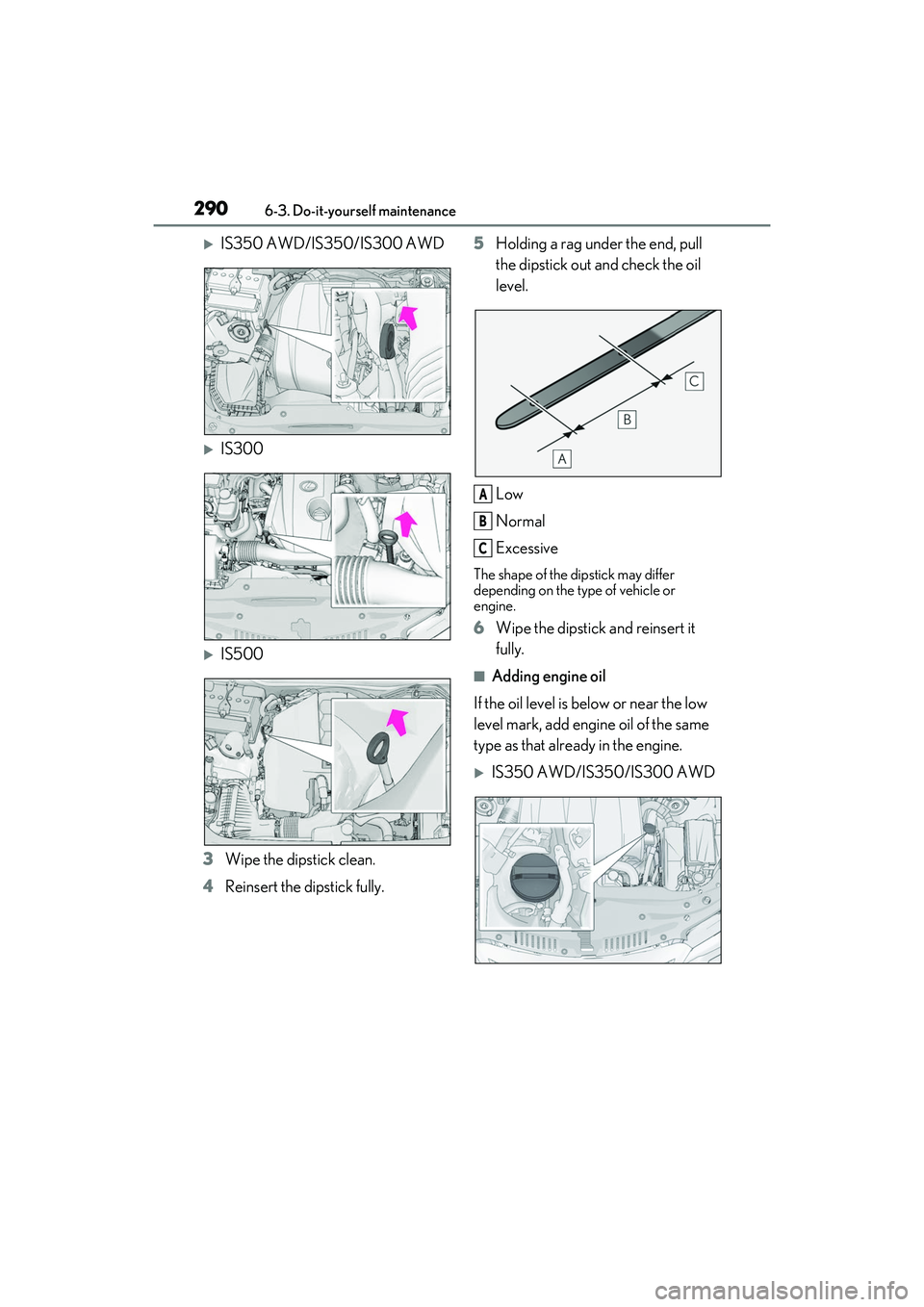
IS350 AWD/IS350/IS300 AWD
IS300
IS500
3 Wipe the dipstick clean.
4 Reinsert the dipstick fully. 5
Holding a rag under the end, pull
the dipstick out and check the oil
level.
Low
Normal
Excessive
The shape of the dipstick may differ
depending on the type of vehicle or
engine.
6Wipe the dipstick and reinsert it
fully.
■Adding engine oil
If the oil level is below or near the low
level mark, add engine oil of the same
type as that already in the engine.
IS350 AWD/IS350/IS300 AWD
A
B
C
Page 293 of 440

2916-3. Do-it-yourself maintenance
6
Maintenance and care
IS300
IS500
1 Remove the oil filler cap by turning
it counterclockwise.
2 Add engine oil slowly, checking the
dipstick.
3 Install the oil filler cap by turning it
clockwise.
■Checking the oil type and prepar-
ing the item needed
Make sure to check the oil type and
prepare the items needed before add-
ing oil.
Engine oil selection
P.367
Oil quantity (Low Full)
1.6 qt. (1.5 L, 1.3 Imp. qt.)
Item
Clean funnel
■Engine oil consumption
A certain amount of engine oil will be con-
sumed while driving. In the following situa-
tions, oil consumption may increase, and
engine oil may need to be refilled in
between oil maintenance intervals.
●When the engine is new, for example
directly after purchasing the vehicle or
after replacing the engine
●If low quality oil or oil of an inappropriate
viscosity is used
●When driving at high engine speeds or
with a heavy load, or when driving while
accelerating or dece lerating frequently
●When leaving the engine idling for a long
time, or when driving frequently through
heavy traffic
■After changing the engine oil (IS350
AWD/IS350/IS300 AWD/IS300)
The engine oil maintenance data should be
reset. Perform the following procedures:
1 Press or of the meter control
switch to select on the multi-infor-
mation display.
2 Press or of the meter control
switch, select the “Vehicle Settings”
then “Oil Maintenance”. (To confirm
setting, press .)
3 Select the “Yes” and press .
4 A message will be displayed on the
multi-information display when the
reset procedure has been completed.
WARNING
■Used engine oil
●Used engine oil contains potentially
harmful contaminants which may
cause skin disorders such as inflamma-
tion and skin cancer, so care should be
taken to avoid prolonged and
repeated contact. To remove used
engine oil from your skin, wash thor-
oughly with soap and water.