2022 LEXUS ES350 set
[x] Cancel search: setPage 32 of 468

301-1. For safe use
Driver’s seat belt buckle switch
Airbag sensor assembly
“PASSENGER AIR BAG” indicator lights
Front passenger’s seat belt buckle switch
Front impact sensors
Your vehicle is equipped with ADVANCED AIRBAGS designed based on the
US motor vehicle safety standards (FMVSS208). The airbag sensor assembly
(ECU) controls airbag deployment based on information obtained from the sen-
sors etc. shown in the system components diagram above. This information
includes crash severity and occupant information. As the airbags deploy, a chemi-
cal reaction in the inflators quickly fills the airbags with non-toxic gas to help
restrain the motion of the occupants.
■If the SRS airbags deploy (inflate)
●Slight abrasions, burns, bruising etc., may
be sustained from SRS airbags, due to the
extremely high speed deployment (infla-
tion) by hot gases.
●A loud noise and white powder will be
emitted.
●Parts of the airbag module (steering
wheel hub, airbag cover and inflator) as
well as the front seats, parts of the front
and rear pillars, and roof side rails, may
be hot for several minutes. The airbag
itself may also be hot.
●The windshield may crack.
●All of the doors will be unlocked.
( P.97)
●The brakes and stop lights will be con-
trolled automatically. ( P.246)
●The interior lights will turn on automati-
cally. ( P.274)
●The emergency flashers will turn on auto-
matically. ( P.344)
●Fuel supply to the engine will be stopped.
( P.350)
●For Lexus Enform Safety Connect sub-
scribers, if any of the following situations
occur, the system is designed to send an
emergency call to the response center,
notifying them of the vehicle’s location
(without needing to push the “SOS” but- ton) and an agent will attempt to speak
with the occupants to ascertain the level
of emergency and assistance required. If
the occupants are unable to communi-
cate, the agent automatically treats the
call as an emergency and helps to dis-
patch the necessary emergency services.
(
P.55)
•An SRS airbag is deployed.
• A seat belt pretensioner is activated.
• The vehicle is involved in a severe rear- end collision.
■SRS airbag deployment conditions (SRS
front airbags)
●The SRS front airbags will deploy in the
event of an impact that exceeds the set
threshold level (the level of force corre-
sponding to an approximately 12 - 18
mph [20 - 30 km/h] frontal collision with
a fixed wall that does not move or
deform).
However, this threshold velocity will be
considerably higher in the following situ-
ations:
• If the vehicle strikes an object, such as a parked vehicle or sign pole, which can
move or deform on impact
• If the vehicle is involved in an underride collision, such as a collision in which the
front of the vehicle “underrides”, or goes
under, the bed of a truck
●Depending on the type of collision, it is
possible that only the seat belt preten-
N
O
P
Q
R
Page 33 of 468
311-1. For safe use
1
For safety and security
sioners will activate.
●The SRS front airbags for the front pas-
senger will not activate if there is no pas-
senger sitting in the front passenger seat.
However, the SRS front airbags for the
front passenger may deploy if luggage is
put in the seat, even if the seat is unoccu-
pied.
■SRS airbag deployment conditions (SRS
side and curtain shield airbags)
●The SRS side and curtain shield airbags
will deploy in the event of an impact that
exceeds the set threshold level (the level
of force corresponding to the impact
force produced by an approximately
3300 lb. [1500 kg] vehicle colliding with
the vehicle cabin from a direction per-
pendicular to the vehicle orientation at an
approximate speed of 12 - 18 mph [20 -
30 km/h]).
●Both SRS curtain shield airbags may
deploy in the event of a severe side colli-
sion.
●Both SRS curtain shield airbags will
deploy in the event of vehicle rollover.
●Both SRS curtain shield airbags may also
deploy in the event of a severe frontal
collision.
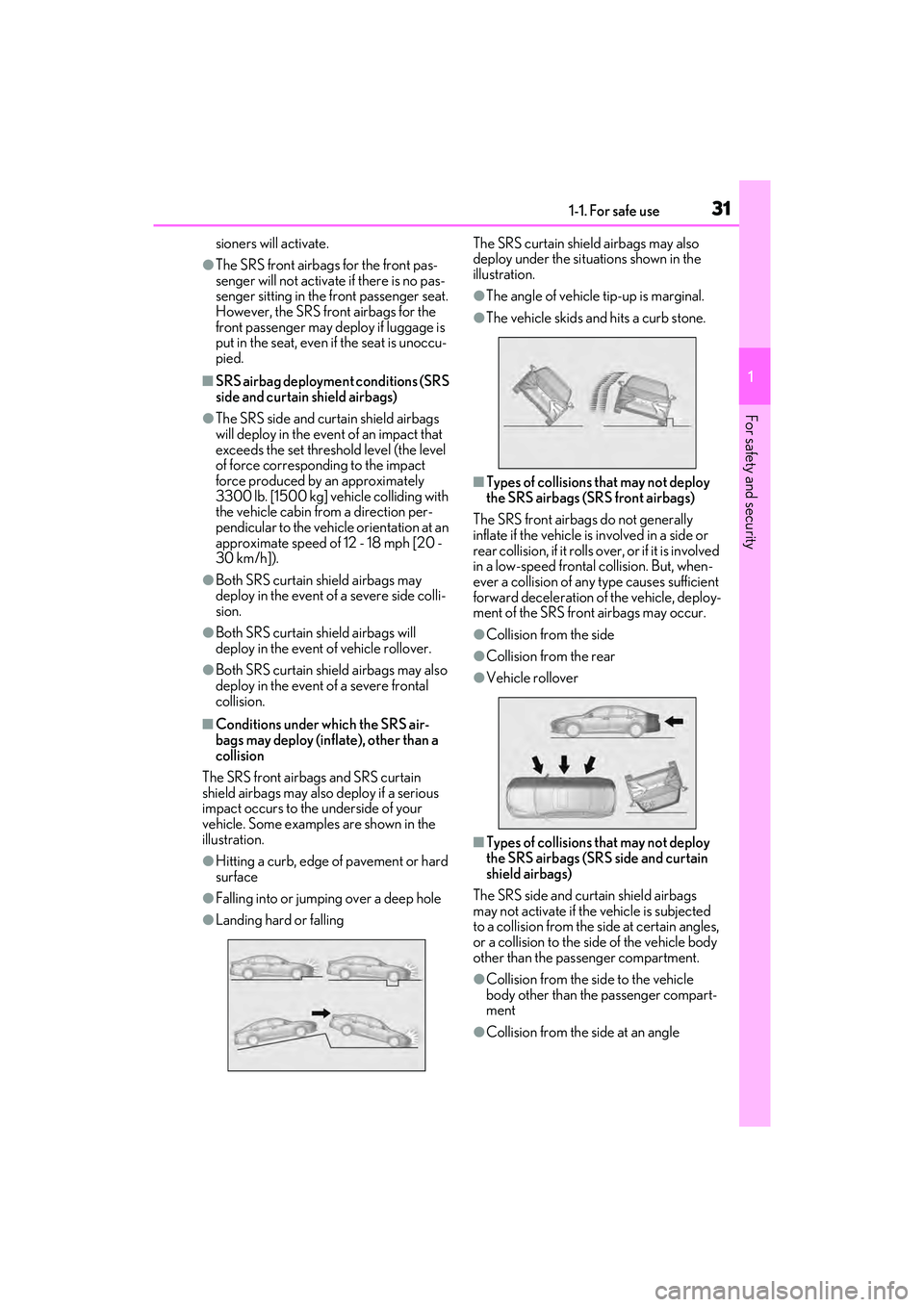
■Conditions under which the SRS air-
bags may deploy (inflate), other than a
collision
The SRS front airbags and SRS curtain
shield airbags may also deploy if a serious
impact occurs to the underside of your
vehicle. Some examples are shown in the
illustration.
●Hitting a curb, edge of pavement or hard
surface
●Falling into or jumpin g over a deep hole
●Landing hard or falling The SRS curtain shield airbags may also
deploy under the situations shown in the
illustration.
●The angle of vehicle tip-up is marginal.
●The vehicle skids and hits a curb stone.
■Types of collisions that may not deploy
the SRS airbags (SRS front airbags)
The SRS front airbags do not generally
inflate if the vehicle is involved in a side or
rear collision, if it rolls over, or if it is involved
in a low-speed frontal collision. But, when-
ever a collision of any type causes sufficient
forward deceleration of the vehicle, deploy-
ment of the SRS front airbags may occur.
●Collision from the side
●Collision from the rear
●Vehicle rollover
■Types of collisions that may not deploy
the SRS airbags (SRS side and curtain
shield airbags)
The SRS side and curtain shield airbags
may not activate if the vehicle is subjected
to a collision from the side at certain angles,
or a collision to the side of the vehicle body
other than the passenger compartment.
●Collision from the side to the vehicle
body other than the passenger compart-
ment
●Collision from the side at an angle
Page 60 of 468
581-3. Lexus Enform
In August 1996, the Federal Commu-
nications Commission (FCC) adopted
RF exposure guidelines with safety lev-
els for mobile wireless phones. Those
guidelines are consistent with the
safety standards previously set by the
following U.S. and international stan-
dards bodies.
ANSI (American National Stan-
dards Institute) C95.1 [1992]
NCRP (National Council on Radia-
tion Protection and Measurement)
Report 86 [1986]
ICNIRP (International Commission
on Non-Ionizing Radiation Protec-
tion) [1996]
Those standards were based on com-
prehensive and periodic evaluations of
the relevant scientific literature. Over
120 scientists, engineers, and physi-
cians from universities, and govern-
ment health agencies and industries
reviewed the available body of
research to develop the ANSI Stan-
dard (C95.1).
The design of Safety Connect com-
plies with the FCC guidelines in addi-
tion to those standards.
Page 62 of 468

601-4. Theft deterrent system
■Items to check before locking the
vehicle
To prevent unexpected triggering of
the alarm and vehicle theft, make sure
of the following:
Nobody is in the vehicle.
The windows and moon roof (if
equipped) or panoramic moon roof
(if equipped) are closed before the
alarm is set.
No valuables or other personal
items are left in the vehicle.
■Setting
Close the doors, trunk and hood, and
lock all the doors using the entry func-
tion or wireless remote control. The
system will be set automatically after
30 seconds.
Except for Canada, the alarm can also
be set using the mechanical key.
The indicator light changes from being on
to flashing when the system is set.
■Canceling or stopping
Do one of the following to deactivate
or stop the alarm:
Except for Canada: Unlock the
doors using the entry function, wire-
less remote control or mechanical
key.
For Canada: Unlock the doors using
the entry function or wireless
remote control.
Turn the engine switch to ACCES-
SORY or IGNITION ON mode, or
start the engine. (The alarm will be
deactivated or stopped after a few
seconds.)
■System maintenance
The vehicle has a maintenance-free type
alarm system.
Alarm
The alarm uses light and sound to
give an alert when an intrusion is
detected.
The alarm is triggered in the follow-
ing situations when the alarm is set:
A locked door is unlocked or
opened in any way other than
using the entry function, wireless
remote control or mechanical
key
*. (The doors will lock again
automatically.)
A locked trunk is unlocked or
opened in any way other than
using the entry function or wire-
less remote control.
The hood is opened.
*:Except for Canada
Setting/canceling/stopping the
alarm system
Page 68 of 468

662-1. Instrument cluster
*1: These lights come on when the engine switch is turned to IGNITION ON
mode to indicate that a system check is
being performed. They will turn off after
the engine is started, or after a few sec-
onds. There may be a malfunction in a
system if the lights do not come on, or
turn off. Have the vehicle inspected by
your Lexus dealer.
*2: This light illuminates on the multi-infor-mation display.
The indicators inform the driver of the
operating state of the vehicle’s various
systems.
(flashes)
Brake hold operated indica-
tor
*1 ( P.358)
Master warning light
*1
( P.358)
WARNING
■If a safety system warning light does
not come on
Should a safety system light such as the
ABS and SRS warning light not come on
when you start the engine, this could
mean that these systems are not avail-
able to help protect you in an accident,
which could result in death or serious
injury. Have the vehicle inspected by
your Lexus dealer immediately if this
occurs.
Indicators
Turn signal indicator ( P.153)
(U.S.A.)
Headlight indicator ( P.158)
(Canada)
Tail light indicator ( P.158)
Headlight high beam indicator
( P.160)
Automatic High Beam indicator
( P.161)
PCS warning light
*1, 2 ( P.176)
Cruise control indicator
*3
( P.198)
Dynamic radar cruise control
indicator
*3 ( P.198)
Cruise control “SET” indica-
tor
*3 ( P.198)
(white)
LTA indicator*3 ( P.191)
(green)
LTA indicator*3 ( P.176, 191)
(orange)
(flashes)LTA indicator*3 ( P.191)
BSM outside rear view mirror
indicators
*1, 4 ( P.208, 223)
BSM indicator ( P.208)
Intuitive parking assist OFF indi-
cator
*1, 2 (if equipped)
( P.217)
RCTA OFF indicator
*1, 2
( P.224)
RCD OFF indicator
*2 (if
equipped) ( P.229)
PKSB OFF indicator
*1, 2 (if
equipped) ( P.234)
(flashes)
Slip indicator*1 ( P.247)
VSC OFF indicator
*1, 2
( P.247)
Page 72 of 468

702-1. Instrument cluster
■Display items
Odometer
Displays the total distance the vehicle has
been driven.
Trip meter A/trip meter B
Displays the distance the vehicle has been
driven since the meter was last reset. Trip
meters A and B can be used to record and
display different distances independently.
Distance until next engine oil
change
Displays the distance the vehicle can be
driven until an oil change is necessary.
■Changing the display
Each time the “ODO TRIP” switch is
pressed, the displayed item will be
changed. When the trip meter is dis-
played, pressing and holding the switch
will reset the trip meter.
■Pop-up display
Distance until the next engine oil
change will be displayed when a warn-
ing message indicating that oil mainte-
nance should be performed soon or is
required is displayed.
The brightness of the instrument panel
lights can be adjusted.
1 Darker
2 Brighter
■Brightness of the meter lights (day mode
and night mode)
The brightness of the meter lights can be
adjusted individually.
In the following situations, the meters
changes between day mode and night
mode.
●Day mode: When the tail lights are off or
when the tail lights are on but the sur-
rounding area is bright
●Night mode: When the tail lights are on
and the surrounding area is dark
NOTICE
●The engine may be overheating if the
engine coolant temperature gauge is
in the red zone (H). In this case, imme-
diately stop the vehicle in a safe place,
and check the engine after it has
cooled completely. ( P.382)
Odometer and trip meter dis-
playChanging the instrument panel
light brightness
Page 75 of 468

732-1. Instrument cluster
2
Vehicle status information and indicators
• Rev indicator (P.73)
•Rev peak ( P.73)
Speedometer
Shift position and shift range ( P.149)
Odometer and trip meter display ( P.74)
Fuel gauge
Displays the quantity of fuel remaining in the tank
In the following situations, the actual quantity of fuel remaining in the tank may not be dis-
played correctly. Refer to P.74 if the actual quantity of fuel remaining in the tank is not dis-
played correctly.
• A small amount of fuel is added.
• Fuel is added with the fuel gauge near or at “F”.
• The vehicle is stopped on an uneven surface, such as a slope.
• The vehicle is driven on a slope or around a curve.
Engine coolant temperature gauge
Displays the engine coolant temperature
Multi-information display
Presents the driver with a variety of vehicle data ( P.76)
Displays warning messages if a malfunction occurs (P.361)
■Rev indicator
When the engine speed reaches a set
speed or the red zone, a ring-shaped
indicator ( ) will be displayed on the
tachometer.
The indicators will be displayed in amber
when the engine speed reaches a set
speed, and in red when the engine speed
reaches the red zone.
The engine speed at which the rev indica-
tor will begin to be displayed can be set on
of the multi-information display.
( P.80)
■Rev peak
When the engine speed reaches or
exceeds 5000 rpm, an afterimage of
the tachometer will be displayed at the
highest engine speed for approxi-
mately 1 second.
D
E
F
G
H
I
A
Page 77 of 468

752-1. Instrument cluster
2
Vehicle status information and indicators
Displays the distance the vehicle has been
driven since the meter was last reset. Trip
meters A and B can be used to record and
display different distances independently.
Distance until next engine oil
change
Displays the distance the vehicle can be
driven until an oil change is necessary.
■Changing the display
Each time the “ODO TRIP” switch is
pressed, the displayed item will be
changed. When the trip meter is dis-
played, pressing and holding the switch
will reset the trip meter.
■Pop-up display
Distance until the next engine oil
change will be displayed when a warn-
ing message indicating that oil mainte-
nance should be performed soon or is
required is displayed.
The brightness of the instrument panel
lights can be adjusted. 1
Darker
2 Brighter
■Brightness of the meter lights (day mode
and night mode)
The brightness of the meter lights can be
adjusted individually.
In the following situations, the meters
changes between day mode and night
mode.
●Day mode: When the tail lights are off or
when the tail lights are on but the sur-
rounding area is bright
●Night mode: When the tail lights are on
and the surrounding area is dark
The display can be switched between
the center and side positions.
Changing the instrument panel
light brightness
Changing the main meter loca-
tion