2022 LEXUS ES350 change time
[x] Cancel search: change timePage 231 of 468

2294-5. Using the driving support systems
4
Driving
*: If equipped
Pedestrian detection icon
Displayed automatically when a pedestrian
is detected.
RCD OFF icon
When the RCD function is disabled, the
RCD OFF icon illuminates. (Each time the
engine switch is turned off then changed to
IGNITION ON mode, the RCD function
will be enabled automatically.)
Use the meter control switches to
enable/disable the RCD function.
RCD (Rear Camera Detec-
tion) function
*
When the vehicle is backing up, the
rear camera detection function can
detect pedestrians in the detection
area behind the vehicle. If a pedes-
trian is detected, a buzzer will
sound and an icon will be displayed
on the Center Display to inform the
driver of the pedestrian.
WARNING
■Cautions regarding the use of the
system
The recognition and control capabilities
for this system are limited.
The driver should alwa ys drive safely by
always being responsible without over
relying on the system and have a under-
standing of the surrounding situations.
■To ensure the system can operate
properly
Observe the following, otherwise there is
the danger that could lead to an acci-
dent.
●Always clean the camera without
damaging it.
●Do not install market electronic parts
(such as Illuminated license plate, fog
lamps, etc.) in the camera vicinity.
●Do not subject the camera vicinity to
strong impacts. If the vicinity is sub-
jected to a strong impact, have the
vehicle inspected by your Lexus
dealer.
●Do not disassemble, remodel or paint
the camera.
●Do not attach accessories or stickers
to the camera.
●Do not install market protection parts
(bumper trim, etc.) to the rear bumper.
●Maintain suitable tire air pressure.
●Make sure the trunk is completely
closed.
■RCD function is turned off
In the following situations the system
turns off. The RCD function may not
operate properly and thus there is the
danger that an accident may occur.
●The contents mentioned above are not
observed.
●Suspensions other than Lexus genu-
ine parts are installed.
Center Display
Turning the RCD function on/off
A
B
Page 236 of 468

2344-5. Using the driving support systems
The Parking Support Brake can be
enabled/disabled on the multi-infor-
mation display. All of the Parking Sup-
port Brake functions (static objects,
rear-crossing vehicles, and rear
pedestrians) are enabled/disabled
simultaneously.
Use the meter control switches to
enable/disable the parking support
brake. (P.77)
1 Press or to select .
2 Press or to select and
then press “OK”.
When the Parking Support Brake is dis-
abled, the PKSB OFF indicator ( P.66)
illuminates on the multi-information dis-
play.
To re-enable the system, select on the
multi-information display, select and
turn it on. If the system is disabled, it will
remain off even if the engine switch is
turned to IGNITION ON mode after the
engine switch has been turned off. If the engine output restriction control or
brake control operates, a buzzer will
sound and a message will be displayed on
the Center Display and multi-information
display, to alert the driver. On vehicles with
a head-up display, the head-up display will
display the same message as the multi-
information display.
Depending on the situation, engine output
restriction control will operate to either
limit acceleration or restrict output as
much as possible.
Engine output restriction control is
operating (acceleration restriction)
Acceleration greater than a certain
amount is restricted by the system.
Center Display (Panoramic view monitor):
No warning displayed
Multi-information display: “Object
Detected Acceleration Reduced”
PKSB OFF indicator: Not illuminated
Buzzer: Does not sound
Engine output restriction control is
operating (output restricted as
much as possible)
The system has determined that stronger-
than-normal brake operation is necessary.
Center Display (Panoramic view monitor):
“BRAKE!”
Multi-information display: “BRAKE!”
PKSB OFF indicator: Not illuminated
Buzzer: Short beep
Brake control is operating
The system determined that emergency
braking is necessary.
NOTICE
■If “Parking Support Brake Unavail-
able” is displayed on the multi-infor-
mation display and the PKSB OFF
indicator is flashing
If this message is displayed immediately
after the engine switch is changed to
IGNITION ON mode, operate the vehi-
cle carefully, paying attention to your
surroundings. It may be necessary to
drive the vehicle for a certain amount of
time before the system returns to normal.
(If the system is not return to normal after
driving for a while, clean the rear camera
lens.)
Enabling/Disabling the Parking
Support Brake
Displays and buzzers for engine
output restriction control and
brake control
Page 239 of 468

2374-5. Using the driving support systems
4
Driving
Braking force
Time
Engine output restriction control begins operating
System determines that possibility of collision with detected object is high
Engine output reduced
System determines that possibility of collision with detected object is extremely
high
Brake control begins operating
Brake control strength increased
Example: Multi-information display: “BRAKE!”
Example: Multi-information display: “Switch to Brake”
■If the Parking Support Brake has oper-
ated
If the vehicle is stopped due to operation of
the Parking Support Brake, the Parking
Support Brake will be disabled and the
PKSB OFF indicator will illuminate. If the
Parking Support Brake operates unneces-
sarily, brake control can be canceled by
depressing the brake pedal or waiting for
approximately 2 seconds for it to automati-
cally be canceled. Then, the vehicle can be
operated by depressing the accelerator
pedal.
■Re-enabling the Parking Support Brake
To re-enable the Parking Support Brake
when it has been disabled due to system
operation, perform any of the following
operations. At this time, the PKSB OFF
indicator will turn off. ( P.66)
●Turn the PKSB system on ( P.234)
●Turn the engine switch off, and then back
to IGNITION ON mode
●Shift the shift lever to P
●Drive with no operation targets in the
traveling direction of the vehicle
●Change the traveling direction of the
vehicle*
*
: Except the Parking Support Brake func- tion (rear pedestrian)
■If “Parking Support Brake Unavailable”
is displayed on the multi-information
display and the PKSB OFF indicator is
flashing
If this message is displayed only when the
shift lever is in R, the rear camera lens may
be dirty. Clean the camera lens. If this mes-
sage is displayed when the shift lever is in
any position other than R, a sensor on the
front or rear bumper may be dirty. Clean
the sensors and their surrounding area on
the bumpers.
■If “Parking Support Brake Unavailable”
and “Parking Assist Unavailable Clean
Parking Assist Sensor” are displayed on
the multi-information display and the
PKSB OFF indicator is flashing
●A sensor may be covered with ice, snow,
dirt, etc. In this case, remove the ice,
snow, dirt, etc., from the sensor to return
the system to normal. If this message is
shown even after removing dirt from the
sensor, or shown when the sensor was
not dirty to begin with, have the vehicle
inspected at your Lexus dealer.
●A sensor may be frozen. Once the ice
melts, the system will return to normal.
●Water may be continuously flowing over
the sensor surface, such as in a heavy
rain. When the system determines that it
B
C
D
E
F
G
H
I
J
K
Page 252 of 468

2504-5. Using the driving support systems
WARNING
■TRAC/VSC may not operate effec-
tively when
Directional control and power may not
be achievable while driving on slippery
road surfaces, even if the TRAC/VSC
system is operating.
Drive the vehicle carefully in conditions
where stability and power may be lost.
■Active Cornering Assist does not
operate effectively when
●Do not overly rely on Active Corner-
ing Assist. Active Cornering Assist
may not operate effectively when
accelerating down slopes or driving on
slippery road surfaces.
●When Active Cornering Assist fre-
quently operates, Active Cornering
Assist may temporarily stop operating
to ensure proper operation of the
brakes, TRAC and VSC.
■Hill-start assist control does not oper-
ate effectively when
●Do not overly rely on hill-start assist
control. Hill-start assist control may
not operate effectively on steep
inclines and roads covered with ice.
●Unlike the parking brake, hill-start
assist control is not intended to hold
the vehicle stationary for an extended
period of time. Do not attempt to use
hill-start assist control to hold the vehi-
cle on an incline, as doing so may lead
to an accident.
■When the TRAC/VSC is activated
The slip indicator light flashes. Always
drive carefully. Reckless driving may
cause an accident. Exercise particular
care when the indicator light flashes.
■When the TRAC/VSC systems are
turned off
Be especially careful and drive at a
speed appropriate to the road condi-
tions. As these are the systems to help
ensure vehicle stability and driving force,
do not turn the TRAC/VSC systems off
unless necessary.
■Secondary Collision Brake
Do not rely solely upon the Secondary
Collision Brake. This system is designed
to help reduce the possibility of further
damage due to a secondary collision,
however, that effect changes according
to various conditions. Overly relying on
the system may result in death or serious
injury.
■Replacing tires
Make sure that all tires are of the speci-
fied size, brand, tread pattern and total
load capacity. In addition, make sure that
the tires are inflated to the recom-
mended tire inflation pressure level.
The ABS, TRAC and VSC systems will
not function correctly if different tires are
installed on the vehicle.
Contact your Lexus dealer for further
information when replacing tires or
wheels.
■Handling of tires and the suspension
Using tires with any kind of problem or
modifying the suspension will affect the
driving assist systems, and may cause a
system to malfunction.
Page 258 of 468

2565-1. Remote Touch/Display
5-1 . Remote To uch/ Di spl ay
■Switches
8-inch display model“HOME” button
Press this button to display the home
screen.
12.3-inch display model
“MAP” button
Press this button to display the current
location.
“MENU” button
Press this button to display the menu
screen.
Back button
Press this button to display the previous
screen.
Touchpad
Slide your finger on the touchpad and move the pointer to select a function, letter
and screen button.
Press the touchpad to enter the selected
function, letter or screen button. Certain
finger movements on the touchpad can
perform functions, such as changing map
scalings and scrolling list screens.
Sub function button
When is displayed on the screen, a
function screen assigned to the screen can
be displayed.
■Using the touchpad
1 Select: Touch the touchpad to
select the desired button on the
screen.
2 Enter: The buttons on the screen
can be selected by either depress-
ing or double tapping on the
touchpad. Once a button has been
selected, the screen will change.
■Touch operation
Operations are performed by touch-
ing the touchpad with your finger.
Trace
Trace the pad surface while maintaining
contact with the touchpad. Moving the
cursor and the pointer.
Remote Touch
The Remote Touch can be used to
operate the Center Display.
For details on the Remote touch,
refer to the “NAVIGATION AND
MULTIMEDIA SYSTEM
OWNER’S MANUAL”.
Remote Touch operation
A
A
B
C
D
E
Page 265 of 468
2635-3. Using the air conditioning system
5
Interior features
■Setting the fan speed
Operate the fan speed increase switch
to increase the fan speed and the fan
speed decrease switch to decrease the
fan speed.
Press the off switch to turn the fan off.
■Changing the air flow mode
Press the airflow mode control switch.
The mode changes as follows each
time the switch is pressed. ( P.265)
■Switching between outside air and
recirculated air modes
Press the outside/recirculated air
mode switch.
The mode changes as follows each
time the switch is pressed.
(recirculated air mode)
automatic mode
* (outside
air mode) (recirculated air
mode)
When the system is switched to automatic
mode, the air conditioning system oper-
ates automatically.
*: This item cannot be selected when the air conditioning is off.
■Defogging the windshield
Defoggers are used to defog the wind-
shield and front side windows.
Press the windshield defogger switch.
Set the outside/recirculated air mode
switch to outside air mode if the recircu-
lated air mode is used. (It may switch auto-
matically.)
To defog the windshield and the side win-
dows early, turn the air flow and tempera-
ture up. To return to the previous mode, press the
windshield defogger switch again when the
windshield is defogged.
■Defogging the rear window and
outside rear view mirrors
Defoggers are used to defog the rear
window, and to remove raindrops, dew
and frost from the outside rear view
mirrors.
Press the rear window and outside
rear view mirror defoggers switch.
The defoggers will automatically turn off
after 15 to 60 minutes. The operation time
changes according to the ambient tem-
perature and vehicle speed.
■When the outside temperature exceeds
75°F (24°C) and the air conditioning
system is on
●In order to reduce the air conditioning
power consumption, the air conditioning
system may switch to recirculated air
mode automatically. This may also
reduce fuel consumption.
●Recirculated air mode is selected as a
default mode when the engine switch is
turned to IGNITION ON mode.
●It is possible to switch to outside air mode
at any time by pressing the outside/recir-
culated air mode switch.
■Fogging up of the windows
The windows will easily fog up when the
humidity in the vehicle is high. Turning
“A/C” on will dehumidify the air from the
outlets and defog the windshield effectively.
●If you turn “A/C” off, the windows may
fog up more easily.
●The windows may fog up if the recircu-
lated air mode is used.
■When driving on dusty roads
Close all windows. If dust thrown up by the
vehicle is still drawn into the vehicle after
closing the windows, it is recommended
that the air intake mode be set to outside air
Page 266 of 468

2645-3. Using the air conditioning system
mode and the fan speed to any setting
except off.
■Outside/recirculated air mode
●Setting to the recirculated air mode tem-
porarily is recommended in preventing
dirty air from entering the vehicle interior
and helping to cool the vehicle when the
outside air temperature is high.
●Outside/recirculated air mode may
automatically switch regardless of the air
conditioning setting depending on the
temperature setting or inside tempera-
ture.
■Registering air conditioning settings to
electronic keys
●Unlocking the vehicle using an electronic
key and turning the engine switch to
IGNITION ON mode will recall that
key’s registered air conditioning settings.
●When the engine switch is turned off, the
current air conditioning settings will auto-
matically be registered to the electronic
key that was used to unlock the vehicle.
●The system may not operate correctly if
more than one electronic key is in the
vicinity or if the smart access system with
push-button start is used to unlock the
passenger door.
●Vehicles with the driving position mem-
ory: The doors that can recall the air con-
ditioning setting
* when unlocked using
the smart access system with push-but-
ton start can be changed. For details,
contact your Lexus dealer.
*: The doors that can recall the driving posi-
tion memory are changed at the same
time.
■Operation of the air conditioning sys-
tem in Eco drive mode
In Eco drive mode, the air conditioning sys-
tem is controlled as follows to prioritize fuel
efficiency:
●Engine speed and compressor operation
controlled to restrict heating/cooling
capacity
●Fan speed restricted when automatic
mode is selected To improve air conditioning performance,
perform the following operations:
●Turn off eco air conditioning mode
(
P.266)
●Adjust the fan speed
●Turn off Eco drive mode ( P.213)
■When the outside temperature falls to
nearly 32°F (0°C)
The dehumidification function may not
operate even when “A/C” is selected.
■Ventilation and air conditioning odors
●To let fresh air in, set the air conditioning
system to the outside air mode.
●During use, various odors from inside
and outside the vehicle may enter into
and accumulate in the air conditioning
system. This may then cause odor to be
emitted from the vents.
●To reduce potential odors from occur-
ring, the start timing of the blower may be
delayed for a short period of time imme-
diately after the air conditioning system is
started in automatic mode.
●When parking, the system automatically
switches to fresh air intake mode to
encourage better air circulation through-
out the vehicle, helping to reduce odors
that occur when starting the vehicle.
■Using the voice command system
Air conditioning system can be operated
using voice commands. For details, refer to
the “NAVIGATION AND MULTIMEDIA
SYSTEM OWNER’S MANUAL”.
■Air conditioning filter
P.331
■Air conditioning system refrigerant
●A label regarding the refrigerant of the
air conditioning system is attached to the
hood at the location shown in the follow-
ing illustration.
Page 270 of 468
2685-3. Using the air conditioning system
even when the heater is on due to sunlight.
■Automatic mode for air intake control
In automatic mode, the system detects
exhaust gas and other pollutants and auto-
matically switches between outside air and
recirculated air modes.
When the dehumidification function is off,
and the fan is operating, turning automatic
mode on will activate the dehumidification
function. The next time the dehumidification
function is turned off, the automatic mode
for switching between outside air and recir-
culated air modes is canceled.
To turn on the “DUAL” mode, perform
any of the following procedures:
Select “DUAL” on the sub function
menu. ( P.266)
Select “DUAL” on the option con-
trol screen.
Adjust the front passenger’s side
temperature setting.
The indicator on the main control screen
comes on when the “DUAL” mode is on.
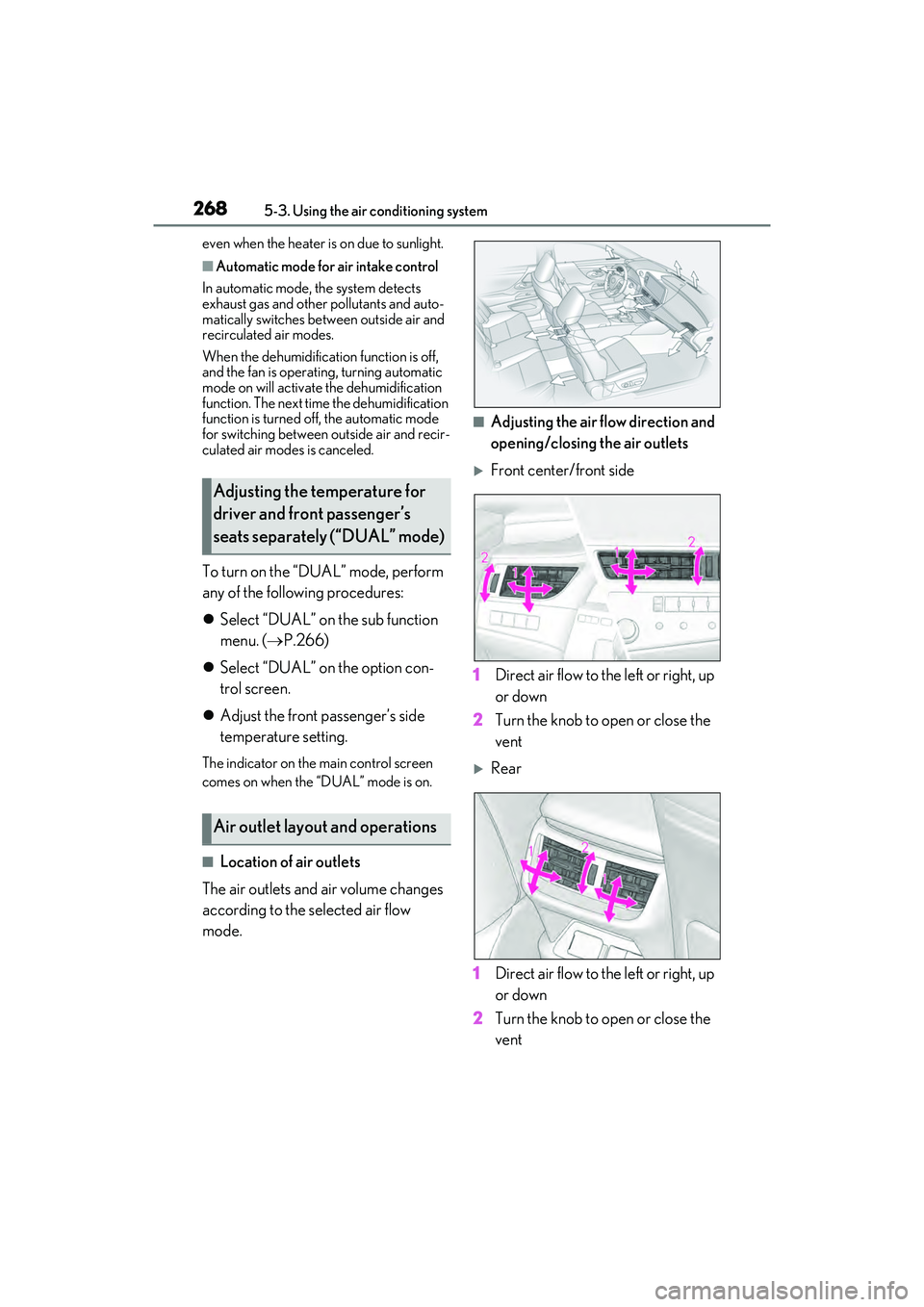
■Location of air outlets
The air outlets and air volume changes
according to the selected air flow
mode.
■Adjusting the air flow direction and
opening/closing the air outlets
Front center/front side
1 Direct air flow to the left or right, up
or down
2 Turn the knob to open or close the
vent
Rear
1 Direct air flow to the left or right, up
or down
2 Turn the knob to open or close the
vent
Adjusting the temperature for
driver and front passenger’s
seats separately (“DUAL” mode)
Air outlet layout and operations