2022 LEXUS ES350 ESP
[x] Cancel search: ESPPage 215 of 468
2134-5. Using the driving support systems
4
Driving
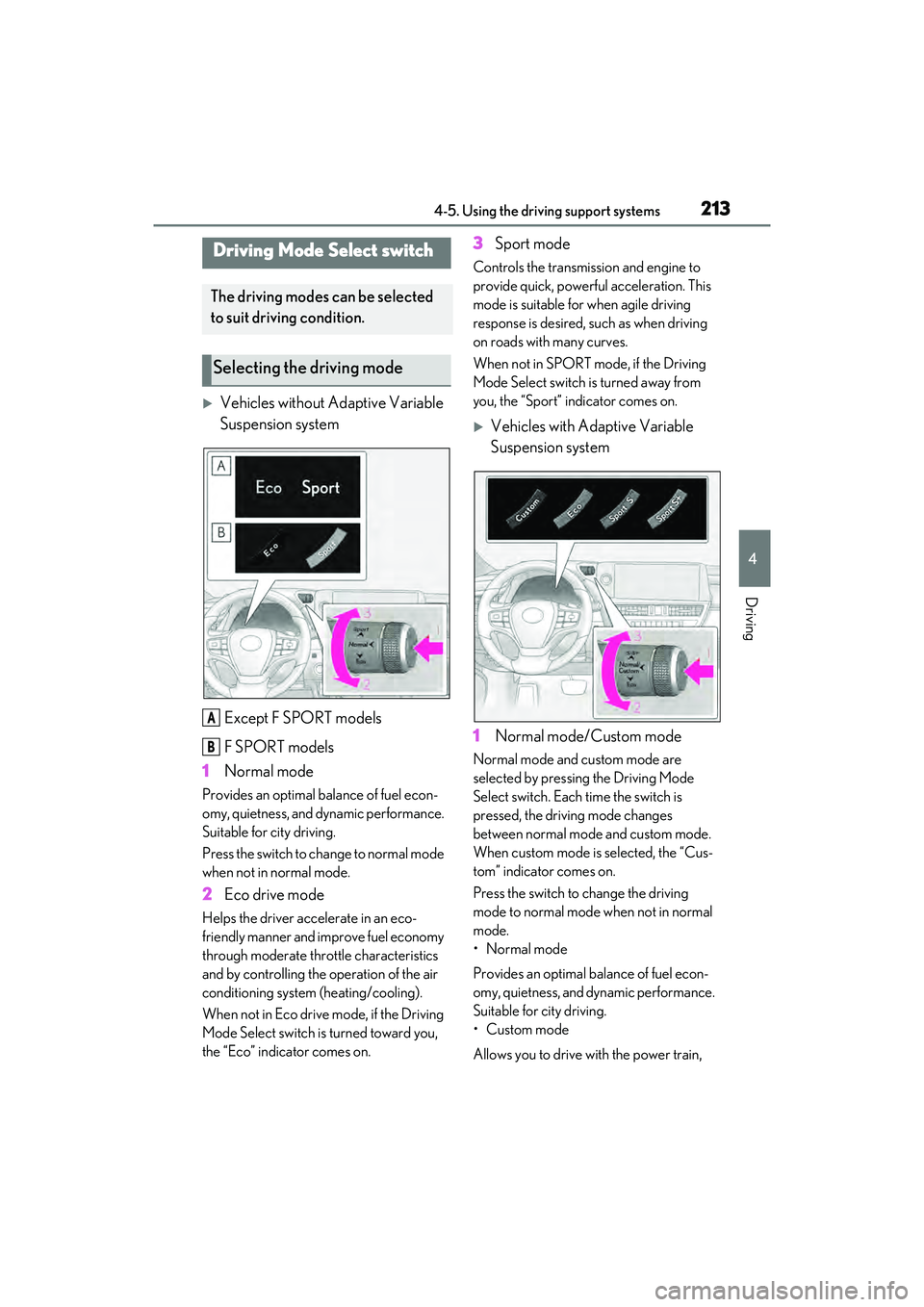
Vehicles without Adaptive Variable
Suspension systemExcept F SPORT models
F SPORT models
1 Normal mode
Provides an optimal balance of fuel econ-
omy, quietness, and dynamic performance.
Suitable for city driving.
Press the switch to change to normal mode
when not in normal mode.
2Eco drive mode
Helps the driver accelerate in an eco-
friendly manner and improve fuel economy
through moderate throttle characteristics
and by controlling the operation of the air
conditioning system (heating/cooling).
When not in Eco drive mode, if the Driving
Mode Select switch is turned toward you,
the “Eco” indicator comes on.
3Sport mode
Controls the transmission and engine to
provide quick, powerful acceleration. This
mode is suitable for when agile driving
response is desired, such as when driving
on roads with many curves.
When not in SPORT mode, if the Driving
Mode Select switch is turned away from
you, the “Sport” indicator comes on.
Vehicles with Adaptive Variable
Suspension system
1 Normal mode/Custom mode
Normal mode and custom mode are
selected by pressing the Driving Mode
Select switch. Each time the switch is
pressed, the driving mode changes
between normal mode and custom mode.
When custom mode is selected, the “Cus-
tom” indicator comes on.
Press the switch to change the driving
mode to normal mode when not in normal
mode.
• Normal mode
Provides an optimal balance of fuel econ-
omy, quietness, and dynamic performance.
Suitable for city driving.
•Custom mode
Allows you to drive with the power train,
Driving Mode Select switch
The driving modes can be selected
to suit driving condition.
Selecting the driving mode
A
B
Page 216 of 468

2144-5. Using the driving support systems
chassis and air conditioning system func-
tions set to your preferred settings.
Custom mode settings can only be
changed on the drive mode customization
display of the Center Display. (P.258)
2 Eco drive mode
Helps the driver accelerate in an eco-
friendly manner and improve fuel economy
through moderate throttle characteristics
and by controlling the operation of the air
conditioning system (heating/cooling).
When not in Eco drive mode, if the Driving
Mode Select switch is turned toward you,
the “Eco” indicator comes on.
3Sport mode
•SPORT S mode
Controls the transmission and engine to
provide quick, powerful acceleration. This
mode is suitable for when agile driving
response is desired, such as when driving
on roads with many curves.
When not in SPORT S mode, if the Driving
Mode Select switch is turned away from
you, the “Sport S” indicator comes on.
•SPORT S+ mode
Helps to ensure steering performance and
driving stability by simultaneously con-
trolling the steering and suspension in
addition to the transmission and engine.
Suitable for sportier driving.
When in SPORT S mode, if the Driving
Mode Select switch is turned away from
you, the “Sport S+” indicator comes on.
■Operation of the air conditioning sys-
tem in Eco drive mode
Eco drive mode contro ls the heating/cool-
ing operations and fan speed of the air con-
ditioning system to enhance fuel efficiency.
To improve air conditioning performance,
perform the following operations:
●Turn off eco air conditioning mode
( P.267)
●Adjust the fan speed ( P.263, 265)
●Turn off Eco drive mode ( P.213)
■Automatic deactivation of sport mode
and custom mode (if equipped)
If the engine switch is turned off after driv-
ing in sport mode or custom mode, the
drive mode will be changed to normal
mode.
■Driving mode pop-up display (12.3-inch
display model)
When the driving mode is changed, the
selected driving mode will be temporarily
displayed on the side display. ( P.259)
■Customization (vehicles with Adaptive
Variable Suspension system)
Settings (e.g. custom mode) can be
changed.
(Customizable features: P.408)
Page 219 of 468

2174-5. Using the driving support systems
4
Driving
When an object is detected, a graphic will
be displayed on the panoramic view moni-
tor (if equipped).
Use the meter control switches to
enable/disable the intuitive parking
assist. ( P.77)
1 Press or to select .
2 Press or to select “PKSA”
and then press “OK”.
3 Press or to select and
then press “OK”.
When the intuitive parking assist func-
tion is disabled, the intuitive parking
assist OFF indicator ( P.66) illumi-
nates on the multi-information display.
To re-enable the system, select on
the multi-information display, select and turn it on. If the system is dis-
abled, it will remain off even if the
engine switch is turned to IGNITION
ON mode after the engine switch has
been turned off.
Turning intuitive parking assist
on/off
WARNING
■Cautions regarding the use of the
system
There is a limit to the degree of recogni-
tion accuracy and control performance
that this system can provide, do not
overly rely on this system. The driver is
always responsible for paying attention
to the vehicle’s surroundings and driving
safely.
■To ensure the system can operate
properly
Observe the following precautions.
Failing to do so may result in the vehicle
being unable to be driven safely and pos-
sibly cause an accident.
●Do not damage the sensors, and
always keep them clean.
●Do not attach a sticker or install an
electronic component, such as a
backlit license plate (especially fluo-
rescent type), fog lights, fender pole or
wireless antenna near a radar sensor.
●Do not subject the surrounding area of
the sensor to a strong impact. If sub-
jected to an impact, have the vehicle
inspected by your Lexus dealer. If the
front or rear bumper needs to be
removed/installed or replaced, con-
tact your Lexus dealer.
●Do not modify, disassemble or paint
the sensors.
●Do not attach a license plate cover.
●Keep your tires properly inflated.
Page 221 of 468

2194-5. Using the driving support systems
4
Driving
attention to the following objects:
●Wires, fences, ropes, etc.
●Cotton, snow and other materials that
absorb sound waves
●Sharply-angled objects
●Low objects
●Tall objects with upper sections project-
ing outwards in the direction of your vehi-
cle
People may not be detected if they are
wearing certain types of clothing.
■Situations in which the system may not
operate properly
Certain vehicle conditions and the sur-
rounding environment may affect the ability
of a sensor to correctly detect objects. Par-
ticular instances where this may occur are
listed below.
●There is dirt, snow or ice on a sensor.
(Cleaning the sensors will resolve this
problem.)
●A sensor is frozen. (Thawing the area will
resolve this problem.)
In especially cold weather, if a sensor is
frozen the sensor display may be dis-
played abnormally, or objects, such as a
wall, may not be detected.
●When a sensor or the area around a sen-
sor is extremely hot or cold.
●On an extremely bumpy road, on an
incline, on gravel, or on grass.
●When vehicle horns, vehicle detectors,
motorcycle engines, air brakes of large
vehicles, the clearance sonar of other
vehicles or other devices which produce
ultrasonic waves are near the vehicle.
●A sensor is coated with a sheet of spray
or heavy rain.
●If objects draw too close to the sensor.
●When a pedestrian is wearing clothing
that does not reflect ultrasonic waves (ex.
skirts with gathers or frills).
●When objects that are not perpendicular
to the ground, not perpendicular to the
vehicle traveling direction, uneven, or
waving are in the detection range.
●Strong wind is blowing.
●When driving in inclement weather such
as fog, snow or a sandstorm.
●When an object that cannot be detected
is between the vehicle and a detected
object.
●If an object such as a vehicle, motorcycle,
bicycle or pedestrian cuts in front of the
vehicle or runs out from the side of the
vehicle.
●If the orientation of a sensor has been
changed due to a collision or other
impact.
●When equipment that may obstruct a
sensor is installed, such as a towing eye-
let, bumper protector (an additional trim
strip, etc.), bicycle carrier, or snow plow.
●If the front of the vehicle is raised or low-
ered due to the carried load.
●If the vehicle cannot be driven in a stable
manner, such as when the vehicle has
been in an accident or is malfunctioning.
●When tire chains, a compact spare tire or
an emergency tire puncture repair kit are
used.
■Situations in which the system may
operate even if there is no possibility of a
collision
In some situations, such as the following, the
system may operate even though there is
no possibility of a collision.
●When driving on a narrow road.
Page 225 of 468

2234-5. Using the driving support systems
4
Driving
Meter control switches
Turn the RCTA function on/off.
When the RCTA function is disabled, the
RCTA OFF indicator illuminates.
Outside rear view mirror indicators
When a vehicle approaching from the right
or left at the rear of the vehicle is detected,
both outside rear view mirror indicators
will flash.
Center Display
If a vehicle approaching from the right or
left at the rear of the vehicle is detected,
the RCTA icon (P.225) for the detected
side will be displayed on the Center Dis-
play. This illustration shows an example of a
vehicle approaching from both sides of the
vehicle.
RCTA buzzer
If a vehicle approaching from the right or
left at the rear of the vehicle is detected, a
buzzer will sound.
RCTA (Rear cross traffic
alert) function
The RCTA function uses the BSM
rear side radar sensors installed on
the inner side of the rear bumper.
This function is intended to assist
the driver in checking areas that
are not easily visible when backing
up.
WARNING
■Cautions regarding the use of the
system
There is a limit to the degree of recogni-
tion accuracy and control performance
that this system can provide, do not
overly rely on this system. The driver is
always responsible for paying attention
to the vehicle’s surroundings and driving
safely. ( P.208)
■To ensure the system can operate
properly
P.209
System components
A
B
C
D
Page 231 of 468

2294-5. Using the driving support systems
4
Driving
*: If equipped
Pedestrian detection icon
Displayed automatically when a pedestrian
is detected.
RCD OFF icon
When the RCD function is disabled, the
RCD OFF icon illuminates. (Each time the
engine switch is turned off then changed to
IGNITION ON mode, the RCD function
will be enabled automatically.)
Use the meter control switches to
enable/disable the RCD function.
RCD (Rear Camera Detec-
tion) function
*
When the vehicle is backing up, the
rear camera detection function can
detect pedestrians in the detection
area behind the vehicle. If a pedes-
trian is detected, a buzzer will
sound and an icon will be displayed
on the Center Display to inform the
driver of the pedestrian.
WARNING
■Cautions regarding the use of the
system
The recognition and control capabilities
for this system are limited.
The driver should alwa ys drive safely by
always being responsible without over
relying on the system and have a under-
standing of the surrounding situations.
■To ensure the system can operate
properly
Observe the following, otherwise there is
the danger that could lead to an acci-
dent.
●Always clean the camera without
damaging it.
●Do not install market electronic parts
(such as Illuminated license plate, fog
lamps, etc.) in the camera vicinity.
●Do not subject the camera vicinity to
strong impacts. If the vicinity is sub-
jected to a strong impact, have the
vehicle inspected by your Lexus
dealer.
●Do not disassemble, remodel or paint
the camera.
●Do not attach accessories or stickers
to the camera.
●Do not install market protection parts
(bumper trim, etc.) to the rear bumper.
●Maintain suitable tire air pressure.
●Make sure the trunk is completely
closed.
■RCD function is turned off
In the following situations the system
turns off. The RCD function may not
operate properly and thus there is the
danger that an accident may occur.
●The contents mentioned above are not
observed.
●Suspensions other than Lexus genu-
ine parts are installed.
Center Display
Turning the RCD function on/off
A
B
Page 235 of 468

2334-5. Using the driving support systems
4
Driving
■Parking Support Brake function
(rear pedestrians) (if equipped)
A rear camera sensor is used to detect
pedestrians in the detection area
behind the vehicle when backing up.
( P.244)
WARNING
■Cautions regarding the use of the
system
Do not overly rely on the system, as
doing so may lead to an accident.
Always drive while checking the safety of
the surroundings of the vehicle.
Depending on the vehicle and road con-
ditions, weather, etc., the system may not
operate.
The detection capabilities of sensors and
radars are limited. Always drive while
checking the safety of the surroundings
of the vehicle.
●The driver is solely responsible for safe
driving. Always drive carefully, taking
care to observe your surroundings.
The Parking Support Brake system is
designed to provide support to lessen
the severity of collisions. However, it
may not operate in some situations.
●The Parking Support Brake system is
not designed to stop the vehicle com-
pletely. Additionally, even if the system
has stopped the vehicle, it is necessary
to depress the brake pedal immedi-
ately as brake control will be canceled
after approximately 2 seconds.
●It is extremely dangerous to check the
system operations by intentionally
driving the vehicle in to the direction of
a wall, etc. Never attempt such actions.
■When to disable the Parking Support
Brake
In the following situations, disable the
Parking Support Brake as the system
may operate even though there is no
possibility of a collision.
●When inspecting the vehicle using a
chassis roller, chassis dynamo or free
roller.
●When loading the vehicle onto a boat,
truck or other transport vessel.
●If the suspension has been modified or
tires of a size other than specified are
installed.
●If the front of the vehicle is raised or
lowered due to the carried load.
●When equipment that may obstruct a
sensor is installed, such as a towing
eyelet, bumper protector (an addi-
tional trim strip, etc.), bicycle carrier,
or snow plow.
●When using automatic car washing
devices.
●If the vehicle cannot be driven in a sta-
ble manner, such as when the vehicle
has been in an accident or is malfunc-
tioning.
●When the vehicle is driven in a sporty
manner or off-road.
●When the tires are not properly
inflated.
●When the tires are very worn.
●When tire chains, a compact spare tire
or an emergency tire puncture repair
kit are used.
Page 248 of 468

2464-5. Using the driving support systems
■ABS (Anti-lock Brake System)
Helps to prevent wheel lock when the
brakes are applied suddenly, or if the
brakes are applied while driving on a
slippery road surface
■Brake assist
Generates an increased level of brak-
ing force after the brake pedal is
depressed when the system detects a
panic stop situation
■VSC (Vehicle Stability Control)
Helps the driver to control skidding
when swerving suddenly or turning on
slippery road surfaces.
■Enhanced VSC (Enhanced Vehi-
cle Stability Control)
Provides cooperative control of the
ABS, TRAC, VSC and EPS.
Helps to maintain directional stability
when swerving on slippery road sur-
faces by controlling steering perfor-
mance.
■Secondary Collision Brake
When the SRS airbag sensor detects a
collision and the system operates, the
brakes and brake lights are automati-
cally controlled to reduce the vehicle
speed and help reduce the possibility
of further damage due to a secondary
collision.
■TRAC (Traction Control)
Helps to maintain drive power and
prevent the drive wheels from spinning
when starting the vehicle or accelerat-
ing on slippery roads
■Active Cornering Assist (ACA)
Helps to prevent the vehicle from drift-
ing to the outer side by performing
inner wheel brake control when
attempting to accelerate while turning
■Hill-start assist control
Helps to reduce the backward move-
ment of the vehicle when starting on an
uphill
■Dynamic Torque Control AWD
system (AWD models)
Automatically switches from front-
wheel drive to all-wheel drive (AWD)
according to the driving conditions,
helping to ensure reliable handling and
stability. Examples of conditions where
the system will switch to AWD are
when cornering, going uphill, starting
off or accelerating, and when the road
surface is slippery due to snow, rain,
etc.
■EPS (Electric Power Steering)
Employs an electric motor to reduce
the amount of effort needed to turn the
Driving assist systems
To keep driving safety and perfor-
mance, the following systems oper-
ate automatically in response to
various driving situations. Be
aware, however, that these systems
are supplementary and should not
be relied upon too heavily when
operating the vehicle.
Summary of the driving assist
systems