2022 LEXUS ES350 turn signal
[x] Cancel search: turn signalPage 164 of 468

1624-3. Operating the lights and wipers
●House lights, street lights, traffic signals,
and illuminated billboards or signs may
cause the high beam to switch to the low
beams, or the low beams to remain on.
●The following factors may affect the
amount of time taken to turn the high
beam on or off:
• The brightness of headlights, fog lights,
and tail lights of vehicles ahead
• The movement and direction of vehicles ahead
• When a vehicle ahead only has opera- tional lights on one side
• When a vehicle ahead is a two-wheeled
vehicle
• The condition of the road (gradient, curve, condition of the road surface etc.)
• The number of passengers and amount of luggage
●The high beam may be turned on or off
when the driver does not expect it.
●Bicycles or similar objects may not be
detected.
●In the situations shown below, the system
may not be able to accurately detect sur-
rounding brightness levels. This may
cause the low beams to remain on or the
high beams to cause problems for pedes-
trians, vehicles ahead or other parties. In
these cases, manually switch between the
high and low beams.
• In bad weather (rain, snow, fog, sand-
storms etc.)
• The windshield is obscured by fog, mist, ice, dirt etc.
• The windshield is cracked or damaged
• The front camera is deformed or dirty
• When the temperature of the front cam- era is extremely high
• Surrounding brightness levels are equal to those of headlights, tail lights or fog
lights
• When headlights or tail lights of vehicles ahead are turned off, dirty, changing
color, or not aimed properly
• When the vehicle is hit by water, snow,
dust, etc. from a preceding vehicle
• When driving through an area of inter- mittently changing brightness and dark-
ness
• When frequently and repeatedly driving ascending/descending roads, or roads with rough, bumpy or uneven surfaces
(such as stone-paved roads, gravel roads
etc.)
• When frequently and repeatedly taking curves or driving on a winding road
• There is a highly reflective object ahead
of the vehicle, such as a sign or a mirror
• The back of a vehicle ahead is highly reflective, such as a container on a truck
• The vehicle’s headlights are damaged or dirty
• The vehicle is listing or tilting, due to a flat
tire, a trailer being towed etc.
• The high beam and low beam are repeat- edly being switched between in an
abnormal manner
• The driver believes that the high beam may be causing problems or distress to
other drivers or pedestrians nearby
■Temporarily lowering sensor sensitivity
The sensitivity of the sensor can be tempo-
rarily lowered.
1 Turn the engine switch off while the fol-
lowing conditions are met.
• The headlight switch is in or .
• The headlight switch lever is in low beam position.
• Automatic High Beam switch is on.
2 Turn the engine switch to IGNITION
ON mode.
3 Within 60 seconds after 2, repeat pull-
ing the headlight switch lever to the
original position then pushing it to the
high beam position quickly 10 times,
then leave the lever in high beam posi-
tion.
4 If the sensitivity is changed, the Auto-
matic High Beam indicator turns on and
off 3 times.
Automatic High Beam (headlights) may
turn on even the vehicle is stopped.
■If “Headlight System Malfunction Visit
Your Dealer” is displayed
P.363
Page 180 of 468
1784-5. Using the driving support systems
WARNING
●Although this system is designed to
help avoid a collision or help reduce
the impact of the collision, its effective-
ness may change according to various
conditions, therefore the system may
not always be able to achieve the same
level of performance.
Read the following conditions care-
fully. Do not overly rely on this system
and always drive carefully.
• Conditions under which the system may operate even if there is no possi-
bility of a collision: P.182
• Conditions under which the system may not operate properly: P.184
●Do not attempt to test the operation of
the pre-collision system yourself.
Depending on the objects used for
testing (dummies, cardboard objects
imitating detectable objects, etc.), the
system may not operate properly, pos-
sibly leading to an accident.
■Pre-collision braking
●When the pre-collision braking func-
tion is operating, a large amount of
braking force will be applied.
●If the vehicle is stopped by the opera-
tion of the pre-collision braking func-
tion, the pre-collision braking function
operation will be canceled after
approximately 2 seconds.
Depress the brake pedal as necessary.
●The pre-collision braking function may
not operate if certain operations are
performed by the driver. If the acceler-
ator pedal is being depressed strongly
or the steering wheel is being turned,
the system may determine that the
driver is taking evasive action and pos-
sibly prevent the pre-collision braking
function from operating.
●In some situations, while the pre-colli-
sion braking function is operating,
operation of the function may be can-
celed if the accelerator pedal is
depressed strongly or the steering
wheel is turned and the system deter-
mines that the driver is taking evasive
action.
●If the brake pedal is being depressed,
the system may determine that the
driver is taking ev asive action and pos-
sibly delay the operation timing of the
pre-collision braking function.
■Emergency steering assist
●As emergency steering assist opera-
tion will be canceled when the system
determines that lane departure pre-
vention function has been completed.
●Emergency steering assist may not
operate or may be cancel in the fol-
lowing cases as the system may deter-
mine the driver is taking actions.
• If the accelerator pedal is being depressed strongly, the steering wheel
is being operated sharply, the brake
pedal is being depressed or the turn
signal lever is bein g operated. In this
case, the system may determine that
the driver is taking evasive action and
the emergency steering assist may not
operate.
• In some situations, while the emer- gency steering assist is operating,
operation of the function may be can-
celed if the accelerator pedal is
depressed strongly, the steering wheel
is operated sharply or the brake pedal
is being depressed and the system
determines that the driver is taking
evasive action.
• When the emergency steering assist is operating, if the steering wheel is held
firmly or is operated in the opposite
direction to that which the system is
generating torque, the function may
be canceled.
Page 183 of 468
1814-5. Using the driving support systems
4
Driving
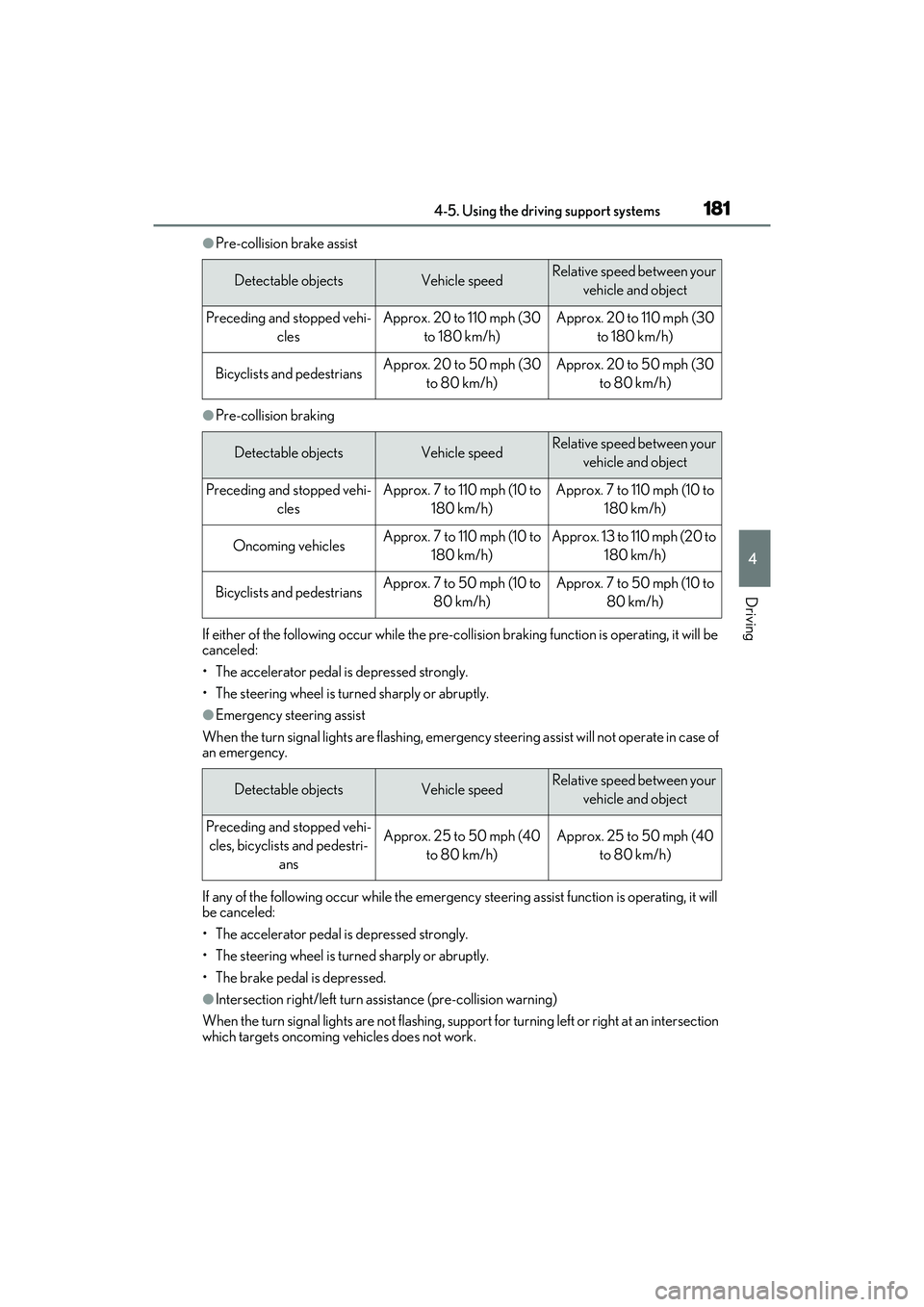
●Pre-collision brake assist
●Pre-collision braking
If either of the following occur while the pre-collision braking function is operating, it will be
canceled:
• The accelerator pedal is depressed strongly.
• The steering wheel is turned sharply or abruptly.
●Emergency steering assist
When the turn signal lights are flashing, emer gency steering assist will not operate in case of
an emergency.
If any of the following occur while the emergency steering assist function is operating, it will
be canceled:
• The accelerator pedal is depressed strongly.
• The steering wheel is turned sharply or abruptly.
• The brake pedal is depressed.
●Intersection right/left turn assistance (pre-collision warning)
When the turn signal lights are not flashing, support for turning left or right at an intersection
which targets oncoming vehicles does not work.
Detectable objectsVehicle speedRelative speed between your vehicle and object
Preceding and stopped vehi- clesApprox. 20 to 110 mph (30 to 180 km/h)Approx. 20 to 110 mph (30 to 180 km/h)
Bicyclists and pedestriansApprox. 20 to 50 mph (30 to 80 km/h)Approx. 20 to 50 mph (30 to 80 km/h)
Detectable objectsVehicle speedRelative speed between your vehicle and object
Preceding and stopped vehi- clesApprox. 7 to 110 mph (10 to 180 km/h)Approx. 7 to 110 mph (10 to 180 km/h)
Oncoming vehiclesApprox. 7 to 110 mph (10 to 180 km/h)Approx. 13 to 110 mph (20 to 180 km/h)
Bicyclists and pedestriansApprox. 7 to 50 mph (10 to 80 km/h)Approx. 7 to 50 mph (10 to 80 km/h)
Detectable objectsVehicle speedRelative speed between your vehicle and object
Preceding and stopped vehi-cles, bicyclists and pedestri- ansApprox. 25 to 50 mph (40 to 80 km/h)Approx. 25 to 50 mph (40 to 80 km/h)
Page 184 of 468
1824-5. Using the driving support systems
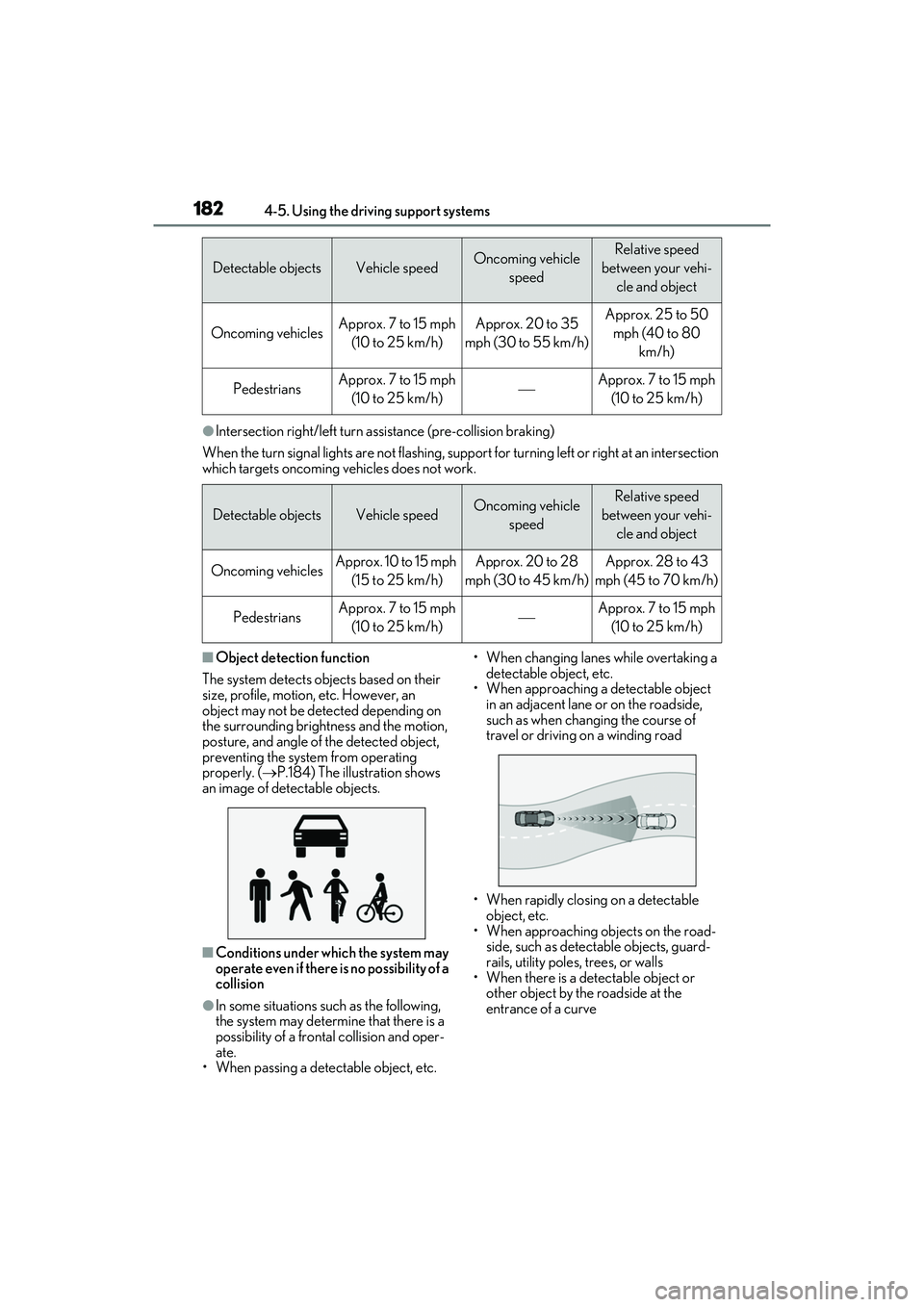
●Intersection right/left turn assistance (pre-collision braking)
When the turn signal lights are not flashing, support for turning left or right at an intersection
which targets oncoming vehicles does not work.
■Object detection function
The system detects objects based on their
size, profile, motion, etc. However, an
object may not be detected depending on
the surrounding brightness and the motion,
posture, and angle of the detected object,
preventing the system from operating
properly. ( P.184) The illustration shows
an image of detectable objects.
■Conditions under which the system may
operate even if there is no possibility of a
collision
●In some situations such as the following,
the system may determine that there is a
possibility of a frontal collision and oper-
ate.
• When passing a detectable object, etc. • When changing lanes while overtaking a
detectable object, etc.
• When approaching a detectable object
in an adjacent lane or on the roadside,
such as when changing the course of
travel or driving on a winding road
• When rapidly closing on a detectable object, etc.
• When approaching objects on the road- side, such as detectable objects, guard-
rails, utility poles, trees, or walls
• When there is a detectable object or other object by the roadside at the
entrance of a curve
Detectable objectsVehicle speedOncoming vehicle
speedRelative speed
between your vehi- cle and object
Oncoming vehiclesApprox. 7 to 15 mph (10 to 25 km/h)Approx. 20 to 35
mph (30 to 55 km/h)Approx. 25 to 50 mph (40 to 80 km/h)
PedestriansApprox. 7 to 15 mph (10 to 25 km/h)Approx. 7 to 15 mph (10 to 25 km/h)
Detectable objectsVehicle speedOncoming vehicle speedRelative speed
between your vehi- cle and object
Oncoming vehiclesApprox. 10 to 15 mph (15 to 25 km/h)Approx. 20 to 28
mph (30 to 45 km/h)Approx. 28 to 43
mph (45 to 70 km/h)
PedestriansApprox. 7 to 15 mph (10 to 25 km/h)Approx. 7 to 15 mph (10 to 25 km/h)
Page 191 of 468

1894-5. Using the driving support systems
4
Driving
■Lane departure alert function
When the system determines that the
vehicle might depart from its lane or
course
*, a warning is displayed on the
multi-information display, and either a
warning buzzer will sound or the steer-
ing wheel will vibrate to alert the driver.
When the warning buzzer sounds or the
steering wheel vibrates, check the area
around your vehicle and carefully operate
the steering wheel to move the vehicle
back to the center of the lane.
When the system determines that the vehi-
cle might depart from its lane and that the
possibility of a collision with an overtaking
vehicle in the adjacent lane is high, the lane
departure alert will operate even if the turn
signals are operating.
*: Boundary between asphalt and the side of the road, such as grass, soil, or a curb
WARNING
●Light from the headlights of an oncom-
ing vehicle, the sun, etc. enters the
camera.
●The vehicle is driven on a slope.
●The vehicle is driven on a road which
tilts left or right, or a winding road.
●The vehicle is driven on an unpaved or
rough road.
●The traffic lane is excessively narrow
or wide.
●The vehicle is extremely tilted due to
carrying heavy luggage or having
improper tire pressure.
●The distance to the preceding vehicle
is extremely short.
●The vehicle is moving up and down a
large amount due to road conditions
during driving (poor roads or road
seams).
●When driving in a tunnel or at night
with the headlights off or when a head-
light is dim due to its lens being dirty or
it being misaligned.
●The vehicle is struck by a crosswind.
●The vehicle is affected by wind from a
vehicle driven in a nearby lane.
●The vehicle has just changed lanes or
crossed an intersection.
●Tires which differ by structure, manu-
facturer, brand or tread pattern are
used.
●When tires of a size other than speci-
fied are installed.
●Snow tires, etc. are equipped.
●The vehicle is being driven at
extremely high speeds.
Functions included in LTA sys-
tem
Page 192 of 468
1904-5. Using the driving support systems
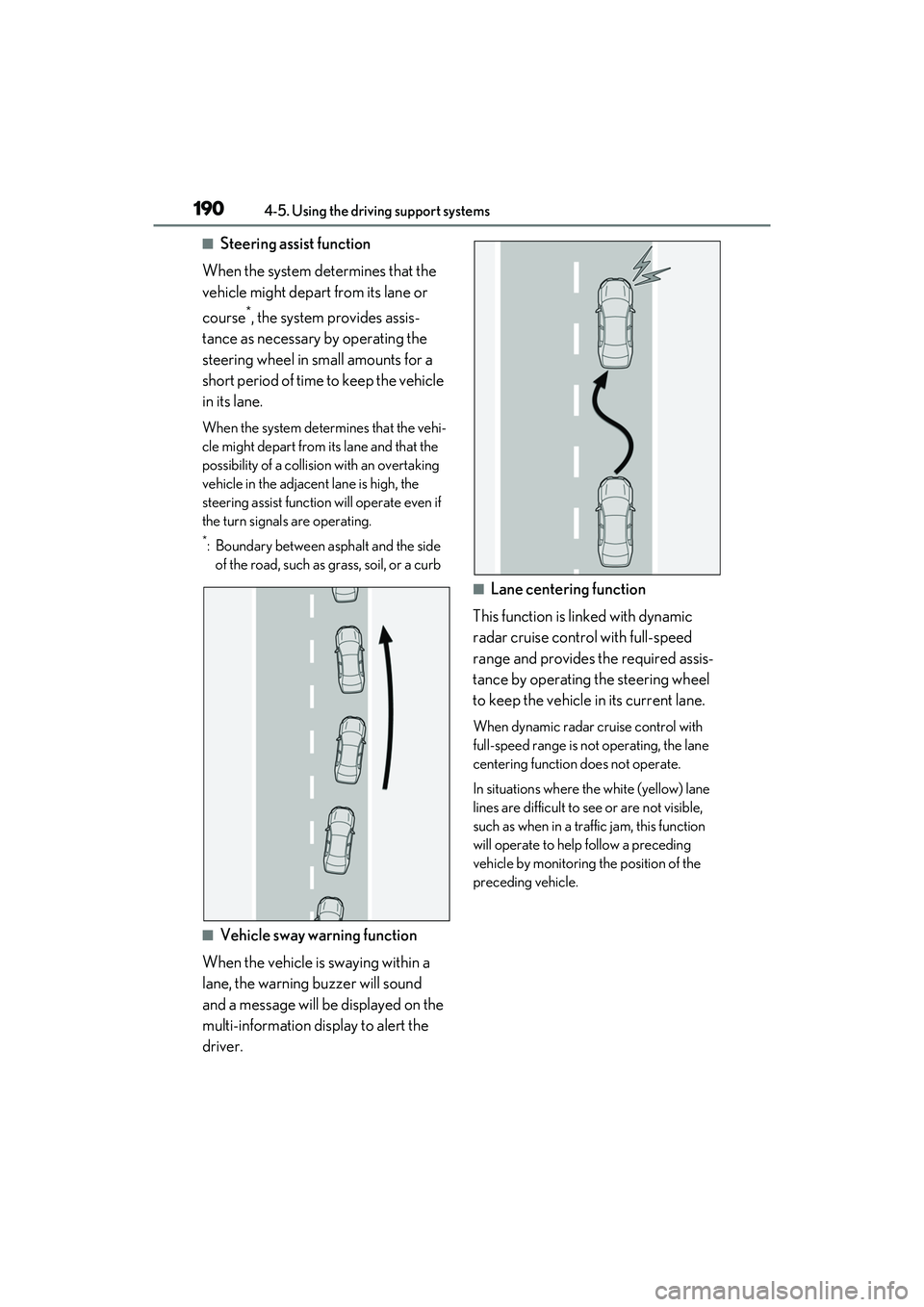
■Steering assist function
When the system determines that the
vehicle might depart from its lane or
course
*, the system provides assis-
tance as necessary by operating the
steering wheel in small amounts for a
short period of time to keep the vehicle
in its lane.
When the system determines that the vehi-
cle might depart from its lane and that the
possibility of a collision with an overtaking
vehicle in the adjacent lane is high, the
steering assist function will operate even if
the turn signals are operating.
*: Boundary between asphalt and the side of the road, such as grass, soil, or a curb
■Vehicle sway warning function
When the vehicle is swaying within a
lane, the warning buzzer will sound
and a message will be displayed on the
multi-information display to alert the
driver.
■Lane centering function
This function is linked with dynamic
radar cruise control with full-speed
range and provides the required assis-
tance by operating the steering wheel
to keep the vehicle in its current lane.
When dynamic radar cruise control with
full-speed range is not operating, the lane
centering function does not operate.
In situations where the white (yellow) lane
lines are difficult to see or are not visible,
such as when in a traffic jam, this function
will operate to help follow a preceding
vehicle by monitoring the position of the
preceding vehicle.
Page 194 of 468

1924-5. Using the driving support systems
centering function).
Lane departure alert function dis-
play
Displayed when the multi-information dis-
play is switched to the driving support sys-
tem information display.
Inside of displayed lines is white
Indicates that the system is recognizing
white (yellow) lines or a course
*. When the
vehicle departs from its lane, the white line
displayed on the side the vehicle departs
from flashes orange.
Inside of displayed lines is black
Indicates that the system is not able to rec-
ognize white (yellow) lines or a course
* or
is temporarily canceled.
Follow-up cruising display
Displayed when the multi-information dis-
play is switched to the driving support sys-
tem information display.
Indicates that steering assist of the lane
centering function is operating by monitor- ing the position of a preceding vehicle.
When the follow-up cruising display is dis-
played, if the preceding vehicle moves,
your vehicle may move in the same way.
Always pay careful attention to your sur-
roundings and operate the steering wheel
as necessary to correct the path of the
vehicle and ensure safety.
*: Boundary between asphalt and the side
of the road, such as grass, soil, or a curb
■Operation conditions of each function
●Lane departure alert function
This function operates when all of the fol-
lowing conditions are met.
• LTA is turned on.
• Vehicle speed is approximately 32 mph (50 km/h) or more.
*1
• System recognizes white (yellow) lane lines or a course*2. (When a white [yel-
low] line or course*2 is recognized on
only one side, the system will operate
only for the recognized side.)
• Width of traffic lane is approximately 9.8 ft. (3 m) or more.
• Turn signal lever is not operated. (Except when another vehicle is in the lane on the
side where the turn signal was operated)
• Vehicle is not being driven around a sharp curve.
• No system malfunctions are detected.
( P.194)
*1: The function operates even if the vehicle
speed is less than approximately 32 mph
(50 km/h) when the lane centering
function is operating.
*2: Boundary between asphalt and the side of the road, such as grass, soil, or a curb
●Steering assist function
This function operates when all of the fol-
lowing conditions are met in addition to the
operation conditions for the lane departure
alert function.
• Vehicle is not accelerated or decelerated by a fixed amount or more.
C
D
Page 195 of 468

1934-5. Using the driving support systems
4
Driving
• Steering wheel is not operated with a steering force level suitable for changing
lanes.
• ABS, VSC, TRAC and PCS are not operating.
• TRAC or VSC is not turned off.
●Vehicle sway warning function
This function operates when all of the fol-
lowing conditions are met.
• Setting for “Warning” in of the multi- information display is set to “On”.
( P.76)
• Vehicle speed is approximately 32 mph (50 km/h) or more.
• Width of traffic lane is approximately 9.8
ft. (3 m) or more.
• No system malfunctions are detected. ( P.194)
●Lane centering function
This function operates when all of the fol-
lowing conditions are met.
• LTA is turned on.
• Setting for “Lane Center” in of the multi-information display is set to “On”.
( P.76)
• This function recognizes white (yellow) lane lines or the position of a preceding
vehicle (except when the preceding vehi-
cle is small, such as a motorcycle).
• The dynamic radar cruise control with full-speed range is operating in vehicle-
to-vehicle distance control mode.
• Width of traffic lane is approximately 10 to 13 ft. (3 to 4 m).
• Turn signal lever is not operated.
• Vehicle is not being driven around a sharp curve.
• No system malfunctions are detected. ( P.194)
• Vehicle does not accelerate or deceler-
ate by a fixed amount or more.
• Steering wheel is not operated with a steering force level suitable for changing
lanes.
• ABS, VSC, TRAC and PCS are not operating.
• TRAC or VSC is not turned off.
• Hands off steering wheel warning is not displayed. ( P.194)
• The vehicle is being driven in the center of a lane.
• Steering assist function is not operating.
■Temporary cancelation of functions
●When operation conditions are no lon-
ger met, a function may be temporarily
canceled. However, when the operation
conditions are met again, operation of
the function is automatically restored.
( P.192)
●If the operation conditions ( P.190) are
no longer met while the lane centering
function is operating, the steering wheel
may vibrate and the buzzer may sound to
indicate that the function has been tem-
porarily canceled. Howe ver, if the “Alert”
customization setting is set to , the
system will notify the driver by vibrating
the steering wheel instead of sounding
the buzzer.
■Steering assist function/lane centering
function
●Depending on the vehicle speed, lane
departure situation, road conditions, etc.,
the driver may not feel the function is
operating or the function may not oper-
ate at all.
●The steering control of the function is
overridden by the driver’s steering wheel
operation.
●Do not attempt to test the operation of
the steering assist function.
■Lane departure alert function
●The warning buzzer may be difficult to
hear due to external noise, audio play-
back, etc. Also, it may be difficult to feel
steering wheel vibrations due to the road
conditions, etc.
●If the edge of the course* is not clear or
straight, the lane departure alert function
may not operate.
●It may not be possible for the system to
determine if there is a danger of a colli-
sion with a vehicle in an adjacent lane.
●Do not attempt to test the operation of
the lane departure alert function.
*: Boundary between asphalt and the side
of the road, such as grass, soil, or a curb