Page 50 of 316

2-12
Surround View Monitor (if equipped)
You can check the surroundings by using multiple cameras on the vehicle.0000
A
Use the +/- button on the right of the screen to zoom in or out.
Viewing the surround view while driving
1 In order to see the surround view, press the [] or [] button.
The system displays both the front view and surround view.
0000
A
The surround view monitor function operates only when any of the following
conditions are met.
000DThe driving speed is below 6 mph or 9 mph with the shift position in "D" (Drive) (if
equipped).
000DThe vehicle is stationary and the shift position is in "D" (Drive) or \
"N" (Neutral).
0000
A
You can use Remote Smart Parking Assist by long pressing the [
] button. For more
information, refer to the owner’s manual that is separately provided (if equipped).
2 Press the icon to get a view in the desired direction.
Icon Description
Displays the zoom-in front top view and top view.
Displays the front wide view and top view (default).
Displays the front blind spot view and top view.
Displays the surround view settings.
0000
A
When any door or trunk (tailgate) is open or outside rear view mirrors are folded, an
alert icon appears on the screen.
0000
A
To turn off the surround view screen, press the [
] or [] button.
Page 52 of 316

2-14
Using the climate control system (if equipped)
You can check and adjust the climate system settings on the screen.0000
A
For more information about how to use the heater and air conditioner, refer to Owner's
Manual of the vehicle.
1 Perform any of the following methods:
\225Press the [
CLIMATE] button on the climate control system.
\225On the All Menus screen, press Climate.
2 Select and then change the settings.
\037
\036
\035
\034
\033
\032\031
\030
\027
\026\025
a a Returns to the previous step.
b b Shows the set temperature for the driver's seat.
c c Shows the set temperature for the passenger seat.
d d Shows the current airflow direction.
e e Shows the current fan speed.
f f Shows whether the automatic temperature control function is on or off.
g g Shows whether the A/C is on or off.
h h Shows whether the SYNC function, which syncs the driver's seat temperature with the
passenger seat temperature, is on or off.
i i Configure specific climate control function settings.
0000
A
Available settings may differ depending on the vehicle model and specifications.
j j Shows the outside temperature of the vehicle.
k k The list of menu items appears.
\225Display Off
: Turns off the screen. To switch the screen back on, press the screen or
briefly press the power button.
\225 User's Manual on Web (QR Code): Displays the QR code that provides access to
the online user manual for the system.
Page 53 of 316

2-15
When you manipulate the climate control system while using the product, the climate
settings appear on the upper part of the screen.
\037\036\035\034\033\032\031
0000A
The temperature of the climate system can be adjusted by 1 ℉ increments. When the
temperature is set to the lower limit or upper limit, "LOW" or "HIGH" appears on the
screen.
0000
A
In Auto mode, the mode turns off in the following situations:
000DThe fan speed or air direction is changed.
000DThe air conditioner is turned on or off.
000DThe Auto Defog function is turned on to ensure driver's visibility.
0000
A
Available settings may differ depending on the vehicle model and specifications.
Using the rear-seat climate control system
(if equipped)
You can check or set the rear-seat climate status on the system screen.
1 Perform any of the following methods:
\225Press the [
REAR] button on the climate control system.
\225On the All Menus screen, press Rear Climate Controls.
2 Select and then change the settings.
\037
\036
\035
\034
\033
\032\031
\030
For automatic temperature control
Page 56 of 316
2-18
Using the Rear-seat View (if equipped)
You can check the status and safety of rear-seat occupants through the rear-seat camera feed
displayed on the system screen.
\335Warning
A car accident may occur when focusing on the vehicle display and not pa\
ying attention to
the road while driving.
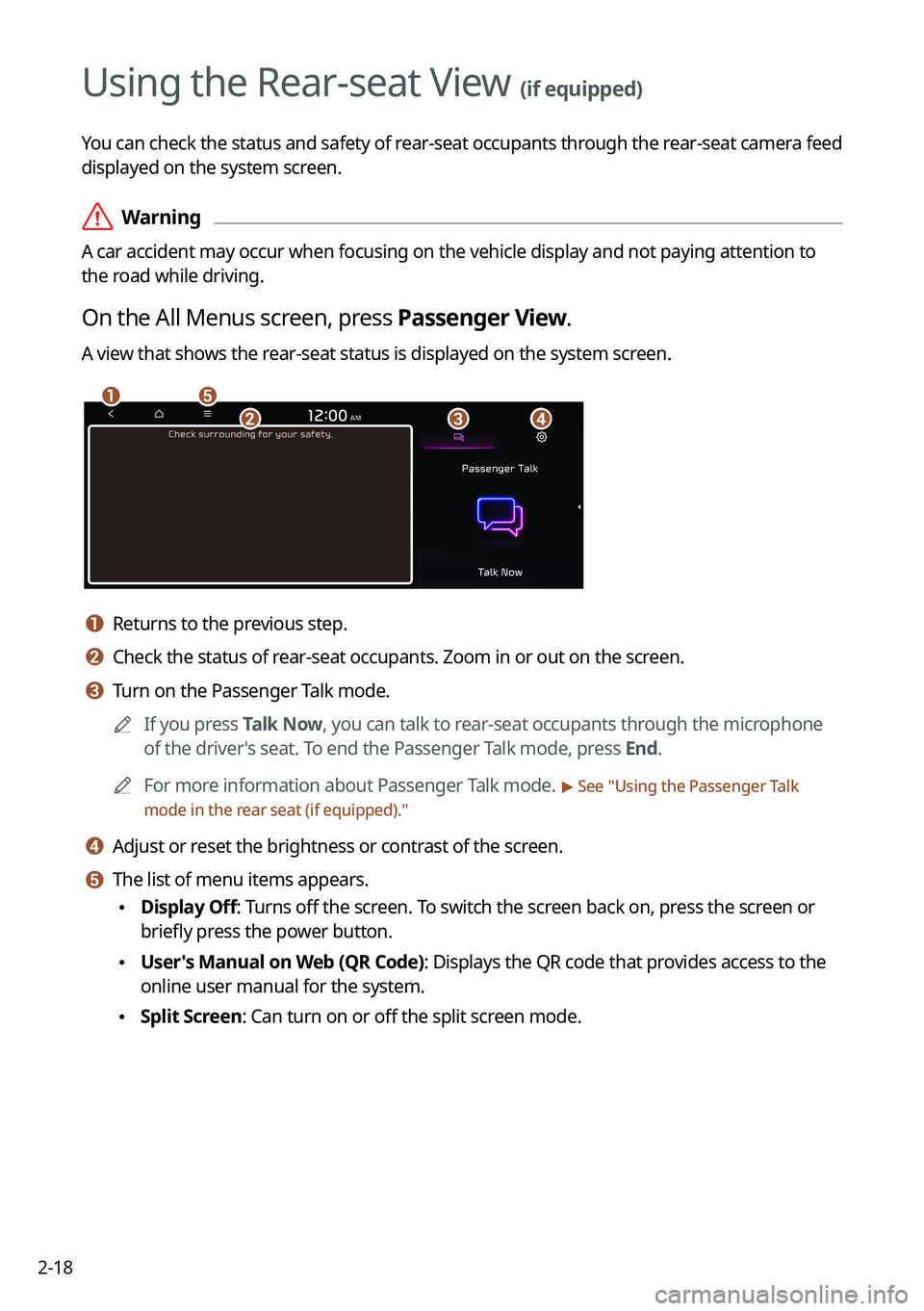
On the All Menus screen, press Passenger View.
A view that shows the rear-seat status is displayed on the system screen.
\037\036
\035\034\033
a a Returns to the previous step.
b b Check the status of rear-seat occupants. Zoom in or out on the screen.
c c Turn on the Passenger Talk mode.0000
A
If you press Talk Now, you can talk to rear-seat occupants through the microphone
of the driver's seat. To end the Passenger Talk mode, press End.
0000
A
For more information about Passenger Talk mode.
> See "Using the Passenger Talk
mode in the rear seat (if equipped)."
d d Adjust or reset the brightness or contrast of the screen.
e e The list of menu items appears.
\225 Display Off: Turns off the screen. To switch the screen back on, press the screen or
briefly press the power button.
\225User's Manual on Web (QR Code): Displays the QR code that provides access to the
online user manual for the system.
\225Split Screen: Can turn on or off the split screen mode.
Page 58 of 316

2-20
Using the sound mood lamp (if equipped)
You can set to implement various lighting effects by synchronizing with the playing music.
1 On the All Menus screen, press Sound Mood Lamp.
2 Select and then change the settings.
\037
\036
\035
\034
\033
\032\031
a a Returns to the previous step.
b b Can turn on or off the sound mood lamp.
c c Can select various color themes. Based on the selected color theme, the \
interior
lighting changes its colors in various patterns.
d d Can select the color of the light. The selected lighting color changes i\
nto a soft glow
effect.
e e Can synchronize the light with the playing music.0000
A
After checking Music+, music is not played back or the light does not illuminate
when muted.
f f Can adjust the brightness of the light.
g g The list of menu items appears.
\225Display Off
: Turns off the screen. To switch the screen back on, press the screen or
briefly press the power button.
\225 Reset: Can reset all the settings of the sound mood lamp.
\225User's Manual on Web (QR Code): Displays the QR code that provides access to
the online user manual for the system.
\225Split Screen: Can turn on or off the split screen mode.
0000
A
You cannot manipulate the sound mood lamp while driving.
0000
A
When a door is opened, the light automatically turns off.
0000
A
The screen may differ depending on the vehicle model and specifications.
Page 59 of 316

2-21
Playing Sounds of Nature
Listen to the calming sound of rain, waves, and more to relax while driving by turning on a
Sounds of Nature.
1 On the All Menus screen, press Sounds of Nature.
2 Select from the Sounds of Nature list to play.
\037\036\035
\034\033
\032
\031
\030
a a Returns to the previous step.
b b Select and play Sounds of Nature.
c c Play the previous sound.
d d Stop or play playback.
e e Play the next sound.
f f You can check the playback status of Sound of Nature.
g g Select and play Sounds of Nature.
h h The list of menu items appears.
\225Display Off
: Turns off the screen. To switch the screen back on, press the screen or
briefly press the power button.
\225 Media Sources: Open the Radio/Media selection window.
\225Sound Settings: Displays the system sound settings screen.
\225User's Manual on Web (QR Code): Displays the QR code that provides access to
the online user manual for the system.
\225Split Screen: Can turn on or off the split screen mode.
0000
A
Playing Sounds of Nature will mute or pause other sound effects and music that may be
active at the moment.
0000
A
Incoming or outgoing calls will pause Sounds of Nature playback.
0000
A
The sound effect settings button may appear on the screen depending on the amp
specifications.
Page 61 of 316
2-23
Seeing traffic information by using HD radio data
1 On the All Menus screen, press HD Radio Data.
2 Press Traffic.
3 Select an item from the traffic information list to see the details.
0000
A
To see traffic information along with your current route or to see all available traffic
information, press On Route.
0000
A
To select the types of traffic information to see, press Filter.
4 Check the traffic information details.
0000
A
Traffic information for border crossings and speed limits in local roads may not be
accurate. Use the information at your discretion.
Page 62 of 316
2-24
Seeing weather information by using Doppler weather
radar
1 On the All Menus screen, press HD Radio Data.
2 Press Doppler Radar.
3 See the weather condition details in the HD Radio coverage area.
Seeing fuel price information by using HD radio data
(if equipped)
1 On the All Menus screen, press HD Radio Data.
2 Press Fuel Price.
3 Search nearby gas stations, and check the current fuel prices.
0000
A
To change the sorting order, press on the drop-down list and then select the
sorting criteria.
0000
A
To see the latest information, press
.

