Page 15 of 156

1
1 System overview
Before you start 1-2
Component names and functions 1-5
Turning the system on or off 1-8
Using the touch screen 1-9
Using the Search lever/button on the
steering wheel 1-11
Getting to know the Home screen 1-13
Getting to know the All Menus
screen 1-15
2 Useful functions
Using phone projection 2-2
Getting to know the driving
assistance screen 2-15
Using the climate control system (if
equipped) 2-20
Using the rear seat climate control
system (if equipped) 2-21
Viewing driving information (if
equipped) 2-22
Using the sound-reactive mood light
(if equipped) 2-23
Using the quiet mode for the rear
seats (if equipped) 2-24
Viewing UVO notices (if equipped) 2-24
3 Radio
Listening to the radio 3-2
Listening to HD Radio™ (if equipped) 3-6
Listening to SiriusXM™ radio (if
equipped) 3-7
4 Media
Using the media 4-2
5 Phone
Connecting Bluetooth devices 5-2
Making a call via Bluetooth 5-6
Answering a call via Bluetooth 5-13
6 Voice functions
Using Voice Memo 6-2
Contents
Page 33 of 156
Useful functions
Using phone projection
Getting to know the driving assistance screen
Using the climate control system (if equipped)
Using the rear seat climate control system (if equipped) Viewing driving information (if equipped)
Using the sound-reactive mood light (if equipped)
Using the quiet mode for the rear seats (if equipped) Viewing UVO notices (if equipped)
2
Page 56 of 156
2-24
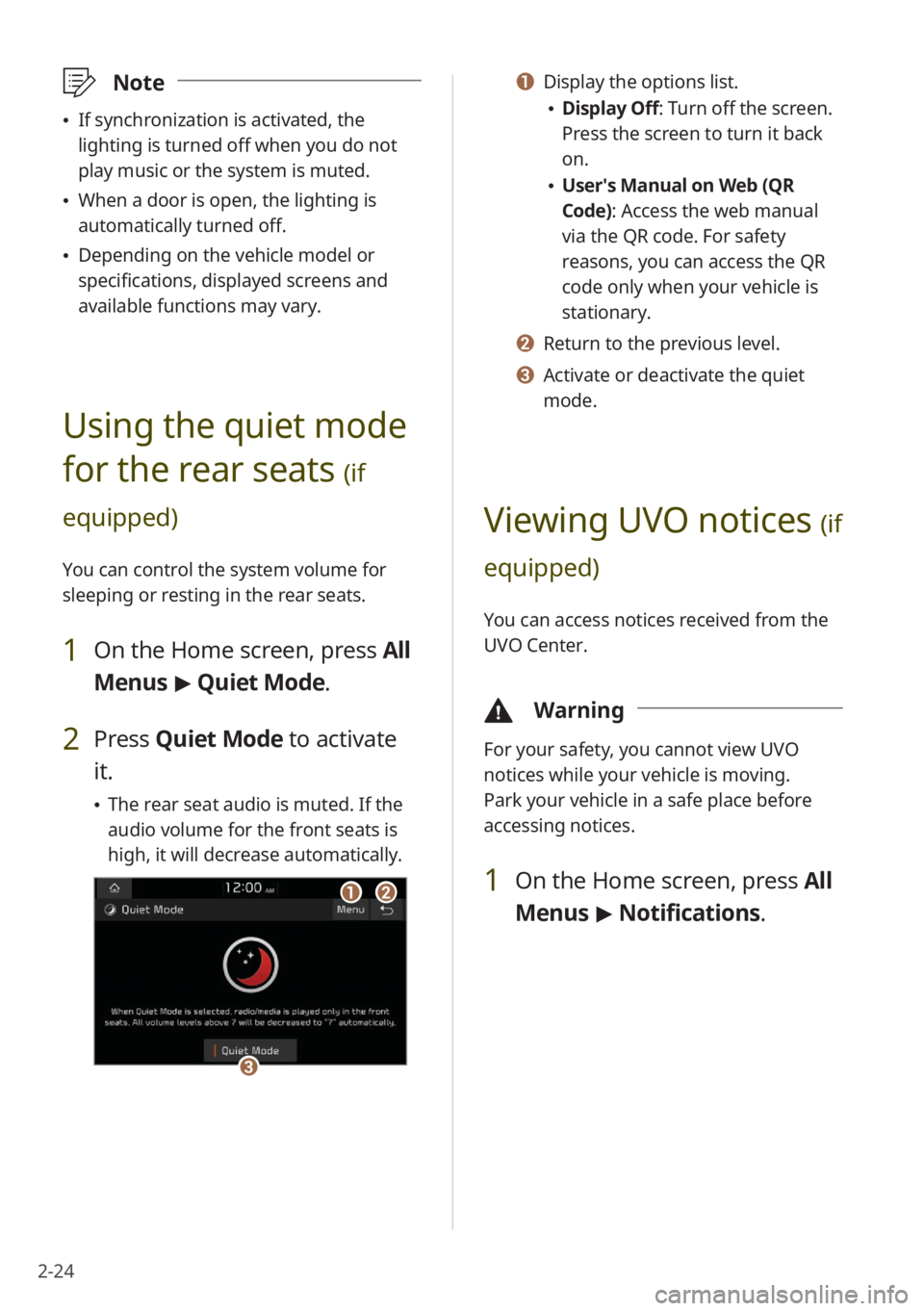
a a Display the options list.
\225Display Off: Turn off the screen.
Press the screen to turn it back
on.
\225User′s Manual on Web (QR
Code): Access the web manual
via the QR code. For safety
reasons, you can access the QR
code only when your vehicle is
stationary.
b b Return to the previous level.
c c Activate or deactivate the quiet
mode.
Viewing UVO notices (if
equipped)
You can access notices received from the
UVO Center.
\334 Warning
For your safety, you cannot view UVO
notices while your vehicle is moving.
Park your vehicle in a safe place before
accessing notices.
1 On the Home screen, press All
Menus > Notifications .
\333Note
\225If synchronization is activated, the
lighting is turned off when you do not
play music or the system is muted.
\225When a door is open, the lighting is
automatically turned off.
\225Depending on the vehicle model or
specifications, displayed screens and
available functions may vary.
Using the quiet mode
for the rear seats
(if
equipped)
You can control the system volume for
sleeping or resting in the rear seats.
1 On the Home screen, press All
Menus > Quiet Mode.
2 Press Quiet Mode to activate
it.
\225 The rear seat audio is muted. If the
audio volume for the front seats is
high, it will decrease automatically.
aabb
cc
Page 133 of 156
9-7
Downloading contacts and call
history from a mobile phone
connected via Bluetooth to the
system
[UVO (if equipped)
UVO network signal strength
UVO network signal strength
(roaming)
UVO service expired or not
subscribed
UVO call in progress
911 Connect activated
[Rear seat status (if
equipped)
Quiet mode activated
\333 Note
Depending on the vehicle model or
specifications, some status icons may not
be displayed.
System status icons
Status icons appear at the top right of
the screen to display the current system
status.
Familiarize yourself with the status icons
that appear when you perform certain
actions or functions and their meanings.
[Mute and voice
recording
Radio and media muted
Voice memo recording
[Bluetooth
Mobile phone connected via
Bluetooth
Audio device connected via
Bluetooth
Mobile phone and audio device
connected via Bluetooth
Bluetooth call in progress
Microphone turned off during
Bluetooth call
Page 146 of 156

9-20
phone projection 2-2
Android Auto (USB) 2-3
Android Auto (wireless) 2-7
Apple CarPlay (USB) 2-5
Apple CarPlay (wireless) 2-12
privacy mode 5-7, 8-6
proximity warning 2-16
Q
quiet mode 2-24
R
radio
deleting stations 3-5
HD Radio 3-6
mode, change 3-3
noise reduction 8-16
number of saved stations 3-6
rearranging stations 3-5
saved stations, select 3-5
saving stations 3-5
scanning stations 3-4
searching for stations 3-4
SiriusXM 3-7
rear seat climate control system 2-21
rear seat heat control, set 8-5
rear seat quiet mode 2-24
rear view
parking guides 2-16
rear camera operation, set 8-8, 8-20
rear top view 2-17
resetting to default
all menus 1-15
Bluetooth settings 8-6
display settings 8-21
home screen menu icons 1-14
home screen widgets 1-14
sound settings 8-17
system 8-11
S
screen saver, set 8-12, 8-20
seat change notification, set 8-4, 8-5
seat settings 8-5
settings
advanced system settings 8-7
button settings 8-9
device connection settings 8-6
display settings 8-17
general system settings 8-10
sound settings 8-13
UVO settings 7-7, 8-21
vehicle settings 8-2
Wi-Fi settings 8-22
SiriusXM radio 3-7
sound effect settings 8-13
sound output level, set 8-14, 8-15
sound position, set 8-15
sound priority settings 8-14
sound-reactive mood light 2-23
sound settings 8-13
status icons 9-7
steering wheel remote control 1-6
surround view monitor
display settings 2-19
rear top view 2-19
surround view while backing up 2-18
surround view while driving 2-17
system information 8-10
system reset 9-6

