Page 19 of 316
7
Contents
01 System overview
Component names and functions 1-2
Turning the system on or off 1-6
Using the touch screen 1-8
Using the Home screen 1-11
Seeing the All Menus screen 1-14
Using the split screen 1-15
02 Useful functions
Using the First Run Setup 2-2
Using the phone projection function 2-4
Viewing the driving assistance screen 2-9
Using the climate control system 2-14
Using the rear-seat climate control system 2-15
Using the Passenger Talk mode in the rear seat 2-17
Using the Rear-seat View 2-18
Using the Quiet mode in the rear seat 2-19
Using the sound mood lamp 2-20
Playing Sounds of Nature 2-21
Using the HD Radio Data 2-22
Seeing the driving information 2-25
Seeing notifications 2-26
Using the Valet mode 2-27
Page 39 of 316
Useful functions
Using the First Run Setup
Using the phone projection function
Viewing the driving assistance screen Using the climate control system
Using the rear-seat climate control system
Using the Passenger Talk mode in the rear seat Using the Rear-seat View
Using the Quiet mode in the rear seat Using the sound mood lamp Playing Sounds of NatureUsing the HD Radio Data
Seeing the driving information Seeing notifications
Using the Valet mode
02
Page 53 of 316
2-15
j j Shows the outside temperature of the vehicle.
k k The list of menu items appears.
\225Display Off: Turns off the screen. To switch the screen back on, press the screen or
briefly press the power button.
\225User's Manual on Web (QR Code): Displays the QR code that provides access to the
online user manual for the system.
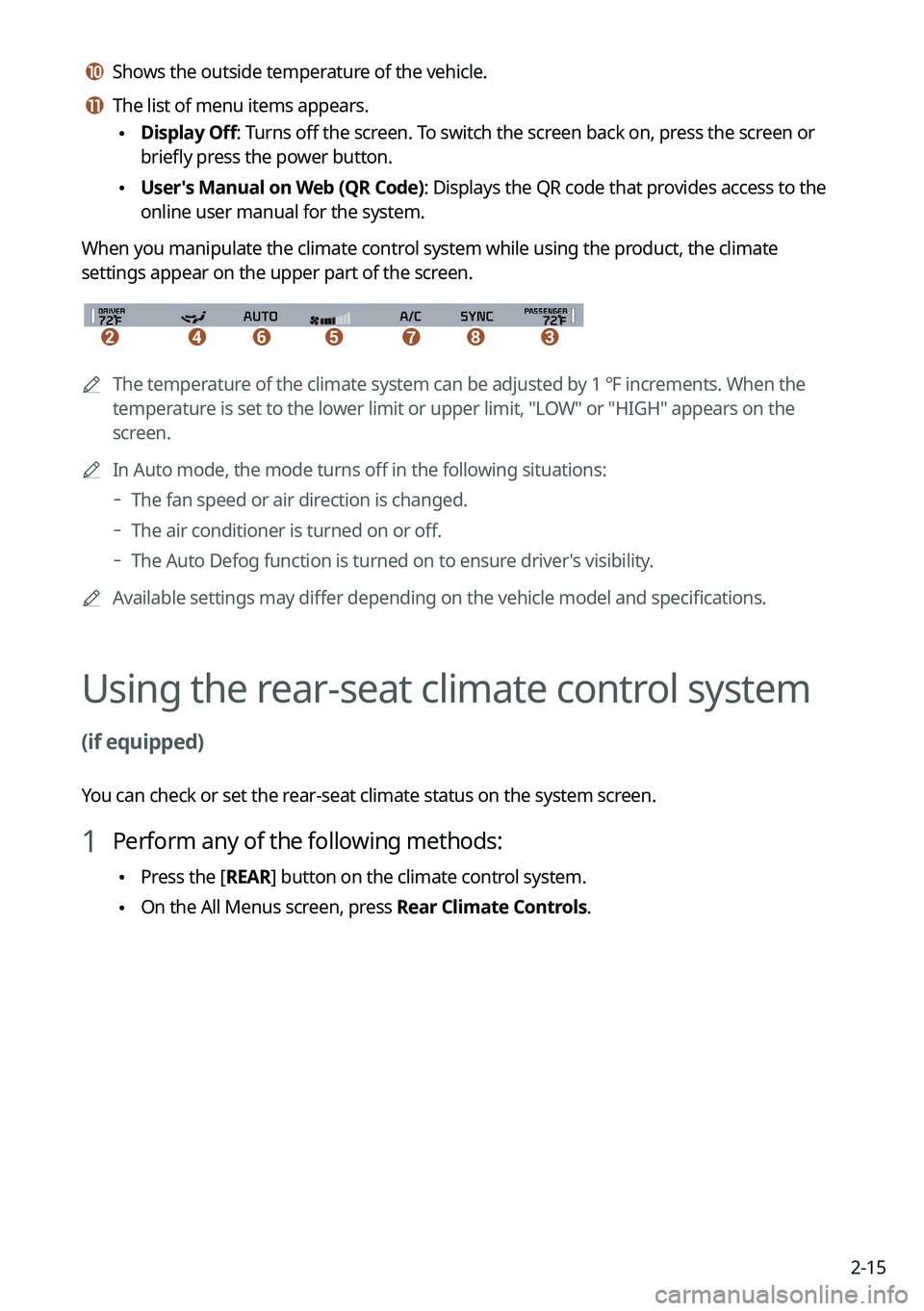
When you manipulate the climate control system while using the product, the climate
settings appear on the upper part of the screen.
\037\036\035\034\033\032\031
0000A The temperature of the climate system can be adjusted by 1 ℉ increments. When the
temperature is set to the lower limit or upper limit, "LOW" or "HIGH" appears on the
screen.
0000
A
In Auto mode, the mode turns off in the following situations:
000DThe fan speed or air direction is changed.
000DThe air conditioner is turned on or off.
000DThe Auto Defog function is turned on to ensure driver's visibility.
0000
A
Available settings may differ depending on the vehicle model and specifications.
Using the rear-seat climate control system
(if equipped)
You can check or set the rear-seat climate status on the system screen.
1 Perform any of the following methods:
\225Press the [
REAR] button on the climate control system.
\225On the All Menus screen, press Rear Climate Controls.
Page 161 of 316

7-9
CommandFunction
Open/Close the rear
windows Open or close all rear-seat windows.
Open/Close the sunroof Open or close the sunroof.
Open/Close the
trunk (liftgate) Open or close the trunk (liftgate).
Turn On/Off the heated
steering wheel Turn on or off the steering wheel heater.
Turn On/Off all seat
warmers Turn on or off the heaters for all seats.
Turn On/Off seat warmer Turn on or off the driver's seat heater.
Seat warmer
level 1 to 3 Set the driver's seat heater level in the range of 1 to 3.
Turn On/Off the
passenger seat warmer Turn on or off the passenger seat heater.
Passenger's Seat
Warmer Level 1 to 3 Set the passenger seat heater level in the range of 1 to 3.
Turn On/Off the rear seat
warmer Turn on or off the rear-seat heaters.
Turn On/Off all air
ventilation seats Turn on or off the ventilation for all seats.
Turn On/Off air
ventilation seats Turn on or off the driver's seat ventilation.
Air ventilation seat level
1 to 3 Set the driver's seat ventilation level in the range of 1 to 3.
Turn On/Off the
passenger air ventilation
seats Turn on or off the passenger seat ventilation.
Passenger's Air
Ventilation Seat Level
1 to 3 Set the passenger seat ventilation level in the rage of 1 to 3.
Turn On/Off the rear air
ventilation seat Turn on or off the rear-seat ventilation.
Rear window defroster
On/Off Turn on or off the rear windshield defogger.
Exterior mirror defroster
On/Off Turn on or off the side-mirror defoggers.
Page 162 of 316

7-100000
A
Vehicle control commands are recognizable in English only.
0000
A
Some commands may not be supported, depending on the vehicle model and f\
unctions.
Rear-seat function commands (if equipped)
Command Function
Passenger Talk Turn on the Passenger Talk.
Quiet Mode
Turn off Quiet Mode Turn on or off the Quiet Mode.
0000
A
Some commands may not be supported, depending on the vehicle model and f\
unctions.
Search commands
Command Function
Search settings for
You can search for a setting menu.
For example, say "Search settings for Bluetooth" or "Search
settings for Display."
> See "Configuring system settings."
Other commands
Command
Function
Help Move to the help screen.
Line <1 to 4>* Select an item with the designated number on a list. Simple
numbers, such as "One" or "Two," can be recognized.
Yes * Accept a notification asking for your confirmation in an
exceptional situation.
No * Deny a notification asking for your confirmation in an
exceptional situation.
Next * If there are more than five items on a list, scroll to the next page.
Previous * If you scroll to the next page of a list, scroll back to the previous
page.
Manual Input* When using the Dial Number command, open the keypad to
enter a phone number manually.
Go Back * Returns to the previous step.
Exit End voice recognition.
* These commands are available only in certain situations.
Page 243 of 316
9-55
Configuring the voice recognition settings
(Type2)
You can change the settings for voice recognition.
1 On the All Menus screen, press Setup >
Voice Recognition.
The voice recognition settings screen appears.
2 Configure the settings required:
0000
A
Press >
Search for Settings or press and enter a keyword to search for a
setting item. You can also search for a setting item by voice.
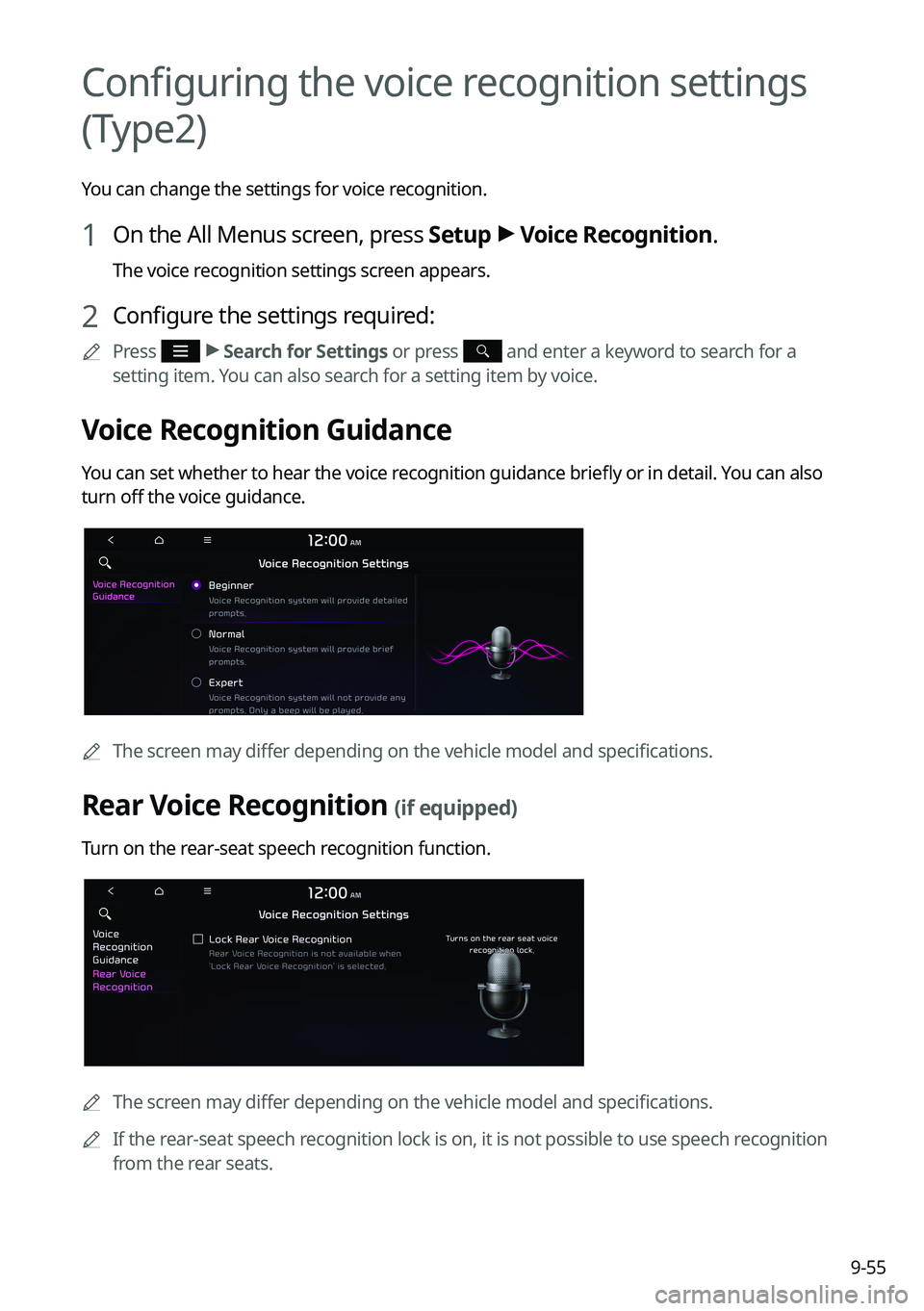
Voice Recognition Guidance
You can set whether to hear the voice recognition guidance briefly or in detail. You can also
turn off the voice guidance.
0000
A
The screen may differ depending on the vehicle model and specifications.
Rear Voice Recognition (if equipped)
Turn on the rear-seat speech recognition function.
0000AThe screen may differ depending on the vehicle model and specifications.
0000
A
If the rear-seat speech recognition lock is on, it is not possible to use speech recognition
from the rear seats.
Page 298 of 316
10-10
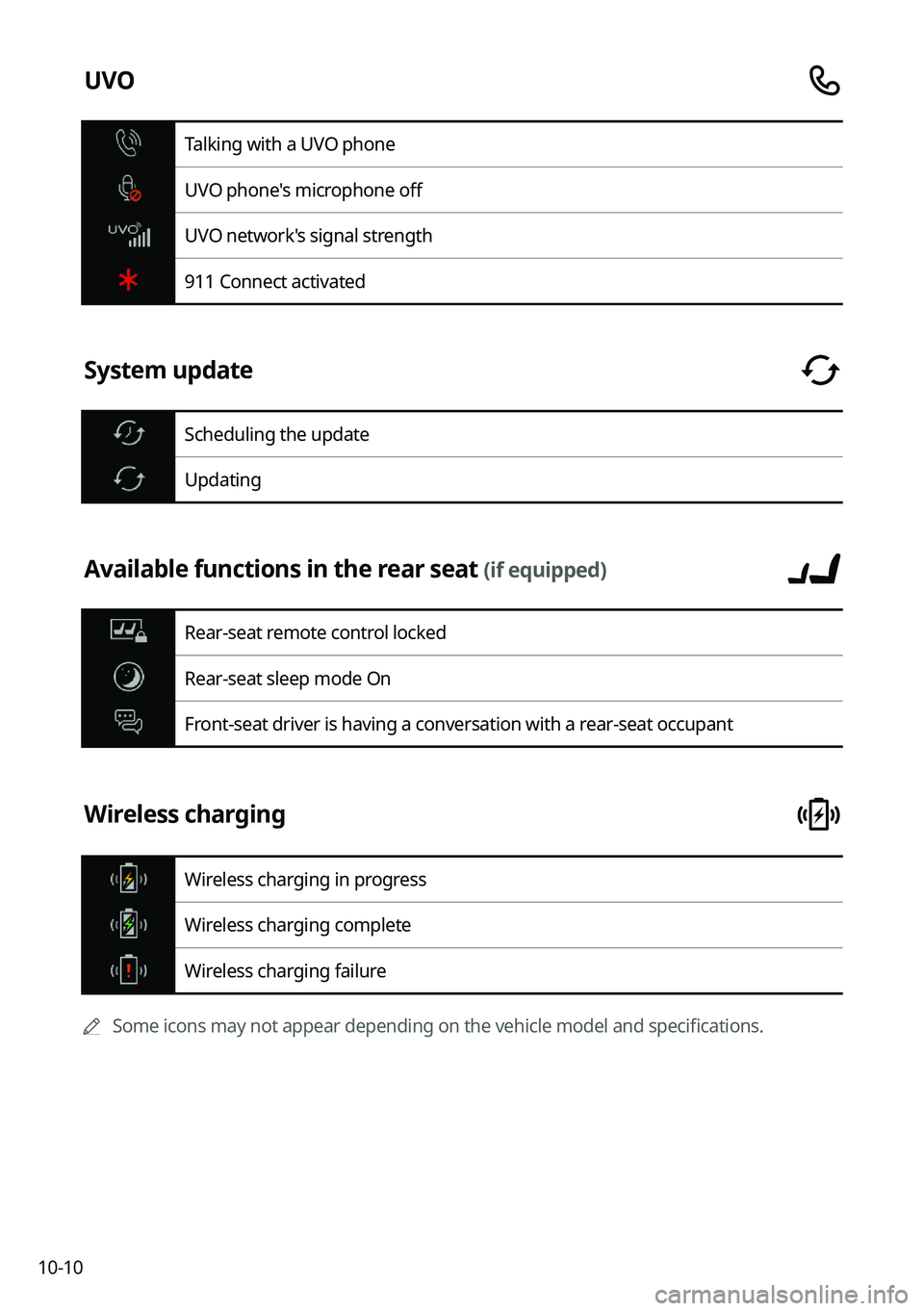
UVO
Talking with a UVO phone
UVO phone's microphone off
UVO network's signal strength
911 Connect activated
System update
Scheduling the update
Updating
Available functions in the rear seat (if equipped)
Rear-seat remote control locked
Rear-seat sleep mode On
Front-seat driver is having a conversation with a rear-seat occupant
Wireless charging
Wireless charging in progress
Wireless charging complete
Wireless charging failure
0000
A
Some icons may not appear depending on the vehicle model and specifications.
Page 310 of 316
10-22UVO menu
Diagnosing the vehicle 8-9
Driving Information 2-25
Roadside Assistance 8-5
Settings 8-11,
9-68, 9-70
Virtual Assistant 8-10
Voice Local Search 8-11
Weather info 8-8
V
Vehicle settings 9-3, 9-15
Voice memo 7-22
Voice recognition Help 7-4
Microphone 7-2
Navigation commands 7-7
Other commands 7-10
POI name 7-11
Radio commands 7-8
Using the voice recognition 7-2
Volume setting 7-4
Voice recognition settings 9-54, 9-55
T
Troubleshooting 10-2
Bluetooth connection 10-5
Navigation operation 10-8
Phone projection 10-6
Sound and display 10-2
System operation 10-7
USB playback 10-4
TUNE Knob Function 9-38
Turning the system on or off 1-6
U
Update 9-96
USB file specifications 10-13
USB music 4-2
USB port 4-2
USB storage device specifications 10-14
Using the Driver talk mode in the rear seat
2-17
Using the Quiet mode in the rear seat 2-19
Using the rear-seat climate control system
2-15
Using the sound mood lamp 2-20
Using the touch screen 1-8
UVO Service 8-2
Find 8-12