Page 143 of 528
Features of your vehicle
64
4
LCD DISPLAY (FOR TYPE B CLUSTER)
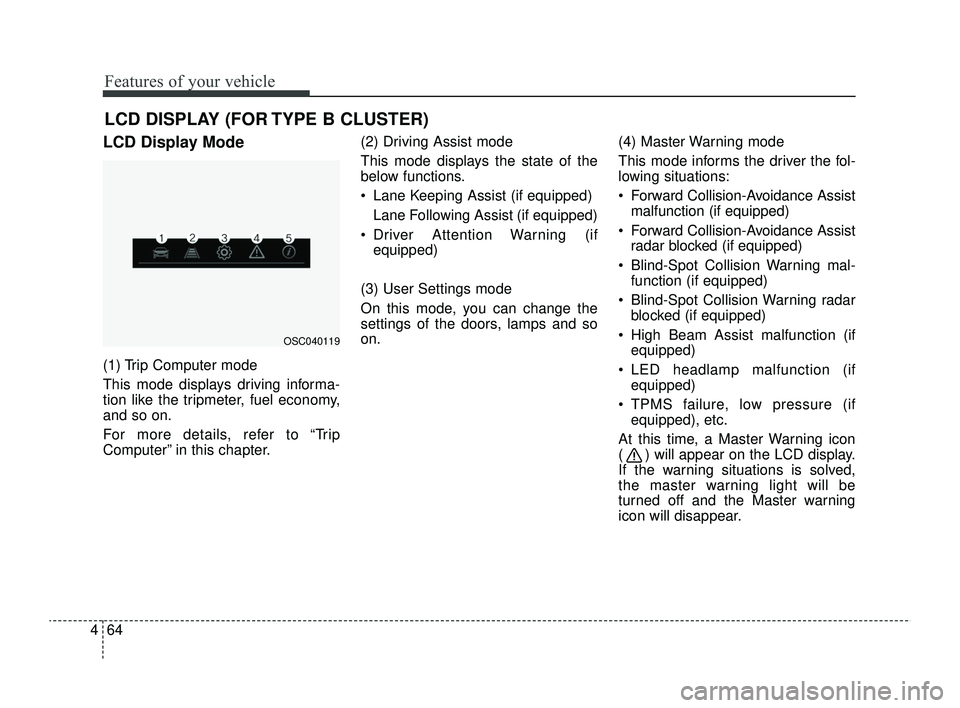
LCD Display Mode
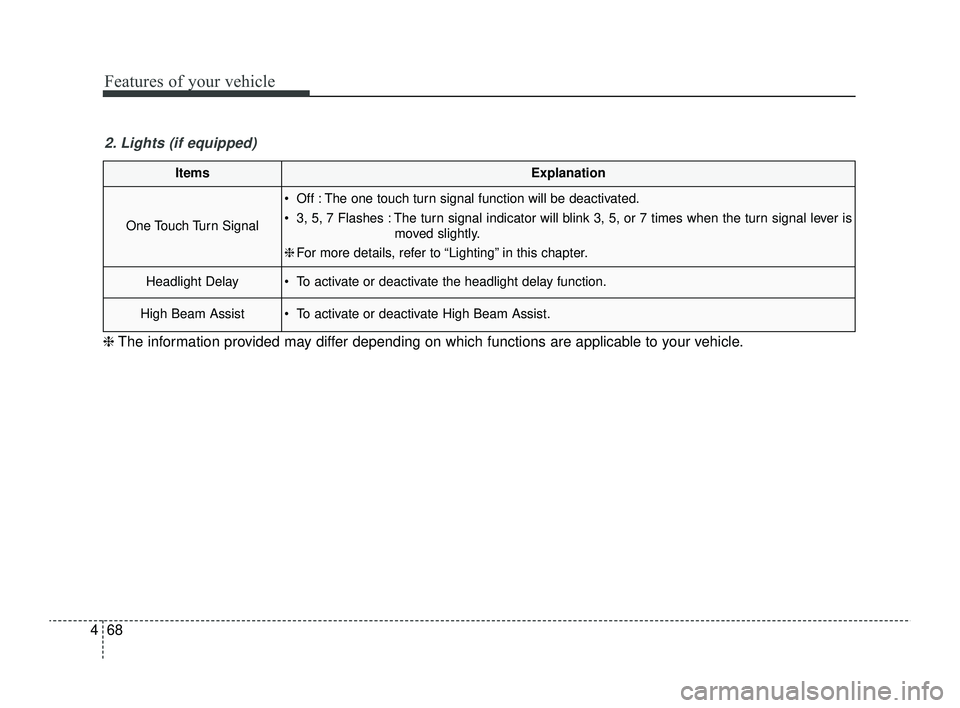
(1) Trip Computer mode
This mode displays driving informa-
tion like the tripmeter, fuel economy,
and so on.
For more details, refer to “Trip
Computer” in this chapter. (2) Driving Assist mode
This mode displays the state of the
below functions.
Lane Keeping Assist (if equipped)
Lane Following Assist (if equipped)
Driver Attention Warning (if equipped)
(3) User Settings mode
On this mode, you can change the
settings of the doors, lamps and so
on. (4) Master Warning mode
This mode informs the driver the fol-
lowing situations:
Forward Collision-Avoidance Assist
malfunction (if equipped)
Forward Collision-Avoidance Assist radar blocked (if equipped)
Blind-Spot Collision Warning mal- function (if equipped)
Blind-Spot Collision Warning radar blocked (if equipped)
High Beam Assist malfunction (if equipped)
LED headlamp malfunction (if equipped)
TPMS failure, low pressure (if equipped), etc.
At this time, a Master Warning icon
( ) will appear on the LCD display.
If the warning situations is solved,
the master warning light will be
turned off and the Master warning
icon will disappear.
OSC040119
SC PE USA 4.QXP 9/9/2021 6:04 PM Page 64
Page 147 of 528
Features of your vehicle
68
4
ItemsExplanation
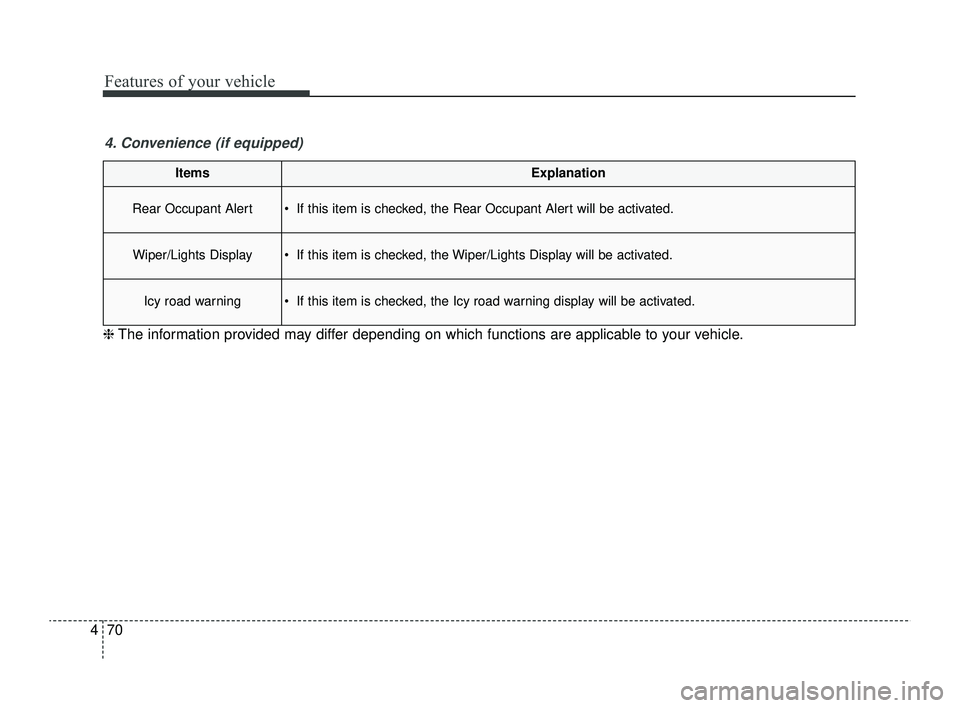
One Touch Turn Signal
Off : The one touch turn signal function will be deactivated.
3, 5, 7 Flashes : The turn signal indicator will blink 3, 5, or 7 times when the turn signal lever is
moved slightly.
❈ For more details, refer to “Lighting” in this chapter.
Headlight Delay To activate or deactivate the headlight delay function.
High Beam Assist To activate or deactivate High Beam Assist.
2. Lights (if equipped)
❈ The information provided may differ depending on which functions are applicable to your vehicle.
SC PE USA 4.QXP 9/9/2021 6:05 PM Page 68
Page 149 of 528
Features of your vehicle
70
4
ItemsExplanation
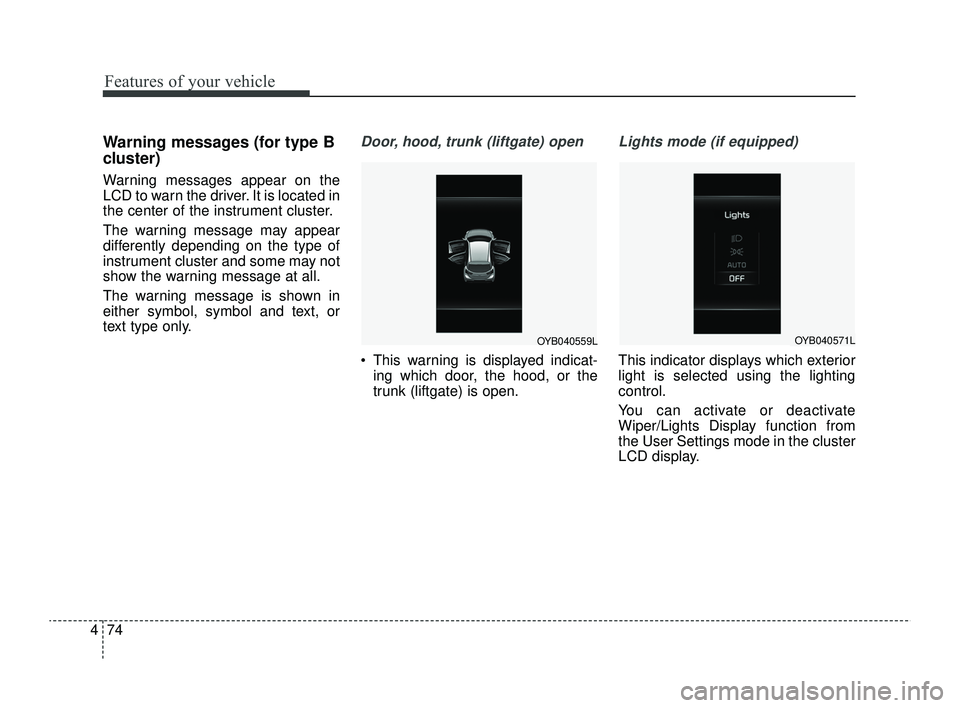
Rear Occupant Alert If this item is checked, the Rear Occupant Alert will be activated.
Wiper/Lights Display If this item is checked, the Wiper/Lights Display will be activated.
Icy road warning If this item is checked, the Icy road warning display will be activated.
4. Convenience (if equipped)
❈ The information provided may differ depending on which functions are applicable to your vehicle.
SC PE USA 4.QXP 9/9/2021 6:05 PM Page 70
Page 153 of 528
Features of your vehicle
74
4
Warning messages (for type B
cluster)
Warning messages appear on the
LCD to warn the driver. It is located in
the center of the instrument cluster.
The warning message may appear
differently depending on the type of
instrument cluster and some may not
show the warning message at all.
The warning message is shown in
either symbol, symbol and text, or
text type only.
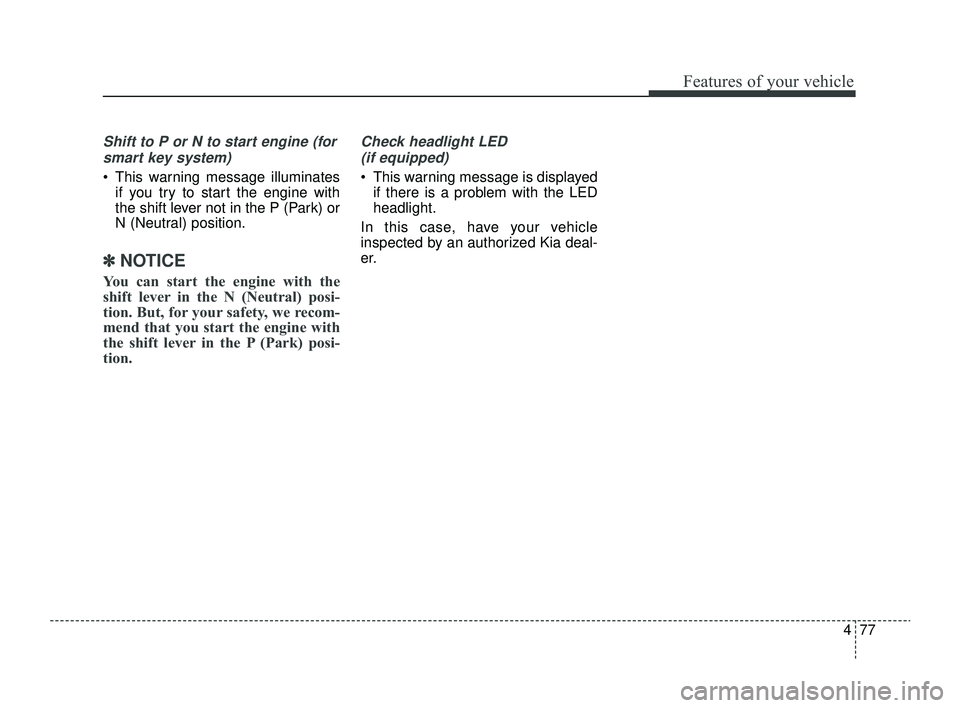
Door, hood, trunk (liftgate) open
This warning is displayed indicat-
ing which door, the hood, or the
trunk (liftgate) is open.
Lights mode (if equipped)
This indicator displays which exterior
light is selected using the lighting
control.
You can activate or deactivate
Wiper/Lights Display function from
the User Settings mode in the cluster
LCD display.
OYB040559LOYB040571L
SC PE USA 4.QXP 9/9/2021 6:05 PM Page 74
Page 154 of 528
475
Features of your vehicle
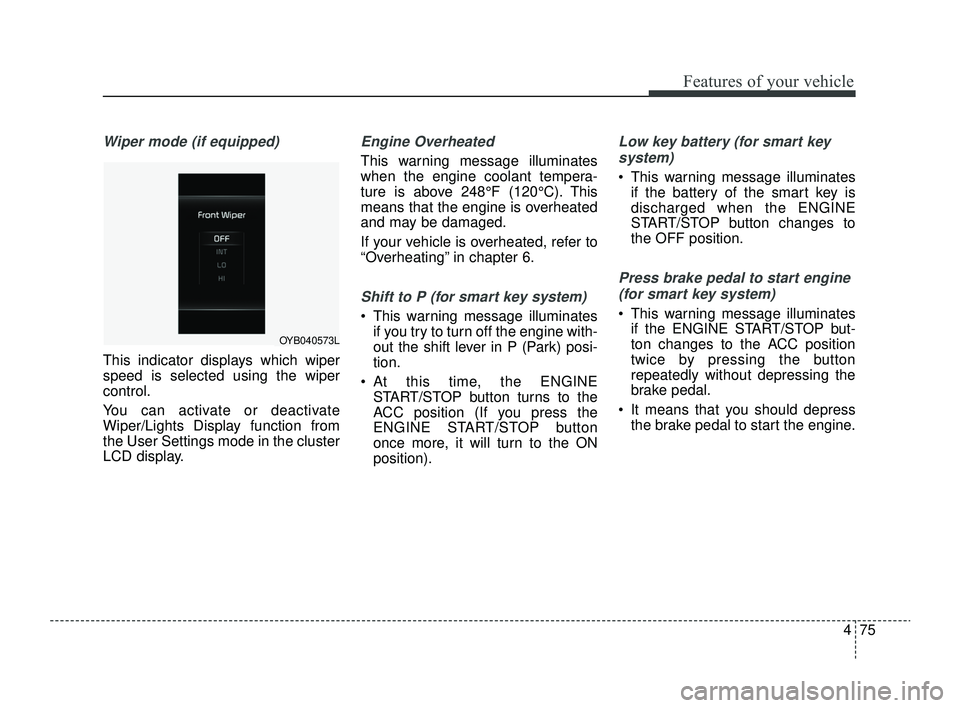
Wiper mode (if equipped)
This indicator displays which wiper
speed is selected using the wiper
control.
You can activate or deactivate
Wiper/Lights Display function from
the User Settings mode in the cluster
LCD display.
Engine Overheated
This warning message illuminates
when the engine coolant tempera-
ture is above 248°F (120°C). This
means that the engine is overheated
and may be damaged.
If your vehicle is overheated, refer to
“Overheating” in chapter 6.
Shift to P (for smart key system)
This warning message illuminatesif you try to turn off the engine with-
out the shift lever in P (Park) posi-
tion.
At this time, the ENGINE START/STOP button turns to the
ACC position (If you press the
ENGINE START/STOP button
once more, it will turn to the ON
position).
Low key battery (for smart key
system)
This warning message illuminates if the battery of the smart key is
discharged when the ENGINE
START/STOP button changes to
the OFF position.
Press brake pedal to start engine
(for smart key system)
This warning message illuminates if the ENGINE START/STOP but-
ton changes to the ACC position
twice by pressing the button
repeatedly without depressing the
brake pedal.
It means that you should depress the brake pedal to start the engine.
OYB040573L
SC PE USA 4.QXP 9/9/2021 6:05 PM Page 75
Page 155 of 528
Features of your vehicle
76
4
Key not in vehicle (for smart key
system)
This warning message illuminates if the smart key is not in the vehicle
when you press the ENGINE
START/STOP button.
It means that you should always have the smart key with you.
Key not detected (for smart key
system)
This warning message illuminates if the smart key is not detected
when you press the ENGINE
START/STOP button.
Press START button again (for
smart key system)
This warning message illuminates if you can not operate the ENGINE
START/STOP button when there is
a problem with the ENGINE
START/STOP button system.
It means that you could start the engine by pressing the ENGINE
START/STOP button once more.
If the warning illuminates each time you press the ENGINE
START/STOP button, have your
vehicle inspected by an authorized
Kia dealer.
Press START button with key (for
smart key system)
This warning message illuminates if you press the ENGINE
START/STOP button while the
warning message “Key not detect-
ed” is illuminating.
At this time, the immobilizer indica- tor light blinks.
Check BRAKE SWITCH fuse (for
smart key system)
This warning message illuminates if the brake switch fuse is discon-
nected.
It means that you should replace the fuse with a new one. If that is
not possible, you can start the
engine by pressing the ENGINE
START/STOP button for 10 sec-
onds in the ACC position.
SC PE USA 4.QXP 9/9/2021 6:05 PM Page 76
Page 156 of 528
477
Features of your vehicle
Shift to P or N to start engine (forsmart key system)
This warning message illuminates if you try to start the engine with
the shift lever not in the P (Park) or
N (Neutral) position.
✽ ✽ NOTICE
You can start the engine with the
shift lever in the N (Neutral) posi-
tion. But, for your safety, we recom-
mend that you start the engine with
the shift lever in the P (Park) posi-
tion.
Check headlight LED
(if equipped)
This warning message is displayed if there is a problem with the LED
headlight.
In this case, have your vehicle
inspected by an authorized Kia deal-
er.
SC PE USA 4.QXP 9/9/2021 6:05 PM Page 77
Page 157 of 528
Features of your vehicle
78
4
Warning lights
✽ ✽
NOTICE - Warning lights
Make sure that all warning lights
are OFF after starting the engine. If
any light is still ON, this indicates a
situation that needs attention.
Air bag Warning Light
This warning light illuminates:
Once you set the ignition switch or
ENGINE START/STOP button to
the ON position.
- It illuminates for approximately 6seconds and then goes off.
When there is a malfunction with the SRS.
In this case, have your vehicle
inspected by an authorized Kia
dealer.
Seat Belt Warning Light
This warning light informs the driver
that the seat belt is not fastened.
❈ For more details, refer to the “Seat
Belts” in chapter 3.
WARNING AND INDICATOR LIGHTS
SC PE USA 4.QXP 9/9/2021 6:05 PM Page 78