Page 111 of 528
Features of your vehicle
32
4
WARNING
No one should be allowed to
occupy the luggage compart-
ment of the vehicle at any
time. The luggage compart-
ment is a very dangerous
location in the event of a
crash.
Use the release lever for emergencies only. Use with
extreme caution, especially
while the vehicle is in motion.
SC PE USA 4.QXP 9/9/2021 6:02 PM Page 32
Page 114 of 528
435
Features of your vehicle
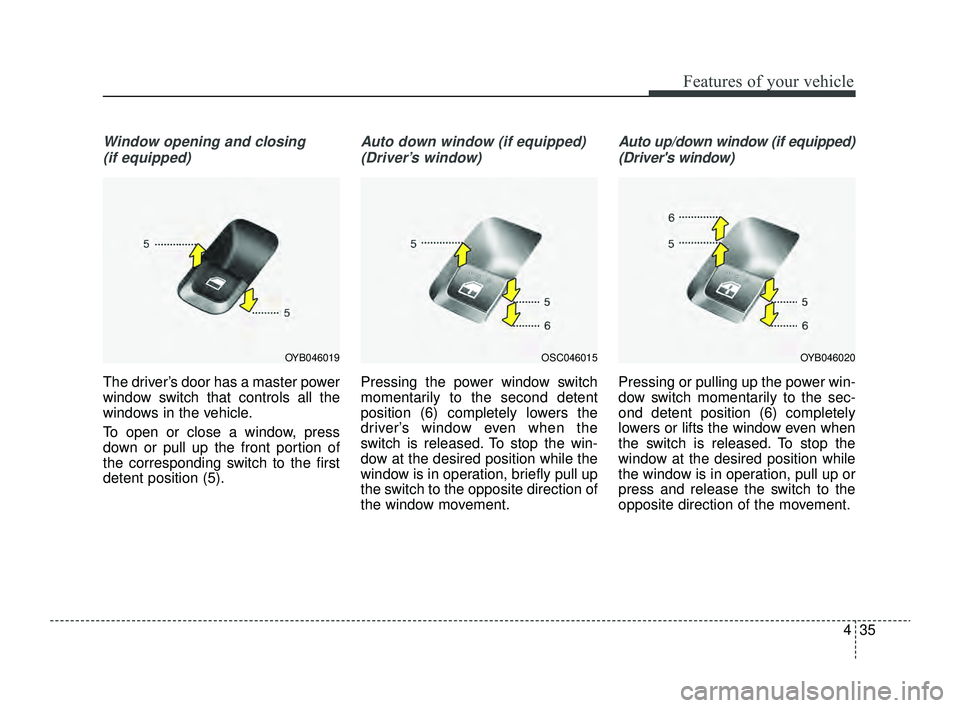
Window opening and closing(if equipped)
The driver’s door has a master power
window switch that controls all the
windows in the vehicle.
To open or close a window, press
down or pull up the front portion of
the corresponding switch to the first
detent position (5).
Auto down window (if equipped) (Driver’s window)
Pressing the power window switch
momentarily to the second detent
position (6) completely lowers the
driver’s window even when the
switch is released. To stop the win-
dow at the desired position while the
window is in operation, briefly pull up
the switch to the opposite direction of
the window movement.
Auto up/down window (if equipped)(Driver's window)
Pressing or pulling up the power win-
dow switch momentarily to the sec-
ond detent position (6) completely
lowers or lifts the window even when
the switch is released. To stop the
window at the desired position while
the window is in operation, pull up or
press and release the switch to the
opposite direction of the movement.
OSC046015OYB046020OYB046019
SC PE USA 4.QXP 9/9/2021 6:02 PM Page 35
Page 123 of 528

Features of your vehicle
44
4
Make sure to refuel your vehicle
according to the “Fuel requirements”
suggested in chapter 1.
If the fuel filler cap requires replace-
ment, use only a genuine Kia cap or
the equivalent specified for your vehi-
cle. An incorrect fuel filler cap can
result in a serious malfunction of the
fuel system or emission control sys-
tem.
CAUTION- Exterior paint
Do not spill fuel on the exterior
surfaces of the vehicle. Anytype of fuel spilled on paintedsurfaces may damage the paint.
WARNING - Refueling &
Vehicle fires
When refueling, always shut the
engine off. Sparks produced by
electrical components related
to the engine can ignite fuel
vapors, causing a fire. Once
refueling is complete, check to
make sure the filler cap and
filler door are securely closed,
before starting the engine.
WARNING - Smoking
DO NOT use matches or a lighter
and DO NOT SMOKE or leave a
lit cigarette in your vehicle while
at a gas station especially during
refueling. Automotive fuel is
highly flammable and can, when
ignited, result in fire.
WARNING - Cell phone fires
Do not use cellular phones while
refueling. Electric current and/or
electronic interference from cel-
lular phones can potentially
ignite fuel vapors causing a fire.
WARNING- Portable fuel container
When using an approved portable
fuel container, be sure to place
the container on the ground prior
to refueling. Static electricity dis-
charge from the container can
ignite fuel vapors causing a fire.
Once refueling has begun, con-
tact with the vehicle should be
maintained until the filling is com-
plete. Use only approved portable
plastic fuel containers designed
to carry and store gasoline.
SC PE USA 4.QXP 9/9/2021 6:03 PM Page 44
Page 129 of 528

Features of your vehicle
50
4
Remote control
Electric type
The electric remote control mirror
switch allows you to adjust the posi-
tion of the left and right outside
rearview mirrors. To adjust the posi-
tion of either mirror, the ignition
switch or ENGINE START/STOP but-
ton should be in the ACC or ON posi-
tion.
To adjust the position of either mirror,
press the R or L button (1) to select
the right side mirror or the left side
mirror, then press a corresponding
point (▲) on the mirror adjustment
control to position the selected mirror
up, down, left or right. After adjustment, press the R or L
button again to prevent any inadver-
tent adjustment.
Folding the outside rearview mirror
Manual type
To fold the outside review mirror,
grasp the housing of the mirror and
then fold it toward the rear of the
vehicle.
OSC040518
CAUTION - Outside mirror
The mirrors stop moving when
they reach the maximumadjusting angles, but themotor continues to operatewhile the switch is pressed.Do not press the switch longerthan necessary as the motormay be damaged.
Do not attempt to adjust the outside rearview mirror byhand. Doing so may damagethe parts.
When the mirror control, press exactly “ � �
”(2) marking area.
Otherwise, the mirror will move to unintended directionor malfunction.
OYB046034
SC PE USA 4.QXP 9/9/2021 6:03 PM Page 50
Page 169 of 528
Features of your vehicle
90
4
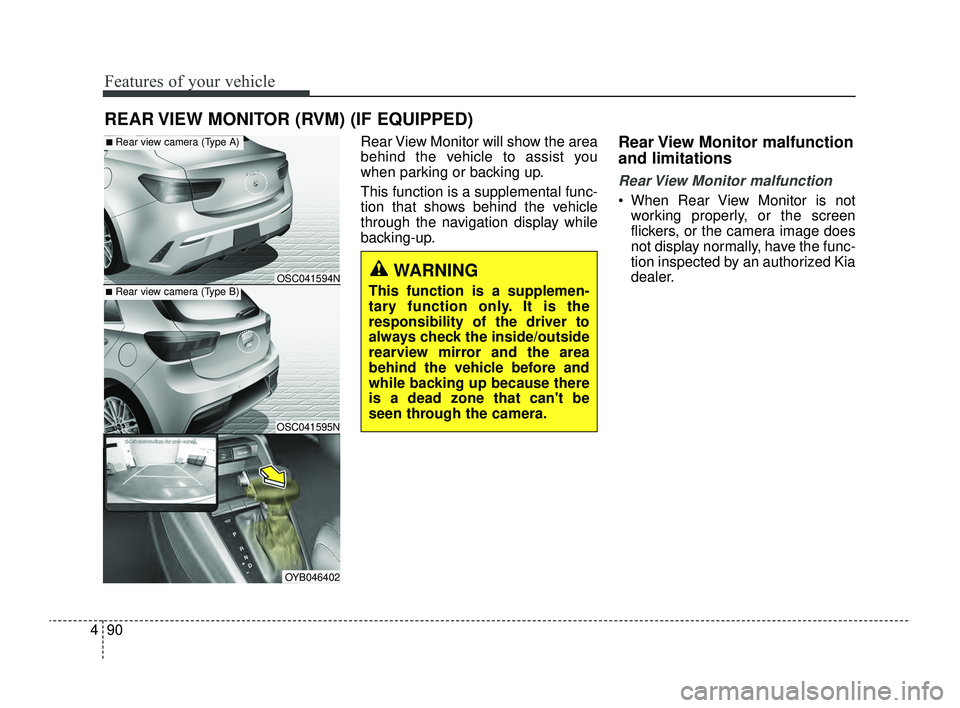
Rear View Monitor will show the area
behind the vehicle to assist you
when parking or backing up.
This function is a supplemental func-
tion that shows behind the vehicle
through the navigation display while
backing-up.Rear View Monitor malfunction
and limitations
Rear View Monitor malfunction
When Rear View Monitor is not
working properly, or the screen
flickers, or the camera image does
not display normally, have the func-
tion inspected by an authorized Kia
dealer.
REAR VIEW MONITOR (RVM) (IF EQUIPPED)
■Rear view camera (Type B)
■Rear view camera (Type A)
OSC041595N
OSC041594N
OYB046402
WARNING
This function is a supplemen-
tary function only. It is the
responsibility of the driver to
always check the inside/outside
rearview mirror and the area
behind the vehicle before and
while backing up because there
is a dead zone that can't be
seen through the camera.
SC PE USA 4.QXP 9/9/2021 6:05 PM Page 90
Page 170 of 528
491
Features of your vehicle
Limitations of Rear View Monitor
When the vehicle is stopped for along time in winter or when the
vehicle is parked in an indoor park-
ing lot, the exhaust fumes may
temporarily blur the image.WARNING
Rear View Monitor is not a
safety device. It only serves to
assist the driver in identifying
objects directly behind the
middle of the vehicle. The
camera does not cover the
complete area behind the
vehicle.
Never rely solely on the rear
view monitor. As there are
blind spots that do not appear
on the camera while backing
up and parking, You must
always use methods of view-
ing the area behind you
including looking over both
shoulders as well as continu-
ously checking all three rear
view mirrors.
(Continued)
(Continued)
Always look around your vehi-
cle to make sure there are no
objects or obstacles before
moving the vehicle in any
direction to prevent a colli-
sion.
Always pay close attention
when the vehicle is driven
close to objects, particularly
pedestrians, and especially
children.
If the camera lens is covered
with foreign material, Rear
View Monitor may not operate
normally. Always keep the
camera lens clean. However,
do not use chemical solvents
such as strong detergents
containing high alkaline or
volatile organic solvents
(gasoline, acetone etc.). This
may damage the camera lens.
When stopping for a long time
in winter or parking in an
indoor parking lot, the image
may temporarily be blurry due
to the exhaust gas.
SC PE USA 4.QXP 9/9/2021 6:05 PM Page 91
Page 214 of 528

4135
Features of your vehicle
WINDSHIELD DEFROSTING AND DEFOGGING
For maximum defrosting, set thetemperature control all the way to
the right/hot position and the fan
speed control to the highest speed.
If warm air to the floor is desired while defrosting or defogging, set the
mode to the floor-defrost position.
Before driving, clear all snow and ice from the windshield, rear win-
dow, outside rear view mirrors, and
all side windows.
Clear all snow and ice from the hood and air inlet in the cowl grill to
improve heater and defroster effi-
ciency and to reduce the probabili-
ty of fogging up the inside of the
windshield.Manual climate control system
To defog inside windshield
1. Select any fan speed except "0" position.
2. Select desired temperature.
3. Select the or position.
4. The outside (fresh) air will be selected automatically.
If the outside (fresh) air position is
not selected automatically, press the
corresponding button manually.
WARNING- Windshield heating
Do not use the ( ) or ( )
position during cooling opera-
tion in extremely humid weath-
er. The difference between the
temperature of the outside air
and the windshield could cause
the outer surface of the wind-
shield to fog up, causing loss of
visibility.
OSC040315N
SC PE USA 4.QXP 9/9/2021 6:08 PM Page 135
Page 215 of 528
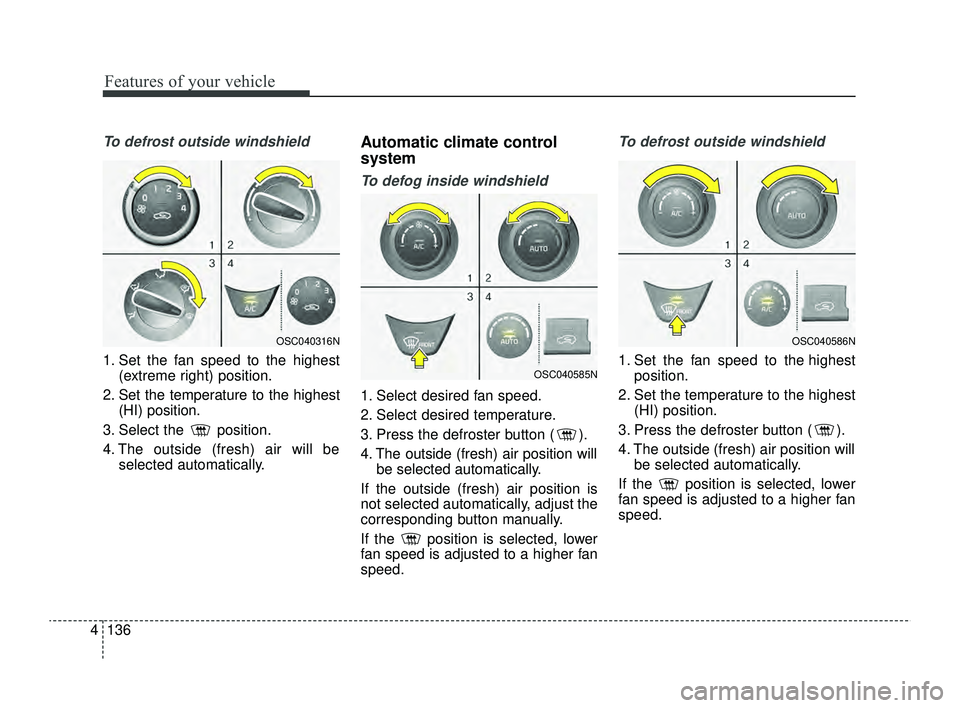
Features of your vehicle
136
4
To defrost outside windshield
1. Set the fan speed to the highest
(extreme right) position.
2. Set the temperature to the highest (HI) position.
3. Select the position.
4. The outside (fresh) air will be selected automatically.
Automatic climate control
system
To defog inside windshield
1. Select desired fan speed.
2. Select desired temperature.
3. Press the defroster button ( ).
4. The outside (fresh) air position willbe selected automatically.
If the outside (fresh) air position is
not selected automatically, adjust the
corresponding button manually.
If the position is selected, lower
fan speed is adjusted to a higher fan
speed.
To defrost outside windshield
1. Set the fan speed to the highest position.
2. Set the temperature to the highest (HI) position.
3. Press the defroster button ( ).
4. The outside (fresh) air position will be selected automatically.
If the position is selected, lower
fan speed is adjusted to a higher fan
speed.
OSC040316N
OSC040585N
OSC040586N
SC PE USA 4.QXP 9/9/2021 6:08 PM Page 136