Page 167 of 710

427
Features of your vehicle
You can activate or deactivate the
ROA from the User Settings mode in
the cluster LCD display.
The option can be found under the
following menu:
1. Press the MODE button ( ) sev-eral times on the steering
wheel until 'User Settings' menu
appears on the LCD.
2. Select 'Convenience Rear
Occupant Alert‘ with the MOVE
switch ( / ) and the OK button
on the steering wheel.
WARNING
The Rear Occupant Alert (ROA)
system does not actually detect
objects or people in the rear
seat. By using a rear door
opened and closed history, the
system informs the driver that
there may be something in the
rear seat.
WARNING
The door lock system may not
work if the electrical system is
compromised. Accordingly,
please train children passen-
gers regarding how to open the
car door manually before an
emergency situation arises. That
way, they would be able to open
the door manually in the event
an emergency situation arises.
CAUTION
The Rear Occupant Alert (ROA) system uses a rear door openedand closed history.
The history is reset after thedriver turns off ignition normal-ly, exits the vehicle and locksthe door remotely using theremote keyless entry. So even ifa rear door does not reopen, theROA system alert can occur.
For example, after the ROA sys-tem alert occurs, if the driverdoes not lock the door, anddrives again, the alert can occur.
Page 172 of 710

Features of your vehicle
32
4
Power windows
The ignition switch or ENGINE
START/STOP button must be in the
ON position for power windows to
operate.
Each door has a power window
switch that controls the door's win-
dow. The driver has a power window
lock button which can block the oper-
ation of rear passenger windows.
The power windows can be operated
for approximately 30 seconds after
the engine is turned off.
However, if the front doors are
opened, the power windows cannot
be operated even within the 30 sec-
ond period.
The driver’s door has a master power
window switch that controls all the
windows in the vehicle.
If the window cannot be closed
because it is blocked by objects,
remove the objects and close the
window.
✽ ✽
NOTICE
While driving with the rear windows
down or with the sunroof (if
equipped) in an open (or partially
open) position, your vehicle may
demonstrate a wind buffeting or
pulsation noise. This noise is a nor-
mal occurrence and can be reduced
or eliminated by taking the follow-
ing actions. If the noise occurs with
one or both of the rear windows
down, partially lower both front
windows approximately 1 inch (2.5
cm). If you experience the noise with
the sunroof open, slightly reduce the
size of the sunroof opening.
Window opening and closing
To open or close a window, press
down or pull up the front portion of
the corresponding switch to the first
detent position (5).
OJF045016
CAUTION
Do not install any accessories
in the vehicle that extend intothe open window area. Suchobjects will impact the properfunction of the Automatic rever-sal “jam protection” feature.
Page 173 of 710

433
Features of your vehicle
Auto up/down window (if equipped)
Pressing or pulling up the power win-
dow switch momentarily to the second
detent position (6) completely lowers
or raises the window even when the
switch is released. To stop the window
at the desired position while the win-
dow is in operation, pull up or press
down and release the switch.If the power window does not operate
normally, the automatic power win-
dow system must be reset as follows:
1. Turn the ignition switch or ENGINE
START/STOP button to the ON
position.
2. Close the driver's and passenger's window and continue pulling up
the driver’s power window switch
for at least 1 second after the win-
dow is completely closed.
Automatic reversal
(for Auto up/down window)
If the upward movement of the win-
dow is blocked by an object or part of
the body, the window will detect the
resistance and will stop upward
movement. The window will then
lower approximately 11.8 in. (30 cm)
to allow the object to be cleared.
The distance may vary based on the
size or position of the window. If the
window detects the resistance while
the power window switch is pulled up
continuously, the window will stop
upward movement then lower
approximately 1 in. (2.5 cm).
OUN026013
OJF045017L
Page 184 of 710

Features of your vehicle
44
4
If your vehicle is equipped with a
sunroof, you can slide or tilt your
sunroof with the sunroof switch locat-
ed on the overhead console.
The sunroof can only be operated
when the ignition switch or Engine
Start/Stop button is in the ON or
START position.
The sunroof can be operated for
approximately 30 seconds the igni-
tion switch or Engine Start/Stop but-
ton is in the ACC or LOCK/OFF posi-
tion. However, if the front door is
open, the sunroof cannot be operat-
ed even within the 30 seconds peri-
od.
✽ ✽
NOTICE
Do not operate the sunroof when
roof bars are installed on the vehicle
or when there is luggage on the roof.
Sunshade
Use the sunshade to block direct
sunlight coming through the sunroof
glass.
Open or close the sunshade by
hand.
SUNROOF (IF EQUIPPED)
ODEEV041620
WARNING
Never adjust the sunroof or
sunshade while driving. This
could result in loss of control
and an accident that may
cause injury, or property dam-
age.
Do not leave the engine run- ning and the key in your vehi-
cle with unsupervised chil-
dren. Unattended children
could operate the sunroof,
which could result in serious
injury.
Do not sit on the top of the vehicle. It may cause injury or
vehicle damage.
OBK049019
Page 191 of 710
451
Features of your vehicle
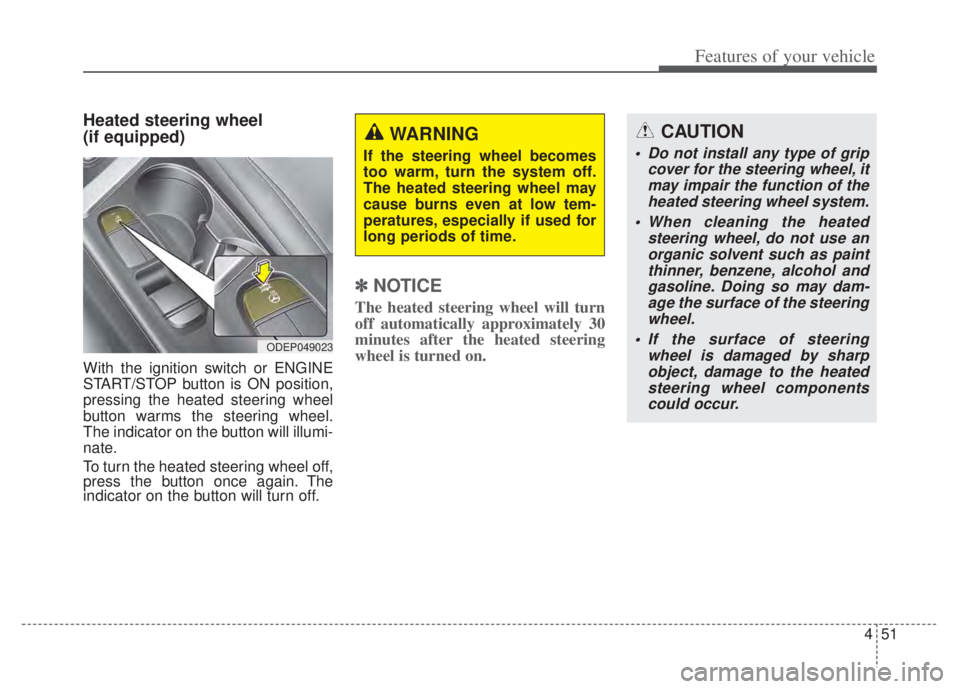
Heated steering wheel
(if equipped)
With the ignition switch or ENGINE
START/STOP button is ON position,
pressing the heated steering wheel
button warms the steering wheel.
The indicator on the button will illumi-
nate.
To turn the heated steering wheel off,
press the button once again. The
indicator on the button will turn off.
✽ ✽NOTICE
The heated steering wheel will turn
off automatically approximately 30
minutes after the heated steering
wheel is turned on.
CAUTION
Do not install any type of grip
cover for the steering wheel, itmay impair the function of theheated steering wheel system.
When cleaning the heated steering wheel, do not use anorganic solvent such as paintthinner, benzene, alcohol andgasoline. Doing so may dam-age the surface of the steeringwheel.
If the surface of steering wheel is damaged by sharpobject, damage to the heatedsteering wheel componentscould occur.
ODEP049023
WARNING
If the steering wheel becomes
too warm, turn the system off.
The heated steering wheel may
cause burns even at low tem-
peratures, especially if used for
long periods of time.
Page 205 of 710

465
Features of your vehicle
✽ ✽NOTICE
The outside rearview mirrors will
automatically revert to their original
positions under the following condi-
tions:
1. ENGINE START/STOP button or
ignition switch is changed to the
ACC or OFF position.
2. Shift lever is moved to any posi- tion except R.
3. Remote control outside rearview mirror switch is placed in the
middle position.
Folding the outside rearview mirror
Electric type (if equipped)
The outside rearview mirror can be
folded or unfolded by pressing the
switch when the ENGINE
START/STOP button is in the ON posi-
tion as below.
Left : The mirror will unfold.
Right : The mirror will fold. Center (AUTO)
:
The mirror will fold or unfold automat-
ically as follows:
Without smart key system - The mirror will fold or unfold whenthe door is locked or unlocked by
the transmitter. (if equipped)
With smart key system - The mirror will fold or unfold whenthe door is locked or unlocked by
the smart key.
- The mirror will fold or unfold when the door is locked or unlocked by
the button on the outside door
handle.
- The mirror will unfold when you approach the vehicle (all doors
closed and locked) with a smart
key in possession. (if equipped)CAUTION
If outside rearview mirror ispositioned at the outermost(left/right/bottom), the automat-ic mirror control function maynot properly work while vehiclemove backward.
ODEP049030L
Page 206 of 710
Features of your vehicle
66
4
Manual type (if equipped)
To fold the outside rearview mirror,
grasp the housing of the mirror and
then fold it toward the rear of the
vehicle.
CAUTION -Electric type
outside rearview mirror
The electric type outside rearview mirror operates eventhough the ignition switch is inthe LOCK position or theENGINE START/STOP button isin the OFF position. However, toprevent unnecessary batterydischarge, do not adjust themirrors longer than necessarywhile the engine is not running.
Do not fold an electric type out-side rearview mirror by hand asthis could cause motor failure.
ODE046029
Page 209 of 710
469
Features of your vehicle
Instrument Cluster Control
Adjusting Instrument ClusterIllumination
The brightness of the instrument
panel illumination is changed by
pressing the illumination control but-
ton (“+” or “-”) when the ignition
switch or ENGINE START/STOP but-
ton is ON, or the taillights are turned
on. If you hold the illumination control
button (“+” or “-”), the brightness
will be changed continuously.
If the brightness reaches to the maximum or minimum level, an
alarm will sound.
Gauges
Speedometer
The speedometer indicates the
speed of the vehicle and is calibrated
in miles per hour (mph) and/or kilo-
meters per hour (km/h).
ODEP041545N
ODEP049543L
ODEP049105N
ODEP049539N
■
Type A
■Type B

