2022 KIA NIRO PHEV Settings
[x] Cancel search: SettingsPage 377 of 710

Driving your vehicle
54
5
Forward Collision-Avoidance Assist
is designed to detect Forward
Collision-Avoidance Assist (FCA)
(Sensor fusion) vehicle ahead or
pedestrian ahead in the roadway
through front view camera recogni-
tion to warn the driver that a collision
is imminent, and if necessary, apply
emergency braking.
❈ FCA stands for Forward Collision-
Avoidance AssistForward Collision-Avoidance
Assist setting and activation
Forward Safety
The driver can activate Forward
Collision-Avoidance Assist by plac-
ing the ignition switch or ENGINE
START/STOP button to the ON posi-
tion and by selecting:
“User Settings Driver Assistance
Forward Safety”
- If you select “Active Assist”, Forward Collision-Avoidance Assist acti-
vates. Forward Collision-Avoidance
Assist produces warning messages
and warning alarms in accordance
with the collision risk levels. Also, it
controls the brakes in accordance
with the collision risk levels.
- If you select “Warning Only”, Forward Collision-Avoidance Assist
activates and produces only warn-
ing alarms in accordance with the
collision risk levels. You should con-
trol the brake directly because
Forward Collision-Avoidance Assist
does not control the brake.
- If you select “Off ”, Forward Collision- Avoidance Assist deactivates,
FORWARD COLLISION-AVOIDANCE ASSIST (FCA) (FRONT VIEW CAMERA ONLY)
(IF EQUIPPED)
WARNING
Take the following precautions
when using Forward Collision-
Avoidance Assist :
This function is only a supple-mental function and it is not
intended to, nor does it replace
the need for extreme care and
attention of the driver. The
sensing range and objects
detectable by the sensors are
limited. Pay attention to the
road conditions at all times.
Never drive too fast in accor- dance with the road condi-
tions or while cornering.
Always drive cautiously to prevent unexpected and sud-
den situations from occur-
ring. Forward Collision-
Avoidance Assist does not
stop the vehicle completely
and is only intended to help
mitigate an imminent colli-
sion.
Page 378 of 710

555
Driving your vehicle
The warning light illumi-nates on the LCD display,
when you cancel Forward
Collision-Avoidance
Assist.
The driver can monitor Forward
Collision-Avoidance Assist ON/OFF
status on the LCD display. Also, the
warning light illuminates when the
ESC (Electronic Stability Control) is
turned off. When the warning light
remains ON with Forward Collision-
Avoidance Assist activated, have
your vehicle inspected by an author-
ized Kia dealer.Warning Timing
The driver can select the initial warn-
ing activation time on the LCD dis-
play.
Go to the “User Settings Driver
Assistance Warning Timing
Normal/Later” The options for the initial Forward
Collision Warning includes the fol-
lowing:
- Normal:
When this condition is selected, the
initial Forward Collision Warning is
activated normally. This setting
allows for a nominal amount of dis-
tance between the vehicle ahead
before the initial warning occurs.
- Later:
When this condition is selected, the
initial Forward Collision Warning is
activated later than normal. This set-
ting reduces the amount of distance
between the vehicle or pedestrian
before the initial warning occurs.
Select 'Later' when traffic is light and
when driving speed is slow.
OYG059344L
Page 380 of 710

557
Driving your vehicle
Forward Collision-Avoidance
Assist warning message and
function control
Forward Collision-Avoidance Assist
produces warning messages and
warning alarms in accordance with
the collision risk levels, such as
abrupt stopping of the vehicle in
front, insufficient braking distance,
pedestrian detection. Also, it controls
the brakes in accordance with the
collision risk levels.
The driver can select the initial warn-
ing activation time in the ‘Settings’ on
the LCD display or Infotainment
System screen. The options for the
initial Forward Collision Warning
include Normal or Late initial warning
time.
Collision Warning (1st warning)
The warning message appears onthe LCD display with the warning
alarms.
The Vehicle may slow down slightly - It will operate if the vehicle speedis greater than 5 mph (8 km/h)
and less than or equal to 40 mph
(60 km/h) on a forward vehicle.
(Depending on the condition of
the vehicle ahead and the envi-
ronment surrounding it, the possi-
ble maximum operating speed
may be reduced.) - For pedestrian, the vehicle speed
is greater than or equal to 5 mph
(8 km/h) and less than 40 mph (60
km/h). (Depending on the condi-
tion of pedestrian and the sur-
rounding environment the possi-
ble maximum operating speed
may be reduced.)
Forward Collision-Avoidance Assist controls the brakes within certain
limit to release shock from the colli-
sion.
- If you select “Warning Only”,Forward Collision-Avoidance
Assist activates and produces
only warning alarms in accor-
dance with the collision risk lev-
els. You should control the brake
directly because Forward
Collision-Avoidance Assist does
not control the brake.
OJF058389L
Page 393 of 710

Driving your vehicle
70
5
Forward Collision-Avoidance Assist
is to reduce or to avoid accident risk.
It recognizes the distance from a
vehicle ahead, a pedestrian or a
cyclist through the sensors (i.e. front
view camera and front radar), and, if
necessary, warns the driver of acci-
dent risk with the warning message
or the warning alarms and apply
emergency braking.
❈ FCA stands for Forward Collision-
Avoidance Assist.
❈ Sensor fusion (front view camera
+ front radar) Forward Collision-
Avoidance Assist operates for the
vehicle ahead, the pedestrian or
the cyclist in front.Forward Collision-Avoidance
Assist setting and activation
Forward safety
The driver can activate Forward
Collision-Avoidance Assist by plac-
ing the ignition switch or ENGINE
START/STOP button to the ON posi-
tion and by selecting:
“User Settings Driver Assistance
Forward Safety”
- If you select “Active Assist”, Forward Collision-Avoidance Assist acti-
vates. Forward Collision-Avoidance
Assist produces warning messages
and warning alarms in accordance
with the collision risk levels. Also, it
controls the brakes in accordance
with the collision risk levels.
- If you select “Warning Only”, Forward Collision-Avoidance
Assist activates and produces only
warning alarms in accordance with
the collision risk levels. You should
control the brake directly because
Forward Collision-Avoidance
Assist do not control the brake.
- If you select “Off ”, Forward Collision- Avoidance Assist deactivates,
FORWARD COLLISION-AVOIDANCE ASSIST (FCA) (SENSOR FUSION) (IF EQUIPPED)
WARNING
Take the following precautions
when using Forward Collision-
Avoidance Assist :
This function is only a supple-mental function and it is not
intended to, nor does it replace
the need for the extreme care
and attention of the driver. The
sensing range and objects
detectable by the sensors are
limited. Pay attention to the
road conditions at all times.
Never drive too fast in accor- dance with the road condi-
tions or while cornering.
Always drive cautiously to prevent unexpected and sud-
den situations from occur-
ring. Forward Collision-
Avoidance Assist does not
stop the vehicle completely
and is only intended to help
mitigate an imminent colli-
sion.
Page 394 of 710
571
Driving your vehicle
The warning light illumi-
nates on the LCD display,
when you cancel Forward
Collision-Avoidance
Assist. The driver can monitor the
Forward Collision-Avoidance Assist
ON/OFF status on the LCD display.
Also, the warning light illuminates
when the ESC (Electronic Stability
Control) is turned off. When the
warning light remains ON with
Forward Collision-Avoidance Assist
activated, have your vehicle inspect-
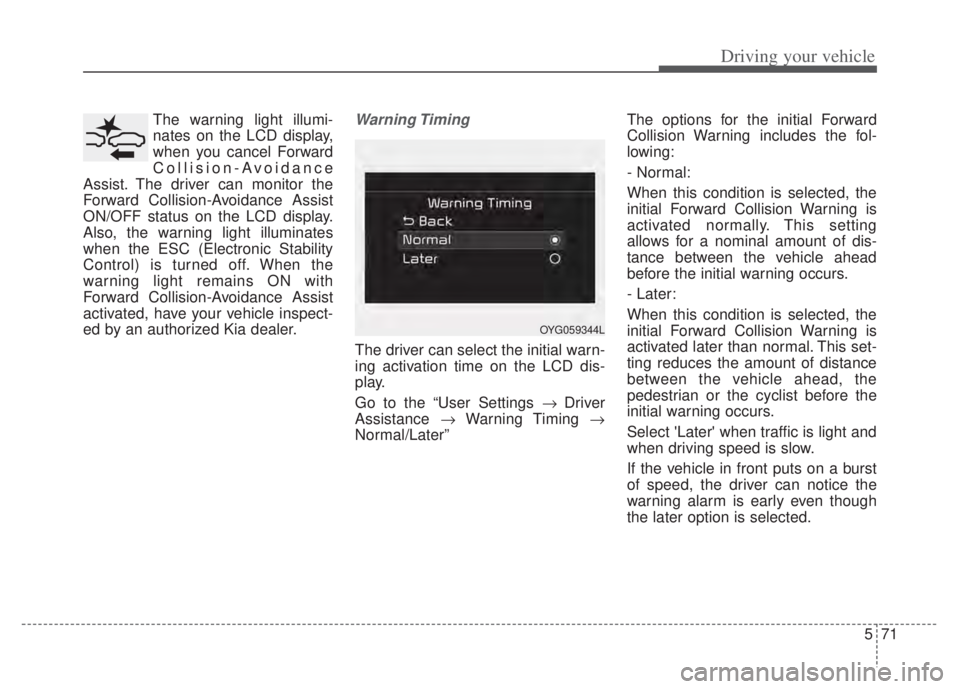
ed by an authorized Kia dealer.Warning Timing
The driver can select the initial warn-
ing activation time on the LCD dis-
play.
Go to the “User Settings Driver
Assistance Warning Timing
Normal/Later” The options for the initial Forward
Collision Warning includes the fol-
lowing:
- Normal:
When this condition is selected, the
initial Forward Collision Warning is
activated normally. This setting
allows for a nominal amount of dis-
tance between the vehicle ahead
before the initial warning occurs.
- Later:
When this condition is selected, the
initial Forward Collision Warning is
activated later than normal. This set-
ting reduces the amount of distance
between the vehicle ahead, the
pedestrian or the cyclist before the
initial warning occurs.
Select 'Later' when traffic is light and
when driving speed is slow.
If the vehicle in front puts on a burst
of speed, the driver can notice the
warning alarm is early even though
the later option is selected.
OYG059344L
Page 412 of 710

589
Driving your vehicle
To activate/deactivate Lane Keeping
Assist:
With the ignition switch or ENGINE
START/STOP button in the ON posi-
tion, press and hold the Lane Driving
Assist button ( ) located on the
steering wheel to turn off Lane
Keeping Assist. Press and hold the
button again to turn on the function.
The indicator ( ) in the cluster
display will initially illuminate white. If
you pressing and holding the Lane
Driving Assist button located on the
steering wheel, Lane Keeping Assist
will be turned off and the indicator on
the cluster display will go off.❈
The color of indicator will change
depend on the condition of Lane
Keeping Assist.
- White : Sensor does not detect the lane marker or vehi-
cle speed is less than 40
mph (60 km/h).
- Green : Sensor detects the lane marker and function is
able to control the steer-
ing.
Lane Keeping Assist setting
The driver can change Lane Keeping
Assist to Lane Depar ture Warning or
change the Lane Keeping Assist
mode from the LCD display.
“User Settings Driver Assistance
Lane Safety Lane Keeping
Assist/Lane Departure Warning/Off ”
Lane Keeping Assist
Lane Keeping Assist mode guides
the driver to keep the vehicle within
the lanes. It rarely controls the steer-
ing wheel, when the vehicle drives
well inside the lanes. However, it
starts to control the steering wheel,
when the vehicle is about to deviate
from the lanes.ODEEV051027
Page 420 of 710

597
Driving your vehicle
Blind-Spot Collision Warning
setting and activation
Blind-Spot Collision Warning set-ting
• The driver can activate the function by placing the ignition switch or
ENGINE START/STOP button to the
ON position and by selecting “User
Settings Driver Assistance
Blind-Spot Safety”
- Blind-Spot Collision Warning turns on and gets ready to be
activated when “Warning Only” is
selected. Then, if a vehicle
approaches the driver's blind spot
area a warning sounds.
- The function is deactivated and the indicator on the Blind-Spot
Safety button is extinguished
when 'Off' is selected. If you press Blind-Spot Safety but-
ton while “Warning Only” is select-
ed the indicator on the button extin-
guishes and the function deacti-
vates.
If you press Blind-Spot Safety but- ton while the function is cancelled
the indicator on the button illumi-
nates and the function activates. In
this case, the function returns to the
state before the vehicle turned off.
When the function is initially turned
on and when the motor is turned off
then on again while the function is
in activation, the warning light will
illuminate for 3 seconds on the out-
side rearview mirror. If the vehicle is turned off then on
again, the function maintains the
previous state.
ODEP051293N
Page 421 of 710

Driving your vehicle
98
5
Warning Timing
The driver can select the initial
warning activation time select “User
Settings Driver Assistance
Warning Timing”
The options for the initial Blind- Spot Collision Warning includes
the following: - Normal:
When this condition is selected,the initial Blind-Spot Collision
Warning is activated normally. If
this setting feels too sensitive
change the option to ‘Normal’.
The warning activation time may feel late if the side/rear vehicle
abruptly accelerates.
- Later: Select this warning activation
time when the traffic is light and
you are driving in a low speed.
✽ ✽ NOTICE
If you change the warning timing,
the warning time of other functions
may change. Always be aware
before changing the warning timing.
Operating conditions
The function enters the ready status,
when ‘Warning Only’ is selected and
the following conditions are satisfied:
(1) Blind-Spot Collision Warning will
activate when:
- The vehicle speed above approxi- mately 20 mph (30 km/h).
OYG059344L