Page 247 of 364

9-29
Warmer/Ventilation Features (if equipped)
You can set to make the driving environment pleasant by controlling the steering wheel
warmer and driver's seat warmer/ventilation.
�Link to Climate Settings for Auto-Adjustment: Automatically controls the heating wire
or ventilation for the driver's seat and steering wheel, in sync with the climate control
function.
Steering Wheel Warmer: Steering Wheel Warmer adjusts automatically based on
Climate settings.
Driver Seat Warmer/Ventilation: Seat Warmer/Ventilation adjusts automatically
based on Climate settings.
Seat (if equipped)
You can configure the settings of the steering wheel or seats, such as seat position change
notification and automatic control of the steering wheel warmer.
A
The screen may differ depending on the vehicle model and specifications.
Seat Position Change Alert (if equipped)
You can set the system to display a notification message along with the seat image on the
screen when a seat position is changed.
Recline 2nd Row Seat Backs (if equipped)
Adjust the second-row seat back angle.
Smart Posture Care (if equipped)
You can see the recommended driving posture according to your physical data, and the
clinical inspection result for your waist.
Page 248 of 364

9-30
Warmer/Ventilation Features (if equipped)
You can set to make the driving environment pleasant by controlling the steering wheel
warmer and driver's seat warmer/ventilation.
�Link to Climate Settings for Auto-Adjustment: Automatically controls the heating wire
or ventilation for the driver's seat and steering wheel, in sync with the climate control
function.
Steering Wheel Warmer: Steering Wheel Warmer adjusts automatically based on
Climate settings.
Driver Seat Warmer/Ventilation: Seat Warmer/Ventilation adjusts automatically
based on Climate settings.
Seating Easy Access (if equipped)
For convenience upon getting on and off, you can adjust the position of the driver's seat or
steering wheel to secure space inside the vehicle.
� Seat Slide Easy Access: Can set the distance to automatically move the driver's seat
when getting on or off.
Rear Seat Heating Control (if equipped)
You can set to enable the warmer for the rear-left and rear-right seats.
Lights (if equipped)
You can configure the settings for vehicle lights.
A
The screen may differ depending on the vehicle model and specifications.
Ambient Light (if equipped)
You can set the brightness and color of the ambient light.
A
To turn off the interior mood lamp, adjust the brightness to 0.
�Dimmed while Driving: This mode automatically decreases the interior mood lamp
brightness when the gear is shifted to a position other than "P" (park) at night.
�Link to Drive Mode: Changes the interior mood lamp color according to the drive mode.
Page 250 of 364

9-32
Auto Unlock (if equipped)
You can set the time to automatically unlock all doors.
Walk-away Lock (if equipped)
You can set to automatically lock all doors when you move away from the vehicle with the
smart key.
A
When all doors are closed, this feature works normally.
Horn Feedback (if equipped)
You can set to generate guiding beep when all doors are locked.
Remote Power Doors & Liftgate (if equipped)
Easily open the doors by pressing the unlock button on the smart key for more than 3
seconds.
2 Press Unlock (if equipped)
You can set to unlock all doors by pressing the door unlock button twice.
A
When you press the door unlock button once, only the driver's seat door is unlocked.
Smart Sliding Door (if equipped)
Set the sliding door to automatically open when you move close to the sliding door carrying
your smart key.
Power Trunk or Power Liftgate (if equipped)
Open or close the trunk (liftgate) automatically using the power trunk (liftgate) button.
A
The displayed name may differ depending on the vehicle model and specifications.
Power Trunk Opening Speed or Power Liftgate Opening Speed
(if equipped)
Set the opening speed for the power trunk (liftgate).
A
The displayed name may differ depending on the vehicle model and specifications.
Power Trunk Opening Height or Power Liftgate Opening Height
(if equipped)
Set the opening height for the power trunk (liftgate).
A
The displayed name may differ depending on the vehicle model and specifications.
Page 252 of 364
9-34
Convenience (if equipped)
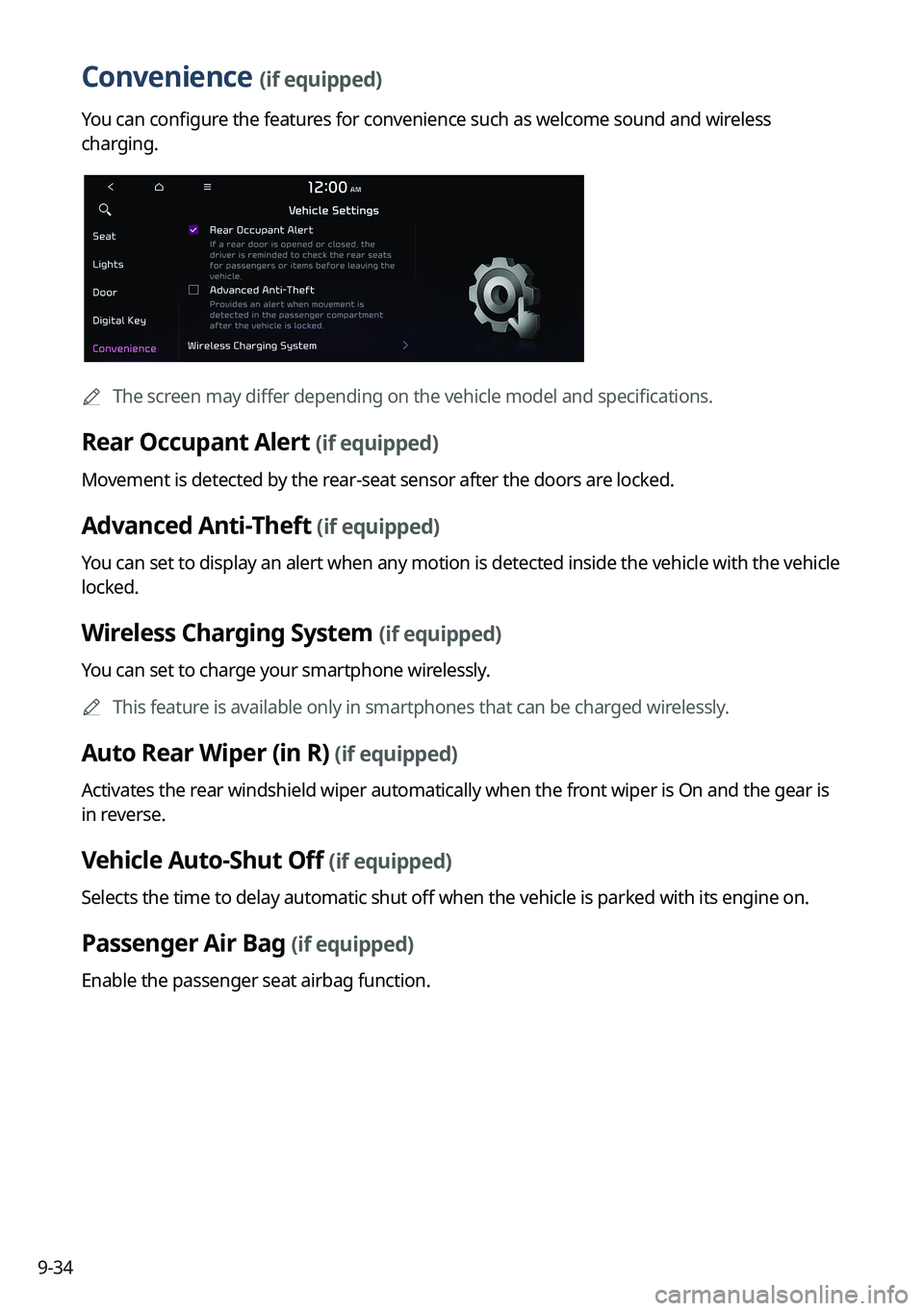
You can configure the features for convenience such as welcome sound and wireless
charging.
A
The screen may differ depending on the vehicle model and specifications.
Rear Occupant Alert (if equipped)
Movement is detected by the rear-seat sensor after the doors are locked.
Advanced Anti-Theft (if equipped)
You can set to display an alert when any motion is detected inside the vehicle with the vehicle
locked.
Wireless Charging System (if equipped)
You can set to charge your smartphone wirelessly.
A
This feature is available only in smartphones that can be charged wirelessly.
Auto Rear Wiper (in R) (if equipped)
Activates the rear windshield wiper automatically when the front wiper is On and the gear is
in reverse.
Vehicle Auto-Shut Off (if equipped)
Selects the time to delay automatic shut off when the vehicle is parked with its engine on.
Passenger Air Bag (if equipped)
Enable the passenger seat airbag function.
Page 274 of 364
9-56
Bass Boost (if equipped)
Provides magnificent and dynamic sound by amplifying the bass.
Quantum Logic Surround (if equipped)
Provides the surround sound that can give spatial depth of field as on an actual stage.
Centerpoint® Surround Technology (if equipped)
Provides rich surround sound after converting the sound sources such as digital files and
satellite radio to stereophonic sound.
Position
You can select a position where sound is more audible in the vehicle. By pressing the desired
point on the seat image or pressing the arrow buttons, you can finely adjust the position. To
concentrate the sound to the center of the vehicle, press
.
Tone
You can adjust the sound by adjusting the strengths (output levels) for each audio band: Bass,
Midrange, and Treble.
A
To reset all audio settings to the default values, press Center.
Page 280 of 364
9-62
Configuring the voice recognition settings
(Type2)
You can change the settings for voice recognition.
1 On the All Menus screen, press Setup >
Voice Recognition.
The voice recognition settings screen appears.
2 Configure the settings required:
A
Press >
Search for Settings or press and enter a keyword to search for a
setting item. You can also search for a setting item by voice.
Audible Prompts
You can set whether to hear the voice recognition guidance briefly or in detail. You can also
turn off the voice guidance.
A
The displayed screen or name may differ depending on the vehicle model and
specifications.
Rear Seat (if equipped)
Turn on the rear-seat speech recognition function.
AThe screen may differ depending on the vehicle model and specifications.
A
If the rear-seat speech recognition lock is on, it is not possible to use speech recognition
from the rear seats.
Page 341 of 364
11-11
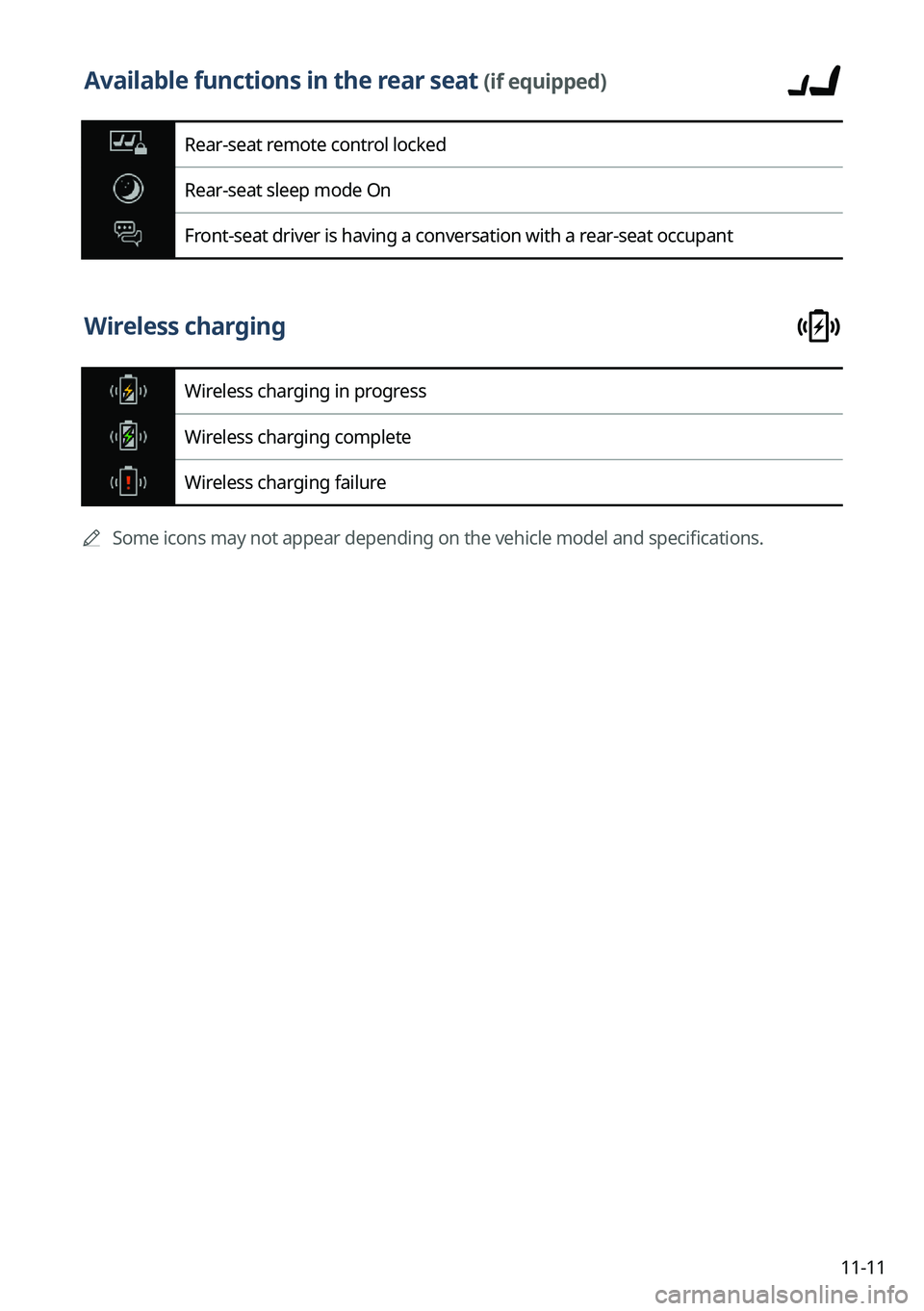
Available functions in the rear seat (if equipped)
Rear-seat remote control locked
Rear-seat sleep mode On
Front-seat driver is having a conversation with a rear-seat occupant
Wireless charging
Wireless charging in progress
Wireless charging complete
Wireless charging failure
A
Some icons may not appear depending on the vehicle model and specifications.
Page 353 of 364

11-23
P
Parking assist guide lines 2-8
Phone 6-6
Phone projectionAndroid Auto 2-4
Apple CarPlay 2-6
Previous Destinations 5-14
Product specifications Bluetooth 11-16
Common specifications 11-16
LTE RF 11-17
Media player 11-14
Radio 11-16
Wi-Fi 11-18
Proximity Warning 2-9
R
Radio Changing the channel 3-9, 3-10, 3-11
Changing the radio mode 3-8, 3-9
Deleting a channel 3-13, 3-14
Saving radio channels 3-12, 3-13
Scanning channels 3-10, 3-11
Rear-seat climate control function 2-16
Rear-seat conversation mode 2-18
Rear-seat quiet mode 2-20
Rear-seat view 2-19
Rear view screen 2-8
Recent calls list 6-6
S
Save searched place 5-23
Saving frequently visited places 5-25
Saving the current position 5-24
Settings Advanced settings 9-42
Bluetooth settings 9-41
Button settings 9-46, 9-48
Data/network settings 9-79
Device connections settings 9-35, 9-37
Display settings 9-94, 9-99
General settings 9-82, 9-87
Kia Connect settings 9-77
Media settings 9-105
Navigation settings 9-63, 9-68
Screen saver settings 9-102
Screen theme/layout settings 9-93
Sound settings 9-51, 9-55
User profile settings 9-80, 9-81
UVO settings 9-75
Vehicle settings 9-3, 9-15
Voice recognition settings 9-61, 9-62
Siri Eyes Free 7-29
SiriusXM™ 3-17 Changing to SiriusXM mode 3-17, 3-18,
3-20
Featured Favorites channels 3-27, 3-28
Searching for channels 3-21, 3-22
Selecting channels 3-23, 3-24
Viewing the program schedule 3-25,
3-26
Software update 9-106