Page 52 of 380
 on your iP\
hone, press t")
2-8
Using the Apple CarPlay
1 On the All Menus screen, press Apple CarPlay.
2 Perform the desired function.
�To run any of functions (phone, messaging, navigation, etc.) on your iP\
hone, press the
corresponding function icon.
A
When you are using your smartphone′s navigation via phone projection, sounds
from both the system′s radio/media function and the navigation will be output
through your vehicle′s speakers. When you use the Volume knob while both
sounds are being output, the navigation volume is adjusted first.
�To run the Siri voice recognition, press and hold the Voice Recognition button on the
steering wheel.
A
By pressing the [ MODE] button on the steering wheel, you can run the media App on
your smartphone as well as the Radio/Media mode of the system.
A
To specify which functions to run when the [ MODE] button on the steering wheel is
pressed, press and hold the [ MODE] button to display the settings screen.
A
When you receive a call, press the Call button on the steering wheel to answer it.
A
When phone projection is active, you cannot change the phone projection settings. To
change the settings, remove the USB cable from your system.
A
Apps or functions used through Apple CarPlay are subject to change according to the
policy of Apple Corporation. For supportable functions, visit the Apple Corporation
website at http://www.apple.com/ios/carplay .
A
To use the functions on your smartphone with the minimized system setting\
s, update the
smartphone OS to the latest version.
A
The recognition time may differ depending on the device type, firmware, and OS version.
A
Charges may apply for any mobile data used while Apple CarPlay is running.
A
Some functions may not work properly depending on the network signal strength.
A
Avoid interacting with the smartphone while using Apple CarPlay.
A
You cannot use the following functions when Apple CarPlay is in use.
Bluetooth phone
USB mode
Android Auto
Browsing using the Search knob on the control panel (if equipped)
Page 53 of 380
2-9
Viewing the driving assistance screen
You can see the view around the vehicle through the system screen.
A
The displayed screen may differ depending on the vehicle model.
ÝWarning
When backing up, make sure to follow the guidelines below:
�Before entering your vehicle, always check the area behind your vehicle.
�Do not solely rely on the rear view camera when backing up. Always ensure that it is safe
to back up by checking behind you and looking in the rearview mirrors.
�Always back up slowly and stop immediately if you suspect that a person, especially a
child, might be behind you.
Page 54 of 380

2-10
a a VIEW icon
� (Home icon): Displays the Home screen.
� (Rear view icon): Press the icon to display the desired view.
� (Settings icon): Used to adjust the brightness and contrast of camera images.
A
To select the information to display on the screen, press Display Contents (if
equipped).
b b Parking Distance Warning or Split Screen (if equipped)
�Parking Distance Warning: Provides a visual warning in color and an audible
warning according to the level of collision risk, based on the distance from an
ambient obstacle.
�Split Screen: The split screen appears.
A
Available settings may differ depending on the vehicle model and specifications.
A
You can set to display the rear camera display even when you change the shift position
other than "R" (Reverse) after reversing. To change rear camera operation settings, On
the All Menus screen, press Setup >
Display >
Extend Rear Camera Use (if equipped).
A
Noting the parking assist guide lines based on the steering, you can see\
the moving
direction.
AA warning sound is heard when the vehicle approaches obstacles while parking. When
you set to automatically lower the audio volume while parking, it can prevent accidents
caused by failure to hear the warning sound. On the All Menus screen, press Setup >
Sound >
Driver Assistance >
Parking Safety Priority.
A
When you press the [
] button with the shift position in "P" (Park), you can see the rear
view (if equipped).
Page 55 of 380
2-11
Viewing the rear view (if equipped)
You can see the rear view through the system screen.
1 On the rear view screen, press .
2 Press the icon to display the desired view.
A
The guidelines appear on the rear view.
Displays the space required to open the trunk (tailgate). After a parking, check
whether the space is sufficient to open the trunk (tailgate) and there is no obstacle.
Displays the extension line from the center of the vehicle. According to the steering
direction, the moving direction of the center is displayed on the screen.
Icon
Description
Displays the rear top view.
Displays the rear view (default).
Configuring rear view settings (if equipped)
1 On the rear view screen, press .
2 Select and then change the settings.
�To select the information to display on the screen, press Display Contents.
�To adjust the brightness and contrast of the rear view screen, press Display Settings.
To initialize all Rear View screen settings, press Reset.
Page 57 of 380

2-13
Viewing the surround view while reversing
1 Press the "R" (Reverse) button shifter (or move the shift lever to "R" in a
previous vehicle model) with the vehicle turned on.
The system displays the rear view of the vehicle.
A
The surround view monitor function is not available when you change the shift
position to "P" (Park).
A
When you press the [
] button with the shift position in "P" (Park), you can see the
rear view (if equipped).
2 Press the icon to get a view in the desired direction.
Icon Description
Displays the zoom-in rear top view and top view.
Displays the rear wide view and top view (default).
Displays the rear blind spot view and top view.
Displays 3D and top views of the vehicle surroundings (if equipped).
Displays the surround view settings.
Configuring the surround view monitor settings
1 On the surround view screen, press .
2 Select and then change the settings.
�
To select the information to appear on the video, press Display Contents (e.g. Top
View Parking Guidance,
Rear View Parking Guidance, Parking Distance Warning) (if
equipped).
� To select the default view for top view monitoring, press Top View Default Mode.
�To select the default view for using the surround view monitor function while driving,
press
Front View Default Mode.
�To set the information to display on the Surround View screen and adjust or reset the
brightness and contrast of the image, on the All Menus screen, press Setup
>
Vehicle
> Driver Assistance >
Parking Safety >
Camera Settings (if equipped).
Page 58 of 380
2-14
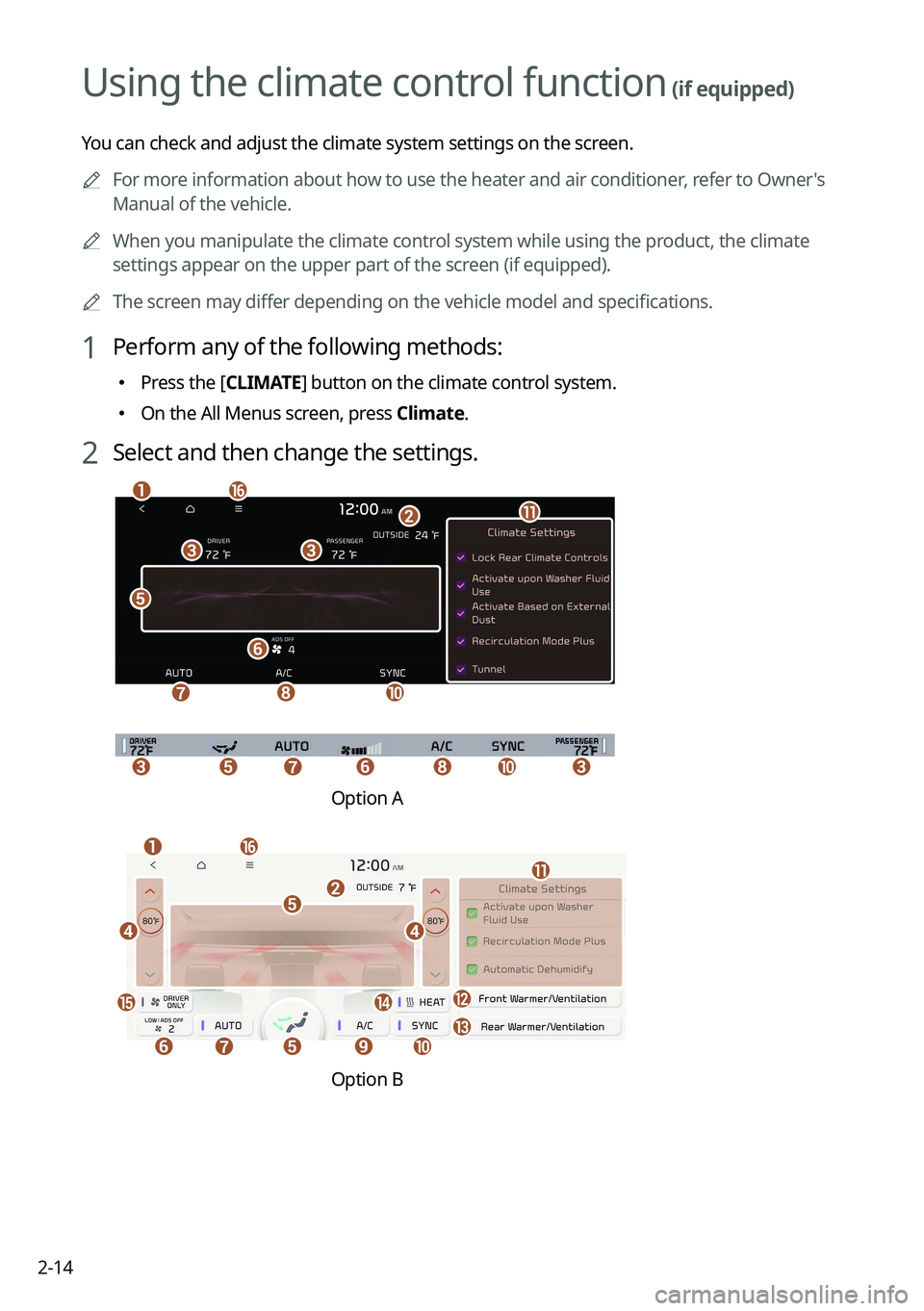
Using the climate control function (if equipped)
You can check and adjust the climate system settings on the screen.
A
For more information about how to use the heater and air conditioner, refer to Owner's
Manual of the vehicle.
A
When you manipulate the climate control system while using the product, the climate
settings appear on the upper part of the screen (if equipped).
A
The screen may differ depending on the vehicle model and specifications.
1 Perform any of the following methods:
�Press the [
CLIMATE] button on the climate control system.
�On the All Menus screen, press Climate.
2 Select and then change the settings.
c
e
f
g
c
hj
p
b
ak
ccfeghj
Option A
o
eij
n
b
fg
p
m
a
k
dd
e
l
Option B
Page 60 of 380

You can adjust the seat warmer/ventilation settings to make your driving \
environment more
pleasant. You can")
2-16
Using the Front Heat/Ventilation and Steering Wheel
Heating Control
(if equipped)
You can adjust the seat warmer/ventilation settings to make your driving \
environment more
pleasant. You can also turn on or off the steering wheel warmer function.
1 On the All Menus screen, press Heat/Ventilation.
2 Select to view the item.
e
f
ga
b
dcc
a a Returns to the previous step.
b b Configure specific climate control function settings.
A
Available settings may differ depending on the vehicle model and specifications.
c c Turn on or off the warmer or ventilation for each seat.
d d Turn on or off the steering wheel warmer function.
e e Displays the front-seat climate control settings screen.
f f Displays the rear-seat warmer/ventilation settings screen.
A
Available settings may differ depending on the vehicle model and specifications.
g g The list of menu items appears.
�Display Off
: Turns off the screen. To switch the screen back on, press the screen or
briefly press the power button (if equipped).
� Front Climate
: Displays the front-seat climate control settings screen (if equipped).
�Rear Heat/Ventilation: Displays the rear-seat warmer/ventilation settings screen
(if equipped).
A
Available settings may differ depending on the vehicle model and
specifications.
�Climate Settings
: Configure specific climate control function settings (if equipped).
�User's Manual on Web (QR Code): Displays the QR code that provides access to
the online user manual for the system.
Page 61 of 380
2-17
Using the rear-seat climate control function
(if equipped)
You can check or set the rear-seat climate status on the system screen.
1 Perform any of the following methods:
�Press the [
REAR] button on the climate control system.
�On the All Menus screen, press Rear Climate.
2 Select and then change the settings.
f
a
c
e
h
gb
d
For automatic temperature control
e
ahg
d
c
b
For manual temperature control
a a Returns to the previous step.
b b Configure specific climate control function settings.
A
Available settings may differ depending on the vehicle model and specifications.
c c Can set the inside temperature.
d d Can adjust the air direction.
e e Can adjust the fan speed.
f f Turn on the AUTO mode. If you change the climate control status using another
button, the AUTO mode automatically turns off.
g g Shows the outside temperature of the vehicle.