2022 HYUNDAI VELOSTER torque
[x] Cancel search: torquePage 134 of 446
3-56
Convenient features of your vehicle
Sport mode
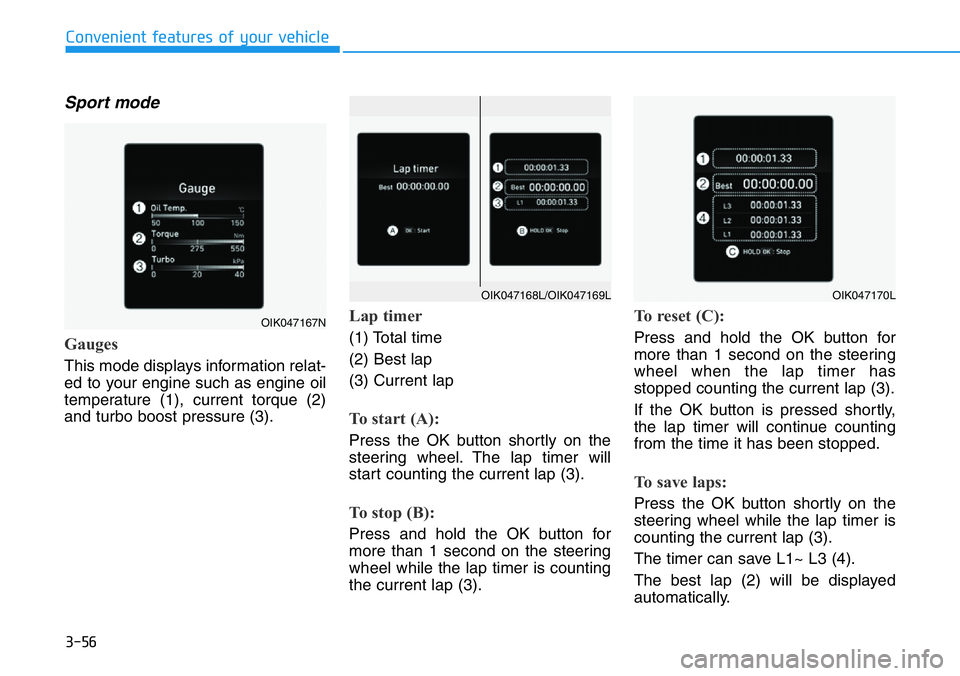
Gauges
This mode displays information relat-
ed to your engine such as engine oil
temperature (1), current torque (2)
and turbo boost pressure (3).
Lap timer
(1) Total time
(2) Best lap
(3) Current lap
To start (A):
Press the OK button shortly on the
steering wheel. The lap timer will
start counting the current lap (3).
To stop (B):
Press and hold the OK button for
more than 1 second on the steering
wheel while the lap timer is counting
the current lap (3).
To reset (C):
Press and hold the OK button for
more than 1 second on the steering
wheel when the lap timer has
stopped counting the current lap (3).
If the OK button is pressed shortly,
the lap timer will continue counting
from the time it has been stopped.
To save laps:
Press the OK button shortly on the
steering wheel while the lap timer is
counting the current lap (3).
The timer can save L1~ L3 (4).
The best lap (2) will be displayed
automatically.
OIK047167N
OIK047170LOIK047168L/OIK047169L
Page 140 of 446
3-62
Convenient features of your vehicle
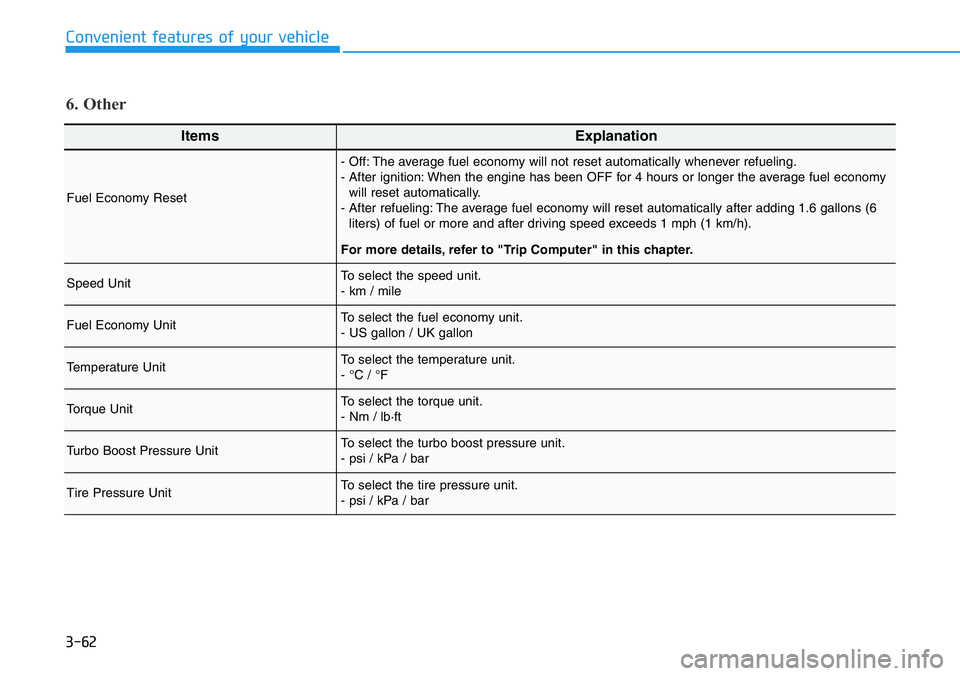
ItemsExplanation
Fuel Economy Reset
- Off: The average fuel economy will not reset automatically whenever refueling.
- After ignition: When the engine has been OFF for 4 hours or longer the average fuel economy
will reset automatically.
- After refueling: The average fuel economy will reset automatically after adding 1.6 gallons (6
liters) of fuel or more and after driving speed exceeds 1 mph (1 km/h).
For more details, refer to "Trip Computer" in this chapter.
Speed UnitTo select the speed unit.
- km / mile
Fuel Economy UnitTo select the fuel economy unit.
- US gallon / UK gallon
Temperature UnitTo select the temperature unit.
- °C / °F
Torque Unit To select the torque unit.
- Nm / lb·ft
Turbo Boost Pressure UnitTo select the turbo boost pressure unit.
- psi / kPa / bar
Tire Pressure Unit To select the tire pressure unit.
- psi / kPa / bar
6. Other
Page 214 of 446
5-20
Driving your vehicle
• The Dual Clutch Transmission gives
the driving feel of a manual trans-
mission, yet provides the ease of a
fully automatic transmission. Unlike
a traditional automatic transmis-
sion, the gear shifting can be felt
(and heard) on the dual clutch
transmission.
- Think of it as an automatically
shifting manual transmission.
- Shift into Drive range and get fully
automatic shifting, similar to a
conventional automatic transmis-
sion.
• Dual clutch transmission adopts
wet-type dual clutch, which is dif-
ferent from torque converter of
automatic transmission, and
shows better acceleration perform-
ance during driving. But, initial
launch might be little bit slower
than Automatic Transmission.
• The wet-type clutch transfers
torque and provides a direct driving
feeling which may feel different
from a conventional automatic
transmission with a torque convert-
er. This may be more noticeable
when starting from a stop or low
vehicle speed.• When rapidly accelerating at low
vehicle speed, engine could rev at
high rpm depending on vehicle
drive condition.
• For smooth launch uphill, press
down the accelerator pedal
smoothly depending on the current
conditions.
• If you release your foot from the
accelerator pedal at low vehicle
speed, you may feel strong engine
brake, which is similar to manual
transmission.
• When driving downhill, you may
use Sports Mode to downshift to a
lower gear in order to control your
speed without using the brake
pedal excessively.
• When you turn the engine on and
off, you may hear clicking sounds
as the system goes through a self
test. This is a normal sound for the
Dual Clutch Transmission.
• Always come to a complete stop
before shifting into D (Drive) or R
(Reverse).
• Do not put the shift lever in N
(Neutral) while driving.
•When using Manual Shift Mode,
use caution when shifting from
a higher gear to a lower gear on
slippery roads. This could
cause the tires to slip and may
result in an accident.
•To avoid damage to your
transmission, do not try to
accelerate with the shift lever
in R (Reverse) or any forward
gear position with the brake
engaged.
•When stopped on a slope, do
not hold the vehicle with accel-
erator pedal. Engage the serv-
ice brake or the parking brake.
Page 233 of 446
5-39
Driving your vehicle
5
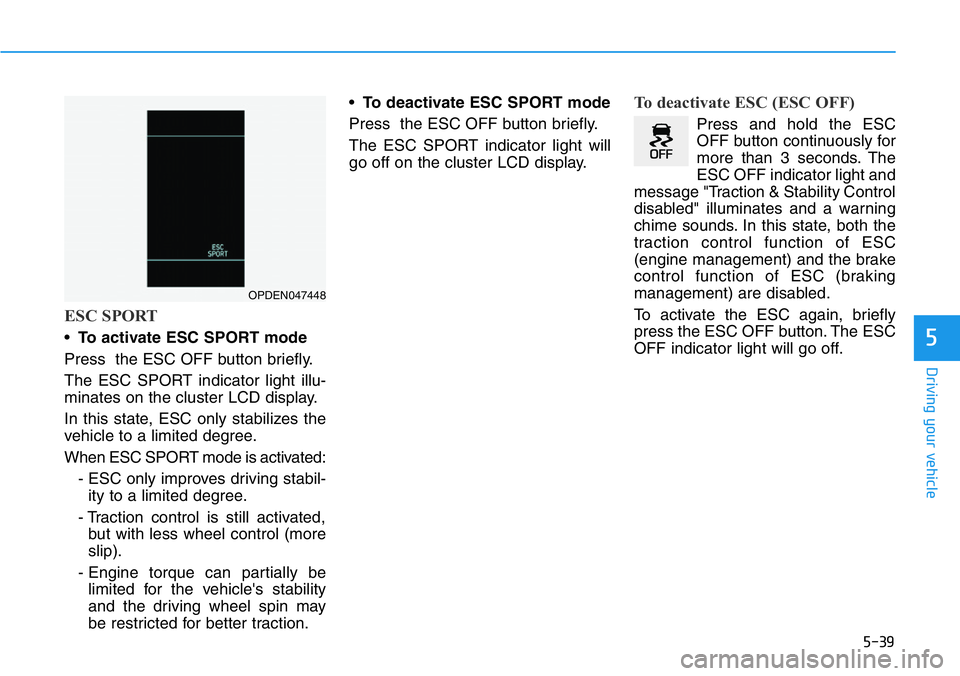
ESC SPORT
•To activate ESC SPORT mode
Press the ESC OFF button briefly.
The ESC SPORT indicator light illu-
minates on the cluster LCD display.
In this state, ESC only stabilizes the
vehicle to a limited degree.
When ESC SPORT mode is activated:
- ESC only improves driving stabil-
ity to a limited degree.
- Traction control is still activated,
but with less wheel control (more
slip).
- Engine torque can partially be
limited for the vehicle's stability
and the driving wheel spin may
be restricted for better traction.•To deactivate ESC SPORT mode
Press the ESC OFF button briefly.
The ESC SPORT indicator light will
go off on the cluster LCD display.
To deactivate ESC (ESC OFF)
Press and hold the ESC
OFF button continuously for
more than 3 seconds. The
ESC OFF indicator light and
message "Traction & Stability Control
disabled" illuminates and a warning
chime sounds. In this state, both the
traction control function of ESC
(engine management) and the brake
control function of ESC (braking
management) are disabled.
To activate the ESC again, briefly
press the ESC OFF button. The ESC
OFF indicator light will go off.
OPDEN047448
Page 235 of 446
5-41
Driving your vehicle
5
ESC OFF usage
When Driving
The ESC OFF mode should only be
used briefly to help free the vehicle if
stuck in snow or mud, by temporarily
stopping operation of the ESC, to
maintain wheel torque.
To turn ESC off while driving, press
the ESC OFF button while driving on
a flat road surface.To prevent damage to the trans-
mission:
• Do not allow wheel(s) of one
axle to spin excessively while
the ESC, ABS, and parking brake
warning lights are displayed.
The repairs would not be cov-
ered by the vehicle warranty.
Reduce engine power and do
not spin the wheel(s) excessive-
ly while these lights are dis-
played.
• When operating the vehicle on a
dynamometer, make sure the
ESC is turned off (ESC OFF light
illuminated).
Information
Turning the ESC off does not affect
ABS or standard brake system opera-
tion.
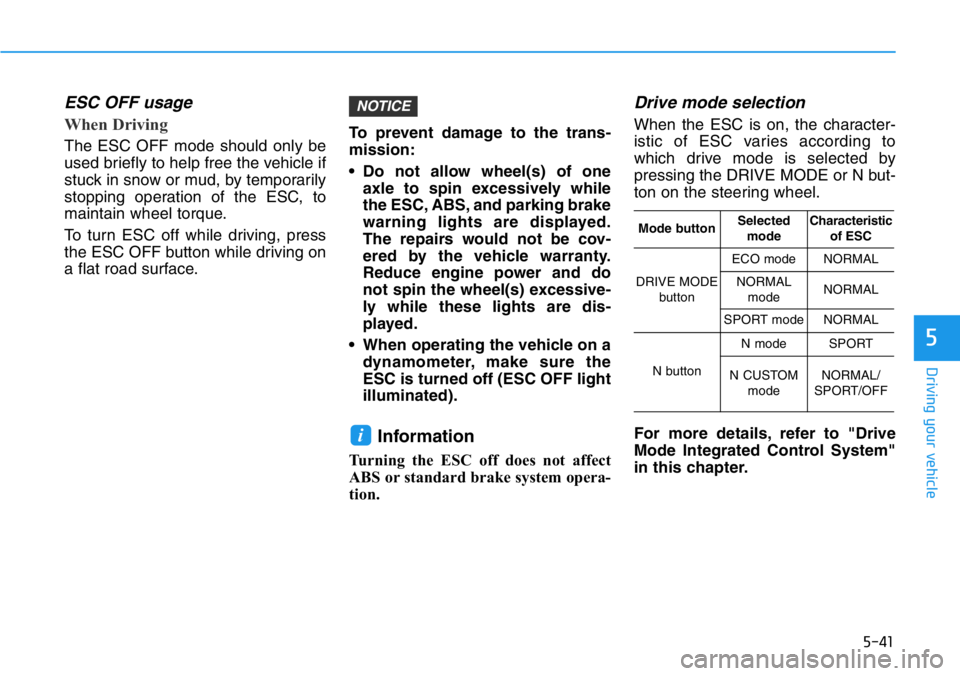
Drive mode selection
When the ESC is on, the character-
istic of ESC varies according to
which drive mode is selected by
pressing the DRIVE MODE or N but-
ton on the steering wheel.
For more details, refer to "Drive
Mode Integrated Control System"
in this chapter.
i
NOTICE
Mode buttonSelected
modeCharacteristic
of ESC
DRIVE MODE
button
ECO modeNORMAL
NORMAL
modeNORMAL
SPORT modeNORMAL
N button
N modeSPORT
N CUSTOM
modeNORMAL/
SPORT/OFF
Page 244 of 446
5-50
Driving your vehicle
When ECO mode is activated:
• The acceleration response may be
slightly reduced as the accelerator
pedal is depressed moderately.
• The air conditioner performance
may be limited.
• The engine noise may get louder.
The above situations are normal
conditions when ECO mode is acti-
vated, to improve fuel efficiency.Limitation of ECO mode opera-
tion:
If the following conditions occur while
ECO mode is operating, the system
operation is limited even though
there is no change in ECO indicator.
• When the coolant temperature is
low:
The system will be limited until
engine performance becomes nor-
mal.
• When driving up a hill:
The system will be limited to gain
power when driving uphill because
engine torque is restricted.
The system will be limited due to
the shift location.
• When the accelerator pedal is
deeply depressed for a few sec-
onds:
The system will be limited, judging
that the driver wants to speed up.
SPORT mode
SPORT mode manages
the driving dynamics by
automatically adjusting the
steering effort, the engine
and transmission control
logic for enhanced driving
performance.
• When SPORT mode is selected by
pressing the DRIVE MODE button,
the SPORT indicator will illuminate.
• When SPORT mode is activated:
- The engine rpm will tend to
remain raised over a certain
length of time even after releas-
ing the accelerator
- Upshifts are delayed when accel-
erating
Information
In SPORT mode, the fuel efficiency
may decrease.
i
Page 367 of 446

7-15
7
Maintenance
Manual Transmission Fluid
Inspect the manual transmission
fluid according to the maintenance
schedule.
Brake Hoses and Lines
Visually check for proper installation,
chafing, cracks, deterioration and
any leakage. Replace any deteriorat-
ed or damaged parts immediately.
Brake/Clutch Fluid
Check the brake/clutch fluid level in
the brake/clutch fluid reservoir. The
level should be between the MIN and
the MAX marks on the side of the
reservoir. Use only hydraulic
brake/clutch fluid conforming to DOT
3 or DOT 4 specification.
Parking Brake
Inspect the parking brake system
including the parking brake pedal
and cables.
Brake Discs, Pads, Calipers
and Rotors
Check the pads for excessive wear,
discs for run out and wear, and
calipers for fluid leakage.
Exhaust Pipe and Muffler
Visually inspect the exhaust pipes,
muffler and hangers for cracks, dete-
rioration, or damage. Start the engine
and listen carefully for any exhaust
gas leakage. Tighten connections or
replace parts as necessary.
Suspension Mounting Bolts
Check the suspension connections
for looseness or damage. Retighten
to the specified torque.
Steering Gear Box, Linkage &
Boots/Lower Arm Ball Joint
With the vehicle stopped and the
engine off, check for excessive free-
play in the steering wheel. Check the
linkage for bends or damage. Check
the dust boots and ball joints for
deterioration, cracks, or damage.
Replace any damaged parts.
Drive Shafts and Boots
Check the drive shafts, boots and
clamps for cracks, deterioration, or
damage. Replace any damaged
parts and, if necessary, repack the
grease.
Air Conditioning Refrigerant
Check the air conditioning lines and
connections for leakage and dam-
age.
Page 384 of 446
7-32
Maintenance
TIRES AND WHEELS
Information - Power Hop
When fully accelerating the vehicle
from standstill, a front tire oscillation
called “Power Hop“ of Veloster N may
occur due to the high torque of engine
and the characteristics of high per-
formance tire. This may be affected by
road condition and temperatures.
Additionally it is a normal phenome
non in powerful front-wheel drive
vehicles. Veloster N will act on this
phenomenon with the traction control
in all ESC modes with the main focus
on high performance character.i•Replace tires that are worn,
show uneven wear, or are
damaged. Worn tires can
cause loss of braking effec-
tiveness, steering control, or
traction.
•ALWAYS replace tires with the
same size as each tire that
was originally supplied with
this vehicle. Using tires and
wheels other than the recom-
mended sizes could cause
unusual handling characteris-
tics, poor vehicle control, or
negatively affect your vehi-
cle's Anti-Lock Brake System
(ABS) resulting in a serious
accident.
Tire failure may cause loss of
vehicle control resulting in an
accident. To reduce risk of
SERIOUS INJURY or DEATH,
take the following precautions:
•Inspect your tires monthly for
proper inflation as well as
wear and damage.
•The recommended cold tire
pressure for your vehicle can
be found in this manual and
on the tire label located on the
driver's side center pillar.
Always use a tire pressure
gauge to measure tire pres-
sure. Tires with too much or
too little pressure wear
unevenly causing poor han-
dling.
•Check the pressure of the
spare every time you check
the pressure of the other tires
on your vehicle.
WARNING