2022 HYUNDAI TUCSON steering
[x] Cancel search: steeringPage 280 of 638
Convenient features5-136
INFOTAINMENT SYSTEM
NOTICE
• If you install an aftermarket HID
head lamp, your vehicle’s audio and
electronic devices may not function
properly.
• Prevent chemicals such as perfume,
cosmetic oil, sun cream, hand
cleaner, and air freshener from
contacting the interior parts
because they may cause damage or
discoloration.
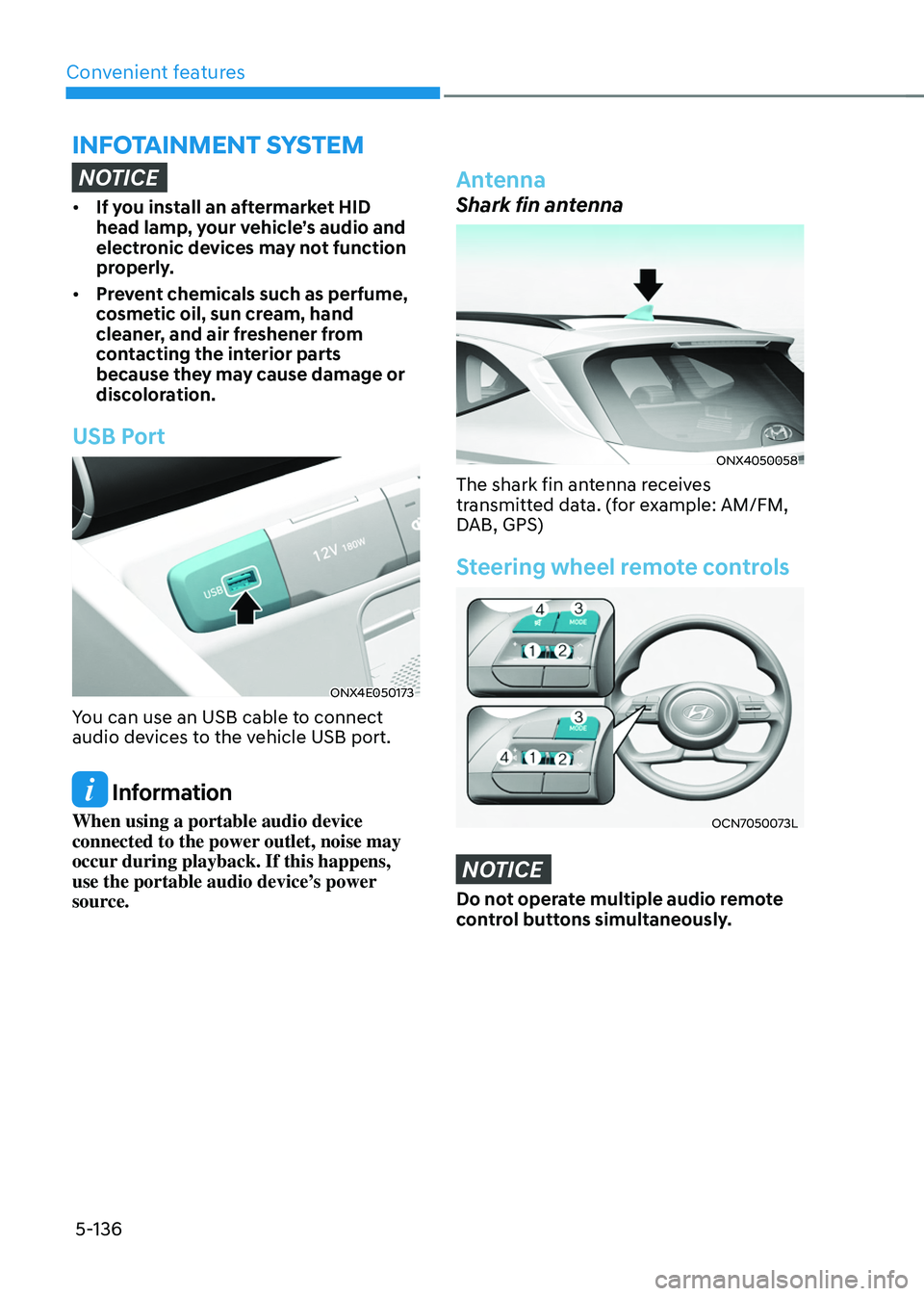
USB Port
ONX4E050173
You can use an USB cable to connect
audio devices to the vehicle USB port.
Information
When using a portable audio device
connected to the power outlet, noise may
occur during playback. If this happens,
use the portable audio device’s power
source.
Antenna
Shark fin antenna
ONX4050058
The shark fin antenna receives
transmitted data. (for example: AM/FM,
DAB, GPS)
Steering wheel remote controls
OCN7050073L
NOTICE
Do not operate multiple audio remote
control buttons simultaneously.
Page 289 of 638
Driving your vehicle
6-4
Before entering the vehicle
• Be sure all windows, outside mirror(s),
and outside lights are clean and
unobstructed.
• Remove frost, snow, or ice.
• Visually check the tires for uneven
wear and damage.
• Check under the vehicle for any sign
of leaks.
• Be sure there are no obstacles behind
you if you intend to back up.
Before starting
• Make sure the hood, the liftgate, and
the doors are securely closed and
locked.
• Adjust the position of the seat and
steering wheel.
• Adjust the inside and side view
mirrors.
• Verify all the lights work.
• Fasten your seat belt. Check that all
passengers have fastened their seat
belts.
• Check the gauges and indicators
in the instrument panel and the
messages on the instrument display
when the ignition switch is in the ON
position.
• Check that any items you are carrying
are stored properly or fastened down
securely.
WARNING
To reduce the risk of SERIOUS INJURY or
DEATH, take the following precautions:
• ALWAYS wear your seat belt. All
passengers must be properly belted
whenever the vehicle is moving.
For more information, refer to “Seat
Belts” section in chapter 3.
• Always drive defensively. Assume
other drivers or pedestrians may be
careless and make mistakes.
• Stay focused on the task of driving.
Driver distraction can cause
accidents.
• Leave plenty of space between you
and the vehicle in front of you.
WARNING
NEVER drink or take drugs and drive.
Drinking or taking drugs and driving
is dangerous and may result in an
accident and SERIOUS INJURY or
DEATH.
Drunk driving is the number one
contributor to the highway death
toll each year. Even a small amount
of alcohol will affect your reflexes,
perceptions and judgment. Just
one drink can reduce your ability to
respond to changing conditions and
emergencies and your reaction time
gets worse with each additional drink.
Driving while under the influence
of drugs is as dangerous or more
dangerous than driving under the
influence of alcohol.
You are much more likely to have a
serious accident if you drink or take
drugs and drive. If you are drinking or
taking drugs, don’t drive. Do not ride
with a driver who has been drinking
or taking drugs. Choose a designated
driver or call a taxi.
BEFORE DRIVING
Page 290 of 638
06
6-5
WARNING
To reduce the risk of SERIOUS INJURY or
DEATH, take the following precautions:
• NEVER allow children or any person
who is unfamiliar with the vehicle to
touch the ignition switch or related
parts. Unexpected and sudden
vehicle movement can occur.
• NEVER reach through the steering
wheel for the ignition switch, or any
other control, while the vehicle is in
motion. The presence of your hand
or arm in this area may cause a loss
of vehicle control resulting in an
accident.
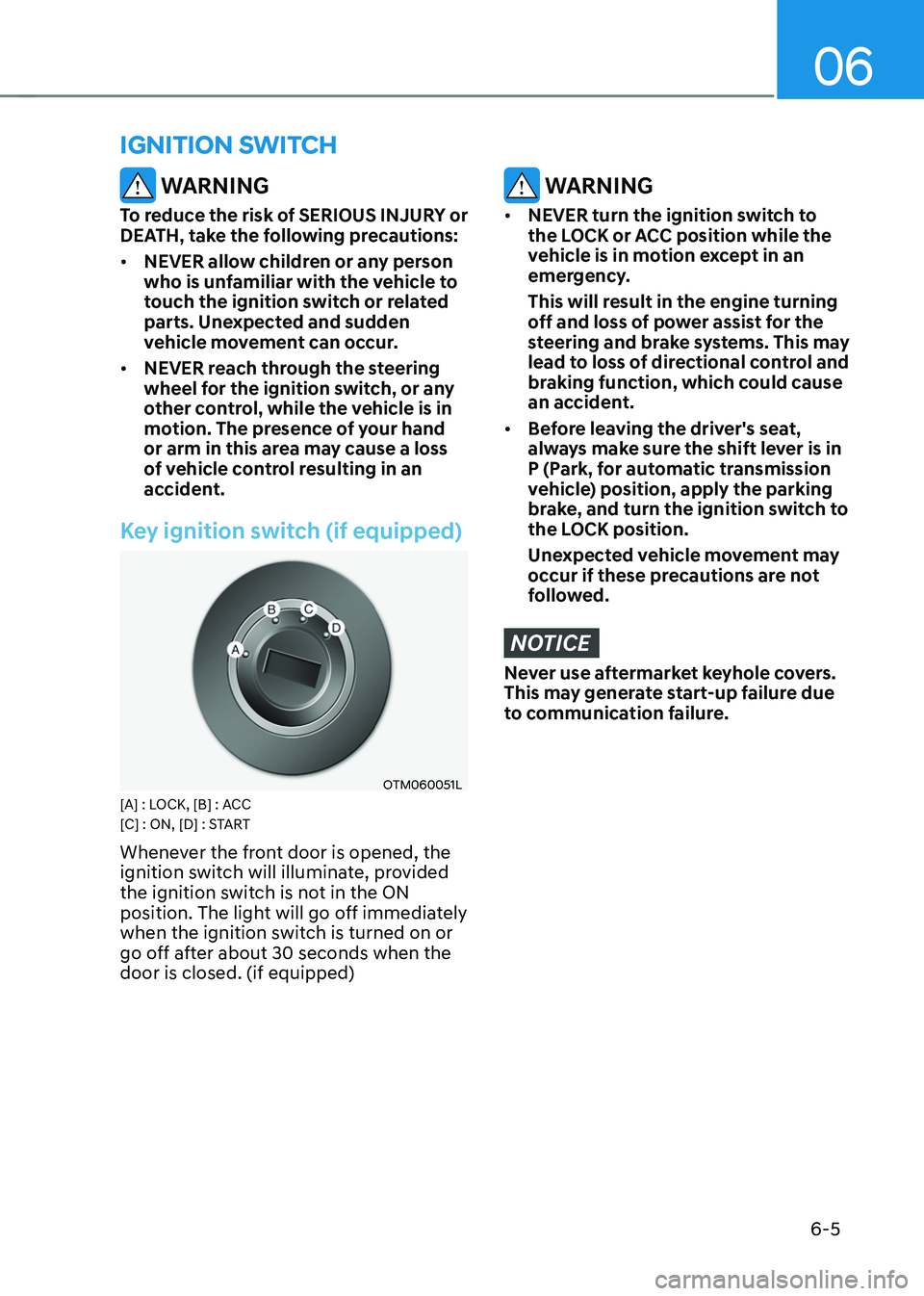
Key ignition switch (if equipped)
OTM060051L[A] : LOCK, [B] : ACC
[C] : ON, [D] : START
Whenever the front door is opened, the
ignition switch will illuminate, provided
the ignition switch is not in the ON
position. The light will go off immediately
when the ignition switch is turned on or
go off after about 30 seconds when the
door is closed. (if equipped)
WARNING
• NEVER turn the ignition switch to
the LOCK or ACC position while the
vehicle is in motion except in an
emergency.
This will result in the engine turning
off and loss of power assist for the
steering and brake systems. This may
lead to loss of directional control and
braking function, which could cause
an accident.
• Before leaving the driver's seat,
always make sure the shift lever is in
P (Park, for automatic transmission
vehicle) position, apply the parking
brake, and turn the ignition switch to
the LOCK position.
Unexpected vehicle movement may
occur if these precautions are not
followed.
NOTICE
Never use aftermarket keyhole covers.
This may generate start-up failure due
to communication failure.
IGNITION SWITCH
Page 291 of 638
Driving your vehicle
6-6
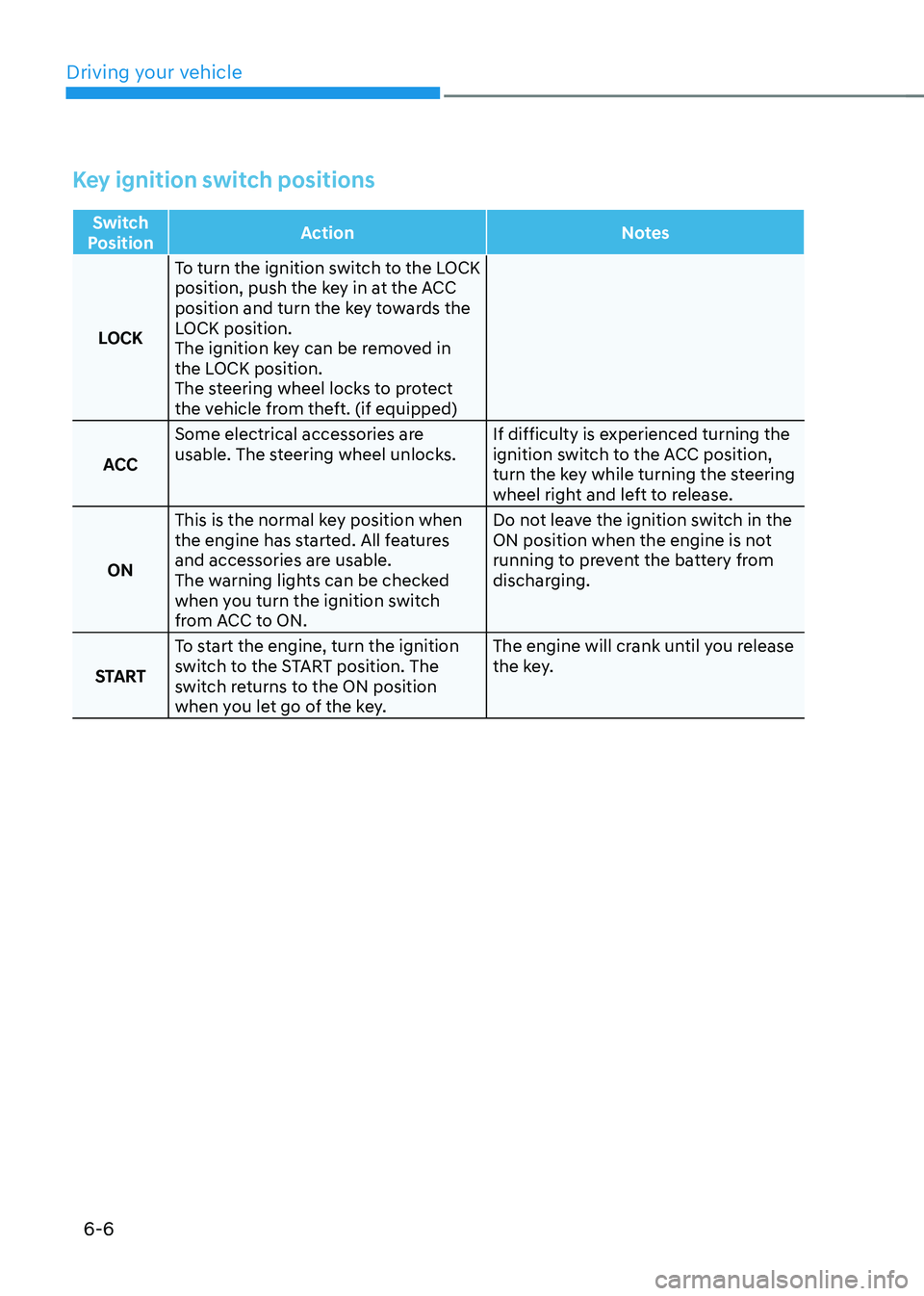
Key ignition switch positions
Switch
Position Action
Notes
LOCK To turn the ignition switch to the LOCK
position, push the key in at the ACC
position and turn the key towards the
LOCK position.
The ignition key can be removed in
the LOCK position.
The steering wheel locks to protect
the vehicle from theft. (if equipped)
ACC Some electrical accessories are
usable. The steering wheel unlocks.
If difficulty is experienced turning the
ignition switch to the ACC position,
turn the key while turning the steering
wheel right and left to release.
ON This is the normal key position when
the engine has started. All features
and accessories are usable.
The warning lights can be checked
when you turn the ignition switch
from ACC to ON. Do not leave the ignition switch in the
ON position when the engine is not
running to prevent the battery from
discharging.
START To start the engine, turn the ignition
switch to the START position. The
switch returns to the ON position
when you let go of the key. The engine will crank until you release
the key.
Page 293 of 638
Driving your vehicle
6-8
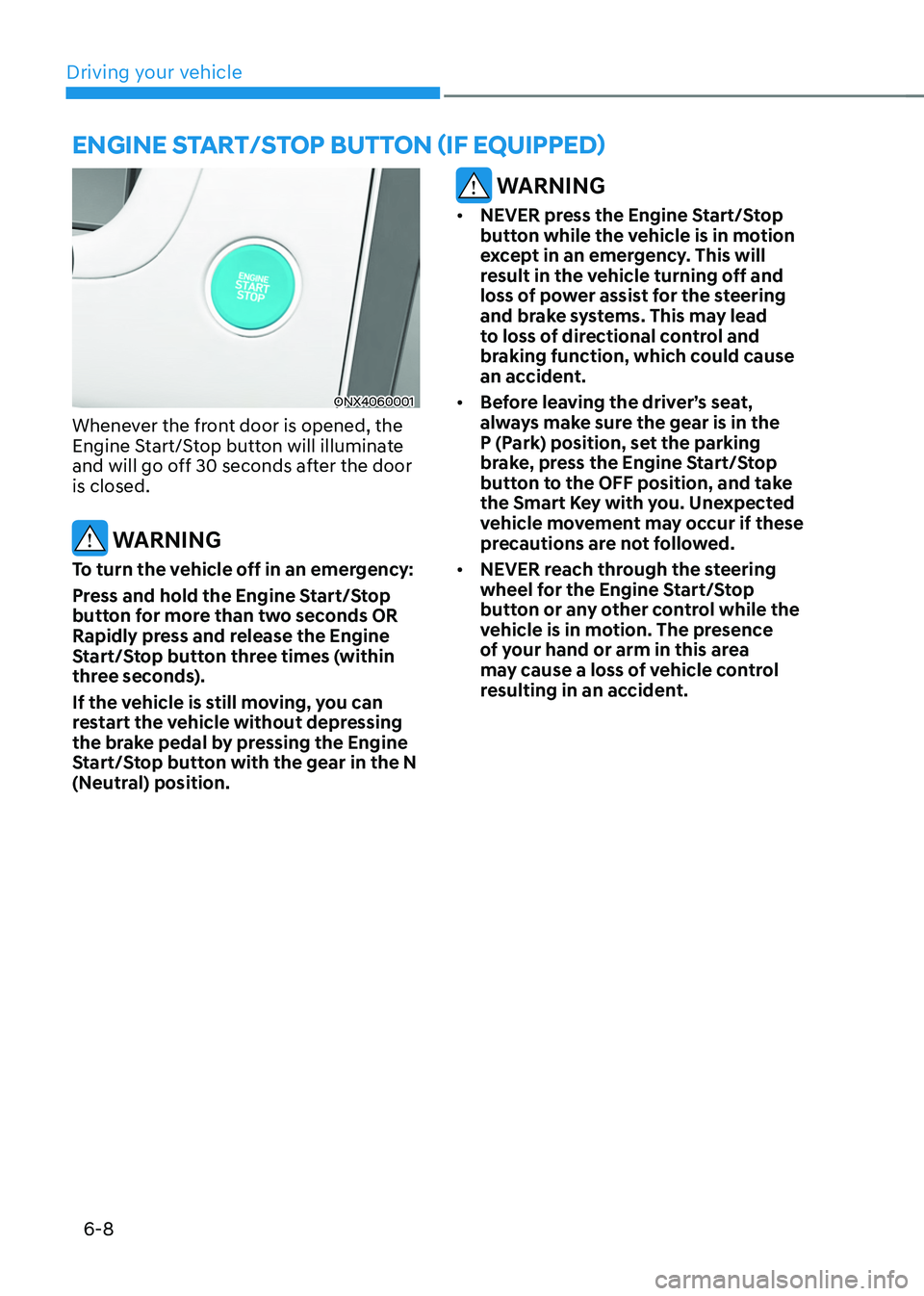
ENGINE START/STOP BUTTON (IF EQUIPPED)
ONX4060001
Whenever the front door is opened, the
Engine Start/Stop button will illuminate
and will go off 30 seconds after the door
is closed.
WARNING
To turn the vehicle off in an emergency:
Press and hold the Engine Start/Stop
button for more than two seconds OR
Rapidly press and release the Engine
Start/Stop button three times (within
three seconds).
If the vehicle is still moving, you can
restart the vehicle without depressing
the brake pedal by pressing the Engine
Start/Stop button with the gear in the N
(Neutral) position.
WARNING
• NEVER press the Engine Start/Stop
button while the vehicle is in motion
except in an emergency. This will
result in the vehicle turning off and
loss of power assist for the steering
and brake systems. This may lead
to loss of directional control and
braking function, which could cause
an accident.
• Before leaving the driver’s seat,
always make sure the gear is in the
P (Park) position, set the parking
brake, press the Engine Start/Stop
button to the OFF position, and take
the Smart Key with you. Unexpected
vehicle movement may occur if these
precautions are not followed.
• NEVER reach through the steering
wheel for the Engine Start/Stop
button or any other control while the
vehicle is in motion. The presence
of your hand or arm in this area
may cause a loss of vehicle control
resulting in an accident.
Page 294 of 638
06
6-9
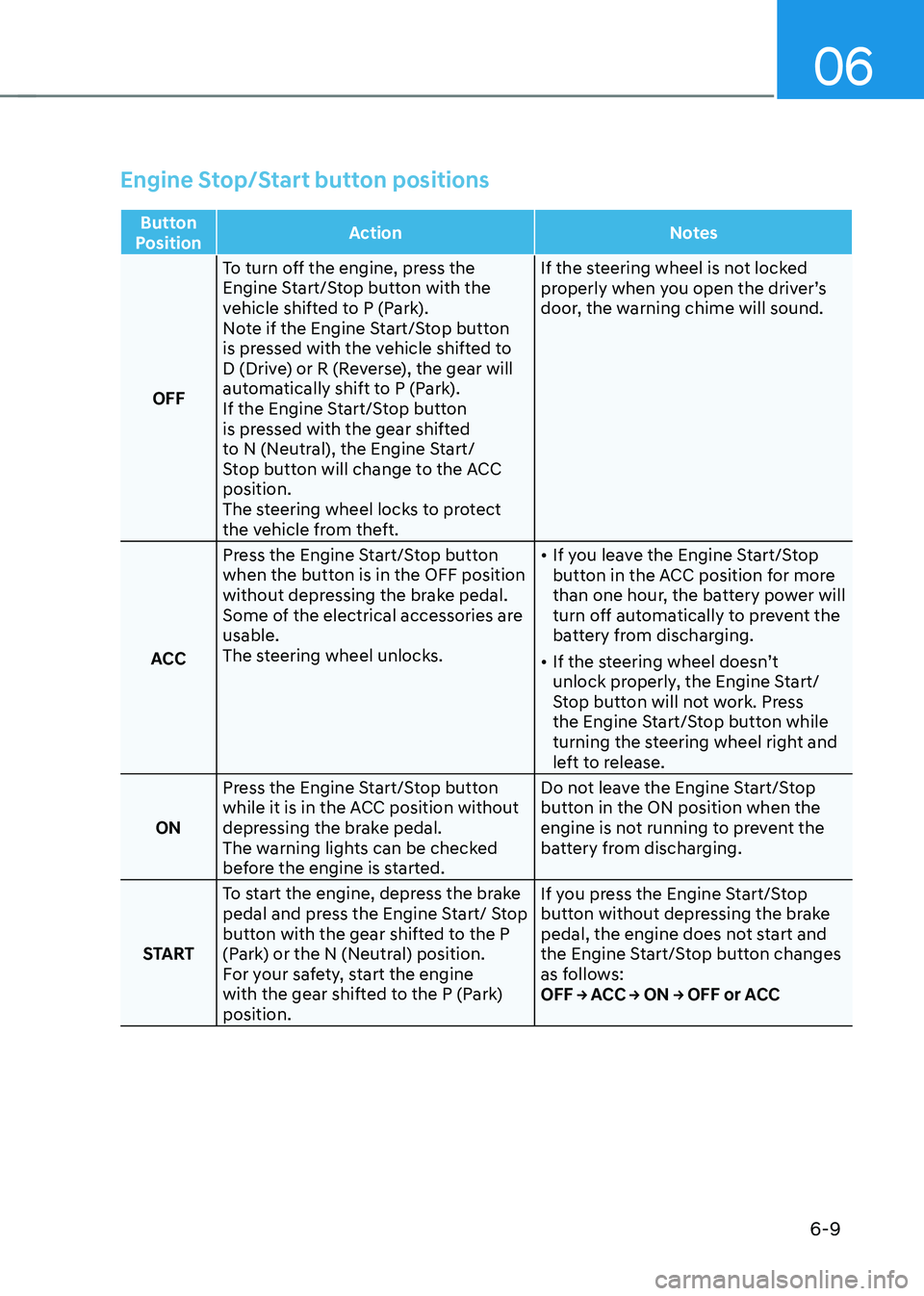
Engine Stop/Start button positions
Button
Position Action
Notes
OFF To turn off the engine, press the
Engine Start/Stop button with the
vehicle shifted to P (Park).
Note if the Engine Start/Stop button
is pressed with the vehicle shifted to
D (Drive) or R (Reverse), the gear will
automatically shift to P (Park).
If the Engine Start/Stop button
is pressed with the gear shifted
to N (Neutral), the Engine Start/
Stop button will change to the ACC
position.
The steering wheel locks to protect
the vehicle from theft. If the steering wheel is not locked
properly when you open the driver’s
door, the warning chime will sound.
ACC Press the Engine Start/Stop button
when the button is in the OFF position
without depressing the brake pedal.
Some of the electrical accessories are
usable.
The steering wheel unlocks.
•
If you leave the Engine Start/Stop
button in the ACC position for more
than one hour, the battery power will
turn off automatically to prevent the
battery from discharging.
• If the steering wheel doesn’t
unlock properly, the Engine Start/
Stop button will not work. Press
the Engine Start/Stop button while
turning the steering wheel right and
left to release.
ON Press the Engine Start/Stop button
while it is in the ACC position without
depressing the brake pedal.
The warning lights can be checked
before the engine is started. Do not leave the Engine Start/Stop
button in the ON position when the
engine is not running to prevent the
battery from discharging.
START To start the engine, depress the brake
pedal and press the Engine Start/ Stop
button with the gear shifted to the P
(Park) or the N (Neutral) position.
For your safety, start the engine
with the gear shifted to the P (Park)
position. If you press the Engine Start/Stop
button without depressing the brake
pedal, the engine does not start and
the Engine Start/Stop button changes
as follows:
OFF → ACC → ON → OFF or ACC
Page 297 of 638
Driving your vehicle
6-12
Auto shut-off system (if equipped)
To prevent accidents caused by carbon
dioxide poisoning, the engine is turned
off automatically 60 minutes later when
the following conditions are satisfied.
The timer appears on the instrument
cluster 30 minutes before it turns off
automatically.
Operating conditions
• The driver does not fasten a seat belt
• No one in the passenger's seat
• Stop the vehicle and the speed is
under 1.86mph and the gear shift is
in P
• While the brake or accelerator is not
working
• When AVN update is performing
Cluster timer reset conditions
• Release the accelerator or brake after
completing operation
• Press the OK button on the steering
wheel while the timer appears on the
instrument cluster
Off conditions
• The driver fastened the seat belt
• A passenger is in the pasenger's seat
• Driving over 1.86mph
• Shifting the gear in R, N or D
CAUTION
Please do not leave a passenger or a pet
in the vehicle since the air conditioning
system stops when the engine is off.
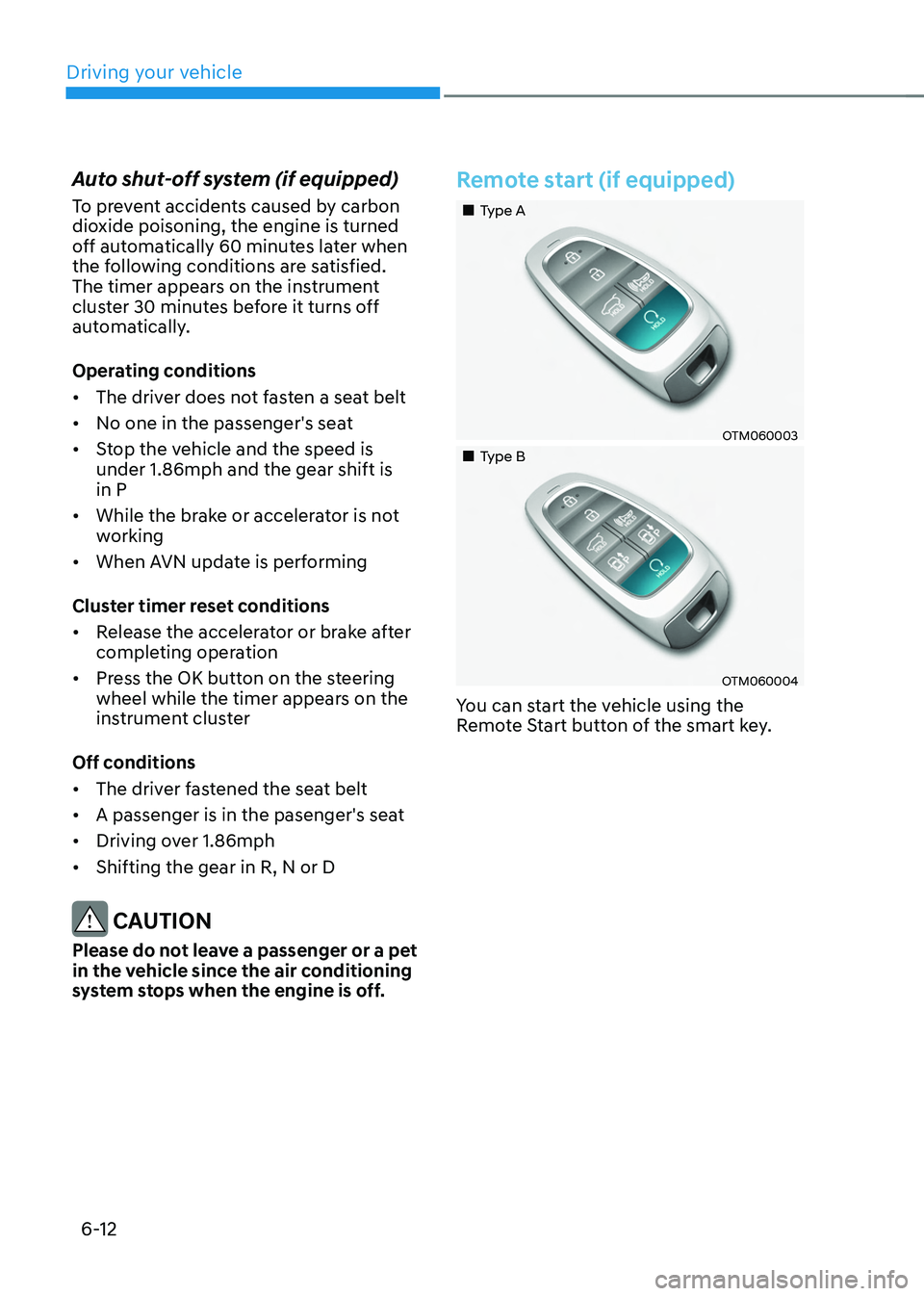
Remote start (if equipped)
„„Type A
OTM060003
„„Type B
OTM060004
You can start the vehicle using the
Remote Start button of the smart key.
Page 302 of 638
06
6-17
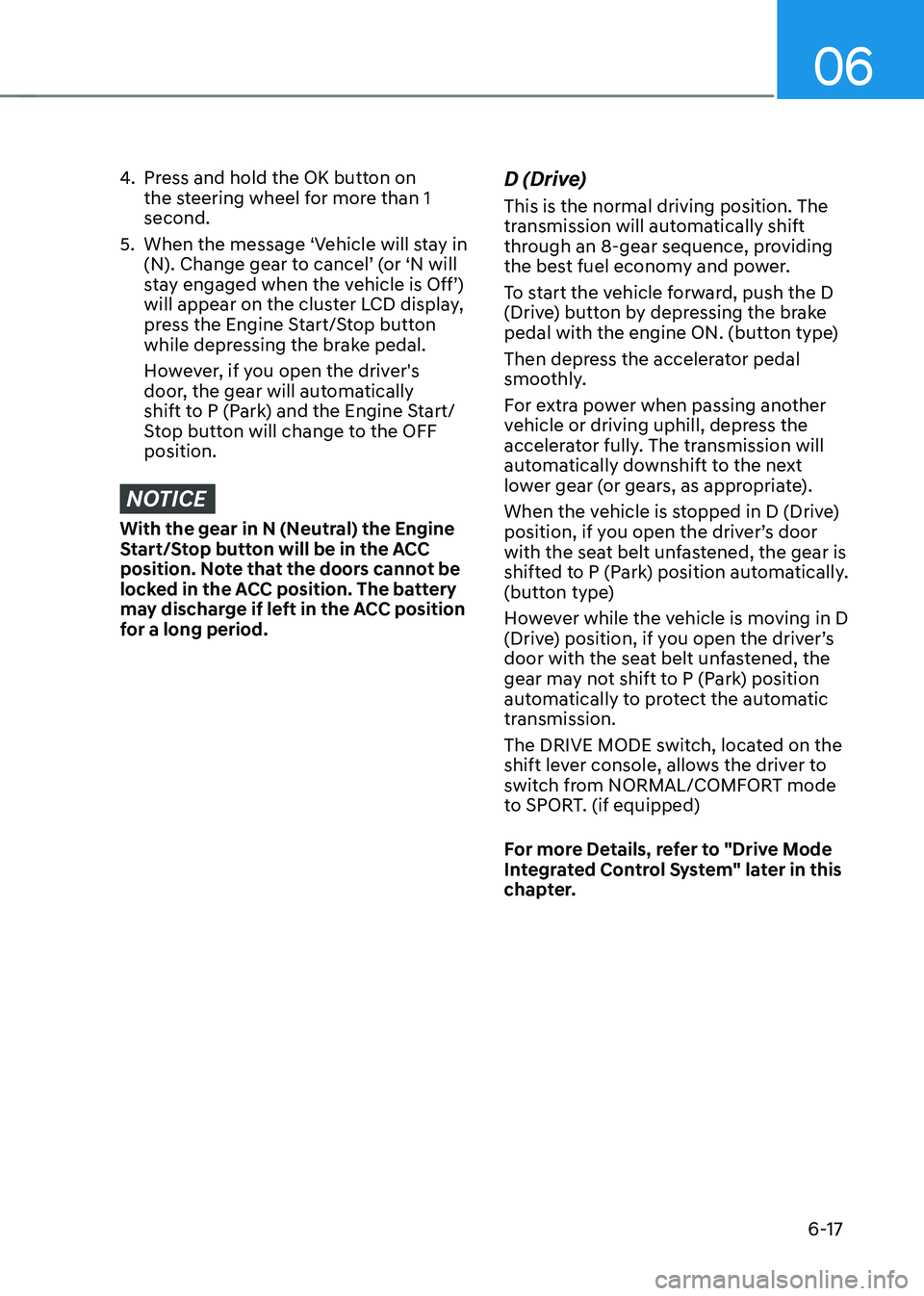
4. Press and hold the OK button on
the steering wheel for more than 1
second.
5. When the message ‘Vehicle will stay in
(N). Change gear to cancel’ (or ‘N will
stay engaged when the vehicle is Off’)
will appear on the cluster LCD display,
press the Engine Start/Stop button
while depressing the brake pedal.
However, if you open the driver's
door, the gear will automatically
shift to P (Park) and the Engine Start/
Stop button will change to the OFF
position.
NOTICE
With the gear in N (Neutral) the Engine
Start/Stop button will be in the ACC
position. Note that the doors cannot be
locked in the ACC position. The battery
may discharge if left in the ACC position
for a long period.
D (Drive)
This is the normal driving position. The
transmission will automatically shift
through an 8-gear sequence, providing
the best fuel economy and power.
To start the vehicle forward, push the D
(Drive) button by depressing the brake
pedal with the engine ON. (button type)
Then depress the accelerator pedal
smoothly.
For extra power when passing another
vehicle or driving uphill, depress the
accelerator fully. The transmission will
automatically downshift to the next
lower gear (or gears, as appropriate).
When the vehicle is stopped in D (Drive)
position, if you open the driver’s door
with the seat belt unfastened, the gear is
shifted to P (Park) position automatically.
(button type)
However while the vehicle is moving in D
(Drive) position, if you open the driver’s
door with the seat belt unfastened, the
gear may not shift to P (Park) position
automatically to protect the automatic
transmission.
The DRIVE MODE switch, located on the
shift lever console, allows the driver to
switch from NORMAL/COMFORT mode
to SPORT. (if equipped)
For more Details, refer to "Drive Mode
Integrated Control System" later in this
chapter.