2022 HYUNDAI TUCSON Climate
[x] Cancel search: ClimatePage 175 of 638
05
5-31
Operating door locks from
outside the vehicle
Mechanical key
ONX4050066
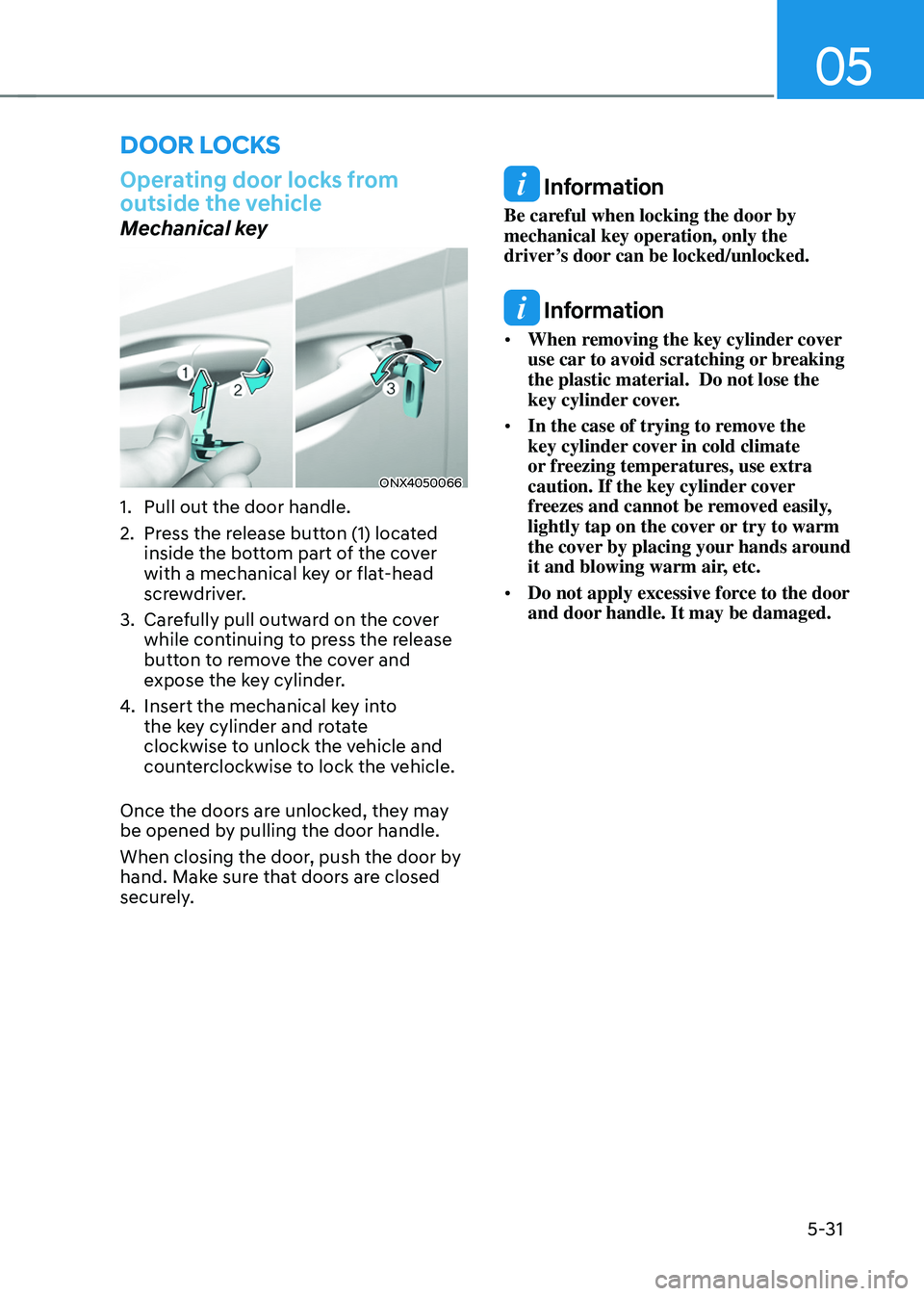
1. Pull out the door handle.
2. Press the release button (1) located
inside the bottom part of the cover
with a mechanical key or flat-head
screwdriver.
3. Carefully pull outward on the cover
while continuing to press the release
button to remove the cover and
expose the key cylinder.
4. Insert the mechanical key into
the key cylinder and rotate
clockwise to unlock the vehicle and
counterclockwise to lock the vehicle.
Once the doors are unlocked, they may
be opened by pulling the door handle.
When closing the door, push the door by
hand. Make sure that doors are closed
securely.
Information
Be careful when locking the door by
mechanical key operation, only the
driver’s door can be locked/unlocked.
Information
• When removing the key cylinder cover
use car to avoid scratching or breaking
the plastic material. Do not lose the
key cylinder cover.
• In the case of trying to remove the
key cylinder cover in cold climate
or freezing temperatures, use extra
caution. If the key cylinder cover
freezes and cannot be removed easily,
lightly tap on the cover or try to warm
the cover by placing your hands around
it and blowing warm air, etc.
• Do not apply excessive force to the door
and door handle. It may be damaged.
DOOR LOCKS
Page 176 of 638
Convenient features
5-32
Remote key
OTMA050015MX
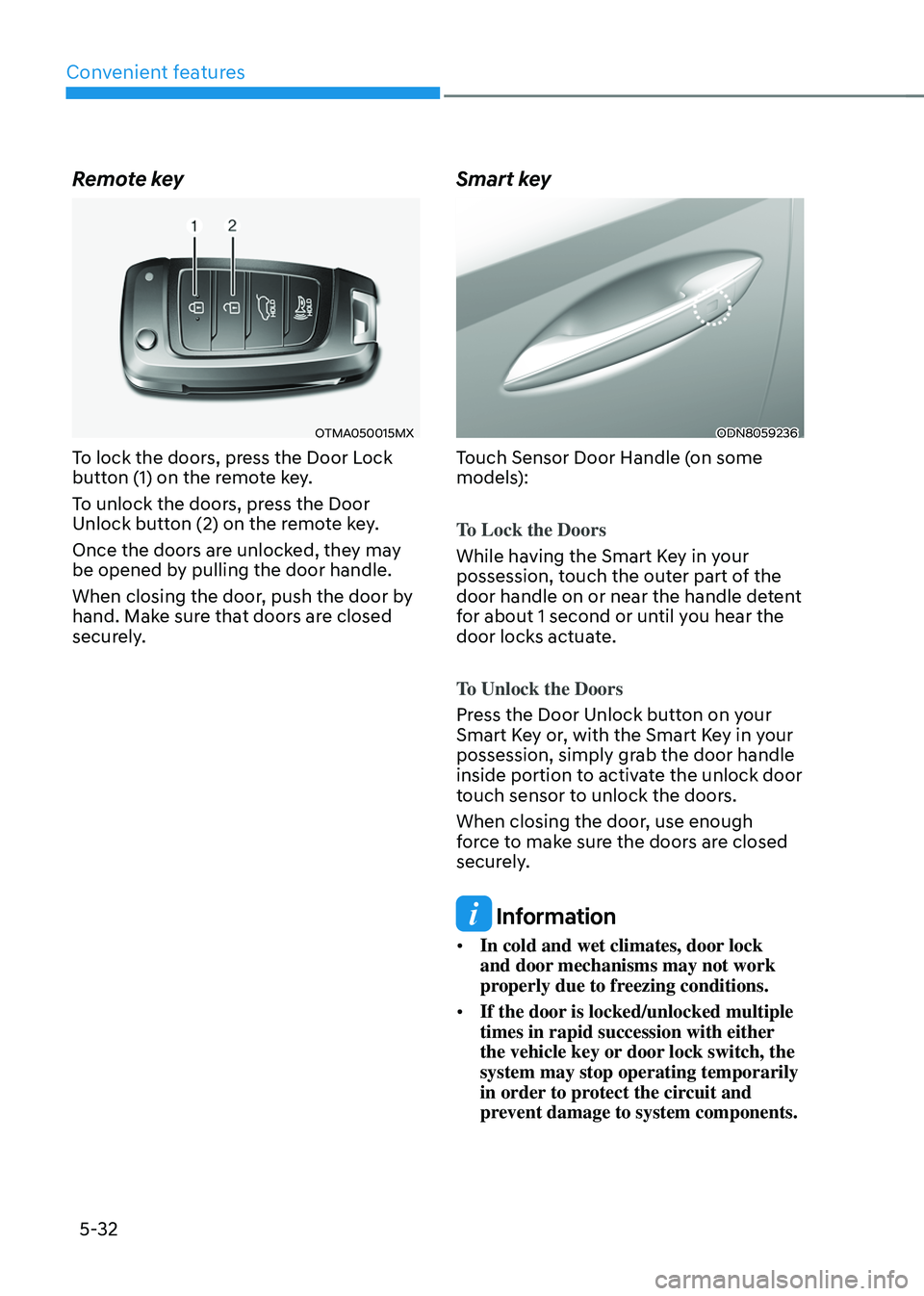
To lock the doors, press the Door Lock
button (1) on the remote key.
To unlock the doors, press the Door
Unlock button (2) on the remote key.
Once the doors are unlocked, they may
be opened by pulling the door handle.
When closing the door, push the door by
hand. Make sure that doors are closed
securely.
Smart key
ODN8059236
Touch Sensor Door Handle (on some
models):
To Lock the Doors
While having the Smart Key in your
possession, touch the outer part of the
door handle on or near the handle detent
for about 1 second or until you hear the
door locks actuate.
To Unlock the Doors
Press the Door Unlock button on your
Smart Key or, with the Smart Key in your
possession, simply grab the door handle
inside portion to activate the unlock door
touch sensor to unlock the doors.
When closing the door, use enough
force to make sure the doors are closed
securely.
Information
• In cold and wet climates, door lock
and door mechanisms may not work
properly due to freezing conditions.
• If the door is locked/unlocked multiple
times in rapid succession with either
the vehicle key or door lock switch, the
system may stop operating temporarily
in order to protect the circuit and
prevent damage to system components.
Page 186 of 638

Convenient features
5-42
• Auto Comfort Control for Driver (if
equipped)
The Automatic Comfort Control
feature can control the steering
wheel heater operation according
to the ambient temperature and
the set climate control temperature
while the engine is running.
If the heated steering wheel switch
is pressed while the Automatic
Comfort Control feature is
operating, then the heated steering
wheel operation will be controlled
manually.
The Auto Comfort Control feature
is enabled from the Vehicle
Settings menu on the navigation
infotainment screen.
-The heated steering wheel defaults
to the OFF position whenever the
ignition switch is ON. However, if
the Auto Comfort Control function
is ON, the heated steering wheel
will turn on and off depending on
the ambient temperature and the
set climate control temperature.
For more details, we recommend that
you contact an authorized HYUNDAI
dealer.
Information
The heated steering wheel will turn off
automatically approximately 30 minutes
after the heated steering wheel is turned
on.
NOTICE
Do not install any cover or accessory
on the steering wheel. This cover or
accessory could cause damage to the
heated steering wheel system.
Horn
OCN7050016
To sound the horn, press the area
indicated by the horn symbol on your
steering wheel (see illustration). The
horn will operate only when this area is
pressed.
NOTICE
Do not strike the horn severely to
operate it, or hit it with your fist. Do not
press on the horn with a sharp-pointed
object.
Page 206 of 638
Convenient features
5-62
Automatic reversal
ODH043039
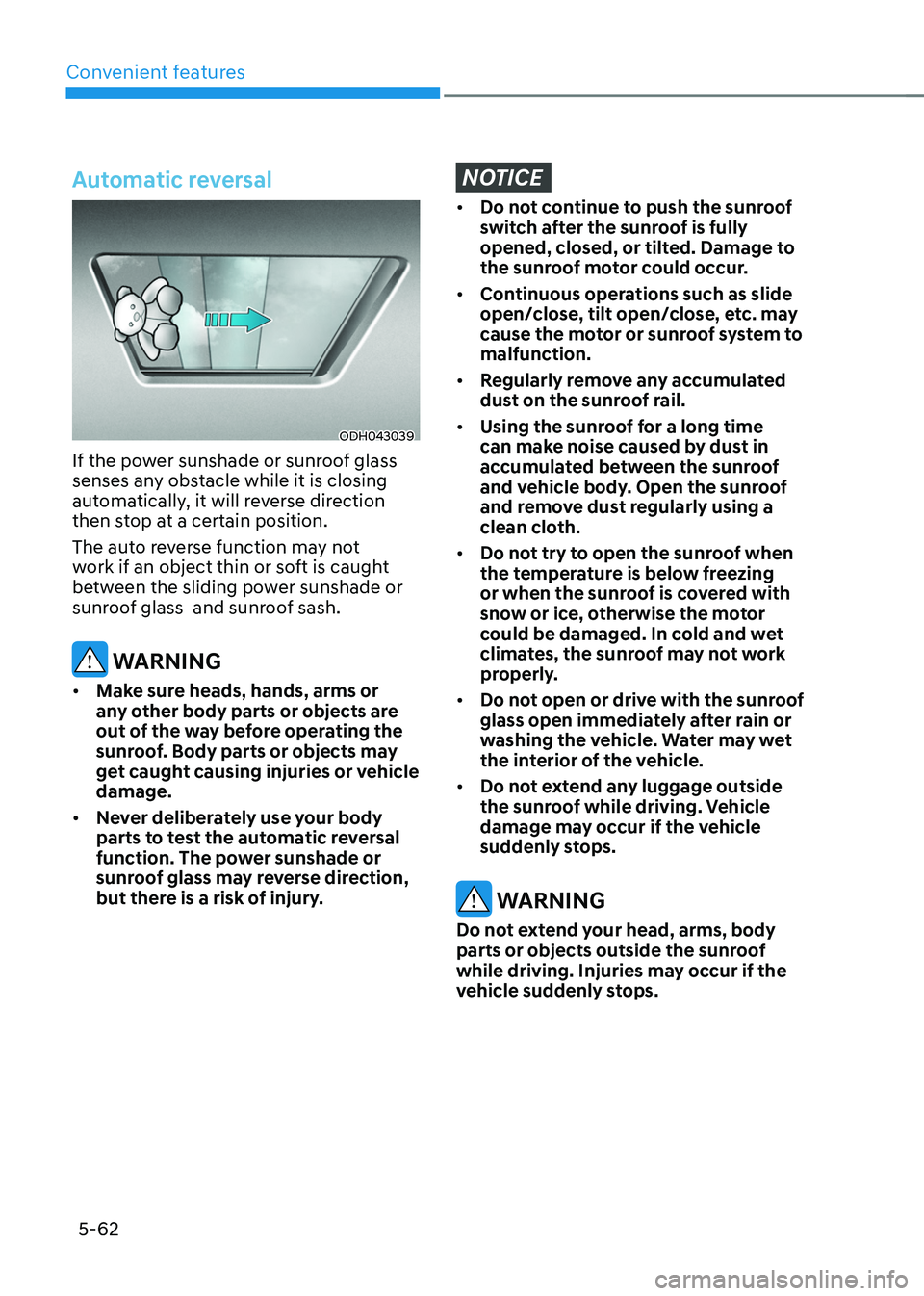
If the power sunshade or sunroof glass
senses any obstacle while it is closing
automatically, it will reverse direction
then stop at a certain position.
The auto reverse function may not
work if an object thin or soft is caught
between the sliding power sunshade or
sunroof glass and sunroof sash.
WARNING
• Make sure heads, hands, arms or
any other body parts or objects are
out of the way before operating the
sunroof. Body parts or objects may
get caught causing injuries or vehicle
damage.
• Never deliberately use your body
parts to test the automatic reversal
function. The power sunshade or
sunroof glass may reverse direction,
but there is a risk of injury.
NOTICE
• Do not continue to push the sunroof
switch after the sunroof is fully
opened, closed, or tilted. Damage to
the sunroof motor could occur.
• Continuous operations such as slide
open/close, tilt open/close, etc. may
cause the motor or sunroof system to
malfunction.
• Regularly remove any accumulated
dust on the sunroof rail.
• Using the sunroof for a long time
can make noise caused by dust in
accumulated between the sunroof
and vehicle body. Open the sunroof
and remove dust regularly using a
clean cloth.
• Do not try to open the sunroof when
the temperature is below freezing
or when the sunroof is covered with
snow or ice, otherwise the motor
could be damaged. In cold and wet
climates, the sunroof may not work
properly.
• Do not open or drive with the sunroof
glass open immediately after rain or
washing the vehicle. Water may wet
the interior of the vehicle.
• Do not extend any luggage outside
the sunroof while driving. Vehicle
damage may occur if the vehicle
suddenly stops.
WARNING
Do not extend your head, arms, body
parts or objects outside the sunroof
while driving. Injuries may occur if the
vehicle suddenly stops.
Page 211 of 638
05
5-67
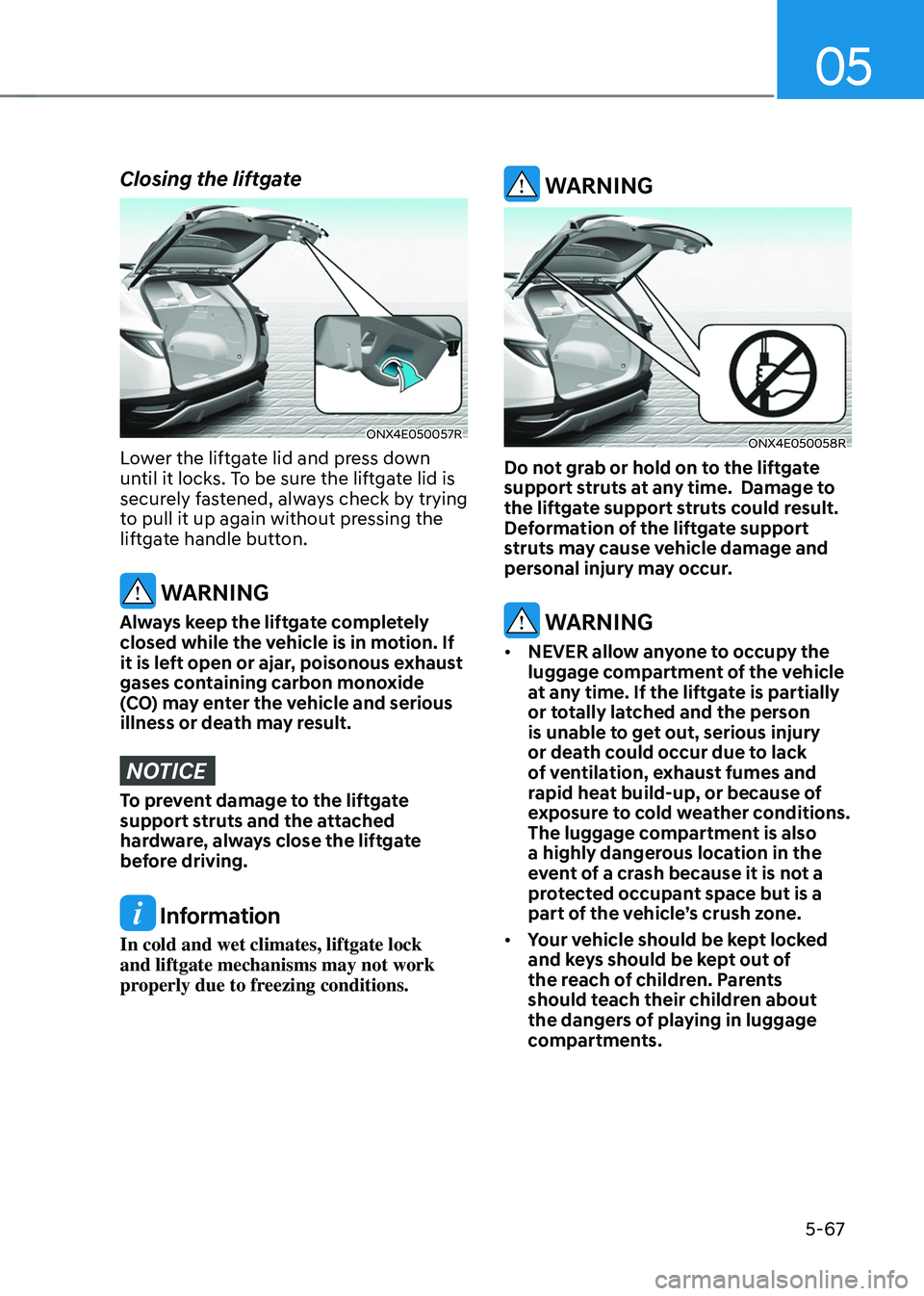
Closing the liftgate
ONX4E050057R
Lower the liftgate lid and press down
until it locks. To be sure the liftgate lid is
securely fastened, always check by trying
to pull it up again without pressing the
liftgate handle button.
WARNING
Always keep the liftgate completely
closed while the vehicle is in motion. If
it is left open or ajar, poisonous exhaust
gases containing carbon monoxide
(CO) may enter the vehicle and serious
illness or death may result.
NOTICE
To prevent damage to the liftgate
support struts and the attached
hardware, always close the liftgate
before driving.
Information
In cold and wet climates, liftgate lock
and liftgate mechanisms may not work
properly due to freezing conditions.
WARNING
ONX4E050058R
Do not grab or hold on to the liftgate
support struts at any time. Damage to
the liftgate support struts could result.
Deformation of the liftgate support
struts may cause vehicle damage and
personal injury may occur.
WARNING
• NEVER allow anyone to occupy the
luggage compartment of the vehicle
at any time. If the liftgate is partially
or totally latched and the person
is unable to get out, serious injury
or death could occur due to lack
of ventilation, exhaust fumes and
rapid heat build-up, or because of
exposure to cold weather conditions.
The luggage compartment is also
a highly dangerous location in the
event of a crash because it is not a
protected occupant space but is a
part of the vehicle’s crush zone.
• Your vehicle should be kept locked
and keys should be kept out of
the reach of children. Parents
should teach their children about
the dangers of playing in luggage
compartments.
Page 215 of 638
05
5-71
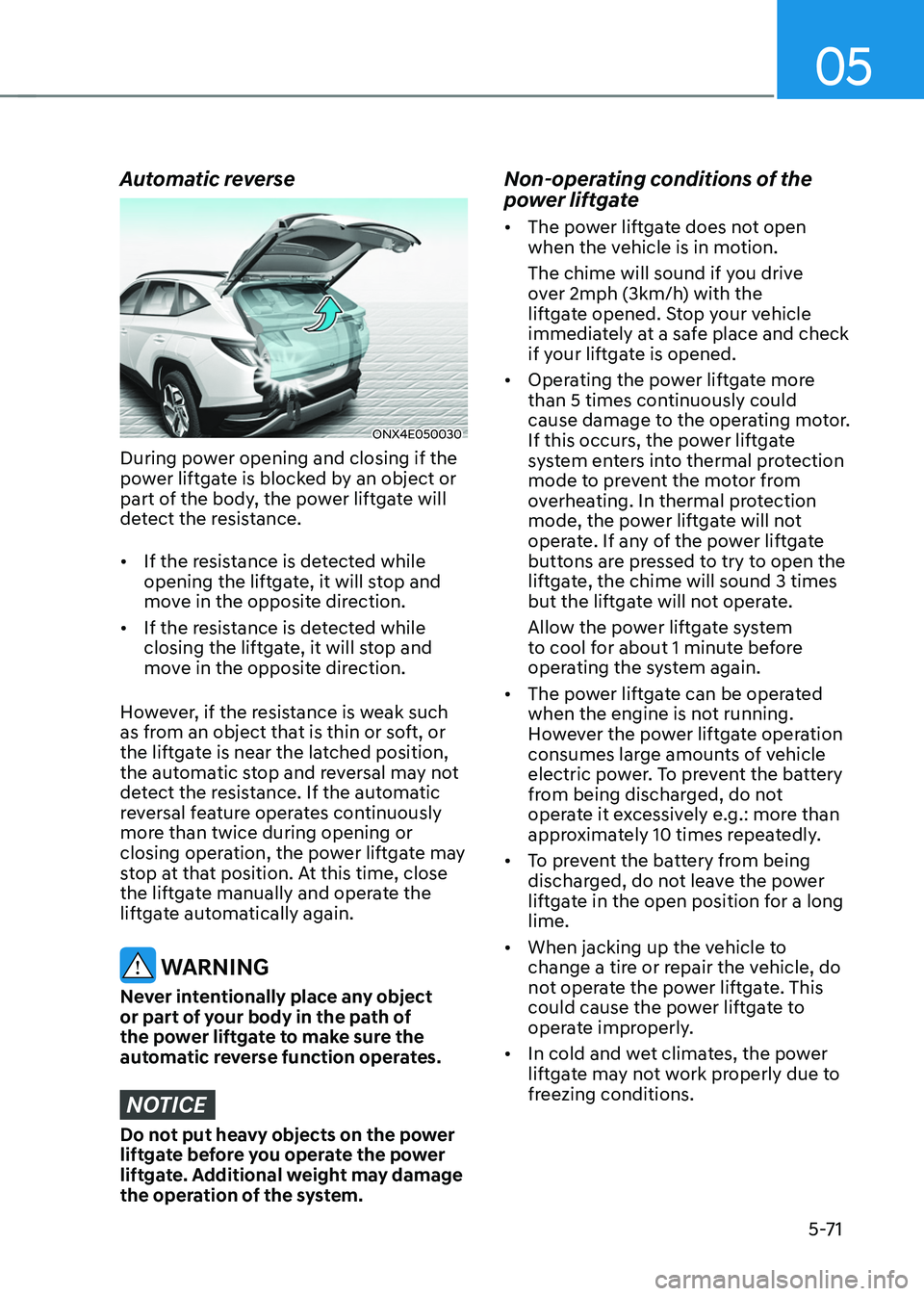
Automatic reverse
ONX4E050030
During power opening and closing if the
power liftgate is blocked by an object or
part of the body, the power liftgate will
detect the resistance.
• If the resistance is detected while
opening the liftgate, it will stop and
move in the opposite direction.
• If the resistance is detected while
closing the liftgate, it will stop and
move in the opposite direction.
However, if the resistance is weak such
as from an object that is thin or soft, or
the liftgate is near the latched position,
the automatic stop and reversal may not
detect the resistance. If the automatic
reversal feature operates continuously
more than twice during opening or
closing operation, the power liftgate may
stop at that position. At this time, close
the liftgate manually and operate the
liftgate automatically again.
WARNING
Never intentionally place any object
or part of your body in the path of
the power liftgate to make sure the
automatic reverse function operates.
NOTICE
Do not put heavy objects on the power
liftgate before you operate the power
liftgate. Additional weight may damage
the operation of the system.
Non-operating conditions of the
power liftgate
• The power liftgate does not open
when the vehicle is in motion.
The chime will sound if you drive
over 2mph (3km/h) with the
liftgate opened. Stop your vehicle
immediately at a safe place and check
if your liftgate is opened.
• Operating the power liftgate more
than 5 times continuously could
cause damage to the operating motor.
If this occurs, the power liftgate
system enters into thermal protection
mode to prevent the motor from
overheating. In thermal protection
mode, the power liftgate will not
operate. If any of the power liftgate
buttons are pressed to try to open the
liftgate, the chime will sound 3 times
but the liftgate will not operate.
Allow the power liftgate system
to cool for about 1 minute before
operating the system again.
• The power liftgate can be operated
when the engine is not running.
However the power liftgate operation
consumes large amounts of vehicle
electric power. To prevent the battery
from being discharged, do not
operate it excessively e.g.: more than
approximately 10 times repeatedly.
• To prevent the battery from being
discharged, do not leave the power
liftgate in the open position for a long
lime.
• When jacking up the vehicle to
change a tire or repair the vehicle, do
not operate the power liftgate. This
could cause the power liftgate to
operate improperly.
• In cold and wet climates, the power
liftgate may not work properly due to
freezing conditions.
Page 238 of 638
Convenient features
5-94
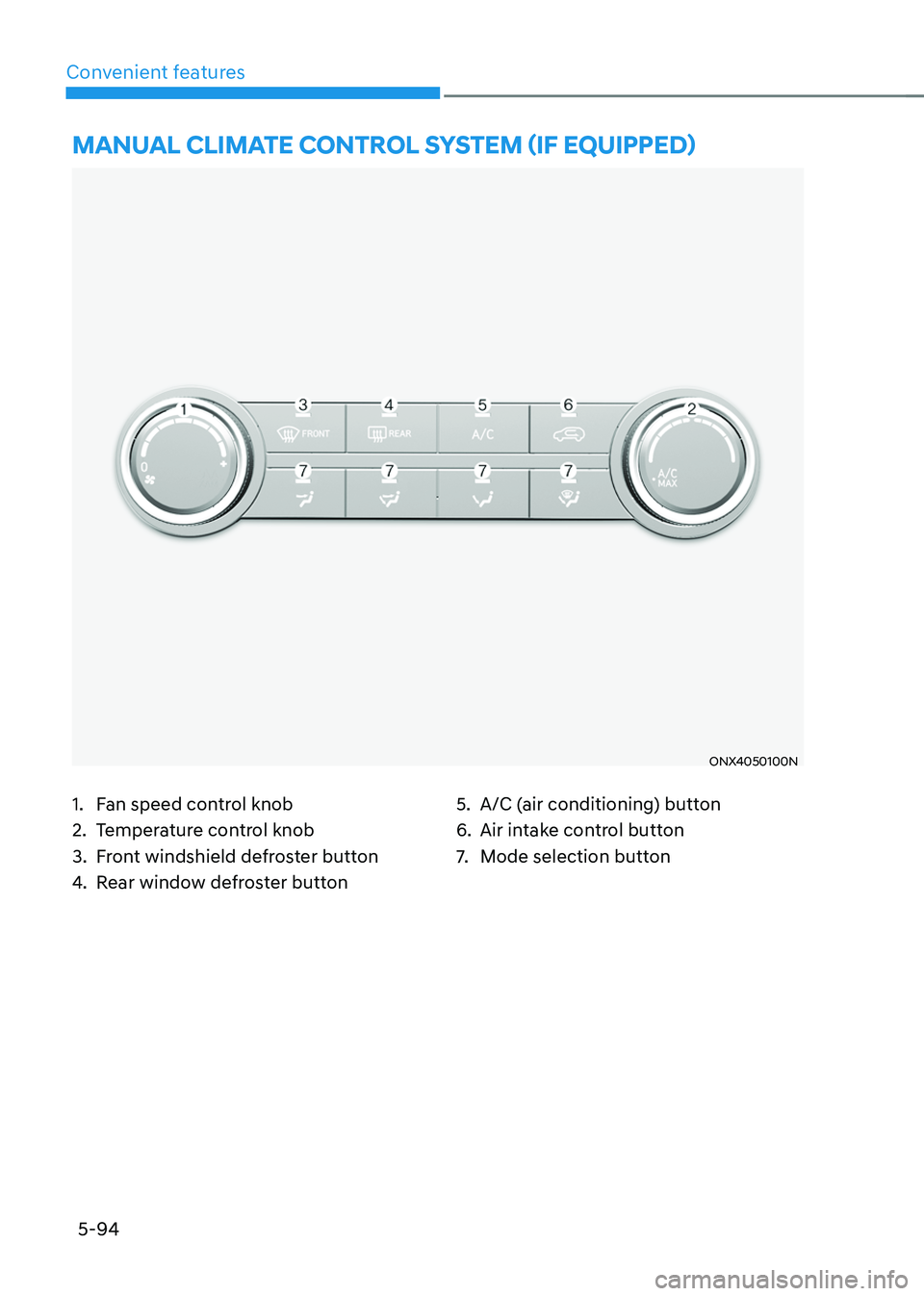
ONX4050100N
MANUAL CLIMATE CONTROL SYSTEM (IF EQUIPPED)
1. Fan speed control knob
2. Temperature control knob
3. Front windshield defroster button
4. Rear window defroster button
5. A/C (air conditioning) button
6. Air intake control button
7. Mode selection button
Page 242 of 638
Convenient features
5-98
Information
Using the system in the fresh air position is
recommended.
Prolonged operation of the heater in the
recirculated air position (without air
conditioning selected) can cause fogging of
the windshield and side windows and the
air within the passenger compartment will
become stale.
In addition, prolonged use of the air
conditioning with the recirculated air
position selected will result in excessively
dry air in the passenger compartment.
WARNING
• Continued climate control system
operation in the recirculated air
position may allow humidity to
increase inside the vehicle which
may fog the glass and obscure
visibility.
• Do not sleep in a vehicle with the air
conditioning or heating system on. It
may cause serious harm or death due
to a drop in the oxygen level and/or
body temperature.
• Continued climate control system
operation in the recirculated air
position can cause drowsiness
or sleepiness, and loss of vehicle
control. Set the air intake control
to the outside (fresh) air position as
much as possible while driving.
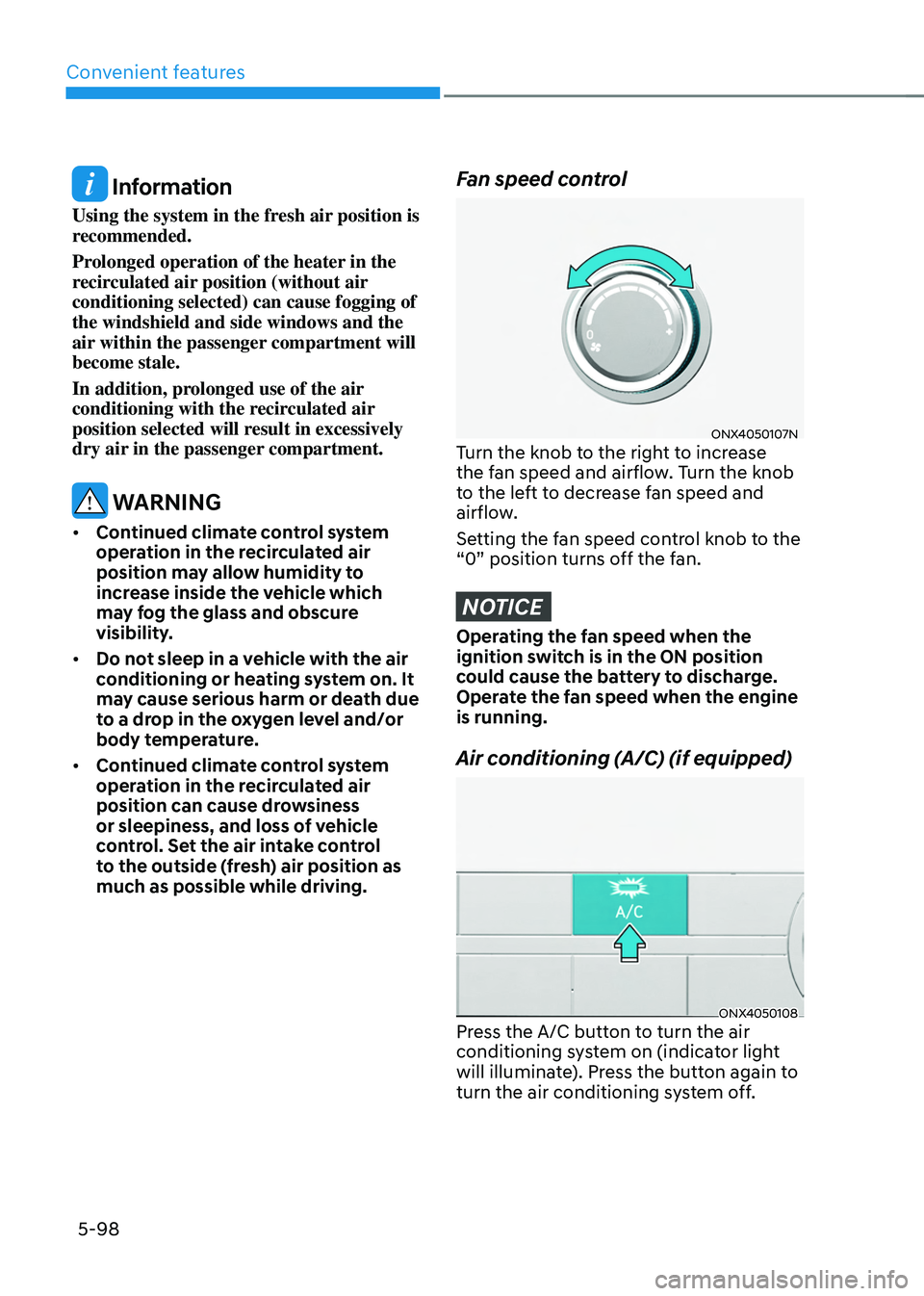
Fan speed control
ONX4050107NTurn the knob to the right to increase
the fan speed and airflow. Turn the knob
to the left to decrease fan speed and
airflow.
Setting the fan speed control knob to the
“0” position turns off the fan.
NOTICE
Operating the fan speed when the
ignition switch is in the ON position
could cause the battery to discharge.
Operate the fan speed when the engine
is running.
Air conditioning (A/C) (if equipped)
ONX4050108Press the A/C button to turn the air
conditioning system on (indicator light
will illuminate). Press the button again to
turn the air conditioning system off.