2022 HYUNDAI TUCSON display
[x] Cancel search: displayPage 482 of 638
07
7-119
Surround View Monitor
Operation
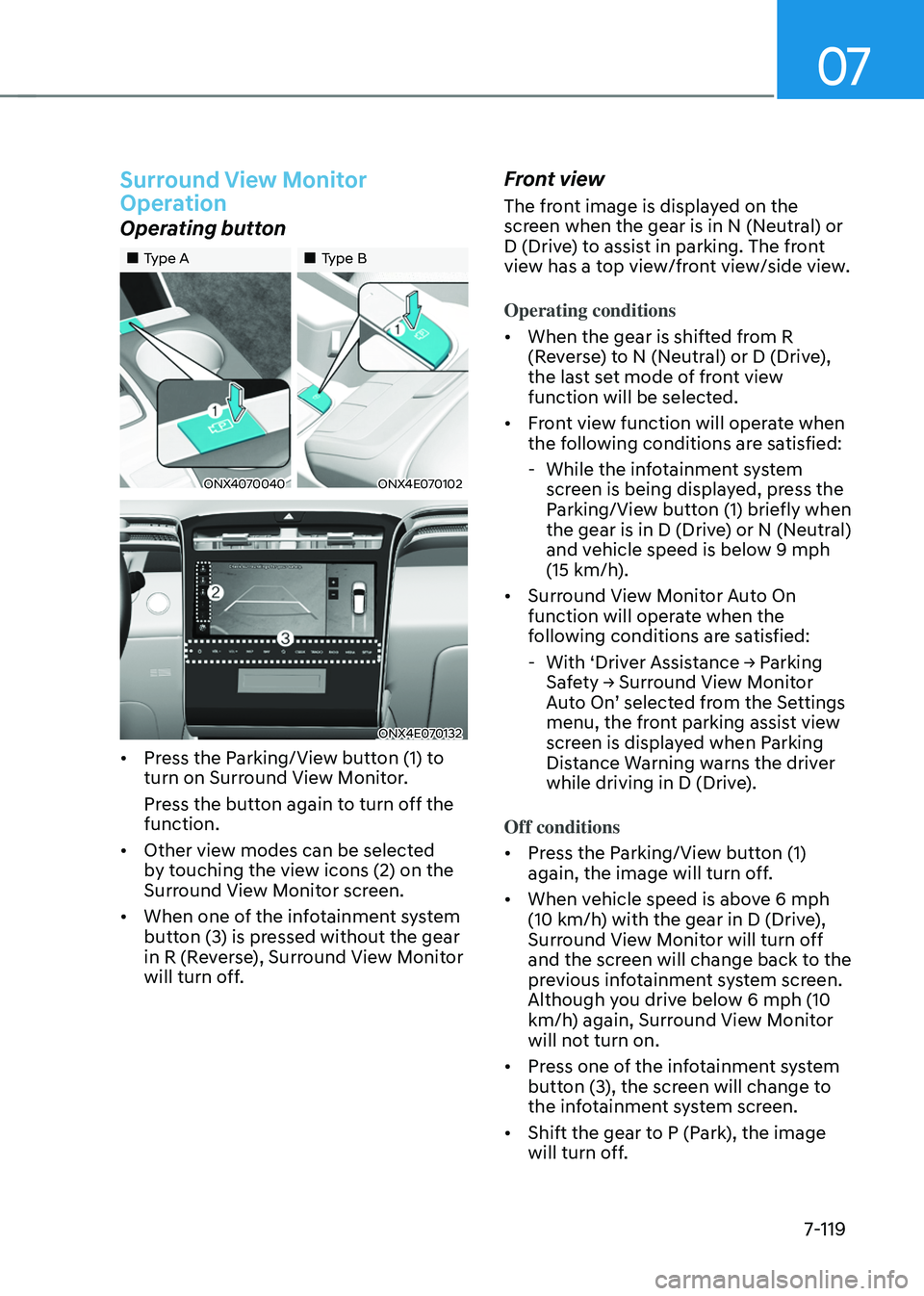
Operating button
„„Type A„„Type B
ONX4070040ONX4E070102
ONX4E070132
• Press the Parking/View button (1) to
turn on Surround View Monitor.
Press the button again to turn off the
function.
• Other view modes can be selected
by touching the view icons (2) on the
Surround View Monitor screen.
• When one of the infotainment system
button (3) is pressed without the gear
in R (Reverse), Surround View Monitor
will turn off.
Front view
The front image is displayed on the
screen when the gear is in N (Neutral) or
D (Drive) to assist in parking. The front
view has a top view/front view/side view.
Operating conditions
• When the gear is shifted from R
(Reverse) to N (Neutral) or D (Drive),
the last set mode of front view
function will be selected.
• Front view function will operate when
the following conditions are satisfied:
-While the infotainment system
screen is being displayed, press the
Parking/View button (1) briefly when
the gear is in D (Drive) or N (Neutral)
and vehicle speed is below 9 mph
(15 km/h).
• Surround View Monitor Auto On
function will operate when the
following conditions are satisfied:
-With ‘Driver Assistance → Parking Safety → Surround View Monitor Auto On’ selected from the Settings menu, the front parking assist view
screen is displayed when Parking
Distance Warning warns the driver
while driving in D (Drive).
Off conditions
• Press the Parking/View button (1)
again, the image will turn off.
• When vehicle speed is above 6 mph
(10 km/h) with the gear in D (Drive),
Surround View Monitor will turn off
and the screen will change back to the
previous infotainment system screen.
Although you drive below 6 mph (10
km/h) again, Surround View Monitor
will not turn on.
• Press one of the infotainment system
button (3), the screen will change to
the infotainment system screen.
• Shift the gear to P (Park), the image
will turn off.
Page 483 of 638
Driver assistance system7-120
Rear view
The rear image is displayed on the screen
when the gear is in R (Revers) or P (Park)
to assist in parking. The rear view has a
top view/rear view/side view/3D view.
Operating conditions
• Shift the gear to R (Reverse), the
image will appear on the screen.
• Press the Parking/View button (1)
while the gear is in P (Park), the image
will appear on the screen.
Off conditions
• The image cannot be turned off when
the gear is in R (Reverse).
• Shift the gear from R (Reverse) to P
(Park), the image will turn off.
• Press the Parking/View button (1)
again while the gear is in P (Park) with
the image on the screen.
Surround View Monitor
Malfunction and Limitations
Surround View Monitor malfunction
When Surround View Monitor is not
working properly, or the screen flickers,
or the camera image does not display
normally, we recommend that the
vehicle be inspected by an authorized
HYUNDAI dealer.
Limitations of Surround View
Monitor
• When the vehicle is stopped for a long
time in winter or when the vehicle is
parked in an indoor parking lot, the
exhaust fumes may temporarily blur
the image.
• The screen may be displayed
abnormally, and an icon will appear at
the top left side of the screen under
the following circumstances:
-The liftgate is opened
-The driver or front passenger door
is opened
-The side view mirror is folded
Page 490 of 638
07
7-127
WARNING
Take the following precautions when
using Rear Cross-Traffic Safety system:
• For your safety, change the Settings
after parking the vehicle at a safe
location.
• If any other system’s warning
message is displayed or audible
warning is generated, Rear Cross-
Traffic Safety system’s warning
message may not be displayed
and audible warning may not be
generated.
• You may not hear the warning sound
of Rear Cross-Traffic Safety system if
the surrounding is noisy.
• Rear Cross-Traffic Safety system may
not operate if the driver applies the
brake pedal to avoid collision.
• During Rear Cross-Traffic Safety
system operation, the vehicle may
stop suddenly injuring passengers
and shifting loose objects. Always
have the seat belt on and keep loose
objects secured.
• Even if there is a problem with Rear
Cross-Traffic Safety system, the
vehicle’s basic braking performance
will operate normally.
• When Rear Cross-Traffic Safety
system is operating, braking control
by the system will automatically
cancel when the driver excessively
depresses the accelerator pedal.
• Rear Cross-Traffic Safety system does
not operate in all situations or cannot
avoid all collisions.
• Rear Cross-Traffic Safety system may
warn the driver late or may not warn
the driver depending on the road and
driving conditions. •
The driver is solely responsible to
operate the vehicle in a safe manner.
Do not solely depend on Rear
Cross-Traffic Safety system. Rather,
maintain a safe braking distance, and
if necessary, depress the brake pedal
to reduce driving speed or to stop
the vehicle.
• Never deliberately operate Rear
Cross-Traffic Safety system on
people, animal, objects, etc. It may
cause serious injury or death.
CAUTION
The brake control may not operate
properly depending on the status of
ESC (Electronic Stability Control).
There will only be a warning when:
-The ESC (Electronic Stability Control)
warning light is on
-ESC (Electronic Stability Control) is
engaged in a different function
Information
If the system assists you with braking,
the driver must immediately depress
the brake pedal and check vehicle
surroundings.
-Brake control will end when the driver
depresses the brake pedal with sufficient
power.
-After shifting the gear to R (Reverse),
braking control will operate once for left
and right vehicle approach.
Page 498 of 638
07
7-135
WARNING
• Reverse Parking Distance Warning
is a supplemental function. The
operation of Reverse Parking
Distance Warning can be affected
by several factors (including
environmental conditions). It is the
responsibility of the driver to always
check the rear view before and while
parking.
• Your new vehicle warranty does not
cover any accidents or damage to
the vehicle due to the malfunction of
Reverse Parking Distance Warning.
• Pay close attention when driving
near objects, pedestrians, and
especially children. Some objects
may not be detected by the
ultrasonic sensors, due to the objects
distance, size or material, all of
which can limit the effectiveness of
the sensor.
Limitations of Reverse Parking
Distance Warning
• Reverse Parking Distance Warning
may not operate normally when:
-Moisture is frozen to the sensor
-Sensor is covered with foreign
material, such as snow or water
(Reverse Parking Distance Warning
will operate normally when such
foreign material are removed.)
-The weather is extremely hot or cold
-The sensor or sensor assembly is
disassembled
-The surface of the sensor has been
subjected to a hard impact
-The surface of the sensor has been
scratched with a sharp object
-The sensors or its surrounding
area is directly sprayed with high
pressure washer •
Reverse Parking Distance Warning
may malfunction when:
-Heavy rain or water spray is present
-Water flows on the surface of the
sensor
-Affected by another vehicle’s sensors
-The sensor is covered with snow
-Driving on uneven road, gravel
roads or bushes
-Objects that generates ultrasonic
waves are near the sensor
-Installing the license plate
differently from the original location
-The vehicle bumper height or
ultrasonic sensor installation has
been modified
-Attaching equipments or
accessories around the ultrasonic
sensors
• The following objects may not be
detected:
-Sharp or slim objects, such as ropes,
chains or small poles.
-Objects, which tend to absorb
sensor frequency, such as clothes,
spongy material or snow.
-Objects smaller than 40 in. (100 cm)
in length and narrower than 6 in. (14
cm) in diameter.
-Pedestrians, animals or objects
that are very close to the ultrasonic
sensors
• Parking Distance Warning Indicators
may be displayed differently from
the actual detected location when
the obstacle is located between the
sensors.
• Parking Distance Warning indicator
may not occur sequentially depending
on vehicle speed or obstacle shape.
• If Reverse Parking Distance Warning
needs repair, have the vehicle
inspected by an authorized HYUNDAI
dealer.
Page 503 of 638
Driver assistance system
7-140
Limitations of Forward/Reverse
Parking Distance Warning
• Forward/Reverse Parking Distance
Warning may not operate normally
when:
-Moisture is frozen to the sensor
-Sensor is covered with foreign
material, such as snow or water
(Forward/Reverse Parking Distance
Warning will operate normally when
such foreign material are removed.)
-The weather is extremely hot or cold
-The sensor or sensor assembly is
disassembled
-The surface of the sensor has been
subjected to a hard impact
-The surface of the sensor has been
scratched with a sharp object
-The sensors or its surrounding
area is directly sprayed with high
pressure washer
• Forward/Reverse Parking Distance
Warning may malfunction when:
-Heavy rain or water spray is present
-Water flows on the surface of the
sensor
-Affected by another vehicle’s sensors
-The sensor is covered with snow
-Driving on uneven road, gravel
roads or bushes
-Objects that generates ultrasonic
waves are near the sensor
-Installing the license plate
differently from the original location
-The vehicle bumper height or
ultrasonic sensor installation has
been modified
-Attaching equipments or
accessories around the ultrasonic
sensors •
The following objects may not be
detected:
-Sharp or slim objects, such as ropes,
chains or small poles.
-Objects, which tend to absorb
sensor frequency, such as clothes,
spongy material or snow.
-Objects smaller than 40 in. (100 cm)
in length and narrower than 6 in. (14
cm) in diameter.
-Pedestrians, animals or objects
that are very close to the ultrasonic
sensors
• Parking Distance Warning Indicators
may be displayed differently from
the actual detected location when
the obstacle is located between the
sensors.
• Parking Distance Warning indicator
may not occur sequentially depending
on vehicle speed or obstacle shape.
• If Forward/Reverse Parking Distance
Warning needs repair, have the
vehicle inspected by an authorized
HYUNDAI dealer.
Page 535 of 638
08
8-9
ONX4080004
ONX4E080005
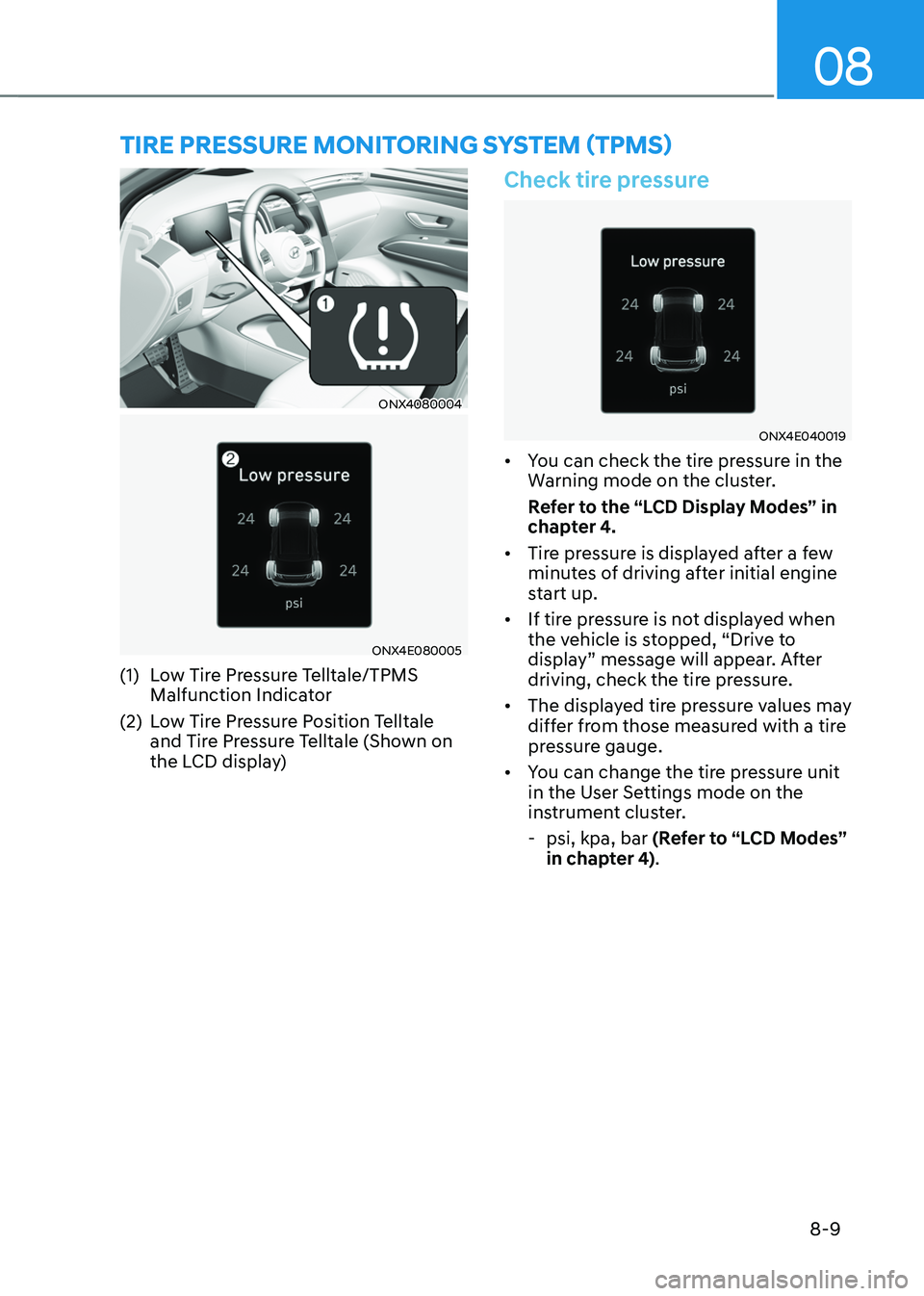
(1) Low Tire Pressure Telltale/TPMS
Malfunction Indicator
(2) Low Tire Pressure Position Telltale
and Tire Pressure Telltale (Shown on
the LCD display)
Check tire pressure
ONX4E040019
• You can check the tire pressure in the
Warning mode on the cluster.
Refer to the “LCD Display Modes” in
chapter 4.
• Tire pressure is displayed after a few
minutes of driving after initial engine
start up.
• If tire pressure is not displayed when
the vehicle is stopped, “Drive to
display” message will appear. After
driving, check the tire pressure.
• The displayed tire pressure values may
differ from those measured with a tire
pressure gauge.
• You can change the tire pressure unit
in the User Settings mode on the
instrument cluster.
-psi, kpa, bar (Refer to “LCD Modes”
in chapter 4).
TIRE PRESSURE MONITORING SYSTEM (TPMS)
Page 537 of 638
08
8-11
Low tire pressure
warning light
Low tire pressure position and
tire pressure telltale
ONX4E040019
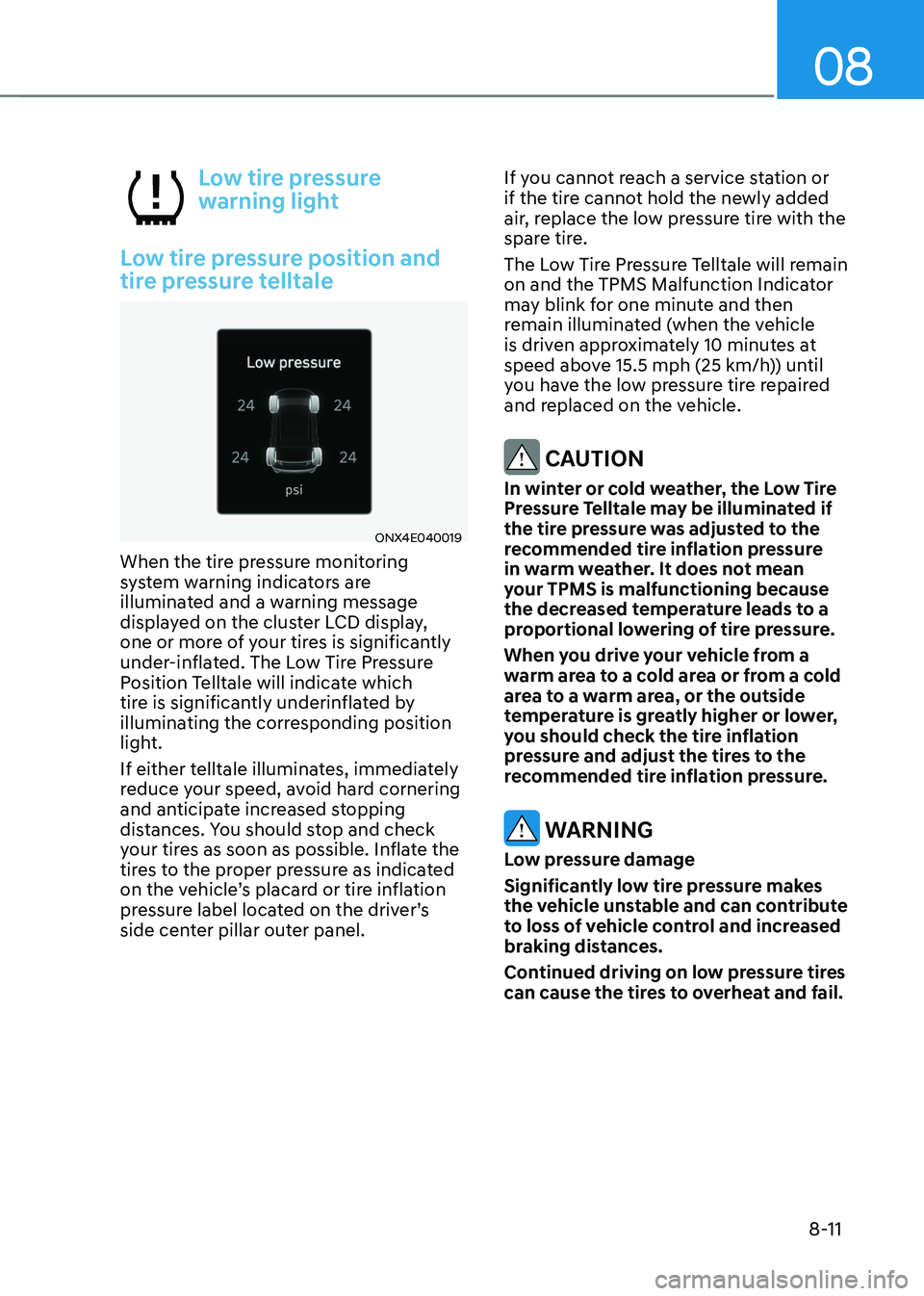
When the tire pressure monitoring
system warning indicators are
illuminated and a warning message
displayed on the cluster LCD display,
one or more of your tires is significantly
under-inflated. The Low Tire Pressure
Position Telltale will indicate which
tire is significantly underinflated by
illuminating the corresponding position
light.
If either telltale illuminates, immediately
reduce your speed, avoid hard cornering
and anticipate increased stopping
distances. You should stop and check
your tires as soon as possible. Inflate the
tires to the proper pressure as indicated
on the vehicle’s placard or tire inflation
pressure label located on the driver’s
side center pillar outer panel. If you cannot reach a service station or
if the tire cannot hold the newly added
air, replace the low pressure tire with the
spare tire.
The Low Tire Pressure Telltale will remain
on and the TPMS Malfunction Indicator
may blink for one minute and then
remain illuminated (when the vehicle
is driven approximately 10 minutes at
speed above 15.5 mph (25 km/h)) until
you have the low pressure tire repaired
and replaced on the vehicle.
CAUTION
In winter or cold weather, the Low Tire
Pressure Telltale may be illuminated if
the tire pressure was adjusted to the
recommended tire inflation pressure
in warm weather. It does not mean
your TPMS is malfunctioning because
the decreased temperature leads to a
proportional lowering of tire pressure.
When you drive your vehicle from a
warm area to a cold area or from a cold
area to a warm area, or the outside
temperature is greatly higher or lower,
you should check the tire inflation
pressure and adjust the tires to the
recommended tire inflation pressure.
WARNING
Low pressure damage
Significantly low tire pressure makes
the vehicle unstable and can contribute
to loss of vehicle control and increased
braking distances.
Continued driving on low pressure tires
can cause the tires to overheat and fail.
Page 538 of 638
Emergency situations
8-12
TPMS malfunction
indicator
The TPMS Malfunction Indicator
will illuminate after it blinks for
approximately one minute when there
is a problem with the Tire Pressure
Monitoring System.
We recommend that you have the
system checked by an authorized
HYUNDAI dealer as soon as possible.
NOTICE
If there is a malfunction with the
TPMS, the individual tire pressures
in the cluster LCD display will not be
available. Have the system checked by
an authorized HYUNDAI dealer as soon
as possible.
NOTICE
The TPMS Malfunction Indicator may
illuminate after blinking for one minute
if the vehicle is near electric power
supply cables or radio transmitters
such as police stations, government
and public offices, broadcasting
stations, military installations, airports,
transmitting towers, etc.
Additionally, the TPMS Malfunction
Indicator may illuminate if snow chains
are used or electronic devices such as
computers, chargers, remote starters,
navigation, etc. This may interfere with
normal operation of the TPMS.
Changing a tire with TPMS
If you have a flat tire, the Low Tire
Pressure and Position telltales will come
on. We recommend that you have the flat
tire repaired by an authorized HYUNDAI
dealer as soon as possible or replace the
flat tire with the spare tire.
NOTICE
It is recommended that you do not
use a puncture-repairing agent not
approved by HYUNDAI dealer or the
equivalent specified for your vehicle to
repair and/or inflate a low pressure tire.
Tire sealant not approved by HYUNDAI
dealer or the equivalent specified for
your vehicle may damage the tire
pressure sensor.
The spare tire (if equipped) does not
come with a tire pressure monitoring
sensor. When the low pressure tire or
the flat tire is replaced with the spare
tire, the Low Tire Pressure Telltale will
remain on. Also, the TPMS Malfunction
Indicator will illuminate after blinking
for one minute if the vehicle is driven
at speed above 15.5 mph (25 km/h) for
approximately 10 minutes.
Once the original wheel equipped with
a tire pressure monitoring sensor is
reinflated to the recommended pressure
and reinstalled on the vehicle, the
Low Tire Pressure Telltale and TPMS
Malfunction Indicator will go off within a
few minutes of driving.