2022 HYUNDAI SONATA battery
[x] Cancel search: batteryPage 162 of 546
Convenient Features
5-32
In case of an emergency
ODN8059291
If the electrical power door lock switch
is not operating (ex. dead car battery)
the only way to lock the door(s) is with
the mechanical key from the outside key
hole.
Doors without an outside key hole can be
locked as follows:
1.
Open the door
.
2.
Insert the k
ey into the emergency
door lock hole and turn the key
horizontally to lock.
3.
Close the door secur
ely.
Information
If the electrical power to door lock switch
is not operating (ex. dead car battery) and
the trunk is closed, you will not be able to
open the trunk until power is restored.
Operating Door Locks from
Inside the Vehicle
With the door handle
ODN8059012
Front door
If the inner door handle is pulled when
the door is locked, the door will unlock
and open.
Rear door
If the inner door handle is pulled once
when the door is locked, the door will
unlock. If the inner door handle is pulled
once more, the door will open.
Information
If a power door lock ever fails to function
while you are in the vehicle try one or
more of the following techniques to exit:
• Operate the door unlock feature
repeatedly (both electronic and
manual) while simultaneously pulling
on the door handle.
• Operate the other door locks and
handles, front and rear.
• Lower a front window and use the
mechanical key to unlock the door from
outside.
Page 169 of 546
05
5-39
ODN8A059019
The Driver Position Memory System is
provided to store and recall the following
memory settings with a simple button
operation.
- Driver’s seat position (Power seat)
- Side vie
w mirror position
- Ins
trument panel illumination intensity
- H
ead Up Display (HUD) position and
brightness (if equipped)
WARNING
Never attempt to operate the driver
position memory system while the
vehicle is moving.
This could result in loss of control, and
an accident causing death, serious
injury, or property damage.
Information
• If the battery is disconnected, the
memory settings will be erased.
• If the Driver Position Memory System
does not operate normally, have the
system checked by an authorized
HYUNDAI dealer.
Storing Positions into Memory
1. Shift to P (Park) while the ignition
switch is in the ON position.
2.
A
djust the driver’s seat position, side
view mirror position, instrument panel
illumination intensity and head-up
display height/brightness to positions
comfortable for the driver.
3.
Pr
ess the SET button. The system
will beep once and notify you “Press
button to save settings” on the cluster
LCD display.
4.
Pr
ess one of the memory buttons (1
or 2) within 4 seconds. The system
will beep twice when the memory has
been successfully stored.
5.
“Se
ttings 1 (or 2) saved” will appear on
the cluster LCD display.
Driver poS i T ion memory SyS T em ( if eQU ippe D)
Page 172 of 546
Convenient Features5-42
steering Wheel
Electric Power Steering (EPS)
The system assists you with steering the
vehicle. If the vehicle is turned off or
if the power steering system becomes
inoperative, you may still steer the
vehicle, but it will require increased
steering effort.
Also, the steering effort becomes heavier
as the vehicle’s speed increases and
becomes lighter as the vehicle’s speed
decreases for better control of the
steering wheel.
Should you notice any change in the
effort required to steer during normal
vehicle operation, have the system
checked by an authorized HYUNDAI
dealer.
CAUTION
• If the Electric Power Steering System
does not operate normally, the
warning light (
) will illuminate
on the instrument cluster. You may
steer the vehicle, but it will require
increased steering efforts. Take your
vehicle to an authorized HYUNDAI
dealer and have the system checked
as soon as possible.
• When an abnormality is detected
in the electric power steering
system, to prevent a an accident, the
steering assist function may become
inoperative. At this time, the warning
light turns on or blinks on the cluster.
The steering wheel may become
difficult to control or operate. Have
your vehicle checked immediately,
after moving the vehicle to a safe
area.
Information
The following symptoms may occur during
normal vehicle operation:
• The steering effort may be high
immediately after placing the ignition
switch in the ON position.
This happens as the system performs
the EPS system diagnostics. When the
diagnostics are completed, the steering
wheel effort will return to its normal
condition.
• When the battery voltage is low, you
might have to put more steering effort.
However, it is a temporary condition so
that it will return to normal condition
after charging the battery.
• A click noise may be heard from the
EPS relay after the ignition switch is in
the ON or LOCK/OFF position.
• Motor noise may be heard when the
vehicle is at a stop or at a low driving
speed.
• When you operate the steering wheel
in low temperatures, abnormal noise
may occur. If the temperature rises, the
noise will disappear. This is a normal
condition.
• When an error is detected from the
EPS, the steering effort assist function
may become inoperative in order to
prevent fatal accidents. Instrument
cluster warning lights may be on or the
steering effort may be high. If these
symptoms occur, drive the vehicle to
a safe area as soon as it is safe to do
so. Have the system checked by an
authorized HYUNDAI dealer as soon
as possible.
Page 178 of 546
Convenient Features5-48
Automatic-Dimming Night Vision Safety™
(NVS®) Mirror (if equipped)
The NVS® Mirror automatically reduces
glare by monitoring light levels in the
front and the rear of the vehicle. Any
object that obstructs either light sensor
will degrade the automatic dimming
control feature.
For more information regarding NVS®
mirrors and other applications, please
refer to the Gentex website:
www.gentex.com
Your mirror will automatically dim
upon detecting glare from the vehicles
traveling behind you.
The mirror defaults to the ON position
each time the vehicle is started.
Integrated HomeLink
® Wireless Control
System
The HomeLink® Wireless Control System
can replace up to three hand-held
radio-frequency (RF) transmitters with
a single built-in device. This innovative
feature will learn the radio frequency
codes of most current transmitters to
operate devices such as gate operators,
garage door openers, entry door locks,
security systems, even home lighting.
Both standard and rolling code-equipped
transmitters can be programmed by
following the outlined procedures.
Additional HomeLink® information can
be found at: www.homelink.com, www.
youtube.com/HomeLinkGentex or by
calling 1-800-355-3515.
Retain the original transmitter of the
RF device you are programming for use
in other vehicles as well as for future
HomeLink® programming. It is also
suggested that upon the sale of the
vehicle, the programmed HomeLink®
buttons be erased for security purposes.
WARNING
Before programming HomeLink® to a
garage door opener or gate operator,
make sure people and objects are out
of the way of the device to prevent
potential harm or damage. Do not
use the HomeLink® with any garage
door opener that lacks the safety
stop and reverse features required
by U.S. federal safety standards (this
includes any garage door opener model
manufactured before April 1, 1982).
A garage door that cannot detect an
object - signaling the door to stop and
reverse - does not meet current U.S.
federal safety standards. Using a garage
door opener without these features
increases the risk of serious injury or
death.
Programming HomeLink
®
Please note the following:
• When
programming a garage door
opener
, it is advised to park the
vehicle outside of the garage.
• It
is recommended that a new battery
be placed in the hand-held tr
ansmitter
of the device being programmed to
HomeLink® for quicker training and
accurate transmission of the radio-
frequency signal.
• Some
vehicles may require the
E
ngine Start/Stop button to be in the
ACC (or “Accessories”) position for
programming and/or operation of
HomeLink®.
• In
the event that there are still
pr
ogramming difficulties or questions
after following the programming steps
listed below, contact HomeLink® at:
www.homelink.com, www.youtube.
com/HomeLinkGentex or by calling
1-800-355-3515.
Page 193 of 546
05
5-63
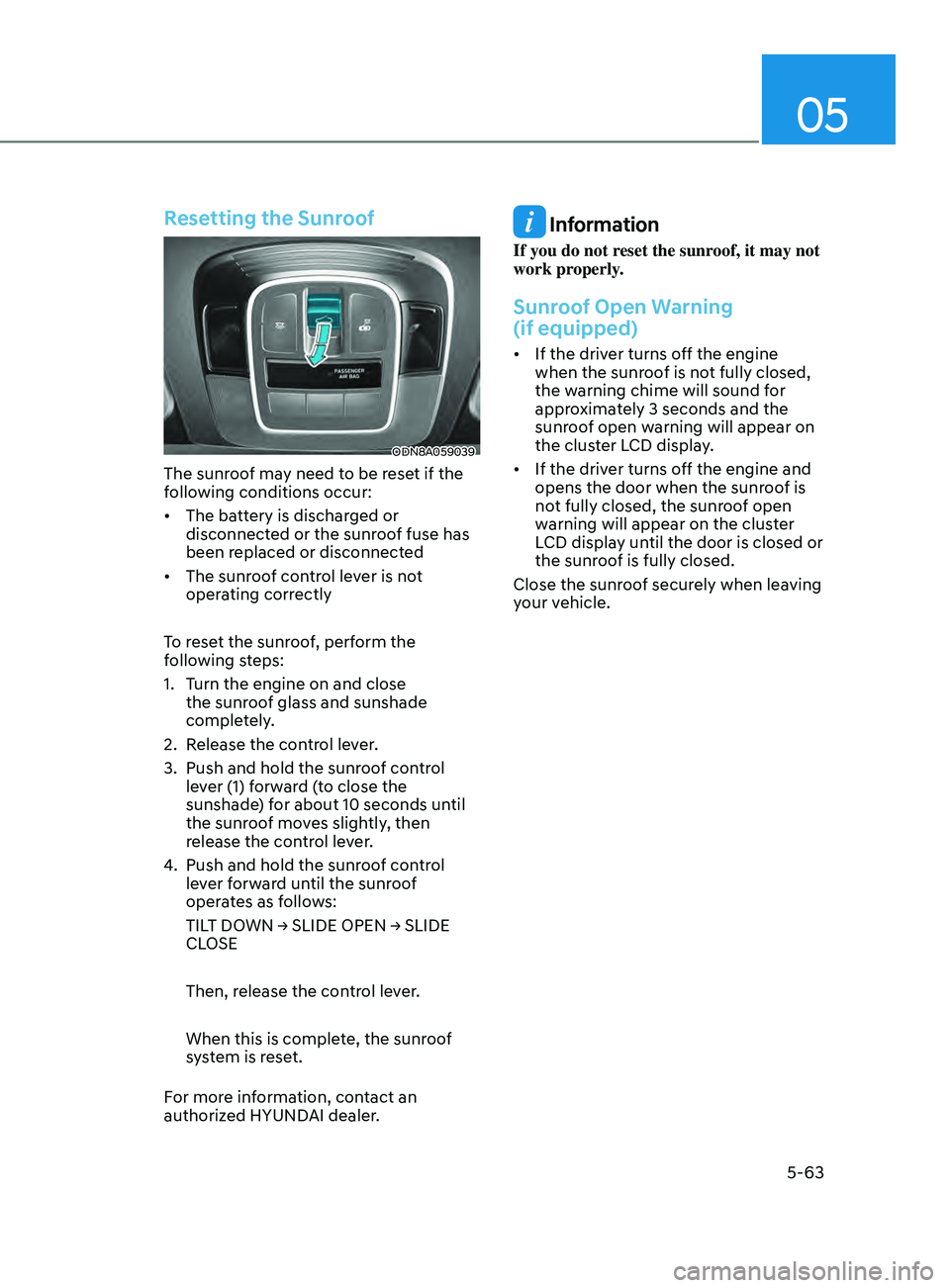
Resetting the Sunroof
ODN8A059039
The sunroof may need to be reset if the
following conditions occur:
• The battery is discharged or
disconnect
ed or the sunroof fuse has
been replaced or disconnected
• The
sunroof control lever is not
oper
ating correctly
To reset the sunroof, perform the
following steps:
1.
T
urn the engine on and close
the sunroof glass and sunshade
completely.
2.
R
elease the control lever.
3.
Push and hold the sunr
oof control
lever (1) forward (to close the
sunshade) for about 10 seconds until
the sunroof moves slightly, then
release the control lever.
4.
Push and hold the sunr
oof control
lever forward until the sunroof
operates as follows:
TILT
DOWN → SLIDE OPEN → SLIDE
CL
OSE
Then, release the control lever.
When this is complete, the sunroof
system is reset.
For more information, contact an
authorized HYUNDAI dealer.
Information
If you do not reset the sunroof, it may not
work properly.
Sunroof Open Warning
(if equipped)
• If the driver turns off the engine when the sunr oof is not fully closed,
the warning chime will sound for
approximately 3 seconds and the
sunroof open warning will appear on
the cluster LCD display.
• If
the driver turns off the engine and
opens the door when the sunr
oof is
not fully closed, the sunroof open
warning will appear on the cluster
LCD display until the door is closed or
the sunroof is fully closed.
Close the sunroof securely when leaving
your vehicle.
Page 196 of 546
Convenient Features
5-66
Emergency Trunk Safety Release
Inside the trunk
ODN8059044L
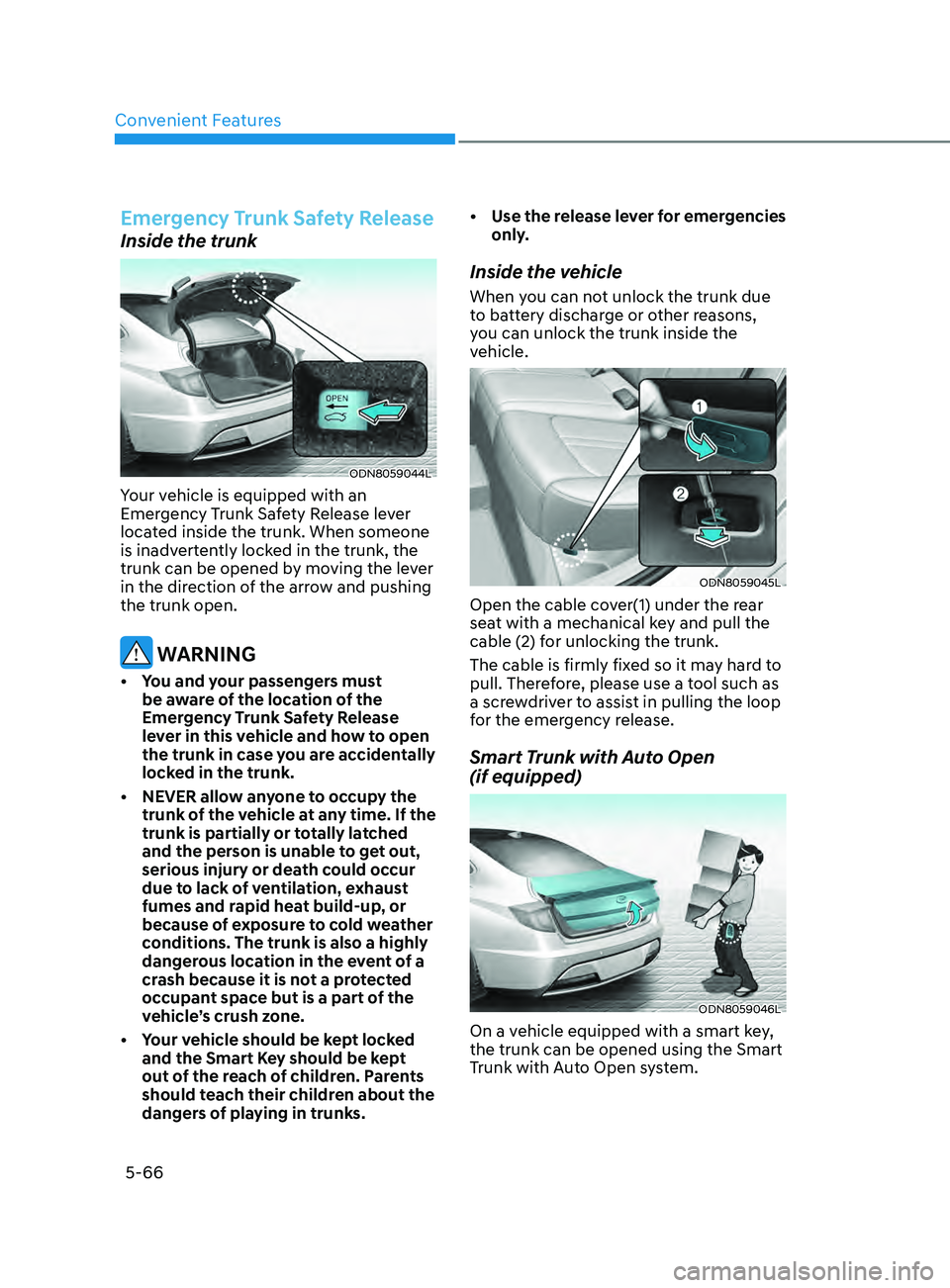
Your vehicle is equipped with an
Emergency Trunk Safety Release lever
located inside the trunk. When someone
is inadvertently locked in the trunk, the
trunk can be opened by moving the lever
in the direction of the arrow and pushing
the trunk open.
WARNING
• You and your passengers must be aware of the location of the
Emergency Trunk Safety Release
lever in this vehicle and how to open
the trunk in case you are accidentally
locked in the trunk.
•
NEVER allo
w anyone to occupy the
trunk of the vehicle at any time. If the
trunk is partially or totally latched
and the person is unable to get out,
serious injury or death could occur
due to lack of ventilation, exhaust
fumes and rapid heat build-up, or
because of exposure to cold weather
conditions. The trunk is also a highly
dangerous location in the event of a
crash because it is not a protected
occupant space but is a part of the
vehicle’s crush zone.
•
Y
our vehicle should be kept locked
and the Smart Key should be kept
out of the reach of children. Parents
should teach their children about the
dangers of playing in trunks. •
U
se the release lever for emergencies
only.
Inside the vehicle
When you can not unlock the trunk due
to battery discharge or other reasons,
you can unlock the trunk inside the
vehicle.
ODN8059045L
Open the cable cover(1) under the rear
seat with a mechanical key and pull the
cable (2) for unlocking the trunk.
The cable is firmly fixed so it may hard to
pull. Therefore, please use a tool such as
a screwdriver to assist in pulling the loop
for the emergency release.
Smart Trunk with Auto Open
(if equipped)
ODN8059046L
On a vehicle equipped with a smart key,
the trunk can be opened using the Smart
Trunk with Auto Open system.
Page 209 of 546
05
5-79
Turn signals and lane change signals
ODN8A059207
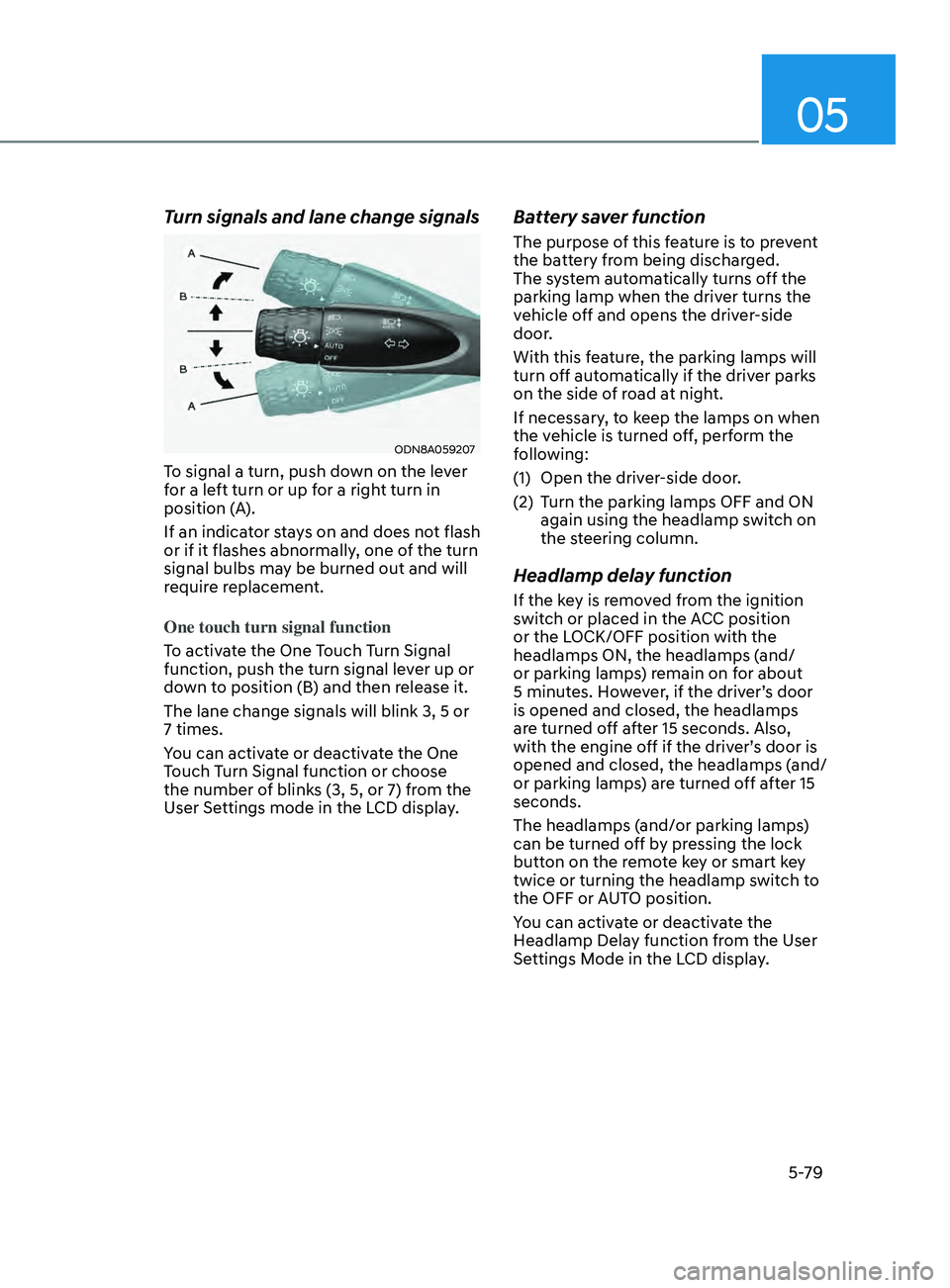
To signal a turn, push down on the lever
for a left turn or up for a right turn in
position (A).
If an indicator stays on and does not flash
or if it flashes abnormally, one of the turn
signal bulbs may be burned out and will
require replacement.
One touch turn signal function
To activate the One Touch Turn Signal
function, push the turn signal lever up or
down to position (B) and then release it.
The lane change signals will blink 3, 5 or
7 times.
You can activate or deactivate the One
Touch Turn Signal function or choose
the number of blinks (3, 5, or 7) from the
User Settings mode in the LCD display.
Battery saver function
The purpose of this feature is to prevent
the battery from being discharged.
The system automatically turns off the
parking lamp when the driver turns the
vehicle off and opens the driver-side
door.
With this feature, the parking lamps will
turn off automatically if the driver parks
on the side of road at night.
If necessary, to keep the lamps on when
the vehicle is turned off, perform the
following:
(1)
Open the driv
er-side door.
(2)
T
urn the parking lamps OFF and ON
again using the headlamp switch on
the steering column.
Headlamp delay function
If the key is removed from the ignition
switch or placed in the ACC position
or the LOCK/OFF position with the
headlamps ON, the headlamps (and/
or parking lamps) remain on for about
5 minutes. However, if the driver’s door
is opened and closed, the headlamps
are turned off after 15 seconds. Also,
with the engine off if the driver’s door is
opened and closed, the headlamps (and/
or parking lamps) are turned off after 15
seconds.
The headlamps (and/or parking lamps)
can be turned off by pressing the lock
button on the remote key or smart key
twice or turning the headlamp switch to
the OFF or AUTO position.
You can activate or deactivate the
Headlamp Delay function from the User
Settings Mode in the LCD display.
Page 210 of 546
Convenient Features
5-80
NOTICE
If the driver exits the vehicle through
another door besides the driver
door, the battery saver function
does not operate and the headlamp
delay function does not turn OFF
automatically.
This may cause the battery to
discharge. To avoid battery discharge,
turn OFF the headlamps manually from
the headlamp switch before exiting the
vehicle.
Headlamp leveling device
It automatically adjusts the headlamp
beam level according to the number of
passengers and loading weight in the
luggage area.
And it offers proper headlamp beam
under various conditions.
WARNING
If the function does not work properly,
have the vehicle inspected by an
authorized HYUNDAI dealer. Do not
attempt to inspect or replace the wiring
yourself.
Interior Lights
WARNING
Do not use the interior lights when
driving in the dark. The interior lights
may obscure your view and cause an
accident.
NOTICE
Do not use the interior lights for
extended periods when the vehicle is
turned off or the battery will discharge.
Interior lamp AUTO cut
The interior lamps will automatically go
off approximately 20 minutes after the
engine is turned off and the doors are
closed. If a door is opened, the lamp
will go off 40 minutes after the engine is
turned off. If the doors are locked by the
remote key or smart key and the vehicle
enters the armed stage of the theft
alarm system, the lamps will go off five
seconds later.