2022 HYUNDAI SONATA ECU
[x] Cancel search: ECUPage 62 of 546
3-34
NOTICE
The recommended weight for the
LATCH system is under 65 lb (30 kg).
How to determine an appropriate child
restraint weight:
Child weight + Child restraint weight <
65 lb (30kg)
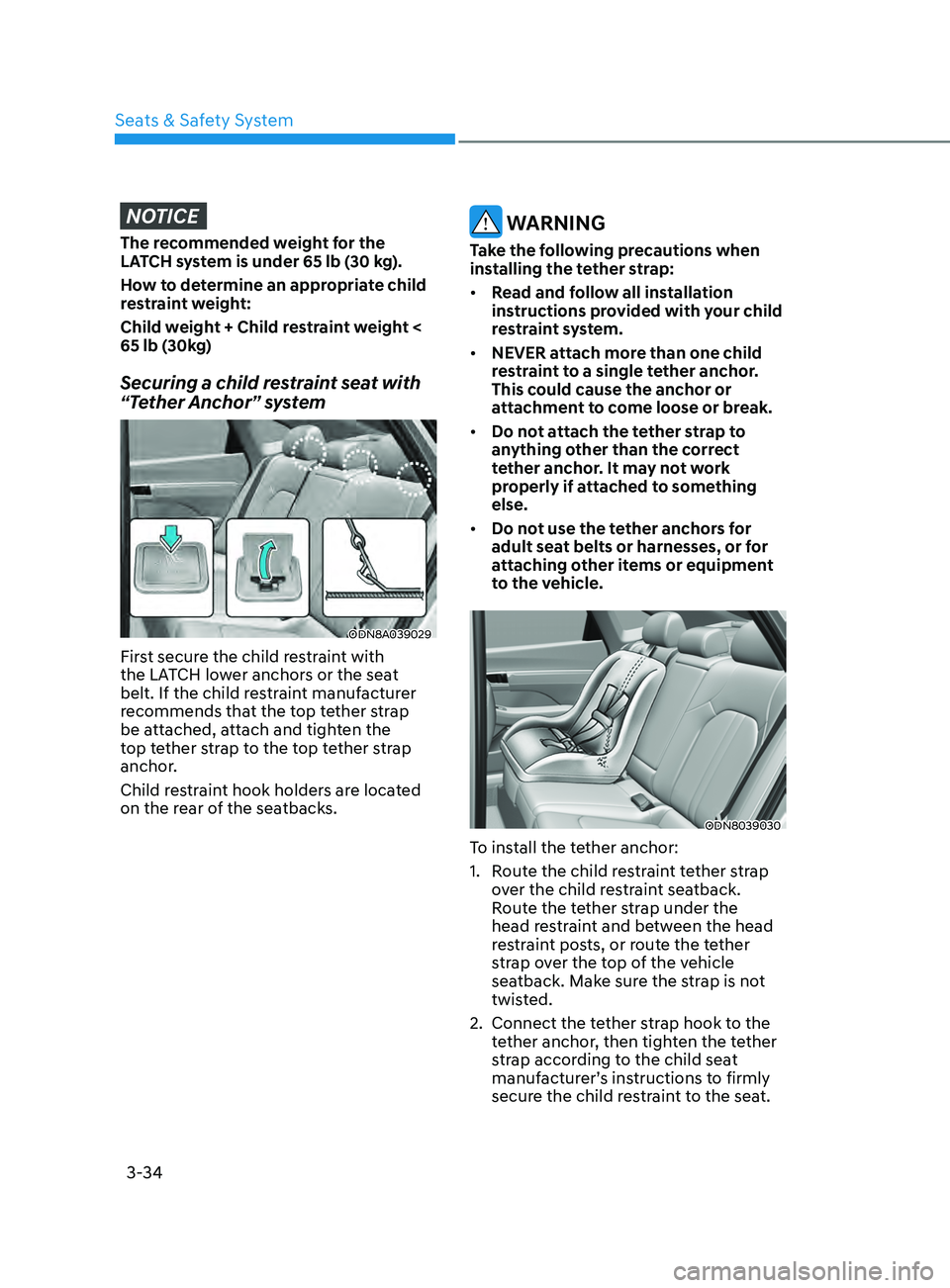
Securing a child restraint seat with
“Tether Anchor” system
ODN8A039029
First secure the child restraint with
the LATCH lower anchors or the seat
belt. If the child restraint manufacturer
recommends that the top tether strap
be attached, attach and tighten the
top tether strap to the top tether strap
anchor.
Child restraint hook holders are located
on the rear of the seatbacks.
WARNING
Take the following precautions when
installing the tether strap:
• Read and follow all installation
instructions provided with your child
restraint system.
• NEVER attach more than one child
restraint to a single tether anchor.
This could cause the anchor or
attachment to come loose or break.
• Do not attach the tether strap to
anything other than the correct
tether anchor. It may not work
properly if attached to something
else.
• Do not use the tether anchors for
adult seat belts or harnesses, or for
attaching other items or equipment
to the vehicle.
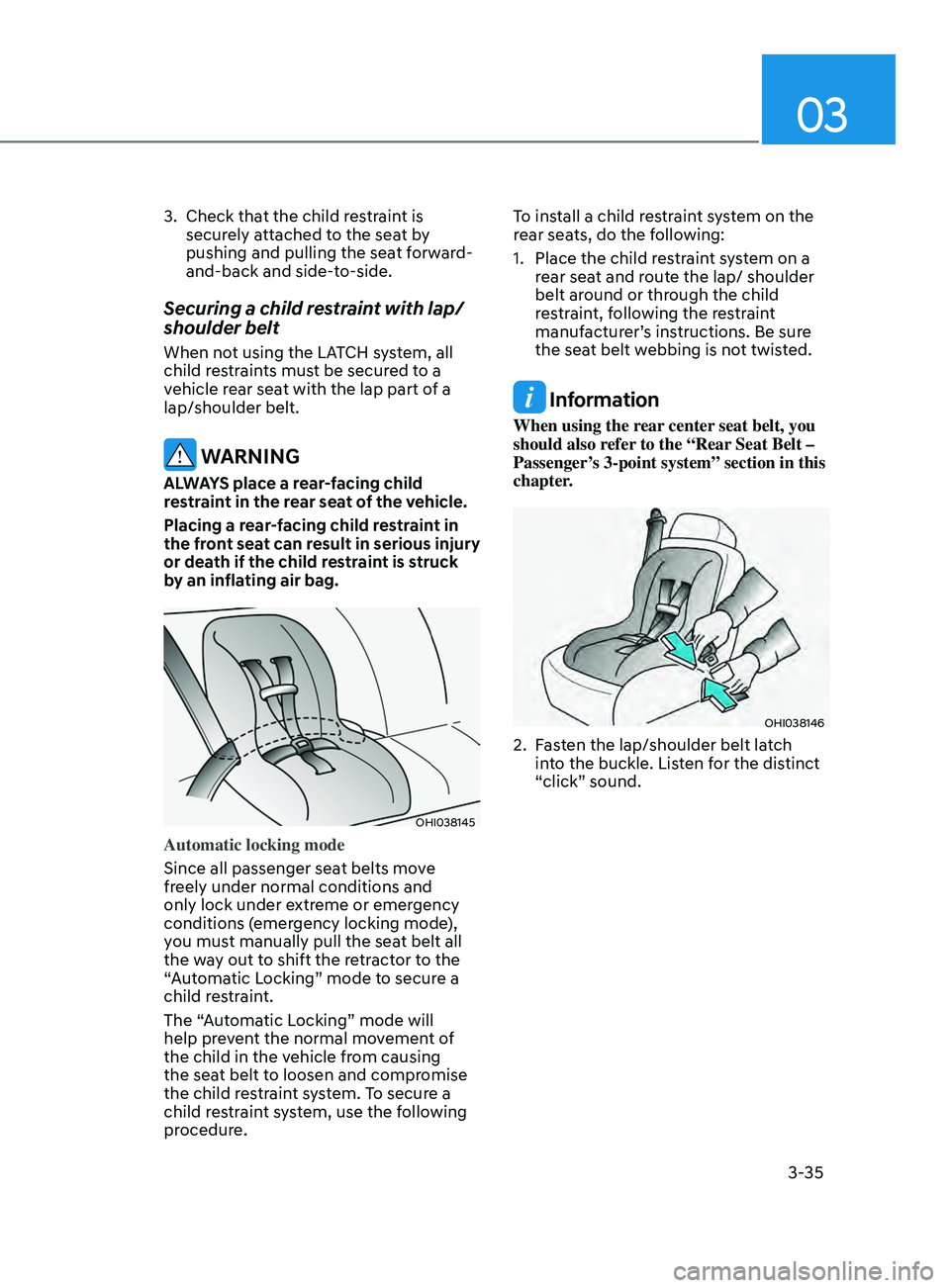
ODN8039030
To install the tether anchor:
1.
R
oute the child restraint tether strap
over the child restraint seatback.
Route the tether strap under the
head restraint and between the head
restraint posts, or route the tether
strap over the top of the vehicle
seatback. Make sure the strap is not
twisted.
2.
Connect the t
ether strap hook to the
tether anchor, then tighten the tether
strap according to the child seat
manufacturer’s instructions to firmly
secure the child restraint to the seat.
Seats & Safety System
Page 63 of 546
03
3-35
3. Check that the child restraint is
securely attached to the seat by
pushing and pulling the seat forward-
and-back and side-to-side.
Securing a child restraint with lap/
shoulder belt
When not using the LATCH system, all
child restraints must be secured to a
vehicle rear seat with the lap part of a
lap/shoulder belt.
WARNING
ALWAYS place a rear-facing child
restraint in the rear seat of the vehicle.
Placing a rear-facing child restraint in
the front seat can result in serious injury
or death if the child restraint is struck
by an inflating air bag.
OHI038145
Automatic locking mode
Since all passenger seat belts move
freely under normal conditions and
only lock under extreme or emergency
conditions (emergency locking mode),
you must manually pull the seat belt all
the way out to shift the retractor to the
“Automatic Locking” mode to secure a
child restraint.
The “Automatic Locking” mode will
help prevent the normal movement of
the child in the vehicle from causing
the seat belt to loosen and compromise
the child restraint system. To secure a
child restraint system, use the following
procedure. To install a child restraint system on the
rear seats, do the following:
1.
Place the child r
estraint system on a
rear seat and route the lap/ shoulder
belt around or through the child
restraint, following the restraint
manufacturer’s instructions. Be sure
the seat belt webbing is not twisted.
Information
When using the rear center seat belt, you
should also refer to the “Rear Seat Belt –
Passenger’s 3-point system” section in this
chapter.
OHI038146
2. Fasten the lap/shoulder belt latch into the buckle. Listen for the distinct
“click” sound.
Page 70 of 546
3-42
WARNING
To reduce the risk of serious injury or
death from an inflating curtain air bag,
take the following precautions:
• All seat occupants must wear
seat belts at all times to help keep
occupants positioned properly.
• Properly secure child restraints as far
away from the door as possible.
• Do not place any objects over the air
bag. Also, do not attach any objects
around the area the air bag inflates
such as the door, side door glass,
front and rear pillar, roof side rail.
• Do not hang other objects except
clothes, especially hard or breakable
objects. In an accident, it may cause
vehicle damage or personal injury.
• Do not allow passengers to lean their
heads or bodies onto doors, put their
arms on the doors, stretch their arms
out of the window, or place objects
between the doors and seats.
• Do not open or repair the side curtain
air bags.
How Does the Air Bag System
Operate?
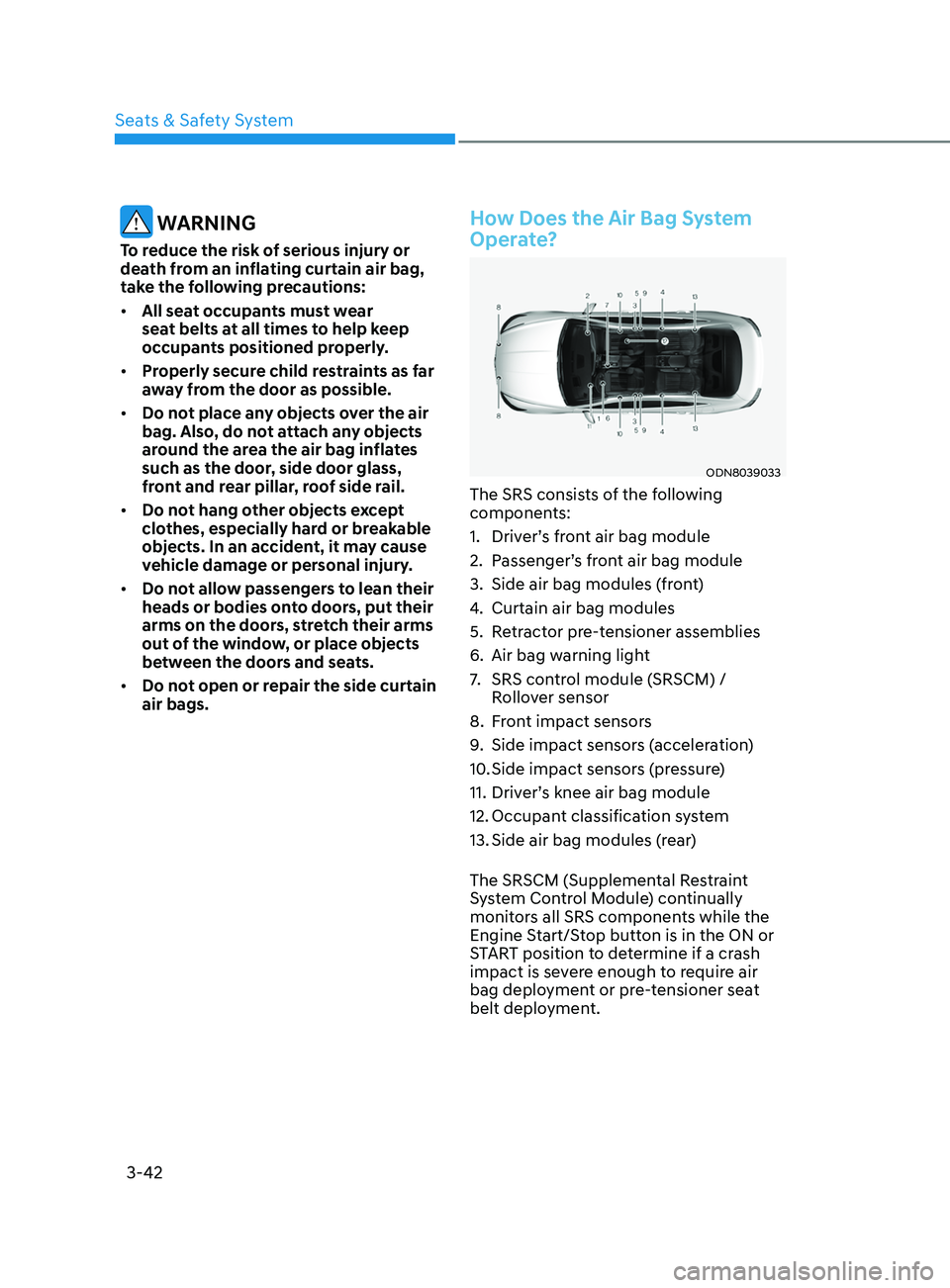
ODN8039033
The SRS consists of the following
components:
1.
Driv
er’s front air bag module
2.
P
assenger’s front air bag module
3.
Side air bag modules (
front)
4.
Curtain air bag modules
5.
R
etractor pre-tensioner assemblies
6.
Air bag w
arning light
7.
SRS con
trol module (SRSCM) /
Rollover sensor
8.
F
ront impact sensors
9.
Side impact sensor
s (acceleration)
10.
Side impact sensor
s (pressure)
11.
Driv
er’s knee air bag module
12.
Occupan
t classification system
13.
Side air bag modules (
rear)
The SRSCM (Supplemental Restraint
System Control Module) continually
monitors all SRS components while the
Engine Start/Stop button is in the ON or
START position to determine if a crash
impact is severe enough to require air
bag deployment or pre-tensioner seat
belt deployment.
Seats & Safety System
Page 102 of 546

04
4-17
Door, Hood, Trunk Open Indicator
ODN8049012
This warning is displayed if any door or
the hood or the liftgate is left open. The
warning will indicate which door is open
in the display.
CAUTION
Before driving the vehicle, you should
confirm that the door/hood/liftgate
is fully closed. Also, check there is no
door/hood/liftgate open warning light
or message displayed on the instrument
cluster.
Sunroof Open (if equipped)
ODN8049013
This warning is displayed if you turn off
the engine when the sunroof is open.
Close the sunroof securely before leaving
your vehicle.
Low Pressure
ODN8049019L
This warning message is displayed if the
tire pressure is low. The corresponding
tire on the vehicle will be illuminated.
For more information, refer to "Tire
Pressure Monitoring System (TPMS)" in
chapter 7.
Lights Mode
OIK047145L
This indicator displays which exterior
light is selected using the lighting
control.
Page 149 of 546
05
5-19
After unlock the door or start up the
vehicle with digital key, even though
the driver tries to lock the doors by the
central door lock switch, the door lock
will be once locked and immediately
released at the moment of door closed.
Start-up with Digital Key
1.
A
fter placing your registered
smartphone onto the interior
authentication pad (wireless charger),
step on the brake and press the
Engine Start/Stop button.
2.
A
fter start-up, the digital key data
will be automatically updated. It
takes 5 to 20 seconds, after that,
the smartphone can be go into the
wireless charging mode automatically.
Once the engine started, you can
remove the smartphone from the pad.
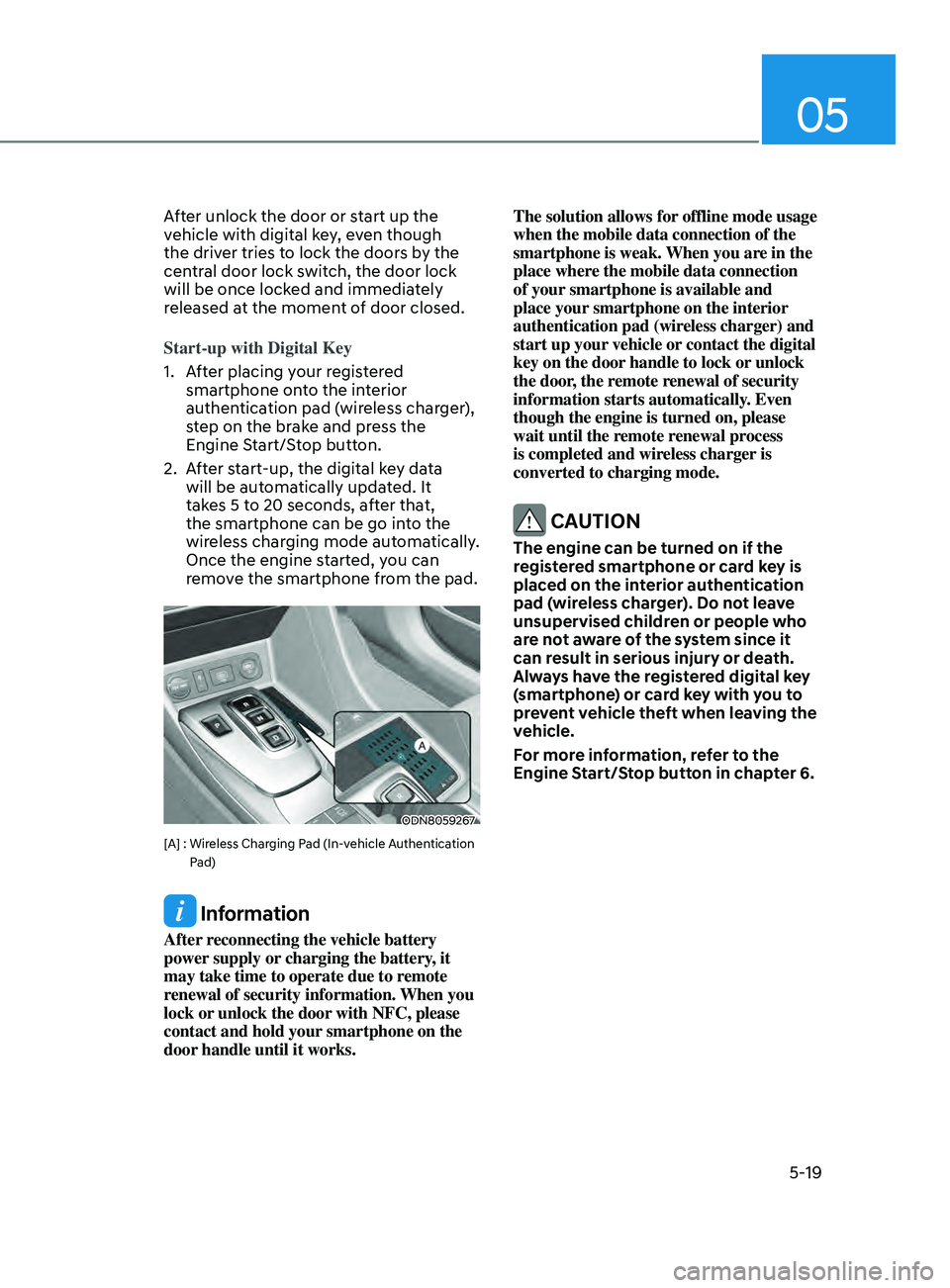
ODN8059267
[A] : Wireless Charging Pad (In-vehicle Authentication
Pad)
Information
After reconnecting the vehicle battery
power supply or charging the battery, it
may take time to operate due to remote
renewal of security information. When you
lock or unlock the door with NFC, please
contact and hold your smartphone on the
door handle until it works. The solution allows for offline mode usage
when the mobile data connection of the
smartphone is weak. When you are in the
place where the mobile data connection
of your smartphone is available and
place your smartphone on the interior
authentication pad (wireless charger) and
start up your vehicle or contact the digital
key on the door handle to lock or unlock
the door, the remote renewal of security
information starts automatically. Even
though the engine is turned on, please
wait until the remote renewal process
is completed and wireless charger is
converted to charging mode.
CAUTION
The engine can be turned on if the
registered smartphone or card key is
placed on the interior authentication
pad (wireless charger). Do not leave
unsupervised children or people who
are not aware of the system since it
can result in serious injury or death.
Always have the registered digital key
(smartphone) or card key with you to
prevent vehicle theft when leaving the
vehicle.
For more information, refer to the
Engine Start/Stop button in chapter 6.
Page 150 of 546
Convenient Features
5-20
Remote Control with Digital Key
To use the remote control function with
your android smartphone, Bluetooth
must be turned on.
Remote Control Connection with Digital
Key
1.
Open Hyundai digital k
ey application
on the smartphone. Select the
vehicle to activate the remote control
function as a main vehicle.
2.
Appr
oach with the activated
smartphone app to your vehicle
and you can check whether the
connection is available. If it enables
your smartphone to connect, connect
with your vehicle by pressing the
connect button. The remote control
function is activated after completing
the process.
Remote Control Operation with Digital
Key
You can execute the remote control
operation including door lock/unlock,
panic on/off, remote start / remote
stop and trunk opening. The icon for
each function will be highlighted and
alarm/vibration also provided when the
operation is performed.
Note that you cannot lock your vehicle
using the Hyundai digital key app if any
of the following occurs:
• The POWER button is in ACC or ON
position.
• Any doors are open.
When the smartphone and the vehicle
are connected by the Bluetooth function
but the remote control command
cannot be received over 5 minutes, the
remote control connection is cancelled
automatically. CAUTION
• If metallic window tint was applied
to your vehicle, it may cause
bad Bluetooth connection or
performance degradation of the
digital key.
• If multiple users operate the remote
control function simultaneously, the
connection between the digital key
and the vehicle might result in failed
commands. Please connect and
operate the remote control function
only the necessary user.
• When using the remote control
operation, the driver (the remote
control user) should leave the vehicle
after confirming the door lock (the
chime sounds once and the hazard
warning lights blink).
• The remote functions of the Digital
Key app enables the vehicle to be
controlled from a set distance. If
the digital key or the vehicle goes
beyond the operable distance, the
remote control function might be
disconnected or cancelled.
• If the digital key (smartphone) is
connected with the vehicle for the
remote control, the driver with the
key goes far away from the vehicle,
the function might not work.
• If the remote control operation
is executed where the mobile
connection is weak, Bluetooth
connection is poor due to several
Bluetooth devices or there is an
object such as metal or concrete, it
might be delayed or the operable
distance might decrease. You should
not cover the smartphone with your
hand or place other devices which
can cause frequency interference. It
may result in poor performance.
• If the remote control function is not
available, please use NFC function to
lock or unlock the doors.
Page 152 of 546
Convenient Features
5-22
CAUTION
• Do not leave the registered digital
key (smartphone) and card key in
your vehicle. Please carry around
your keys all the times.
• If you happen to lose your digital
key (smartphone) or card key
registered as a main user’s key, you
should immediately delete the key
on the vehicle’s key menu. For more
information, refer to the Digital Key
Deletion in this chapter.
• If you registered your digital key
(smartphone) or card key in the
vehicle, a message appears on the
instrument cluster and let you know
the key is registered.
(Message: Digital key(s) active.)
• If you buy a used vehicle, you should
confirm the message and delete the
registered smartphone key and card
key. In this case, you should carry
your smart key.
• If you keep place the NFC card
of the digital key on the interior
authentication pad (wireless
charger) while driving, it may cause a
malfunction of the NFC card.
• You should remove your NFC card
of the digital key on the interior
authentication pad after turning on
the engine.
• Hyundai digital key app may not
work properly when the NFC or
Bluetooth communication between
smartphone and car is not good.
• If the remote control operation
is executed where the mobile
connection is weak, Bluetooth
connection is poor due to lots of
Bluetooth devices or there is an
object such as metal or concrete, it
might be delayed or the operable
distance might decrease. Especially,
you should not cover the smartphone
with your hand or place other
devices which can cause frequency
interference. It may result in poor performance.
• If the remote control function is not
activated, please use NFC function to
lock or unlock the doors
• You should be careful not to
press the remote control button
on the digital key (smartphone)
accidentally.
• If the digital key (smartphone) is
discharged or defective or you
cannot use the digital key since the
vehicle battery is discharged, use the
inside door lock button to lock all of
the doors.
CAUTION
• Hyundai digital key app on the
smartphone and card key may not
work if any of the following occurs:
-Hyundai digital k
ey app on the
smartphone is deleted. (Required
to reinstall the app)
- A
ccount log in information of
Hyundai digital key app is expired.
(Required to re-log in)
- When y
ou try to log in to another
smartphone instead of the
registered smartphone with same
user account.
- Smartphone r
ooting or app
hacking is detected.
- Smartphone ba
ttery or the vehicle
battery is discharged.
- Smartphone
’s screen is off or
locked.
- NF
C or Bluetooth is turned off on
the smartphone settings.
- Smartphone
’s mobile network
setting is off or airplane mode is
activated.
- A cr
edit card is overlapped in the
back of your smartphone or metal
or thick case is used.
- U
se the card key with insert it
into the wallet or card holder or
overlapping with other cards.
Page 161 of 546
05
5-31
Door locKs
Operating Door Locks from
Outside the Vehicle
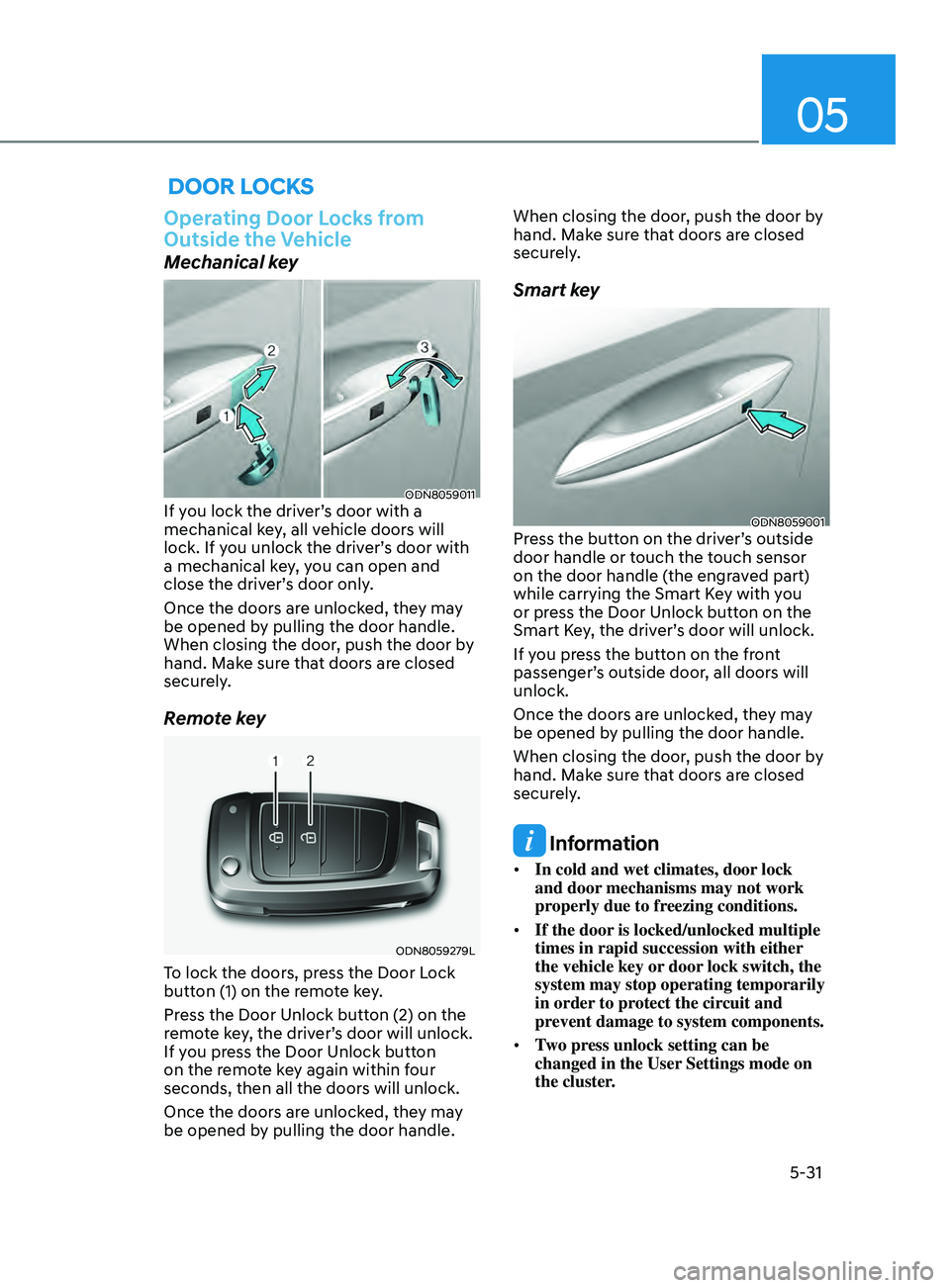
Mechanical key
ODN8059011If you lock the driver’s door with a
mechanical key, all vehicle doors will
lock. If you unlock the driver’s door with
a mechanical key, you can open and
close the driver’s door only.
Once the doors are unlocked, they may
be opened by pulling the door handle.
When closing the door, push the door by
hand. Make sure that doors are closed
securely.
Remote key
ODN8059279L
To lock the doors, press the Door Lock
button (1) on the remote key.
Press the Door Unlock button (2) on the
remote key, the driver’s door will unlock.
If you press the Door Unlock button
on the remote key again within four
seconds, then all the doors will unlock.
Once the doors are unlocked, they may
be opened by pulling the door handle. When closing the door, push the door by
hand. Make sure that doors are closed
securely.
Smart key
ODN8059001Press the button on the driver’s outside
door handle or touch the touch sensor
on the door handle (the engraved part)
while carrying the Smart Key with you
or press the Door Unlock button on the
Smart Key, the driver’s door will unlock.
If you press the button on the front
passenger’s outside door, all doors will
unlock.
Once the doors are unlocked, they may
be opened by pulling the door handle.
When closing the door, push the door by
hand. Make sure that doors are closed
securely.
Information
•
In cold and wet climates, door lock
and door mechanisms may not work
properly due to freezing conditions.
• If the door is locked/unlocked multiple
times in rapid succession with either
the vehicle key or door lock switch, the
system may stop operating temporarily
in order to protect the circuit and
prevent damage to system components.
• Two press unlock setting can be
changed in the User Settings mode on
the cluster.