2022 HYUNDAI I20 reset
[x] Cancel search: resetPage 194 of 444
6-66
Convenient features
OBI3050103OBI3050103
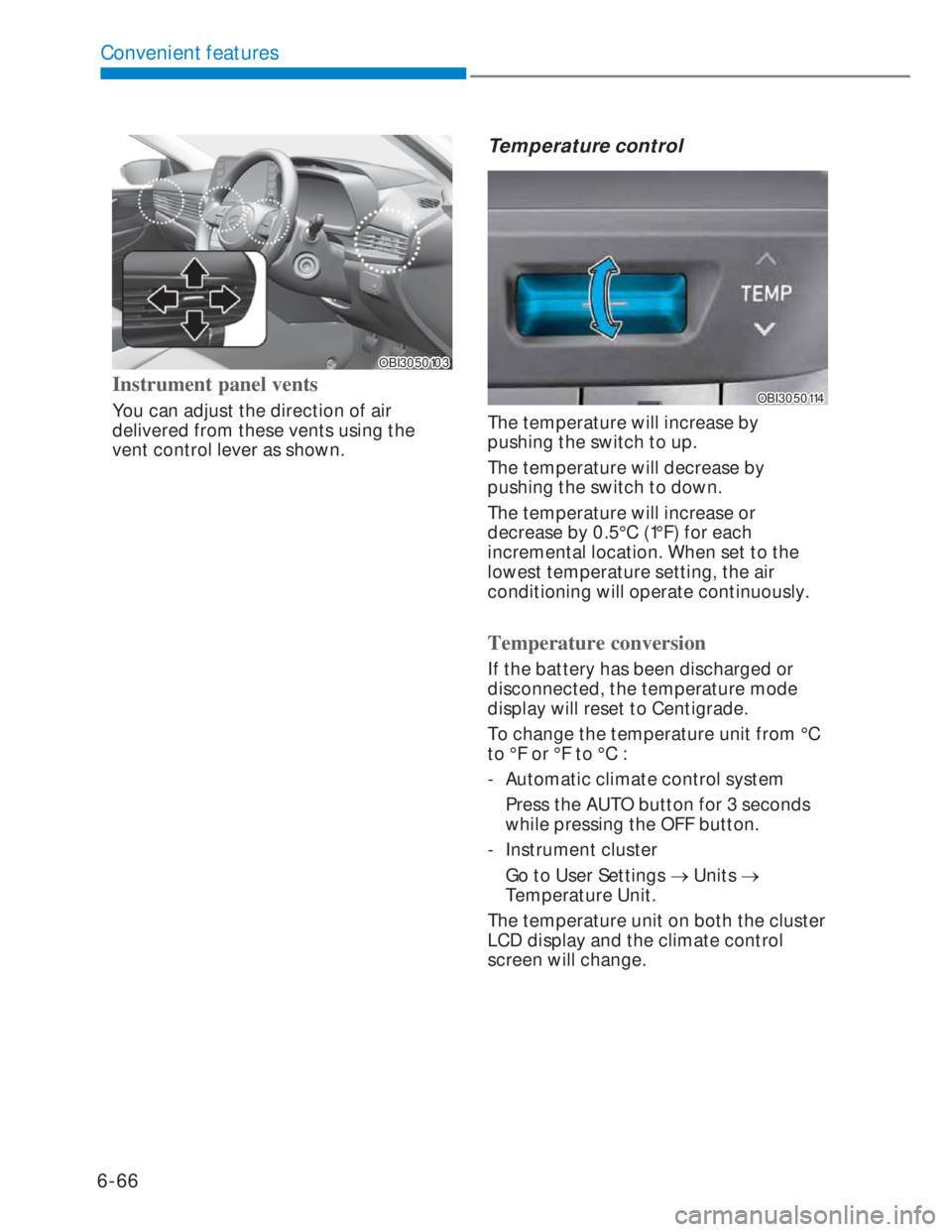
Instrument panel vents
You can adjust the direction of air
delivered from these vents using the
vent control lever as shown.
Temperature control
OBI3050114OBI3050114
The temperature will increase by
pushing the switch to up.
The temperature will decrease by
pushing the switch to down.
The temperature will increase or
decrease by 0.5°C (1°F) for each
incremental location. When set to the
lowest temperature setting, the air
conditioning will operate continuously.
Temperature conversion
If the battery has been discharged or
disconnected, the temperature mode
display will reset to Centigrade.
To change the temperature unit from °C
to °F or °F to °C :
- Automatic climate control system
Press the AUTO button for 3 seconds
while pressing the OFF button.
- Instrument cluster
Go to User Settings o Units o
Temperature Unit.
The temperature unit on both the cluster
LCD display and the climate control
screen will change.
Page 203 of 444

6-75
06
To cancel or reset the Auto Defogging
System
Press the front windscreen defroster
button for 3 seconds when the ignition
switch is in the ON position.
When the Auto Defogging System is
cancelled, defrost button indicator will
blink 3 times.
When the Auto Defogging System is
reset, defrost button indicator will blink
6 times without a signal.
i Information
When the air conditioning is turned on by
Auto defogging system, if you try to turn
off the air conditioning, the indicator will
blink 3 times and the air conditioning will
not be turned off.
To maintain the effectiveness and
efficiency of the Auto Defogging System,
do not select Recirculation mode whilst
the system is operating.
When the Auto Defogging System is
operating, the blower speed adjustment
knob, the temperature adjustment knob,
and the air intake control button are all
disabled.
NOTICE
Do not remove the sensor cover
located at the top of the driver side
windscreen glass.
Damage to system parts could occur
and may not be covered by your vehicle
warranty.
Defroster
NOTICE
To prevent damage to the conductors
bonded to the inside surface of the rear
window, never use sharp instruments
or window cleaners containing
abrasives to clean the window.
i Information
If you want to defrost and defog the
front windshield, refer to “Windshield
Defrosting and Defogging” in this chapter.
Page 217 of 444

6-89
06
VOLUME (VOL + / VOL -) (1)
• Move the VOLUME toggle switch up to
increase volume.
• Move the VOLUME toggle switch
down to decrease volume.
SEEK/PRESET ( / ) (2)
If the SEEK/PRESET toggle switch is
moved up or down and held for 0.8
second or more, it will function in the
following modes.
RADIO mode
It will function as the AUTO SEEK select
switch. It will SEEK until you release the
switch.
MEDIA mode
It will function as the FF/REW switch
(except in Bluetooth audio mode).
If the SEEK/PRESET toggle switch is
moved up or down, it will function in the
following modes.
RADIO mode
It will function as the PRESET STATION
UP/DOWN switch.
MEDIA mode
It will function as the TRACK UP/ DOWN
switch.
MODE () (3)
Press the MODE button to select RADIO/
MEDIA/Bluetooth Audio, etc.
MUTE () (4, if equipped)
• Press the button to mute the sound.
• Press the button again to activate the
sound.
• During a call, press to turn off the
microphone.
i Information
Detailed information for audio control
buttons are described in the following
pages in this chapter.
Infotainment system (if equipped)
If your vehicle is equipped with
additional navigation, please refer to the
infotainment system manual separately
supplied.
Page 223 of 444
6-95
06
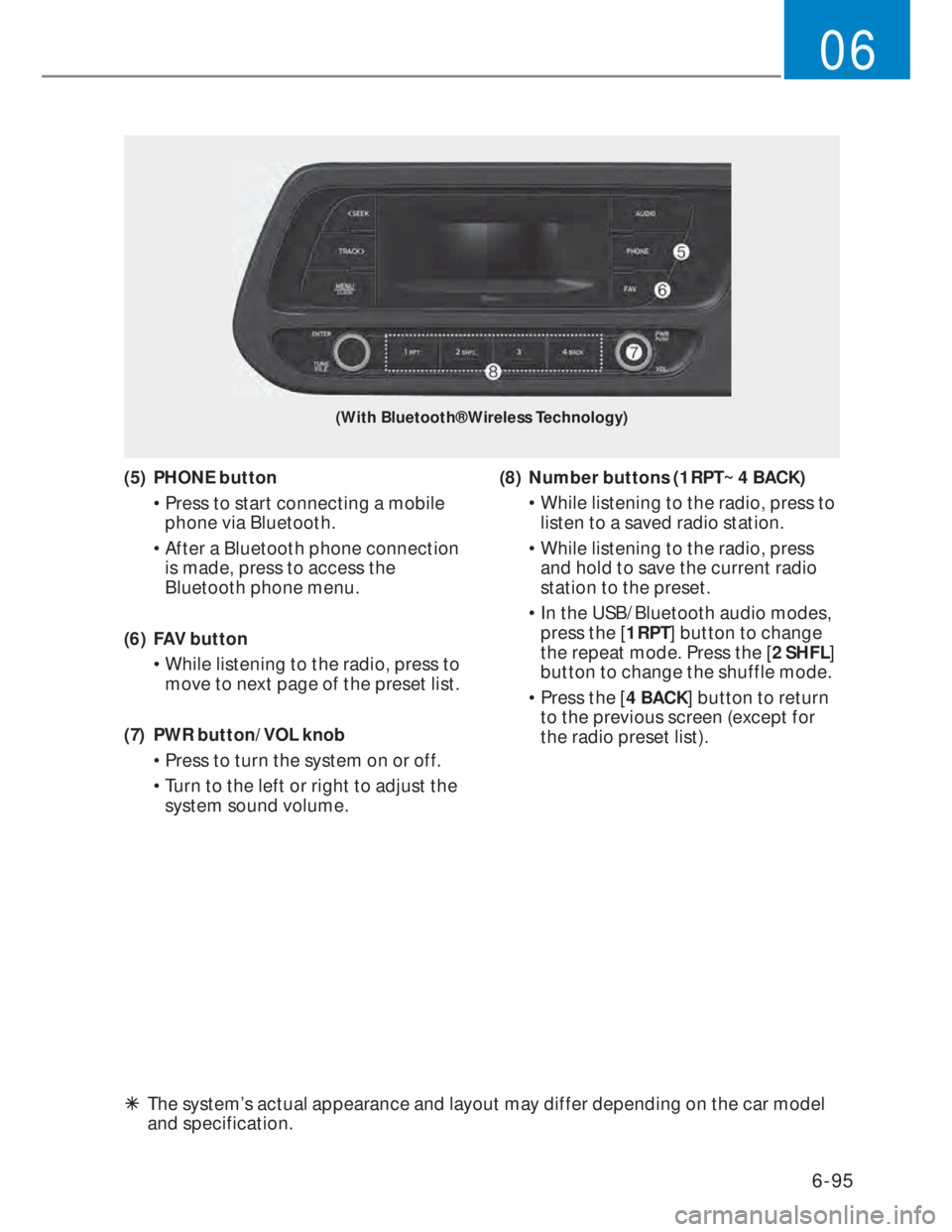
(With Bluetooth® Wireless Technology)
(5) PHONE button
• Press to start connecting a mobile
phone via Bluetooth.
• After a Bluetooth phone connection
is made, press to access the
Bluetooth phone menu.
(6) FAV button
• While listening to the radio, press to
move to next page of the preset list.
(7) PWR button/VOL knob
• Press to turn the system on or off.
• Turn to the left or right to adjust the
system sound volume.(8) Number buttons (1 RPT~ 4 BACK)
• While listening to the radio, press to
listen to a saved radio station.
• While listening to the radio, press
and hold to save the current radio
station to the preset.
• In the USB/Bluetooth audio modes,
press the [1 RPT] button to change
the repeat mode. Press the [2 SHFL]
button to change the shuffle mode.
• Press the [4 BACK] button to return
to the previous screen (except for
the radio preset list).
ÃThe system’s actual appearance and layout may differ depending on the car model
and specification.
Page 228 of 444
![HYUNDAI I20 2022 Owners Manual 6-100
Convenient features
5$,2
Turning on the radio
1. On the control panel, press the
[AUDIO] button.
2. When the mode selection window
displays, turn the [TUNE] knob to
select the desire](/manual-img/35/56130/w960_56130-227.png "HYUNDAI I20 2022 Owners Manual 6-100
Convenient features
5$,2
Turning on the radio
1. On the control panel, press the
[AUDIO] button.
2. When the mode selection window
displays, turn the [TUNE] knob to
select the desire")
6-100
Convenient features
5$',2
Turning on the radio
1. On the control panel, press the
[AUDIO] button.
2. When the mode selection window
displays, turn the [TUNE] knob to
select the desired radio mode and
then press the knob.
FM/AM Mode
(1) Current radio mode
(2) Radio station information
(3) Preset list
Press the [MENU/CLOCK] button on the
control panel to access the following
menu options:
• Autostore: Save radio stations to the
preset list.
• Scan: The system searches for radio
stations with strong radio signals and
plays each radio station for about five
seconds.
• Sound settings: You can change
the settings related to sounds, such
as location where sound will be
concentrated and the output level for
each range.
-Position: Select a location where
sound will be concentrated in the
vehicle. Select Fader or Balance,
turn the [TUNE] knob to select the
desired position, and then press the
knob. To set sound to be centred in
the vehicle, select Centre.
-Equaliser: Adjust the output level
for each sound tone mode.
-Sound experience: Select the
location where sound is focused
in the vehicle between the driver’s
seat and all other seats.
-Speed dependent vol.: Set the
volume to be adjusted automatically
according to your driving speed.
NOTICE
• Depending on vehicle models or
specifications, available options may
vary.
• Depending on the system or
amplifier specifications applied to
your vehicle, available options may
vary.
• Mode popup: Set to display mode
selection window when the [AUDIO]
button is pressed on the control panel.
• Bluetooth remote lock: Even if
Bluetooth remote control application
is connected, if Set Bluetooth remote
lock is enabled. System cannot be
operated via smart phone application.
• Date/Time: You can change the
date and time that are shown on the
system display.
-Set date: Set date to display on the
system display.
-Set time: Set time to display on the
system display.
-Time format: Select to display time
in the 12 hour format or the 24 hour
format.
- Display (Power Off): Set to display
the clock when the system power is
off.
• Language: You can change the
display language.
Page 230 of 444

6-102
Convenient features
Saving radio stations
You can save your favourite radio stations
and listen to them by selecting them
from the preset list.
Saving the current radio station
While listening to the radio, press and
hold the desired number button on the
control panel.
• The radio station you are listening to
will be added to the selected number.
• To save the next page of the preset
list, press the [FAV] button.
NOTICE
• You can save up to 12 radio stations
in each mode.
• If a station is already saved to the
selected preset number, the station
will be replaced by the station you
are listening to.
Using the auto save function
You can search for radio stations in your
area where there is a strong signal. The
results of your search can be saved to the
preset list automatically.
1. From the radio screen, press the
[MENU/CLOCK] button on the control
panel.
2. When the option selection window
displays, turn the [TUNE] knob to
select Autostore, and then press the
knob.
Listening to saved radio stations
FM/AM Mode
1. Confirm the preset number for the
radio station you want to listen to.
• To view the next page of the preset
list, press the [FAV] button.
2. On the control panel, press the
desired number button.
• Alternatively, Push the Up/Down
lever on the steering wheel to
change the station.
Page 306 of 444
Driver assistance system
8-4
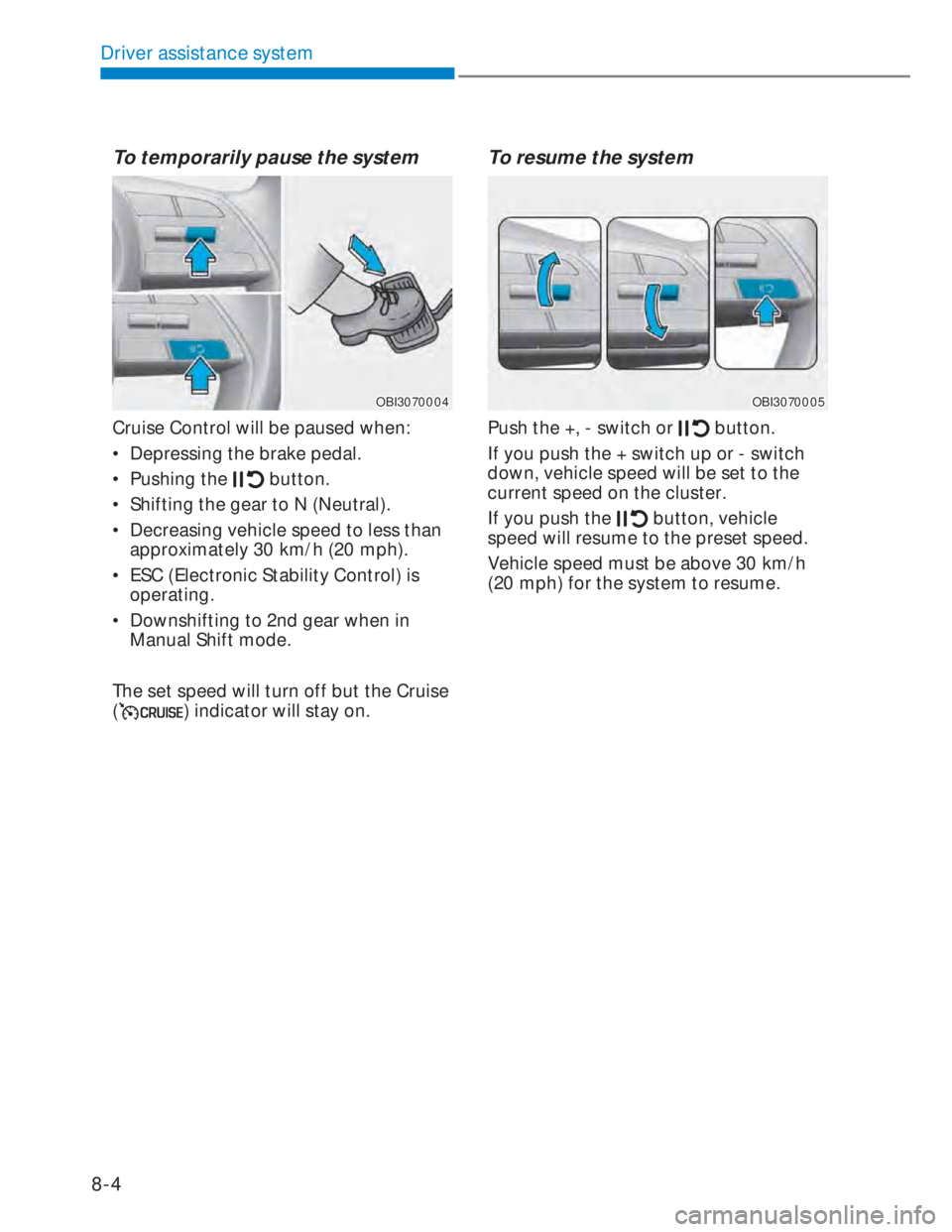
To temporarily pause the system
OBI3070004OBI3070004
Cruise Control will be paused when:
• Depressing the brake pedal.
• Pushing the
button.
• Shifting the gear to N (Neutral).
• Decreasing vehicle speed to less than
approximately 30 km/h (20 mph).
• ESC (Electronic Stability Control) is
operating.
• Downshifting to 2nd gear when in
Manual Shift mode.
The set speed will turn off but the Cruise
(
) indicator will stay on.
To resume the system
OBI3070005OBI3070005
Push the +, - switch or button.
If you push the + switch up or - switch
down, vehicle speed will be set to the
current speed on the cluster.
If you push the
button, vehicle
speed will resume to the preset speed.
Vehicle speed must be above 30 km/h
(20 mph) for the system to resume.
Page 341 of 444

10
Wiper blades ............................................................................................... 10-45
Blade inspection .....................................................................................................10-45
Blade replacement .................................................................................................10-45
Battery ......................................................................................................... 10-48
For best battery service ........................................................................................ 10-48
Battery capacity label
........................................................................................... 10-50
Battery recharging ................................................................................................ 10-48
Reset items ............................................................................................................ 10-49
Battery replacement
............................................................................................. 10-49
Tires and wheels ......................................................................................... 10-50
Tire care ................................................................................................................. 10-50
Recommended cold tire inflation pressures ....................................................... 10-50
Checking tire inflation pressure
............................................................................ 10-51
Tire rotation
............................................................................................................10-52
Wheel alignment and tire balance ........................................................................10-53
Tire replacement ....................................................................................................10-54
Wheel replacement
................................................................................................10-55
Tire traction
............................................................................................................10-55
Tire maintenance .................................................................................................. 10-56
Tire sidewall labeling ............................................................................................. 10-56
Low aspect ratio tire.............................................................................................. 10-59
Fuses ............................................................................................................. 10-61
Instrument panel fuse replacement .....................................................................10-62
Engine compartment panel fuse replacement ................................................... 10-63
Fuse/relay panel description
................................................................................ 10-64
Light bulbs .................................................................................................... 10-75
Headlight, Position Light, Turn signal Light bulb replacement ........................... 10-76
Side repeater light replacement ........................................................................... 10-81
Rear combination light bulb replacement
........................................................... 10-81
High mounted stop light replacement ................................................................ 10-85
License plate light bulb replacement .................................................................. 10-85
Interior light bulb replacement ............................................................................ 10-86