2022 HYUNDAI ELANTRA HYBRID tow
[x] Cancel search: towPage 374 of 529
07
7-7 7
•
Only part of the vehicle is detected
• The vehicle in front has no tail lights,
tail lights are located unusually, etc.
• The brightness outside is low, and the
tail lamps are not on or are not bright
• The rear of the front vehicle is small
or does not look normal (for example,
tilted, overturned, etc.)
• The front vehicle’s ground clearance is low or high
• A vehicle suddenly cuts in front
• Your vehicle is being towed
• Driving through a tunnel or iron bridge
• Driving near areas containing metal
substances, such as a construction
zone, railroad, etc.
• An object reflecting off the front radar
such as a guardrail, nearby vehicle,
etc.
• The bumper around the front radar is
impacted, damaged or the front radar
is out of position
• The temperature around the front
radar is high or low
• Driving in vast areas where there
are few vehicles or structures (for
example, desert, meadow, suburb,
etc.)
• The vehicle in front is made of
material that does not reflect on the
front radar
• Driving near a highway interchange or
tollgate
• Driving on a slippery surface due to
snow, water puddle, ice, etc.
• Driving on a curved road
• The vehicle in front is detected late
• The vehicle in front is suddenly
blocked by an obstacle
• The vehicle in front suddenly changes
lane or suddenly reduces speed •
The vehicle in front is bent out of shape
• The front vehicle’s speed is fast or slow
• With a vehicle in front, your vehicle
changes lane at low speed
• The vehicle in front is covered with
snow
• Unstable driving
• You are on a roundabout and the
vehicle in front is not detected
• You are continuously driving in a circle
• Driving in a parking lot
• Driving through a construction area,
unpaved road, partial paved road,
uneven road, speed bumps, etc.
• Driving on an incline road, curved
road, etc.
• Driving through a roadside with trees
or streetlights
• The adverse road conditions cause
excessive vehicle vibrations while driving
• Your vehicle height is low or high
due to heavy loads, abnormal tire
pressure, etc.
• Driving through a narrow road where
trees or grass are overgrown
• There is interference by
electromagnetic waves, such as
driving in an area with strong radio
waves or electrical noise
Page 383 of 529
Driver Assistance System
7-86
WARNINg
• Navigation-based Smart Cruise
Control is not a substitute for safe
driving practices, but a convenience
function. Always have your eyes on
the road, and it is the responsibility
of the driver to avoid violating traffic
laws.
• The navigation’s speed limit
information may differ from the
actual speed limit information on the
road. It is the driver's responsibility
to check the speed limit on the
actual driving road or lane.
• Navigation-based Smart Cruise
Control will automatically be
canceled when you leave the
highway main road. Always pay
attention to road and driving
conditions while driving.
• Navigation-based Smart Cruise
Control may not operate due to the
existence of leading vehicles and
the driving conditions of the vehicle.
Always pay attention to road and
driving conditions while driving.
• When you are towing a trailer or
another vehicle, we recommend
that Navigation-based Smart Cruise
Control is turned off due to safety
reasons. •
After you pass through a tollgate on
a highway, Navigation-based Smart
Cruise Control will operate based on
the first lane. If you enter one of the
other lanes, Navigation-Based Smart
Cruise Control may not operate
properly.
• The vehicle will accelerate if the
driver depresses the accelerator
pedal while Navigation-based Smart
Cruise Control is operating, and
the function will not decelerate the
vehicle. However, if the accelerator
pedal is depressed insufficiently, the
vehicle may decelerate.
• If the driver accelerates and
releases the accelerator pedal while
Navigation-based Smart Cruise
Control is operating, the vehicle may
not decelerate sufficiently or may
rapidly decelerate to a safe speed.
• If the curve is too large or too small,
Navigation-based Smart Cruise
Control may not operate.
Page 394 of 529

07
7-97
•
Highway Driving Assist may
inadvertently operate or turn off
depending on road conditions
(navigation information) and
surroundings.
• Lane following Assist function may
be temporarily disabled when the
front view camera cannot detect
lanes properly or the hands-off
warning is on.
• You may not hear the warning sound
of Highway Driving Assist if the
surrounding is noisy.
• If the vehicle is driven at high speed
above a certain speed at a curve,
your vehicle may drive to one side or
may depart from the driving lane.
• When you are towing a trailer or
another vehicle, we recommend that
Highway Driving Assist is turned off
due to safety reasons.
• The hands–off warning message
may appear early or late depending
on how the steering wheel is held or
road conditions. Always have your
hands on the steering wheel while driving.
• for your safety, please read the
owner's manual before using the
Highway Driving Assist.
• Highway Driving Assist will not
operate when the engine is started,
or when the detecting sensors or
navigation is being initialized. Limitations of the Highway Driving
Assist
Highway Driving Assist may not operate
properly, or may not operate under the
following circumstances: •
The map information and the
actual road is different because the
navigation is not updated
• The map information and the actual
road is different because of real-time
GPS data or map information error
• The infotainment system is overloaded
by simultaneously performing
functions such as route search, video
playback, voice recognition, etc.
• GPS signals are blocked in areas such as a tunnel
• The driver goes off course or the
route to the destination is changed or
canceled by resetting the navigation
• The vehicle enters a service station or
rest area
• Android Auto or Car Play is operating
• The navigation cannot detect the
current vehicle position (for example,
elevated roads including overpass
adjacent to general roads or nearby
roads exist in a parallel way)
Information
For more details on the limitations of
the front view camera, front radar, front
corner radar and rear corner radar, refer
to “Forward Collision-Avoidance Assist
(FCA)” section in chapter 7.
Page 404 of 529
07
7-107
•
Rear Cross-Traffic Collision-Avoidance
Assist will operate when all the
following conditions are satisfied:
- The gear is shifted to R (Reverse)
- Vehicle speed is below 8 km/h (5 mph)
- The approaching vehicle is within approximately 1.5 m (5 ft.) from the
left and right side of your vehicle
- The speed of the vehicle approaching from the left and right
is above 5 km/h (3 mph)
• Emergency braking will be assisted
to help prevent collision with
approaching vehicles from the left
and right.
WARNINg
Brake control will end when: - The approaching vehicle is out of the
detecting range
- The approaching vehicle passes
behind your vehicle
- The approaching vehicle does not
drive toward your vehicle
- The approaching vehicle speed slows
down
- The driver depresses the brake pedal
with sufficient power
OCN7H070045N
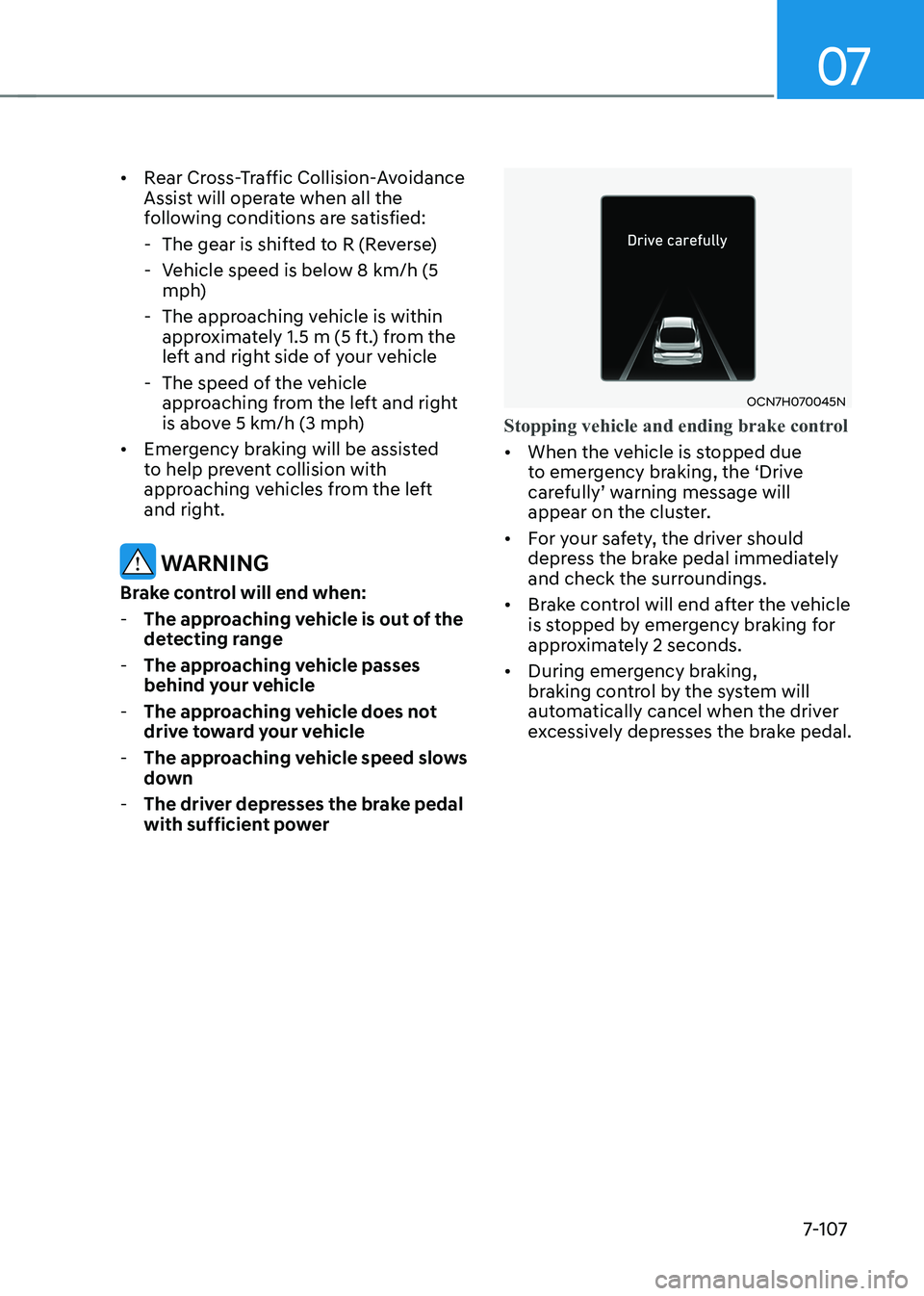
Stopping vehicle and ending brake control
• When the vehicle is stopped due
to emergency braking, the ‘Drive
carefully’ warning message will
appear on the cluster.
• For your safety, the driver should
depress the brake pedal immediately
and check the surroundings.
• Brake control will end after the vehicle
is stopped by emergency braking for
approximately 2 seconds.
• During emergency braking,
braking control by the system will
automatically cancel when the driver
excessively depresses the brake pedal.
Page 409 of 529
![HYUNDAI ELANTRA HYBRID 2022 Owners Manual Driver Assistance System
7-112
•
Pulling into the parking space where
there is a structure
OHY059022
[A] : Structure, [B] :Wall
Rear Cross-Traffic Collision-
Avoidance Assist may detect vehicle](/manual-img/35/56241/w960_56241-408.png "HYUNDAI ELANTRA HYBRID 2022 Owners Manual Driver Assistance System
7-112
•
Pulling into the parking space where
there is a structure
OHY059022
[A] : Structure, [B] :Wall
Rear Cross-Traffic Collision-
Avoidance Assist may detect vehicle")
Driver Assistance System
7-112
•
Pulling into the parking space where
there is a structure
OHY059022
[A] : Structure, [B] :Wall
Rear Cross-Traffic Collision-
Avoidance Assist may detect vehicles
passing by in front of you when
parking in reverse into a parking
space with a wall or structure in the
rear or side area. If this occurs, the
function may unnecessarily warn the
driver and control the brake.
Always check your surroundings while backing up.
• When the vehicle is parked rearward
OHY059020
Rear Cross-Traffic Collision-
Avoidance Assist may detect vehicles
passing by behind you when parking
in reverse into a parking space.
If this occurs, the function may
unnecessarily warn the driver and
control the brake.
Always check your surroundings while backing up.
WARNINg
• When you are towing a trailer or
another vehicle, have Rear Cross-
Traffic Collision-Avoidance Assist is
turned off due to safety reasons.
• Rear Cross-Traffic Collision-
Avoidance Assist may not operate
properly if interfered by strong
electromagnetic waves.
• Rear Cross-Traffic Collision-
Avoidance Assist may not operate
for 15 seconds after the vehicle is
started, or the rear corner radars are
initialized.
Information
This device complies with Industry Canada RSS-210 standard.
Operation is subject to the following three conditions: 1. This device may not cause harmful
interference, and
2. This device must accept any
interference received, including
interference that may cause undesired operation.
3. Changes or modifications not expressly
approved by the party responsible
for compliance could void the user's authority to operate the device.
Information
Radio frequency radiation exposure information: This equipment complies with RSS- 210
radiation exposure limits set forth for an
uncontrolled environment. This equipment should be installed and operated with minimum distance of 20cm
(8 in.) between the radiator (antenna) and
your body.
This transmitter must not be co-located or
operating in conjunction with any other
antenna or transmitter.
Page 420 of 529

07
7-123
Reverse Parking Collision-Avoidance
Assist may unnecessarily warn the driver
or assist with braking even if there are
no pedestrians or objects under the
following circumstances: •
Any non-factory equipment or
accessory is installed
• Your vehicle is unstable due to an
accident or other causes
• Bumper height or rear ultrasonic
sensor installation has been modified
• Your vehicle height is low or high
due to heavy loads, abnormal tire
pressure, etc.
• Rear view camera or the rear
ultrasonic sensor(s) is stained with
foreign material, such as snow, dirt,
etc.
• The pattern on the road is mistaken
for a pedestrian
• There is shadow or light reflecting on
the ground
• Pedestrians or objects are around the
path of the vehicle
• Objects generating excessive
noise, such as vehicle horns, loud
motorcycle engines or truck air
brakes, are near your vehicle
• Your vehicle is backing towards a
narrow passage or parking space
• Your vehicle is backing towards an
uneven road surface, such as an
unpaved road, gravel, bump, gradient,
etc.
• A trailer or carrier is installed on the
rear of your vehicle
• An ultrasonic sensor with similar
frequency is near your vehicle
Page 422 of 529
Hazard Warning Flasher ................................................................................ 8-2
In Case of an Emergency While Driving .......................................................8-3
If the Engine Stalls While Driving ............................................................................ 8-3
If the Engine Stalls at a Crossroad or Crossing ......................................................8-3
If You Have a Flat Tire While Driving ....................................................................... 8-3
If the Engine Will Not Start ............................................................................ 8-4
If the 12 Volt Battery Is Discharged ............................................................... 8-5
Before Jump Starting ............................................................................................... 8-5
Jump Starting ........................................................................................................... 8-6
If the Engine Overheats ................................................................................. 8-8
Check tire Pressure ................................................................................................ 8-10
Tire Pressure Monitoring System (TPMS) ..................................................8-10
Tire Pressure Monitoring System ........................................................................... 8-11
Low Tire Pressure Telltale ....................................................................................... 8-12
Low Tire Pressure Position and tire Pressure Telltale............................................ 8-12
TPMS Malfunction Indicator ................................................................................... 8-14
Changing a Tire with TPMS .................................................................................... 8-14
Jack and Tools ......................................................................................................... 8-16
If you Have a Flat Tire (With spare tire) ......................................................8-16
Changing Tires ......................................................................................................... 8-17
Towing Service ....................................................................................................... 8-22
Towing .......................................................................................................... 8-22
Emergency Towing ................................................................................................ 8-23
Removable Towing Hook ....................................................................................... 8-24
Emergency Towing ................................................................................................. 8-24
Basic Troubleshooting Guide ...................................................................... 8-27
8. Emergency Situations
8
Page 427 of 529
Emergency Situations
8-6
NOTICE
External power source using 12V battery
The use of external power accessories
may reduce performance and function
of the vehicle. Especially, the use of
dash cameras may shut off the power of
the vehicle prior to the dash camera’s
automatic shut-down.
If the power of the vehicle is shut off,
start the vehicle as explained. (refer to
“Using the 12V Battery Reset Switch”)
Jump Starting
In the event vehicle still does not have a
functional 12V battery (check if interior
lights will not turn on) then you can try
a jump start to the engine compartment
jumper terminals using a 12V booster
pack or jumper cables from another
vehicle’s 12V battery according to the
following instructions.
CAUTION
Jump starting can be dangerous if
done incorrectly. Follow the jump
starting procedure in this section to
avoid serious injury or damage to
your vehicle. If in doubt about how to
properly jump start your vehicle, have a
service technician or towing service do
it for you.
1. Position the vehicles close enough that the jumper cables will reach, but
do not allow the vehicles to touch.
Avoid fans or any moving parts in the
engine compartment at all times, even
when the vehicles are turned off.
2. Turn off all electrical devices such as radios, lights, air conditioning, etc.
Put the vehicles in P (Park) and set the
parking brake. Turn both vehicles OFF.
OCN7H070001
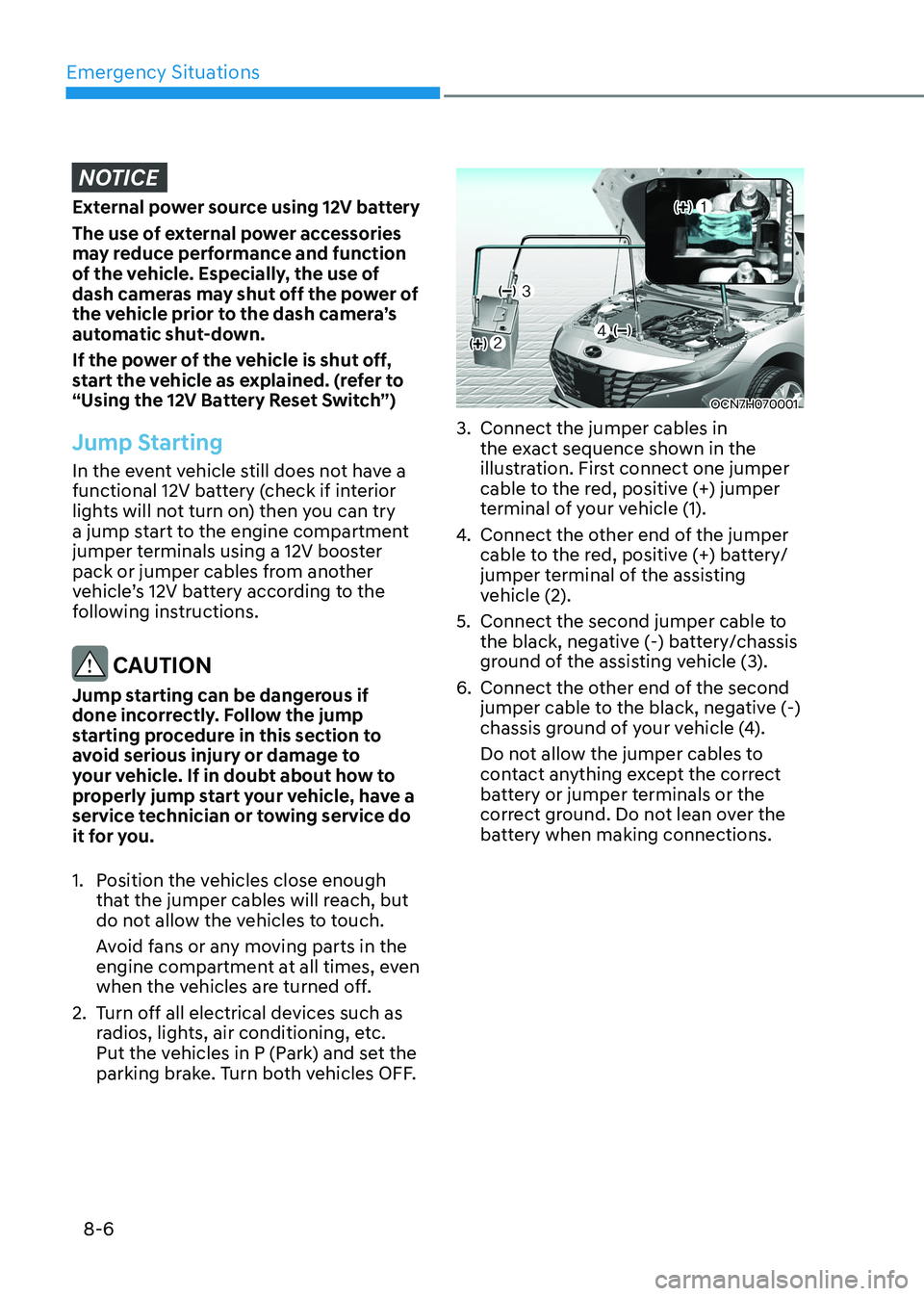
3. Connect the jumper cables in the exact sequence shown in the
illustration. First connect one jumper
cable to the red, positive (+) jumper
terminal of your vehicle (1).
4. Connect the other end of the jumper
cable to the red, positive (+) battery/
jumper terminal of the assisting
vehicle (2).
5. Connect the second jumper cable to the black, negative (-) battery/chassis
ground of the assisting vehicle (3).
6. Connect the other end of the second jumper cable to the black, negative (-)
chassis ground of your vehicle (4).
Do not allow the jumper cables to
contact anything except the correct
battery or jumper terminals or the
correct ground. Do not lean over the
battery when making connections.