Page 261 of 607
259
uuAudio System Basic Operation uVoice Control Operation
Features
The system will acce pt these commands
when on the dedicated phone voice
recognition screen.
• Call
• Call
• Call
■Phone Commands
The system will accept these commands
when on the dedicated audio voice
recognition screen.
■FM Commands
• Tune to <87.7-107.9> FM
■AM Commands
• Tune to <530-1710> AM
■Sirius XM Commands*
•Channel <1-999>
• Channel
■USB/My Honda Music Commands
• Play Artist
• Play Album
• Play Genre
• Play Playlist
• Play Music
• Play Song
■Audio Commands
* Not available on all models
22 PASSPORT-31TGS6300.book 259 ページ 2021年10月6日 水曜日 午前10時2分
Page 275 of 607
273
uuAudio System Basic Operation uPlaying an iPod
Continued
Features
Playing an iPod
Connect the iPod using your USB connector to the USB port, then select the USB
mode.
2 USB Ports P. 223
(Back) Icon
Select to go back to the previous
display.
Track Icons
Select or to change songs.
Select and hold to move rapidly
within a song.
VOL/ AUDIO (Volume/Power) Knob
Push to turn the audio system on and
off.
Turn to adjust the volume.
Cover Art
Audio/Information Screen
Play/Pause Icon
22 PASSPORT-31TGS6300.book 273 ページ 2021年10月6日 水曜日 午前10時2分
Page 276 of 607
uuAudio System Basic Operation uPlaying an iPod
274
Features
1. Select Browse .
2. Select the items on that menu.
■How to Select a Song from the Music Search List1Playing an iPod
Available operating functi ons vary on models or
versions. Some functions ma y not be available on the
vehicle’s audio system.
If there is a problem, you may see an error message
on the audio/information screen. 2 iPod/USB Flash Drive P. 302
If you operate the musi c app on your iPhone/iPod
while the phone is connected to the audio system,
you may no longer be able to operate the same app
on the audio/information screen.
Reconnect the devi ce if necessary.
If an iPhone is connected vi a Apple CarPlay, the iPod/
USB source will be unavailable and audio files on the
phone will be playable onl y within Apple CarPlay.
22 PASSPORT-31TGS6300.book 274 ページ 2021年10月6日 水曜日 午前10時2分
Page 278 of 607
276
uuAudio System Basic Operation uPlaying a USB Flash Drive
Features
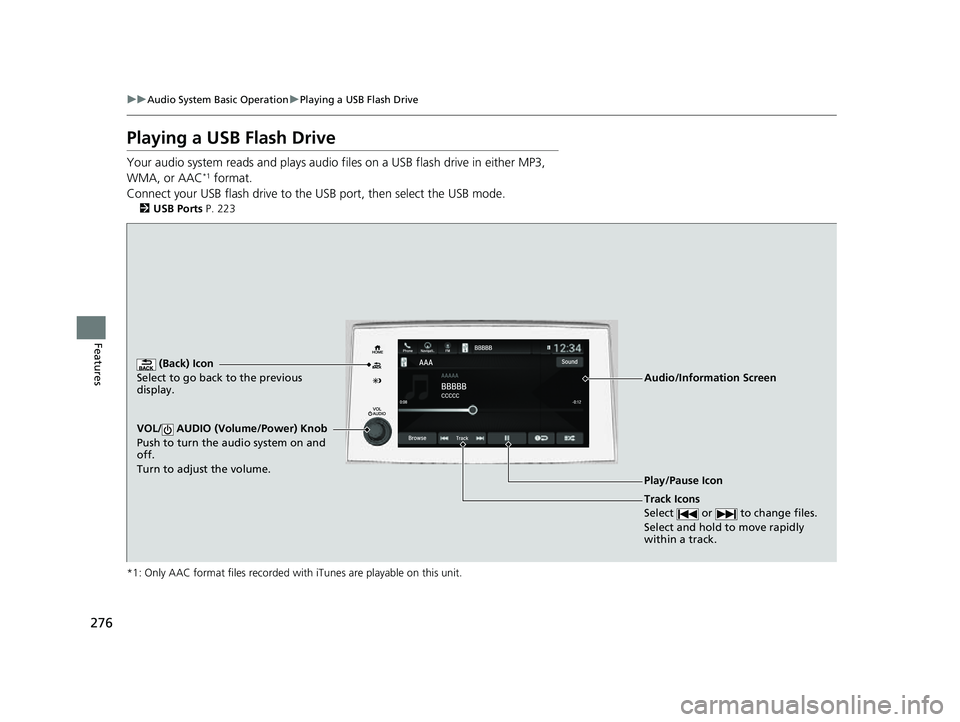
Playing a USB Flash Drive
Your audio system reads and plays audio f iles on a USB flash drive in either MP3,
WMA, or AAC*1 format.
Connect your USB flash drive to the USB port, then select the USB mode.
2USB Ports P. 223
*1: Only AAC format files recorded with iTunes are playable on this unit.
(Back) Icon
Select to go back to the previous
display.
Track Icons
Select or to change files.
Select and hold to move rapidly
within a track.
VOL/ AUDIO (Volume/Power) Knob
Push to turn the audio system on and
off.
Turn to adjust the volume.
Audio/Information Screen
Play/Pause Icon
22 PASSPORT-31TGS6300.book 276 ページ 2021年10月6日 水曜日 午前10時2分
Page 279 of 607
Continued277
uuAudio System Basic Operation uPlaying a USB Flash Drive
Features
1. Select Browse .
2. Select the items on that menu.
■How to Select a File from the Music Search List1Playing a USB Flash Drive
Use the recommended USB flash drives.
2 General Information on the Audio System
P. 305
WMA files protected by di gital rights management
(DRM) cannot be played.
The audio system displays The selected file cannot
be played on this system , then skips to the next
file.
If there is a problem, you may see an error message
on the audio/information screen. 2 iPod/USB Flash Drive P. 302
22 PASSPORT-31TGS6300.book 277 ページ 2021年10月6日 水曜日 午前10時2分
Page 280 of 607
uuAudio System Basic Operation uPlaying a USB Flash Drive
278
Features
You can select repeat and random modes when playing a file.
■Random/Repeat
Select or .
■To turn off a play mode
Select the mode you want to turn off.
■How to Select a Play Mode1 How to Select a Play Mode
Play Mode Menu Items
Random/Repeat
Random in Category : Plays all files in the
current category in random order. Repeat Track: Repeats the current file.
22 PASSPORT-31TGS6300.book 278 ページ 2021年10月6日 水曜日 午前10時2分
Page 281 of 607
279
uuAudio System Basic Operation uPlaying My Honda Music
Continued
Features
Playing My Honda Music
My Honda Music plays audio files that have been im ported from a USB flash drive.
Your audio system supports audio f iles in either MP3, WMA, or AAC*1 format.
2File Manager P. 248
*1: Only AAC format files recorded with iTunes are playable on this unit.
(Back) Icon
Select to go back to the previous
display.
Track Icons
Select or to change files.
Select and hold to move rapidly
within a track.
VOL/ AUDIO (Volume/Power) Knob
Push to turn the audio system on and
off.
Turn to adjust the volume.
Audio/Information Screen
Play/Pause Icon
22 PASSPORT-31TGS6300.book 279 ページ 2021年10月6日 水曜日 午前10時2分
Page 282 of 607
uuAudio System Basic Operation uPlaying My Honda Music
280
Features
1. Connect a USB device into the USB port.
2 USB Ports P. 223
2.Select More.
3. Select Import Files to My Honda Music .
u The File Manager screen is displayed.
4. Transfer an audio file to your audio system.
2 How to Transfer a File P. 248
■How to delete an audio file
1. Select More.
2. Select Delete Files from My Honda Music.
u The File Manager screen is displayed.
3. Delete an audio file.
2 How to Delete a File P. 251
■How to Transfer an Audio File1How to Transfer an Audio File
If there is no audio file in your audio system, the
system will automatically proceed to step 3 after
connecting a USB device.
Use the recommended USB flash drives.
2 General Information on the Audio System
P. 305
22 PASSPORT-31TGS6300.book 280 ページ 2021年10月6日 水曜日 午前10時2分