Page 3 of 782

The data belongs to the vehicle owner and may not be accessed by
anyone else except as legally required or with the permission of the
vehicle owner.
Service Diagnostic Recorders
This vehicle is equipped with se rvice-related devices that record
information about powertrain perfo rmance. The data can be used
to verify emissions law requirements and/or help technicians
diagnose and solve service problems. It may also be combined with
data from other sources for research purposes, but it remains
confidential. Some diagnostic and maintenance information is
uploaded to Honda upon vehicle start up.
California Perchlorate Contamination Prevention Act
The airbags, seat belt tensioners , and CR type batteries in this
vehicle may contain perchlorate materials - special handling may
apply. See www.dtsc.ca.gov/hazardou swaste/perchlorate/
As you read this manual , you will find information that is preceded
by a symbol. This information is intended to help you avoid
damage to your vehicle, other property, or the environment.
Software End User License Agreement
Your vehicle comes equipped with software, which is governed by
the End User License Agreement in Owner’s Manual, and which
contains a binding arbitration clau se. Please refer to the End User
License Agreement for the terms and conditions governing your
use of the installed software, as well as the applications, services,
functions, and content provided through the software. Your use of
the installed software will serve as your consent to the terms and
conditions of the End User License Agreement.
NOTICE
You may opt out within 30 days of your initial use of the Software
by sending a signed, written notic e to HONDA at American Honda
Motor Co., Inc., Honda Automobile Customer Services Mail Stop
CHI-5, 1919 Torrance Blvd., Torrance, CA 90501-2746.
Privacy Notice
This vehicle may share location and usage information. To manage
this setting, visit www.hondalink.com/vehicle-data-choices .
To learn more about how we collect and use Personal
Information, please read our Privacy Policy, accessible
at www.honda.com.
22 US ODYSSEY-31THR6400.book 2 ページ 2020年11月16日 月曜日 午後1時41分
Page 6 of 782

Contents
Child Safety P. 67Exhaust Gas Hazard P. 85Safety Labels P. 86
Tailgate P. 171 Sliding Doors P. 182
Moonroof* P. 197 Operating the Switches Around the Steering Wheel P. 198
Interior Convenience Items P. 239 Climate Control Syst em P. 260, 265
Audio Error Messages P. 380 General Information on the Audio System P. 385
Customized Features P. 457, 463 HomeLink ® Universal Transceiver* P. 482 Bluetooth ® HandsFreeLink ® P. 485, 510
When Driving P. 550 Honda Sensing® P. 586 Braking P. 638
Refueling P. 659 Fuel Economy and CO
2 Emissions P. 662
Maintenance Under the Hood P. 673 Replacing Light Bulbs P. 686
Checking and Maintaining Tires P. 697 Battery P. 706 Remote Transmitter Care P. 708
Climate Control System Maintenance P. 711 Clea ning P. 712 Accessories and Modifications P. 718
Engine Does Not Start P. 732If the Battery Is Dead P. 735Overheating P. 737
Emergency Towing P. 752 If You Cannot Unlock the Fuel Fill Door P. 753
When You Cannot Close the Power Sliding Doors
* P. 756 Refueling P. 757
Devices that Emit Radio Waves P. 763 Reporting Safety Defects P. 764 Emissions Testing P. 765
Customer Service Information P. 771
Quick Reference GuideP. 6
Safe DrivingP. 35
Instrument PanelP. 87
ControlsP. 153
FeaturesP. 273
DrivingP. 537
MaintenanceP. 663
Handling the UnexpectedP. 721
InformationP. 759
IndexP. 772
22 US ODYSSEY-31THR6400.book 5 ページ 2020年11月16日 月曜日 午後1時41分
Page 32 of 782
Quick Reference Guide
31
Handling the Unexpected (P721)
Flat Tire (P723)
●Park in a safe location and replace the
flat tire with the compact spare tire under
the floor between the front seats and the
second row seats.
Indicators Come On
(P 739)
●Identify the indicator and consult the
owner’s manual.
Engine Won’t Start (P732)
●If the battery is dead, jump start using a
booster battery.
Blown Fuse (P745)
●Check for a blown fuse if an electrical
device does not operate.
Overheating (P737)
●Park in a safe location. If you do not see
steam under the hood, open the hood,
and let the engine cool down.
Emergency Towing (P752)
●Call a professional towing service if you
need to tow your vehicle.
22 US ODYSSEY-31THR6400.book 31 ページ 2020年11月16日 月曜日 午後1時41分
Page 67 of 782

66
uuAirbags uAirbag Care
Safe Driving
Airbag Care
You do not need to, and should not, perform any maintenance on or replace any
airbag system components yourself. However, you should have your vehicle
inspected by a dealer in the following situations:
■When the airbags have deployed
If an airbag has inflated, th e control unit and other related parts must be replaced.
Similarly, once an automatic seat belt te nsioner has been activated, it must be
replaced.
■When the vehicl e has been in a moderate-to-severe collision
Even if the airbags did not inflate, have your dealer inspect the following: the driver’s
seat position sensor, weight sensors in the passenger’s seat, front seat belt
tensioners, and each seat belt that was worn during the crash.
■Do not remove or modify a front seat without consulting a dealer
This would likely disable or affect the prop er operation of the driver’s seat position
sensor or the weight sensors in the passenger ’s seat. If it is necessary to remove or
modify a front seat to accommodate a pe rson with disabilities, contact a Honda
dealer, or for U.S. vehicles, American H onda Automobile Customer Service at 1-800-
999-1009 and for Canadian vehicles, Hond a Canada Customer Relations at 1-888-
9-HONDA-9.
1 Airbag Care
We recommend against the use of salvaged airbag
system components, includi ng the airbag, tensioners,
sensors, and control unit.
22 US ODYSSEY-31THR6400.book 66 ページ 2020年11月16日 月曜日 午後1時41分
Page 275 of 782

274
Features
Audio System
About Your Audio System
The audio system features AM/FM radio and SiriusXM® Radio* service. It can also
play audio CDs*, USB flash drives, iPod, iPhone, iPad* and Bluetooth ® devices.
You can operate the audio system from the buttons
* and knobs on the panel, the
remote controls on the steering wheel, or the icons on the touchscreen interface*.
1 About Your Audio System
iPod, iPad, iPhone and iT unes are trademarks of
Apple Inc.
State or local laws may pr ohibit the operation of
handheld electronic devices while operating a
vehicle.
Video CDs, DVDs
*1, Blu-ray Discs*1, and 3-inch (8-cm)
mini CDs are not supported.
*1: Models with CD player
SiriusXM ® Radio
* is available on a subscription basis
only. For more information on SiriusXM ® Radio*,
contact a dealer.
2 General Information on the Audio System
P. 385
SiriusXM ® Radio
* is available in the United States and
Canada, except Ha waii, Alaska, and Puerto Rico.
SiriusXM ®
* is a registered tra demark of SiriusXM
Radio*, Inc.
After you set the power m ode to VEHICLE OFF, you
can use the audio system for up to 30 minutes per
driving cycle, or until opening the driver’s door.
However, whether you can continue using the audio
system depends on the batter y condition. Repeatedly
using this feature ma y drain the battery.
Models with Blu-rayTM or CD player
Models with Display Audio
Remote Controls iPod
USB Flash Drive*1 : Models with color audio system
*2 : Models with Display Audio
*1
*2
* Not available on all models
22 US ODYSSEY-31THR6400.book 274 ページ 2020年11月16日 月曜日 午後1時41分
Page 315 of 782
314
uuAudio System Basic Operation uAudio/Information Screen
Features
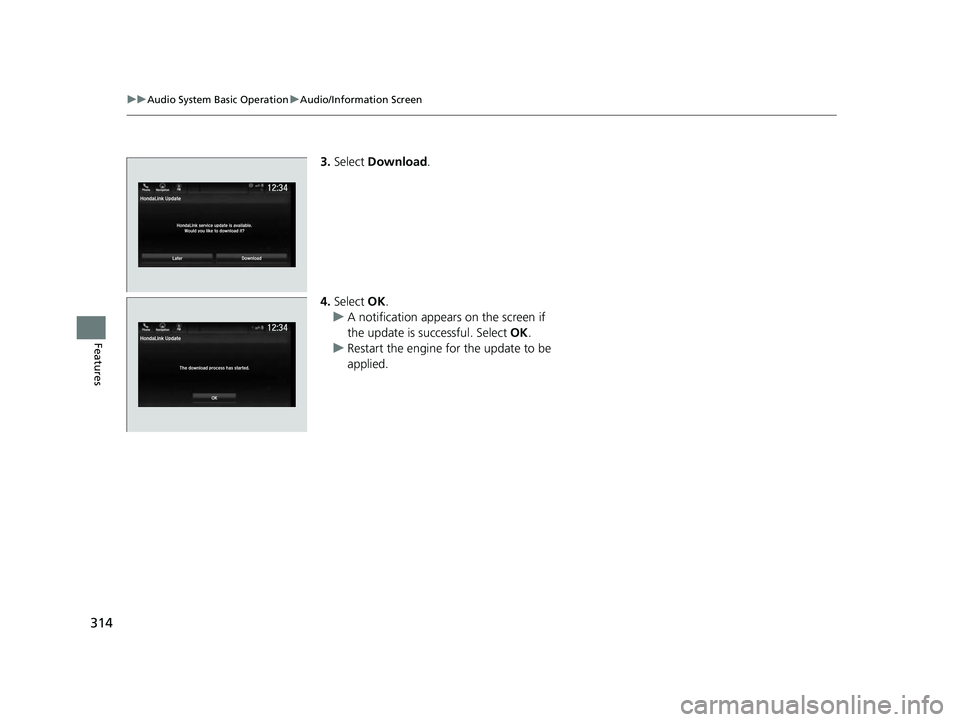
3. Select Download .
4. Select OK.
u A notification appears on the screen if
the update is successful. Select OK.
u Restart the engine for the update to be
applied.
LaterDownload
HondaLink Update
HondaLink service update is available.Would you like to download it?
12:34Phone Navigation FM
22 US ODYSSEY-31THR6400.book 314 ページ 2020年11月16日 月曜日 午後1時41分
Page 365 of 782

364
uuAudio System Basic Operation uHondaLink ®
Features
HondaLink ®
HondaLink® connects you to the latest information from Honda. You can connect
your phone wirelessly through Wi-Fi or Bluetooth®.
2Wi-Fi Connection P. 369
2 Phone Setup P. 515
Use the following procedure to connect to HondaLink® service.
■To enable the HondaLink ® service
You need to allow the consent of the location service to enable the HondaLink ®
service.
Disable: Does not allo w this consent.
Enable Once : Allows only one time. (Shows
again next time.)
Always Enable : Allows anytime. (Never
show again.)
■To Connect to HondaLink ® Service
1 HondaLink ®
The HondaLink® connect app is compatible with most
iPhone and Android phones.
Some cell phone carriers charge for tethering and
smartphone data use. Check your phone’s data
subscription package.
When Apple CarPlay or Andr oid Auto is connected to
the audio system, HondaLink® can be accessed even
without a Wi-Fi connection.
22 US ODYSSEY-31THR6400.book 364 ページ 2020年11月16日 月曜日 午後1時41分
Page 366 of 782
365
uuAudio System Basic Operation uHondaLink ®
Continued
Features
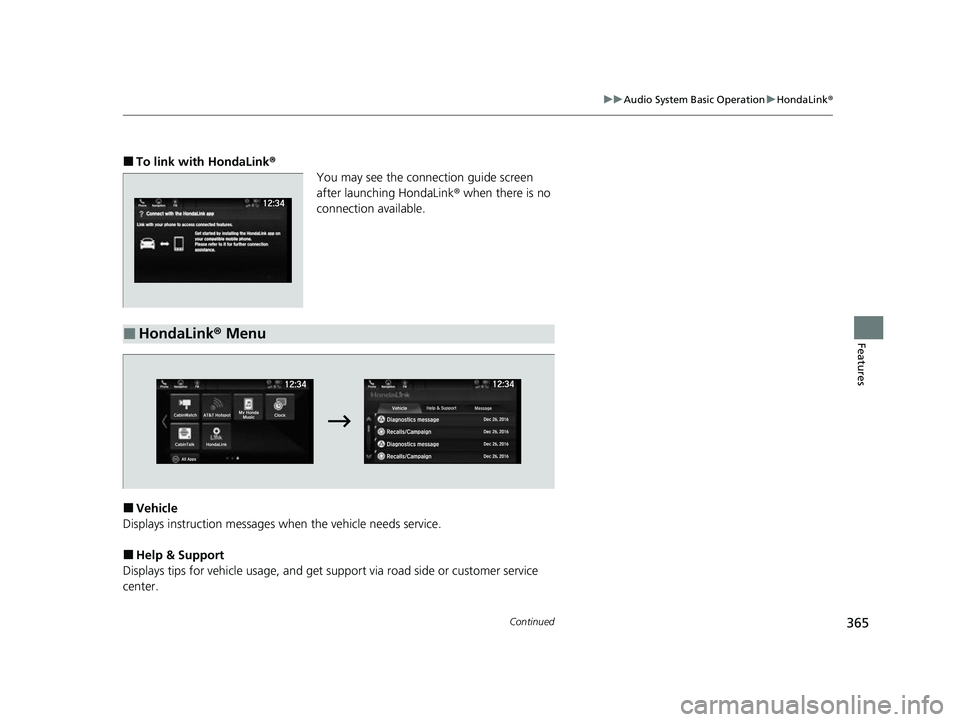
■To link with HondaLink ®
You may see the connection guide screen
after launching HondaLink ® when there is no
connection available.
■Vehicle
Displays instruction messages when the vehicle needs service.
■Help & Support
Displays tips for vehicle us age, and get support via road side or customer service
center.
■HondaLink® Menu
22 US ODYSSEY-31THR6400.book 365 ページ 2020年11月16日 月曜日 午後1時41分