Page 69 of 609

68
uuChild Safety uSafety of Infants and Small Children
Safe Driving
Safety of Infants and Small Children
An infant must be properly restrained in a rear-facing child seat until the infant
reaches the seat manufacturer’s weig ht or height limit for the seat.
■Positioning a rear-facing child seat
Child seats must be placed and secured in a
rear seating position.
When properly installed, a rear-facing child seat may prevent the driver or a front
passenger from moving their seat all the way back, or from locking their seat-back
in the desired position. Make sure that th ere is no contact between the child seat
and the seat in front of it.
It can also interfere with pr oper operation of the passenger’s advanced front airbag
system.
2 Airbags P. 51
If this occurs, we recommend that you install the child seat directly behind the front
passenger’s seat, move the seat as far fo rward as needed, and leave it unoccupied.
Or, you may wish to get a sm aller rear-facing child seat.
■Protecting Infants1Protecting Infants
Experts recommend use of a rear-facing seat for a
child so long as the child’ s height and weight are
appropriate for a rear-facing seat.
Infants should never be s eated in a forward-facing
position.
Always refer to the child seat manufacturer’s
instructions before installation.
Do not allow a front seat to rest against a child seat
installed in a rear seating position.
The weight sensor in the fr ont seat may not correctly
detect the actual weight of the occupant.
3WARNING
Placing a rear-facing child seat in the front
seat can result in serious injury or death
during a crash.
Always place a rear-fac ing child seat in the
rear seat, not the front.
22 INSIGHT HMIN-31TXM6300.book 68 ページ 2021年2月24日 水曜日 午後3時45分
Page 73 of 609

uuChild Safety uSafety of Infants and Small Children
72
Safe Driving
4. Open the tether anchor cover behind the
head restraint.
5. Route the tether strap over the top of the
head restraint and secure the tether strap
hook to the anchor.
6. Tighten the tether strap as instructed by the
child seat manufacturer.
7. Make sure the child seat is firmly secured by
rocking it forward and back and side to
side; little movement should be felt.
8. Make sure any unused seat belt that a child
can reach is buckled, the lockable retractor
is activated, and the be lt is fully retracted
and locked.1 Installing a LATCH-Compatible Child Seat
Installing a LATCH-compatible child seat in the
rear center seat
Each outer rear seat is equi pped with a pair of lower
anchors which are used to secure a LATCH-
compatible child seat. The rear center seat, however,
is not equipped with anchors of any kind.
The inner and outer anchors are spaced apart at a
standard distance of 11 in ches (280 mm). The distance
between the two inner anchors is 15 inches (380 mm).
LATCH-compatible restraint systems that are fitted
with rigid-type attachments cannot be installed in the
rear center seat. However, a system fitted with
flexible-type attachments can be installed in the
center seat, provided that the manufacturer’s
instructions for that system permit the use of the
inner anchors with the stated spacing.
Before seating a child, make sure that the system is
properly attached to both the lower anchors and
tether anchors.
3WARNING
Using the outer rear seats’ inner anchors to
secure a LATCH-compatible child seat in the
center seating position may result in failure
of the child seat, causing injury or death.
Only use the outer rear seats’ inner anchors
to install a child seat in the center seating
position if the manufa cturer’s instructions
expressly permit.
Anchor
Tether Strap
Hook
Anchor
Tether Strap
Hook
Straight Top Tether Type
Other Top Tether Type
22 INSIGHT HMIN-31TXM6300.book 72 ページ 2021年2月24日 水曜日 午後3時45分
Page 74 of 609

Continued73
uuChild Safety uSafety of Infants and Small Children
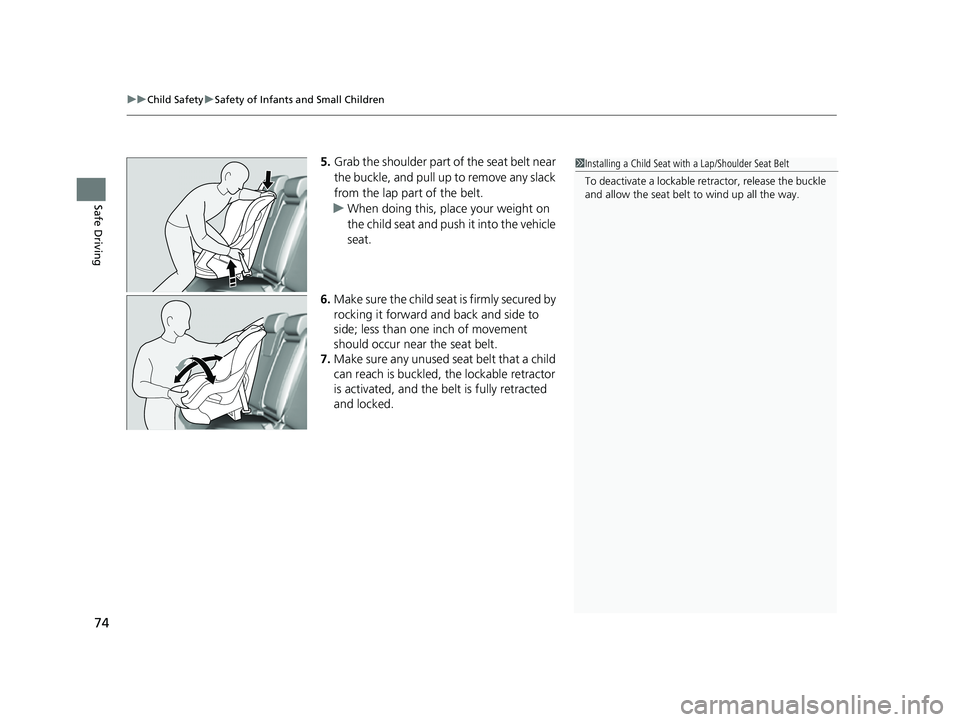
Safe DrivingA child seat can be installed with a lap/shoulder belt in any rear seat or, if absolutely
necessary, the front passenger seat.
1.Place the child seat on the vehicle seat.
2. Route the seat belt through the child seat
according to the seat manufacturer’s
instructions, and insert the latch plate into
the buckle.
u Insert the latch plate fully until it clicks.
3. Slowly pull the shoulder part of the belt all
the way out until it stops. This activates the
lockable retractor.
4. Let the seat belt retract a few inches and
check that the retractor has switched
modes by pulling on the webbing. It should
not pull out again until it is reset by
removing the latch pl ate from the buckle.
u If you are able to pull the shoulder belt
out, the lockable retractor is not
activated. Slowly pull the seat belt all the
way out, and repeat steps 3 – 4.
■Installing a Child Seat with a Lap/Shoulder Seat Belt1 Installing a Child Seat with a Lap/Shoulder Seat Belt
A child seat that is not properly secured will not
adequately protect a child in a crash and may cause
injury to the child or other vehicle occupants.
22 INSIGHT HMIN-31TXM6300.book 73 ページ 2021年2月24日 水曜日 午後3時45分
Page 75 of 609
uuChild Safety uSafety of Infants and Small Children
74
Safe Driving
5. Grab the shoulder part of the seat belt near
the buckle, and pull up to remove any slack
from the lap part of the belt.
u When doing this, place your weight on
the child seat and push it into the vehicle
seat.
6. Make sure the child seat is firmly secured by
rocking it forward and back and side to
side; less than one inch of movement
should occur near the seat belt.
7. Make sure any unused seat belt that a child
can reach is buckled, the lockable retractor
is activated, and the be lt is fully retracted
and locked.1 Installing a Child Seat with a Lap/Shoulder Seat Belt
To deactivate a lockable retractor, release the buckle
and allow the seat belt to wind up all the way.
22 INSIGHT HMIN-31TXM6300.book 74 ページ 2021年2月24日 水曜日 午後3時45分
Page 93 of 609
92
uuIndicators u
Instrument Panel
IndicatorNameOn/BlinkingExplanationMessage
Anti-lock Brake
System (ABS)
Indicator
• Comes on if there is a problem with
the ABS.• Stays on constantly - Have your vehicle
checked by a dealer. With this indicator
on, your vehicle still has normal braking
ability but no anti-lock function.
2 Anti-lock Brake System (ABS) P. 476
Supplemental
Restraint
System
Indicator
•Comes on if a problem with any of
the following is detected:
- Supplemental restraint system
- Side airbag system
- Side curtain airbag system
- Seat belt tensioner• Stays on constantly - Have your vehicle
checked by a dealer.
Electric Power
Steering (EPS)
System
Indicator• Comes on if there is a problem with
the EPS system.• Stays on constantly - Have your vehicle
checked by a dealer.
2 If the Electric Power Steering (EPS)
System Indicator Comes On P. 574
22 INSIGHT HMIN-31TXM6300.book 92 ページ 2021年2月24日 水曜日 午後3時45分
Page 102 of 609
101
uuIndicators u
Continued
Instrument Panel
IndicatorNameOn/BlinkingExplanationMessage
Safety Support
Indicator
(Amber)
●Comes on when RDM and/or
CMBSTM shuts itself off.
●Indicator may come on temporarily when
passing through an en closed space, such
as a tunnel.
●The area around the radar sensor is
blocked by dirt, mud, etc. Stop your
vehicle in a safe place and wipe the debris
off with a soft cloth. Indicator may take
some time to go off after the radar sensor
is cleaned.
●Have your vehicle checked by a dealer if
the indicator does not go off even after
you have cleaned the radar sensor.
2 Radar Sensor P. 467
●Stays on - The temperature inside the
camera is too high.
Use the climate control system to cool
down the camera.
The system activates when the
temperature inside the camera cools
down.
2 Front Sensor Camera P. 465
22 INSIGHT HMIN-31TXM6300.book 101 ページ 2021年2月24日 水曜日 午後3時45分
Page 103 of 609
102
uuIndicators u
Instrument Panel
IndicatorNameOn/BlinkingExplanationMessage
Safety Support
Indicator
(Amber)
●Comes on when RDM and/or
CMBSTM shuts itself off.
●Stays on - The area around the camera is
blocked by dirt, mud, etc. Stop your
vehicle in a safe place and wipe the debris
off with a soft cloth.
●Have your vehicle checked by a dealer if
the indicator and message are still
displayed even after you have cleaned the
area around the camera.
2 Front Sensor Camera P. 465
●Comes on when mud, snow, or ice
has accumulated in the vicinity of
the blind spot information system
sensor.●Comes on while driving - Something
may be interfering with the Blind spot
information System sensor. Check the
vicinity of the Blin d spot information
System sensor and remove any obstacles.
2 Blind spot information System P. 411
22 INSIGHT HMIN-31TXM6300.book 102 ページ 2021年2月24日 水曜日 午後3時45分
Page 126 of 609

125
uuIndicators uDriver Information Interface Wa rning and Information Messages
Continued
Instrument Panel
MessageConditionExplanation
●Appears if anything covers the radar sensor cover
and prevents the sensor from detecting a vehicle in
front.
●May appear when driving in bad weather (rain,
snow, fog, etc.)
●When the radar sensor gets dirty, stop your vehicle in a
safe place, and wipe off dirt using a soft cloth. The
message may take some time to go off.
●Have your vehicle checked by a dealer if the message
does not disappear even after you clean the sensor
cover.
2 Radar Sensor P. 467
●Appears if the temperature inside the front sensor
camera is too high and the ACC with Low Speed
Follow, LKAS, traffic sign recognition system and
auto high-beam cannot be activated.●Use the climate control sy stem to cool down the
camera.
●Disappears - The camera has been cooled down and
the systems are activated normally.
2 Front Sensor Camera P. 465
●Appears if the area around the front sensor camera is
blocked by dirt, mud, etc and be prevented from
detecting a vehicle in front.
●May appear when driving in bad weather (rain,
snow, fog, etc.)
●When the front window gets dirty, stop your vehicle in
a safe place, and wipe it off with a soft cloth.
●Have your vehicle checked by a dealer if the message
does not disappear even a fter you cleaned the area
around the camera.
2 Front Sensor Camera P. 465
22 INSIGHT HMIN-31TXM6300.book 125 ページ 2021年2月24日 水曜日 午後3時45分