2022 HONDA INSIGHT light
[x] Cancel search: lightPage 147 of 609
146
uuGauges and Driver Information Interface uDriver Information Interface
Instrument Panel
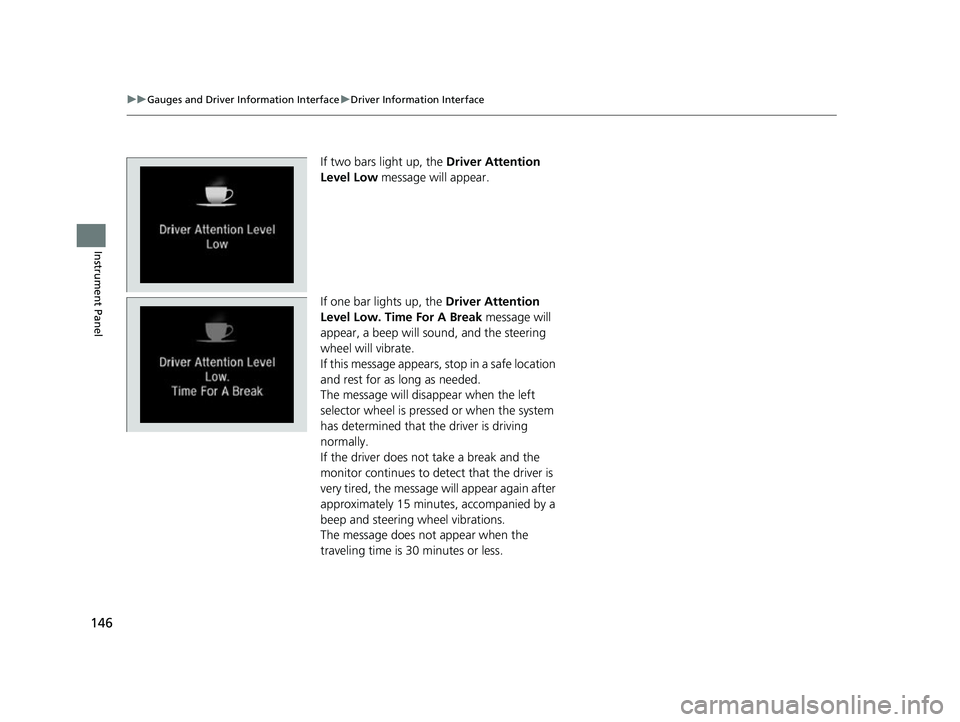
If two bars light up, the Driver Attention
Level Low message will appear.
If one bar lights up, the Driver Attention
Level Low. Time For A Break message will
appear, a beep will sound, and the steering
wheel will vibrate.
If this message appears, stop in a safe location
and rest for as long as needed.
The message will disappear when the left
selector wheel is pressed or when the system
has determined that the driver is driving
normally.
If the driver does not take a break and the
monitor continues to dete ct that the driver is
very tired, the message will appear again after
approximately 15 minutes, accompanied by a
beep and steering wheel vibrations.
The message does not appear when the
traveling time is 30 minutes or less.
22 INSIGHT HMIN-31TXM6300.book 146 ページ 2021年2月24日 水曜日 午後3時45分
Page 153 of 609

152
uuGauges and Driver Information Interface uDriver Information Interface
Instrument Panel
■Drive Cycle Score/Lifetime Points
Appear for a few seconds when you set th e power mode to VEHICLE OFF. Each has
three stages. Depending on your driving style, the leaf icon(s) and the gauge
increase or decrease to indicate that you have reached a different stage of fuel
economy.
■Resetting the Drive Cycle Score
1. Make sure the shift position is in
(P. Turn the power mode to ON.
2. If ECON mode is on, press the ECON button to turn it off.
3. Turn the power mode to VEHICLE OFF.
4. Turn the power mode to ON again.
u Make sure to complete steps from 4 through 6 within 30 seconds.
5. Depress the brake pedal twice.
u The color of the ambient meter wi ll change from white to green.
u When the Fuel Efficiency Backlight setting on the audio/information screen
is off, the color stays white.
6. Press the ECON button twice.
u The color of the ambient mete r will turn to monochrome.
7. Turn the power mode to VEHICLE OFF.
Drive Cycle Score
Lifetime Points Advancing
to 2nd
Stage
Advancing
to 3rd
Stage
Receding
to 3rd
Stage
Receding
to 2nd
Stage
22 INSIGHT HMIN-31TXM6300.book 152 ページ 2021年2月24日 水曜日 午後3時45分
Page 156 of 609

155
Controls
This chapter explains how to operate the various controls necessary for driving.
Clock.................................................. 156
Locking and Unlocking the Doors Key .................................................. 157
Low Keyless Remote Signal Strength ... 159
Locking/Unlocking the Doors from the Outside .......................................... 160
Locking/Unlocking the Doors from the Inside ............................................. 167
Childproof Door Locks ..................... 169
Auto Door Locking/Unlocking .......... 170
Opening and Closing the Trunk ....... 171
Security System
Immobilizer System .......................... 174 Security System Alarm...................... 175
Opening and Closing the Windows ... 177
Moonroof*................................................ 180Operating the Switches Around the
Steering Wheel POWER Button................................. 181
Turn Signals ..................................... 184
Light Switches.................................. 185
Fog Lights
*...................................... 188
Daytime Running Lights ................... 188
Auto High-Beam .............................. 189
Wipers and Washers ........................ 192
Rear Defogger/Heated Door Mirror Button ........................................ 194
Brightness Control ........................... 195
Adjusting the Steering Wheel .......... 196
Adjusting the Mirrors Interior Rearview Mirror ................... 197
Power Door Mirrors ......................... 198
Adjusting the Seats .......................... 199
Interior Lights/Interior Convenience
Items ................................................ 207
Climate Control System Using Automatic Climate Control .... 216
Automatic Climate Control Sensors ... 222
* Not available on all models
22 INSIGHT HMIN-31TXM6300.book 155 ページ 2021年2月24日 水曜日 午後3時45分
Page 158 of 609

157Continued
Controls
Locking and Unlocking the Doors
Key
This vehicle comes with the following key:Use the keys to turn on and off the power
system, and to lock and unlock all the doors
and to open the trunk.1 Key
All the keys have an immobilizer system. The
immobilizer system helps to protect against vehicle
theft. 2 Immobilizer System P. 174
Follow the advice below to prevent damage to the
keys:
•Do not leave the keys in direct sunlight, or in
locations with high temperature or high humidity.
•Do not drop the keys or set heavy objects on them.•Keep the keys away from liquids, dust and sand.
•Do not take the keys apart except for replacing the
battery.
If the circuits in the keys are damaged, the power
system may not activate, and the remote transmitter
may not work.
If the keys do not work properly, have them
inspected by a dealer.
You can remotely turn the power system on using the
remote engine start. 2 Remote Engine Start with Vehicle
Feedback P. 384
22 INSIGHT HMIN-31TXM6300.book 157 ページ 2021年2月24日 水曜日 午後3時45分
Page 161 of 609

160
uuLocking and Unlocking the Doors uLocking/Unlocking the Doors from the Outside
Controls
Locking/Unlocking the Doors from the Outside
When you carry the keyless remote, you can
lock/unlock the doors and open the trunk.
You can lock/unlock the doors within a radius
of about 32 inches (80 cm) of the outside door
handle. You can open the trunk within about
32 inches (80 cm) radius from the trunk
release button.
■Locking the doors
Touch the door lock sensor on the front door.u Some exterior lights flash; the beeper
sounds; all the doors lock; and the
security system sets.
■Using the Keyless Access System1Locking/Unlocking the Doors from the Outside
If the interior light switch is in the door activated
position, the interior light comes on when you unlock
the doors.
No doors opened: The li ght fades out after 30
seconds.
Doors relocked: The light goes off immediately.
2 Interior Lights P. 207
Door Lock Sensor
1Using the Keyless Access System
If you do not open a door within 30 seconds of
unlocking the vehicle with the keyless access system,
the doors will automatically relock.
You can lock or unlock doors using the keyless access
system only when the power mode is in VEHICLE OFF.
The keyless access system will not lock the vehicle
when a door is open.
22 INSIGHT HMIN-31TXM6300.book 160 ページ 2021年2月24日 水曜日 午後3時45分
Page 162 of 609

Continued161
uuLocking and Unlocking the Doors uLocking/Unlocking the Doors from the Outside
Controls
■Unlocking the doors and trunk
Grab the driver’s door handle:u The driver’s door unlocks.
u Some exterior lights flash twice and the
beeper sounds twice.
Grab the front passenger’s door handle:
u All doors unlock.
u Some exterior lights flash twice and the
beeper sounds twice.
Press the trunk release button: u The trunk unlocks and opens.
u Some exterior lights flash twice and the
beeper sounds.
2 Using the Trunk Release Button P. 172
Trunk Release Button
1Using the Keyless Access System
•Do not leave the keyless remote in the vehicle
when you get out. Carry it with you.
•Even if you are not carrying the keyless remote, you
can lock/unlock the doors while someone else with
the remote is within range.
•The door may be unlocked if the door handle is
covered with water in heavy rain or in a car wash if
the keyless remote is within range.
•If you grip a front door ha ndle or touch a door lock
sensor wearing gloves, the door sensor may be
slow to respond or may no t respond by locking or
unlocking the doors.
•After locking the door, yo u have up to two seconds
during which you can pull the door handle to
confirm whether the door is locked. If you need to
unlock the door immediately after locking it, wait
at least two seconds befo re gripping the handle,
otherwise the door will not unlock.
•The door might not open if you pull it immediately
after gripping the door handle. Grip the handle
again and confirm that th e door is unlocked before
pulling the handle.
•Even within the 32 inches (80 cm) radius, you may
not be able to lock/unloc k the doors with the keyless
remote if it is above or below the outside handle.
•The keyless remote may not operate if it is too close
to the door and door glass.
The light flash, beep and door unlock mode settings
can be customized using the audio/information
screen. 2 Customized Features P. 326
22 INSIGHT HMIN-31TXM6300.book 161 ページ 2021年2月24日 水曜日 午後3時45分
Page 163 of 609

uuLocking and Unlocking the Doors uLocking/Unlocking the Doors from the Outside
162
Controls
■Locking the doors (Walk away auto
lock ®)
When you walk away from the vehicle with all
doors closed while carrying the keyless
remote, the doors will automatically lock.
The auto lock function activates when all
doors are closed, and the keyless remote is
within about 5 feet (1 .5 m) radius of the
outside door handle or trunk release button.
Exit vehicle while carry ing keyless remote and
close door(s).
1. While within about 5 feet (1.5 m) radius of
the vehicle.
u The beeper sounds; the auto lock
function will be activated.
2. Carry the keyless remote beyond about 5
feet (1.5 m) from the vehicle and remain
outside this range fo r 2 or more seconds.
u Some exterior lights flash; the beeper
sounds; all doors will then lock.1Locking the doors (Walk away auto lock ®)
The auto lock function is set to OFF as the factory
default setting. The auto lo ck function can be set to
ON using the audio/information screen.
If you set the auto lock function to ON using the
audio/information screen, only the remote
transmitter that was used to unlock the driver’s door
prior to the setting change can activate auto lock. 2 Customized Features P. 326
After the auto lock function has been activated,
when you stay within the locking/unlocking
operation range, the indicato r on the keyless remote
will continue to flash until the doors are locked.
When you stay beside the vehicle within the
operation range, the doors wi ll automatically lock
approximately 30 seconds after the auto lock
function activating beeper sounds.
When you open a door after the auto lock function
activating beeper sounds, the auto lock function will
be delayed until all doors are closed.
Under the following circumstances, the auto lock
function will not activate:
•The remote is inside the vehicle.
•The remote is taken out of its operational range
before all the doors are closed. u The beeper will not sound.
u The beeper will sound.
The activation range of
the auto lock function is
about 5 feet (1.5 m)
22 INSIGHT HMIN-31TXM6300.book 162 ページ 2021年2月24日 水曜日 午後3時45分
Page 165 of 609

uuLocking and Unlocking the Doors uLocking/Unlocking the Doors from the Outside
164
Controls
■Locking the doors
Press the lock button.
Once: u Some exterior lights flash, all the doors
lock, and the security system sets.
Twice (within five se conds after the first
push):
u The beeper sounds and verifies the
security system is set.
■Unlocking the doors
Press the unlock button.
Once: u Some exterior lights flash twice, and the
driver’s door unlocks.
Twice:
u The remaining doors unlock.
■Using the Remote Transmitter1Using the Remote Transmitter
If you do not open a door within 30 seconds of
unlocking the vehicle with the remote transmitter,
the doors will automatically relock.
You can change the relock timer setting. 2 Customized Features P. 326
You can lock or unlock doors using the remote
transmitter only when the power mode is in VEHICLE
OFF.
The remote transmitter us es low-power signals, so
the operating range may vary depending on the
surroundings.
The remote will not lock th e vehicle when a door is
open.
If the distance at which the remote transmitter works
varies, the batter y is probably low.
If the LED does not come on when you press a
button, the battery is dead. 2 Replacing the Remote Battery P. 530
You can customize the door unlock mode setting. 2 Customized Features P. 326
LED
Unlock ButtonLock Button
22 INSIGHT HMIN-31TXM6300.book 164 ページ 2021年2月24日 水曜日 午後3時45分