Page 151 of 641
Continued149
uuLocking and Unlocking the Doors uLocking/Unlocking the Doors from the Outside
Controls
■Unlocking the doors
Press the unlock button.
Once: u Some exterior lights flash twice, and the driver’s door unlocks.
Twice: u The remaining doors and the tailgate unlock.1Using the Remote Transmitter
If the distance at which the remote transmitter works
varies, the batter y is probably low.
If the LED does not come on when you press a
button, the battery is dead. 2 Replacing the Remote Battery P. 572
You can customize the door unlock mode setting. 2 Customized Features P. 127
Models with multi-information display
22 HR-V HDMC-31T7A6600.book 149 ページ 2021年4月12日 月曜日 午前10時50分
Page 152 of 641
uuLocking and Unlocking the Doors uLocking/Unlocking the Doors from the Outside
150
Controls
If the lock or unlock button of the re mote does not work, use the key instead.
If the lock or unlock button of the remote
does not work, use the key instead.
Fully insert the key and turn it.
■Locking/Unlocking the Doors Using a Key1 Locking/Unlocking the Doors Using a Key
If you unlock the doors wi th the key, the alarm
activates when you open the hood or move the shift
lever out of
( P.
When you lock the driver’s door with a key, all the
other doors and tailgate lock at the same time. When
unlocking, the driver’s door unlocks first. Turn the
key a second time within a few seconds to unlock the
remaining doors a nd the tailgate.
You can customize the door unlock mode setting. 2 Customized Features P. 127
Models with multi-information display
LockUnlock
22 HR-V HDMC-31T7A6600.book 150 ページ 2021年4月12日 月曜日 午前10時50分
Page 155 of 641

Continued153
uuLocking and Unlocking the Doors uLocking/Unlocking the Doors from the Inside
Controls
Pull the front door inner handle.
u The door unlocks and opens in one
motion.
Unlocking and opening the driver’s door from the inner handle unlocks all the other
doors.
To avoid all the doors unlocking use the lock tab on the driver’s door to unlock, then
lock again before opening the door. u This setting works for one time only.
If you do not want all the doors to unlock all the time, customize the Auto Door
Unlock setting to OFF using the multi-information display.
2Customized Features P. 127
If you do not want all the doors to unlock all the time, customize the Auto Door
Unlock setting to Off using th e master door lock switch.
2Customizing the Auto Door Locking/Unlocking Setting* P. 157
■Unlocking Using the Front Door Inner Handle1Unlocking Using the Front Door Inner Handle
The front door inne r handles are designed to allow
front seat occupants to ope n the door in one motion.
However, this feature requires that front seat
occupants never pull a front door inner handle while
the vehicle is in motion.
Children should always ride in a rear seat where
childproof door locks are provided.
2 Childproof Door Locks P. 155
Inner Handle
Models with multi-information display
Models without multi-information display
* Not available on all models
22 HR-V HDMC-31T7A6600.book 153 ページ 2021年4月12日 月曜日 午前10時50分
Page 158 of 641
156
uuLocking and Unlocking the Doors uAuto Door Locking/Unlocking
Controls
Auto Door Locking/Unlocking
Your vehicle locks and unlocks all doors automatically when a certain condition is
met.
■Drive lock mode
All doors lock when the vehicle’s speed reaches about 10 mph (15 km/h).
■Driver’s door open mode
All doors and the tailgate unlock when the driver’s door is opened.
■Auto Door Locking
■Auto Door Unlocking
1 Auto Door Locking/Unlocking
You can turn off or cha nge to another auto door
locking/unlocking setting us ing the master door lock
switch. 2 Customizing the Auto Door Locking/
Unlocking Setting
* P. 157
You can turn off or cha nge to another auto door
locking/unlocking setting us ing the multi-information
display. 2 Customized Features P. 127
Models with multi-information display
* Not available on all models
22 HR-V HDMC-31T7A6600.book 156 ページ 2021年4月12日 月曜日 午前10時50分
Page 171 of 641

169
Controls
Operating the Switches Around the Steering Wheel
Ignition Switch
Models without keyless access system
1Ignition Switch
You cannot take the key out unless the shift lever is
in
( P.
If you open the driver’s door when the key is in LOCK
(0 or ACCESSORY (q, a warning buzzer will sound
to remind you to take the key out.
When the warning buzzer sounds, the following
messages appear on the multi-information display:
•In LOCK ( 0: the symbol with an Remove
Key From Ignition
•In ACCESSORY ( q: the symbol with a
Return Ignition Switch To Lock (0) Position
If the key won’t turn from LOCK
( 0 to ACCESSORY
(q, turn the key while moving the steering wheel left
and right. The steering wh eel will unlock, allowing
the key to turn.
Models with multi-information display
( 0 LOCK: Insert and remove the key in this
position.
( q ACCESSORY: Operate the audio system and
other accessories in this position.
( w ON: This is the position when driving.
(e START: This position is for starting the engine.
The switch returns to ON ( w when you let go of
the key.
22 HR-V HDMC-31T7A6600.book 169 ページ 2021年4月12日 月曜日 午前10時50分
Page 179 of 641

177
uuOperating the Switches Around the Steering Wheel uLight Switches
Controls
The headlights automatically come on when the wipers are used several times within
a number of certain intervals with the headlight switch in AUTO.
The headlights automatically go off a few minutes later if the wipers are stopped.
The headlights, all other exterior lights, a nd the instrument panel lights turn off 15
seconds after you remove the key or set the power mode to VEHICLE OFF (LOCK),
take the remote with you, and close the driver’s door.
If you turn the igniti on switch to LOCK
(0*1 with the headlight switch on, but do
not open the door, the lights tu rn off after 10 minutes (3 minutes, if the switch is in
the AUTO
* position).
The lights turn on again when you unlock or open the driver’s door. If you unlock
the door, but do not open it within 15 seconds, the lights go off. If you open the
driver’s door, you will hear a lights on reminder chime.
*1: Models with the keyless access system have an ENGINE START/STOP button instead of an
ignition switch.
■Headlight Integration with Wipers*
■Automatic Lighting Off Feature
1 Automatic Operation (aut omatic lighting control)*
You can adjust the auto li ght sensitivity as follow:
2 Customized Features P. 127
SettingThe exterior lights come on
when the ambient light is at
Max
High
Mid
Low
Min
U.S. models
Bright
Dark
1 Headlight Integration with Wipers*
This feature activates while the headlights are off in
AUTO .
The instrument panel br ightness does not change
when the headlights come on.
At dark ambient light levels, the automatic lighting
control feature turns on the headlights, regardless of
the number of wiper sweeps.
1 Automatic Lighting Off Feature
You can change the headlight auto off timer setting.
2 Customized Features P. 127
Models with multi-information display
* Not available on all models
22 HR-V HDMC-31T7A6600.book 177 ページ 2021年4月12日 月曜日 午前10時50分
Page 191 of 641
189
uuOperating the Switches Around the Steering Wheel uBrightness Control
Controls
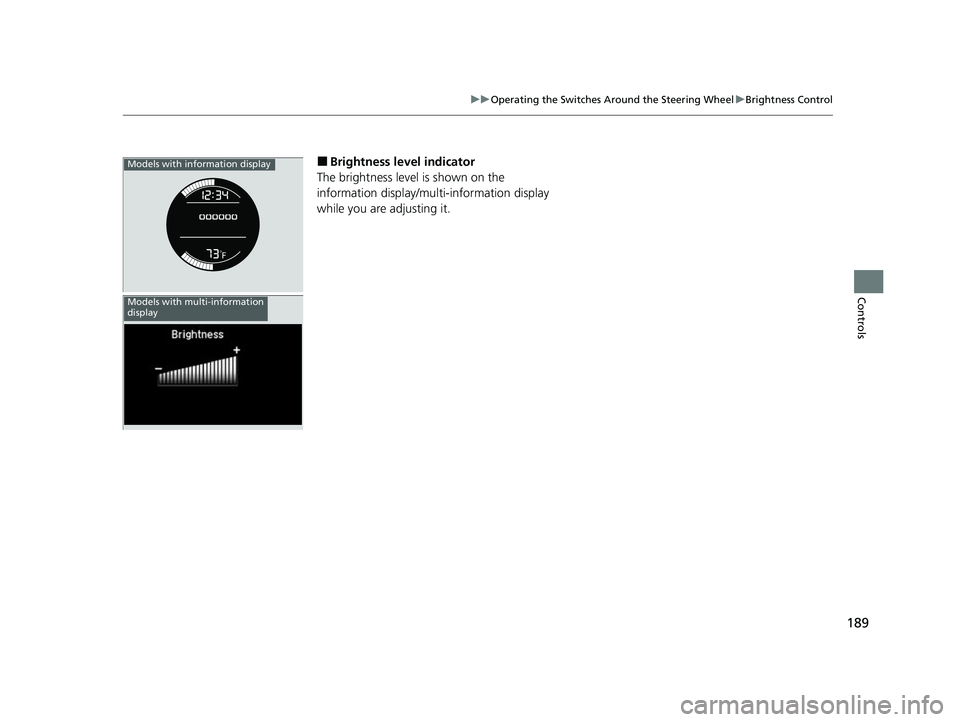
■Brightness level indicator
The brightness level is shown on the
information display/multi-information display
while you are adjusting it.Models with information display
Models with multi-information
display
22 HR-V HDMC-31T7A6600.book 189 ページ 2021年4月12日 月曜日 午前10時50分
Page 207 of 641
205Continued
Controls
Interior Lights/Interior Convenience Items
Interior Lights
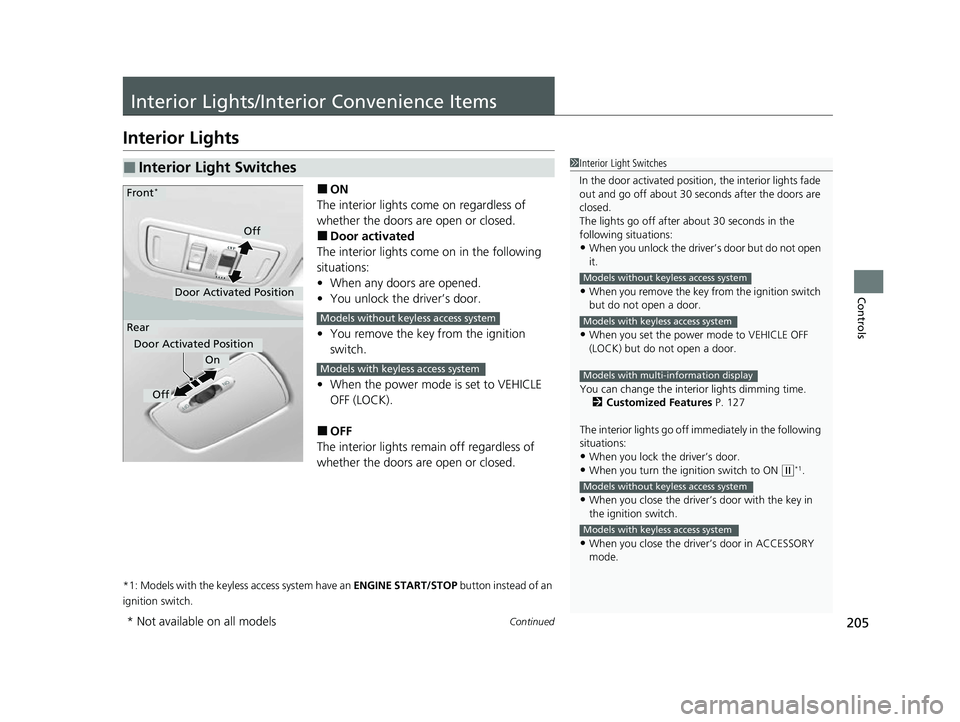
■ON
The interior lights come on regardless of
whether the doors are open or closed.
■Door activated
The interior lights come on in the following
situations:
• When any doors are opened.
• You unlock the driver’s door.
• You remove the key from the ignition
switch.
• When the power mode is set to VEHICLE
OFF (LOCK).
■OFF
The interior lights remain off regardless of
whether the doors are open or closed.
*1: Models with the keyless access system have an ENGINE START/STOP button instead of an
ignition switch.
■Interior Light Switches1 Interior Light Switches
In the door activated position, the interior lights fade
out and go off about 30 se conds after the doors are
closed.
The lights go off after about 30 seconds in the
following situations:
•When you unlock the driver’s door but do not open
it.
•When you remove the key from the ignition switch
but do not open a door.
•When you set the power mode to VEHICLE OFF
(LOCK) but do not open a door.
You can change the interi or lights dimming time.
2 Customized Features P. 127
The interior lights go off im mediately in the following
situations:
•When you lock the driver’s door.•When you turn the ignition switch to ON ( w*1.
•When you close the driver’s door with the key in
the ignition switch.
•When you close the driver’s door in ACCESSORY
mode.
Models without keyless access system
Models with keyless access system
Models with multi-information display
Models without keyless access system
Models with keyless access system
On
Off
Door Activated Position
Front*
Rear
Door Activated Position
Off
Models without keyless access system
Models with keyless access system
* Not available on all models
22 HR-V HDMC-31T7A6600.book 205 ページ 2021年4月12日 月曜日 午前10時50分