2022 HONDA HRV light
[x] Cancel search: lightPage 181 of 641

179
uuOperating the Switches Around the Steering Wheel uDaytime Running Lights
Controls
Daytime Running Lights
The parking/daytime running lights come on when the following conditions have
been met:
• The ignition switch is in ON
(w*1.
• The headlight switch is OFF.
• The headlight switch is AUTO.
• The parking brake is released.
The lights remain on even if you set th e parking brake. Turning off the ignition
switch or setting the power mode to VEHI CLE OFF will turn off the daytime running
lights.
The daytime running lights are off once the h eadlight switch is turned on, or when
the head light switch is in AUTO
* and it is getting darker outside.
*1: Models with the keyless access system have an ENGINE START/STOP button instead of an
ignition switch.
1 Daytime Running Lights
The daytime running lights come on dimmer when
the headlight switch is in than when it is in
AUTO
*. In AUTO*, if the ambient br ightness is dark,
the low beam headlights come on.U.S. models
Canadian models
All models
* Not available on all models
22 HR-V HDMC-31T7A6600.book 179 ページ 2021年4月12日 月曜日 午前10時50分
Page 182 of 641

180
uuOperating the Switches Around the Steering Wheel uAuto High-Beam*
Controls
Auto High-Beam*
The front sensor camera detects the light sources ahead of the vehicle such as the
lights of a preceding or oncoming vehicle, or street lights. When you are driving at
night, the system automatically switches the headlights between low beam and high
beam depending on the situation.
When all of the following conditions have been met, the auto high-beam indicator
comes on and the auto high-beam is activated. •The ignition switch is in ON
(w*1.
• The light switch is in AUTO.
• The lever is in the low beam position.
• The headlights have been automatically
activated.
• It is dark outside the vehicle.
If the auto high-beam indicator does not co me on even when all the conditions have
been met, carry out the following procedure and the indicator will come on.
• Pull the lever toward you for flashing the high beams then release it while driving.
*1: Models with the keyless access system have an ENGINE START/STOP button instead of an
ignition switch.
1 Auto High-Beam*
The auto high-beam system does not always operate
in every situation. This syst em is just for assisting the
driver. Always observe your surroundings and switch
the headlights between high beam and low beam
manually if necessary.
If you find the timing of beam changes inconvenient
for driving, change the headlight beams manually.
The range and the distance at which the camera can
recognize varies de pending on conditions
surrounding your vehicle.
Regarding the handling of the camera mounted to
the inside of the windshiel d, refer to the following.
2 Front Sensor Camera P. 504
For the auto high-beam to work properly:
•Do not place an object that reflects light on the
dashboard.
•Keep the windshield around the camera clean.
When cleaning the windshield, be careful not to
apply the windshield cleans er to the camera lens.
•Do not attach an object, sticker or film to the area
around the camera.
•Do not touch the camera lens.
If the camera receives a st rong impact, or repairing of
the area near the camera is required, consult a dealer.
■How to Use the Auto High-Beam
Front Sensor Camera
Light Switch
Auto High-
Beam
Indicator
* Not available on all models
22 HR-V HDMC-31T7A6600.book 180 ページ 2021年4月12日 月曜日 午前10時50分
Page 183 of 641

Continued181
uuOperating the Switches Around the Steering Wheel uAuto High-Beam*
Controls
■Automatic switching between high-beam and low-beam
When auto-high beam is active, the head lights switch between high beam and low
beam based on the following conditions.
■Manual switching between high-beam and low-beam
If you want to manually switch the h eadlights between high beam and low beam,
follow either of the procedur es below. Note that when you do this, the auto high-
beam indicator will turn off and the auto high-beam will be deactivated.
Using the lever:
Pull the lever toward you for flashing the hi gh beams then release it within about
one second while driving. u To reactivate the auto hi gh-beam, pull the lever toward you for flashing the
high beams then release it while driv ing. The auto high-beam indicator will
come on.
Using the light switch:
Turn the light switch to .
u To reactivate the au to high-beam, turn the light switch to AUTO when the
lever is in the low beam position, the auto high-beam indicator will come on.
1How to Use the Auto High-Beam
In the following cases, th e auto high-beam system
may not switch the head lights properly or the
switching timing may be ch anged. In case of the
automatic switching operation does not fit for your
driving habits, please swit ch the headlights manually.
•The brightness of the lights from the preceding or
oncoming vehicle is intense or poor.
•Visibility is poor due to the weather (rain, snow,
fog, windshield frost, etc.).
•Surrounding light sources, such as street lights,
electric billboards and traf fic lights are illuminating
the road ahead.
•The brightness level of th e road ahead constantly
changes.
•The road is bumpy or has many curves.•A vehicle suddenly appears in front of you, or a
vehicle in front of you is not in the preceding or
oncoming direction.
•Your vehicle is tilted with a heavy load in the rear.•A traffic sign, mirror, or other reflective object
ahead is reflecting strong light toward the vehicle.
•The oncoming vehicle freq uently disappears under
roadside trees or be hind median barriers.
•The preceding or oncoming vehicle is a motorcycle,
bicycle, mobility scooter, or other small vehicle.
The auto high-beam system keeps the headlight low
beam when:
•Windshield wipers are operating.
•The camera has been detected a dense fog.
Switching to high beam:
All of the following conditions
must be met before the high
beams turn on.
•Your vehicle speed is 45 mph
(72 km/h) or more.
• There are no preceding or
oncoming vehicle with
headlights or taillights turned
on.
• There are few street lights on
the road ahead.
Switching to low beam:
One of the following conditions
must be met before the low beams
turn on.
•Your vehicle speed is 30 mph
(48 km/h) or less.
• There is a preceding or
oncoming vehicle with
headlights or taillights turned
on.
• There are many street lights on
the road ahead.
22 HR-V HDMC-31T7A6600.book 181 ページ 2021年4月12日 月曜日 午前10時50分
Page 184 of 641

uuOperating the Switches Around the Steering Wheel uAuto High-Beam*
182
Controls
You can turn the auto high-beam system off. If you want to turn the system off or
on, turn the igniti on switch to ON
(w*1, then carry out the following procedures
while the vehicle is stationary.
To turn the system off:
With the light switch is in AUTO, pull the lever
toward you and hold it for at least 40 seconds.
After the auto high-beam indicator light blinks
twice, release the lever.
To turn the system on:
With the light switch is in AUTO, pull the lever
toward you and hold it for at least 30 seconds.
After the auto high-beam indicator light blinks
once, release the lever.
*1: Models with the keyless access system have an ENGINE START/STOP button instead of an
ignition switch.
■How to Turn Off the Auto High-Beam1 How to Use the Auto High-Beam
If the Some Driver Assist Systems Cannot
Operate: Camera Temperature Too High message
appears:
•Use the climate control system to cool down the
interior and, if necessary, also use defroster mode
with the airflow directed toward the camera.
•Start driving the vehicle to lower the windshield
temperature, which cool s down the area around
the camera.
If the Some Driver Assist Systems Cannot
Operate: Clean Front Windshield message
appears:
•Park your vehicle in a sa fe place, and clean the
windshield. If the message does not disappear after
you have cleaned the winds hield and driven for a
while, have your vehicle checked by a dealer.
1 How to Turn Off the Auto High-Beam
If you turn the au to high-beam system off, the system
does not operate until you turn the system on.
Park in a safe place before turning the system off or
on.
AUTO Position
22 HR-V HDMC-31T7A6600.book 182 ページ 2021年4月12日 月曜日 午前10時50分
Page 190 of 641
188
uuOperating the Switches Around the Steering Wheel uBrightness Control
Controls
Brightness Control
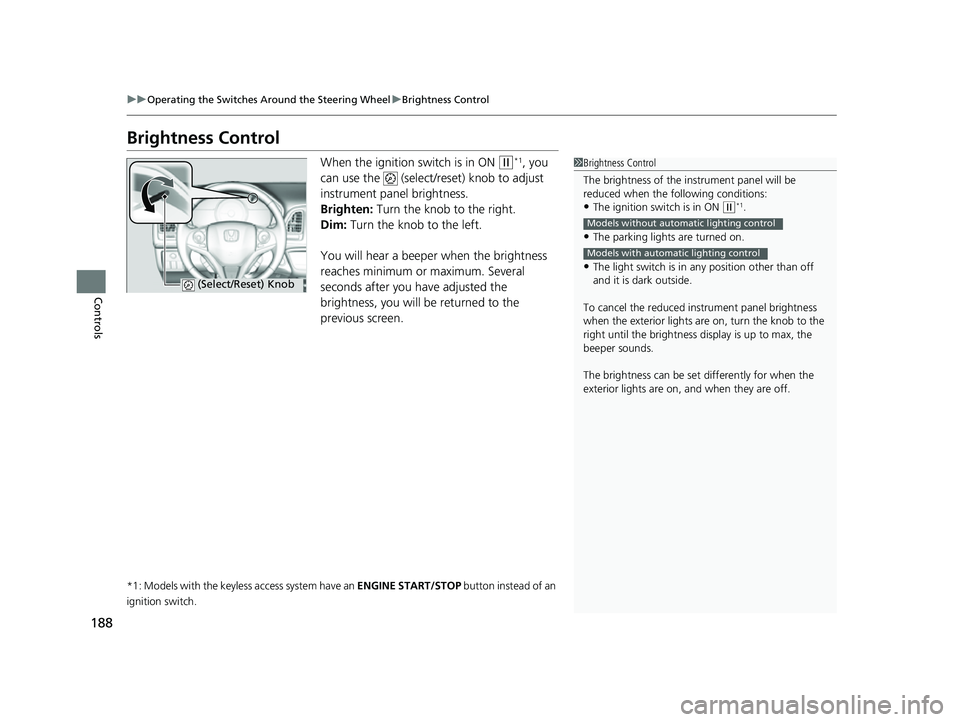
When the ignition switch is in ON (w*1, you
can use the (select/reset) knob to adjust
instrument panel brightness.
Brighten: Turn the knob to the right.
Dim: Turn the knob to the left.
You will hear a beeper when the brightness
reaches minimum or maximum. Several
seconds after you have adjusted the
brightness, you will be returned to the
previous screen.
*1: Models with the keyless access system have an ENGINE START/STOP button instead of an
ignition switch.
1 Brightness Control
The brightness of the in strument panel will be
reduced when the following conditions:
•The ignition switch is in ON ( w*1.
•The parking lights are turned on.
•The light switch is in any position other than off
and it is da rk outside.
To cancel the reduced in strument panel brightness
when the exterior lights are on, turn the knob to the
right until the brightness display is up to max, the
beeper sounds.
The brightness can be set differently for when the
exterior lights are on, and when they are off.
Models without automatic lighting control
Models with automatic lighting control
(Select/Reset) Knob
22 HR-V HDMC-31T7A6600.book 188 ページ 2021年4月12日 月曜日 午前10時50分
Page 193 of 641

191Continued
Controls
Adjusting the Mirrors
Interior Rearview Mirror
Adjust the angle of the rearview mirror when you are sitting in the correct driving
position.
Flip the tab to switch the position.
The night position will help to reduce the glare
from headlights behind you when driving
after dark.
■Rearview Mirror with Day and Night Positions*
1Adjusting the Mirrors
Keep the inside and out side mirrors clean and
adjusted for best visibility.
Adjust the mirrors befo re you start driving.
2 Front Seats P. 194
Tab
Daytime
Position Night
Position
* Not available on all models
22 HR-V HDMC-31T7A6600.book 191 ページ 2021年4月12日 月曜日 午前10時50分
Page 194 of 641

uuAdjusting the Mirrors uInterior Rearview Mirror
192
Controls
When you are driving after dark, the
automatic dimming rearview mirror reduces
the glare from headlights behind you. Press
the auto button to turn this function on and
off. When activated, the auto indicator comes
on.
■Automatic Dimming Rearview Mirror*1Automatic Dimming Rearview Mirror*
The auto dimming function cancels when the shift
position is in
(R.
Sensor
Auto Button
Indicator
Models without HomeLink buttons
Sensor
Auto Button
Models with HomeLink buttons
* Not available on all models
22 HR-V HDMC-31T7A6600.book 192 ページ 2021年4月12日 月曜日 午前10時50分
Page 205 of 641
203
uuAdjusting the Seats uHead Restraints
Controls
Head restraints can be removed for cleaning or repair.
To remove a head restraint:
Pull the restraint up as far as it will go. Then, push the release button and pull the
restraint up and out.
To reinstall a head restraint:
Insert the legs back in place, then adjust the head restraint to an appropriate height
while pressing the release button. Pull up on the restraint to make sure it is locked
in position.
■Removing and Reinstalling the Head Restraints1 Removing and Reinstalling the Head Restraints
To remove and install the rear outer head restraint,
recline the seat-back slightly forward as the space
between the ceili ng and the seat-back is limited.
3WARNING
Failure to reinstall, or correctly reinstall, the
head restraints can result in severe injury
during a crash.
Always replace the he ad restraints before
driving.
22 HR-V HDMC-31T7A6600.book 203 ページ 2021年4月12日 月曜日 午前10時50分