Page 295 of 641
293
uuAudio System Basic Operation uPlaying SiriusXM ® Radio*
Features
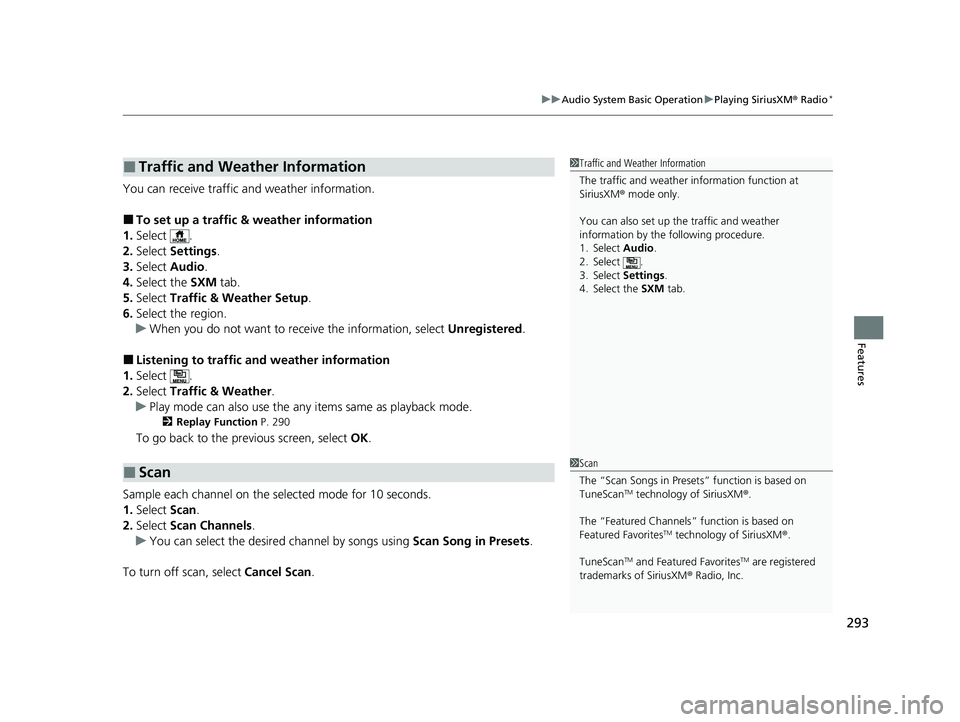
You can receive traffic and weather information.
■To set up a traffic & weather information
1. Select .
2. Select Settings .
3. Select Audio .
4. Select the SXM tab.
5. Select Traffic & Weather Setup.
6. Select the region.
u When you do not want to receive the information, select Unregistered.
■Listening to traffic and weather information
1. Select .
2. Select Traffic & Weather .
u Play mode can also use the any items same as playback mode.
2 Replay Function P. 290
To go back to the previous screen, select OK.
Sample each channel on the selected mode for 10 seconds.
1. Select Scan.
2. Select Scan Channels.
u You can select the desired channel by songs using Scan Song in Presets.
To turn off scan, select Cancel Scan.
■Traffic and Weather Information
■Scan
1Traffic and Weather Information
The traffic and weather information function at
SiriusXM ® mode only.
You can also set up th e traffic and weather
information by the following procedure.
1. Select Audio .
2. Select .
3. Select Settings .
4. Select the SXM tab.
1Scan
The “Scan Songs in Preset s” function is based on
TuneScan
TM technology of SiriusXM ®.
The “Featured Channels ” function is based on
Featured Favorites
TM technology of SiriusXM ®.
TuneScan
TM and Featured FavoritesTM are registered
trademarks of SiriusXM ® Radio, Inc.
22 HR-V HDMC-31T7A6600.book 293 ページ 2021年4月12日 月曜日 午前10時50分
Page 334 of 641
332
uuAudio Error Messages uAndroid/Apps
Features
Models with display audio system
Android/Apps
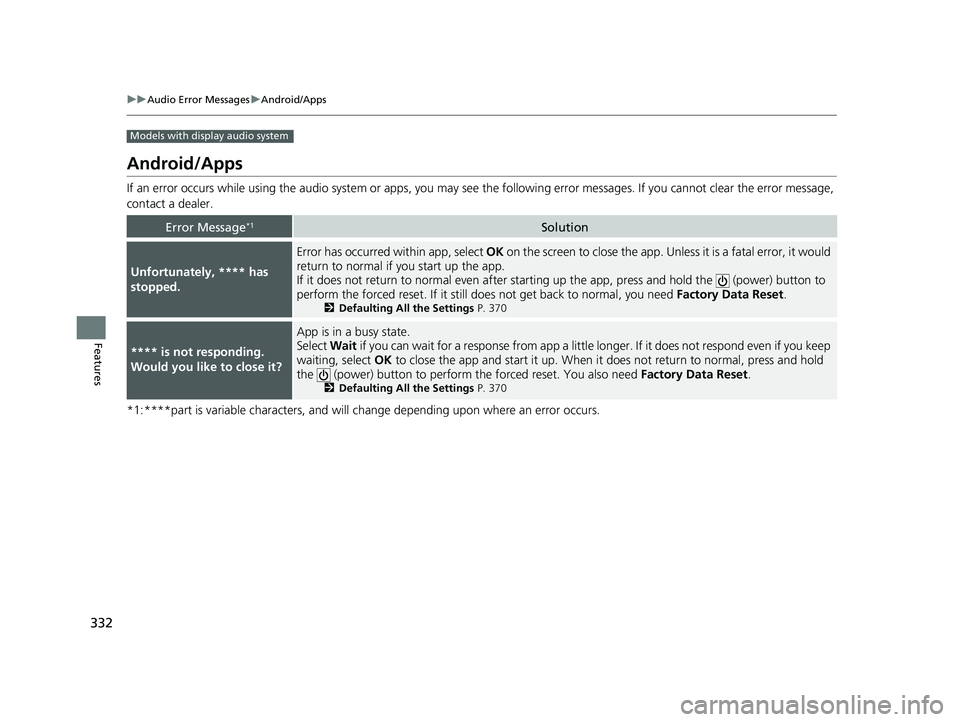
If an error occurs while using the audio system or apps, you may see the followi ng error messages. If you cannot clear the error message,
contact a dealer.
*1:****part is variable characters, and will change depending upon where an error occurs.
Error Message*1Solution
Unfortunately, **** has
stopped.
Error has occurred within app, select OK on the screen to clos e the app. Unless it is a fatal error, it would
return to normal if you start up the app.
If it does not return to normal even after starting up the app, press and hold the (power) button to
perform the forced reset. If it still does not get back to normal, you need Factory Data Reset.
2Defaulting All the Settings P. 370
**** is not responding.
Would you like to close it?
App is in a busy state.
Select Wait if you can wait for a response from app a little longer. If it does not respond even if you keep
waiting, select OK to close the app and start it up. When it does not return to normal, press and hold
the (power) button to perform th e forced reset. You also need Factory Data Reset.
2Defaulting All the Settings P. 370
22 HR-V HDMC-31T7A6600.book 332 ページ 2021年4月12日 月曜日 午前10時50分
Page 357 of 641
355
uuCustomized Features u
Features
*1:Default Setting
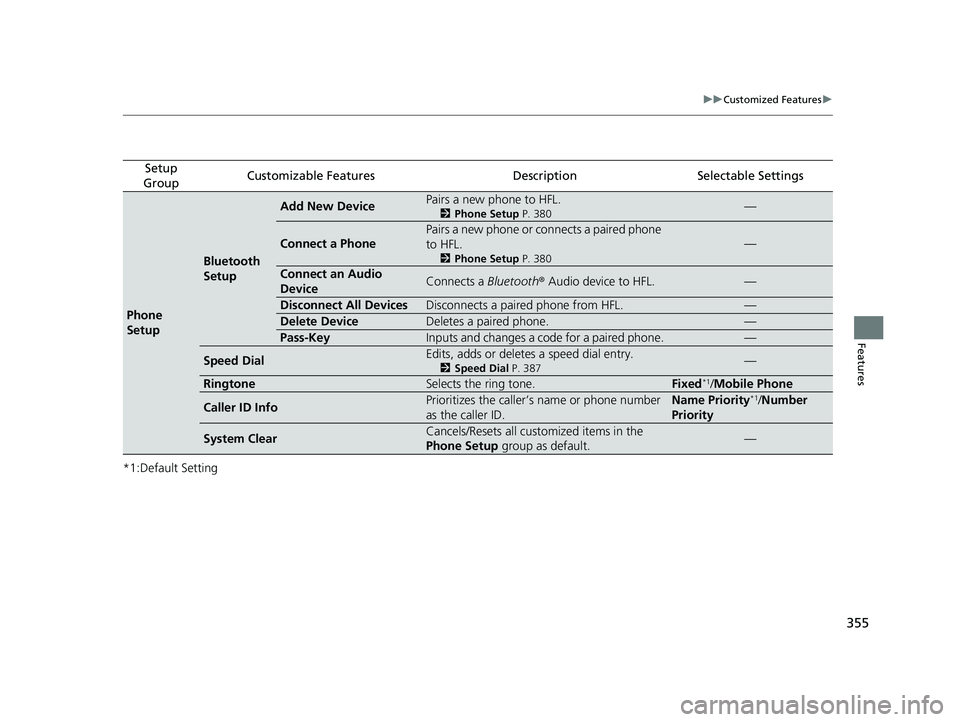
Setup
GroupCustomizable FeaturesDescriptionSelectable Settings
Phone
Setup
Bluetooth
Setup
Add New DevicePairs a new phone to HFL.
2 Phone Setup P. 380—
Connect a Phone
Pairs a new phone or connects a paired phone
to HFL.
2Phone Setup P. 380
—
Connect an Audio
DeviceConnects a Bluetooth® Audio device to HFL.—
Disconnect All DevicesDisconnects a paired phone from HFL.—
Delete DeviceDeletes a paired phone.—
Pass-KeyInputs and changes a code for a paired phone.—
Speed DialEdits, adds or deletes a speed dial entry.
2Speed Dial P. 387—
RingtoneSelects the ring tone.Fixed*1/Mobile Phone
Caller ID InfoPrioritizes the caller’s name or phone number
as the caller ID.Name Priority*1/Number
Priority
System ClearCancels/Resets all customized items in the
Phone Setup group as default.—
22 HR-V HDMC-31T7A6600.book 355 ページ 2021年4月12日 月曜日 午前10時50分
Page 359 of 641
357
uuCustomized Features u
Continued
Features
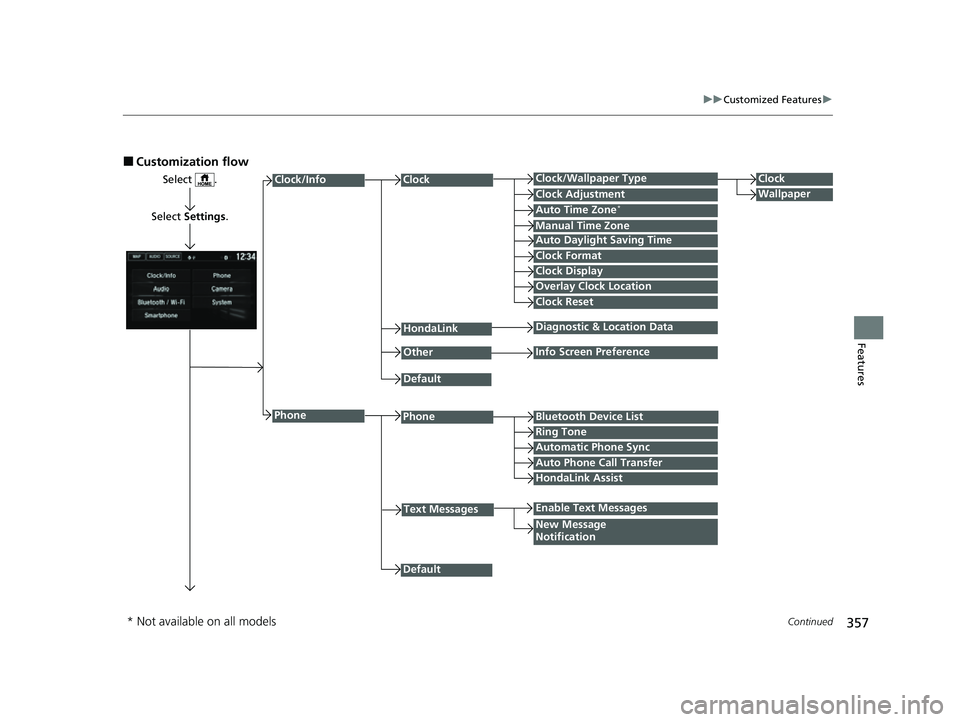
■Customization flow
Select .
Select Settings .
PhoneBluetooth Device List
Manual Time Zone
HondaLink
Auto Time Zone*
Default
New Message
Notification
Phone
Diagnostic & Location Data
Other
Auto Daylight Saving Time
Info Screen Preference
Default
Enable Text Messages
Clock Format
ClockClock/Wallpaper TypeClock
WallpaperClock Adjustment
Clock Display
Overlay Clock Location
Clock Reset
Ring Tone
Text Messages
Auto Phone Call Transfer
HondaLink Assist
Automatic Phone Sync
Clock/Info
* Not available on all models
22 HR-V HDMC-31T7A6600.book 357 ページ 2021年4月12日 月曜日 午前10時50分
Page 360 of 641
358
uuCustomized Features u
Features
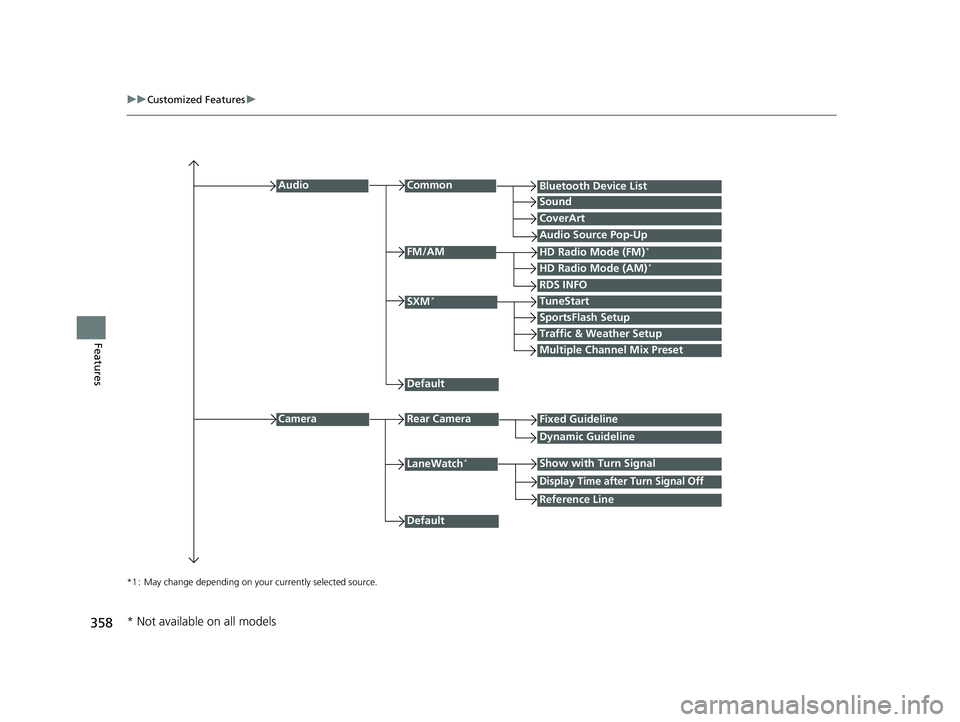
*1 : May change depending on your currently selected source.
Common
Multiple Channel Mix Preset
Audio
Sound
Audio Source Pop-Up
SXM*
HD Radio Mode (AM)*HD Radio Mode (FM)*
TuneStart
Traffic & Weather Setup
CameraRear Camera
LaneWatch*
Default
CoverArt
RDS INFO
Bluetooth Device List
FM/AM
Fixed Guideline
Dynamic Guideline
Show with Turn Signal
Default
Display Time after Turn Signal Off
Reference Line
SportsFlash Setup
* Not available on all models
22 HR-V HDMC-31T7A6600.book 358 ページ 2021年4月12日 月曜日 午前10時50分
Page 362 of 641
360
uuCustomized Features u
Features
Auto Daylight Saving Time
Auto Time Zone*
ClockClock/Wallpaper Type
Clock Adjustment
Manual Time Zone
Clock Format
System
Default
OtherLanguage
Remember Last Screen
Memory Refresh
Clock Display
Clock Reset
Overlay Clock Location
Detail Information
Touch Panel Sensitivity
Refresh Time Adjustment
Clock
Wallpaper
Factory Data Reset
* Not available on all models
22 HR-V HDMC-31T7A6600.book 360 ページ 2021年4月12日 月曜日 午前10時50分
Page 364 of 641
362
uuCustomized Features u
Features
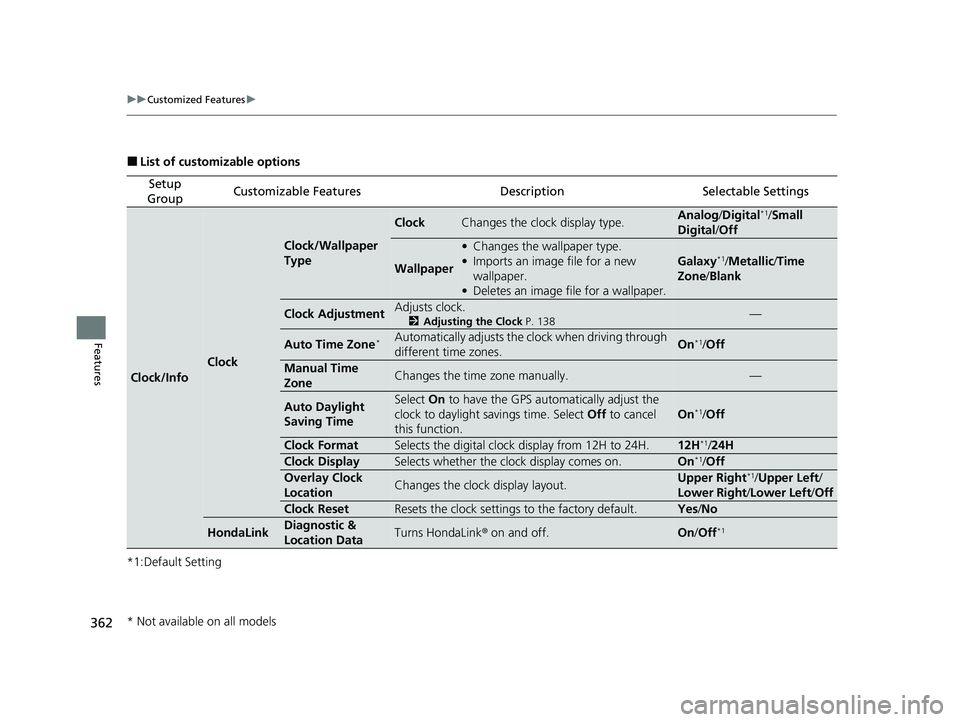
■List of customizable options
*1:Default Setting
Setup
GroupCustomizable FeaturesDescriptionSelectable Settings
Clock/Info
Clock
Clock/Wallpaper
Type
ClockChanges the clock display type.Analog /Digital*1/Small
Digital /Off
Wallpaper
• Changes the wallpaper type.
• Imports an image file for a new
wallpaper.
• Deletes an image file for a wallpaper.
Galaxy*1/Metallic/ Time
Zone /Blank
Clock AdjustmentAdjusts clock.
2 Adjusting the Clock P. 138—
Auto Time Zone*Automatically adjusts the clock when driving through
different time zones.On*1/Off
Manual Time
ZoneChanges the time zone manually.—
Auto Daylight
Saving TimeSelect On to have the GPS automatically adjust the
clock to daylight savings time. Select Off to cancel
this function.
On*1/ Off
Clock FormatSelects the digital clock display from 12H to 24H.12H*1/ 24H
Clock DisplaySelects whether the clock display comes on.On*1/Off
Overlay Clock
LocationChanges the clock display layout.Upper Right*1/ Upper Left /
Lower Right/ Lower Left/Off
Clock ResetResets the clock settings to the factory default.Yes /No
HondaLinkDiagnostic &
Location DataTurns HondaLink ® on and off.On/Off*1
* Not available on all models
22 HR-V HDMC-31T7A6600.book 362 ページ 2021年4月12日 月曜日 午前10時50分
Page 365 of 641
363
uuCustomized Features u
Continued
Features
*1:Default Setting
Setup
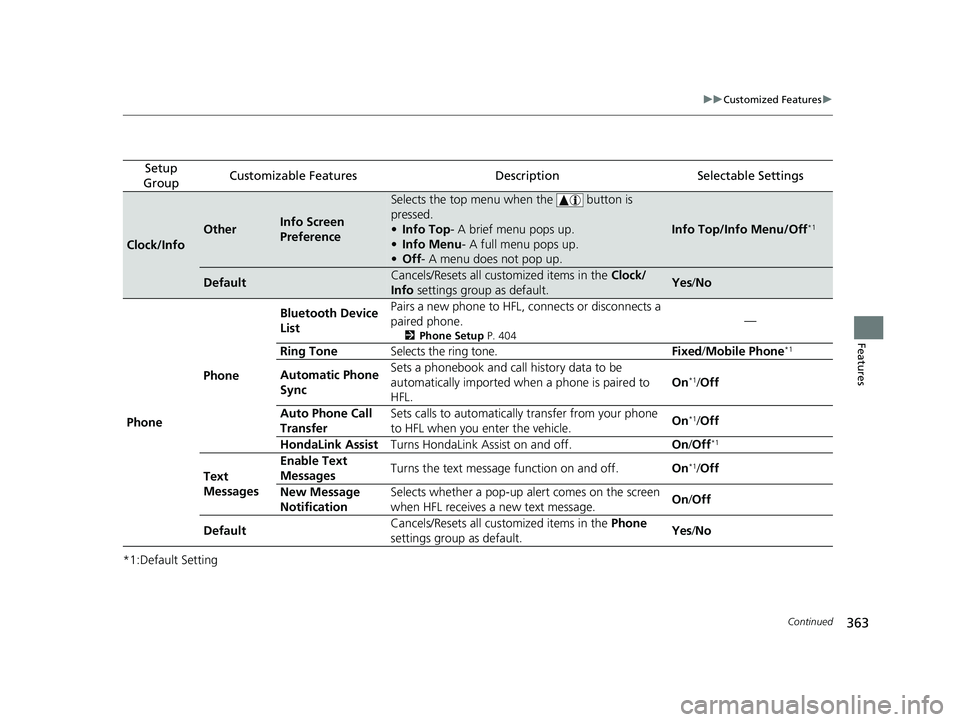
GroupCustomizable FeaturesDescriptionSelectable Settings
Clock/Info
OtherInfo Screen
Preference
Selects the top menu when the button is
pressed.
• Info Top- A brief menu pops up.
• Info Menu - A full menu pops up.
• Off - A menu does not pop up.
Info Top/Info Menu/Off*1
DefaultCancels/Resets all customized items in the Clock/
Info settings group as default.Yes/No
Phone Phone Bluetooth Device
List
Pairs a new phone to HFL, connects or disconnects a
paired phone.
2
Phone Setup P. 404
—
Ring Tone Selects the ring tone. Fixed/Mobile Phone
*1
Automatic Phone
Sync Sets a phonebook and call history data to be
automatically imported when
a phone is paired to
HFL. On*1/
Off
Auto Phone Call
Transfer Sets calls to automatically
transfer from your phone
to HFL when you enter the vehicle. On
*1/
Off
HondaLink Assist Turns HondaLink Assist on and off. On/Off
*1
Text
Messages Enable Text
Messages
Turns the text message function on and off.
On*1/Off
New Message
Notification Selects whether a pop-up alert comes on the screen
when HFL receives a new text message.
On
/Off
Default Cancels/Resets all customized items in the
Phone
settings group as default. Yes
/No
22 HR-V HDMC-31T7A6600.book 363 ページ 2021年4月12日 月曜日 午前10時50分