2022 HONDA HRV oil
[x] Cancel search: oilPage 127 of 641

Continued125
uuGauges and Displays uMulti-Information Display*
Instrument Panel
Shows the estimated average fuel economy of each trip meter in mpg (U.S.) or l/100
km (Canada). The display is updated at set intervals. When a trip meter is reset, the
average fuel economy is also resetM
Shows the estimated distance you can travel on the remaining fuel. This distance is
estimated from the fuel economy of your previous tripsM
Shows the time elapsed since Trip A or Trip B was reset.
Shows the average speed in mph (U.S.) or km /h (Canada) since Trip A or Trip B was
reset.
Shows the instant fuel economy as a bar gr aph in mpg (U.S.) or l/100 km (Canada)M
Shows the remaining oil life and Maintenance Minder
TMM
2 Maintenance MinderTM P. 525
■Average Fuel Economy
■Range
■Elapsed Time
■Average Speed
■Instant Fuel Economy
■Engine Oil Life
1Average Fuel Economy
You can change when to reset the average fuel
economy.
2 Customized Features P. 127
1Elapsed Time
You can change when to reset the elapsed time.
2 Customized Features P. 127
1Average Speed
You can change when to reset the average speed.
2 Customized Features P. 127
22 HR-V HDMC-31T7A6600.book 125 ページ 2021年4月12日 月曜日 午前10時50分
Page 135 of 641

133
uuGauges and Displays uMulti-Information Display*
Continued
Instrument Panel
*1:Default SettingSetup Group Customizable Features
Description Selectable Settings
Door Setup Auto Door Lock
Changes the setting for when the doors
automatically lock. With Vehicle Speed
*1/
Shift From P /OFF
Auto Door Unlock Changes the setting for when the doors
automatically unlock. All Doors When Driver's
Door Opens
*1/
All Doors When Shifted To
Park /
All Doors When Ignition
Switched OFF /
OFF
Key And Remote Unlock
Mode Sets up either the driver’s door or all doors to unlock
on the first operation of
the remote or built-in key. Driver Door
*1/
All Doors
Walk Away Auto Lock
*Changes the settings for the auto lock function
when you walk away from the vehicle. ON
/OFF*1
Keyless Lock Answer
Back LOCK/UNLOCK- The exterior lights flash.
LOCK (2nd push)- The beeper sounds.
ON*1/
OFF
Security Relock Timer Changes the time it takes for the doors to relock and
the security system to set after you unlock the
vehicle without op
ening any door. 90sec
/60sec /30sec
*1
Maintenance
Info.—Resets or cancels the engine oil life display when you
have performed the maintenance service.Cancel /Reset
Default All —Cancels/Resets all the customized settings as
default.
Cancel
/Set
* Not available on all models
22 HR-V HDMC-31T7A6600.book 133 ページ 2021年4月12日 月曜日 午前10時50分
Page 516 of 641

514
Driving
Parking Your Vehicle
When Stopped
1.Depress the brake pedal firmly.
2. With the brake pedal depressed, pull up th e electric parking brake switch slowly,
but fully.
3. Move the shift lever from
(D to (P.
4. Turn off the engine.
u The electric parking brake indicator goes off in about 15 seconds.
Always set the parking brake, in particular if you are parked on an incline.
1 Parking Your Vehicle
Do not park your vehicle near flammable objects,
such as dry grass, oil, or timber.
Heat from the exhaust can cause a fire.
1 When Stopped
NOTICE
The following can dama ge the transmission:•Depressing the accelerator and brake pedals
simultaneously.
•Holding the vehicle in place when facing uphill by
depressing the accelerator pedal.
•Moving the shift lever into ( P before the vehicle
stops completely.
In extremely cold temper atures, the parking brake
may freeze up if applied. If such temperatures are
expected, do not apply the parking brake but, if
parking on a slope, either turn the front wheels so
they will contact the curb if the vehicle rolls down the
slope or block the wheels to keep the vehicle from
moving. If you do not take either precaution, the
vehicle may roll unexpect edly, leading to a crash.
3WARNING
The vehicle can roll away if left unattended
without confirming that Park is engaged.
A vehicle that rolls away could cause a crash
resulting in serious injury or death.
Always keep your foot on the brake pedal
until you have confirmed that
( P is shown
on the shift posi tion indicator.
22 HR-V HDMC-31T7A6600.book 514 ページ 2021年4月12日 月曜日 午前10時50分
Page 522 of 641
520
Driving
Fuel Economy and CO2 Emissions
Improving Fuel Economy and Reducing CO2
Emissions
Achieving fuel economy and reducing CO2 emissions is dependent on several
factors, including driving conditions, load weight, idling time, driving habits, and
vehicle condition. Depending on these and other factors, you may not achieve the
rated fuel economy of this vehicle.
You can optimize your fuel economy with proper maintenance of your vehicle.
Always maintain your vehicle in accordance with the messages displayed on the
information display.
• Use engine oil with the viscosity recommended.
2 Recommended Engine Oil P. 535
•Maintain the specified tire pressure.
• Do not load the vehicl e with excess cargo.
• Keep your vehicle clean. A buildup of snow or mud on your vehicle’s underside
adds weight and increases wind resistance.
■Maintenance and Fuel Economy
1Improving Fuel Economy and Reducing CO2 Emissions
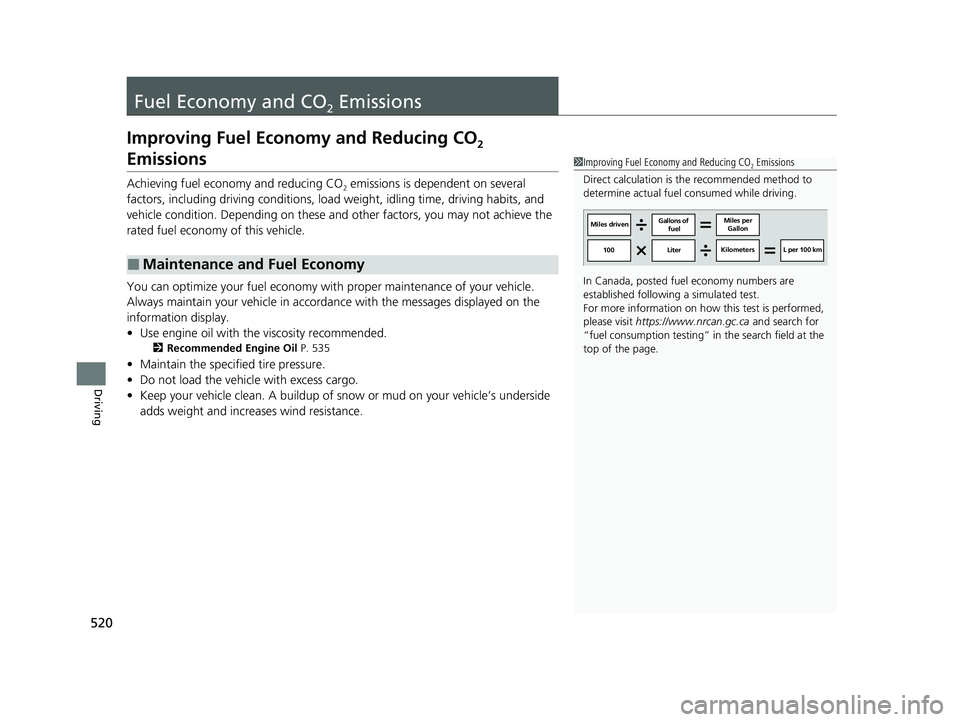
Direct calculation is the recommended method to
determine actual fuel consumed while driving.
In Canada, posted fuel economy numbers are
established following a simulated test.
For more information on how this test is performed,
please visit https://www.nrcan.gc.ca and search for
“fuel consumption testing” in the search field at the
top of the page.
Miles driven Gallons of
fuel Miles per
Gallon
100 Liter Kilometers L per 100 km
22 HR-V HDMC-31T7A6600.book 520 ページ 2021年4月12日 月曜日 午前10時50分
Page 523 of 641

521
Maintenance
This chapter discusses basic maintenance.
Before Performing MaintenanceInspection and Maintenance ............ 522
Safety When Performing Maintenance .... 523
Parts and Fluids Used in Maintenance Service ........................................... 524
Maintenance Minder
TM..................... 525
Maintenance Under the Hood
Maintenance Items Un der the Hood .... 533
Opening the Hood ........................... 534
Recommended Engine Oil ................ 535
Oil Check ......................................... 536
Adding Engine Oil ............................ 537
Changing the Engine Oil and Oil Filter ..... 538
Engine Coolant ................................ 540
Transmission Fluid ............................ 542
Brake Fluid ....................................... 543
Refilling Window Washer Fluid......... 544
Replacing Light Bulbs ....................... 545
Checking and Maintaining Wiper Blades.... 555Checking and Maintaining Tires
Checking Tires ................................. 559
Tire and Loading Information Label .. 561
Tire Labeling .................................... 561
DOT Tire Quality Grading (U.S. Vehicles).. 563Wear Indicators................................ 565 Tire Service Life ................................ 565
Tire and Wheel Replacement ........... 566
Tire Rotation .................................... 567
Winter Tires ..................................... 568
Battery ............................................... 570
Remote Transmitter Care
Replacing the Remote Battery .......... 572
Heating and Cooling System
*/Climate
Control System* Maintenance ....... 574
Cleaning Interior Care .................................... 575
Exterior Care.................................... 577
Accessories and Modifications ........ 580
* Not available on all models
22 HR-V HDMC-31T7A6600.book 521 ページ 2021年4月12日 月曜日 午前10時50分
Page 524 of 641
522
Maintenance
Before Performing Maintenance
Inspection and Maintenance
For your safety, perform all listed inspections and maintenance to keep your vehicle
in good condition. If you become aware of an y abnormality (noise, smell, insufficient
brake fluid, oil residue on the ground, etc.), have your vehicle inspected by a dealer.
(Note, however, that service at a dealer is not mandatory to keep your warranties in
effect.)
■Routine inspections
Perform inspections before long distance trips, when washing the vehicle, or when
refueling.
2 Maintenance P. 29
■Periodic inspections
• Check the brake fluid level monthly.
2 Brake Fluid P. 543
•Check the tire pressure monthly. Examin e the tread for wear and foreign objects.
2Checking and Maintaining Tires P. 559
•Check the operation of the exterior lights monthly.
2 Replacing Light Bulbs P. 545
•Check the condition of the wiper bl ades at least every six months.
2Checking and Maintaining Wiper Blades P. 555
■Types of Inspection and Maintenance
1Inspection and Maintenance
Maintenance, replacement, or repair of
emissions control devices and systems may be
done by any automotive repair establishment or
individuals using parts that are “certified” to
EPA standards.
According to state and fede ral regulations, failure to
perform maintenance on the maintenance main
items marked with # will not void your emissions
warranties. However, all ma intenance services should
be performed in accordan ce with the intervals
indicated by the information display
*/multi-
information display*.
2 Maintenance Service Items P. 527, 531
If you want to perform complex maintenance tasks
that require more skills a nd tools, you can purchase a
subscription to the Service Express website at
www.techinfo.honda.com .
2 Authorized Manuals P. 628
If you want to perform ma intenance yourself, make
sure that you have the necessary tools and skills first.
After performing maintenanc e, update the records in
the separate maintenance booklet.
U.S. models
* Not available on all models
22 HR-V HDMC-31T7A6600.book 522 ページ 2021年4月12日 月曜日 午前10時50分
Page 527 of 641

525Continued
Maintenance
Maintenance MinderTM
If the engine oil life is less than 15%, you will see the Maintenance Minder messages
appear on the information display or the multi-information display every time you
turn the ignition switch to ON
(w*1. The messages notify you when to change the
engine oil, or when to bring your vehicle to a dealer for indicated maintenance
services.
To Use Maintenance MinderTM
1. Turn the ignition switch to ON (w.
2. Press the (select/reset) knob repeatedly
until the engine oil life appears on the
information display.
The Maintenance Minder indicator ( ) stays
on in the instrument panel after the engine oil
life becomes 0% . Have the indicated
maintenance done by a dealer immediately.
*1: Models with the keyless access system have an ENGINE START/STOP button instead of an
ignition switch.
■Displaying the Engine Oil Life
Models with info rmation display
1Displaying the Engine Oil Life
Based on the engine ope rating conditions, the
remaining engine oi l life is calculated and displayed
as a percentage.
Displayed Engine Oil Life (%)Calculated Engine Oil Life (%)
100 100 to 91
9090 to 81
80 80 to 71
7070 to 61
60 60 to 51
5050 to 41
40 40 to 31
3030 to 21
20 20 to 16
1515 to 11
10 10 to 6
55 to 1
00
22 HR-V HDMC-31T7A6600.book 525 ページ 2021年4月12日 月曜日 午前10時50分
Page 528 of 641

526
uuMaintenance MinderTMuTo Use Maintenance MinderTM
Maintenance
To switch the display, pres s the (select/reset) knob.
■Maintenance Minder Messages on the Information Display
Oil Life DisplayExplanationInformationMaintenance Minder Indicator
The engine oil life indicator starts
to appear along with other due
soon maintenance item codes
when the remaining oil life
becomes 15 percent.The engine oil is approaching the
end of its service life.
Starts to come on when the
remaining engine oil life becomes
15 percent.
It goes off when the display is
switched.
The SERVICE message also starts
to appear along with the engine oil
life indicator and the maintenance
item codes.The engine oil has almost reached
the end of its service life, and the
maintenance items should be
inspected and serviced as soon as
possible.
The remaining engine oil life has
passed its service life, and a
negative distance appears after
driving over 10 miles. The negative
distance on the display blinks.The engine oil life has passed.
The maintenance items must be
inspected and serviced
immediately.
Stays on as a reminder even when
the display is switched.
22 HR-V HDMC-31T7A6600.book 526 ページ 2021年4月12日 月曜日 午前10時50分