Page 139 of 641

137
Controls
This chapter explains how to operate the various controls necessary for driving.
Clock.................................................................. 138
Locking and Unlocking the Doors
Key................................................................. 140
Low Keyless Remote Signal Strength
*............. 142Locking/Unlocking the Doors from the Outside ... 143Locking/Unlocking the Doors from the Inside .. 152
Childproof Door Locks .................................... 155
Auto Door Locking/Unlocking ......................... 156
Customizing the Auto Door Locking/Unlocking Setting
*....................................................... 157
Tailgate ............................................................. 160
Opening/Closing the Tailgate.......................... 161
Security System Immobilizer System......................................... 163
Security System Alarm .................................... 163
Opening and Closing the Windows ................ 166
Moonroof
*........................................................ 168 Operating the Switches Around the Steering
Wheel
Ignition Switch ............................................... 169
ENGINE START/STOP Button ........................... 170
Ignition Switch and Power Mode Comparison .....173Turn Signals ................................................... 174
Light Switches ................................................ 175
Fog Lights
*..................................................... 178
Daytime Running Lights .................................. 179
Auto High-Beam
*........................................... 180
Wipers and Washers....................................... 183
Defogger/Heated Door Mirror*/Heated Windshield*..... 186Brightness Control.......................................... 188
Adjusting the Steering Wheel ......................... 190
Models without keyless access system
Models with keyless access system
Adjusting the Mirrors Interior Rearview Mirror.................................. 191
Power Door Mirrors ........................................ 193
Adjusting the Seats Front Seats ..................................................... 194
Rear Seats ...................................................... 197
Maintain a Proper Sitting Position ................... 200
Head Restraints .............................................. 201
Armrest .......................................................... 204
Interior Lights/Interior Convenience Items Interior Lights ................................................. 205
Interior Convenience Items ............................. 207
Heating and Cooling System
*Using Vents, Heating and A/C ........................ 216
Climate Control System*Using Automatic Climate Control ................... 220
Automatic Climate Control Sensors ................ 229
* Not available on all models
22 HR-V HDMC-31T7A6600.book 137 ページ 2021年4月12日 月曜日 午前10時50分
Page 184 of 641

uuOperating the Switches Around the Steering Wheel uAuto High-Beam*
182
Controls
You can turn the auto high-beam system off. If you want to turn the system off or
on, turn the igniti on switch to ON
(w*1, then carry out the following procedures
while the vehicle is stationary.
To turn the system off:
With the light switch is in AUTO, pull the lever
toward you and hold it for at least 40 seconds.
After the auto high-beam indicator light blinks
twice, release the lever.
To turn the system on:
With the light switch is in AUTO, pull the lever
toward you and hold it for at least 30 seconds.
After the auto high-beam indicator light blinks
once, release the lever.
*1: Models with the keyless access system have an ENGINE START/STOP button instead of an
ignition switch.
■How to Turn Off the Auto High-Beam1 How to Use the Auto High-Beam
If the Some Driver Assist Systems Cannot
Operate: Camera Temperature Too High message
appears:
•Use the climate control system to cool down the
interior and, if necessary, also use defroster mode
with the airflow directed toward the camera.
•Start driving the vehicle to lower the windshield
temperature, which cool s down the area around
the camera.
If the Some Driver Assist Systems Cannot
Operate: Clean Front Windshield message
appears:
•Park your vehicle in a sa fe place, and clean the
windshield. If the message does not disappear after
you have cleaned the winds hield and driven for a
while, have your vehicle checked by a dealer.
1 How to Turn Off the Auto High-Beam
If you turn the au to high-beam system off, the system
does not operate until you turn the system on.
Park in a safe place before turning the system off or
on.
AUTO Position
22 HR-V HDMC-31T7A6600.book 182 ページ 2021年4月12日 月曜日 午前10時50分
Page 188 of 641
186
uuOperating the Switches Around the Steering Wheel uDefogger/Heated Door Mirror*/Heated Windshield*
Controls
Defogger/Heated Door Mirror*/Heated Windshield*
Press the rear defogger button or touch the
icon to defog the rear window and mirrors*
when the ignition switch is in ON
(w*1.
The rear defogger and heated door mirrors
*
automatically switch off after 10-30 minutes
depending on the outside temperature.
However, if the outside temperature is 32°F
(0°C) or below, they do not automatically
switch off.
*1: Models with the keyless access system have an ENGINE START/STOP button instead of an
ignition switch.
■Rear Defogger/Heated Door Mirror* Button1 Rear Defogger/Heated Door Mirror* Button
This system consumes a lot of power, so turn it off
when the window has been defogged.
Also, do not use the system for a long time while the
engine is idling. This may weaken the battery, making
it difficult to start the engine.
Models with heating and cooling system
Models with climate control system
Models with climate control system
* Not available on all models
22 HR-V HDMC-31T7A6600.book 186 ページ 2021年4月12日 月曜日 午前10時50分
Page 222 of 641
220
Controls
Climate Control System*
Using Automatic Climate Control
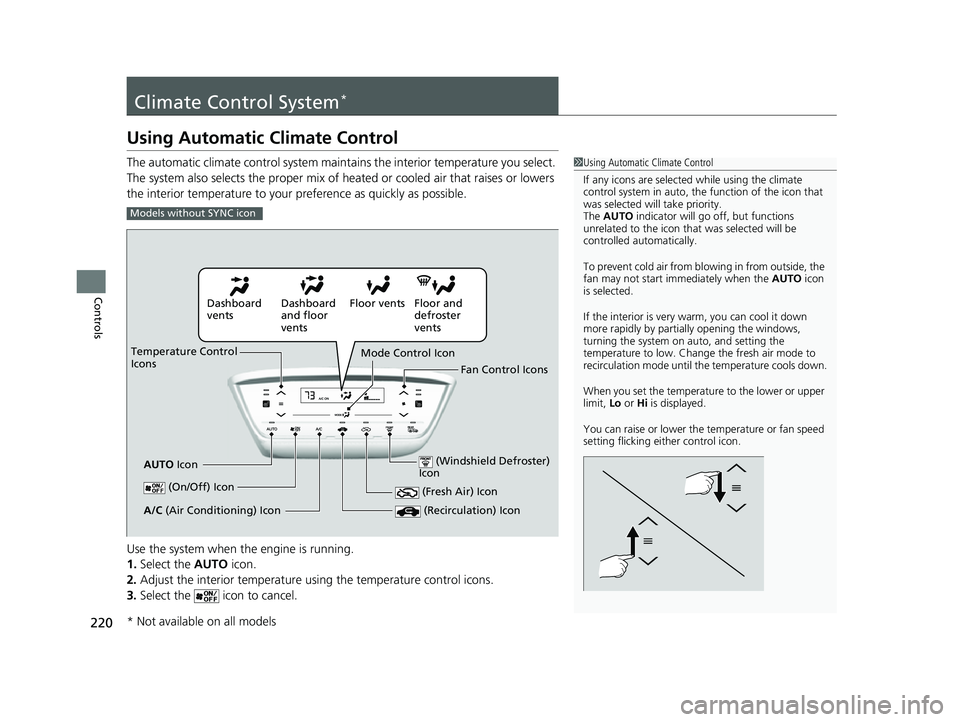
The automatic climate control system maintains the interior temperature you select.
The system also selects the proper mix of heated or cooled air that raises or lowers
the interior temperature to your pr eference as quickly as possible.
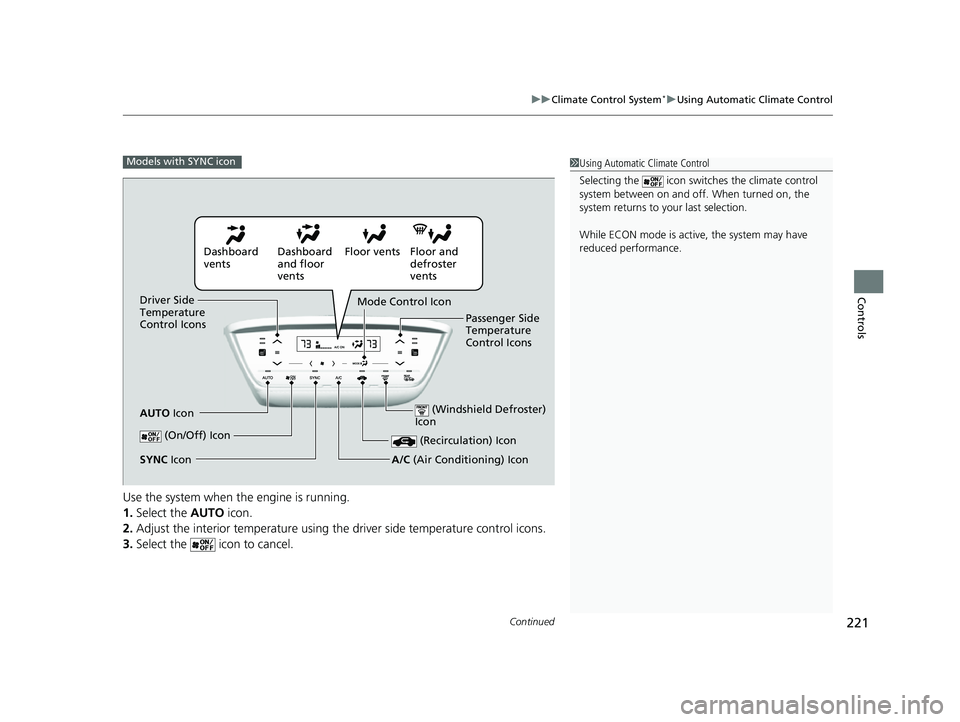
Use the system when the engine is running.
1. Select the AUTO icon.
2. Adjust the interior temperature us ing the temperature control icons.
3. Select the icon to cancel.1Using Automatic Climate Control
If any icons are selected while using the climate
control system in auto, the function of the icon that
was selected will take priority.
The AUTO indicator will go off, but functions
unrelated to the icon that was selected will be
controlled automatically.
To prevent cold air from bl owing in from outside, the
fan may not start i mmediately when the AUTO icon
is selected.
If the interior is very warm, you can cool it down
more rapidly by partial ly opening the windows,
turning the system on auto, and setting the
temperature to low. Change the fresh air mode to
recirculation mode until the temperature cools down.
When you set the temperat ure to the lower or upper
limit, Lo or Hi is displayed.
You can raise or lower the temperature or fan speed
setting flicking either control icon.
Models without SYNC icon
Dashboard
vents Dashboard
and floor
ventsFloor vents Floor and
defroster
vents
Temperature Control
Icons
AUTO Icon Mode Control Icon
Fan Control Icons
(On/Off) Icon
(Recirculation) IconA/C (Air Conditioning) Icon (Fresh Air) Icon
(Windshield Defroster)
Icon
* Not available on all models
22 HR-V HDMC-31T7A6600.book 220 ページ 2021年4月12日 月曜日 午前10時50分
Page 223 of 641
Continued221
uuClimate Control System*uUsing Automatic Climate Control
Controls
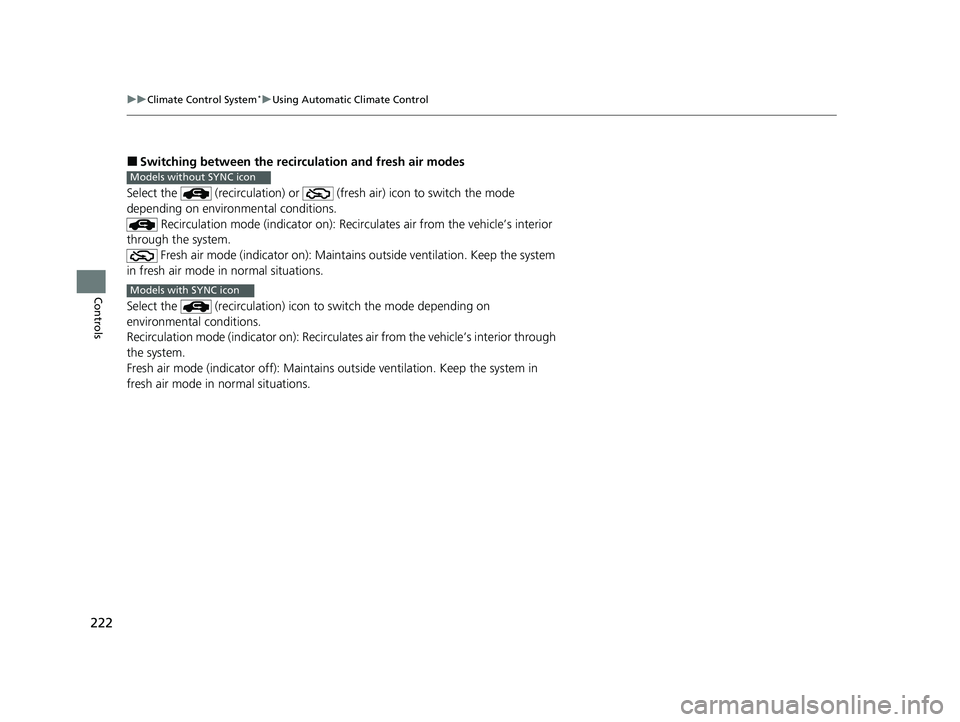
Use the system when the engine is running.
1. Select the AUTO icon.
2. Adjust the interior temperature using th e driver side temperature control icons.
3. Select the icon to cancel.
1Using Automatic Climate Control
Selecting the icon switches the climate control
system between on and off. When turned on, the
system returns to your last selection.
While ECON mode is active, the system may have
reduced performance.Models with SYNC icon
Dashboard
vents Dashboard
and floor
ventsFloor vents Floor and
defroster
vents
Driver Side
Temperature
Control Icons
AUTO Icon Mode Control Icon
Passenger Side
Temperature
Control Icons
(On/Off) Icon
(Recirculation) Icon
A/C (Air Conditioning) IconSYNC Icon
(Windshield Defroster)
Icon
22 HR-V HDMC-31T7A6600.book 221 ページ 2021年4月12日 月曜日 午前10時50分
Page 224 of 641
222
uuClimate Control System*uUsing Automatic Climate Control
Controls
■Switching between the recirc ulation and fresh air modes
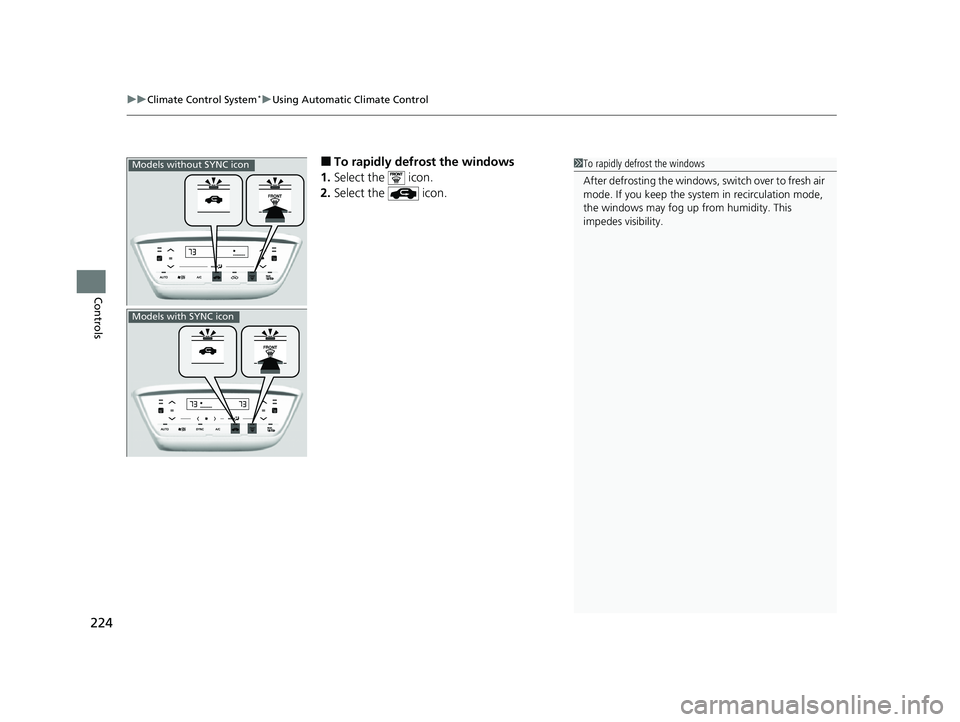
Select the (recirculation ) or (fresh air) icon to switch the mode
depending on environmental conditions. Recirculation mode (indicator on): Reci rculates air from the vehicle’s interior
through the system.
Fresh air mode (indicator on): Maintain s outside ventilation. Keep the system
in fresh air mode in normal situations.
Select the (recirculation) icon to switch the mode depending on
environmental conditions.
Recirculation mode (indicator on): Recirculates air from the vehicle’s interior through
the system.
Fresh air mode (indicator off): Maintains ou tside ventilation. Keep the system in
fresh air mode in normal situations.
Models without SYNC icon
Models with SYNC icon
22 HR-V HDMC-31T7A6600.book 222 ページ 2021年4月12日 月曜日 午前10時50分
Page 225 of 641
Continued223
uuClimate Control System*uUsing Automatic Climate Control
Controls
Select the icon to turn the air conditioning
system on and automa tically switch the
system to fresh air mode.
Select the icon again to turn off, the
system returns to the previous settings.
■Defrosting the Windshield and Windows1 Defrosting the Windshield and Windows
For your safety, make sure you have a clear view
through all the windows before driving.
Do not set the temperatur e near the upper or lower
limit.
When cold air hits the windshield, the outside of the
windshield may fog up.
If the side windows fog up, adjust the vents so that
the air hits the side windows.
Models without SYNC icon
Models with SYNC icon
22 HR-V HDMC-31T7A6600.book 223 ページ 2021年4月12日 月曜日 午前10時50分
Page 226 of 641
uuClimate Control System*uUsing Automatic Climate Control
224
Controls
■To rapidly defrost the windows
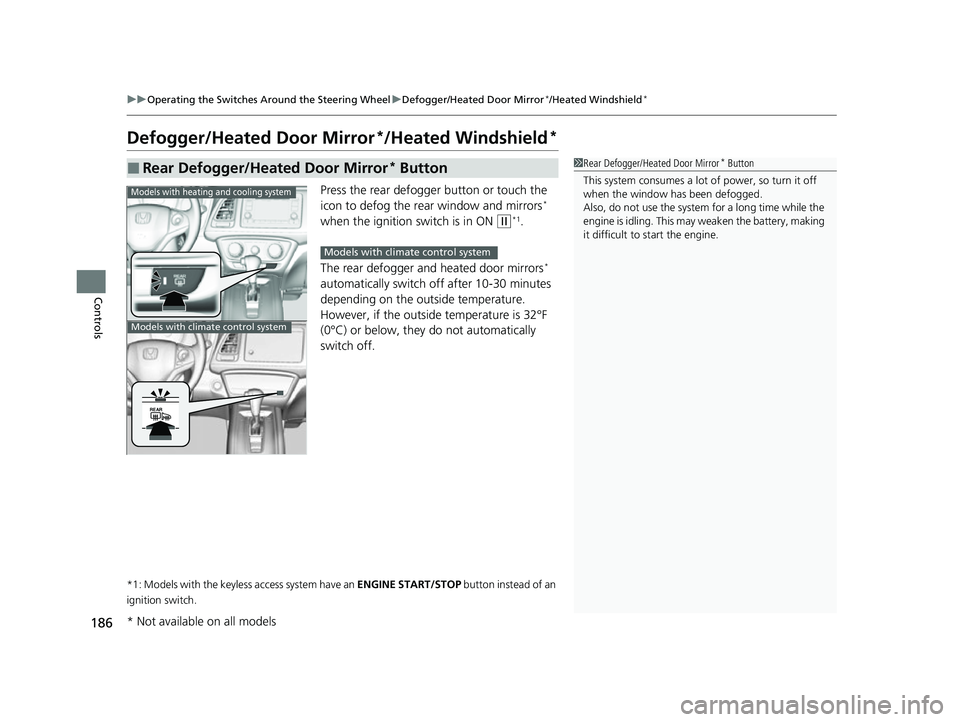
1. Select the icon.
2. Select the icon.1To rapidly defrost the windows
After defrosting the windows, switch over to fresh air
mode. If you keep the syst em in recirculation mode,
the windows may fog up from humidity. This
impedes visibility.Models without SYNC icon
Models with SYNC icon
22 HR-V HDMC-31T7A6600.book 224 ページ 2021年4月12日 月曜日 午前10時50分