Page 236 of 641
234
uuAudio System uAudio System Theft Protection
Features
Audio System Theft Protection
The audio system is disabled when it is disconnected from the power source, such as
when the battery is disconnected or goes dead. In certain conditions, the system
may display a code entry screen. If this occurs, reactivate the audio system.
■Reactivating the audio system
1. Turn the ignition switch to ON
(w*1.
2. Turn on the audio system.
3. Press and hold the audio system power button for more than two seconds.
u The audio system is reac tivated when the audio co ntrol unit establishes a
connection with the vehicle control unit. If the control unit fails to recognize
the audio unit, you must go to a dealer and have the audio unit checked.
*1: Models with the keyless access system have an ENGINE START/STOP button instead of an
ignition switch.
22 HR-V HDMC-31T7A6600.book 234 ページ 2021年4月12日 月曜日 午前10時50分
Page 261 of 641
259
Features
Audio System Basic Operation
To use the audio system function, the ignition swit ch must be in ACCESSORY (q or
ON
(w*1.
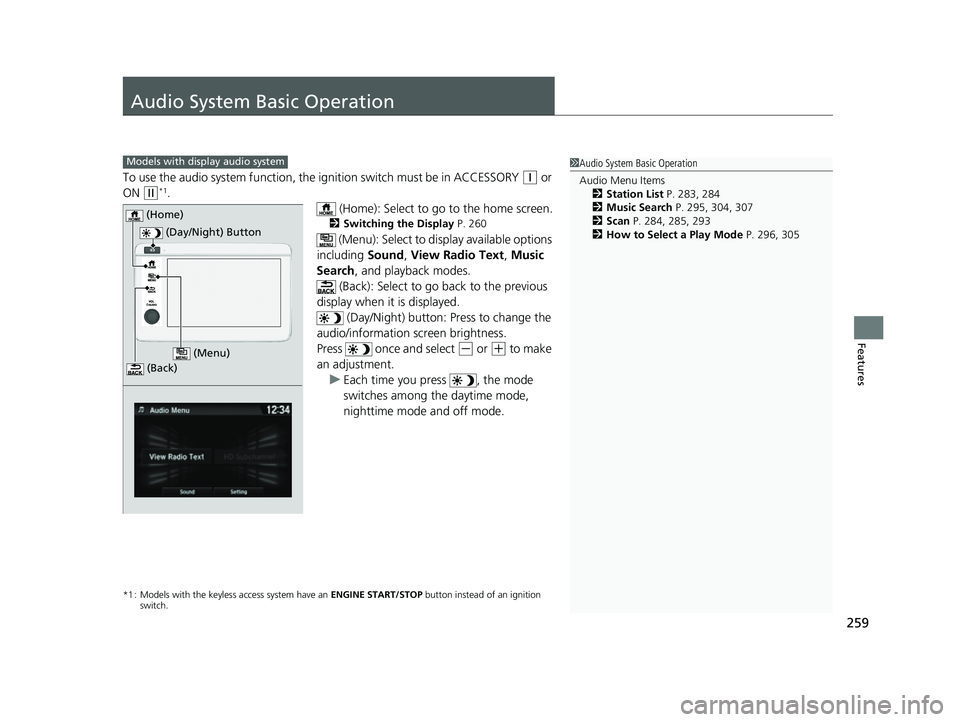
(Home): Select to go to the home screen.
2Switching the Display P. 260
(Menu): Select to display available options
including Sound, View Radio Text , Music
Search , and playback modes.
(Back): Select to go back to the previous
display when it is displayed. (Day/Night) button: Press to change the
audio/information screen brightness.
Press once and select
(- or (+ to make
an adjustment. u Each time you press , the mode
switches among the daytime mode,
nighttime mode and off mode.
*1 : Models with the keyless access system have an ENGINE START/STOP button instead of an ignition
switch.
1 Audio System Basic Operation
Audio Menu Items
2 Station List P. 283, 284
2 Music Search P. 295, 304, 307
2 Scan P. 284, 285, 293
2 How to Select a Play Mode P. 296, 305Models with display audio system
(Day/Night) Button
(Home)
(Menu)
(Back)
22 HR-V HDMC-31T7A6600.book 259 ページ 2021年4月12日 月曜日 午前10時50分
Page 314 of 641
uuAudio System Basic Operation uHondaLink ®
312
Features
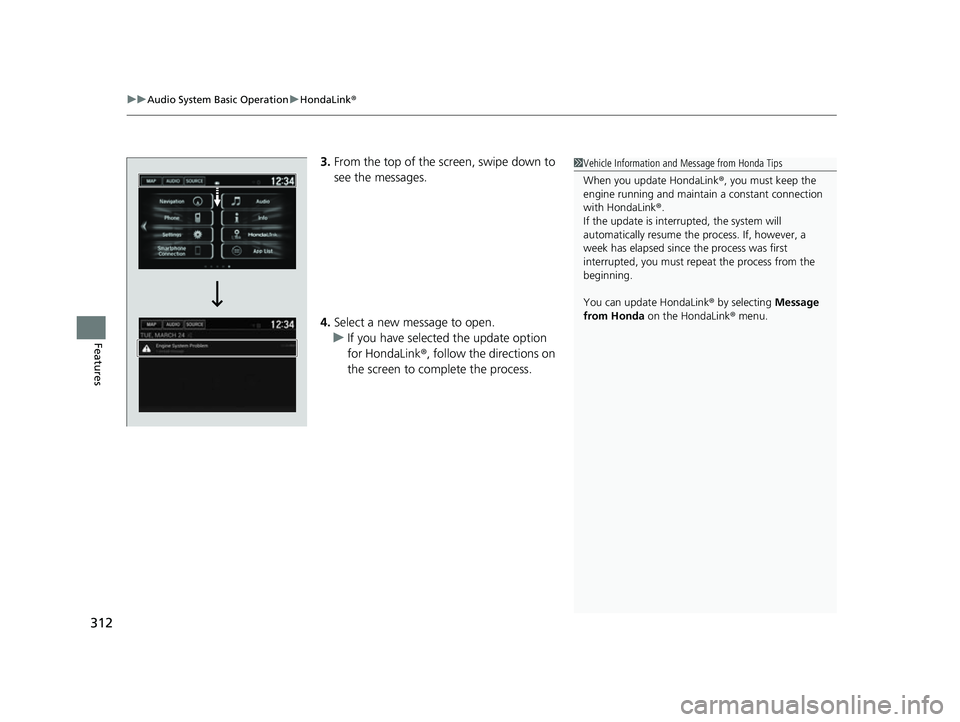
3.From the top of the screen, swipe down to
see the messages.
4. Select a new message to open.
u If you have selected the update option
for HondaLink ®, follow the directions on
the screen to complete the process.1 Vehicle Information and Message from Honda Tips
When you update HondaLink ®, you must keep the
engine running and maintain a constant connection
with HondaLink ®.
If the update is interr upted, the system will
automatically resume the process. If, however, a
week has elapsed since the process was first
interrupted, you must repeat the process from the
beginning.
You can update HondaLink ® by selecting Message
from Honda on the HondaLink ® menu.
22 HR-V HDMC-31T7A6600.book 312 ページ 2021年4月12日 月曜日 午前10時50分
Page 341 of 641

339
uuGeneral Information on the Audio System uHonda App License Agreement
Continued
Features
(b) Restrictions on Use. The licenses granted under this AGREEMENT do not perm it you to use the SOFTWARE or SERVICES on a device
other than your VEHICLE. As a condition of using the SOFT WARE and SERVICES, you agree that you may not and will not:
6. Intellectual Property Rights. All title and intellectual property rights in and to the SOFTWARE and SERVICES, the accompanying
DOCUMENTATION, and all copies of the SOFTWARE or SERVICES are owned by HONDA, PROVIDERS, or their suppliers or licensors. This
AGREEMENT does not grant you any rights in connection with any trademarks or serv ice marks of HONDA, PROVIDERS, or their licensors,
affiliates, or suppliers. (1) copy, download, distribute, mo
dify, publish, sell, rent, lease, lend, license, sublicense, reuse, or create derivative work s of the
SOFTWARE or SERVICES or any of the content or other material within the SOFTWARE or SERVICES, including without limitation,
HONDA or PROVIDER names, logos, or any other trademarks of HONDA or PROVIDERS or used in association with the SOFTWARE or
any SERVICES, except as required to use the SOFTWARE or SERVICES in accordance with this AGREEMENT, any applicable PROVIDER
TERMS, and the DOCUMENTATION;
(2) access or use the SOFTWARE or SERVICES in any manner intended to damage or impair the operation of the SOFTWARE or SERVICES
or interfere with anyone else’s use an d enjoyment of the SOFTWARE or SERVICES;
(3) access or attempt to access any system or server on which the SOFTWARE or SERVICES is hosted or modify or alter the SOFTWARE
or SERVICES in any way;
(4) use the SOFTWARE or SERVICES for any unlawful purpose, or in violation of any third party rights;
(5) use the SOFTWARE or SERVICES in violation of any applicable traffic regulations, rules or laws, including but not limited t o any driver
distraction laws, rules or regulations;
(6) violate the terms of this AGREEMENT, any HONDA TERMS, any PROVIDER TERMS or other applicable third-party terms, conditions,
and privacy policies; or
(7) reverse engineer, decomp ile, disassemble, attempt to derive the source code of, nor permit others to reverse engineer, deco mpile,
or disassemble, or attempt to derive the source code of the SOFT WARE or SERVICES, except and only to the extent that such activity is
expressly permitted (a) by applicable law no twithstanding this limitation or (b) the terms of applicable free or opensource sof tware
licenses.
22 HR-V HDMC-31T7A6600.book 339 ページ 2021年4月12日 月曜日 午前10時50分
Page 345 of 641

343
uuGeneral Information on the Audio System uHonda App License Agreement
Continued
Features
E. Information Collection and Storage
1. Information Collection , Use, Transmission and Storage of Data. Consent to Use of Data:
You agree that HONDA and PROVIDERS may
collect and use your information gathered in any manner as part of product support services related to the SOFTWARE or related services.
HONDA may share such information with third parties, including, without limitation, PR OVIDERS, third party software and services
suppliers, their affiliates and/or their designated agents, solely to improve their products or to provide services or technolo gies to you.
HONDA, third party software and syst ems suppliers, their affiliates and/or their de signated agent may disclose this information to others,
but not in a form that pe rsonally identifies you.
2. Information Storage.
Depending on the type of mult imedia system you have in your VEHICLE, certain information may be stored for ease
of use of the SOFTWARE including, without limitation, search hi story, location history in certain applications, previous and saved
destinations, map locations within certain applications, and device numbers and contact information.
(a) Vehicle Health Information.
Your VEHICLE may remotely transmit information re garding the status and health of your VEHICLE
(“VEHICLE INFORMATION”) to HONDA without notification to you. VEHICLE INFORMATION may contain VEHICLE maintenance and
malfunction status that is derived from VEHICLE diagnostic data and includes, but is not limited to, status of powered doors and windows,
battery life data, battery charging data, VE HICLE speed, coolant temperature, air comp ressor revolution, output power, warning codes,
diagnostic trouble codes, fuel injection volume, and engine rotati ons per minute. VEHICLE HEALTH INFORMATION may be used by HON DA
for research and development, to deliver HONDA SERVICES and informat ion to you, and to contact you, and is retained only for a period
of time necessary to fulfill these goals.
(b) VEHICLE Geolocation Data (non-navigation/map based).
If you opt-in to geolocation-based SERVICES, your vehicle’s geolocation data
(latitude and longitude) will be automatically sent from your VEHICLE to HONDA and PROVIDERS.
(c) You understand that the inputting or uploading of information to your VEHICLE’s multimedia system or the SOFTWARE or SERVIC ES is
at your own risk and that HONDA is not responsible for unauthori zed access to or use of any personal or other information. All information
uploaded to the SOFTWARE and SERVICES may be stored on your VEHICLES’s multimedia system and you understand that the security and
safety of your VEHICLE’s multimedia system is your sole responsibility.
22 HR-V HDMC-31T7A6600.book 343 ページ 2021年4月12日 月曜日 午前10時50分
Page 358 of 641
356
Features
Customized Features
Use the audio/information screen to customize certain features.
■How to customize
With the ignition switch in ON
(w*1, select Settings , then select a setting item.
*1 : Models with the keyless access system have an ENGINE START/STOP button instead of an ignition
switch.
1 Customized Features
When you customize settings:
•Make sure that the vehicle is at a complete stop.
•Shift to (P.
To customize other features, select Settings.
2 List of customizable options P. 362
Models with display audio system
Audio/Information Screen
22 HR-V HDMC-31T7A6600.book 356 ページ 2021年4月12日 月曜日 午前10時50分
Page 370 of 641
368
uuCustomized Features u
Features
*1:Default Setting
*2:Models with the keyless access system have an ENGINE START/STOP button instead of an ignition switch.
Setup
GroupCustomizable FeaturesDescriptionSelectable Settings
System
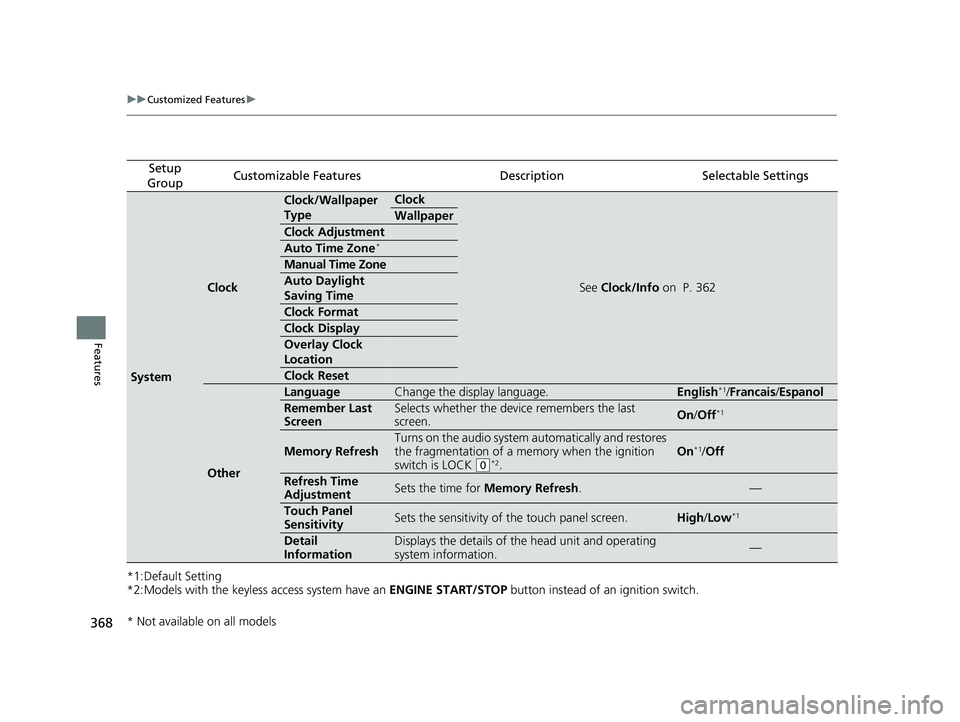
Clock
Clock/Wallpaper
TypeClock
See Clock/Info on P. 362
Wallpaper
Clock Adjustment
Auto Time Zone*
Manual Time Zone
Auto Daylight
Saving Time
Clock Format
Clock Display
Overlay Clock
Location
Clock Reset
Other
LanguageChange the display language.English*1/Francais /Espanol
Remember Last
ScreenSelects whether the device remembers the last
screen.On /Off*1
Memory Refresh
Turns on the audio system automatically and restores
the fragmentation of a memory when the ignition
switch is LOCK
(0*2.
On*1/ Off
Refresh Time
AdjustmentSets the time for Memory Refresh .—
Touch Panel
SensitivitySets the sensitivity of the touch panel screen.High/Low*1
Detail
InformationDisplays the details of th e head unit and operating
system information.—
* Not available on all models
22 HR-V HDMC-31T7A6600.book 368 ページ 2021年4月12日 月曜日 午前10時50分
Page 402 of 641
400
uuBluetooth ® HandsFreeLink ®u HFL Menus
Features
HFL Menus
The ignition switch must be in ACCESSORY (q or ON (w*1 to use the system.
■Phone settings screen
1.Select .
2. Select Settings .
3. Select Phone .
*1 : Models with the keyless access system have an ENGINE START/STOP button instead of an ignition
switch.
1 HFL Menus
To use HFL, you must first pair your Bluetooth-
compatible cell phone to th e system while the vehicle
is parked.
Some functions are li mited while driving.
Disconnect a paired phone
from the system.
Bluetooth Device List(Existing entry list)
Disconnect
DeleteDelete a previously paired
phone.
Add Bluetooth DevicePair a new phone to the system.
Phone
Connect a paired device to
the system.Connect :
Connect :
Connect :
22 HR-V HDMC-31T7A6600.book 400 ページ 2021年4月12日 月曜日 午前10時50分