Page 304 of 692
uuAudio System Basic Operation uPlaying AM/FM Radio
302
Features
To store a station:
1. Tune to the selected station.
2. Select and hold the preset number fo r the station you want to store.
You can also store a preset station by the following procedure.
1. Tune to the selected station.
2. Select the open/close ic on to display a list.
3. Select the Preset tab.
4. Select and hold the preset number fo r the station you want to store.
Lists the strongest stations on the selected band.
1. Select the open/close ic on to display a list.
2. Select the Station List tab.
3. Select the station.
■Manual update
Updates your available station list at any time.
1. Select the open/close ic on to display a list.
2. Select the Station List tab.
3. Select Refresh .
■Preset Memory
■Station List
1Preset Memory
The ST indicator appears on the display indicating
stereo FM broadcasts.
Stereo reproduction in AM is not available.
Switching the Audio Mode
Press the or button on the steering wheel or
select SOURCE on the screen.
2 Audio Remote Controls P. 248
You can store 6 AM stations and 12 FM stations into
preset memory.
HD Radio Technology manufactured under license
from iBiquity Digi tal Corporation. U.S. and Foreign
Patents. HD Radio
TM and the HD, HD Radio, and
“Arc” logos are proprietary trademarks of iBiquity
Digital Corp.
34
22 CR-V HEV ELP-31TPG6200.book 302 ページ 2021年6月30日 水曜日 午前11時6分
Page 308 of 692
uuAudio System Basic Operation uPlaying SiriusXM ® Radio
306
Features
1. Select MENU .
2. Select Tune Mode .
3. Select Channel Mode or Category Mode .
■To Change the Tune Mode1Playing SiriusXM ® Radio
In the channel mode, all available channels are
selectable. In the categor y mode, you can select a
channel within a ca tegory (Jazz, Rock, Classical, etc.).
There may be instances when SiriusXM ® Radio does
not broadcast all the data fi elds (artist name, title).
This does not indicate a problem with your audio
system.
SiriusXM ® Radio stations load in ascending order,
which can take about a minute. Once they have
loaded you will be able to scroll up or down to make
your selections.
Switching the Audio Mode
Press the or button on the steering wheel or
select SOURCE on the screen.
2 Audio Remote Controls P. 248
Tune Start:
When you change to a preset channel, a song being
played on that channel restarts from the beginning
with this function. This can be turned on or off from
the Audio Settings screen.
2 Customized Features P. 369
34
22 CR-V HEV ELP-31TPG6200.book 306 ページ 2021年6月30日 水曜日 午前11時6分
Page 318 of 692
uuAudio System Basic Operation uSong By VoiceTM (SBV)
316
Features
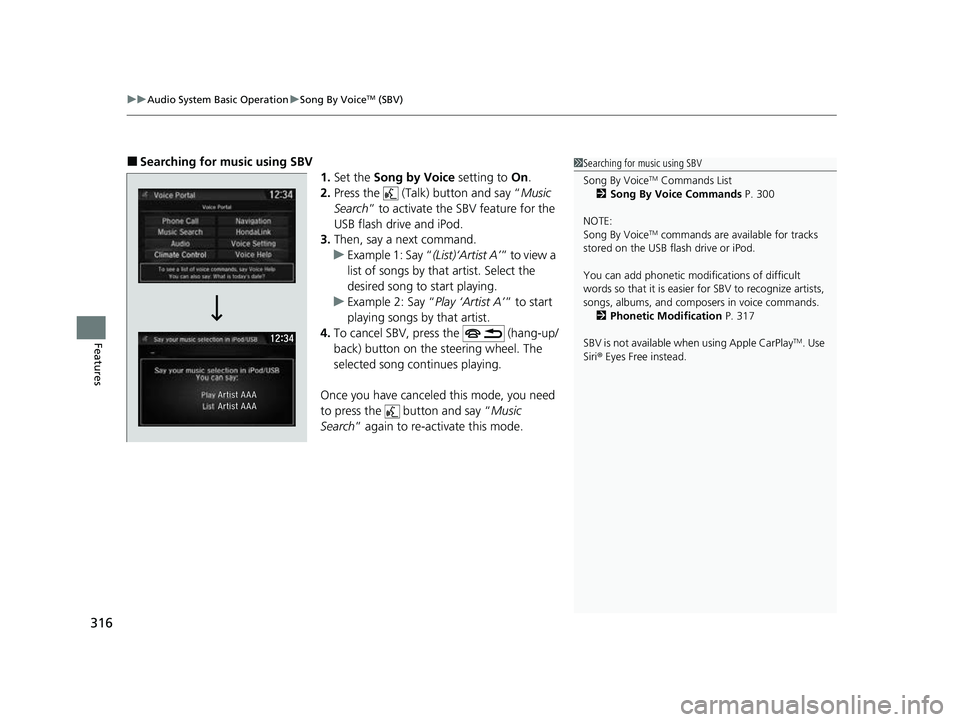
■Searching for mu sic using SBV
1.Set the Song by Voice setting to On.
2. Press the (Talk) button and say “ Music
Search ” to activate the SBV feature for the
USB flash drive and iPod.
3. Then, say a next command.
u Example 1: Say “ (List)‘Artist A’” to view a
list of songs by that artist. Select the
desired song to start playing.
u Example 2: Say “ Play ‘Artist A’” to start
playing songs by that artist.
4. To cancel SBV, pr ess the (hang-up/
back) button on the steering wheel. The
selected song continues playing.
Once you have canceled this mode, you need
to press the button and say “ Music
Search ” again to re-activate this mode.1Searching for music using SBV
Song By Voice
TM Commands List
2 Song By Voice Commands P. 300
NOTE:
Song By Voice
TM commands are available for tracks
stored on the USB flash drive or iPod.
You can add phonetic modi fications of difficult
words so that it is easier for SBV to recognize artists,
songs, albums, and composers in voice commands. 2 Phonetic Modification P. 317
SBV is not available wh en using Apple CarPlay
TM. Use
Siri ® Eyes Free instead.
22 CR-V HEV ELP-31TPG6200.book 316 ページ 2021年6月30日 水曜日 午前11時6分
Page 334 of 692
332
uuAudio System Basic Operation uSiri ® Eyes Free
Features
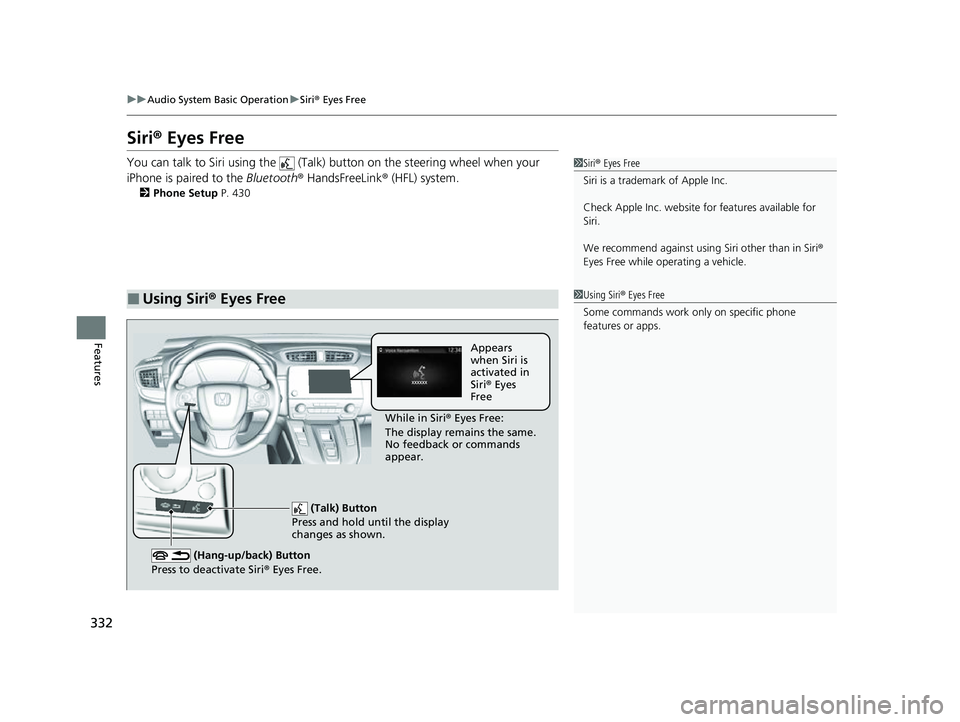
Siri ® Eyes Free
You can talk to Siri using the (Talk) button on the steering wheel when your
iPhone is paired to the Bluetooth® HandsFreeLink ® (HFL) system.
2Phone Setup P. 430
■Using Siri® Eyes Free
1 Siri ® Eyes Free
Siri is a trademark of Apple Inc.
Check Apple Inc. website for features available for
Siri.
We recommend against using Siri other than in Siri ®
Eyes Free while operating a vehicle.
1 Using Siri ® Eyes Free
Some commands work only on specific phone
features or apps.
(Talk) Button
Press and hold until the display
changes as shown.
(Hang-up/back) Button
Press to deactivate Siri ® Eyes Free.
While in Siri ® Eyes Free:
The display remains the same.
No feedback or commands
appear. Appears
when Siri is
activated in
Siri
® Eyes
Free
22 CR-V HEV ELP-31TPG6200.book 332 ページ 2021年6月30日 水曜日 午前11時6分
Page 347 of 692

345
Features
General Information on the Audio System
SiriusXM® Radio Service*
1.You need your radio ID ready before registering for subscription. To see the ID on
the screen, select Channel 0.
2. Have your radio ID ready, and either call SiriusXM ® or visit the SiriusXM® website
to subscribe.
Switch to the SiriusXM ® mode by using the audio remote controls on the steering
wheel, or through the audio/information screen, and stay in this mode for about 30
minutes until the service is activated. Make sure your vehicle is in an open area with
good reception.
Requested Channel Not Subscribed:
You are not subscribed to the channel selected.
Subscription Updated.:
SiriusXM ® radio is receiving informati on update from the network.
Channel Not Available:
No such channel exists, or the artist or title information is unavailable.
No Signal:
The signal is too weak in the current location.
Check Tuner:
There is a problem with the SiriusXM ® tuner. Contact a dealer.
Check Antenna:
The SiriusXM ® antenna is disconnected. Contact a dealer.
■Subscribing to SiriusXM ® Radio
■Receiving SiriusXM ® Radio
■SiriusXM ® Radio Display Messages
1 Subscribing to SiriusXM ® Radio
Contact Information for SiriusXM ® Radio:
SiriusXM ® Radio at
www.siriusxm.com/subscribenow
or 1-866-635-2349
1 Receiving SiriusXM ® Radio
The SiriusXM ® satellites are in orbit over the equator;
therefore, objects south of the vehicle may cause
satellite reception interruptions. Sa tellite signals are
more likely to be blocked by tall buildings and
mountains the farther north you travel from the
equator.
You may experience rece ption problems under the
following circumstances:
•In a location with an obstruction to the south of
your vehicle.
•In tunnels•On the lower level of a multi-tiered road
•Large items carried on the roof rack
* Not available on all models
22 CR-V HEV ELP-31TPG6200.book 345 ページ 2021年6月30日 水曜日 午前11時6分
Page 382 of 692

380
uuCustomized Features u
Features
*1:Default SettingSetup
Group Customizable Features
DescriptionSelectable Settings
Info HondaLink
Diagnostic &
Location Data
Turns HondaLink
® on and off. On
*1/Off
Others Info Screen
Preference Selects the top menu when the (display/
information) button is pressed.
●Info Top
- A brief menu pops up.●Info Menu - A full menu pops up.●Off- A menu does not pop up. Info Top
/Info
Menu
*1/ Off
Default Cancels/Resets all customized items in the
Info settings
group as default. Yes
/No
Camera
Rear
Camera
Fixed Guideline
Selects whether the fixed guidelines come on the rear
camera monitor.
2 Multi-View Rear Camera P. 570
On*1/Off
Dynamic Guideline
Selects whether the guidelines adjust to the movement
of the steering wheel.
2 Multi-View Rear Camera P. 570
On*1/Off
Parking Sensor
Display*Selects whether to turn on the parking sensor display.Normal View /Split
View*1
DefaultCancels/Resets all customized items in the Rear Camera
setting group as default.Yes /No
Cross Traffic MonitorTurns on and off the cross traffic monitor.On*1/Off
* Not available on all models
22 CR-V HEV ELP-31TPG6200.book 380 ページ 2021年6月30日 水曜日 午前11時6分
Page 424 of 692

422
Features
Bluetooth® HandsFreeLink ®
Bluetooth® HandsFreeLink ® (HFL) allows you to place and receive phone calls using
your vehicle’s audio system, without handling your cell phone.
Using HFL
■HFL Buttons
1 Bluetooth ® HandsFreeLink ®
Place your phone where y ou can get good reception.
To use HFL, you need a Bluetooth-compatible cell
phone. For a list of compatible phones, pairing
procedures, and special feature capabilities:
Visit automobiles.honda.com/handsfreelink/ , or call
1-888-528 -7876.
To use the system, the Bluetooth On/Off Status
setting must be On. If there is an active connection to
Apple CarPlay
TM or Android AutoTM, HFL is
unavailable. 2 How to customize P. 369
Voice control tips
•Aim the vents away from the ceiling and close the
windows, as noise coming from them may interfere
with the microphone.
•Press the button when you want to call a
number using a stored voice tag, a phonebook
name, or a number. Spe ak clearly and naturally
after a beep.
•If the microphone picks up vo ices other than yours,
the command may be misinterpreted.
•To change the volume level, select the audio
system’s VOL (Volume) or use the remote audio
controls on the steering wheel.
Up to three speed dial entries can be displayed
among a total of 20 that can be entered. 2 Speed Dial P. 436
Up to three previous calls can be displayed at a time
among a total of 20 that can be entered. If there is no
call history, Call History is disabled.
Models with Display Audio
(Talk) Button
( + (- Bar
(Hang-up/Back) Button
(Pick-up) Button
ENTEq Button
(Display/Information) Button
Buttons34
22 CR-V HEV ELP-31TPG6200.book 422 ページ 2021年6月30日 水曜日 午前11時6分
Page 463 of 692
Continued461
uuBefore Driving uDriving Preparation
Driving
• Store or secure all items on board properly.
u Carrying too much cargo, or improperly storing it, can affect your vehicle's
handling, stability, sto pping distance, and tires, and make it unsafe.
2Maximum Load Limit P. 463
•Do not pile items higher than the seat height.
u They can block your view and may be thrown forward in the event of sudden
braking.
• Do not place anything in the front seat footwells. Make sure to secure the floor
mat.
u An object or unsecured floor mat can in terfere with your brake and accelerator
pedal operation while driving.
• If you have any animals on board, do not let them move around in the vehicle.
u They may interfere with driving and a crash could occur.
• Securely close and lock al l doors and the tailgate.
2Locking/Unlocking the Doors from the Inside P. 163
•Adjust your seating position properly.
u Adjust the head restraint, too.
2Seats P. 208
2 Adjusting the Front Head Restraints P. 215
•Adjust the mirrors and steering wheel properly.
u Adjust them while sitting in the proper driving position.
2 Adjusting the Steering Wheel P. 205
2 Mirrors P. 206
■Interior Checks1Interior Checks
The headlight aim is set by the factory, and does not
need to be adjusted. Howeve r, if you regularly carry
heavy items in the cargo area, have the aiming
readjusted at a dealer or by a qualified technician.
22 CR-V HEV ELP-31TPG6200.book 461 ページ 2021年6月30日 水曜日 午前11時6分